CMPE 246 Computer Engineering Design Studio
 Call Kai
 Learn
Learn Practice Test
 Spaced Repetition
 Match
Match Flashcards
 Knowt Play
1/88

Earn XP
Description and Tags
WORK IN PROGRESS
Name | Mastery | Learn | Test | Matching | Spaced | Call with Kai |
|---|
No analytics yet
Send a link to your students to track their progress
89 Terms
Embedded System
Multiple components (hardware AND software) combined to perform a set of dedicated functions
Generally includes:
Microprocessor
RAM and ROM
ADC
Firmware
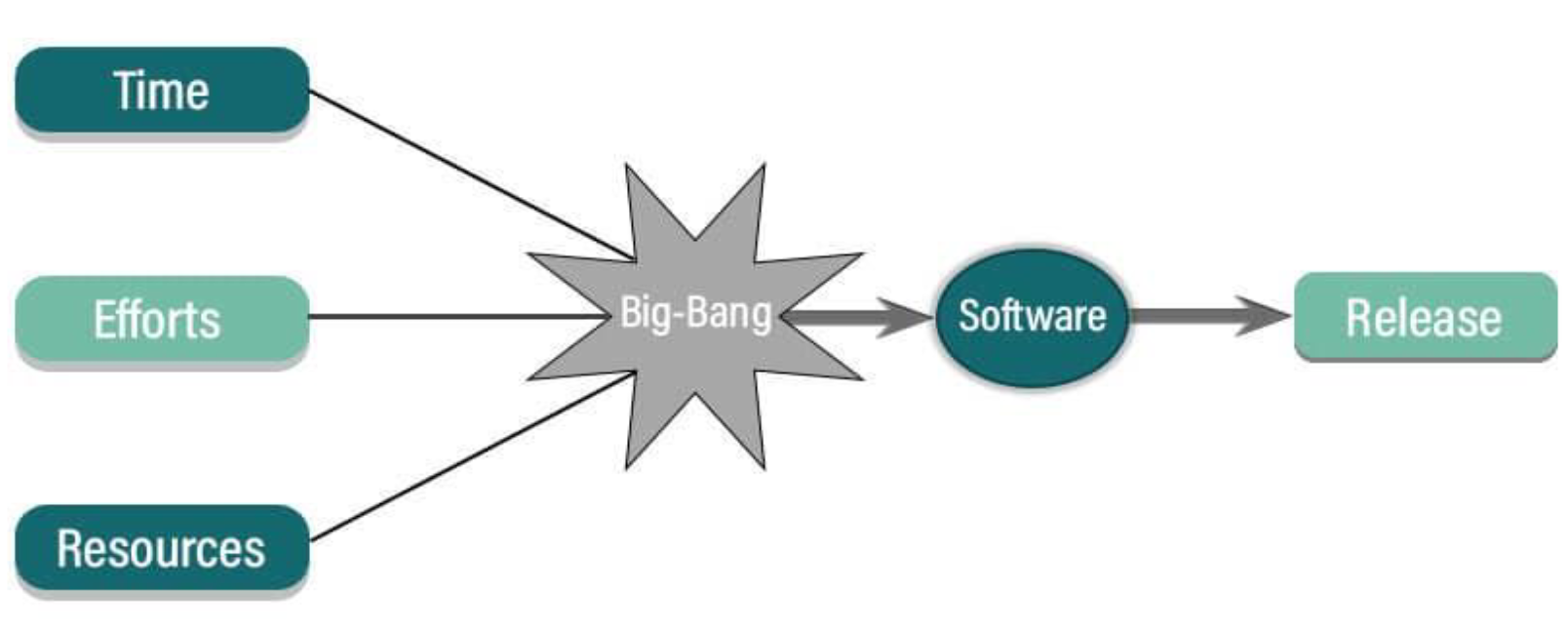
Big Bang Model
Type of design flow model
No planning or process before developing a system
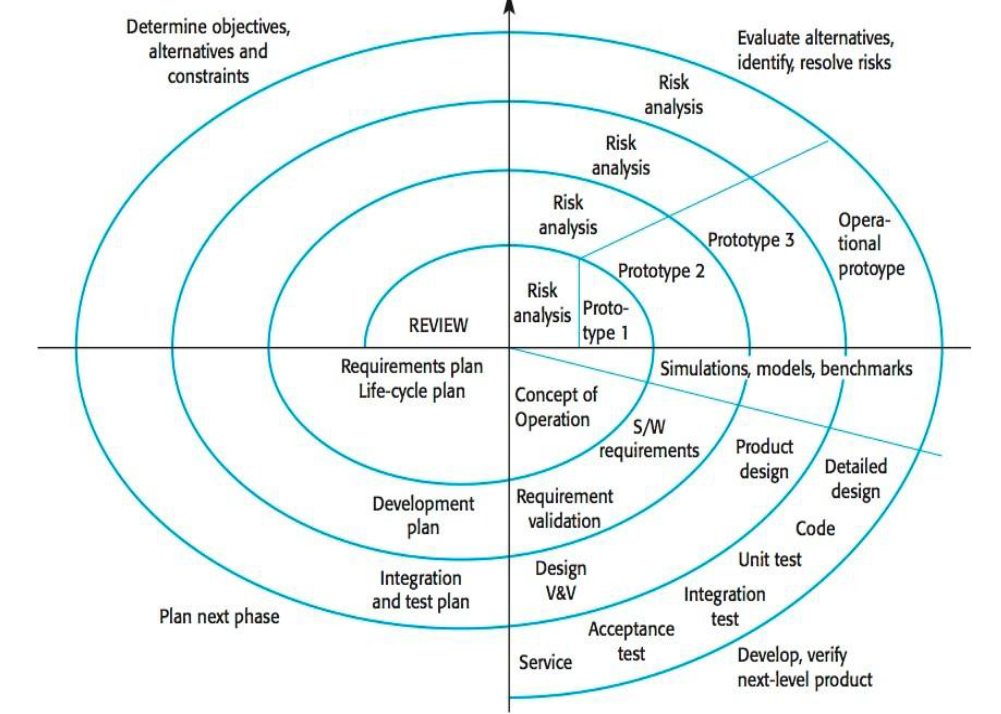
Spiral Model
Type of design flow model
Loops through a development cycle of 4 phases:
Planning
Risk analysis
Engineering
Evaluation
Waterfall Model
Type of design flow model
Linear process where the next step cannot start until its previous step is finished.

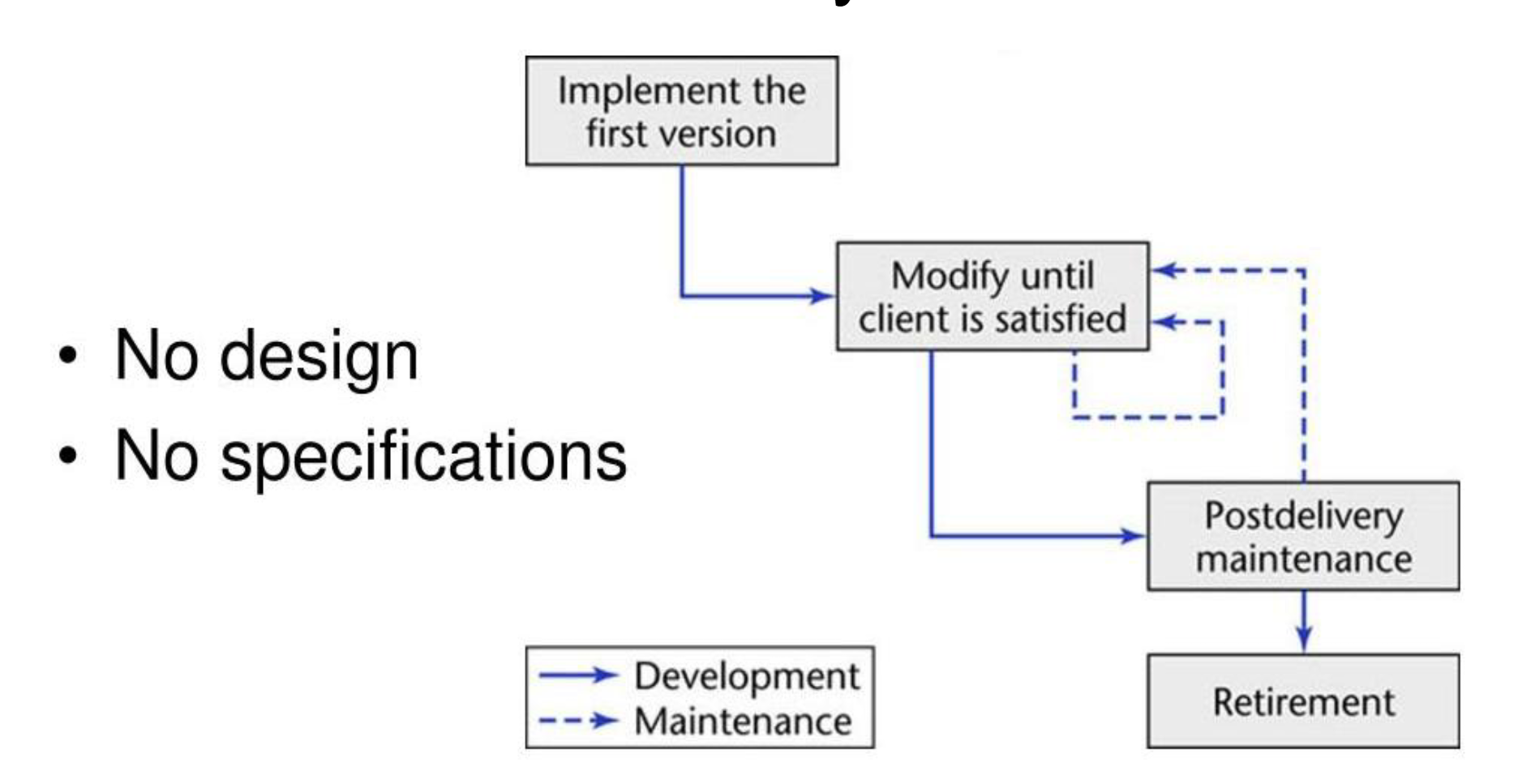
Code-and-Fix Model
Type of design flow model
Requirements are defined but there is NO plan of the process before development
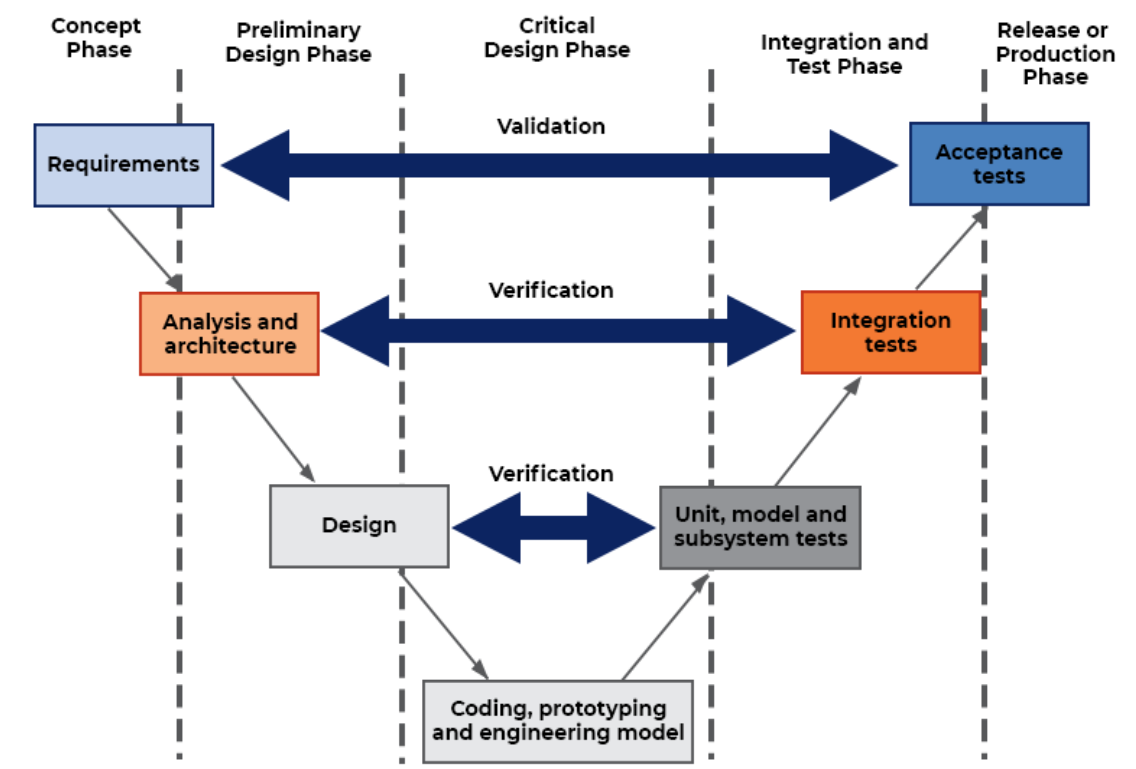
The V-Model
Type of design flow model
Similar to the waterfall model but with each step paired with a step for testing.
ARM processor
Processor of a smaller size in which power efficiency is prioritized
ROM
“Read only memory”
Stores code (AKA instructions) permanently
RAM
“Random Access Memory”
Stores temporary information
PROM
“Programmable ROM”
Purchased empty, programmed only once
EPROM
“Erasable and reprogrammable ROM”
Microprocessor
Takes in a task and processes it into instructions for (hardware or software??)
Advantages of Embedded System
Cheap
Portable
Small
Low power consumption
High performance and accuracy
API
“Application Programming Interface"“
Takes instructions from user (picks from API documentation), transfers info to the application of API (info is translated for the software of interest
Drivers
Piece of a software that allows communication between the and hardware
SRAM
“Static Ram”
Retains content as long as electric power is applied to chip
DRAM
“Dynamic Ram”
Retains content for an extremely short amount of time
About 4ms
Masked ROM
Stores data permanently
Contents of memory is specified before chip is produced
EEPROM
“Electrically Erasable Programmable ROM”
Type of hybrid memory
Can be erased with electric power and reprogrammed
For small, frequently read/written data
Flash Memory
Type of hybrid memory
Retains data without power
For larger, bulk data storage
NVRAM
“Non-Volatile RAM”
Type of hybrid memory
Fast, persistent data storage for speed
OS Kernel Mode
Has unlimited access to hardware while OS is running
Basically core component in OS that has control over whole system
Doing management of which tasks are running
Makes CPU process the higher priority tasks
Manages allocation of devices connected to the system
Mouse, keyboard, e.g.
Allocates and deallocates memory space of processes to ensure all has enough space to complete their execution
Shares resources amongst the processes
Acts as bridge between users and system resources
Resides in middle of software and hardware to ensure their interactions
OS User Mode
Limited access to CPU and memory
Process/Task
Executed program/part of a program
Program runs, gets processed and split up by the OS, and turns into a task
Live Code
Code that is actively being run
AKA code currently going through the OS
Prefixes For Storage
Done in 2^n instead of 10^n
Ex:
Gigabyes = 2^30 bytes
Kilo = 2^10 bytes
PROM
“Programmable ROM”
ROM manufactured as blank ROM so user can edit it later.
EPROM
ROM where it’s data can be erased and reprogrammed
Requires strong UV light to erase the data
Dont ever use ts bruh
Buses
System that only transmits information
Ex.
Cables
Wifi
Bluetooth
Lasers
Buffer
Type of memory where one device’s processor will send information into another’s “buffer”
System Bus
AKA memory bus
Connects the CPU and main memory of computer
Actuator
Takes electric signal and blends with energy source to create movement
Cyber-Physical System
CPS
Integration of embedded systems to translate digital information into the physical world
IDE
“Integrated development environment”
Type sh
Embedded Testing
Literally just Software and hardware verification and validation
AKA V&V
Verification: “yeah this does what we designed it to do”
Validation: “yeah the people and environment say it’s doing what they want it to do”
Firmware
Code embedded into hardware
Ex. Every time washing machine turns on, the firmware ensures it functions the same each time
Bare Metal
Where developers to directly program hardware without OS
Complete control over hardware pieces
ISP
“In-system programming”
Chips of which are already programmed before soldering onto a board
Upgrading Firmware
Two ways:
Flashing
Process of changing the firmware
Erases and replaces the ROM inside microcontroller
Compiler
Converts from high level code into assembly code (AKA binary)
(Optional?) Two types:
Each line is compiled and sent to the processor one at a time for real time changes
Compiles everything and sends to processor, but if changes are made everything will have to compile again (basically translates to .exe files)
(shorten the examples?)
Executable File
.exe file
File that is of compiled code????
Assembly Code
Code of which is in binary form
Used so the processor can understand and complete the tasks
Communication Network
Does three things:
Data exchange: allows devices, sensors, and actuators to transfer/exchange data
System integration: connects multiple devices
Remote and control monitoring: remote supervision. firmware updates, and control commands
Physical Ports
Physical connection points
Ex.
Ethernet ports
Usb ports
Logical Ports
Logical connection point
Routes data
Ex.
TCP/IP
HTTPS
Brewing secure websites
FTP
File transfers
Protocols
Set rules and conventions on how data is formatted, transmitted, processed, and errors detected and corrected
Wireless Communication Protocol
Enables data transmission over air without physical connectors
Key characteristics:
Mobility: data moves without cables
Flexibility: scalable and adaptable to varies environments
Range: range varies: low data rate w/ long range and the opposite
Interference and security: Can be interfered with
BAN
“Body area network”
Literally just network of devices operating in or on a body
WAN
“Wide area network”
Network of devices +-10 meters away from your body
PAN
“Personal area network”
LPWAN
“Low power wide area network”
idfk
Embedded System Architecture
Embedded system contains of multiple components working together to perform tasks
3 Layers:
Application software layer (optional)
High level software for system’s functionality + user interface
System software layer (optional)
Manages operation of the hardware
Hardware layer (required)
The foundation of the system
Hardware resides on a PCB
Printed Circuit Board
PCB
All hardware in embedded devices resides on the PCB
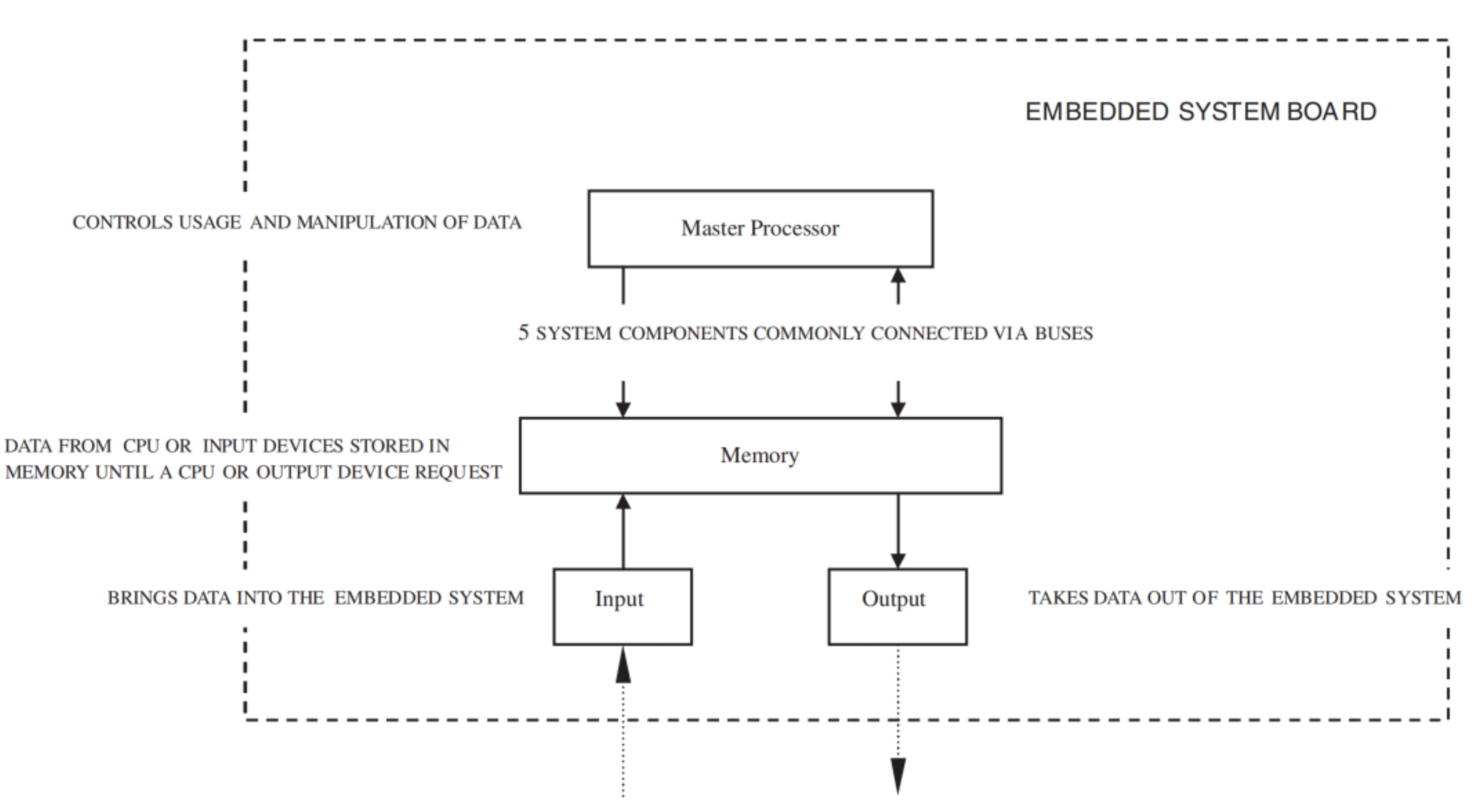
The Major Categories for PCB Hardware Components
Central processing unit
CPU → the master processorMemory
Where system’s software is storedInput Devices
Output Devices
Bus(es)
The data pathway → “highway” across different components for data to travel across
Image example attached.
Embedded Processor
Microprocessor for processing instructions and data
AKA brain to interpret and carry out instructions from a program
Multi-core General Purpose Processors
GPP (AKA the CPU) with multiple processors on a single chip
Can have high power consumption
Clock Speed
AKA processor or CPU speed
Basically how many cycles the processor can perform in a second
Each cycle can perform 1 task per processor
In Hertz (Hz, and usually in GHz)
Cache
Small amount of high-speed memory that stores frequently accessed data
To improve processor performance
Microcontrollers
AKA SoC (System on Chip)
Small, low-power processor to manage, control, and automate embedded systems
Contains:
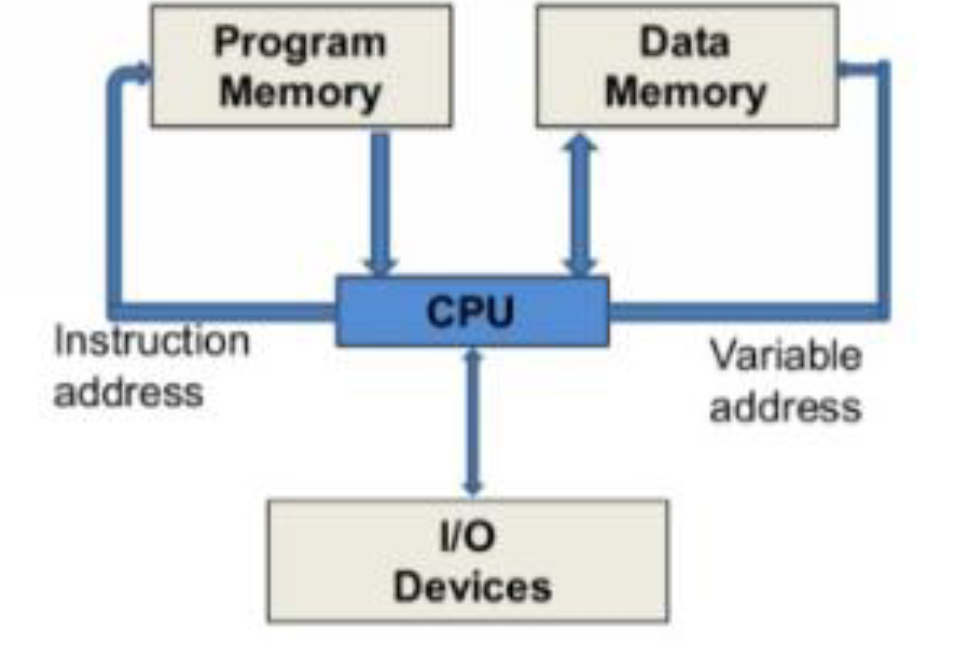
Program memory
Stores instructions
Data memory
Stores variables and other data
I/O pins
Input/output pins
Can connect external devices through these
Analog to Digital Converter
AKA an ADC
Converts analog signals to digital
Basically sin to square wave (1 and 0)
Digital Signal Processor
AKA a DSP
Microprocessors designed to process digital signals
Used in (e.g.)
Audio and video processing
Audio equalization
Video rendering
Microphone input processing
Noise cancelation
Single Board Computer
AKA a SBC
Uses a microprocessor instead of microcontroller
With IOs
And ram
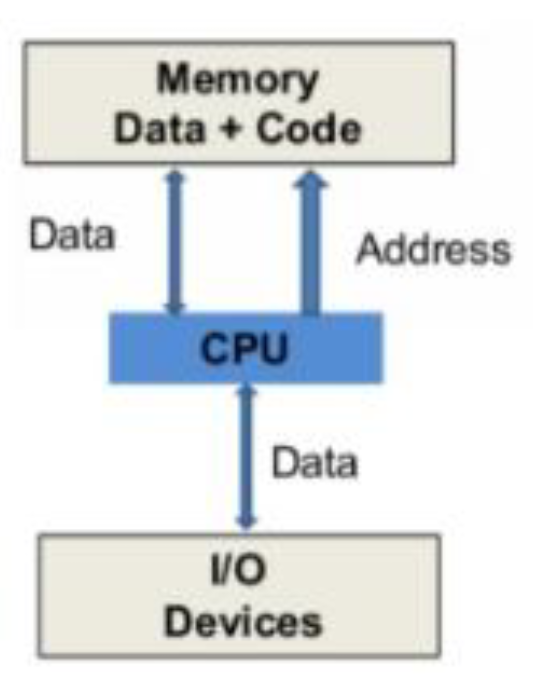
Von Neumann Machine
Type of processor architecture
Harvard Machine
Type of processor architecture
Advantages of Embedded Systems
Size of an embedded system can be very small
Has lower power consumption
Has high performance and accuracy
Extremely cheap
Very potable
Keep glazing lil bro
Application Software Layer
Top layer in the embedded system architecture
Defines function and purpose of embedded devices
Can interact with users
System Software Layer
Middle layer in the embedded system architecture
Sub-layers:
Middleware
Operating system
Device drivers
Device Drivers
Bottom layer in system software layers
Software libraries that initialize the hardware
Manage access to the hardware through application software later
Helps communicate OS and other software with the hardware
Tells hardware to initiate its functions
Application Programming Interfaces
AKA the APIs
Set of rules and protocols that enables software programs to communicate and exchange data with one another
Basically acting like a middleman
Client sends request to a website’s API, API processes request, sends back the appropriate response
Middleware
Top layer in the system software layers
3rd party tool that supports (can use) APIs
Basically anything that’s NOT OS kernel, device drivers, or application software
Operating System
Middle layer in system software layers
AKA the OS
Set of software libraries
Provides abstraction layer to make development of middleware and software application layer easier
Copies a program and cuts it down sequentially into tasks that are sent to the processors.
Is split up into user and kernel mode
Kernel Space
Separate memory space where kernel executes processes and services
User Space
Memory space on system for user applications
Basically everything except Kernel operates here
Multitasking
Ability to execute more than one task/process at a time
NOT executing at the same time, but allowing more than one task to advance over a over a period of time
E.g. 3 tasks: task 1 executes 50%, then task 2 executes 50%, then task 3 100%, then task 2 50%, and finally task 1 at 50%
Thread
Executed program that is using the same space as the other programs
Real-Time Operating System
AKA the RTOS
OS that can manage and support the completion of multiple tasks/processes with different deadlines without missing any
The Layers of Programming Languages
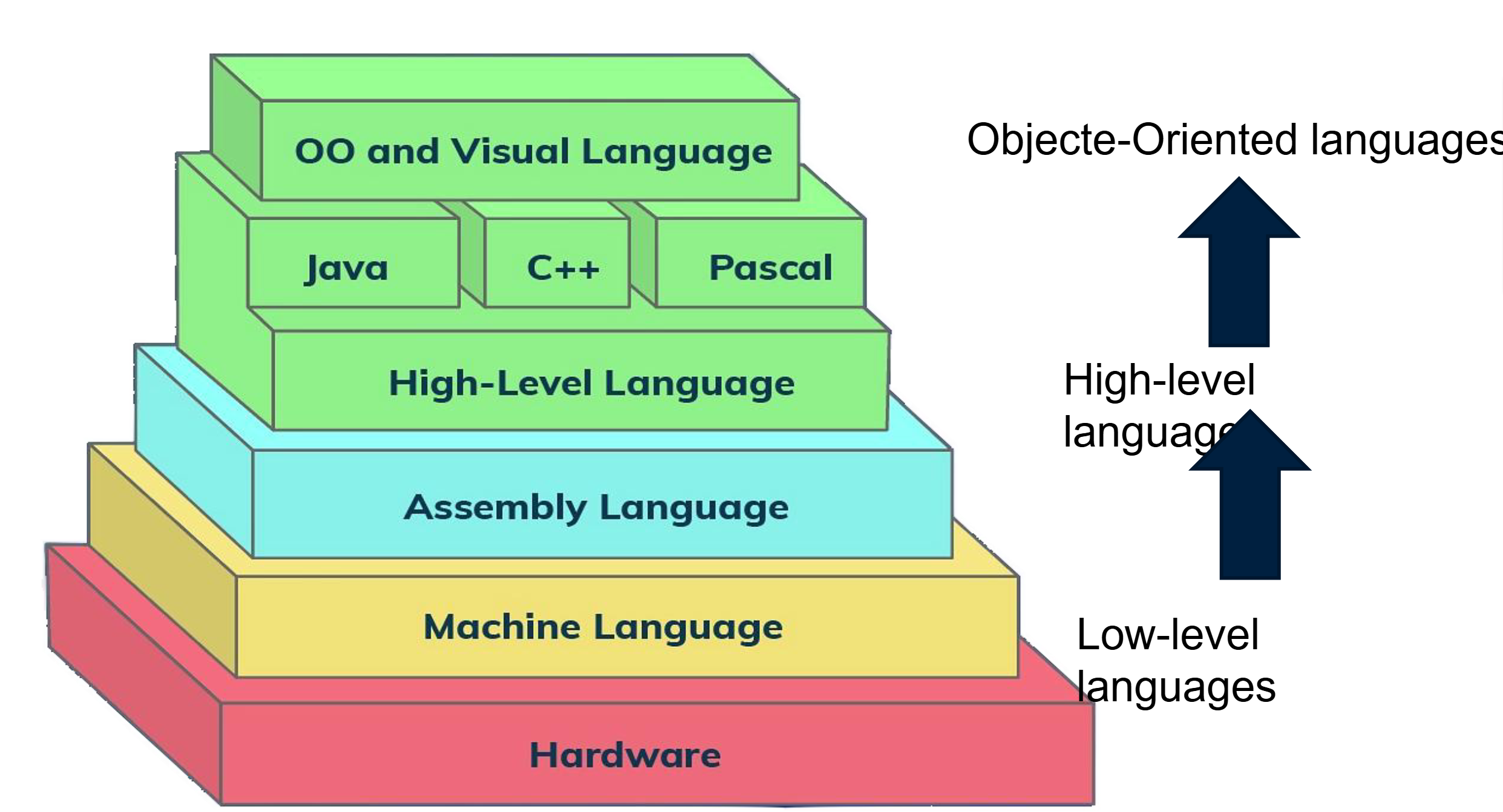
Machine Language
Type of programing language
Represented in binary or hexadecimal form
Only language hardware can directly execute
Assembly Language
Type of programming language
Intended to communicate directly with a computer’s hardware
Shell
Program that links the user and the operating system together
Examples
cmd.exe
File explorer
Basically you can send tasks to the OS
I/O Components
Moves information into and out of the board
To and from the master processor
In serial, parallel, or both
Made up of
Transmission medium
Wired/wireless medium connecting I/O to embedded board for data communication and exchanges
Communication port
Connected to the transmission medium or receives a wireless signal
I/O controller
Slave processor (basically not the main one) that manages the I/O device
I/O buses
Connects I/O and master processor
I/O Controllers
Bridges communication between the CPU, memory, and I/O devices
Devices usually require an I/O controller
Also acts as a buffer during data transfer
Serial Interfaces
Manage serial data transmission and reception between master CPU and I/O device or controller
System Bus
AKA memory bus
Connects CPU and main memory of the computer
Expansion Buses
AKA Input/Output (I/O)
Connect peripheral devices to the CPU
Such as the mouse, keyboard, and a headset
Sensor
Electronic instrument that translate real-world parameters into electrical signals
Actuators
Device that creates movement using an electrical signal in combination with an energy source