Operating Systems and Software Types: Windows, Linux, Applications, and Utilities
 Call Kai
 Learn
Learn Practice Test
 Spaced Repetition
 Match
Match Flashcards
 Knowt Play
1/19

There's no tags or description
Looks like no tags are added yet.
Name | Mastery | Learn | Test | Matching | Spaced | Call with Kai | Chat |
|---|
No analytics yet
Send a link to your students to track their progress
20 Terms
What is an operating system?
An interface between hardware and the user, responsible for managing hardware and system operations.
Name three examples of operating systems.
Windows, Linux, and Mac OS.
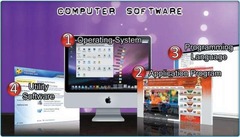
What are the four main types of computer software?
Operating systems, application programs, utility software, and programming languages.
What is the role of application software?
To help with specific tasks, such as word processing or maintaining a database.
What does utility software do?
Helps analyze, configure, optimize, and maintain the computer.
What is a programming language?
A language used to create application programs, such as Java or C++.
What are the four main tasks of an operating system?
Controlling hardware, running application programs, organizing files, and providing a user interface.
How does an operating system control hardware?
It manages all devices and resources, making graphics and text appear and controlling power to components.
What happens when you click the Shut Down button in Windows?
The operating system stops all computer hardware from working.
How do operating systems run application programs?
They allow programs to communicate with hardware, enabling tasks like printing documents.
How do operating systems organize files?
They store information in files and folders on storage units, similar to a filing cabinet.
What is the user interface of an operating system?
The part that allows users to input commands and data.
What are the two parts of an operating system?
The kernel and the shell.
What is the function of the kernel in an operating system?
It manages memory, files, devices, and system resources.
What does the shell do in an operating system?
It provides direct communication between the user and the kernel.
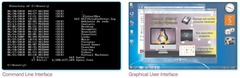
What are the two types of user interfaces?
Graphical user interface (GUI) and command-line interface.
Name a mobile operating system.
Android or iOS.
What is the purpose of application software?
To perform specific tasks tailored to user needs.
What is the difference between utility software and application software?
Utility software maintains and optimizes the computer, while application software performs specific tasks.
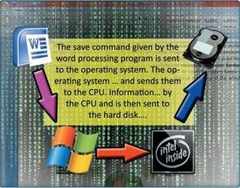
What does the operating system do when an application requests to save a file?
It accesses and uses the hard disk to save the file.