ACCT 4300 - Exam 2 Review, Part 1
 Call Kai
 Learn
Learn Practice Test
 Spaced Repetition
 Match
Match Flashcards
 Knowt Play
1/97

There's no tags or description
Looks like no tags are added yet.
Name | Mastery | Learn | Test | Matching | Spaced | Call with Kai | Chat |
|---|
No analytics yet
Send a link to your students to track their progress
98 Terms
(Module 4) What are the steps of the revenue cycle?
1.) Sales Order Entry
2.) Credit Approval
3.) Inventory and Shipping
4.) Billing
5.) Accounts Receivable and Collections
6.) Cash Receipts and Documents
(Module 4) When does the revenue cycle begin?
When a customer places an order for goods or services
(Module 4) Revenue Cycle — Sales Order Entry
Receiving and logging the order
Verifying inventory availability
Preparing the sales order document
(Module 4) True or False: An effective AIS may automate validations at the sales order entry stage of the revenue cycle
True
(Module 4) Revenue Cycle — Credit Approval
Evaluating the customer’s creditworthiness before fulfilling the order to minimize bad debt risk
Implementing background/credit checks for new customers
Evaluating existing customers against credit limits and past payment history
Automatically approving for low-risk or repeat customers, while higher-value transactions may be routed to a credit manager
(Module 4) Inadequate controls at the credit approval stage of the revenue cycle can cause what?
A loss of revenue or damaged customer relationships
(Module 4) Revenue Cycle — Inventory and Shipping
Upon credit approval, the sales order is forwarded to the warehouse for picking, packing, and shipment
Pick and pack lists are generated based on inventory availability
Shipping documents, such as packing slips and bills of lading, are prepared
Carrier handoff is logged, and the shipping date is captured for revenue recognition and customer service tracking
(Module 4) Examples of AIS functionality at the inventory and shipping phase of the revenue cycle
Inventory Updates
Barcode Scanning for Accuracy
Automated Triggers for Invoicing Once Shipment is Confirmed
(Module 4) Revenue Cycle — Billing
After the goods are shipped/services are rendered, the billing department generates and sends invoices to the customer
Sales invoices detail the transaction, including quantity shipped, prices, taxes, and payment terms
System generated invoices help prevent discrepancies by pulling data directly from the sales order and shipping records (three-way match)
(Module 4) Errors in the billing step of the revenue cycle can lead to what?
Delayed collections and impaired cash flows
(Module 4) Revenue Cycle — Accounts Receivable and Collections
Once the invoice is issued, it is recorded in the Accounts Receivable subsidiary ledger and the company monitors the outstanding balance until payment is received
Customer payments may arrive via check, ACH, credit card, or digital platforms
Cash application matches payments to open invoices and updates the A/R balance
Follow up procedures, such as reminders, dunning letters, or collection agency referrals are used for delinquent accounts
(Module 4) How do AIS systems support the accounts receivable and collections step of the revenue cycle?
Automating Aging Reports
Tracking Payment Histories
Flagging Overdue Accounts for Further Action
(Module 4) Revenue Cycle — Cash Receipts and Deposits
Once payment is received:
Cash is deposited into the company’s bank account
Deposit information is recorded in the general ledger and reconciliations are performed to ensure that bank activity aligns with accounting records
(Module 4) ___________ is a key control in the cash receipts and deposits step of the revenue cycle to prevent fraud or misappropriation
Segregation of Duties
(Module 4) In the Revenue Cycle, when do the journal entries take place?
When the invoice is issued
When cash is received
(Module 4) True or False: In the revenue cycle, there are no journal entries at the sales order and picking ticket/shipping stage
True
(Module 4) Revenue Cycle — What is the journal entry to be made when the invoice is issued?
DR Accounts Receivable XXX
— CR Revenue XXX
DR Cost of Goods Sold XXX
— CR Inventory XXX
(Module 4) Revenue Cycle — What is the journal entry to be made when cash is received?
DR Cash XXX
— CR Accounts Receivable XXX
(Module 4) What are the major source documents that appear in the Revenue Cycle?
Customer Purchase Order (PO)
Sales Order
Picking Ticket
Packing Slip
Bill of Lading (BOL)
Sales Invoice
Remittance Advice
(Module 4) Customer Purchase Order (PO)
Customer’s request to buy goods/services — starts the revenue cycle and is used to create the company’s sales order.
(Module 4) Sales Order Document
Internal document created from the customer PO that authorizes the sale and triggers credit approval, shipping, and billing
(Module 4) Picking Ticket
Instruction sent to the warehouse identifying which inventory items and quantities to retrieve
(Module 4) Packing Slip
Document sent with the shipment listing the items actually shipped — evidence shipment occurred
(Module 4) Bill of Lading (BOL)
Legal shipping contract confirming goods were transferred to the carrier
(Module 4) Sales Invoice
Formal bill sent to the customer requesting payment and recording revenue/accounts receivable
(Module 4) Accounts Receivable Subsidiary Ledger
Record tracking each customer’s outstanding invoices and payment history
(Module 4) Remittance Advice
Customer document returned with payment indicating which invoice is being paid
(Module 4) Cash Receipts Journal
Record of all cash received from customers (date, customer, amount, payment method)
(Module 4) Where/when are risks most concentrated in the revenue cycle?
Order Entry
Shipping
Billing
Cash Collections
(Module 4) What are the key risks/weaknesses when it comes to issuing sales orders and granting credit?
Incomplete or Inaccurate Sales Orders
Invalid or Unauthorized Orders
Uncollectable Accounts
Stockouts or Excess Inventory
Loss of Customers Due to Poor Order Management
(Module 4) Issuing Sales Orders and Granting Credit — Mitigating Controls to Address the Risk Tied to Incomplete or Inaccurate Sales Orders
Data Entry Validation Controls
Reconciliations Between Sales Orders and Customer Records
Pre-Set Inventory Availability Checks
(Module 4) Issuing Sales Orders and Granting Credit — Mitigating Controls to Address the Risk Tied to Invalid or Unauthorized Orders
Specific Authorization for High-Value Transactions
Digital Signature
Credit Checks and Pre-Approval for New Customers
(Module 4) Issuing Sales Orders and Granting Credit — Mitigating Controls to Address the Risk Tied to Uncollectable Accounts
Credit Limits
Aging Reports and Review of Accounts Receivable
Customer Credit Approval Process
(Module 4) Issuing Sales Orders and Granting Credit — Mitigating Controls to Address the Risk Tied to Stockouts or Excess Inventory
Inventory Management Systems with Real-Time Tracking
Sales Forecasting Tools
Cycle Counts and Reconciliations
(Module 4) Issuing Sales Orders and Granting Credit — Mitigating Controls to Address the Risk Tied to the Loss of Customers Due to Poor Order Management
Customer Relationship Management (CRM) Systems
Return Policy Reviews and Monitoring
Post-Sale Surveys and Customer Feedback
(Module 4) What are the key risks/weaknesses when it comes to picking items from inventory and shipping the goods?
Picking the Wrong Items or Quantity
Inventory Theft
Shipping Errors (e.g. Duplicate Shipments)
Shipping Delays or Failures
Damage During Shipment
(Module 4) Picking Items from Inventory and Shipping the Goods — Mitigating Controls to Address the Risk Tied to Picking the Wrong Items or Quantity
Bar Codes or RFID Tagging
Reconciliation Between Picking Lists and Sales Orders
Pick-to-Light Systems (visual indicators to guide workers to the correct storage locations)
(Module 4) Picking Items from Inventory and Shipping the Goods — Mitigating Controls to Address the Risk Tied to Inventory Theft
Restriction of Physical Access to Inventory
Segregation of Duties
Security Cameras and Monitoring
(Module 4) Picking Items from Inventory and Shipping the Goods — Mitigating Controls to Address the Risk Tied to Shipping Errors (e.g. Duplicate Shipments)
Automated Order Management Systems
Reconciliation of Shipment Documents
Shipping Confirmation Protocols
(Module 4) Picking Items from Inventory and Shipping the Goods — Mitigating Controls to Address the Risk Tied to Shipping Delays or Failures
Integrated Shipping and Order Management Systems
Real-Time Shipment Tracking
Periodic Shipping Performance Audits
(Module 4) Picking Items from Inventory and Shipping the Goods — Mitigating Controls to Address the Risk Tied to Damage During Shipment
Standardized Packaging Procedures
Carrier Selection and Performance Monitoring
Shipment Insurance
(Module 4) True or False: Periodic Inventory Counts and Reconciliations and Documentation of Inventory Transfers are not useful in mitigating the risks tied to the picking and shipping processes
False
(Module 4) What are the key risks/weaknesses when it comes to issuing the invoice?
Failure to Bill
Billing Errors (Incorrect Amounts or Quantities)
Posting Errors in Accounts Receivable
Inaccurate or Invalid Credit Memos
(Module 4) Issuing the Invoice — Mitigating Controls to Address the Risk Tied to the Failure to Bill
Automated Billing Systems
Periodic Audits and Reconciliations
System Alerts for Unbilled Orders
(Module 4) Issuing the Invoice — Mitigating Controls to Address the Risk Tied to Billing Errors (Incorrect Amounts or Quantities)
Automated Price and Quantity Verification
Data Validation Checks
Reconciliations Between Sales Orders, Delivery Receipts, and Invoices
(Module 4) Issuing the Invoice — Mitigating Controls to Address the Risk Tied to Posting Errors in Accounts Receivable
System-Integrated Posting
Review of Daily Posting Summaries
Segregation of Duties
(Module 4) Issuing the Invoice — Mitigating Controls to Address the Risk Tied to Inaccurate or Invalid Credit Memos
Separate Authorization for Credit Memos
Credit Memo Reconciliation
Return and Credit Memo Verification
(Module 4) True or False: Separation of Billing and Shipping Functions, Monthly Statements to Customers, and Routine Reconciliations with Inventory Control Accounts are all helpful mitigating controls for the invoicing process
True
(Module 4) What are the key risks/weaknesses when it comes to cash collections?
Theft of Cash
Cash Flow Problems
Misapplication of Payments
Delayed Deposits
Unapplied or Lost Payments
(Module 4) Cash Collections — Mitigating Controls to Address the Risk Tied to the Theft of Cash
Segregation of Duties
Restrictive Endorsements on Checks
Daily Deposit of All Cash Receipts
Multiple Cashiers Opening Mail
(Module 4) Cash Collections — Mitigating Controls to Address the Risk Tied to Cash Flow Problems
Aging of Accounts Receivables
Early Payment Discounts
Credit Monitoring and Limits
Cash Flow Forecasting
(Module 4) Cash Collections — Mitigating Controls to Address the Risk Tied to the Misapplication of Payments
Automated Payment Matching Systems
Customer Payment Instructions or Improved Turnaround Documents
Reconciliations of Accounts Receivable
(Module 4) Cash Collections — Mitigating Controls to Address the Risk Tied to Unapplied or Lost Payments
Use of Secure Payment Channels
Customer Payment Reconciliation
Electronic Invoicing and Systems
True or False: Segregation of Duties, Monitoring and Reporting of Collection Metrics, and Customer Payment Reminders are all great additional mitigating controls for cash collections
True
(Module 4) What kinds of fraud is likely to occur in the Revenue Cycle if unmitigated?
Lapping of Accounts Receivable
Skimming
Check Substitution and Theft
Manipulation of Receivables
(Module 4) Lapping of Accounts Receivable
When an employee steals a cash payment from one customer and covers it by applying a subsequent payment from another customer to the first customer’s account
Example: An employee applies Customer B’s payment to Customer A’s outstanding balance to conceal theft of Customer A’s original payment
(Module 4) Consequences of the Lapping of Receivables
Distortion of Receivables Aging
Overstated Assets
Delayed Detection of Misappropriated Funds
(Module 4) Red Flags related to the Lapping of Accounts Receivable
Frequent Adjustments to Customer Accounts
Unusually Long Delays in Applying Payments
Overreliance on a Single Employee for Both Collection and Recordkeeping
(Module 4) Skimming
Diverting income cash before it is recorded in the accounting system
(Module 4) Consequences of Skimming
Revenue is understated
Assets are understated
Undetected fraud with weak controls
(Module 4) Red Flags related to Skimming
Discrepancies between sales records and cash deposits
Missing or unnumbered receipts
Complaints from customers claiming to have paid
(Module 4) Check and Substitution Theft
An employee intercepts customer checks and substitutes them with personal checks or withholds them entirely, particularly in small businesses without robust mailroom controls
(Module 4) Consequences of Check Substitution and Theft
Loss of funds
Misstated cash balances
Serious legal consequences
(Module 4) Red Flags related to Check Substitution and Theft
Unexplained delays in deposits
Checks made out to the business found missing or undeposited
Lack of separation between mail opening and accounting duties
(Module 4) Manipulation of Receivables and Related Journal Entries — Examples
Fictitious credits and write-offs
Unauthorized reversals and refunds
Concealment tactics and weak control environments (i.e. fake customer accounts, altering system records to delay reconciliation or mask aging, and collusion among employees in different departments)
(Module 4) How can the risks tied to the manipulation of receivables and related journal entries be mitigated?
Daily reconciliations of cash receipts and deposits
Mandatory vacations and job rotations
Independent approval of write-offs and credits
System-based segregation of duties and access restrictions
(Module 4) Segregation of Duties Across the Revenue Cycle — How is Authorization Implemented in the Sales Order and Credit Approval stage?
Credit limits and sales terms should be approved by a credit manager or controller—not the salesperson
(Module 4) Segregation of Duties Across the Revenue Cycle — How is Recording Implemented in the Sales Order and Credit Approval stage?
Sales order data should be entered by sales staff but without the ability to approve terms or adjust customer master data
(Module 4) Segregation of Duties Across the Revenue Cycle — How is Custody Implemented in the Shipping and Billing stage?
Warehouse staff handle physical goods and shipping
(Module 4) Segregation of Duties Across the Revenue Cycle — How is Recording Implemented in the Shipping and Billing stage?
Billing staff generate invoices based on shipping confirmations
(Module 4) Segregation of Duties Across the Revenue Cycle — How is Authorization Implemented in the Shipping and Billing stage?
Shipping should only occur for approved orders
(Module 4) Segregation of Duties Across the Revenue Cycle — How is Custody Implemented in the Cash Collections and A/R Posting stage?
Employees who handle cash or checks should not update accounting records
(Module 4) Segregation of Duties Across the Revenue Cycle — How is Recording Implemented in the Cash Collections and A/R Posting stage?
The accounts receivable clerk should apply payments but have no access to physical receipts
(Module 4) Segregation of Duties Across the Revenue Cycle — How is Authorization Implemented in the Cash Collections and A/R Posting stage?
Adjustments to A/R balances (e.g. write-offs, credits) should require supervisor approval
(Module 4) Authentication
Determines who can login or connect to a new system
(Module 4) Authorization
Limits what actions a user can perform within the system
(Module 4) What are the factors for authentication?
What someone knows (username, password, PIN, SSN, etc.)
What someone has (key fob, phone, email, etc.)
What someone is (biometric identifiers like face/fingerprint/eye scans)
(Module 4) Multi-Modal Authentication
The use of a single factor, but multiple modes within that factor
(Module 4) Multi-Factor Authentication
Authentication using two or more different types of factors
(Module 4) Examples of Multi-Factor Authentication
Password + text message code
Password + Microsoft Authenticator app
ATM card + PIN
Login + fingerprint
(Module 4) Examples of Multi-Modal Authentication
Fingerprint + facial recognition
Face scan + voice recognition
Retina scan + fingerprint
(Module 4) Example of Authentication
Logging in with password
(Module 4) Example of Authorization
Only managers can approve payments
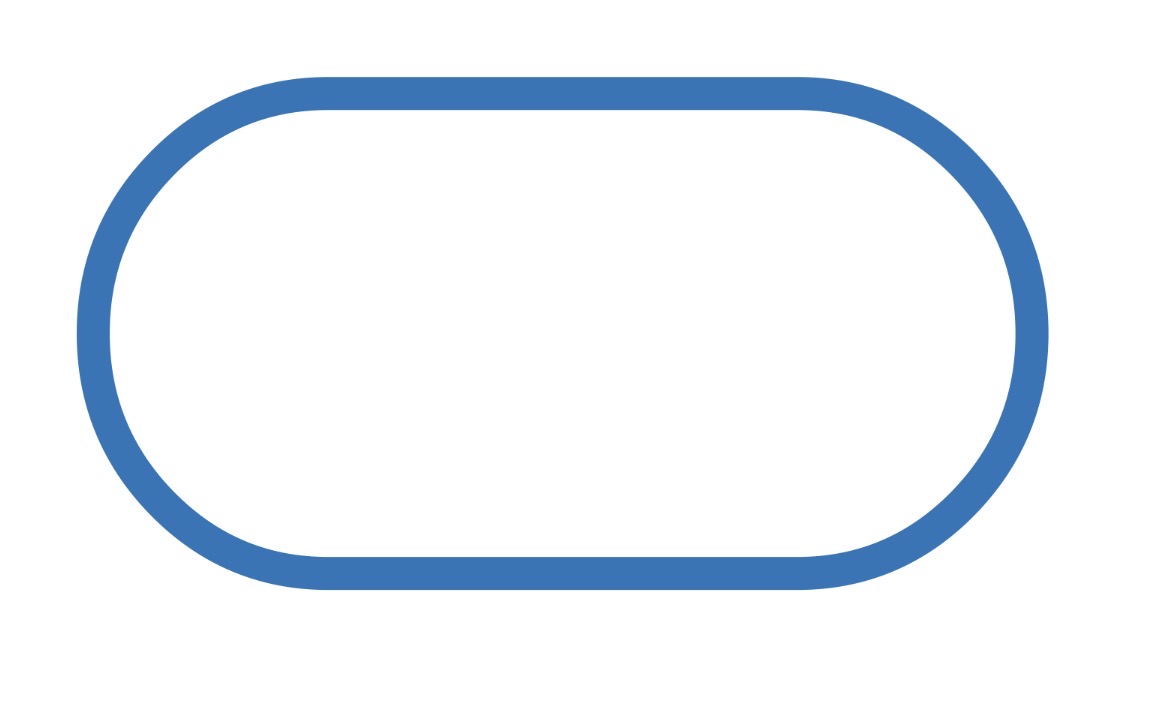
(Module 4) Flowchart Symbol — What does the following symbol represent?
Start/End: The beginning or end of any flow

(Module 4) Flowchart Symbol — What does the following symbol represent?
Electronic Process: Any electronic action or moment in the flow

(Module 4) Flowchart Symbol — What does the following symbol represent?
Decision: Branching point, followed by two or more paths

(Module 4) Flowchart Symbol — What does the following symbol represent?
Document: Any brief, form, or other document

(Module 4) Flowchart Symbol — What does the following symbol represent?
Multiple Documents: Multiple briefs, forms, or other documents

(Module 4) Flowchart Symbol — What does the following symbol represent?
Filing

(Module 4) Flowchart Symbol — What does the following symbol represent?
Connector: A jump between separated sections of the flow on one page

(Module 4) Flowchart Symbol — What does the following symbol represent?
Off-Page Connector: Flow continues on the next page/from the previous page
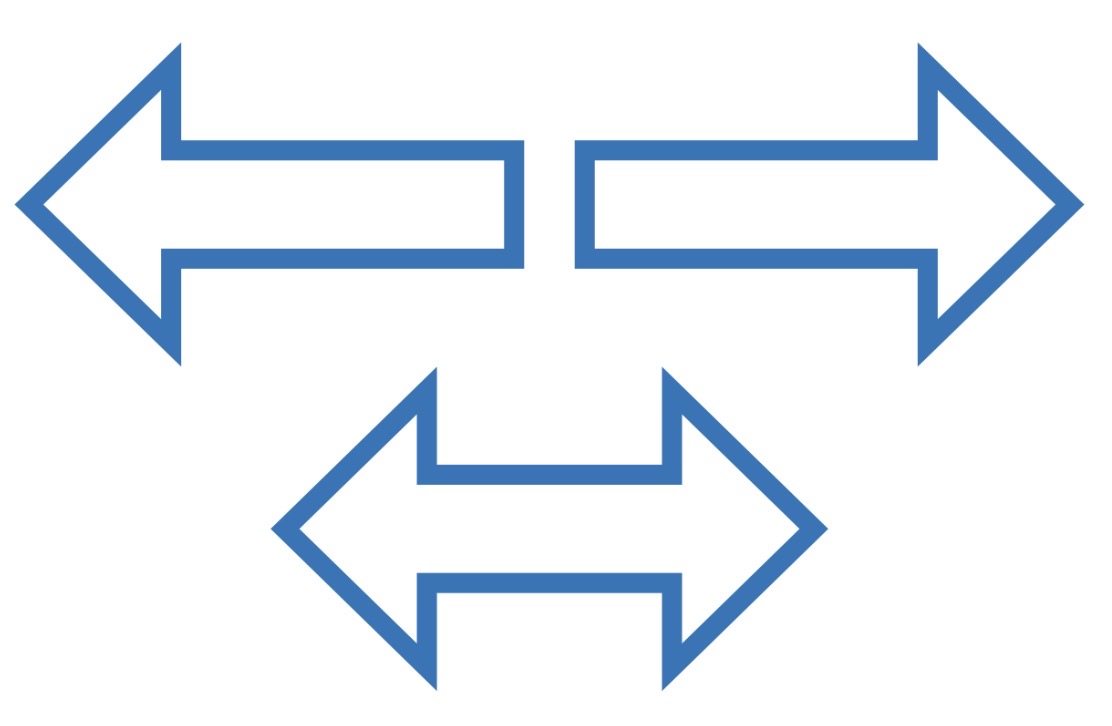
(Module 4) Flowchart Symbol — What does the following symbol represent?
Arrows: Bold alternatives to standard connectors

(Module 4) Flowchart Symbol — What does the following symbol represent?
Display: Information displayed to a user

(Module 4) Flowchart Symbol — What does the following symbol represent?
Journal Entry/Subsidiary Ledger Update

(Module 4) Flowchart Symbol — What does the following symbol represent?
Manual Input: Data that must be entered at a prompt (e.g. filling out a form)

(Module 4) Flowchart Symbol — What does the following symbol represent?
Manual Operation: Any adjustment to the flow that must be made manually

(Module 4) Flowchart Symbol — What does the following symbol represent?
Database: Data that can be accessed in any order
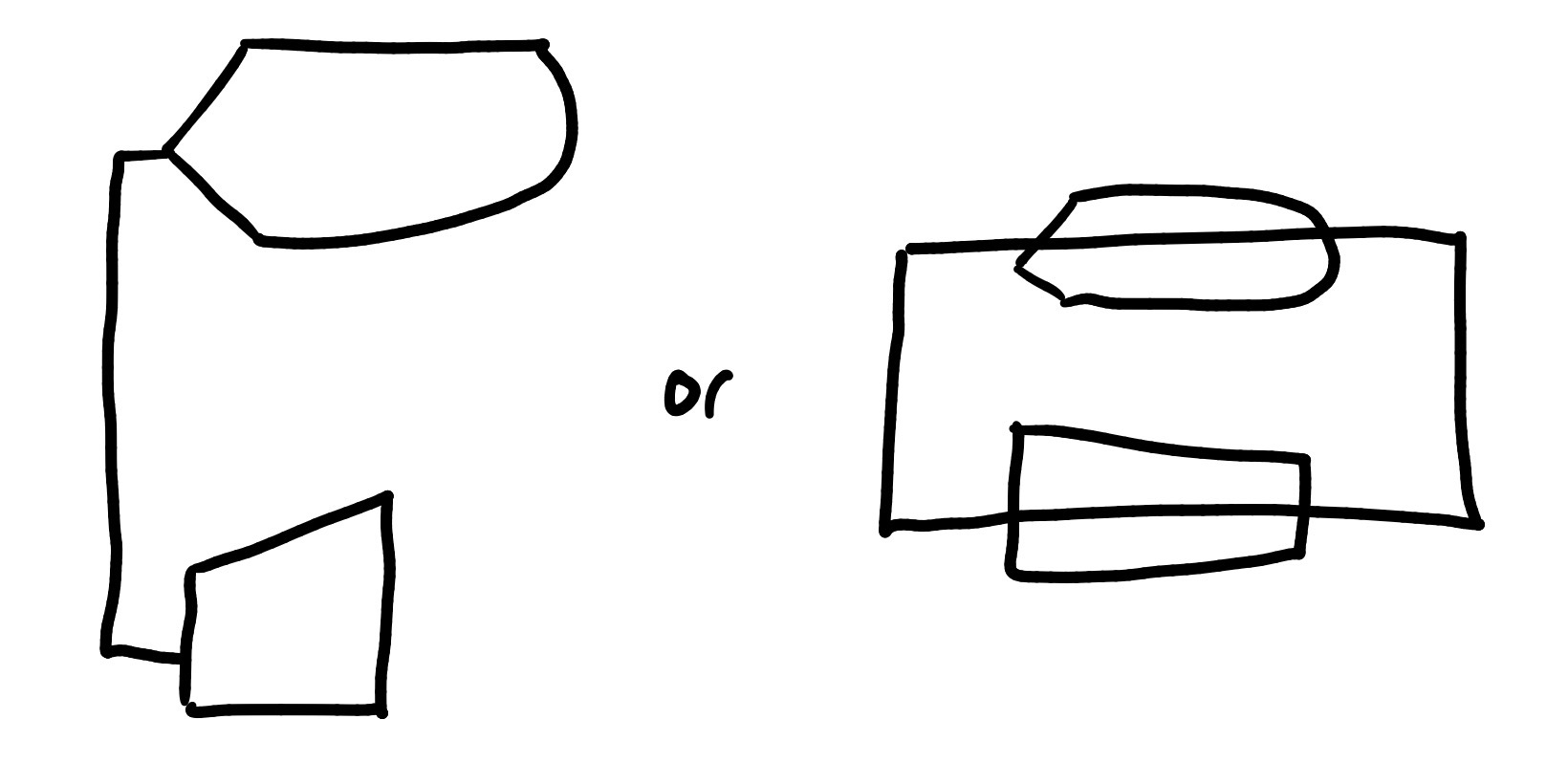
(Module 4) Flowchart Symbol — What does the following symbol represent?
Computer Terminal: Entering something into the system while viewing it on the display