1.2.1 Systems Software
0.0(0)
Studied by 3 people Call Kai
 Learn
Learn Practice Test
 Spaced Repetition
 Match
Match Flashcards
 Knowt Play
Card Sorting
1/55

Earn XP
Description and Tags
Last updated 11:24 AM on 4/26/23
Name | Mastery | Learn | Test | Matching | Spaced | Call with Kai |
|---|
No analytics yet
Send a link to your students to track their progress
56 Terms
1
New cards
What are the purposes of operating systems?
* Memory management (paging, segmentation, virtual memory)
* Resource management (scheduling)
* File management (moving, editing, deleting files and folders)
* Input/output management (device drivers)
* Interrupt management
* Utility software (disk fragmentation, backup, formatting)
* Security (firewall)
* User interface
* Resource management (scheduling)
* File management (moving, editing, deleting files and folders)
* Input/output management (device drivers)
* Interrupt management
* Utility software (disk fragmentation, backup, formatting)
* Security (firewall)
* User interface
2
New cards
What are the 4 parts of an operating system?
* The Kernel
* The Device Drivers
* The User Interface
* The System Utilities
* The Device Drivers
* The User Interface
* The System Utilities
3
New cards
What is the purpose of the kernel?
* Loading / Unloading applications from memory
* Scheduling tasks to run efficiently on the CPU
* Memory management
* File storage to and from secondary storage devices such as the hard disk
* File management
* Data security
\
The kernel within each type of operating system might be responsible for a slightly different blend of tasks. For example, a 'single user, single application' operating system does not have to deal with networking, whereas the kernel in a network operating system would have to.
* Scheduling tasks to run efficiently on the CPU
* Memory management
* File storage to and from secondary storage devices such as the hard disk
* File management
* Data security
\
The kernel within each type of operating system might be responsible for a slightly different blend of tasks. For example, a 'single user, single application' operating system does not have to deal with networking, whereas the kernel in a network operating system would have to.
4
New cards
File Allocation Table (FAT)
* a map of where files are stored on the hard disk
* The table stores addresses or pointers to the start of files
* It also stores file names, file sizes, and access rights
* This allows the OS to identify free space
* The OS updates the FAT when files are created, accessed, saved and deleted
* The table stores addresses or pointers to the start of files
* It also stores file names, file sizes, and access rights
* This allows the OS to identify free space
* The OS updates the FAT when files are created, accessed, saved and deleted
5
New cards
New Technology File System (NTFS)
* Supports much larger hard disks and file sizes as well as longer file names
* Replaced the FAT system
* Replaced the FAT system
6
New cards
Device Drivers
* Programs designed to work closely with a particular piece of hardware
* Enables the operating system to control and communicate with the device
* Usually the company who made the hardware creates the associated device driver and hands it to the operating system proprietor to bundle with their O.S.
* Every piece of hardware that communicates with the operating system will require a device driver
* e.g. Internal devices: Hard disk, DVD drive, graphics card…
* External devices: printer, monitor, mouse, keyboard…
* Operating systems can come with hundreds of device drivers pre-installed, and the right ones for that particular computer set-up are loaded whenever the computer is booted up.
* The exact detail of which device driver is needed by the operating system is kept in a file.
* \
* Enables the operating system to control and communicate with the device
* Usually the company who made the hardware creates the associated device driver and hands it to the operating system proprietor to bundle with their O.S.
* Every piece of hardware that communicates with the operating system will require a device driver
* e.g. Internal devices: Hard disk, DVD drive, graphics card…
* External devices: printer, monitor, mouse, keyboard…
* Operating systems can come with hundreds of device drivers pre-installed, and the right ones for that particular computer set-up are loaded whenever the computer is booted up.
* The exact detail of which device driver is needed by the operating system is kept in a file.
* \
7
New cards
User Interface
* Allows a person to interact with the computer and there are different types
* A **graphical user interface (GUI)** is the most commonly used today
* Another type of user interface is called a Command Line Interface (CLI)
* A **graphical user interface (GUI)** is the most commonly used today
* Another type of user interface is called a Command Line Interface (CLI)
8
New cards
Graphical user interface (GUI)
* It is a very 'friendly' way for people to interact with the computer because it makes use of pictures, graphics and icons - hence why it is called 'graphical'.
* This part of the operating system directs what you see on the screen (via the device driver) and reacts to your key presses, mouse clicks and touch on a touch sensitive screen.
* This part of the operating system directs what you see on the screen (via the device driver) and reacts to your key presses, mouse clicks and touch on a touch sensitive screen.
9
New cards
Command Line Interface (CLI)
* Commands are typed into the computer at a prompt and users must know the commands and the syntax.
* No attention paid to the aesthetics of the system
* Uses fewer resources than other interfaces.
* Access to required operations is often faster than using other interfaces
* Is still used by software developers and system administrators to configure computers and access features that are not available in the graphical interface.
* No attention paid to the aesthetics of the system
* Uses fewer resources than other interfaces.
* Access to required operations is often faster than using other interfaces
* Is still used by software developers and system administrators to configure computers and access features that are not available in the graphical interface.
10
New cards
Utilities
* Tend to be maintenance programs which carry out basic housekeeping tasks on a system e.g. disk defragmentation.
* Provides many basic facilities that run in the background without user interaction e.g.
* Print spool services
* Cryptographic password management
* File management services
* You can also install additional utility software, e.g
* Anti-virus utility
* Disk defragmenter utility
* File compression utility
* Provides many basic facilities that run in the background without user interaction e.g.
* Print spool services
* Cryptographic password management
* File management services
* You can also install additional utility software, e.g
* Anti-virus utility
* Disk defragmenter utility
* File compression utility
11
New cards
Data Security
* Authentication is one of the protective methods used by the OS to ensure that the user accessing a program is authorised or legitimate.
* This could be performed by a combination of usernames and passwords along with setting different access rights to restrict data to specific users.
* It could also be performed by scheduling automatic backups so that the device can be protected in the case of data loss.
* This could be performed by a combination of usernames and passwords along with setting different access rights to restrict data to specific users.
* It could also be performed by scheduling automatic backups so that the device can be protected in the case of data loss.
12
New cards
Memory Management
* Memory is a finite resource and the OS must deal with all of the applications trying to use it at the same time.
* The OS organises the use of (main) memory by converting logical addresses to physical addresses
* It allows programs to share memory and allocates free memory to new processes
* It protects programs and data from each other so that they are not corrupted.
* It allows programs larger than main memory to run.
* Memory management includes partitioning, virtual memory, paging and segmentation
* The OS organises the use of (main) memory by converting logical addresses to physical addresses
* It allows programs to share memory and allocates free memory to new processes
* It protects programs and data from each other so that they are not corrupted.
* It allows programs larger than main memory to run.
* Memory management includes partitioning, virtual memory, paging and segmentation
13
New cards
What are the two methods of dealing with events?
* Interrupts
* Polling
* Polling
14
New cards
Polling
* Checks every device/process to see if it needs to do anything
* This a like picking up the phone every second to see if you have received a call and is very inefficient.
* The **advantage of polling** is that it is very simple and predictable, as polling only occurs at specific points while software runs.
* The **disadvantage of polling** is that it may be inefficient in terms of using up CPU processing time.
* This a like picking up the phone every second to see if you have received a call and is very inefficient.
* The **advantage of polling** is that it is very simple and predictable, as polling only occurs at specific points while software runs.
* The **disadvantage of polling** is that it may be inefficient in terms of using up CPU processing time.
15
New cards
Interrupts
* A signal to the processor indicating that a device or process needs attention
* It means that the operating system should stop what it is doing and instead carry out the interrupt task.
* When the interrupting process finishes, the previous process resumes.
* This is like waiting for the phone to ring to see if you have received a call
* It means that the operating system should stop what it is doing and instead carry out the interrupt task.
* When the interrupting process finishes, the previous process resumes.
* This is like waiting for the phone to ring to see if you have received a call
16
New cards
Interrupt Process Summary
* If the interrupt is of a lower/equal priority to the current process then the current process continues
* If it is of a higher priority the CPU finishes its current Fetch-Decode-Execute cycle
* The contents of the CPU’s registers are copied to a stack in memory
* The location of the appropriate interrupt service routine(ISR) is loaded into the program counter
* When the ISR is complete, the previous contents are popped from the stack and loaded back into the registers
* If it is of a higher priority the CPU finishes its current Fetch-Decode-Execute cycle
* The contents of the CPU’s registers are copied to a stack in memory
* The location of the appropriate interrupt service routine(ISR) is loaded into the program counter
* When the ISR is complete, the previous contents are popped from the stack and loaded back into the registers
17
New cards
Name some types of interrupts
* User interrupt – such as a key press CTRL/ALT/DEL
* Software interrupt - may arise from a run time error (e.g. division by zero/array index exceeded etc.)
* I/O interrupt - may arise from a peripheral device (e.g. printer out of paper)
* Hardware interrupt – battery is about to run out
* Software interrupt - may arise from a run time error (e.g. division by zero/array index exceeded etc.)
* I/O interrupt - may arise from a peripheral device (e.g. printer out of paper)
* Hardware interrupt – battery is about to run out
18
New cards
What are some examples of higher order interrupts?
* Impending data loss
* Impending hardware / software failure
* Detection of imminent power failure
* Impending hardware / software failure
* Detection of imminent power failure
19
New cards
What are the issues with interrupts?
* Latency - If the CPU keeps receiving interrupts, it can take a long time for it to finish processing the task that the user asks it to perform
* Stack overflow - The CPU can receive interrupts while it is still processing the last interrupt. If the new interrupt has an even higher priority, then all the values in the registers will be loaded into the stack whilst it handles the newest interrupt. However, if too many interrupts are queued up, it runs out of memory to write the address into, this is called a stack overflow.
\
* Stack overflow - The CPU can receive interrupts while it is still processing the last interrupt. If the new interrupt has an even higher priority, then all the values in the registers will be loaded into the stack whilst it handles the newest interrupt. However, if too many interrupts are queued up, it runs out of memory to write the address into, this is called a stack overflow.
\
20
New cards
Logical address
Address at which an item appears to reside, generated by CPU

21
New cards
Physical address
The actual physical location of the storage cell in memory, generated by MMU.
This allows programs to share memory and for memory to be allocated to other processes, which protects programs and data from each other and allows programs larger than main memory to run.
This allows programs to share memory and for memory to be allocated to other processes, which protects programs and data from each other and allows programs larger than main memory to run.

22
New cards
Paging
* Designed to handle virtual memory
* The memory is partitioned into pages
* A page is a **fixed-sized physical** division of memory.
* Each page resides next to each other (contiguous).
* The memory manager gives each page a number and records its location in a table, called a 'page table'.
* The memory is partitioned into pages
* A page is a **fixed-sized physical** division of memory.
* Each page resides next to each other (contiguous).
* The memory manager gives each page a number and records its location in a table, called a 'page table'.

23
New cards
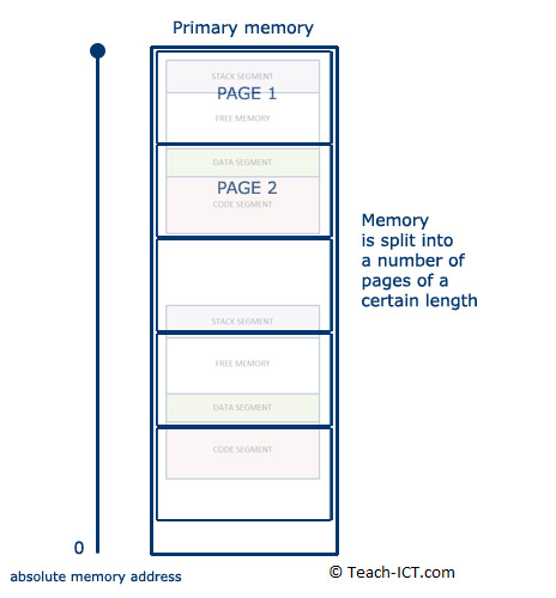
Pagination
* When RAM is getting full, the memory manager can determine the least-used page.
* This page is then copied down into virtual memory.
* Process memory segments can straddle several pages, like the second process segment shown in the diagram.
* The free area is re-numbered by the memory manager, and marked as free for use.
* The memory manager is constantly juggling pages in and out of virtual memory.
* Different segments of the same process can be on different pages and when the process is going to run, every page holding a segment of that process is moved into RAM at once.
* Pagination is only done when virtual memory is being used – enough RAM = no pagination.
* This page is then copied down into virtual memory.
* Process memory segments can straddle several pages, like the second process segment shown in the diagram.
* The free area is re-numbered by the memory manager, and marked as free for use.
* The memory manager is constantly juggling pages in and out of virtual memory.
* Different segments of the same process can be on different pages and when the process is going to run, every page holding a segment of that process is moved into RAM at once.
* Pagination is only done when virtual memory is being used – enough RAM = no pagination.

24
New cards
Similarities between segmentation and pagination
* Both are a way of dividing up memory but each method has different purpose.
* Both allow programs larger than memory to run
* Both are managed by the memory manager within the OS
* Both allow programs larger than memory to run
* Both are managed by the memory manager within the OS

25
New cards
What are the differences between segmentation and pagination?
* A page is assigned a fixed size by the memory manager whilst the size of a segment varies
* Paging deals with physical divisions in memory, whereas segmentation is diving memory logically
* Pagination is used to swap data in and out of virtual memory whilst segmentation is used to load and unload processes
* A page is not subdivided into smaller elements whilst segmentation has sub-elements of code, data, stack and free segments
* Paging deals with physical divisions in memory, whereas segmentation is diving memory logically
* Pagination is used to swap data in and out of virtual memory whilst segmentation is used to load and unload processes
* A page is not subdivided into smaller elements whilst segmentation has sub-elements of code, data, stack and free segments

26
New cards
Disk thrashing
* A problem that may occur when virtual memory is in heavy use
* Compared to RAM speed, moving the head on a hard disk to a new location is thousands of times slower.
* As more pages are swapped, eventually more time is spent swapping pages than on processing the data.
* The solution is to either install more RAM, or use fewer application at the same time.
* Compared to RAM speed, moving the head on a hard disk to a new location is thousands of times slower.
* As more pages are swapped, eventually more time is spent swapping pages than on processing the data.
* The solution is to either install more RAM, or use fewer application at the same time.

27
New cards
Memory leaks
* A well-written program will flush its data away once it no longer needs it. It declares that the memory it was using is now free, and the memory manager can assign it for other processes to use.
* Badly-written programs will not flush data properly. The memory remains unavailable, locked up. As the program continues to run, more and more memory gets locked up. This is called a '**memory leak**'.
* If the leak is bad enough, then the system eventually runs out of memory. Before that happens, the computer seems to run slower and slower.
* Usually the only solution is to re-boot the computer to ensure all its memory has been cleared.
* Badly-written programs will not flush data properly. The memory remains unavailable, locked up. As the program continues to run, more and more memory gets locked up. This is called a '**memory leak**'.
* If the leak is bad enough, then the system eventually runs out of memory. Before that happens, the computer seems to run slower and slower.
* Usually the only solution is to re-boot the computer to ensure all its memory has been cleared.

28
New cards
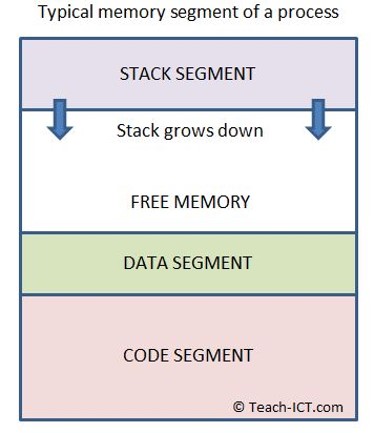
Stack overflow
* The stack can grow down towards the data segment. It grows because every time a function calls another function, the address of the first is stored in the stack along with any parameters it uses.
* A stack overflow means the stack has run out of free memory to expand into
* The program will usually crash at this point, possibly with a 'stack overflow' error message on screen
* A poorly written or faulty program will cause the stack to 'overflow'.
\
* A stack overflow means the stack has run out of free memory to expand into
* The program will usually crash at this point, possibly with a 'stack overflow' error message on screen
* A poorly written or faulty program will cause the stack to 'overflow'.
\

29
New cards
Segmentation
* The splitting up of memory into logical sized divisions, known as segments, which vary in size.
* These are representative of the structure and logical flow of the program, with segments being allocated to blocks of code such as conditional statements or loops.
* These are representative of the structure and logical flow of the program, with segments being allocated to blocks of code such as conditional statements or loops.
30
New cards
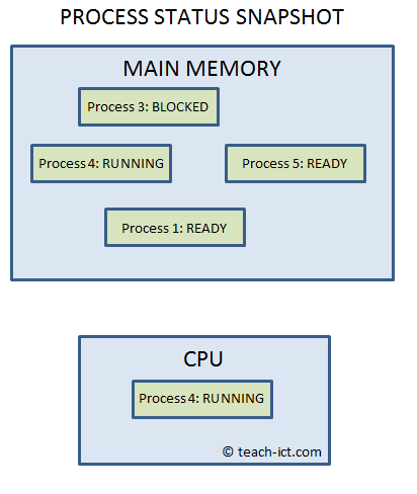
Multi-tasking OS
* Allows more than one program to run at the same time - or at least they appear to run concurrently as far as the user is concerned
* It arranges for every process in memory to run in the CPU once once they are ready to do so, switching between processes from different applications to keep them all up to date
* The CPU is able to process billions of instructions per second, so this switching of processes is not apparent to the user (using **scheduling**).
* It arranges for every process in memory to run in the CPU once once they are ready to do so, switching between processes from different applications to keep them all up to date
* The CPU is able to process billions of instructions per second, so this switching of processes is not apparent to the user (using **scheduling**).
31
New cards
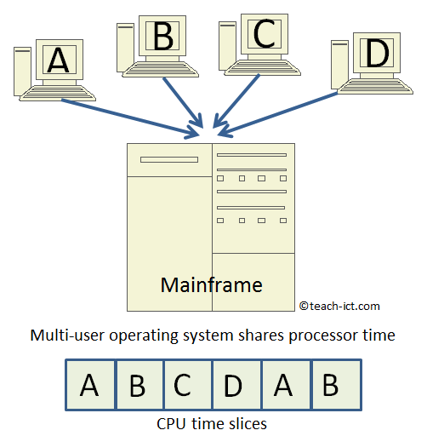
Multi-user OS
* Allows multiple users, on different workstations, to access a single, powerful computer via a network.
* This central computer, often a mainframe or super-computer, contains the operating system which is used on all connected terminals.
* The workstations are not running their own operating systems, but are controlled by a single larger one on the mainframe.
* This type of OS system carries out the following tasks:
* Each user logs on to the system and is presented with their workspace
* Allocates resources for the jobs they want to run
* Keeps logs of how much processing time and resources they use
* Works out the most efficient use of computer processing cycles
* Maintains security and privacy between the different users
* This central computer, often a mainframe or super-computer, contains the operating system which is used on all connected terminals.
* The workstations are not running their own operating systems, but are controlled by a single larger one on the mainframe.
* This type of OS system carries out the following tasks:
* Each user logs on to the system and is presented with their workspace
* Allocates resources for the jobs they want to run
* Keeps logs of how much processing time and resources they use
* Works out the most efficient use of computer processing cycles
* Maintains security and privacy between the different users
32
New cards
Distributed OS
* controls a number of computers at the same time in order to undertake a single computer-intensive task.
* Each computer contains part of the overall operating system.
* The group of computers is called a 'cluster'.
* It is a form of parallel processing
* Each computer contains part of the overall operating system.
* The group of computers is called a 'cluster'.
* It is a form of parallel processing
33
New cards
Real Time OS
* Designed to handle input data ***within a guaranteed response time*** (called its latency).
* It is specifically designed to be extremely reliable and to have very precise and consistent timings, so it can perform time critical operations.
* If two inputs arrive at the same time, the RTOS programmer is able to set a priority to them, so the most important signals are handled first.
* It is specifically designed to be extremely reliable and to have very precise and consistent timings, so it can perform time critical operations.
* If two inputs arrive at the same time, the RTOS programmer is able to set a priority to them, so the most important signals are handled first.
34
New cards
Embedded OS
* Designed to handle a specific task on a specific system hardware
* Many types of electronic equipment contain a computer with an embedded operating system to control their operation
* Many types of electronic equipment contain a computer with an embedded operating system to control their operation
35
New cards
Batch OS
* Common on a mainframe computer that was purchased specifically with massive repetitive data processing in mind.
* Does not need any intervention by a person once the initial commands are set up
* The data is collected first and then processed together (unlike RT where it is processed immediately)
* A batch process requires separate programs for input, process and output
* Does not need any intervention by a person once the initial commands are set up
* The data is collected first and then processed together (unlike RT where it is processed immediately)
* A batch process requires separate programs for input, process and output
36
New cards
Scheduling
The task of allocating CPU processor time amongst all running programs.
A scheduler (software within the OS) ensures that the computer:
* Makes efficient use of resources and processor
* Ensures all jobs and/or users are processed fairly
* Processes as many jobs as possible in the least possible time
* Prevents processes from failing to run
* Provides a reasonable response time
A scheduler (software within the OS) ensures that the computer:
* Makes efficient use of resources and processor
* Ensures all jobs and/or users are processed fairly
* Processes as many jobs as possible in the least possible time
* Prevents processes from failing to run
* Provides a reasonable response time
37
New cards
Round Robin
* Each process is given an equal amount of time being processed
* A queue is made holding all processes that are ready to run and each processes is loaded into main memory in turn and given a set amount of CPU time to use
* If the process is completed during the allocated time then the next process in the queue is loaded immediately
* However, if the process is not finished when its time expires, it is put at the back of the queue to wait for another turn
* A queue is made holding all processes that are ready to run and each processes is loaded into main memory in turn and given a set amount of CPU time to use
* If the process is completed during the allocated time then the next process in the queue is loaded immediately
* However, if the process is not finished when its time expires, it is put at the back of the queue to wait for another turn
38
New cards
Advantages/disadvantages of round robin scheduling
Advantages:
* Simple to implement, it is a good algorithm if all the processes are more or less of similar priority and size
Disadvantages:
* It does not take into account a process’ priority
* It does not consider that some processes are short and some are long
* Simple to implement, it is a good algorithm if all the processes are more or less of similar priority and size
Disadvantages:
* It does not take into account a process’ priority
* It does not consider that some processes are short and some are long
39
New cards
First come first served scheduling
* All processes are in a queue ready to be put into memory
* Each process is allowed to run to completion before the next one begins
* Once a job starts it prevents other jobs from being processed
* Each process is allowed to run to completion before the next one begins
* Once a job starts it prevents other jobs from being processed
40
New cards
Advantages/disadvantages of first come first served scheduling
Advantages:
* Simple algorithm to implement. It also ensures that once a process starts, it will run to completion in minimal time
Disadvantages:
* Once a job starts it prevents other jobs from being processed until it is completed
* A job that needs to access a slow resource (e.g a printer) wastes processing time
* It does not take into account the priority of a process
* It does not consider that some processes are short and others long, a long process will delay all the processes in the queue behind it
* Simple algorithm to implement. It also ensures that once a process starts, it will run to completion in minimal time
Disadvantages:
* Once a job starts it prevents other jobs from being processed until it is completed
* A job that needs to access a slow resource (e.g a printer) wastes processing time
* It does not take into account the priority of a process
* It does not consider that some processes are short and others long, a long process will delay all the processes in the queue behind it
41
New cards
Shortest job first scheduling
* The processes are arranged in a queue and ordered by how much time (measured in the number of FDE cycles) each process needs in order to run to completion
* The idea of this algorithm is to push as many processes as possible through the CPU in a given time
* If a new process comes along, the scheduler works out its processing time and it gets slotted into the queue at an appropriate point
* The idea of this algorithm is to push as many processes as possible through the CPU in a given time
* If a new process comes along, the scheduler works out its processing time and it gets slotted into the queue at an appropriate point
42
New cards
Advantages/disadvantages of shortest job first scheduling
Advantages:
* It ensures the maximum number of jobs are completed
* It ensures that short jobs aren’t kept waiting while long processed tie up CPU resources
* It minimises the average time a process takes to complete
Disadvantages:
* Does not take into account the priority of a process
* If a long job is nearly completed, it will still be interrupted and put back into the queue when a shorter job arrives
* The scheduler can only estimate how long a job will take to complete - its estimation could be wrong
* Particularly long jobs may never be completed if shorter jobs keep “jumping the queue”
* It ensures the maximum number of jobs are completed
* It ensures that short jobs aren’t kept waiting while long processed tie up CPU resources
* It minimises the average time a process takes to complete
Disadvantages:
* Does not take into account the priority of a process
* If a long job is nearly completed, it will still be interrupted and put back into the queue when a shorter job arrives
* The scheduler can only estimate how long a job will take to complete - its estimation could be wrong
* Particularly long jobs may never be completed if shorter jobs keep “jumping the queue”
43
New cards
Shortest time remaining scheduling
* Orders jobs in a queue by how much time they have remaining, rather than their total length
* If a process comes along requiring a certain number of cycles to finish, it gets slotted into the queue at the appropriate point
* Jobs will only be interrupted if the new process is shorter than the time remaining before completion
* If a process comes along requiring a certain number of cycles to finish, it gets slotted into the queue at the appropriate point
* Jobs will only be interrupted if the new process is shorter than the time remaining before completion
44
New cards
Advantages/disadvantages of shortest time remaining scheduling
Advantages:
* It allows short processes to be handled very quickly
* It ensures that the maximum number of processes are completed in a given time, taking account what has happened so far
Disadvantages:
* Does not take into account the priority of the process
* Particularly long jobs may never be completed if the shorter jobs keep “jumping the queue”
* It allows short processes to be handled very quickly
* It ensures that the maximum number of processes are completed in a given time, taking account what has happened so far
Disadvantages:
* Does not take into account the priority of the process
* Particularly long jobs may never be completed if the shorter jobs keep “jumping the queue”
45
New cards
Multi-level Feedback queues
* Every job is given a priority by the scheduler when it arrives and is sorted into the relevant queue
* The queues themselves are sorted by one of the scheduling algorithms
* The high priority queue is completed first, and then each of the lower queue levels in turn
* The scheduler is able to re-prioritise jobs at any time, moving them into the queue appropriate for their new priority
* The queues themselves are sorted by one of the scheduling algorithms
* The high priority queue is completed first, and then each of the lower queue levels in turn
* The scheduler is able to re-prioritise jobs at any time, moving them into the queue appropriate for their new priority
46
New cards
Advantages/disadvantages of multi-level feedback queues
Advantages:
* Makes sophisticated use of process priority
* Ensures that higher priority processes run on time
Disadvantages:
* Complex to implement
* Not very efficient if all jobs have similar priority
* Low-priority jobs make take an extremely long time to complete if the queue algorithm doesn’t compensate for wait time, especially if new high-priority jobs keep arriving
* Makes sophisticated use of process priority
* Ensures that higher priority processes run on time
Disadvantages:
* Complex to implement
* Not very efficient if all jobs have similar priority
* Low-priority jobs make take an extremely long time to complete if the queue algorithm doesn’t compensate for wait time, especially if new high-priority jobs keep arriving
47
New cards
BIOS (Basic Input Output System)
* A small program that is responsible for booting up the computer
* Not part of the operating system as it has to work before the OS is even loaded
* Normally stored on the BIOS chip on the motherboard. The chip contains non-volatile memory: either ROM or flash
* Contains the most basic hardware settings of the computer and set of instructions to begin the boot up process
* It is both hardware and software. Like software, the BIOS is a set of instructions to the computer’s microprocessor. Like hardware, these instructions are written into the chip itself. It is called firmware
* It;s he first program that runs when a computer system is switched on. The Program Counter register points to the location of the BIOS upon each start-up of the computer as the BIOS is responsible for running various key tests before the operating system is loaded into memory, such as:
* Sends a a ‘Hardware reset"‘ signal to the CPU.
* POST
* Hardware prepared
* OS system starts
* Not part of the operating system as it has to work before the OS is even loaded
* Normally stored on the BIOS chip on the motherboard. The chip contains non-volatile memory: either ROM or flash
* Contains the most basic hardware settings of the computer and set of instructions to begin the boot up process
* It is both hardware and software. Like software, the BIOS is a set of instructions to the computer’s microprocessor. Like hardware, these instructions are written into the chip itself. It is called firmware
* It;s he first program that runs when a computer system is switched on. The Program Counter register points to the location of the BIOS upon each start-up of the computer as the BIOS is responsible for running various key tests before the operating system is loaded into memory, such as:
* Sends a a ‘Hardware reset"‘ signal to the CPU.
* POST
* Hardware prepared
* OS system starts
48
New cards
What happens when the hardware reset signal is sent?
* The signal travels along a wire directly to the CPU.
* The command is hard coded by its designers to execute an instruction at a specific location during the chip, that contains a ‘jump’ command that point to the starting address of the BIOS start-up program
\
* The command is hard coded by its designers to execute an instruction at a specific location during the chip, that contains a ‘jump’ command that point to the starting address of the BIOS start-up program
\
49
New cards
POST
* The Power On Self-Test
* If there is a problem, the BIOS with emit audible beeps to inform you off the problem
* Checks that the system is healthy
* Checks include:
* BIOS is not corrupted
* System chips are okay
* Processor is okay
* System memory is okay
* Keyboard is present
* Video display memory is okay
\
* If there is a problem, the BIOS with emit audible beeps to inform you off the problem
* Checks that the system is healthy
* Checks include:
* BIOS is not corrupted
* System chips are okay
* Processor is okay
* System memory is okay
* Keyboard is present
* Video display memory is okay
\
50
New cards
Hardware prepared
* The BIOS will initialise the computer internal peripherals (e.g video cards and hard drives)
* The order in which the BIOS looks for an operating system is determined by the '**boot order**' in the BIOS settings. The boot order can be changed by the user
* The BIOS program contains the hardware details of its particular computer
* The process of this system start-up continues until each bit of hardware is up and running
* The order in which the BIOS looks for an operating system is determined by the '**boot order**' in the BIOS settings. The boot order can be changed by the user
* The BIOS program contains the hardware details of its particular computer
* The process of this system start-up continues until each bit of hardware is up and running
51
New cards
OS system starts
* Whenever the CPU boots up a drive, it looks at the ‘boot sector’ on that drive and runs the instructions stored there
* Different drives have different instructions
* The boot sector in a hard disk contains a data table telling the CPU how the storage on the drive is partitioned. This table is called the ‘Master Boot Record’ (MBR)
* From the Master Boot Record the BIOS finds which drive name (usually c:) that holds the operating system, so it goes to that drive and looks for the '**boot loader**’.
* The **boot loader** is a program and part of the operating system itself. When the boot loader is up and running, it takes over the task of
loading the rest of the operating system into main memory.
* After the operating system is booted, a script called the **boot file** or **boot script** is run to prepare the machine for personal use – this includes personalised settings such as default directories, desktop appearance, etc.
* Different drives have different instructions
* The boot sector in a hard disk contains a data table telling the CPU how the storage on the drive is partitioned. This table is called the ‘Master Boot Record’ (MBR)
* From the Master Boot Record the BIOS finds which drive name (usually c:) that holds the operating system, so it goes to that drive and looks for the '**boot loader**’.
* The **boot loader** is a program and part of the operating system itself. When the boot loader is up and running, it takes over the task of
loading the rest of the operating system into main memory.
* After the operating system is booted, a script called the **boot file** or **boot script** is run to prepare the machine for personal use – this includes personalised settings such as default directories, desktop appearance, etc.
52
New cards
Virtual machine
* A piece of software that behaves in the same way as an actual computer
* The process of creating a virtual machine is called virtualisation. There can be many virtual machines stored on a single host
* The process of creating a virtual machine is called virtualisation. There can be many virtual machines stored on a single host
53
New cards
Benefits and uses of storing operating systems on a virtual machine
* You can run older applications that are not compatible with newer OS
* You can run multiple operating system on the same computer
* Virtual machines are very easy to copy and back up once they’re installed. Reverting to backups of virtual machines is simple
* Web hosting companies can create and sell many ‘virtual servers’ within a single physical server
* Saves space, time and cost of setting up multiple systems
* You can run multiple operating system on the same computer
* Virtual machines are very easy to copy and back up once they’re installed. Reverting to backups of virtual machines is simple
* Web hosting companies can create and sell many ‘virtual servers’ within a single physical server
* Saves space, time and cost of setting up multiple systems
54
New cards
Disadvantages of operating systems on virtual machines
* Programs will run less efficiently on a virtual machine than they would on the original hardware
* You still need proper licenses to run the operating system and applications within a virtual machine - they are as applicable to copyright laws as any other
* Requires a powerful computer as it must run it’s own OS aw well as the virtual machine
* You still need proper licenses to run the operating system and applications within a virtual machine - they are as applicable to copyright laws as any other
* Requires a powerful computer as it must run it’s own OS aw well as the virtual machine
55
New cards
Intermediate code
Code that is halfway between machine code and object code is called intermediate code. This is independent of the processor architecture so can be used across different machines and operating systems.
56
New cards
Advantages / disadvantages of virtual machines for intermediate code
Advantages:
* Portable. The same code can run on any hardware platform that supports the virtual machine
* No need to change the source code
* Easy to release code for a variety of platforms
\
Disadvantages:
* Security. The current version of the virtual machine may have security vulnerabilities that allow rogue code to take control of the host computer
* Realistically the real OS/ device will need to be sued to test the code at some point
* Portable. The same code can run on any hardware platform that supports the virtual machine
* No need to change the source code
* Easy to release code for a variety of platforms
\
Disadvantages:
* Security. The current version of the virtual machine may have security vulnerabilities that allow rogue code to take control of the host computer
* Realistically the real OS/ device will need to be sued to test the code at some point