Lesson 4 & 5 Advanced Web Programming
 Call Kai
 Learn
Learn Practice Test
 Spaced Repetition
 Match
Match Flashcards
 Knowt Play
1/45

Earn XP
Description and Tags
React Event - State Management
Name | Mastery | Learn | Test | Matching | Spaced | Call with Kai | Chat |
|---|
No analytics yet
Send a link to your students to track their progress
46 Terms
React Event
an action performed by the user or the browser.
onClick
User clicks an element
onDoubleClick
Double Click
onChange
Input Value Change
onSubmit
Form submission
onMouseEnter
Mouse enters element
onMouseLeave
Mouse leaves element
onKeyDown
Key is pressed
onKeyUp
Key is released
React uses camelCase for event names.
<button onClick={clickMe}>
- onClick
- Curly Braces {}
- Function reference (without parentheses)
Example of Button Click Event
Output: “Welcome, Click the button below to see the greeting”
“click me” button
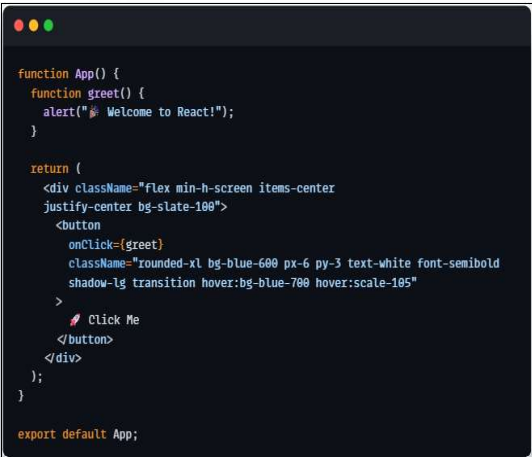
Example of Passing Parameters
Output: “click button” > Hello Christian

React State
is a built-in React object that stores data that may change over time.
makes applications interactive.
Whenever State changes:
React automatically updates the UI.
The component re-renders.
The latest data is displayed.
Why do wee need State
Without State:
• Data cannot change dynamically.
• UI remains static.
• User interactions have no visible effect.
Why do wee need State
With State:
• Counters update.
• Forms respond instantly.
• Shopping carts change.
• Dashboards refresh automatically.
useState Hook/ React Hook
useState is a ______ that allows a functional component to store and update data.
Whenever the stored data changes, React automatically updates the screen
useState React Hook
Syntax:
const [state, setState] = useState(initialValue);
Example:
const [count, setCount] = useState(0)';
count - holds the current value of the state.
setCount - function used to update the value of count.
useState(0) - sets the initial value to 0.
How useState Works
We are importing the useState hook from React so your component can remember values between renders.
Without useState, a variable would reset every time the component renders.
setState()
Before Hooks existed, React mainly used Class Components.
update state using:
this.setState({
count: count +1
});
functional components use:
setCount(count +1);
setState() vs useState()
setState()
used in class components
uses this.setState()
more code
older react approach
still supported
useState()
used functional components
uses useState() Hook
less code
modern react approach
reccomend for new projects
setState()
used in class components
uses this.setState()
more code
older react approach
still supported
useState()
used functional components
uses useState() Hook
less code
modern react approach
reccomend for new projects
React Stateless Components
is a React component that does not manage its own state.
• Instead, it simply receives data from its parent component through Props and displays that
data.
• It is also called a Presentational Component because its primary purpose is to present
information.
Characteristics of React Stateless Components
• Does not use useState()
• Does not use setState()
• Receives data through Props
• Displays UI only
• Easy to reuse
• Easy to test and maintain
Real-World Examples of Stateless Components
• Website Header
• Navigation Bar
• Footer
• Company Logo
• Product Card
• User Profile Card
• Course Card
• News Card
• Employee Information Card
• Contact Card
React Advanced Components
are reusable components and libraries that simplify th development of modern web applications.
Instead of building everything from scratch, developers use existing libraries to create applications faster and more efficiently
Example of React Advanced Components
• Navigation Bars
• Sidebars
• Cards
• Tables
• Maps
• Pagination
• Responsive Layouts6
React Pagination
divides a large amount of data into smaller pages.
Instead of displaying hundreds of records at once, only a limited number are shown.
Why Use Pagination
• Reduces the amount of information
displayed at one time.
• Makes a page easier to read.
• Improves navigation.
• Organizes large datasets.
• Can improve application performance.
• Prevents long and crowded pages.
React Material UI (MUI)
is an open-source React component library that implements
It provides ready-to-use components such as buttons, cards, dialogs, forms, navigation bars, and tables.
Example of MUI Components
• Button
• Card
• TextField
• AppBar
• Alert
• Dialog
• Table
• Grid
Default Material UI installation
npm install @mui/material @emotion/react @emotion/styled
Default Material UI installation for Material Icon
npm install @mui/icons-material
React Bootstrap
is a library that rebuilds Bootstrap components as React components.
It replaces Bootstrap’s JavaScript behavior with React-based components and does not require jQuery.
Example of React Bootstrap
• Container
• Row
• Col
• Navbar
• Card
• Button
• Modal
• Form
• Alert
Installing Bootstrap
npm install react-bootstrap bootstrap
Import Bootstrap Stylesheet in main.jsx
import “bootstrap/dist/css/bootstrap.min.css”;
React Map
displays geographical information inside a React application.
React Map can be used to display
• Business locations
• School locations
• Hospitals
• Disaster evacuation centers
• Hazard areas
• Delivery locations
• User locations
• Routes and destinations
React Leaftlet
provides React bindings for the mapping library. It uses ____ functionality through React components.
Installing React Leaflet
npm install leaflet react-leaflet
React Table
displays structured information using rows and columns.
Example of React Table
Student records
Employee records
Product lists
Sales reports
Attendance records
Enrollment records
Inventory records
Common Table Features
An advanced React table may include:
• Search
• Sorting
• Filtering
• Pagination
• Row selection
• Data formatting
• Editable rows
• Delete actions
• Responsive desig
Installing TanStack React Table
npm install @tanstack/react-table
TanStack Table
is a headless table library. It provides table logic while allowing developers to control the final design and markup
A basic table can be created using HTML elements. For more advanced functions, developers can use libraries such as __________