Join
 Call Kai
 Learn
Learn Practice Test
 Spaced Repetition
 Match
Match Flashcards
 Knowt Play
1/19

There's no tags or description
Looks like no tags are added yet.
Name | Mastery | Learn | Test | Matching | Spaced | Call with Kai | Chat |
|---|
No analytics yet
Send a link to your students to track their progress
20 Terms
Natural Join vs USING Clause
A Natural Join automatically matches columns with identical names in both tables. The USING clause restricts this to specific columns to prevent unintended matching.
Example: SELECT * FROM student JOIN takes USING (ID);
ON Clause Join Predicate
Allows custom condition matching between tables (similar to a
WHEREclause).Example:
SELECT * FROM student JOIN takes ON student.ID = takes.ID;
Left Outer Join
Retains all records from the left table; unmatched right-table attributes are filled with
NULL.Example:
SELECT * FROM course LEFT OUTER JOIN prereq USING (course_id);

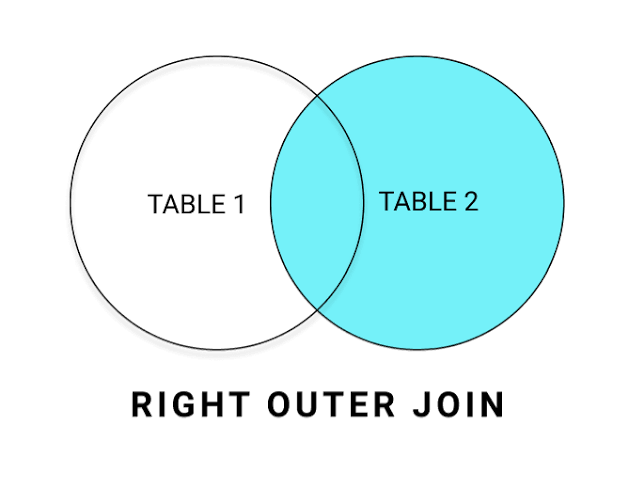
Right Outer Join
Retains all records from the right table; unmatched left-table attributes are filled with
NULL.Example:
SELECT * FROM course RIGHT OUTER JOIN prereq USING (course_id);
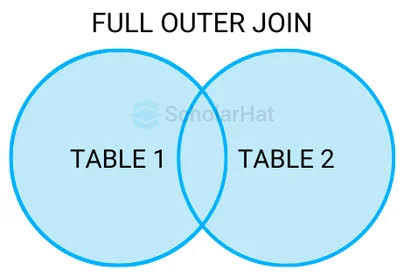
Full Outer Join
Retains all records from both relations, padding unmatched attributes with
NULL.Example:
SELECT * FROM course FULL OUTER JOIN prereq USING (course_id);
Database Views
A view is a virtual relation defined by a stored query expression. It does not physically store data on disk as a independent table; instead, whenever the view is queried, its underlying expression is substituted into the query. Views allow data abstraction, hiding sensitive fields (like salaries), and simplifying complex queries.
Example:[ Physical Table: instructor (ID, name, dept_name, salary) ]
|
[ VIEW: faculty (hides salary) ]
|
[ User Query on Virtual Table ]
Materialized Views
Unlike standard views, a materialized view physically computes and stores its query results on disk when created. This speeds up heavy analytical queries, but requires periodic maintainance (updating the view) to prevent data from becoming out-of-date when base tables change.
Example: Useful for precomputing complex aggregates like total departmental budgets or total credit summaries.
Base Relation Updated ===> View Maintenance Trigger ===> Update Physical Saved Copy
View Update Restrictions
Updating data through a view is restricted because modifications cannot always be unambiguously translated to underlying physical tables. SQL allows direct updates only on simple views, defined as: having a single base table in the FROM clause, no aggregates/expressions, no DISTINCT keyword, and no GROUP BY/HAVING clauses.
[ INSERT via View ] ---> Is it a simple single-table view? |---> YES: Translate to Base Table (Set unlisted attributes to NULL) |---> NO: Reject Update
Database Transactions
A transaction is a sequence of SQL queries and updates executing as a single atomic unit of work. It guarantees Atomicity (all operations succeed or all are completely undone) and Isolation (concurrent transactions do not interfere with each other).
Statements:
COMMIT WORK;Makes all modifications permanent in the database.ROLLBACK WORK;Undoes all modifications made during the active transaction.
Integrity Constraints & Check Clause
Integrity constraints protect databases against accidental data corruption, ensuring authorized modifications preserve consistency. Single-relation constraints include NOT NULL, UNIQUE, PRIMARY KEY, and CHECK(P). The CHECK(P) clause tests a predicate $P$ against every tuple inserted or modified.
Incoming Row Insert ---> Validates CHECK (semester in List) |---> Pass: Insert Tuple |---> Fail: Reject Action / Abort Transaction
Foreign Key & Referential Integrity
Referential integrity ensures that a value appearing in one table for a given attribute set also exists as a primary key in a related table. This prevents orphaned records (e.g., assigning a student to a non-existent department).
[ instructor table ] [ department table ] Tuple: (ID: '101', dept_name: 'CS') ---References---> Tuple: (dept_name: 'CS', building: 'Taylor')
![<p>Referential integrity ensures that a value appearing in one table for a given attribute set also exists as a primary key in a related table. This prevents orphaned records (e.g., assigning a student to a non-existent department).<br><br>[ instructor table ] [ department table ] Tuple: (ID: '101', dept_name: 'CS') ---References---> Tuple: (dept_name: 'CS', building: 'Taylor')</p>](https://assets.knowt.com/user-attachments/e5e7d579-2df6-4e1a-8b21-4df278deb123.webp)
Cascading Referential Actions
When a referenced primary key is deleted or modified, standard behavior rejects the operation. Cascading actions automatically propagate these changes throughout foreign-key tables instead of failing. Options include CASCADE, SET NULL, or SET DEFAULT.
DELETE 'Biology' from department table | +===> Automatically DELETE all courses associated with 'Biology'
Database Assertions
An assertion is a global database predicate defining business conditions that the system must ensure always remain true across multiple relations. Any modification across any referenced table that violates the assertion predicate will be rejected.
Any Table Update ---> Global Assertion Evaluated ---> Valid? Allow : Rollback
SQL Temporal Data Types
Standard built-in types used to store calendar dates, time of day, accurate timestamps, and relative time durations.
Details & Examples:
DATE: Year, month, day →DATE '2026-08-28'TIME: Hours, minutes, seconds →TIME '09:00:30'TIMESTAMP: Date + Time combined →TIMESTAMP '2026-08-28 09:00:30.75'INTERVAL: Period/duration of time →INTERVAL '1' DAY
Operations: Subtracting temporal types returns an
INTERVAL; intervals can be added to dates/timestamps.
Large-Object Types (BLOB & CLOB)
Large Object data types handle massive data elements such as high-res photos, videos, audio, or entire text documents. Database systems return a locator pointer to the application rather than the full raw binary object.
Types:
BLOB(Binary Large Object): Uninterpreted raw binary data.CLOB(Character Large Object): Large collection of text character data.
SELECT photo FROM student_profile; Result Output: [ Pointer Reference Address ] ===> Retrieves stream outside DB engine
User-Defined Types vs. Domains
User-Defined Types (CREATE TYPE) construct new atomic data types. User-Defined Domains (CREATE DOMAIN) create alias types that can include embedded integrity constraints like NOT NULL or explicit CHECK tests.
SQL Index Definition
An index is a specialized data structure constructed on specific attributes of a table. It allows the database system to execute search queries efficiently without doing a full table scan over all stored tuples.
Query Search (ID='12345') ---> B-Tree/Hash Index ---> Direct Memory Address of Row
SQL Authorization Privileges
Privileges specify allowed user operations on database tables or views. Operations include data manipulation (SELECT, INSERT, UPDATE, DELETE) and schema modification privileges (INDEX, RESOURCES, ALTERATION, DROP).
Revoking Authorization & Cascading
The REVOKE statement removes granted privileges. By default, revoking a privilege cascades, removing that privilege from any other users who received it through the revoked user. Use RESTRICT to prevent revocation if dependent grants exist.
DBA ---> Grants to User A (with grant option) ---> Grants to User B DBA revokes from User A (CASCADE) =======> User B privilege automatically revoked
SQL Roles & Privilege Inheritance
Roles represent job functions and group database privileges together. Roles can be granted to individual users or to other roles, creating an inheritance chain where higher-level roles automatically inherit all privileges of lower-level assigned roles.
[ Privileges ] ---> Granted To ---> [ Role: instructor ] | Inherited By Role: dean | Assigned To User: Satoshi
![<p>Roles represent job functions and group database privileges together. Roles can be granted to individual users or to other roles, creating an inheritance chain where higher-level roles automatically inherit all privileges of lower-level assigned roles.<br><br>[ Privileges ] ---> Granted To ---> [ Role: instructor ] | Inherited By Role: dean | Assigned To User: Satoshi</p>](https://assets.knowt.com/user-attachments/224695f1-a6bf-45de-b9ce-940eedb3cf06.png)