Algorithms
 Studied by 0 people
 Call Kai
 Learn
Learn Practice Test
 Spaced Repetition
 Match
Match Flashcards
 Knowt Play
1/29

Earn XP
Description and Tags
intro to algorithms, searching and sorting algorithms, decomposition and abstraction.
Name | Mastery | Learn | Test | Matching | Spaced | Call with Kai |
|---|
No study sessions yet.
30 Terms
What is an algorithm?
Set of step by step instructions used to solve a problem, used by humans & computers.
Difference between algorithms between computers and humans
Computer algorithms must be clear, unambiguous and not open to interpretation. Algorithms in computers are written and stored as software (written in programming languages or physically wired into a computer)
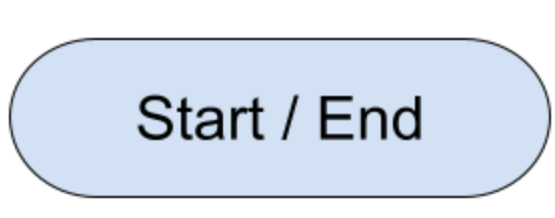
Flowchart: Start / End
Represents the beginning or end point of the program
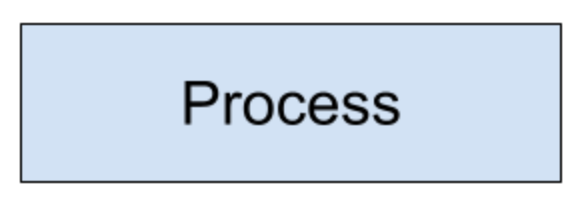
Flowchart: Process / Action
Represents a specific task or action being performed like calculations, data manipulation or function calls.
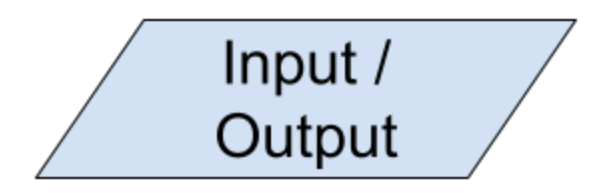
Flowchart: Input / Output
Represents the input or output of data to or from the program, such as reading user input or displaying results.
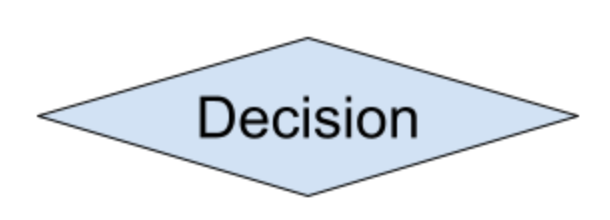
Flowchart: Decision
Represents a branching point in the program where a condition is evaluated, and different actions are taken based on the results, typically represented in a diamond shape. Usually contain a condition statement like if statements, switch cases or loops

Flowchart: Arrows
Flow of the chart is indicated by arrows
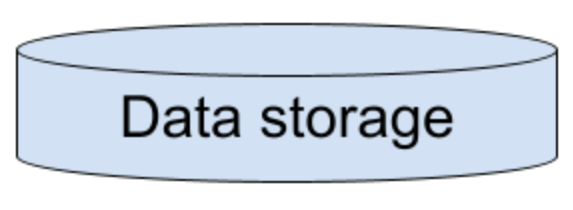
Flowchart: Data storage
Indicates a read from / write to data storage
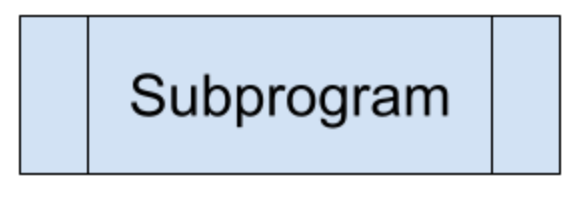
Flowchart: Subroutine / function
Represents a separate block of code that is called and executed as a part of the main program typically shown as a rectangle with rounded corners.
What is a written description?
Narrative explanation of the program’s logic using natural language. Shows overall flow and behaviour of program without diving into details of individual steps. Used for clients, stakeholders, non technical team members.
Written description vs pseudocode
Lacks the precise syntax and structure found in pseudocode or programming languages
Pros of written description
Accessibility: Easily understandable, doesn’t require programming knowledge so easier communication.
Flexibility: Provide flexibilty in terms of language and format, allowing customization and adaptation.
Clarity: Well-written description can convey the flow and behavior in a concise manner, focusing on the purpose, requirement and expected outcome.
Cons of Written Description
Too ambiguous: Lack of precise syntax and structure can lead to different interpretations or misunderstandings
Lack of detail: Not capture the specific steps or decision making involved so hard to translate directly into code
Difficult in Validation: Not easily verifiable or testable
Limited reusability: Not directly executable and cannot be reused as code snippets. They serve more as documentation or communication tools instead of practical implementation instructions
Pros of Pseudocode:
Readable and understandable by both technical and non-technical individuals.
Provides a clear, structured representation of program logic.
Language-agnostic, allowing for flexibility and adaptability to different programming languages.
Facilitates validation and testing of program logic before implementation.
Cons of Pseudocode:
Subjective and open to interpretation.
Lack of standardization in syntax and format.
May lack implementation-specific details.
Not executable code, requiring translation into an actual programming language.
What is pseudcode:
Plain language, high level description of a programs logic using English to represent steps without strict programming syntax. Needs to be translated
What is program code?
Code that can be directly executable (or with a few minor changes) in the target language
Pros of Program Code:
Precision and Execution: gives precise instructions which can be directly executed by computer making functional software or apps
Implementation ready
Can be tested and validated (verified)
Reusability: Can be reused in other projects saving time and effort
Efficiency: Optimized for performance and can be fine tuned for speed and resource usage
Cons of Program Code:
Complexity: Can be complex so harder to understand and maintain
Technical Knowledge Requirement
Limited accessibility: less accessible for individuals not familiar with programming
Less flexibility: Code is tied to specific programming languages and may need big changes to adapt to other languages
Lack of abstraction: may not provide a high level overview of programs logic so less suitable for communicating concepts to nontechnical individuals
Bubble sort
Sort through array in pairs, if the left of array is in wrong place, swap. Keep doing this till the end.
Merge sort
Split in half, then split in half again, repeat until all numbers are individual, repair in order, keep doing until fully complete
Linear search
Check one by one if it’s equal to number.
Binary search
Compare the target with the middle element of the array, if smaller check other half, if bigger check right half. Repeat
Merge sort pros
Merge Sort guarantees a stable sort, which means that the order of equal elements is preserved.
It performs well on large lists
Cons of merge sort
It is not an in-place sorting algorithm, meaning it needs extra storage proportional to the size of the input list.
Because it is usually implemented using recursion it can be difficult for beginner programmers to implement and understand.
Pros of linear search
Simple and easy to understand
Works on both sorted and unsorted lists
Works well for small data sets
Useful if you expect the item to be near the beginning of the list
Cons of linear search
Inefficient for large data sets
Time complexity: O(n), where n is the size of the list
Can be slow compared to other search algorithms
Pros of binary search
Efficient searching algorithm
Divides the search space in half with each comparison
Requires a sorted array, ensuring data integrity
Can quickly find a desired element in a large data set
Cons of binary search
Requires a sorted array, making initial setup time-consuming
Not suitable for dynamic data sets that frequently change
Cannot handle unsorted or unordered data
Implementation is more complex than a linear search