Fundamentals of data representation
 Call Kai
 Learn
Learn Practice Test
 Spaced Repetition
 Match
Match Flashcards
 Knowt Play
1/21

There's no tags or description
Looks like no tags are added yet.
22 Terms
Number bases - decimal, binary, hex - uses - (0 IS A NUMBER)
Dec - base 10, every column are increasing powers of 10, with digits from 0-9 that can be in any column - familiarity
Bin - base 2, every column is increasing powers of 2 with only 0 and 1, any other number must be represented by a combination of 0 and 1
ideal to represent two states (off/on) - useful for circuits high-low voltage
hex - base 16, 0-9, then A-F where F is 15 - can represent bin more compactly
Analogue vs binary bit patterns
all senses can be measured in a continuous sinuating line e.g. turning a light on and off goes gradually brighter, peak brightness and then gradually goes darker
but in binary (bits) - there are only 2 states that the light can be so it just goes on and off
0 off 1 on makes it simple to build circuits - more states makes it more difficult and prone to error
[({N S polarity on HDD representing 1 or 0 on HDDs)}]
![<p>all senses can be measured in a continuous sinuating line e.g. turning a light on and off goes gradually brighter, peak brightness and then gradually goes darker</p><p>but in binary (bits) - there are only 2 states that the light can be so it just goes on and off</p><p>0 off 1 on makes it simple to build circuits - more states makes it more difficult and prone to error</p><p>[({N S polarity on HDD representing 1 or 0 on HDDs)}]</p>](https://assets.knowt.com/user-attachments/5992adea-6b47-40bd-8e7a-99bfe31b8bdc.png)
point of bit patterns - interpretations
Understand that computers use binary to represent all data and instructions.
you cannot represent anything with bit pattern (0s and 1s) until you know how to interpret it bc e.g. a bit pattern through ASCII can be a letter, an integer if converted, a black and white series of pixels, colour or sound
use of hex and main difference in character usage
as the value of the number increases BIN and DEC use more characters e.g. for up to 15 but HEX uses 1
computers exe instructions w BIN but bc of the close relationship of HEX with BIN nibbles they become v. useful for representing large, longer sequence binary numbers in a smaller number of digits - as a human readable shorthand (easier to read)
and used in CS to represent colours, mem adresses, mac adresses
How to convert DEC to BIN using the divide by 2 method, acknowledge that the number line method is a viable options aswell
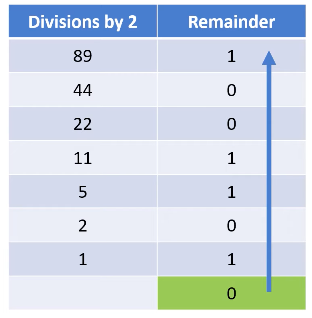
e.g. take 89 into BIN , first divide 89 by two 44r1 keep the 1 in a separate column at the 84 row, and then keep dividing by 2 (if no remainder then 0) until you reach 1 then read the remainder column bottom up
89 → 0101 1001 (best to give answer as 8 bits even if you answer might have less)
to convert BIN to DEC write the columns and write the BIN number underneath and add where 1 is in a column
DEC to HEX
one HEX digit is a binary nibble, so take the DEC number and convert it into binary e.g. 95 which is 0101 1111 now each nibble represents a number, first one being 5 and last being F → so 5F
if given the other way take the two digit number deconstruct it into 2 binary nibbles and convert the 8 bit number into DEC
if for a number that only takes one nibble or under (anything under 15 or F ) best to learn HEX value for it
Units of data capacity
b = bit B = byte
everything is stored in bits and can be used to represent many things, but a byte is a group of 8 bits and a group of 4 is a nibble
kilobyte 210 bytes = 1024 but for science 1 kB = 1000 bytes
using this approximation - 1MB = 1000 kB , 1GB = 1000 MB, 1TB = 1000GB
so to convert between units mult or div by 1000 and then mult or div by 8 for bits and bytes
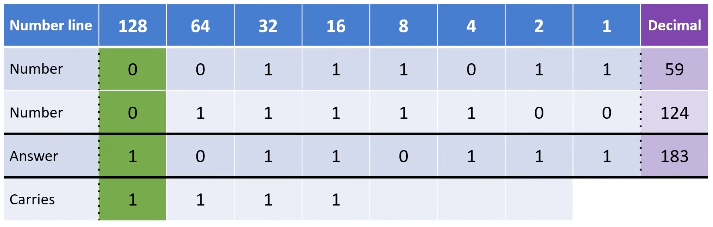
binary rules for addition
0+0 = 0
0 + 1 = 1
1+1 = 0 carry 1
1+1+1 = 1 carry 1
always format table like this and denote overflow if possible
Binary shift
as each column is double the last, if you shift the column leftwards you multiply it by 2 each time and divide by 2 each time you go rightwards
if you shift and odd number right the rule still applies e.g. 0101 (5) becomes 0010 (2) which is 5 DIV 2
whether you shift left or right, the effect of mult or div is given as 2n where n is the number of shifts

character set and bits needed
A defined list of characters recognised by the computer hardware and software, with each character being represented by a single number
given there are 26 letters in the alphabet - we would need 5 bits minimum as 25 gives 32 possible combinations
character sets must be agreed standards of letters that computers use to interpret
ASCII + unicode
but practically there is lower + upper case and many symbols so we need 27 (7 bits) which gives 128 combinations which covered the basics of typing
bc the first 31 characters were computer instructions - actual typing sets only started from no. 32
but because of including intl languages and symbols and emojis is on the unicode standard - (16 mil <) characters in 6 digit HEX - more characters than ASCII
(unicode uses the same codes as ASCII up to 127)
How do character codes run in ASCII/Unicode?
Character codes run in contiguous numerical sequence
(e.g. if 'A' is 65, 'B' is 66, 'C' is 67; '0' is 48, '1' is 49)
To find the code of a target letter, add its alphabetical offset to the base character's code
Bitmap vs vector images
Bitmap - image made from lots of diff coloured squares (pixels) → better for photos not made up of simple shapes
vector - mathematics are stored to draw the shape e.g. circle from XY coords from radius, colour, → best for technical drawings, logos and clipart
How bitmaps are stores - all is stored in binary
e.g. assume black and white img→ black pixel 0 white 1, it would be a sequence of 010101, but width height and bits per pixel (bit depth) needs to be stored along with the data (meta data) for the image to be reconstructed
as the colour depth and resolution (width and height) of the img ↑ so does file size
e.g. if it is 1 bit there r two colours but if 2 bit there r 4 colours : pixels are stored now w 24 bit depth to give many colour range → simplified into 6 digit HEX no of colours
can be calked as 2^n where n is no of bits/pixel
AQA terms about images, pixel, width and height, colour depth, img size, bitmap img file size
Pixel: Short for "picture element", a single point in an image.
Width and Height: Refers to the number of pixels.
Colour depth: Number of bits needed to represent each pixel.
Size of an image: (Width in pixels) x (Height in pixels)
Bitmap image file size: W x H x D
(Width in pixels) x (Height in pixels) x Colour depth in bits
(to get bytes div by 8)
sound representation - ADC, sample rate and res,
sound is analogue wave that must be converted to a digital binary form for storage and processing (by analogue to digital conversion)
sample rate is how often the amplitude of a sound wave is taken. and sample resolution is the fidelity that the wave was recorded at (measurements of amplitude taken) → as both factors ↑ sound quality ↑ but so does file size
sound rep - typical CD, 2^n , file size
typical CD is 16 bits @44100 Hz
1 hz - 1 sample per second
amplitude measurements calked as 2^n where n is sample res bc 2 bits give 4 measurements of amplitude measurements
file size = sample rate (Hz) x (sample res) x (length of sample (s) for bytes div 8
compression + lossy compression
reduces the file size so it takes up less space, and maximises the amount you can store on a device - smaller files r quicker when transferred (streamed) over the internet
often must be decompressed or extracted b4 they can be read
one way would be to make the bit depth or sample rate lower, or store bigger areas of pixels or sound as one colour or amplitude - both will reduce quality : however sometimes it makes no difference to how humans see or hear it so can be effective
lossless compression
doesn’t lose any data at all during compression - keep all the data
instead of storing every pixel with the same binary pattern we can RLE - reduces file size but would only be effective where there are large areas of the same colour - suitable for cartoons and clipart but not for photographs (can be used for all data)
usually much less effective than lossy as reducing file size
some files e.g. spreadsheets docs exe files cannot be lossy because all data is needed so only lossless
Huffman encoding - usually for text
lossless compression method for text doc compression, compresses by using frequency analysis and then assigning shorter bit signs to more frequently coming characters and longer bit signs to less frequently appearing characters
uses binary tree structure, each node in the tree can have 0,1,2 child nodes and each branch is a 0 or 1, so the more frequent characters are nearer to the top as there must be less branches to reach them and vice versa for least frequent
Huffman encoding comparison to general ASCII storage : peter piper picked a pepper e.g.
we take the huffman code and see how many bits it is, then multiply that by how many times it came up for the total space it takes, then add together for the other characters - 79 b
e.g. the ex is 27 characters and ASCII is 7 bit so 27×7 = 189 b
so we have saved 189-79 = 110b

RLE - usually for bitmap
in a black0 white1 image where there are lots of continuous sections of the same colour you can convert the large lengths of 0s and 1s into frequency pairs, with the number of length followed by the colour e.g. of this z in a 10×10 grid it would take 100b
but making into 22B(0), 6W(1),8B,1W etc.. there is large data saving and in frequency pairs they would be 220618011…
