h2cp definitions + processes
 Call Kai
 Learn
Learn Practice Test
 Spaced Repetition
 Match
Match Flashcards
 Knowt Play
1/107

There's no tags or description
Looks like no tags are added yet.
Name | Mastery | Learn | Test | Matching | Spaced | Call with Kai | Chat |
|---|
No analytics yet
Send a link to your students to track their progress
108 Terms
describe bubble sort
compare first and second values. if the first value is larger than second value, swap them around
compare the second and third values. if the second value is larger than the third value, swap them around.
keep comparing adjacent values, swapping them around if necessary, until the last two values in the list have been processed
when we have completed the first pass through the entire array, the largest value is in the correct position at the end of the array. the other values may or may not be in the correct order.
this repeats until no more swaps occur and the array is sorted.
describe insertion sort
To sort an array in ascending order using insertion sort, we start with the first element in the array. One element by itself is already sorted.
Then we consider the next element in the unsorted array. If it is smaller than the first element, we insert this element to the left of the first element, else we place it to the right. Next, we consider the third element in the array.
We make comparisons with the elements in the sorted array leftwards until we find the correct position to insert this element into the sorted array.
Repeat this for the remaining elements, until the whole array is sorted.
describe merge sort
Merge sort recursively divides an unsorted array into subarrays, until each contains one element.
Thereafter, the algorithm repeatedly pairs up the subarrays and merge each pair into a new sorted subarray, using the above process of merging arrays,
until there is only one subarray remaining and that will be the sorted array.
describe quicksort
A pivot element is selected from the array
The array is partitioned into two sub-arrays; elements less than the pivot, and elements greater than the pivot
The process is applied recursively to each sub-array
The base case is reached when a sub-array has zero or one element, and is thereby sorted
The sub-arrays are then concatenated in order – less than, pivot, greater than – to produce the final sorted array
differences between merge sort and quicksort
stability:
merge sort — stable algorithm, it does not change the occurrence of similar elements (equal elements are ordered in the same order in the sorted list). this preserves the order which these elements appeared in the original array
quicksort — unstable sorting technique, might change the occurrence of similar elements
memory:
in-place quicksort — does not need additional memory space to sort
merge sort — requires a temporary array to merge sorted arrays, hence needing additional memory space
time complexity:
quicksort — worst time complexity O(n²)
merge sort — worst time complexity O(nlogn)
linear search — pros + cons
pros
easy and simple
does not need a sorted array
cons:
slow, O(n)
binary search — pros + cons
pros:
fast, O(logn)
cons:
needs a sorted array
closed addressing/open hashing/separate chaining — pros + cons
can be implemented using linked lists. when multiple elements are hashed to same index, these elements can be inserted into a singly-linked list
pros:
easy implementation
ensures all elements can be found in hash table, just as a key in the linked list
cons:
inefficient use of memory as some addresses might never get used at all but still have memory allocated
extra memory allocation to store elements as nodes in linked list
worst time complexity O(n)
open addressing/closed hashing/linear probing — pros + cons
when inserting data into a hash table and collision is detected, search the next empty location by looking at next free index until empty location is found. hash table is full when there are no more locations
pros:
highly efficient in memory as all allocated memory locations will be used. no extra memory is required
cons:
due to clustering, searching is slower. worst case, when the hash table is full, all indexes need to be checked to see if the value exists or not
traits of a good hash table
space of hash table — hash table should be 1.5x the maximum data size, this will reduce the number of collisions
deterministic hash function — for same value, hash function should generate same hash value
efficient to compute — hash function should be quick to compute hash value
uniform distribution — hash function should provide a uniform distribution across the hash table to minimise collisions
usage of all data inputs — ignoring parts of the data can lead to collisions
static vs dynamic memory allocation
Static Memory Allocation | Dynamic Memory Allocation |
Memory is allocated at compile time. | Memory is allocated at run time. |
In static memory allocation, the size and location of memory blocks are fixed and cannot be changed at runtime. | In dynamic memory allocation, the size and location of memory blocks can be changed according to the program logic and data size. |
Allocated memory remains from start to end of the program. | Allocated memory can be released at any time during the program. |
It is inflexible and wasteful if actual memory usage is less than allocated. | It is flexible and efficient as memory is allocated according to required usage |
It is fast and simple, as there is no need to allocate or deallocate memory during execution, and it avoids memory fragmentation, as the memory blocks are contiguous and aligned. | It is slower and more complex, as you have to manage the memory allocation and deallocation yourself. It may also cause memory fragmentation. |
Static memory allocation is preferred in an array. | Dynamic memory allocation is preferred in the linked list. |
circular vs linear queue
utilisation of space:
circular — utilises array space efficiently. when the queue reaches the end of the array, it wraps around to the beginning, hence utilising unused slots at front of array
linear — once a dequeue occurs, space previously occupied cannot be utilised.
speed
circular — data packets can be enqueued as long as there is unused space
linear — when queue is full, enqueuing must pause until queue is fully dequeued before it can be used again, slowing performance
deletion of a node with 2 children
look for next larger value (in-order successor). next larger value can be obtained by finding the minimum value in the right child of the node
replace the contents of the node with next larger value and delete node of next larger value
traversal orders
pre-order — current, left, right
in-order — left, current, right
post-order — left, right, current
time complexity of BST
best time complexity O(logn)
worst time complexity O(n) — when tree is unbalanced or skewed
recursion — pros + cons
pros:
more elegant and less program code
complex tasks can be broken down into simpler sub-problems
when designing a solution to a mathematical problem that is recursive by nature, recursive solutions are easier to implement
cons:
repeated recursive calls carry large amounts of memory usage and processor time from multiple function calls
if recursion continues for too long, computer may run out of memory and the program will crash
use of stacks in recursion
A certain amount of memory is set aside for a function to use (e.g. storing local variables)
Function’s memory address + Contents of local variables → stored as a stack frame
Each recursive call pushes another stack frame onto the stack, until the base case is reached.
When the base case is reached, the top stack frame is popped, which restores the local variables and returns control to the previous caller.
This popping process continues, destroying the stack frames one by one, until control finally returns to the original function caller.
data validation
a process of ensuring that the input data supplied to a system satisfies a set of rules such that it is sensible, complete, and within acceptable boundaries. Its purpose is to avoid data errors. It does not guarantee that data is accurate.
data verification
the process of getting the user to confirm that the data entered was what was intended to be entered.
transcription error
a single incorrect character being entered, such as a wrong password or an invalid email address.
transposition error
where two digits are accidentally swapped.
types of validation checks
Range check | Checks that a value falls within the specified range E.g. the marks of the A level H2 Computing Paper 1 must fall within the specified range of 0 to 100 and not anything less than 0 or more than 100 marks |
Length check | Checks the data isn’t too short or too long E.g. a telephone number must have a length of 8 numbers |
Presence check | Checks that data has been entered into a field E.g. ensure that an entry field is not left blank |
Check digit | An extra digit added to the end of a code number, which has been calculated from the digits of the code number. This ensures the code number has been entered properly. |
types of verification checks
Double entry — the process of entering data twice, with the second entry being compared with the first is to ensure that it is accurate. It is common in batch processing for a second data entry operator to key in a batch of data to verify it. Another example is when setting a password, a user would be asked to key in the password a second time to ensure that the passwords match up.
Proofreading data — someone checking the data entered against the original source to ensure that the data match.
types of errors
Syntax error — Does not follow the rules of the programming language
Runtime error — Program crash when the code is running
Logic error — Produce wrong output without crashing
types of test data
Normal / Valid | Typical data values that are valid and will be accepted by the system. |
Abnormal / Invalid / Erroneous | Data values that the system should not accept or should be rejected. |
Extreme / Boundary | Data values that are at the extreme end of the range of normal data that should be accepted. |
encapsulation
the feature of combining attributes and methods together in a single class.
Encapsulation supports information hiding through the combining of private properties and public methods into a class, ensuring private properties are only accessed/altered by calls to public methods.
It also supports implementation independence, which is the use of methods of a class without needing to know how it is implemented. Even if the underlying implementation were to change, it does not matter to the user.
inheritance
Attributes and methods in a subclass are acquired from a base class (aka superclass/parent).
This reduces the need for duplicate code and promotes software reuse as the inherited attributes and methods need not be written again.
polymorphism
when subclasses define methods with the same name as the methods in base class, but with different implementations.
This allows the method in the derived class to override the one in the base class, so that each derived class can behave differently even when using the same method name.
Polymorphism enables code generalization by allowing objects of different classes to be treated uniformly, providing flexibility and extensibility in code design.
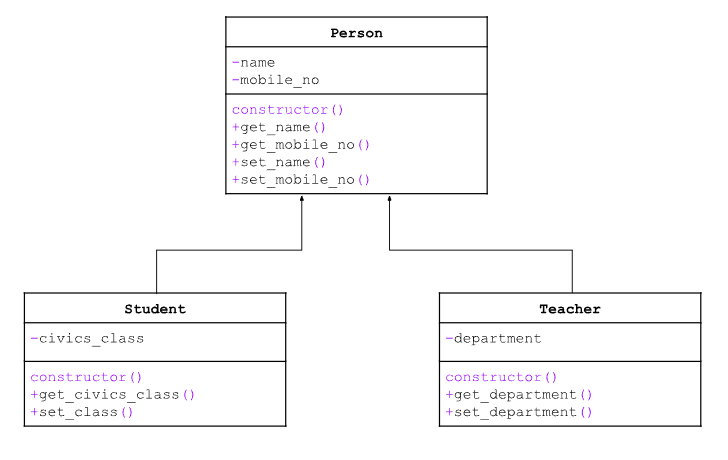
class diagram layout
unicode vs ascii
amount of characters
ASCII — only handles 128 basic English characters and symbols.
Unicode — supports over 149,000 characters across more-than 150 scripts
primary key
a field or a set of fields in a table whose values uniquely identify each record in a table and should not change over time.
secondary key
an additional key, or alternate key, which can be used in addition to the primary key to locate specific data.
composite key
a combination of two or more fields in a table that can be used to uniquely identify each record in a table. Uniqueness is only guaranteed when the fields are combined.
foreign key
an attribute (field) in one table that refers to the primary key in another table. It links to a primary key in the other table and forms a relationship between the tables.
prevents invalid data from being inserted into the foreign key column, because it has to be one of the values contained in the referenced table
data redundancy
refers to the same data being stored more than once
Having to enter data multiple times means the database is at an increased risk of having inaccurate data.
It would be hard to update because every occurrence of the data item will need to be changed. This can lead to data inconsistency.
normalisation
1NF | All columns must be atomic. This means there can be no multi-valued columns – i.e., columns that would hold a collection such as an array or another table. In other words, the information in each column cannot be broken down further. |
2NF |
Attribute Y is functionally dependent on attribute X (usually the primary key), if for every valid instance of X, the value of X uniquely determines the value of Y. This means that for every non-key attribute, the entire primary key uniquely determines the value of that attribute, i.e. no attribute can depend on only part of the primary key. |
3NF |
A functional dependency X => Z is said to be transitive if there exists an attribute Y such that X => Y and Y => Z Note that X => Y does not necessarily imply the converse Y =>X. |
sql vs nosql
Relational Databases (SQL) | NoSQL Databases | |
Language | Use of structured query languages to perform operations. | Use of a dynamic schema to query data. Also, some NoSQL databases use SQL-like syntax for document manipulation |
Data Schema | Fixed, predefined schema where data must fit into tables with specific columns and data types. This rigid structure ensures consistency, and it works well for applications with stable, well-structured, and predictable data requirements. | Adopt flexible data models, allowing for dynamic and non-schematic data storage. This flexibility enables developers to insert data without a predefined schema. NoSQL databases are most useful in scenarios where data structures may be undefined, not fully known in advance, or are subject to frequent changes. |
Scalability | Typically rely on vertical scaling, which involves improving and adding resources, such as faster processors and more memory, to the same server to handle increased load. Such high-performance components can be expensive, and upgrades are limited by the capacity of a single machine. | Typically use horizontal scaling, which is achieved by adding more servers or nodes to a distributed system, which then helps increase capacity. The nodes communicate with each other and distribute the load, so adding more nodes helps increase the overall capacity of the system. This is a more scalable and cost-effective solution for managing a growing database and increasing database traffic. |
Support for Big Data | The vertical scaling makes it difficult for relational databases to store very big data. | The horizontal scaling and dynamic data schema make NoSQL suitable for big data. |
Properties | Use the ACID (Atomicity, Consistency, Isolation, Durability) property. ACID properties ensure immediate and strict consistency in the database. SQL queries guarantee that either all or none of the changes made during a transaction are committed to the database and have rules for how to handle concurrent transactions and unexpected events. | Settles for eventual consistency. They emphasize scalability and distributed architectures. Eventual consistency acknowledges that, in a distributed system, it may take some time for all nodes to converge to a consistent state after an update. While NoSQL databases sacrifice immediate consistency for scalability and fault tolerance, they ensure that, given enough time, all replicas of the data will eventually converge to the same state. |
advantages of nosql
Flexibility | Having a flexible data model also means NoSQL databases can address large volumes of rapidly changing data, making them great for agile development, quick iterations, and frequent code pushes.
|
Cost-effectiveness |
|
Fast queries |
|
Replication |
|
data privacy
the requirement for data to be accessed by, or disclosed to, authorised users only. In other words, it is about keeping data private rather than allowing it to be available in the public domain. The term may be applied to both individuals and organisations.
data integrity
refers to the accuracy and validity of data. Data integrity covers data in storage, during processing, and while in transit. Data integrity can be compromised in several ways and at different stages during data processing.
threats to data
Lapses in users’ behaviour — Users may not be careful when dealing with data. This includes making errors in data entry, using weak passwords, or revealing password/OTP to others.
Mismanagement by multiple users — Multiple users working on the same file may accidentally overwrite each others’ data, causing data to be inaccurate or invalid.
Natural disasters — Natural disasters can destroy the computer system and/or storage device physically.
Unauthorised intrusion into the system — If the system is vulnerable to hackers, data may be corrupted or lost. Other cyberattacks such as virus, worms and trojan are equally damaging to the system and its data.
Malicious software — Malicious software entering the computer system will cause harm to a system and the data stored in the system.
data backup
Data backup involves creating copies of data and storing them separately.
It is intended to be used as a safety precaution or prevention against unexpected loss of data due to unintended data corruption or errors such as disk drive failing, files accidentally being deleted, or a data center going offline during a catastrophic event.
data archive
Archiving data involves storing data that is not actively used but kept for historical references or auditing purposes. It ensures that important records remain available years after they were created.
In most cases, the purpose of data archiving is to meet legal and compliance requirements.
For example, a doctor’s office might be required to keep patient records for a certain period of time. Similarly, a bank may need to retain transaction records.
version control
Version control is a system that records changes to a file or set of files over time so that you can recall specific versions later.
E.g. Git
file naming convention
File naming convention is a framework for naming files in a way that describes what they contain and how they relate to other files.
This helps to minimise the chances of files being misplaced or lost unintentionally due to poor organisation of files.
Such a convention also enables users to locate files quickly.
Developing an FNC is done by identifying the key elements of the project, and the important differences and commonalities between your files.
disaster recovery
Disaster recovery is a set of practices and technologies that determine how an organisation deals with a disaster, such as a cyberattack, natural disaster, or large-scale equipment failure.
The disaster recovery process typically involves setting up a remote disaster recovery site with copies of protected systems and switching operations to those systems in case of disaster.
data encryption
Data encryption alters data content according to an algorithm that can only be reversed with the right encryption key.
Encryption protects your data from unauthorised access even if data is stolen by making it unreadable.
data erasure
Data erasure is more secure than standard data wiping because it uses software to completely overwrite data on any storage device.
It verifies that the data is unrecoverable, limiting liability by deleting data that is no longer needed.
This can be done after data is processed and analysed or periodically when data is no longer relevant.
Erasing unnecessary data is a requirement of many compliance regulations
backup vs archive
Backup | Archive | |
Data Storage | The original data remains in place, while a backup copy is stored in another location. | Archived data is moved from its original location to an archive storage location. |
Data State | Backed-up data is constantly changing. | Once you create an archive, you do not modify it. |
Data Retention Policy | You periodically delete or overwrite data backups that are too old to be useful. | Data archives are designed for long-term storage. |
Storage Type | Hot cloud storage or easily accessible local storage locations | Cold cloud storage or tape archives. |
Data Scope | All of your data, with the exception of unimportant information like temporary files. | Specific files that you must retain for compliance purposes. |
obligations
Accountability Obligation
Organisations must take responsibility for protecting personal data
Make information about your data protection policies, practices and complaints process available upon request
Designate a data protection officer (DPO) with his business contact information available to the public
Notification Obligation
Notify individuals of the purposes for which your organisation is intending to collect, use, or disclose their personal data.
Consent Obligation
Only collect, use or disclose personal data for purposes which an individual has given their consent to.
Allow individuals to withdraw consent with reasonable notice, and inform them of their likely consequences of withdrawal.
Purpose Limitation Obligation
Only collect, use or disclose personal data for the purposes that a reasonable person would consider appropriate under the given circumstances and for which the individual has given consent.
Cannot require individuals to consent to the collection, use or disclosure of their personal data beyond what is reasonable to provide that good or service.
Accuracy Obligation
Make reasonable effort to ensure that personal data collected is accurate and complete, especially if it will affect individuals
Protection Obligation
Make reasonable security arrangement to protect personal data
Retention Limitation Obligation
Cease retention of personal data or dispose of it in a proper manner when it is no longer needed.
Transfer Limitation Obligation
Transfer personal data to another country only according to the requirements prescribed under the regulations, to ensure that the standard of protection is comparable to the protection under the PDPA , unless exempted by the PDPC (Personal Data Protection Commission)
Access and Correction Obligation
Upon request, provide individuals with access to their personal data as well as information about how the data was used or disclosed within a year before request.
Correct any error or omission in an individual’s personal data as soon as practicable and send corrected data to other organisations to which the personal data was disclosed to, within a year before the correction is made.
Data Breach Notification Obligation
In the event of a data breach, take steps to assess if it is notifiable. If the data breach likely results in significant harm to individuals, and/or are of significant scale, organisations are required to notify the PDPC and the affected individuals as soon as practicable.
Data Portability Obligation
At the request of the individual, organisations are required to transmit the individual’s data that is in the organisation's possession or under its control, to another organisation in a commonly used machine-readable format.
ethical principles
PRIC
→ Integrity
Act with complete honesty and transparency in all professional dealings.
Do not misrepresent capabilities, products or findings.
Disclose known risks, vulnerabilities or limitations to relevant parties, even when inconvenient.
Example breach: A data security company discovers a vulnerability in a client's database but hides it to avoid panic and protect their image — this is a breach of integrity.
→ Responsibility
Accept accountability for one's work and its consequences.
Adhere to professional and client standards; do not defer problems or cover mistakes.
Ensure data is entered accurately and reported promptly.
Example breach: A developer knowingly ships buggy code and blames tools, avoiding accountability for the defect.
→ Competence
Only undertake work within one's area of expertise.
Continuously update knowledge and skills; seek guidance when outside one's competence.
Do not claim proficiency in skills or technologies you have not demonstrated.
Example breach: A programmer claims expertise in a programming language they have never used in order to win a contract.
→ Professionalism
Act in the best interests of clients and the public, not solely for profit.
Maintain confidentiality of sensitive information; protect data from unauthorised access.
Do not exploit privileged access to systems or data.
Example breach: A staff member at a vaccination centre leaks patients' personal health data to a third party.
ransomware
Blocks access to a victim's computer system until a sum of money, often in cryptocurrency, is paid
spyware
Secretly collects personal information, such as tracking websites visited or recording keystrokes (keyloggers) to steal passwords and credit card numbers
scareware
Attempts to frighten the victim with loud alarms or flashing images into buying fake antivirus software or handing over financial data
adware
Pushes unwanted advertisements to users while secretly collecting their information
fileless malware
Operates entirely within the computer's memory without downloading code, hiding in trusted applications to evade traditional virus scanners
trojan horse
Pretends to be a harmless or useful application but gives intruders unauthorized access to the computer when run
virus
Attaches itself to a normal program and modifies it, subsequently infecting other programs by attaching copies of itself when executed
worm
A standalone program that automatically spreads copies of itself over a network by exploiting system vulnerabilities or masquerading as an email attachment, which can consume bandwidth and overload servers
phishing
Uses fraudulent emails and fake websites that mimic reputable companies to trick users into revealing sensitive information
pharming
Intercepts a computer's request for a legitimate website and redirects the user to a fake website to steal their data
spamming
The mass distribution of unwanted messages designed to lure users into entering their personal information
cookie misuse
Attackers exploit the small data files websites leave on your browser to secretly collect your personal information
Distributed Denial of Service (DDoS)
A larger-scale attack that uses a "botnet"—a network of multiple compromised systems, such as malware-infected computers or Internet of Things (IoT) devices—to overwhelm the target's infrastructure with internet traffic
Denial of Service (DoS)
An attacker uses a single computer to flood a targeted website or network with requests, overloading it so that its performance degrades or it becomes completely inaccessible to regular users
ethical issues
SEEL
Category | Key concepts and exam triggers |
Social | Digital divide, cyberbullying, social media mental health, facial recognition surveillance, job displacement communities |
Ethical | Code of ethics (integrity/responsibility/competence/professionalism), AI bias, consent, accountability, transparency |
Legal | PDPA (consent, purpose limitation, protection, access/correction), Computer Misuse Act (unauthorised access), copyright infringement |
Economic | E-commerce growth, fintech inclusion, automation and job loss, monopolisation by big tech, digital divide → income gap |
local area network (LAN)
a network of computing devices connected within a small geographical area, typically within the same building, such as a home, school, office or building
metropolitan area network (MAN)
a network of computing devices covering a larger geographical area (two or more buildings within the same town or city) than a LAN. A MAN is typically owned and operated by a large organisation such as a business, city or government body.
wide area network (WAN)
a network of computing devices covering a large-scale geographical area, typically across multiple geographical locations.
Consists of multiple smaller networks such as LANs or MANs.
intranet
a private network built within an organisation, like a company, school or government agency
internet
a global, public network accessible to anyone with an internet connection. It is a network of networks linked by a broad array of electronic, wireless, and optical networking technologies.
Media Access Control (MAC) address
a unique identifier assigned to a network interface controller (NIC) in a device.
Internet Protocol (IP) address
a unique numerical label assigned to devices connected to a network that uses the Internet Protocol for communication.
The Internet Protocol is a set of rules for data transmission which are agreed by sender and receiver.
To identify and locate devices on a network.
Can be assigned dynamically or statically.
Domain Name Service (DNS)
a hierarchical distributed database that maps human-readable domain names to IP addresses. Eliminates the need to memorise IP addresses.
System Type: Decentralised
Installed on numerous domain name servers across the entire Internet
Multiple servers handle requests and share information (not one central server)
Root name servers at the core create a hierarchical structure supporting the whole Internet
Although centralised at the top (root servers), the overall system is decentralised in distribution
DNS Resolution Process
What happens after you type a URL in the browser address bar:
Client checks local cache
Your computer checks if it has previously looked up this domain name recently (local cache)
If found → resolution ends here
Query sent to Recursive DNS Server
Recursive server also checks its local cache of recently looked up domain names
If found → results returned to client, resolutions ends (common for popular services like Google, Facebook)
Recursive server queries Root Name Server
If not cached, Recursive server queries a Root Name Server
Root server recognises the Top-Level Domain (e.g. .com, .sg) and redirects to correct TLD server
TLD Server returns Authoritative Nameserver Address
TLD server holds records indicating where to find the authoritative DNS server
Authoritative nameserver address returned to Recursive server
Authoritative server returns DNS record → Caching → Return result
Authoritative nameserver returns the DNS record (depends on record type – see below)
Recursive DNS Server caches the result locally for future requests (caching duration determined for TTL)
Result relayed back to original client
Browser Action (after resolution of DNS)
Once domain name is resolved to IP address:
Browser connects to the remote server at the resolved IP address
Browser connects to the specific port number (e.g. port 8088)
Browser sends an HTTP request for the specified resource/path (e.g. blog/page-name)
Server responds with the requested resource
TCP/IP Model layers
Layer | Description | Protocols | Hardware/Software |
Physical | Handles physical transmission of data packets over the network medium cables, wires, or wireless signals. | Ethernet | Network cables, Wireless adapters, NICs, Modems |
Data Link | Packages the data into frames and ensures error-free transmission between devices on the same network segment. | Ethernet, Wi-Fi, PPP (Point-to-point protocol), ARP (Address Resolution Protocol) | NICs, Switches |
Internet | Routes data packets across different networks, determining the best path to reach the destination device. | IP (Internet Protocol), ICMP (Internet Control Message Protocol) | Routers |
Transport | Manages reliable data transfer between applications. | TCP (Transmission Control Protocol), UDP (User Datagram Protocol) | Not directly associated with specific hardware but relies on the functionality of the Network Access Layer |
Application | Provides services directly to applications like web browsing, email, and file transfer. | HTTP, HTTPS, FTP, SMTP, DNS, POP3 | Web browsers, Email clients, FTP clients, Operating Systems (for application support) |
function of protocols
Protocols are essential for successful transmission of data over a network. Each protocol defines a set of rules that must be agreed between sender and receiver.
circuit switching
a communication method where a dedicated communication path, or circuit, is established between two devices before data transmission begins.
No other devices can use the circuit for the duration of the session
Commonly used: voice communication, some types of data communication
Each data packet follows the same route to its destination
The returning data follows the same route back to the source
packet switching
a communication method where data is divided into smaller units called packets and transmitted over the network.
Packet = source & destination addresses + other info for routing
May take different paths and transmitted out of order or delayed due to network congestion
Reassembled in correct order to form original data upon reaching destination
packet vs circuit switching
Feature | Packet Switching | Circuit Switching |
Data Transfer | Breaks data into packets, sent independently | Dedicated path established between sender and receiver |
Routing | Packets can take different routes based on traffic | Dedicated path remains fixed for entire communication |
Bandwidth | Dynamically allocated based on traffic | Guaranteed bandwidth for the communication |
Efficiency | More efficient for bursty data traffic | Less efficient for bursty data traffic |
Cost | Generally considered more cost-effective | Can be more expensive, especially for unused bandwidth |
Applications | Ideal for data transfer (web browsing, email) | Ideal for real-time applications (voice calls, video conferencing) |
causes of packet loss
Receive packets faster than they are able to route them on → buffering, high latency
If severe, router may run out of memory and packets are discarded.
fix: TOS field in header → mark packets with a priority level
→ Request for special treatment
→ routers may ignore these requests
Packets sent to unreachable destination address
Unaware routers route packets toward a default device → may also pass packet on → Loop forever between routers
fix: Time to live (TTL) counter in header
→ Set when created, reduced by one every time it goes through a router
→ Counter = zero, packet is discarded
client-server architecture — pros + cons
Server: Always-on host that services requests from many other hosts (clients)
Has a fixed, well-known IP address
Client: Sends requests to the server
Client requests data from server, server responds by sending data back to client
Advantages | Disadvantages |
Centralised control of data and resources | Higher initial cost due to the need for specialised high-performance servers |
Easy to schedule backups of all shared files at regular intervals | Administrative costs needed for the maintenance of servers and clients |
Security may be enhanced with the use of specialised software or operating system features that are designed for servers |
peer-to-peer
Direct communication between pairs of intermittently connected hosts (peers)
Peers – not owned by the service provider, but are desktops of users
Advantages | Disadvantages |
Cheaper to set up as there is no cost related to dedicated servers; basic computers can act as servers to share resources | More effort is required to access back up resources as they are stored locally within each computer instead of centrally in a server |
Easy to set up as no specialised software or operating system features are needed | Security is low as access rights are handled by individual computers; not administered by a central server |
Storage of data is decentralised and can be carried out by individual users at each computer |
native vs web
Native Applications | Web Applications |
Developed for a specific operating system or platform. Can only be accessed from the machines they are deployed on. | Developed to be accessed via devices’ internet browsers. Can be accessed from anywhere, so there is no location constraint. |
Need to be installed in the device to function. Native applications need to be developed separately for different platform machines. | No need to be downloaded or installed. Web applications are platform-independent, they can work on different types of platforms with the only requirement of a web browser. |
Have access to system resources such as GPS, camera, etc. | No access to system resources such as GPS, camera, etc. |
May be able to work offline. Native applications do not require the internet for their operations. Some applications just require internet connectivity at the time of update. | Need an active internet connection to work. Web applications rely heavily on internet connectivity for their operation. |
usability principles in design of web applications
Visibility of system status
E.g. Loading bar
Match between system and the real world
E.g. Trash bin
User control and freedom
E.g. Undo/redo, back/forward buttons
Consistency and standards
Follow convention
Error prevention
E.g. Confirm button
Recognition rather than recall
Flexibility and efficiency of use
E.g. Customisation options, action shortcuts
Aesthetic and minimalist design
Focus on essentials
Help users recognise, diagnose and recover from errors
E.g. Password requirements
Help and documentation
GET vs POST
When sending data via GET, the data is transmitted in the URL itself as query parameters, visible in the address bar of the browser.
(-ve) Limited amount of data that can be sent
(-ve) Less secure
(+ve) Able to be bookmarked or shared
When sending data via POST, the data is transmitted in the request body, making it more secure.
(-ve) Cannot be bookmarked or shared
(+ve) More secure
(+ve) Unlimited amount of data that can be sent
firewalls
a filter that monitors access between an organisation’s internal network and the internet at large, allowing some packets to pass and blocking others.
A firewall allows a network administrator to control access between the outside world and resources within the administered network by managing the traffic flow to and from these resources.
goals of firewalls:
Traffic Control — all traffic passes through a single choke point (easier to manage and enforce policy)
Authorised Traffic Only — blocks unauthorised access as defined by local security policy
Maintain Security — the firewall itself is resistant to attack
types of firewalls
Packet Filter — at gateway router; examines each datagram based on administrator-set rules
Stateful Packet Filter — tracks TCP connections; uses connection state to make filtering decisions
Application Gateway — inspects actual application data (beyond IP/TCP/UDP headers); policy decisions based on application content
limitations of firewalls
Cannot stop attacks from sources the user has explicitly allowed (e.g. user-granted exceptions bypass the firewall)
Cannot protect against internal attacks — malicious traffic from inside the network may not pass through the firewall
Single point of failure — if the firewall is compromised, the entire network becomes vulnerable
signature based IDS
Maintains an extensive database of attack signatures (sets of rules describing known intrusion activity)
Sniffs every passing packet; compares against database signatures
Generates alert (email, log, management system) if a match is found
Limitations:
Requires prior knowledge of an attack to generate a signature — completely blind to new/undocumented attacks
Can generate false alarms (signature match ≠ guaranteed attack)
Processing overhead from comparing every packet against thousands of signatures may cause missed detections
anomaly based IDS
Builds a baseline traffic profile during normal operation
Flags packet streams that are statistically unusual (e.g. sudden spike in ICMP packets, exponential growth in port scans)
Advantage: can detect new, unknown attacks without prior knowledge of them
Limitation: extremely difficult to distinguish normal from statistically unusual traffic — high false positive rate
IDS vs IPS
IDS (Intrusion Detection System) — monitors traffic and generates alerts when potentially malicious activity is detected
IPS (Intrusion Prevention System) — actively filters out suspicious traffic (blocks rather than just alerts)
Both perform deep packet inspection (examining actual application data, not just headers)
symmetric key encryption — cons
One key; secret shared by the sender and receiver
Sender: Encryption algorithm + key to encrypt plaintext
Receiver: Decrypts ciphertext using the same key
E.g. Caesar cipher, monoalphabetic cipher, polyalphabetic encryption
(-ve) Difficult to securely deliver the key to the receiver; can be sent via a different channel or agreed beforehand
public key encryption (asymmetric) — pros + cons
Pairs of keys to encrypt and decrypt data; public key + private key
Sender: Use recipient’s public key to encrypt the data
Recipient: Uses their private key to decrypt the data
E.g. Rivest-Shamir-Adleman (RSA)
(+ve) Eliminates the need to exchange secret keys
(-ve) Not possible to confirm that the message was sent by the stated recipient (without digital signature)
(-ve) Not possible to confirm that the message has not been tampered with en-route (without digital signature)
using digital signature to check if the data has been tampered with
a cryptographic technique to indicate the owner or creator of a resource or to signify one’s agreement with a document’s content in a digital world.
Purpose: To prove that a document signed by an individual was indeed signed by that individual and only that individual could have signed the document.
Sender uses one-way hash algorithm to create hash digest
Sender uses private key to encrypt the hash to the digital signature
Message (encrypted or not) + digital signature are sent to the receiver
Receiver uses sender’s public key to decrypt the digital signature back to the sender’s version of hash
Receiver uses same hash algorithm to create a new hash digest from the received message.
If two hash digests match → not altered and sent by known sender
Application: Public key certification (e.g. IPsec, SSL)