SYSTEMS
 Call Kai
 Learn
Learn Practice Test
 Spaced Repetition
 Match
Match Flashcards
 Knowt Play
1/27

There's no tags or description
Looks like no tags are added yet.
Name | Mastery | Learn | Test | Matching | Spaced | Call with Kai | Chat |
|---|
No analytics yet
Send a link to your students to track their progress
28 Terms
operating system
an intermediary between the computer hardware and the user. It prevents the user from directly accessing the hardware and manages all system resources.
It provides an environment in which a user can execute programs conveniently and efficiently.
True
Operating system (OS) is a program that runs at all times on a computer.
operating systems
It assigns resources such as memory, processors, and input/output devices to processes that need them.
Control Flow
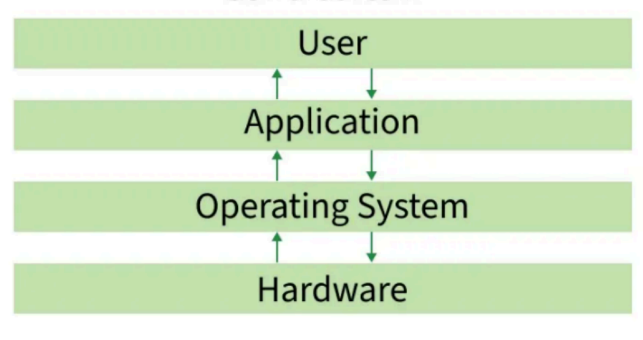
Functions of Operating System
process management
memory management
file management
device management
command interpreter system
network management
security management
secondary storage management
Examples of OS
windows
macOS
Linux
ChromeOS
Android
IOS
UNIX
BSD
True
Every general-purpose computer consists of hardware, an operating system, system programs and application programs.
CPU, ALU, memory, I/O devices, peripheral devices and storage devices
The hardware includes ______________
compilers, loaders, editors and the OS itself.
The system programs include __________________
The application programs
user-level software that perform specific tasks
always
An operating system is _____ running in the background to manage and coordinate the use of hardware resources among system and application programs for multiple users.
An OS provides user interaction mainly through:
CLI (Command-Line Interface) → e.g., Bash, PowerShell
GUI (Graphical User Interface) → e.g., Windows desktop, macOS Finder
💡 Remember: The OS itself is not just a user interface; it provides interfaces for users to interact with the system.
What are the main ways an Operating System (OS) provides an interface for user interaction?
User Convenience – Provide an intuitive, user-friendly interface.
Program Execution – Provide the environment and services needed to run software.
Resource Management – Manage and allocate CPU, memory, storage, and I/O devices fairly.
Security – Protect data and prevent unauthorized access.
Efficient Resource Utilization – Maximize hardware performance and utilization.
Reliability – Handle errors gracefully for stable, continuous operation
What are the main goals of an Operating System (OS)?
Windows → Developed by Microsoft; personal computing, business, gaming.
macOS → Developed by Apple; creative industries, personal computing, professional environments.
Linux → Started by Linus Torvalds and maintained by the open-source community; servers, data centers, programming, and tech enthusiasts.
What are the 3 common Operating Systems (OS) and what are they used for?
Price → Free (Linux) vs. paid (Windows, macOS).
Accessibility → Choose an OS that is intuitive and easy for you to use.
Compatibility → Make sure it supports the applications you need.
Security → Consider security features, updates, configuration, and safe usage.
What are the factors to consider when choosing an Operating System?
1940s–50s → No OS → GM-NAA I/O (1956)
↓
1960s → Multiprogramming & Timesharing
↓
1970s → Unix & Personal Computers
↓
1980s → GUI & Networking
↓
1990s → Linux & Advanced GUIs
↓
2000s–Present → Mobile, Cloud & Virtualization
↓
Ongoing → AI Integration 🤖
What is the OS history timeline?
1940s–1950s: Early Beginnings
Computers operated without OSs; programs were manually loaded and run one at a time.
GM-NAA I/O (1956)
The first operating system; a batch processing system that automated job handling.
1960s: Multiprogramming
Introduction of multiprogramming to utilize CPU efficiently. Timesharing systems, like CTSS (1961) and Multics (1969), allowed multiple users to interact with a single system.
Timesharing
Allowed multiple users to interact with a single computer system.
1970
Unix and Personal Computers
Unix (1971)
revolutionized OS design with simplicity, portability, and multitasking.
1980s
Graphical User Interfaces became popular, making computers easier to interact with.
Apple Macintosh (1984)
Popularized GUI-based personal computing.
Microsoft Windows (1985)
A GUI-based OS that became widely adopted.
1990s
Linux and Advanced GUIs Linux (1991) introduced open-source development. Windows and Mac OS refined GUIs and gained widespread adoption.
2000s-Present
Mobility and Cloud
Mobile OSs like iOS (2007) and Android (2008) dominate. Cloud-based
and virtualization technologies reshape computing, with OSs like
Windows Server and Linux driving innovation.
ongoing
AI integration