CMPT 371 - Application Layer
 Call Kai
 Learn
Learn Practice Test
 Spaced Repetition
 Match
Match Flashcards
 Knowt Play
1/22

There's no tags or description
Looks like no tags are added yet.
Name | Mastery | Learn | Test | Matching | Spaced | Call with Kai | Chat |
|---|
No analytics yet
Send a link to your students to track their progress
23 Terms
App design: client-server model
Server:
always-on host, with permanent IP address
often in data centers, for scaling
Clients:
contact, communicate with server; may be intermittently connected
may have dynamic IP addresses
do not communicate directly with each other
ex. HTTP, IMAP, FTP

App design: peer-to-peer model
no always-on server; end systems directly communicate
peers request service from other peers, provide service in return to other peers
peers are intermittently connected and change IP addresses
complex managmenet
ex. P2P file sharing (BitTorrent)
TCP (Transmission Control Protocol)
Reliable transport protocol between sending and receiving (guarantees delivery)
flow control: sender won’t overwhelm receiver
congestion control: throttle sender when network overloaded
connection-oriented: setup required between client & server processes
DOES NOT PROVIDE: timing, minimum throughput guarantee, security
UDP (User Datagram Protocol)
Simple transport protocol that doesn’t not guarantee delivery
unreliable data transfer: between sending and receiving process
DOES NOT PROVIDE: reliability, flow control, congestion control, timing, throughput guarantee, security, or connection setup
however, is much speedier than TCP
process
program running on a host
within same host, two processes communicate using inter-process communication (defined by OS)
across different hosts, processes communicate by exchanging messages
client process / server process
client process: process that initiates communication
server process: process that waits to be contacted
socket
process sends/receives messages to/from its socket
socket is analogous to a door:
sending process shoves message out door
sending process relies on transport infrastructure on other side of door to deliver message to socket at receiving process
two sockets involved: one on each side

identifier (process)
to receive messages, a process must have an identifier
we use port numbers and IP addresses to identify processes
IP address alone is insufficient to identify as many processes run on the same host
example port numbers: HTTP server: 80, Mail server: 25
HTTP: Hypertext Transfer Protocol
The Web’s application layer protocol
eg. client sends HTTP server a request “Get me this image”
server sends HTTP response with the image

How does HTTP use TCP (what is the process)?
client initiates TCP connection (socket) to server, on port 80 (standard port)
server accepts TCP connection from client
HTTP messages exchanged between browser (HTTP client) and Web server (HTTP server)
After they are done, the connection is then closed
HTTP is stateless; what does this mean?
The server maintains no information about past client requests
aside: protocols that maintain “state” are very complex!
past history must be maintained, client/server can have inconsistent views of “states”
HTTP connection: Non-persistent HTTP (old)
TCP connection opened
at most one object sent over TCP connection
TCP connection closed
downloading multiple objects required multiple connections
HTTP connection: Persistent HTTP 1.1
TCP connection opened
Multiple objects can be sent over a single TCP connection between client, and that server
TCP connection closed
HTTP request message: structure
ASCII (human-readable format)
(blocked portion): carriage return, line feed at start of line indicates end of header lines

HTTP request message: general format

HTTP response message: structure
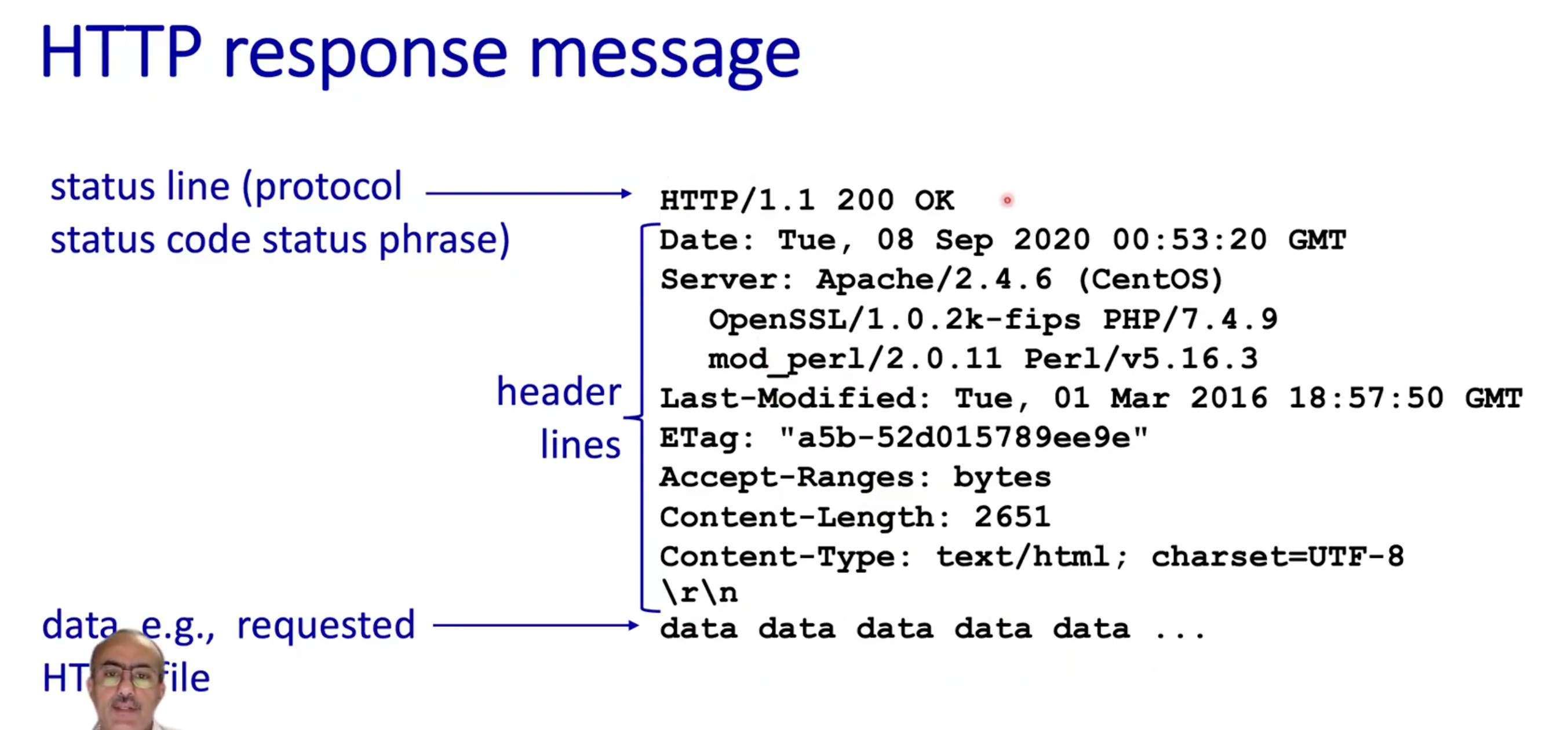
HTTP response status codes
status code appears in 1st line in server-to-client response message

Cookies (maintaining user/server state)
cookies are a way for the server to remember state

Web caches
Goal: satisy client requests without involving origin server
user configures browser to point to a (local) Web cache
browser sends all HTTP requests to cache:
if object in cache: cache returns object toclient
else cache requests object from origin server, caches receives object, then returns object to client

Why should we use a web cache (aka proxy server)?
reduce response time for client request
cache is closer to client
reduce traffic on an institution’s access link
Internet is dense with caches
enables “poor” content providers to more effectively deliver content
also: server explicitly tells cache whether to store the object in cache or not through the header lines (see photo)

Caching example
2 options to resolve this issue:
1. buy a faster access link (expensive!)
2. install a web cache (cheap!)
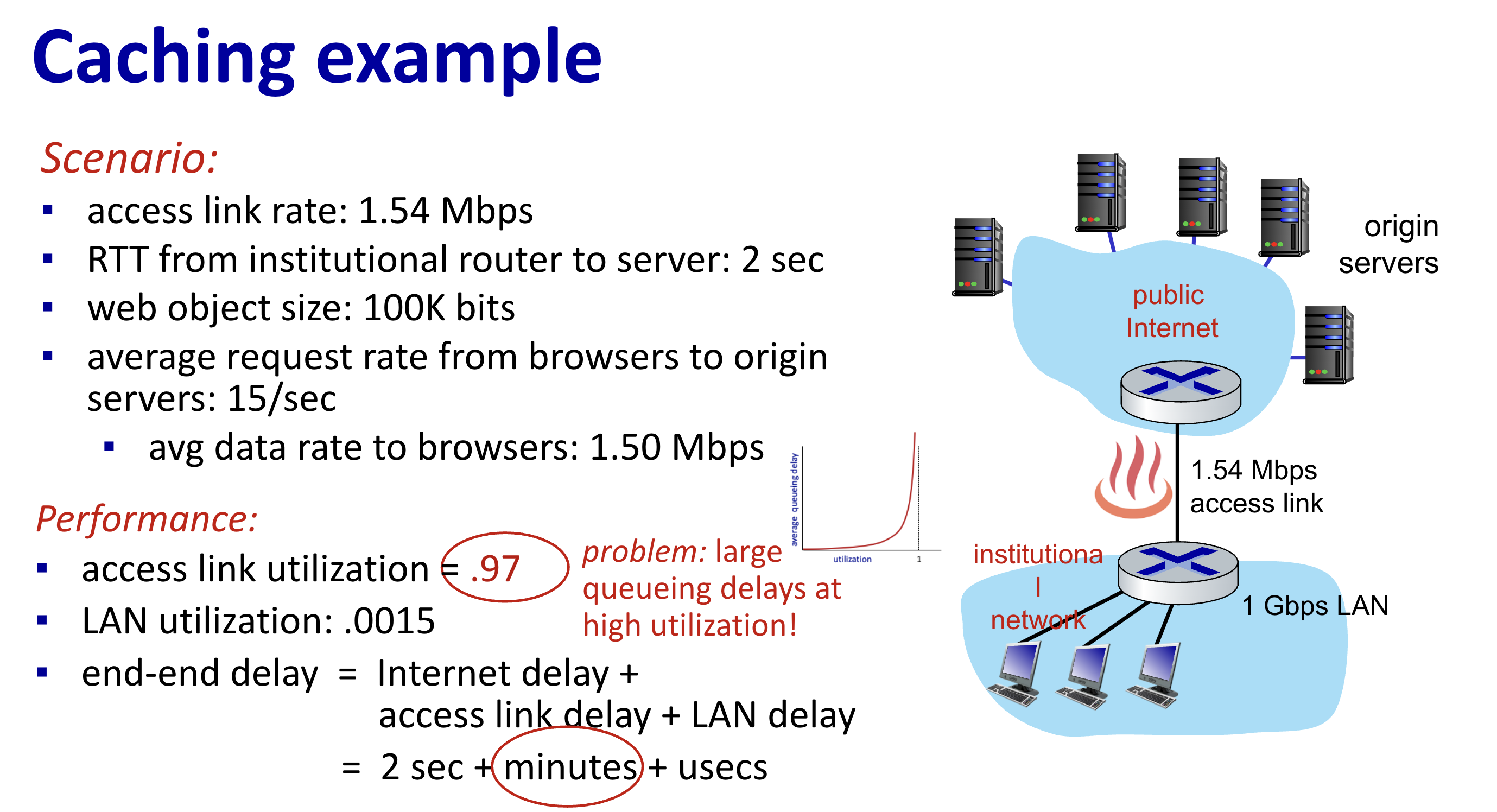
Caching example: option 2 (how to calculate access link utilization, end-end delay with cache)
