Module 3: CC emulating hardware: for home and work
 Call Kai
 Learn
Learn Practice Test
 Spaced Repetition
 Match
Match Flashcards
 Knowt Play
1/73

There's no tags or description
Looks like no tags are added yet.
Name | Mastery | Learn | Test | Matching | Spaced | Call with Kai | Chat |
|---|
No analytics yet
Send a link to your students to track their progress
74 Terms
What refers to the device itself and its components, such as wires, cases, switches, and electronic circuits.
Hardware
What are types of hardware?
✔Memory
✔Storage devices
✔CPU
✔Input and output devices
✔Communication devices
Components of computer hardware contain various types of hardware:
A BLANK is a unit on the processor with the circuitry necessary to execute instructions.
•Processors with BLANK perform better.
Processor core
More cores
A processor with multiple cores is a?
multi-core processor.
BLANK is responsible for holding data and programs as they are being processed by the CPU.
Computer memory
An BLANK and other apps require a certain amount of BLANK to function properly.
Operating system
RAM
When more apps run simultaneously more BLANK will be require d
RAM
The area of the hard drive temporarily used to store data that cannot fit in RAM is called a BLANK or BLANK
Swap file, or paging file.
What may decrease your computer’s performance
Using virtual memory may decrease your computer’s performance.
What are the three types of RAM, describe and volatile or nonvolatile
Dynamic RAM (DRAM) | Memory needs to be constantly recharged or contents will be erased. | Volatile |
Static RAM | Memory can be recharged less frequently than DRAM but can be more expensive than DRAM. | Volatile |
Magneto-resistive RAM | Memory uses magnetic charges to store contents and can retain its contents in the absence of power. | Non volatile |
Flash memory | Fast type of memory that is typically less expensive than some other types of RAM and can retain its contents in the absence of power. | Non volatile |
Factors to consider in buying a computer
| |
Platform | •Do I need to use software that requires a specific platform? •Does the computer need to be compatible with other devices I own that use a particular platform? |
Hardware | •Do I require specific hardware to perform my intended tasks? •How much data and information do I plan to store on the computer? |
Hardware specifications | •Will the tasks I perform or software I want to run require certain hardware specifications? |
Form factor | •Will I be using this computer in one location, or will I need to be mobile? |
Add-on devices | •What additional devices will I need to perform my intended tasks? |
What refers to the shape and size of a computer?
Form factor
Many computers exist including?
Computers exist, including desktop computers, all-in-one computers, laptops, tablets, and other mobile devices.
BLANK typically consists of the system unit, monitor, keyboard, and mouse which remain in a stationary location under a desk or table.
BLANK has a monitor and system unit housed together.
Desktop computer
All-in-one computer
Laptop VS ultra thin laptops
A laptop is a compact communicating device with
•input devices, keyboard, touchpad, and webcam
•output devices, screens, and speakers
•one or more storage devices, such as a hard drive
Ultrathin laptops
•Light weight and more expensive
•Less powerful
•Thin device with fewer parts
•Longer battery life
What are the two popular form factors of tablets?
Slate and convertible
What resembles a letter-sized pad and does not contain a physical keyboard?
Slate tablet
What is a tablet that has a screen on its lid and keyboard on its base?
Convertible tablet
What is an input device that converts and existing paper image into an electronic file that you can open and work with on your computer.
Scanner
What can scan three-dimensional objects?
3-D scanners
BLANK can be used to scan a printed document to edit it using an app on your computer.
•A BLANK creates hard copy output on paper, film, and other media.
•A printer can be linked to a computer wirelessly, over a network, or with a cable.
Printer
What to do to turn on computer…
All necessary components are included and free from damage.
•Read the manual to ensure you are following the setup instructions.
•Carefully unpack all components from the box and in case of laptop, charge the battery completely before use.
•Connect all components and accessories.
•Turn on the computer or device and follow all the remaining steps on the screen.
BLANK over the wireless network need installation directly to your device through a port.
Peripheral
Some devices, called BLANK devices, will begin functioning properly as soon as they are connected to your computer.
•A BLANK is a program that allows your computer or device to issue controls to a separate device, such as a printer, monitor, or video card.
•To connect a BLANK to your computer, follow the installation instructions that come with the device.
Plug-and-Play
Device Driver
Wireless device
The processor’s BLANK measures the speed at which it can execute instructions.
•A BLANK is the smallest unit of time a process can measure.
•The efficiency of a CPU is measured by BLANK
•The BLANK determines the speed at which data travels and is also referred to as the BLANK
•A BLANK is a test run by a laboratory or other organization to determine processor speed and other performance factors.
Clock speed
Cycle
instructions per cycle.
Bus width
Word side
Benchmark
How to clean hardware
•Use a damp cloth to clean the screen gently.
•Use a can of compressed air to clean the keyboard of any dirt and debris.
•Extreme temperatures or humidity can damage electronics.
An BLANK is a device that maintains power to computer equipment in the event of an interruption in the primary electrical source.
•A BLANK is a device that prevents power fluctuations from damaging electronic components.
uninterruptible power supply
surge suppressor
Protecting a computer from a cyber attack is important, but its damage by dropping it or by a lightning strike is also of prime importance.
TYPE OF ELECTRICAL CHANGES
Electrical Change | Explanation |
Blackout | Total loss of power |
Brownout | Drop in voltage lasting minutes or hours |
Spike | Very short duration of voltage increase |
Surge | Short duration of voltage increase |
Noise | Unwanted high-frequency energy |
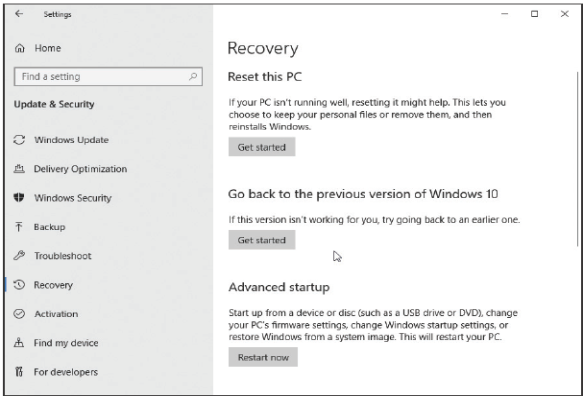
What is an operating system means reverting all settings to their default or migrating back to the operating system’s previous version.
Restoring
•To restore the operating system, review the help documentation and follow the specified steps.
How can data backups help?
protect against hardware malfunctions, user errors, software corruption, and natural disasters.
•They can also protect against cyber attacks.
The central connection devices for a home-based Wi-Fi network are called BLANK
wireless routers
Wi-Fi networks are vulnerable to several risks, such as:
•Reading wireless transmissions
•Viewing or stealing computer data
•Injecting malware
•Downloading harmful content
When using a computer, the most common storage medium is the internal BLANK and can either store data magnetically or use solid state storage.
Hard drive
Internal hard drives are installed on the computer you are using.
•An BLANK can add storage capacity to your computer.
•Magnetic hard disk drives (HDDs) typically have greater storage capacity.
External hard drive
A BLANK is faster and more durable than magnetic drives.
solid-state drive (SSD)
What use laser technology for storage and playback and include CDs, DVDs, and Blu-ray discs.
Optical Media
Optical media were once widely used to ?
distribute installation files for programs and apps, but saving files to optical media requires special software or capabilities within the operating system.
Instead of optical discs BLANK are commonly used (list)
Instead of optical discs, USB flash drives, external hard drives, and cloud storage are now more commonly used to transport files.
What involves storing electronic files on a remote server connected to the Internet, not on a local computer, and is called BLANK on the cloud.
Cloud storage
Storing data
Cloud storage enables the BLANK remotely on servers that could be any part of the world.
Storage of files
Storing files on and retrieving files form cloud storage requires only a BLANK
Cloud storage companies host and maintain the servers and provide access to your BLANK
Computer or mobile device with an Internet Connection
Files
All BLANK have the same basic characteristics and hardware.
•BLANK allow computers to share resources, such as hardware, software, data, and information.
•A network requires a combination of BLANK and BLANK to operate.
BLANK usually require simple hardware and can rely on the operating system’s features while BLANK typically require more sophisticated hardware and software.
Networks
Networks
Hardware and Software
Smaller networks
Larger networks
Devices on a network, also called BLANK, include computers, tablets, mobile phones, printers, game consoles, and smart home devices.
•Most networks also include additional components, such? (3 things)
Nodes
Hubs, switches, routers
Define hub
is a device that provides a central point for cables in a network and transfers all data to all devices.
Define switch
is similar to a hub in that it provides a central point for cables in a network.
Define router
is a device that connects two or more networks and directs, or routes, the flow of information along the networks.
Define Moden
is a communications device that connects a communications channel, such as the Internet, to a sending or receiving device, such as a computer.
For a computer to connect to a network, it should have a ?
Network interface card
What does digital modems mean?
Most of today’s modems are digital, which means that they send and receive data to and from a digital line.
What are two common types of digital modems?
Cables and DSL (Digital subscriber line)
The type of modem required for your network will depend on your ?
Internet service provider
What sends and receives digital data over a cable TV connection.
Cable modem
What uses existing standard copper telephone wiring to send and receive digital data.
DSL modem
*Modems can connect many devices to the Internet.
Many electronic components, such as the processor and memory, attach to the BLANK; others are built into it.
Motherboard
On desktop and laptop computers, the circuitry for the processor, memory, and other components resides on a BLANK
Computer chip
What is a small piece of semiconducting material, usually silicon, on which integrated circuits are etched.
Computer chip
An integrated circuit contains ?
many microscopic pathways capable of carrying electrical current.
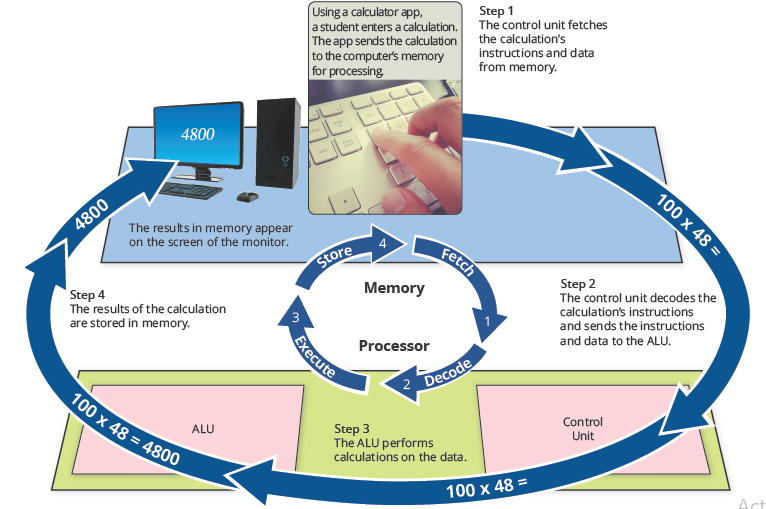
A processor repeats a set of four basic operations, which comprise a ?
Machine cycle
Tell me the four parts of the machine cycle and what they do?
Fetching is the process of obtaining a program or an application instruction or data item from memory.
•Decoding refers to the process of translating the instructions into signals the computer can execute.
•Executing is the process of carrying out the commands.
•Storing, in this context, “writing” means writing the result to memory (not to a storage medium).
A processor contain small, high-speed storage location called?
Registers
What is a register?
Temporarily hold data and instructions
are part of the processor not part of memory or a permanent storage device.
What it’s he registers function?
include storing the location from where instruction was fetched, storing an instruction while the control unit decodes it, storing data while the ALU calculates it, and storing the results of a calculation.
The BLANK of technology is your physical health as well as your behavioral and social well-being.
Hazard
Many users of technological devices report aches and pains associated with repeated and long-term usage of the devices, known as BLANK
repetitive strain injury (RSI).
BLANK impacts your muscles, nerves, tendons, and ligaments. RSI most often affects the upper parts of the body, including elbows, forearms, hands, neck, shoulders, and wrists
Symptoms?
✔Aching
✔Cramp
✔Numbness
✔Pain
✔Stiffness
✔Tenderness
✔Throbbing
✔Tingling
✔Weakness
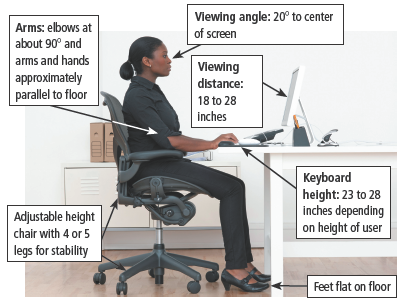
What is ergonomics?
Ergonomics is an applied science that specifies the design and arrangement of items that you use so that you and the items interact efficiently and safely.
Ergonomic posture
One behavioral hazard is BLANK, which occurs when a user is obsessed with using a technology device.
Technology addiction
Apart from technology addiction, other behavioral risks are:
✔Sedentary lifestyle
✔Psychological development
✔Social interaction
One negative impact that can result in serious emotional harm is cyber-bullying.
BLANK is a form of cyber-bullying in which documents (dox) are shared digitally that give private or personal information about a person.
Doxing
Harmful features of cyberbullying
Feature | Bullying | Cyberbullying |
Seems to never end | A child may be bullied at school, but once the child goes home the bullying ceases. | Because cyberbullying comments posted online are visible all the time to the victim the bullying never ends. |
Everyone knows about it | Mean-spirited words spoken to a victim may be heard only by those who are nearby. | A cyberbully can post comments online that can be read by everyone. |
BLANK is electronic waste from discarded digital devices.
•It often contains toxic metals, like lead and mercury which contaminate the ground and water supply, causing harm to the environment.
E-waste
Three responsible methods for disposing of e-waste:
•Send it to a recycling facility
•Donate it to a charity or other nonprofit organization
•Bring it to a technology store or firm