Display Attributes - CompTIA A+ 220-1201 - 3.1

0.0(0)
Studied by 0 people
call kaiCall Kai
Locked
learnLearn
examPractice Test
spaced repetitionSpaced Repetition
heart puzzleMatch
flashcardsFlashcards
GameKnowt Play
Card Sorting

1/8

encourage image

There's no tags or description

Looks like no tags are added yet.

Last updated 1:08 AM on 8/28/26
Name
Mastery
Learn
Test
Matching
Spaced
Call with Kai
Chat

No analytics yet

Send a link to your students to track their progress

9 Terms

1
New cards

Display Attributes

*Not all displays are created equal

- various specifications, options, and settings

*Requirements can vary

- web browsing

- video and photo editing

- information displays

- phones

*Evaluate all of the technical details

- choose the best display for the requirement
<p>*Not all displays are created equal</p><p>- various specifications, options, and settings</p><p>*Requirements can vary</p><p>- web browsing</p><p>- video and photo editing</p><p>- information displays</p><p>- phones</p><p>*Evaluate all of the technical details</p><p>- choose the best display for the requirement</p>
2
New cards

Pixel Density

*Measure how many pixels in an inch

- or pixels per centimeter

- apply a physical measurement to a display

*A higher pixel density looks better

- higher clarity and sharpness

*Consider how the image will be viewed

- displays

- printers (dots per inch)

<p>*Measure how many pixels in an inch</p><p>- or pixels per centimeter</p><p>- apply a physical measurement to a display</p><p>*A higher pixel density looks better</p><p>- higher clarity and sharpness</p><p>*Consider how the image will be viewed</p><p>- displays</p><p>- printers (dots per inch)</p>
3
New cards

Pixel Density Comparison

*Number of pixels / Number of inches

- pixels per (divided by) inch

*27 inch (diagonal) 4K display

- 3,840 horizontal pixels / 24 inches wide (not diagonal)

- 160 pixels per inch

*65 inch (diagonal) 4K television

- 3,480 horizontal pixels / 57 inches wide

- 67 pixels per inch

<p>*Number of pixels / Number of inches</p><p>- pixels per (divided by) inch</p><p>*27 inch (diagonal) 4K display</p><p>- 3,840 horizontal pixels / 24 inches wide (not diagonal)</p><p>- 160 pixels per inch</p><p>*65 inch (diagonal) 4K television</p><p>- 3,480 horizontal pixels / 57 inches wide</p><p>- 67 pixels per inch</p>
4
New cards

Refresh Rates

*We are viewing many images shown consecutively

- a still "frame" or image

*Usually measured in hertz (Hz)

- number of cycles per second

- frames per second (FPS)

*Frame rates may vary

- movies: 24fps

- television: 30fps

- video games: 60 fps and higher

<p>*We are viewing many images shown consecutively</p><p>- a still "frame" or image</p><p>*Usually measured in hertz (Hz)</p><p>- number of cycles per second</p><p>- frames per second (FPS)</p><p>*Frame rates may vary</p><p>- movies: 24fps</p><p>- television: 30fps</p><p>- video games: 60 fps and higher</p>
5
New cards

Refresh Rates pt.2

*Higher refresh rates are useful for rapidly moving content

- video games, sporting events, video production

*Maximum refresh rate is determined by the video adapter/processor and the display device

- the connection between the two is also important

- HDMI 2.1 supports 4K at 144 Hz

- DisplayPort 2.1 supports dual 4K at 144 Hz

<p>*Higher refresh rates are useful for rapidly moving content</p><p>- video games, sporting events, video production</p><p>*Maximum refresh rate is determined by the video adapter/processor and the display device</p><p>- the connection between the two is also important</p><p>- HDMI 2.1 supports 4K at 144 Hz</p><p>- DisplayPort 2.1 supports dual 4K at 144 Hz</p>
6
New cards

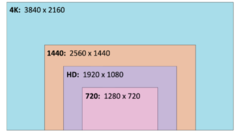
Screen Resolution

*The number of pixels

- width x height

*More pixels mean more detailed display output

- perceived sharpness

- a clearer view

*Many standards

- resolutions can vary widely

- 16:9 aspect ratio is common

<p>*The number of pixels</p><p>- width x height</p><p>*More pixels mean more detailed display output</p><p>- perceived sharpness</p><p>- a clearer view</p><p>*Many standards</p><p>- resolutions can vary widely</p><p>- 16:9 aspect ratio is common</p>
7
New cards

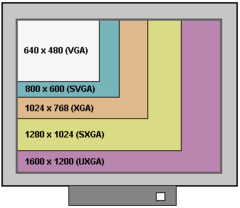
Comparing Resolutions

knowt flashcard image
8
New cards

Color Gamut

*Color gamut

- the range of colors available on a display or output device

*An important consideration in a display

- color representation

- range of colors

*Many standards

- sRGB -> standard red green blue

- Adobe RGB

- International Telecommunication Union (ITU) standards for HDTV

<p>*Color gamut</p><p>- the range of colors available on a display or output device</p><p>*An important consideration in a display</p><p>- color representation</p><p>- range of colors</p><p>*Many standards</p><p>- sRGB -> standard red green blue</p><p>- Adobe RGB</p><p>- International Telecommunication Union (ITU) standards for HDTV</p>
9
New cards

Color Coverage

*A display may be compared with an existing color gamut standard

- part of the display specifications

*Gamut compatibility can vary widely

- higher percentages tend to be more expensive

*OLED displays provide a wide color gamut

- best in class color gamut support

<p>*A display may be compared with an existing color gamut standard</p><p>- part of the display specifications</p><p>*Gamut compatibility can vary widely</p><p>- higher percentages tend to be more expensive</p><p>*OLED displays provide a wide color gamut</p><p>- best in class color gamut support</p>