IS 303 Exam 1 UMBC
 Call Kai
 Learn
Learn Practice Test
 Spaced Repetition
 Match
Match Flashcards
 Knowt Play
1/95

Earn XP
Description and Tags
Name | Mastery | Learn | Test | Matching | Spaced | Call with Kai |
|---|
No analytics yet
Send a link to your students to track their progress
96 Terms
How many terms are there in the Human-Computer Interaction hierarchy of needs (UX pyramid)?
User Experience (UX)
Usability
Utility/Functionality
Utility/Functionality
Baseline: Does it work?
Can a product be used to solve a problem
Does it perform the function(s) that it was designed for
Usability
Baseline: Can users get it to work?
How easily can a user use a product to solve a problem or perform a desired function
User Experience (UX)
Baseline: What is the value gained from a product’s use?
How a product is used by people in the real world
How people feel about a product, their satisfaction using it
Andrew Grimes’ quote to systems development
“The best experiences result from designers matching the way the computer behaves with the way our users are thinking, feeling, and interacting.” ← The Goal
“...interaction modes [however] are often an afterthought.” ← The Problem
How many usability goals are there?
Effectiveness
Efficiency
Safety
Utility
Learnability
Memorability
Effectiveness
How good a product is at doing it’s function/purpose (aka functionality)
Efficiency
The way a product supports users in carrying out their tasks: can they help them stay productive
Safety
The system should protect the user from dangerous and undesirable situations
Utility
The extent at which a product provides the right kind of functionality so a user can do what they need to do
Learnability
How easy a system is to learn
Memorability
how easy a product is to remember how to use, when learned
Interaction Design
designing a space that supports dialogue between a person and a product, system, or service
UX Goals and how they differ from Usability Goals (subjective and practically infinite)
UX Goals: Focus on the user’s experience and satisfaction with the product; more difficult to measure
Usability Goals: Focus on the product’s practical, functional effectiveness and ease of use; measurable data
Human Learning Styles
Visual
Auditory
Tactile
Kinesthetic
What is the most preferred learning style for learning technology?
Kinesthetic learning
The implications of the quote, “…one cannot design a user experience, only design for a user experience.”
You can create the conditions for a good user experience but it might not reflect how users feel about the product
How many design principles are there?
Discoverability (Visibility)
Feedback
Consistency
Constraints
Affordances
Mappings
Discoverability (Visibility)
Appropriate cues for how to use something to make the product easier to use
-make functions visible to users so that they know what
to do next
Feedback
Communicate an immediate and appropriate response to user action
Consistency
Design interfaces to have similar operations and similar elements for achieving similar tasks
Constraints
Ways of restricting the kinds of interaction that can take place at a given at a given moment moment
How many types of constraints are there?
Physical
Semantic
Cultural
Logical
Physical Constraint
physical limitations constrain possible interactions
Semantic Constraint
Rely upon the meaning of the situation to control the set of possible actions
Ex. Traffic lights: red=stop, green=go
Cultural Constraint
Rely upon accepted learned conventions shared by a cultural group even if they don’t affect the physical operation of the device
Ex. Driving on the left side of the road in EU compared to right in the US
Logical Constraint
Use reasoning to determine the alternatives and may come by process of elimination
Affordances
Let a user know if and how they can interact with an object, a “signifier”
Ex. A chair signifies being able to sit on it
Digital Affordance
mimics a real-world object
Ex. A button on a website signifies pressing/flipping
Hidden Affordance
no perceptual information for an existing affordance
Ex. A button with a shadow vs without one
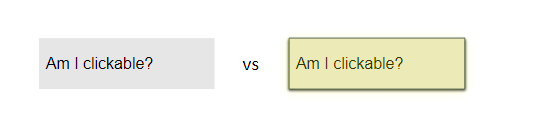
False Affordance
Looks like an affordance exists but isn’t
Mapping
attribute of an object that allows people to know what happens when you interact with it
Tell where/in what way to expect a change
Norman’s explanation of why he “invented” the term “User Experience”
The terms “human interface” and “usability” were too narrow and he wanted to cover all aspects of the person’s experience with this system
Jacob’s Law of Internet User Experience and how it relates to the “Consistency” principle
“Users spend most of their time on other websites”
Relates to Consistency
Forcing Functions
Actions are constrained so failure at one stage prevents you from moving forward
Two Types of Errors
Mistake
Slip
Mistake
Users have inappropriate goals for a problem or task; even if they take the right steps the result is an error
Slip
When users intend to perform one action, but end up doing another (often similar) action
Signifier
any perceivable indicator that communicates appropriate behavior to a person
Skeuomorphism
An object or feature copying the design of a similar artifact in a different material
Ex. A clickable photo mimicking a hyperlink
How many steps does Donald Norman’s “Stages of Action” have?
Need
Choose a Method
Mentally outline steps
Execute the steps
Has “the world changed?
What in “the world” has changed?
Is it the change that I wanted?
Step 1: Need
Forms a goal
Ex. Eating leftover pizza
Step 2: Choose a Method
Forms the intention
Ex. Microwaving, putting it in an oven, eating it cold
Step 3: Mentally outline steps
Specifies the action
Ex. Open microwave door, put the plate in the microwave, close door, enter cooking time, wait for finish indicator, open microwave door
Step 4: Execute the steps
Executes the action
Step 5: Has “the world changed?
Perceives the state of the world
Ex. Is my pizza warm?
Step 6: What in “the world” has changed?
Interprets the state of the world
Ex. I see a plate with a warm slice of pizza
Step 7: Is it the change that I wanted?
Evaluates the outcome
Ex. This was successful, I wanted a warm slice of pizza
What are the two gulfs that may occur?
Gulf of Execution (Stages 2-4)
Gulf of Evaluation (Stages 5-7)
Gulf of Execution (Stages 2-4)
How easy/difficult it is for the user to accomplish their goal
Gulf of Evaluation (Stages 5-7)
How easy/difficult it is for the user to see if their goal was accomplished
Concept Design
Concerned with developing a concept model
Taking an idea from your head and bringing it into visual form
Conceptual Model
The way a designer represents a product, how it works, how to interact with it, and how the user should use it
Mental Model
Used by humans when needing to reason about something (e.g. technology)
The way a user thinks a concept should work
The Action “Cycle”
Actions (what we do to the world) → The world “responds” to our actions → We then compare what happened with what we wanted to happen
What is a “Good Concept Model”?
A conceptual model that is designed to match the user’s mental model
Assumptions
Taking something for granted that should require further investigation
How assumptions can affect creating a good concept model?
Can lead to models with unrealistic or flawed aspects
Claim
Stating something to be true when the question is still open
How claims can affect creating a good concept model?
Can lead to models with inaccurate predictions
Metaphor
Figure of speech, object, activity, or idea denoting one kind of object/idea used in place of another as an analogy between them
Interface Metaphor
A metaphor that combines familiar knowledge with new knowledge that helps users understand the product
Ex. A battery icon being used to represent device power/health
What are Thomas Erikson’s 3 steps for choosing a good metaphor?
Identify functional requirements (what the system will/must do)
What subtasks might cause users problems/complicated/critical
Generate metaphors to support the above
Perception
How information is acquired from the environment
Ex. sight, hearing, touch, taste, smell
Which senses are important for interaction design?
Sight, hearing, and touch
Cognition
Mental activity/process of acquiring, organizing, and using knowledge
What are the 3 interacting subsystems of the Model Human Processor model?
Perceptual
Cognitive
Motor
Perceptual
How we acquire stimuli from the world
Cognitive
How we understand/interpret stimuli
Motor
How we execute tasks based on our perception and understanding
How much data do we process per second?
400 Billion bits/second
Sensory Memory
Received through the senses
Lost when information that isn’t attended to
399.999998G bits are lost
2000 bits/second are attended to
Working Memory
Received through focused attention
Lost through forgetting
Long-term Memory
Received through rehearsing and encoding
Possible to regain working memory
Why is attention so difficult to get and/or keep?
There is a ‘universe of diversions’ which makes focusing on a single task challenging
Selective Attention
Information that is selected for processing at the expense of other information, external or internal factors, or stimuli
Focused Attention
An aspect of attention that brings some information into conscious awareness
Sustained Attention
Enables sustained performance on tasks over extended periods of time
Flow
A state of concentration or complete absorption with the activity at hand
Distractibility
Inability to block out environmental stimuli while trying to concentrate on an activity
Digital Amnesia( The ”Google” Effect)
The tendency to forget information due to the belief that a digital device will store and remember it for you
The magic number 7+ or – 2
The number of objects an average human can hold in short-term memory is 7 ± 2
The Curve of Forgetting
A mathematical model that illustrates how quickly people forget information over time
60% after 20 minutes
50% after an hour
20% after days
Recognition
Refers to our ability to “recognize” an event or piece of information as being familiar
Recall
Designates retrieval of related details from memory
Implications of Attention that affect cognition
Salience
Uncluttered
Scannable
Salience
Make the information stand out when it needs attending to at a given stage of a task
Uncluttered
Avoid cluttering the interface with too much information
Scannable
Interaction is easier when users can quickly find where on the screen interaction should take place
Implications of Memory that affect cognition
Promote recognition v recall
Keep it simple
Categorize
Keeping it simple
Do not overload users’ memories with complicated procedures for carrying out tasks
Categorize
Provide a variety of ways for encoding digital information
Ex. categories, color, time stamping, etc.
Implications of Learning that affect cognition
Exploration
Constrain and guide
Link concrete representations and abstract concepts
Exploration
Design interfaces that encourage exploration
Constrain and Guide
Design interfaces that constrain & guide to appropriate actions when initially learning
Link Concrete Representations and Abstract Concepts
Help users to form a mental representation that makes the abstract idea more tangible