SLR05 - Application generation
 Call Kai
 Learn
Learn Practice Test
 Spaced Repetition
 Match
Match Flashcards
 Knowt Play
1/30

There's no tags or description
Looks like no tags are added yet.
Name | Mastery | Learn | Test | Matching | Spaced | Call with Kai |
|---|
No analytics yet
Send a link to your students to track their progress
31 Terms
Application examples
Word processor
Spreadsheet
Database
Web browser
Graphics manipulator
Generic application VS Specific application
Generic application - (eg. word processor) no narrow process and can be used for general or specific task, more commonly installed
Specific application - (eg. database software) highly specific & essential for creating serious database applications
Utility software
Program with one purpose
Used to maintain the system
Types of utility software
Defragmentation
Anti-malware
Data compression
Backup
File repair
Defragmentation
Reorganises file on hard drive, put fragments of files & empty space together = reduce read/write head across surface disk = speeds up file access
Solid state no defragmented, no moving parts
Anti-malware
Help keep computer & files safe from malware
Data compression
Compression decrease size file = faster download
Compressed file must be extracted before read
Backup
Can schedule backups
Full/increment backups
Can backup to of site cloud
Can come with OS or purchased separately
File repair
File can corrupt
File repair software attempts correct issue & restore file
Can be built into some software or separate
Open source software
Not protected by the Copyright Design & Patents act
User access source code
Can modify & distributed
Can be installed any number of computers
Support by community
May not be fully tested & quality varied
Open source software Benefits & Drawbacks
Software free
Wide community modifications
Creator gets software out there to wider community
Possibly poor supported
Some features not tested
Little to no financial gain
Closed source software
Protected by Copyright Design and Patents Act
User cannot modify software
Usually paid per licence
Supported by devs - not release source code
Tested by devs prior to release, may run beta
Closed source software Benefits & Drawbacks
Well supported, tested, professionally built products
Creator receives income
Cost or ongoing subscription
Constant demand from community for more featured & improvements
Piracy issues
Assembler
Translates assembly language to machine code
Usually one-to-one process from assembly code to machine code
Assembley benefits & drawbacks
Program written in machine language can be replaced with mnemonics - easier to remember
Memory efficient
Faster speed of execution
Hardware oriented
Takes long time to code
Difficult to remember syntax
Long programs cannot be executed on small computers
Lack of portability between different computers
Compiler
Translate source code from high level language to object code to machine code
Whole program translated to machine code before run
Compiler benefits & drawbacks
No need for translation run time
Executes faster
Code optimised
Source code kept secrete
Program not run with syntax errors = difficult
Code need recompiled when changed
Designed for specific processor
Interpreter
Translates high level to machine code
Translates line by line
Interpreter benefits & drawbacks
Stop at syntax error - easier
Not recompiled when changed
Translation software required
Speed slower
Code not optimised
Source code required
What are the 4 stages of compilation?
Lexical analysis
Syntax analysis
Code generation
Code optimisation
Lexical Analysis
Comments and white space removed
Lexemes are identified and converted to tokens with token classes eg. [keyword:WHILE]
Symbol table created to keep track of tokens such as variables & subroutines
![<ul><li><p>Comments and white space removed</p></li><li><p>Lexemes are identified and converted to tokens with token classes eg. [keyword:WHILE]</p></li><li><p>Symbol table created to keep track of tokens such as variables & subroutines</p></li></ul><p></p>](https://knowt-user-attachments.s3.amazonaws.com/8475c43f-ab03-4905-a3bc-373eb4f6ae9b.png)
Syntax Analysis
Checks syntax of code using language’s rules
Errors generated if any tokens break rule
Produces abstract syntax tree using tokens from previous stage - tree outlining the syntax the code must follow
Code generation
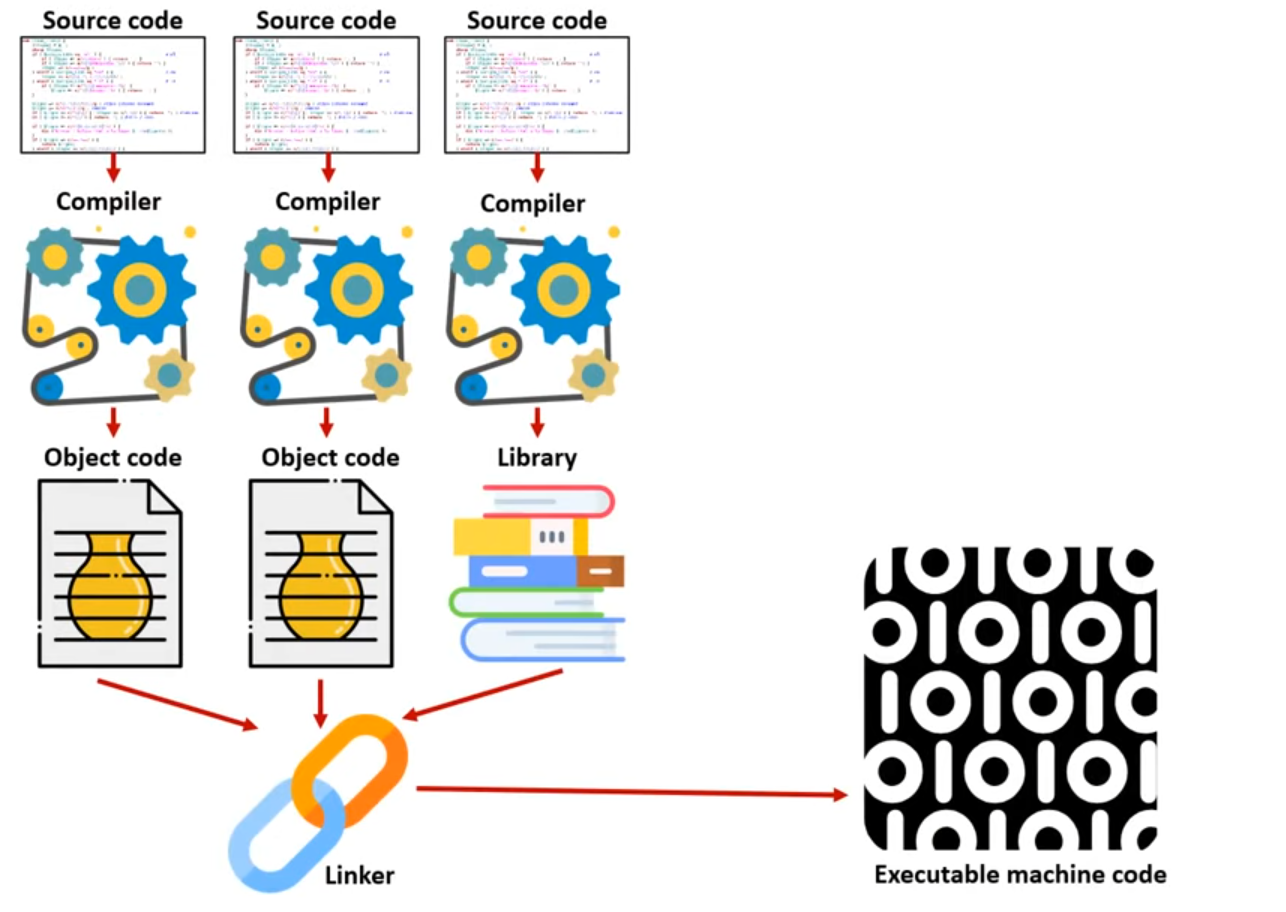
Abstract syntax tree converted to object code - the machine code generated before the final step (linker) is run
Optimisation
Reduces execution time of the program
Spots redundant instruction & producing object code that achieves the same effect as source program
Removing subroutines, variables, constants that are never referenced
Libraries
Complied & tested programs that can be run when needed
Typically grouped into software libraries
Benefits of libraires
Save time & effort as it can be easily implemented
Pre-tested = error free
Pre-compiled & optimised
Same library can be used in different parts of a project or in different projects
Drawbacks of libraires
Adding & tweaking difficult
Don’t know how efficient library is
Need to trust devs to maintain library
Compatibility issues between code & library or multiple libraries
Linkers
Combine different code files and libraries into a single executable
Resolve references between files, ensuring everything points where it should
Static Linking
Libraries are combined with the code at compile time
Creating a larger executable
Dynamic linking
Libraries are linked at runtime
Allowing for more flexibility
But requiring the library to be present during execution
Loader
system tools that load executable files into memory so they can be run by the operating system