Chapter 1 - Introduction to the JVM
 Call Kai
 Learn
Learn Practice Test
 Spaced Repetition
 Match
Match Flashcards
 Knowt Play
1/29

There's no tags or description
Looks like no tags are added yet.
Name | Mastery | Learn | Test | Matching | Spaced | Call with Kai |
|---|
No analytics yet
Send a link to your students to track their progress
30 Terms
Breakdown the lifecycle of JVM
1. Instance birth: When a Java application is launched, a runtime instance of the JVM is created. This instance is responsible for executing the application’s bytecode and managing its runtime environment.
2. Execution: The JVM instance starts running the Java application by invoking the main() method of a designated initial class. This main() method serves as the entry point for the application and must meet specific criteria: it should be public, static, return void, and accept a single parameter, which is an array of strings, (String[]). As of the time of writing, it’s important to note that the criteria for the main() method may evolve, as a preview version in Java 21 suggests potential simplifications. Therefore, developers should stay informed about the latest language updates and evolving best practices regarding the main() method’s signature. Any class with such a main() method can serve as the starting point for a Java application.
3. Application execution: The JVM executes the Java application, processing its instructions and managing memory, threads, and other resources as needed.
4. Application completion: Once the Java application is executed, the JVM instance is no longer needed. At this point, the JVM instance dies.
What’s a one application per instance model?
It’s important to note that the JVM follows a one application per instance model. Suppose you start multiple Java applications concurrently on the same computer, using the same concrete implementation of the JVM. In that case, you’ll have multiple JVM instances, each dedicated to running its respective Java application. These JVM instances are isolated from each other, ensuring the independence and security of each Java application.
what are the processes that ensure continuous availability of the JVM running seamlessly?
While the JVM may operate quietly in the background, numerous concurrent processes ensure its continuous availability. These processes are the unsung heroes that keep the JVM running seamlessly.
These are as follows:
Timers: Timers are the clockwork of the JVM, orchestrating events that occur periodically, such as interruptions and repetitive processes. They play a crucial role in maintaining the synchrony of the JVM’s operations.
Garbage collector processes: The garbage collector processes manage memory within the JVM. They execute the essential task of cleaning up memory by identifying and disposing of objects that are no longer in use, ensuring efficient memory utilization.
Compilers: Compilers within the JVM take on the transformative role of converting bytecode, the low-level representation of Java code, into native code that the host system’s hardware can understand. This process, known as just-in-time (JIT) compilation, enhances the performance of Java applications.
Listeners: Listeners serve as the attentive ears of the JVM, ready to receive signals and information. Their primary function is to relay this information to the appropriate processes within the JVM, ensuring that critical data reaches its intended destination.
When a parallel process or thread in Java is born, it undergoes a series of initial steps to prepare for its execution?
Memory allocation: The JVM allocates memory resources to the thread, including a dedicated portion of the heap for storing its objects and data. Each thread has its own memory space, ensuring isolation from other threads.
Object synchronization: Thread synchronization mechanisms, such as locks and monitors, are established to coordinate access to shared resources. Synchronization ensures that threads do not interfere with each other’s execution and helps prevent data corruption in multi-threaded applications.
Creation of specific registers: The thread is equipped with specific registers, which are part of the thread’s execution context. These registers hold data and execution state information, allowing the thread to operate efficiently.
Allocation of the native thread: A native thread, managed by the operating system, is allocated to support the Java thread’s execution. The native thread is responsible for executing the Java code and interacting with the underlying hardware and operating system.
If an exception occurs during the execution of a thread, the native part of the JVM promptly communicates this information back to the JVM itself. The JVM is responsible for handling the exception, making necessary adjustments, and ensuring the thread’s safety and integrity. If the exception is not recoverable, the JVM closes the thread.
what is returnAddress primitive type in the JVM for?
The returnAddress type in the JVM represents a particular data type critical in method invocation and return. This type is internal to the JVM and is not directly accessible or utilized by the Java programming language. Here’s an explanation of the importance and reason behind the returnAddress type:
Method invocation and return: The returnAddress type is used by the JVM to manage method invocations and returns efficiently. When a method is invoked, the JVM needs to keep track of where to return once it completes its execution. This is crucial for maintaining the flow of control in a program and ensuring that the execution context is correctly restored after a method call.
Call stack management: In the JVM, the call stack is a critical data structure that keeps track of method calls and returns. It maintains a stack of returnAddress values, each representing the address to which control should return when a method completes. This stack is known as the method call stack or execution stack.
Recursion: The returnAddress type is essential in handling recursive method calls. When a method invokes itself or another method multiple times, the JVM relies on returnAddress values to ensure that control returns to the correct calling point, preserving the recursive state.
The returnAddress type is an internal mechanism the JVM uses to manage method invocation and return at a low level. It is not part of the Java programming language specification, and Java code does not directly interact with or access returnAddress values. This design decision aligns with Java’s goals of providing a high-level, platform-independent, and secure language.
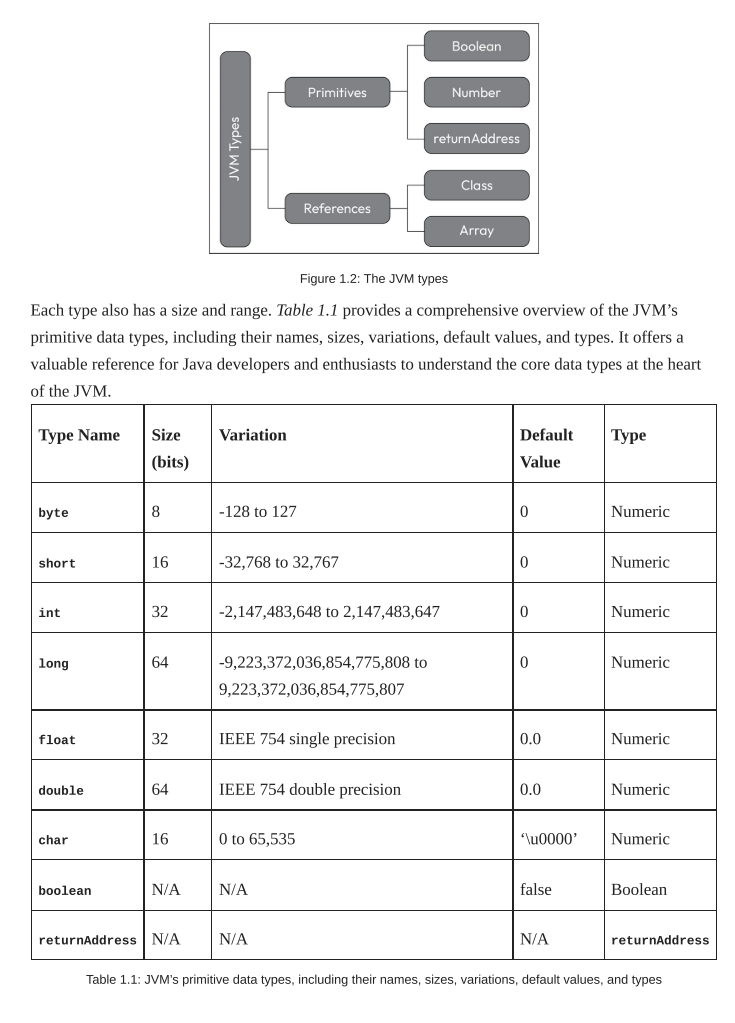
How boolean values are treated in the JVM?
Here are some key aspects of how boolean values are treated in the JVM:
Boolean as integers: The JVM represents boolean values as integers, with 1 typically denoting true and 0 representing false. This means that boolean values are essentially treated as a subset of integers.
Instructions: In JVM bytecode instructions, there are no specific instructions for boolean operations. Instead, operations on boolean values are carried out using integer instructions. For example, comparisons or logical operations involving boolean values are performed using integer instructions such as if_icmpne (if int comparison not equal), if_icmpeq (if int comparison equal), and so on.
Boolean arrays: When working with arrays of boolean values, such as boolean[], the JVM often treats them as byte arrays. The JVM uses bytes (8 bits) to represent boolean values, which align with the byte data type.
Efficiency and simplicity: The choice to represent boolean values as integers simplifies the JVM’s design and makes it more efficient. It reduces the need for additional instructions and data types, which helps keep the JVM implementation straightforward.
What are reference values?
In the JVM, reference values are pivotal in managing complex data structures and objects. These reference values represent and interact with three main types: classes, arrays, and interfaces. Here’s a closer look at these reference types in the JVM:
Classes: The foundation of object-oriented programming in Java. They define the blueprint for creating objects and encapsulating data and behavior. In the JVM, reference values for classes are used to point to instances of these classes. When you create an object of a class, you create an instance of that class, and the reference value points to this instance.
Arrays: Arrays in Java provide a way to store collections of elements of the same data type. In the JVM, reference values for arrays are used to reference these arrays. Arrays can be of primitive data types or objects, and the reference value helps access and manipulate the array’s elements.
Interfaces: Interfaces are a fundamental concept in Java, allowing for the definition of contracts that classes must adhere to. Reference values for interfaces are used to point to objects that implement these interfaces. When you work with interfaces in Java, you use reference values to interact with objects that fulfill the interface’s requirements.
The concept of null serves several important purposes in the Java language and the JVM:
Initialization: When you declare a reference variable but do not assign it to an object, the default initial value for that reference is null. This default value is essential for scenarios where you want to declare a reference but not immediately associate it with an object. This practice allows you to declare a reference variable and assign it to an object when needed, giving you flexibility in your program’s structure.
Absence of value: null indicates no valid object associated with a particular reference. It is useful for cases where you need to represent that no meaningful data or object is available at a certain point in your program.
Resource release: While setting references to null can help indicate to the JVM that an object is no longer needed, it’s essential to clarify that the primary responsibility for memory management and resource cleanup lies with the Java Garbage Collector (GC). The GC automatically identifies and reclaims memory occupied by no longer-reachable objects, effectively managing memory resources. Developers typically do not need to set references to null for memory cleanup explicitly; it’s a task handled by the GC.
While null is a valuable concept in Java and the JVM, its usage comes with trade-offs and considerations:
NullPointerException: One of the main trade-offs is the risk of NullPointerException. If you attempt to perform operations on a reference set to null, it can lead to a runtime exception. Therefore, it’s crucial to handle null references properly to avoid unexpected program crashes.
Defensive programming: Programmers need to be diligent in checking for null references before using them to prevent NullPointerException. It can lead to additional code for null checks and make it more complex.
Resource management: While setting references to null can help release resources, it’s not a guaranteed method for resource management. Some resources may require explicit cleanup or disposal, and relying solely on setting references to null may not be sufficient.
Design considerations: When designing classes and APIs, it’s important to provide clear guidance on how references are meant to be used and under what circumstances they can be set to null.
Anatomy of a JVM Class File
The class file is a highly structured binary blueprint. It is organized into the following sequential components:
Component | Description |
Magic Number | A 4-byte identifier ( |
Version Details | Minor and major version numbers indicating which JVM version is required to run the file. |
Constant Pool | A central repository for literals (strings, numbers) and symbolic references (class names, method names). |
Access Flags | Defines whether the class is |
Class Hierarchy | Identifies the specific class, its superclass, and any implemented interfaces. |
Fields & Methods | Encapsulates the data (state) and the bytecode instructions (behavior) of the class. |
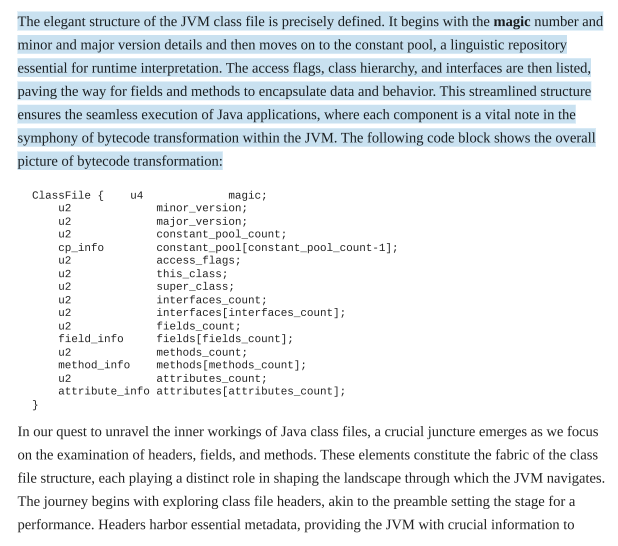
What is the headers of a class file
Headers serve as the introductory notes, containing metadata crucial for the JVM.
The class file header serves as the gatekeeper, guiding the JVM through the intricacies of the bytecode that follows. It houses details such as the Java version compatibility defining the language features the class file relies upon.
Additionally, the header declares the class’ constant pool, a symbolic repository that references strings, types, and other constants, further shaping the semantic landscape for program interpretation.
A nuanced understanding of class file headers is essential for developers, as it forms the basis for the JVM’s decisions during the loading and execution phases, ensuring the harmonious translation of high-level Java code into the binary language comprehensible to the virtual machine.
The Class File Header: Magic Number & Versions
Magic number: At the very outset of the header lies the magic number, a distinctive set of bytes that uniquely identifies a file as a Java class file. With the hexadecimal value of 0xCAFEBABE, this cryptographic signature is the JVM’s first verification step, ensuring it deals with a valid class file. The presence of this magic number is akin to a secret handshake, allowing the JVM to confidently proceed with the interpretation and execution of the associated bytecode. It is an unmistakable mark, signaling the file’s legitimacy and setting the foundation for a secure and accurate runtime environment within the JVM.
Java version compatibility: The declaration of Java version compatibility within the class file header is a pivotal piece of information. This section indicates the language features and specifications the class file adheres to, allowing the JVM to interpret bytecode correctly. The compatibility is expressed through two integral components—minor_version and major_version:
minor_version: This represents the minor version of the Java compiler that generated the class file. It reflects incremental changes or updates to the compiler that don’t introduce significant modifications.
major_version: This signifies the primary version of the compiler. A change in the major version indicates significant alterations or the introduction of new language features.
Common Access Flags and Their Meanings in the header
Binary markers that define the nature of a class:
ACC_PUBLIC (0x0001): Accessible from other packages.
ACC_FINAL (0x0010): Inheritance is forbidden (cannot be subclassed).
ACC_ABSTRACT (0x0400): Cannot be instantiated; must be extended.
ACC_INTERFACE (0x0200): Is an interface, not a class.
ACC_ENUM (0x4000): Declared as an enumerated type.
ACC_ANNOTATION (0x2000): Is an annotation type.
ACC_SYNTHETIC (0x1000): Generated by the compiler, not the user.
ACC_SUPER (0x0020): Directs how superclass methods are invoked.
Difference between the Constant Pool and the Constant Pool Reference
The Constant Pool: The actual "storage unit" containing the symbolic data.
Example: If your code has
String name = "NASA";, the string"NASA"and the class namejava/lang/Stringare literal entries stored inside this pool.
The Reference: The "pointer" located in the Class File Header.
Example: Think of the Reference as a page number in a table of contents. It tells the JVM exactly at which byte offset the Constant Pool starts so it can begin reading those "NASA" and "String" entries.
Constant Pool Example (Code to Binary) - How a simple line of code is represented in the Constant Pool
For the code System.out.println("Hello");, the Constant Pool creates separate, linkable entries for:
"Hello": The Utf8 string literal.
System: A Class reference.
out: A Field reference.
println: A Method reference. The JVM uses the Constant Pool Reference in the header to find these pieces and "stitch" them together during execution.
Bytecode Execution Model - Why bytecode?
The JVM uses a stack-based architecture. Bytecode instructions manipulate data by pushing and popping values onto and off an operand stack rather than using CPU registers.
What are the primary Categories of Bytecode Operations?
Data Movement: Loading and saving values (e.g.,
aload,istore).
Arithmetic: Mathematical logic (e.g.,
iadd,dsub).Type Conversion: Transforming data types (e.g.,
i2ffor int to float).Control Flow: Conditional statements and method invocations/returns.
Object Management: Creating and manipulating objects and arrays.
Java Bytecode Type Prefixes (i, l, s, b)
The first letter of a bytecode instruction identifies the data type:
i(Integer): 32-bit signed integers (e.g.,iadd,isub).l(Long): 64-bit signed integers (e.g.,lload,lmul).s(Short): 16-bit signed integers (e.g.,sload).b(Byte): 8-bit signed integers (e.g.,bload).
Java Bytecode Type Prefixes (f, d, a, c)
f(Float): 32-bit single-precision floating point (e.g.,fadd).d(Double): 64-bit double-precision floating point (e.g.,dmul).a(Reference): Object references/addresses (e.g.,aload,areturn).c(Char): 16-bit Unicode characters (e.g.,caload).
Boolean values do not have dedicated bytecode instructions; instead, the standard integer arithmetic and logical instructions are used.
For instance: iadd, isub, imul, idiv, and similar instructions work seamlessly with Boolean values Logical operations such as and (iand), or (ior), and xor (ixor) can be used for Boolean logic
Core Principle of Bytecode Arithmetic - How Bytecode Arithmetic Operations Function (Operand Stack)
Bytecode arithmetic follows the LIFO (Last-In, First-Out) stack model. The JVM pops the top two values from the operand stack, treats the first value popped as the right-hand operand (divisor/subtrahend) and the second as the left-hand operand, performs the calculation, and pushes the result back onto the stack top for the next instruction to use.
Bytecode Mnemonics for Add, Subtract, Multiply, and Divide
Operations are type-specific and consume the top two values from the operand stack:
Add:
iadd,ladd,fadd,dadd.Subtract:
isub,lsub,fsub,dsub(calculatesvalue1 - value2).Multiply:
imul,lmul,fmul,dmul.Divide:
idiv,ldiv,fdiv,ddiv(calculatesvalue1 / value2). Note: Integer division (idiv,ldiv) truncates toward zero and throwsArithmeticExceptionon division by zero.
Remainder (Modulo) and Negation Instructions
Remainder (
%):irem,lrem,frem,drem. Computes the remainder ofvalue1 / value2.Negation (
-x):ineg,lneg,fneg,dneg. Flips the sign of the value at the top of the stack (e.g., positive to negative). Unlike arithmetic, this only pops one value.
Bitwise Operations (Bitwise AND, OR, and XOR in Bytecode) & Shift Operations (Shift Instructions: Logical vs. Arithmetic)
Operates on the individual bits of int and long types:
AND (
&):iand,land.OR (
|):ior,lor.XOR (
^):ixor,lxor. Used for mask operations and low-level bit manipulation.
Left Shift (
<<):ishl,lshl.Arithmetic Right Shift (
>>):ishr,lshr(preserves the sign bit).Logical Right Shift (
>>>):iushr,lushr(fills with zeros regardless of sign).
Local Variable Increment (iinc) - The iinc Instruction
A unique instruction that increments a local variable directly by a constant value without using the operand stack.
Format:
iinc [index] [constant]Use Case: Highly efficient for loop counters (e.g.,
i++ori += 2) because it avoids theload -> push constant -> add -> storesequence.