(3.4.3 onwards of Computer Systems) Software
 Call Kai
 Learn
Learn Practice Test
 Spaced Repetition
 Match
Match Flashcards
 Knowt Play
1/22

Earn XP
Description and Tags
Application software, System software (Operating System software + Utility software)
Name | Mastery | Learn | Test | Matching | Spaced | Call with Kai |
|---|
No analytics yet
Send a link to your students to track their progress
23 Terms
Specification
Specification
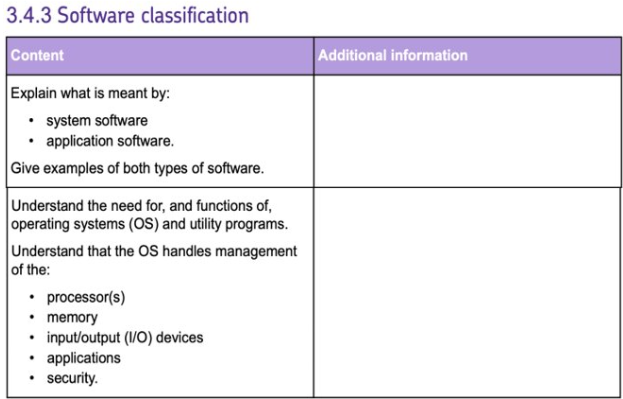
Application Software definition? + examples
Programs that perform user-oriented tasks
software for the stuff we typically use a computer for/ the stuff we do on a computer
Examples (DONT give Brand names):
Word-processing software - Word
Web browsers - google
Games - none needed
Image and Photo editing software - google photos
Spreadsheets - what i use
System Software definition?
Manages + controls hardware and provides a platform/interface for applications to run (Managing Applications)
Overall it manages the operation of the complete computer system ie. hardware + (application) software working together
Operating System (OS) - categorised for the general operation of the Computer System - Manages the hardware and Provides a platform for Applications to run. Makes the literal operation/use of a computer possible.
Utility Software - programs maintaining the computer system allowing operation to run smoothly / optimise computer system performance. So it performs system-oriented tasks
Operating System (OS) software: specific list of things it does (6)
Main Memory management - controls which parts of memory are being used by the process
Processor management - schedules which processes are to be executed by the processor(s) in the CPU
managing Applications - controls access to applications; controls what data an application is allowed to access; controls what parts of the computer system an application can access
Secondary Storage management - loading data and programs from secondary storage into main memory; allocating and managing storage space in a fair and efficient way to specific tasks (and also memory allocation for different users)
Security management - User Authentication to define a user access level (to specific applications or access to specific vulnerable operations (eg. software only allowed to be installed with admin access)); protecting against malware; blocking/restricting access to specific (vulnerable) operations or system areas (eg. memory, network services etc.) that can be exploited by unauthorised access, malicious activity, malware. (eg. Software can only be installed with admin access)
Input/Output device management - allows these devices to send and receive data
System Software - Utility software: specific list of things it includes
Encryption - applying an algorithm to scramble data preventing unauthorised access to files
Backing up data - making copies of data (in case data gets lost)
Compressing data - applying an algorithm to reduce the space required to store/represent data (a file or smthing)
Defragmentation (for HDDs only) - but first Fragmentation?: When files are saved, deleted, and edited over time, they can be broken into smaller pieces and stored in different locations on the disk. So file segments becomes scattered. Defragmentation: software that rearranges these scattered pieces of files, moving them so they are stored next to each other in a single, continuous space. Reduces the time it takes for the read/write head to access data
Programming Languages (two types)
High Level (eg. Python, Java, C++) - can be understood by humans; instructions need to be converted into machine code to be able to be executed by computer processors; doesn’t give exact control over the CPU (hardware)
Low Level (eg. Machine code (binary), Assembly code) - can’t be understood/ more difficult to understand by humans; (Assembly code needs to be translated into machine code); gives exact control over the CPU (hardware)
More on the two Low Level Languages?
Machine code - 0011 (opcode - operation/function) 1011 (memory address of data; or just the data)
any instruction has to be translated into this as it is the “language“ of the processor
Different processors have its own instruction sets (a specific set of instructions it can interpret) so programs aren’t portable between different processor architectures. (However, high-level languages are portable between diff types of CPU (non-embedded ones))
Assembly code - LDA 0×0B
Easier to read/write by humans (but still requires a full understanding of how the CPU + memory within the system works)
Not portable between diff processors either
3 types of Translators? + definition of a Translator?
“a special type of software that translates programs from a human readable source code —> machine code that the CPU can execute“
Compilers, Interpreters
Assemblers
There are different (but important) ways a High-level language can be ultimately translated into Machine Code. Should know when it is appropriate to use each one in the real world
Compilers?
“Translates a High-level program straight into machine code all at once.” This means...
Already in the form of object code (actual executable code) so...
Compilation process doesn’t need to be repeated each time program is run – Faster to execute
Compatible systems (same instruction set) can execute the object code without needing the additional compiler software (already compiled for them) - uses less memory
BUT different processors can't understand this object code – source code needs to be recompiled differently for its particular instruction set.
As program is already compiled into object code, user can't see source code
USE IN PRACTICE - Commercial software (Games, Google, almost anything we use that someone is making profit out of):
Good for software that needs to be run frequently and where speed of execution is important (for a better user experience or other reasons)
Source code is hidden (program is already compiled before its distributed) so it can't be copied.
(BUT) The object code isn't compatible for different computer systems (eg. Why a PS4 game CD doesn't work in an X-box even though an X-box one does, or why there may be "Google for windows"/"Google for IMac") - needs to be compiled differently by developers for each of these different computer systems
Interpreters?
"Translates" a High-level program line-by-line (by using precompiled procedures (separate machine code subroutines) that are executed when appropriate):
Translation process happens every time program is run:
Slower to execute overall
Also processors always need the interpreter software present to translate it (into machine code compatible with the processor's machine code instruction set)
Program can run on multiple platforms
User receives source code before its eventually compiled into object code – can see it and could copy it.
USE IN PRACTICE – Program development:
Easier to debug as an error can be traced from where execution of program stopped.
No need to recompile after every change
Compatible on any computer system– as long as it has interpreter software
However customers CAN see source code before its translated by interpreter
________________________________________________________
(Why some languages, such as Java, which is used in creating some phone apps, are compiled into bytecode – an intermediate stage of translating. Can then be interpreted and run on any type of processor using the appropriate bytecode interpreter. This means...
The source code cannot be seen by users – already in bytecode instead
Compatible with any processor with the necessary interpreter
(Simpler) Easier and quicker to translate into machine code)
Assemblers?
Translates (Low-level) Assembly Code into Machine Code
Each CPU architecture has its own assembly language and assemblers, and machine code instruction set
USE IN PRACTICE -
Writing (Embedded) system software – easier to write in assembly code than machine code (still requires skill tho). Still gives exact control over how CPU functions.
Very efficient code ((compared to a high-level language))
Requires little memory space
Quick to execute (only assembly code --> machine code)
Writing Device drivers for new hardware (software that "connects" the Operating System and each piece of Hardware allowing the OS to specifically control it)
the CPU - The von Neumann architecture
a design for computer systems comprised of the following parts:
Processing Unit – ALU + registers to store data whilst instructions being processed
Control Unit – decode instructions + keep track of instruction to process next
Main Memory – store both data + instructions
Busses – to transfer data between components in a computer system (both within and out of the CPU)
In modern implementations the Control Unit and Processing Unit (ALU + registers) are built into a single Central Processing Unit
The Control Unit?
The Control Unit (CU) -
FETCH - controls the fetching of instructions
A Decoder -
DECODE - Interprets/decodes instructions loaded from memory
EXECUTE - Control Unit sends control signals to the appropriate components in a computer to execute the required operation (via busses)
Controls writing (to/from memory) of data as part of memory operations
A Clock -
Sychronises operations – controls overall clock speed – the no. of instructions carried out each second (the faster the clock speed the faster the CPU carries out instructions)
Why is it needed?: makes sure CPU isn't working at too fast a rate so that it can't cope (may overheat)
The Arithmetic and Logic Unit (ALU)
The Arithmetic and Logic Unit (ALU) -
EXECUTES mathematical instructions
EXECUTES logical instructions
Compares values held in registers
Cache (in CPU)
Cache (in CPU) -
Specialised memory that exists within the CPU; NOT Main Memory
Made from Static RAM (SRAM) – Extremely fast memory, but much smaller in capacity than RAM (and also physically large + expensive)
Stores frequently fetched data and/or instructions so they can be quickly executed even faster (in the fetch-decode-execute cycle)
Unlike registers, it stores any data/instructions
(Also overwrites data when other data more recently used needs to be quickly stored)
Registers
Registers -
Small units of memory in CPU (only 4-8 bytes in size)
Each register used for a specific purpose during the fetch-decode-execute cycle (each one can hold a specific piece of data/value being used by the CPU currently)
System Bus
System Bus -
A collection of wires
Transfers data, instructions, memory addresses and control signals between the CPU and components (including main memory)
Main Memory (RAM and ROM)
Main Memory (RAM and ROM) -
Stores data and instructions for CPU to process
Directly accessed by CPU – stores/contains the instructions that the CPU executes during the fetch-decode-execute cycle
So Programs/sequences of instructions must be loaded from secondary storage into main memory before they can be executed.
Essential for a computer to function (as by the Von Neumann Architecture)
(RAM)
RAM:
Temporarily stores program instructions + data while they're being processed by CPU (fetch-execute cycle) - RAM is empty when the computer is first turned on.
Operating System (OS) copied from Secondary Storage into RAM when computer starts up
Applications, documents + files copied into RAM when opened
Volatile
Faster than most Secondary Storage devices BUT more expensive per GB.
(ROM)
ROM:
Permanently stores program instructions + data
Stores start-up sequences or Basic Input Output System (BIOS) - CPU executes this as it turns on. BIOS (to boot up computer) contains the instructions for the Operating System (OS) to be loaded from the Secondary Storage to RAM as computer starts up. This is a basic instruction that the CPU always uses
CANNOT have new data written onto it (Read-only)
Non-Volatile
Often flash-memory
3 factors affecting CPU performance (ie. speed)
CLOCK SPEED Faster clock speed = more instructions (can be) processed per second
NO. OF CPU CORES more cores --> More instructions can be processed per second simultaneously = better CPU performance
CACHE SIZE Able to store more frequently used data and instructions --> more efficient fetch-decode-execute cycle (CPU can fetch them more quickly) – better CPU performance
Fetch decode execute cycle
First step is for the CPU to fetch the next instruction from Main Memory (RAM or ROM). The Control Unit then decodes the fetched instruction and determines which component(s) should carry out the operation required. They are sent control signals via the system buses and they execute the instruction:
Arithmetic/mathematical instructions (ALU)
Logic instructions (ALU)
Memory instructions (Control Unit controls this)
Then the cycle repeats and the CPU fetches the next instruction to be decoded and executed.