Chapter 3 - Designing a Kafka project
 Call Kai
 Learn
Learn Practice Test
 Spaced Repetition
 Match
Match Flashcards
 Knowt Play
1/15

There's no tags or description
Looks like no tags are added yet.
Name | Mastery | Learn | Test | Matching | Spaced | Call with Kai |
|---|
No analytics yet
Send a link to your students to track their progress
16 Terms
What’s the purpose of Kafka connectors
The purpose of Kafka Connect is to help move data into or out of Kafka without writing our own producers and consumers. Connect is a framework that is already part of Kafka!
Don’t rush to build Kafka for an existing codebase! - Phased approach
If we use a database today and want to kick the tires on the streaming data tomorrow, one of the easiest on-ramps starts with Kafka Connect. Start small to minimize risk. Instead of migrating all your data at once, you should use Kafka Connect to pick just one database table to stream into Kafka. This allows you to test the new streaming architecture and "kick the tires" while your legacy applications continue to run undisturbed in the background.
Here is the breakdown of the author's message:
Avoid the "Big-Bang" Approach: Do not try to move all your data into Kafka simultaneously, as this increases the risk of system failure and complexity.
Low-Barrier Entry: Kafka Connect is presented as the easiest "on-ramp" to transition from traditional database-centric architecture to streaming data.
Coexistence: You can run your new Kafka-based architecture in parallel with your existing applications. You don't have to shut down or replace the legacy system immediately.
Incremental Value: By starting with a single table, you can validate the technology and gain familiarity with Kafka Connect’s capabilities without putting your entire production workflow at stake.
How to use Kafka Connect for a Phased approach to test your application before full migration
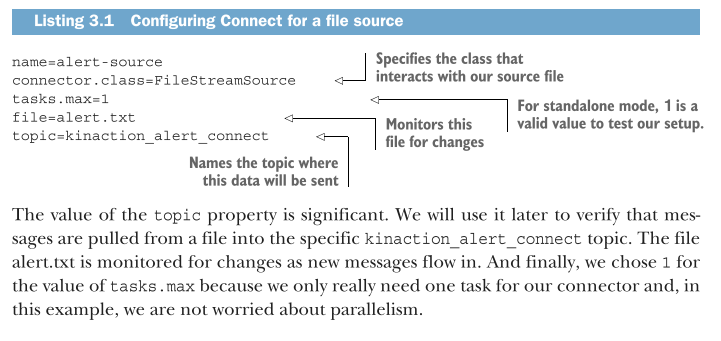
Kafka Connect allows for an incremental migration to streaming by enabling you to bridge external data sources to Kafka without writing custom producer/consumer code. You can test your streaming architecture by streaming a single database table or file while keeping existing applications running. Using Standalone Mode, you can validate data flow by configuring source and sink connectors through property files rather than application code.
Core Concept: Use Connect to "kick the tires" on Kafka by running it in parallel with legacy systems.
Standalone Mode: The ideal environment for local testing and validation before scaling.
Configuration Workflow:
Source: Define a
.propertiesfile (e.g.,alert-source.properties) using theFileStreamSourceclass to ingest data into a Kafka topic.Sink: Define a
.propertiesfile (e.g.,alert-sink.properties) using theFileStreamSinkclass to export data back out to a destination.
Execution: Run via terminal command:
bin/connect-standalone.sh config/connect-standalone.properties source.properties sink.propertiesVerification: Use
kafka-console-consumerto confirm that data ingested from the source file successfully reaches the Kafka topic and is written to the sink file.Risk Mitigation: By starting with one table or file, you validate the technology and gain familiarity without requiring a risky, "big-bang" full-system migration.
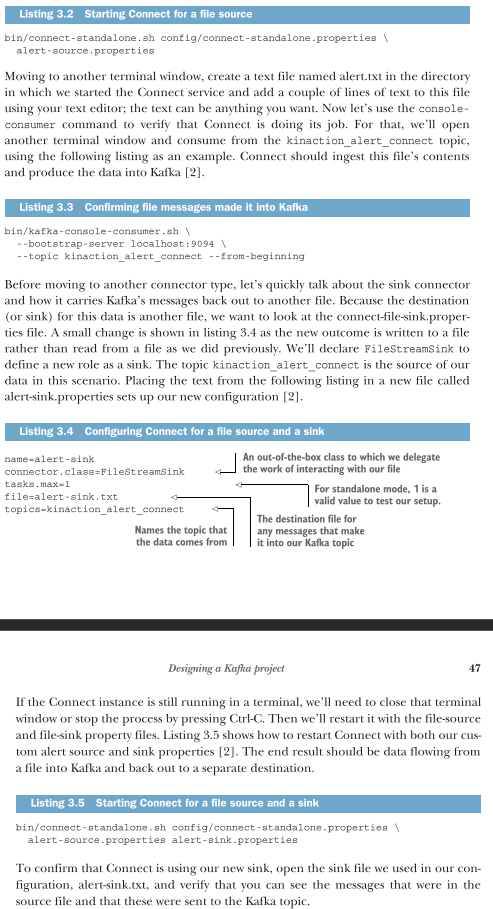
Kafka Connect: Standardized Integration! From file-based to database
Once you understand how to use one connector (like the file-based ones we previously discussed - FC3), the process for integrating other systems—like a relational database—becomes familiar and consistent.
This reinforces the "Phased Approach" by demonstrating that you can swap out a file-based source for a database-based source to start streaming actual business data (like bike order invoices) without disrupting your existing database application.
Standardization: Because Connect provides a consistent framework, moving from a File Connector to a JDBC (Database) Connector requires the same fundamental workflow: configuring a properties file and launching the connector.
Parallel Development: You can integrate your database table updates into Kafka while your legacy application continues to operate, allowing for a low-risk, feature-by-feature transition to a streaming architecture.
Reusable Expertise: The community provides existing connectors for various systems (like the
kafka-connect-jdbcsource connector), meaning you don't need to be an expert in the underlying system to integrate it with Kafka.Component Flexibility: You can easily swap "source" components (e.g., changing from a text file to a database table) while maintaining the rest of your Kafka infrastructure.
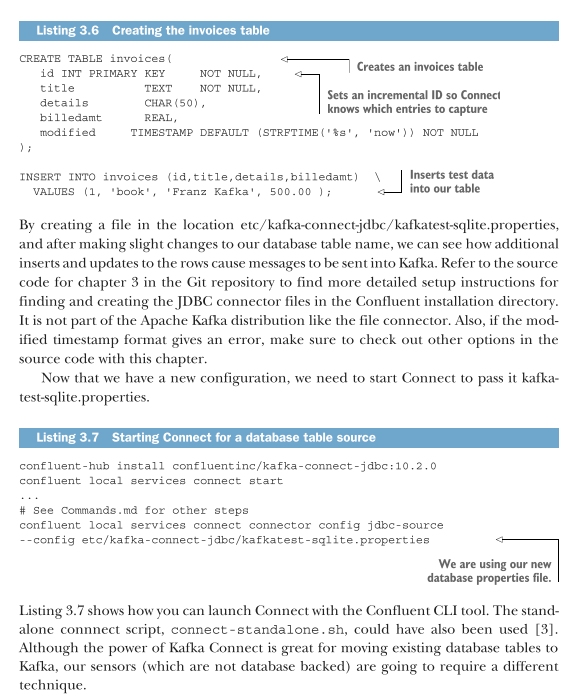
Sensor event design - What to use if our system does
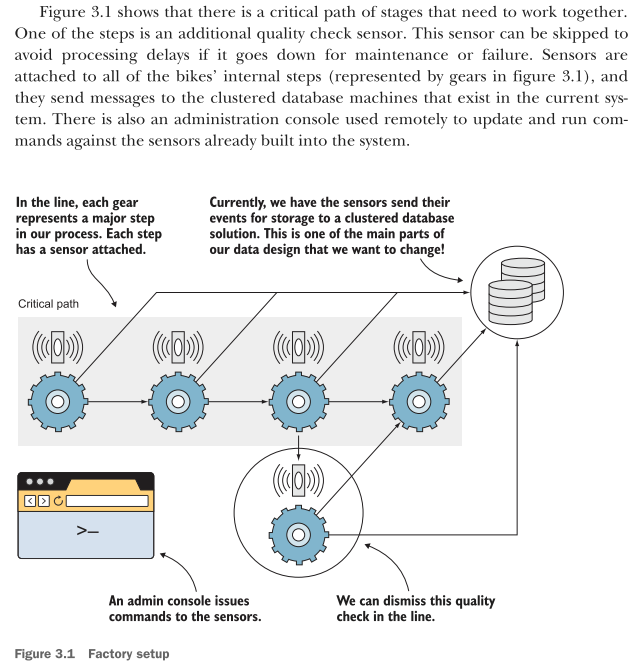
The text describes a scenario where Kafka Connect cannot be used because there are no pre-built connectors for the proprietary sensors. Instead, you must build custom producers to interact directly with the sensor event system. This introduces a architectural choice: leveraging Kafka Connect when possible, and reverting to manual producers for specialized or proprietary hardware.
When to Use Custom Producers: Necessary when no off-the-shelf connectors exist for your specific hardware or event system.
Architectural Flexibility: The system design must be modular enough to handle failures or maintenance—such as the "quality check sensor" mentioned, which can be bypassed if it goes offline to prevent bottlenecks.
Existing issues - DEALING WITH DATA SILOS
In our factory, the data and the processing are owned by an application. If others want to use that data, they would need to talk to the application owner. And what are the chances that the data is provided in a format that can be easily processed? Or what if it does not provide the data at all?
The shift from traditional “data thinking” makes the data available to everyone in its raw source. If you have access to the data as it comes in, you do not have to worry about the application API exposing it to specific formats or after custom transformations. And what if the application providing the API parses the original data incorrectly?
To untangle that mess might take a while if we have to recreate the data from changes to the original data source.
Existing issues - RECOVERABILITY
Kafka’s architecture treats failure as an expected condition, offering powerful recoverability features that traditional messaging systems lack. Unlike queues that delete messages after consumption, Kafka retains data according to configured policies, allowing developers to "replay" events from the past. This enables the correction of logic defects in downstream applications by reprocessing raw, historical data rather than losing it.
The Problem with Standard Queues: In traditional systems, messages are typically deleted once consumed. If a logic bug is discovered later, the original event is lost forever, making data correction nearly impossible.
The Kafka Advantage:
Data Retention: Kafka keeps messages for a set duration, enabling them to be read multiple times.
Replayability: Using tools like
--from-beginning, developers can re-run new, corrected application logic against historical data.Immutability: Because the original events are preserved, you can recover from application errors without data loss or corruption.
Comparison to Write-Ahead Logs (WAL): Kafka behaves similarly to a database’s WAL. By storing every change in sequence, you can audit the state of data from its initial value to its current state.
Design Philosophy: Reprocessing events is a core pattern in Kafka, transforming the "event stream" into a reliable, historical record of business truth.
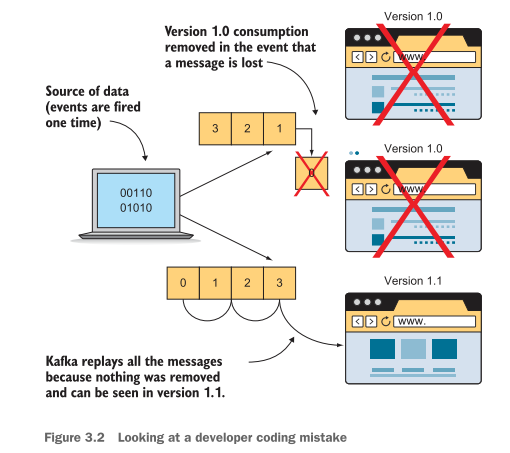
When should data be changed?
Whether data is coming from a database or a log event, our preference is to get the data into Kafka first, then the data will be available in its purest form.
But each step before it is stored in Kafka is an opportunity for the data to be altered or injected with various formatting or programming logic errors.
Keep in mind that hardware, software, and logic can and will fail in distributed computing, so it’s always great to get data into Kafka first, which gives you the ability to replay data if any of those failures occur.
Fault Tolerance: Distributed computing is inherently prone to failure. Storing the raw source data acts as a "source of truth" that enables you to fix downstream processing errors without needing to re-source the data from the origin.
Kafka design requirements -
The following questions are intended to make us think about how we want to process our data. These preferences impact various parts of our design, but our main focus here is on figuring out the data structure.
Is it okay to lose any messages in the system? For example, is one missed event about a mortgage payment going to ruin your customer’s day and their trust in your business? Or is it a minor issue such as your social media account RSS feed missing a post? Although the latter is unfortunate, would it be the end of your customer’s world?
Does your data need to be grouped in any way? Are the events correlated with other events that are coming in? For example, are we going to be taking in account changes? In that case, we’d want to associate the various account changes with the customer whose account is changing. Grouping events up front might also prevent the need for applications to coordinate messages from multiple consumers while reading from the topic.
Do you need data delivered in a specific order? What if a message gets delivered in an order other than when it occurred? For example, you get an order-canceled notice before the actual order. Because product ends up shipping due to order alone, the customer service impact is probably good enough reason to say that the ordering is indeed essential. Or course, not everything will need exact ordering. For example, if you are looking at SEO data for your business, the order is not as important as making sure that you can get a total at the end.
Do you only want the last value of a specific item, or is the history of that item important? Do you care about how your data has evolved? One way to think about this looks at how data is updated in a traditional relational database table. It is mutated in place (the older value is gone and the newer value replaces it). The history of what that value looked like a day ago (or even a month ago) is lost.
How many consumers are you going to have? Will they all be independent of each other, or will they need to maintain some sort of order when reading the messages? If you are going to have a lot of data that you want to consume as quickly as possible, that will inform and help shape how you break up your messages on the tail end of your processing.
Now that we have a couple of questions to ask for our factory, let’s try to apply these to our actual requirements. We will use a chart to answer each scenario. We will learn how to do this in the following section.
(Example foundation for better learning) User data requirements - definning or requirements
In the next examples, you do not memorize but focus on the bold text that indicate how to handle scenarios rather than focusing on the system.
Our example architecture must deliver several specific capabilities, broken down into core functional requirements:
High Availability & Fault Tolerance:
The ability to capture and queue messages even if a consuming service is completely down.
For example, if a consumer application at a remote plant fails or undergoes scheduled maintenance, it must be able to process missed events later without dropping any data.
Sensor Status & Real-Time Alerting:
Tracking sensor statuses explicitly as either working or broken.
Monitoring the "bike process" in real-time to identify if a localized issue could escalate into a total system failure.
Historical Data & Predictive Maintenance:
Maintaining a long-term history of sensor alert statuses.
Utilizing this historical data to analyze trends and predict hardware failures before equipment actually breaks.
Comprehensive Audit & Compliance Logging:
Keeping a detailed audit log of any standard users who push updates or run queries directly against the sensors.
Maintaining a strict compliance log tracking "who did what" regarding administrative actions taken on the sensors themselves.
Now you can proceed to the next flashcards to apply all of the above requirements. For better revising and understand (78-84)
High-level plan for applying our questions - Part 1
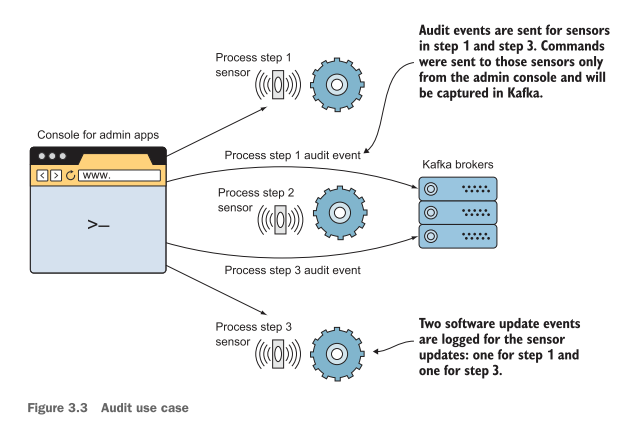
Let’s focus closer on our requirements to create an audit log. Overall, it seems like everything that comes in from the management API will need to be captured.
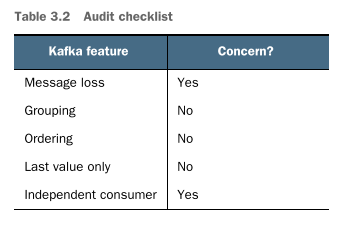
We want to make sure that only users with access permissions are able to perform actions against the sensors, and we should not lose messages, as our audit would not be complete without all the events. In this case, we do not need any grouping key because each event can be treated as independent.
The order does not matter inside our audit topic because each message will have a timestamp in the data itself (no messages ordering). Our primary concern is that all the data is there to process. As a side note, Kafka itself does allow messages to be sorted by time, but the message payload itself can include time.
Figure 3.3 shows how a user would generate two audit events from a web administration console by sending a command to sensor 1 and another to sensor 3. Both commands should end up as separate events in Kafka.
To make this a little clearer, table 3.2 presents a rough checklist of things we should consider regarding data for each requirement.
High-level plan for applying our questions - Part 2
Track alert statuses across each stage of the bike manufacturing system to spot long-term trends and predict equipment failures (e.g., detecting a "Needs Maintenance" message that occurs every few days).
Kafka Key & Grouping Strategy
What a "Key" is: A mechanism used in Kafka to group related events together.
The Strategy: The architecture will use the bike’s unique part ID names (or stage names) where the sensors are installed as the message key.
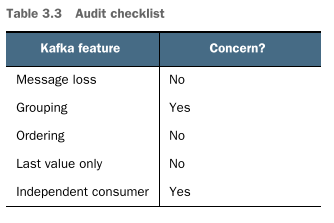
The Benefit: Using the same key ensures all events from a specific stage are grouped together, making it easy for downstream applications to consume and analyze data for that specific stage over time.
Message Loss: Not a major concern. Because sensors transmit alert statuses frequently (every 5 seconds), missing an occasional message is acceptable since a new one will arrive almost immediately.
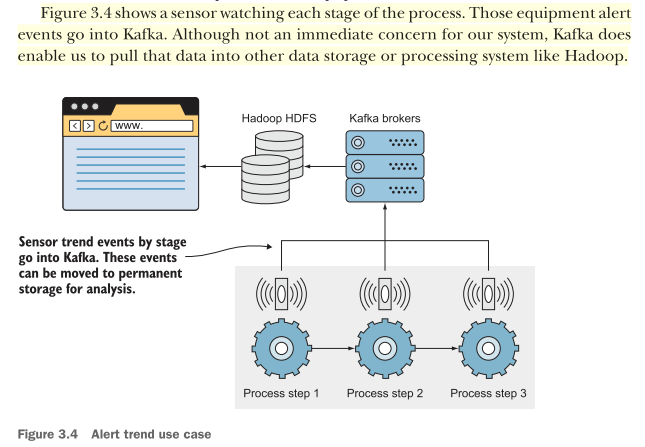
Kafka does enable us to pull that data into other data storage or processing system like Hadoop. (Figure 3.4)
Table 3.3 highlights that our goal is to group the alert results by stage and that we are not concerned about losing a message from time to time.
High-level plan for applying our questions - Part 3
As for alerting on statuses, we also want to group by a key, which is the process stage. However, we do not care about past states of the sensor but rather the current status. In other words, the current status is all we care about and need for our requirements.
The new status replaces the old, and we do not need to maintain a history. The word replace here is not entirely correct (or not what we are used to thinking). Internally, Kafka adds the new event that it receives to the end of its log file like any other message it receives. After all, the log is immutable and can only be appended to at the end of the file.
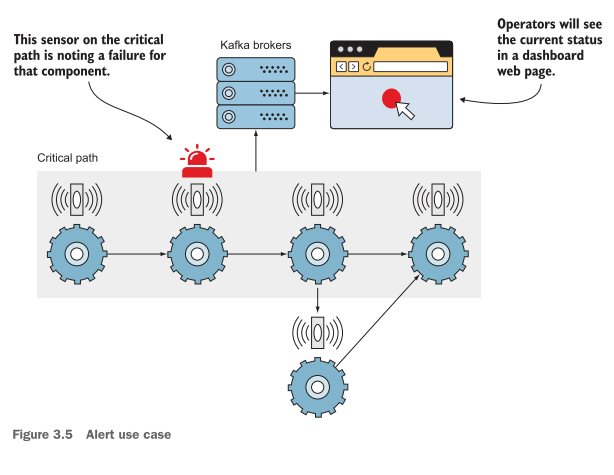
Another difference we have with this requirement is the consumer usage assigned to specific alert partitions. Critical alerts are processed first due to an uptime requirement in which those events need to be handled quickly. Figure 3.5 shows an example of how critical alerts could be sent to Kafka and then consumed to populate an operator’s display to get attention quickly.
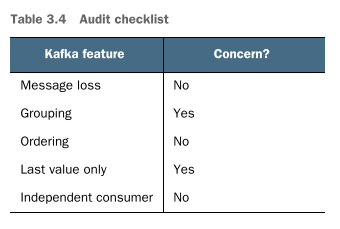
Table 3.4 reinforces the idea that we want to group an alert to the stage it was created in and that we want to know the latest status only. Taking the time to plan out our data requirements will not only help us clarify our application requirements but, hopefully, validate the use of Kafka in our design.
How to keep groups in Kafka organized?
One of the last things to think about is how we want to keep these groups of data organized. Logically, the groups of data can be thought of in the following manner (based on our example):
Audit data
Alert trend data
Alert data
For those of you already jumping ahead, keep in mind that we might use our alert trend data as a starting point for our alerts topic; you can use one topic as the starting point to populate another topic. However, to start our design , we will write each event type from the sensors to their logical topic to make our first attempt uncomplicated and easy to follow. In other words, all audit events end up on an audit topic, all alert trend events end up on a alert trend topic, and our alert events on an alert topic. This one-to-one mapping makes it easier to focus on the requirements at hand for the time being.
The Production Reality: Decoupled & Derived Streams
In a production environment, topic assignment rarely stays this rigid. You will often see topics serving as the starting point for other topics.
For instance, you might use the raw alert trend data topic as a source stream. A stream processing application (like Kafka Streams or Flink) would ingest that data, process or filter it, and then populate the alerts topic based on specific thresholds.
Production Tip: Production architectures favor loose coupling. Instead of forcing sensors to write to multiple highly specific topics, sensors usually dump raw data into an ingest topic, and downstream microservices split, aggregate, or route that data into production topics as needed.
Planning our structured data
Kafka does not do any data validation by default. However, there is likely a need for each process or application to understand what that data means and what format is in use. By using a schema, we provide a way for our application’s developers to understand the structure and intent of the data.
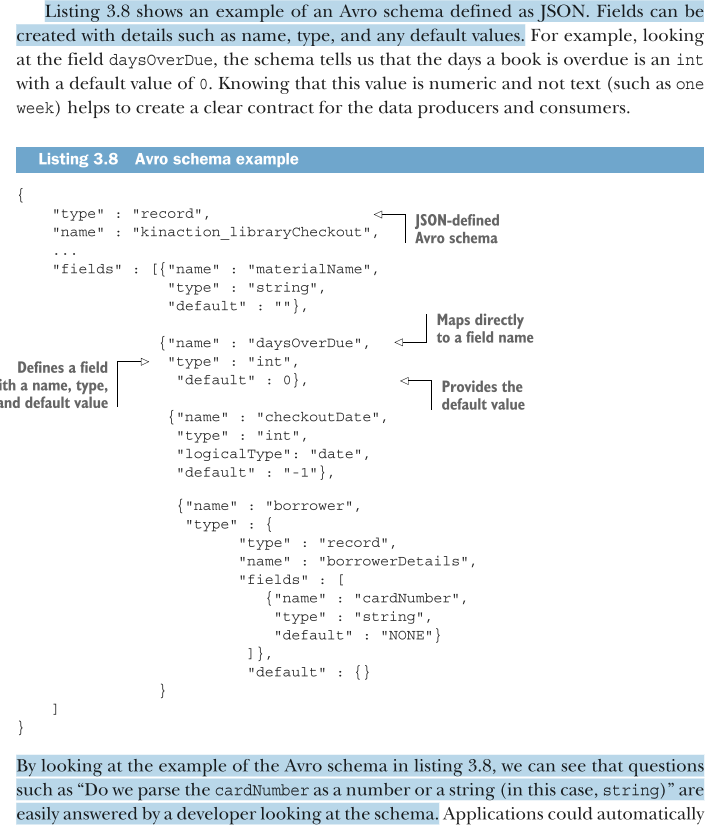
Listing 3.8 shows an example of an Avro schema defined as JSON. Fields can be created with details such as name, type, and any default values.
Schemas can be used by tools like Apache Avro to handle data that evolves. Most of us have dealt with altered statements or tools like Liquibase to work around these changes in relational databases. With schemas, we start with the knowledge that our data will probably change.
Why using Avro for Planning our structured data and using it as an exchange data format?
Avro always is serialized with its schema. Although not a schema itself, Avro supports schemas when reading and writing data and can apply rules to handle schemas that change over time.
Also, if you have ever seen JSON, it is pretty easy to understand Avro. Besides the data, the schema language itself is defined in JSON as well. If the schema changes, you can still process data.
to know how to use Avro with Kafka read the docs or quickly see from the book for quick insight (84-89)