Lower Layers - Part Two - 4
 Call Kai
 Learn
Learn Practice Test
 Spaced Repetition
 Match
Match Flashcards
 Knowt Play
1/46

There's no tags or description
Looks like no tags are added yet.
Name | Mastery | Learn | Test | Matching | Spaced | Call with Kai |
|---|
No analytics yet
Send a link to your students to track their progress
47 Terms
LANs, MANs, WANs
Local (buildings, campuses), Metropolitan (city) and Wide Area Networks
LANs vs WANs
Historically, Local Area and Wide Area networks were different in technology, purpose and protocols
But they are rapidly converging: very few pure LAN or pure WAN technologies left
Very loosely you can plug a LAN together and it will work but WAN requires planning
What are the main applications for WANs?
Used to connect computers together, between buildings
Main applications:
File transfer (lots of problems of format conversion, as even byte-size varied)
Job transfer (for use of national facilities for super computers; batch mode)
Remote login (but you rarely had interactive access to remote systems).
Vendor Networks
Options to connect computers together that were provided by one particular manufacturer.
Fast networks within “machine rooms” (ie, data centres)
Bridged to other similar networks in other data centres, if the computers were the same
IBM’s SNA and (later) Digital’s DECNET were the main players, but every vendor had their own similar product.
Provided file transfer, job transfer and remote login
Workstations
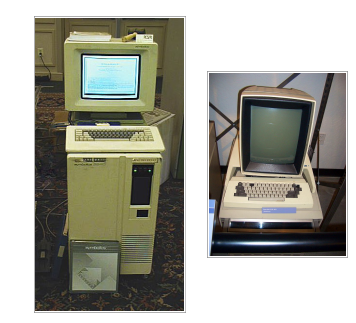
PCs were mostly only used as terminals to timeshare systems, and file transfer was done with protocols like Kermit which ran over serial lines
WAN Technology
Efficiency is very important: wasting tens of bytes is/was a significant performance problem
Latency is always an issue, with related but distinct solutions/mitigations
WAN technologies are unreliable, so dealing with lost and damaged data is a huge issue
So if you wanted a single local and wide area protocol, you needed to consider working over slow-speed, lossy links, high-latency links as well as fast, relatively reliable links.
ARPA Technology
The (D)ARPANet, (Defence) Advanced Research Projects Agency Network, was the precursor to today’s Internet. The latter grew out of the former.
Originally not TCP/IP: a protocol suite based around NCP (Network Control Protocol) running on IMPs (Interface Message Processors).
So older WAN issues were very much part of the design of modern protocols
Lower Layer Technology
Ethernet
Token Ring (IBM Token Ring, FDDI)
Slotted Ring
ATM (Asynchronous Transfer Mode)
MPLS (Multiprotocol Label Switching)
(DWDM is transmission, but we will consider it here)
Topology of Ethernet
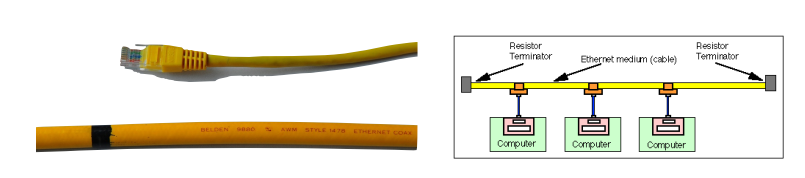
Originally a bus: a single cable with computers connected to it.
(Early versions are 3Mbps, but for practical purposes “yellow hose” is always 10Mbps).
Maximum length is 500m (both for reasons of resistance and timing as we will see); can be amplified and regenerated to go 1500m max.
Format of Ethernet
• 7 bytes of preamble (0x55) to allow receivers to synchronise.
• 1 byte start of frame delimiter (0x5D)
• 6 byte destination address (48 bits)
• 6 byte source address
• 4 byte VLAN tag (optional)
First two bytes 0x8100 to keep older equipment happy
• 2 byte type or length
If ≤ 1500: length. If ≥ 1536: type, with length found by looking for end of the packet
• 42—1500 bytes of payload
• 4 byte CRC
• 12 byte-time inter-packet gap (zeros)

Why is the preamble 0×55?
• 0x55 is 01010101, so a stream of 0x55 is a stream of alternating 1 and 0.
• Ethernet has no central clock, so everyone is responsible for clocking the data at the right speed.
• Commodity crystals are ± 50ppm(the watch looses 50 seconds every 11 days), and drift at several ppm per degree C (you can measure the temperature of a computer by tracking the drift of its clock against a GPS reference). Shortterm stability is much better.
• So two stations can easily be >100ppm out, which is a bit period every 10 000 bits. A packet is ~1500 bytes, or 12 000 bits. So two perfectly sensible stations would not be able to track each other’s data.
• Hence the 0x55 pattern to allow receivers to lock to the current speed of the transmitter.
How is the end found without knowing the length?
Checksum is computed continuously, so when you have a set of bytes where the last four bytes are the correct checksum for the whole packet, you know you have reached the end.
CRC calculation of (data + CRC) generates the magic number 0xC704DD7B or wait until the inter-packet gap
CSMA/CD
Ethernet is formally known as “CSMA/CD” —Carrier Sense Multiple Access Collision Detection.
Collision Detection on Ethernet
As a station transmits, it also listens to the ether and checks the ether only contains the signals that are being sent
this has to be done in or very close to the transmit hardware, as it is mostly an analogue problem.
If there is a mismatch, someone else is transmitting at the same time.
The set of all stations whose packets might mutually collide is called a “collision domain”.
Making that as small as possible is full of win
What happens with Collisions in Ethernet?
First action is to “jam” the network: send a set pattern so everyone knows a collision is in progress.
Usually alternating 1 and 0, followed by something assumed to be an invalid checksum.
Critical that the whole ether knows about the collision before the packet has finished being sent
Imposes a minimum packet size (64 octets), which is a function of the maximum diameter of a collision domain (1500m). Jam pattern pads packets to this length at least
How does the Ethernet recover from collision?
On the first attempt, choose a random number k from {0,1} and delay k x 512 bit periods before trying again.
More generally, on the nth attempt, choose a random number k from {0..2n} and delay k x 512 bit periods before trying again.
After 10 attempts, give up.
Randoms come from things like serial numbers; they don’t need to be very good quality, just different to all other stations on the network to generate non-identical sequences of delays
What are the problems with collisions on the Ethernet?
Collisions increase non-linearly with load, and the precise curve depends on the exact traffic mix
Latency for a single packet is unpredictable, because some number of collisions may delay it.
This can be overstated by advocates of other protocols
What is the maximum frame size in the Ethernet?
Maximum frame size 1500 bytes payload plus 22 packets of header (larger ends up slowing down stations wanting to exchange small packets)
What is the minimum frame size in the Ethernet?
Minimum frame size 64 bytes (slightly wasteful for, say, telnet, but making it smaller reduces maximum diameter of network)
What is the maximum diameter of the Ethernet?
Maximum “diameter” 1500m (from complex rules surrounding number of permissible repeaters).
What are some problems with installing Ethernet?
Cable is heavy, expensive and difficult to install (tight, or more to the point loose, minimum bend radius requirements).
Installing taps for transceivers involves drills, and risks damaging the cable.
Need for transceivers adds cost and complexity.
Performance issues lurking in the background
What is 10base2?
In comparison to Ethernet:
Instead of using thick co-ax, use thin coax. Higher resistance, so limited to 185m: 10base2.
Instead of using transceivers, simply bring the coax to the computer and attach it with a tee-piece.
Cut the cable, rather than drilling into it
much smaller maximum diameter of <600m
Different terminators
Repeater
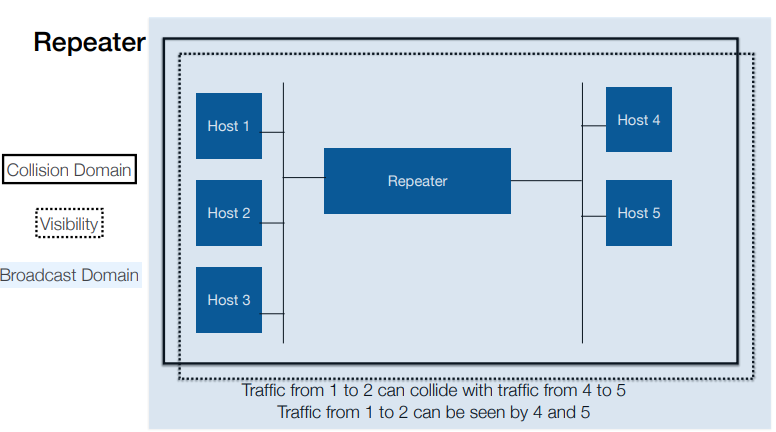
Just an analogue amplifier: collisions are seen on both sides
Bridge
A bridge receives, buffers and transmits frames, so collisions are not propagated
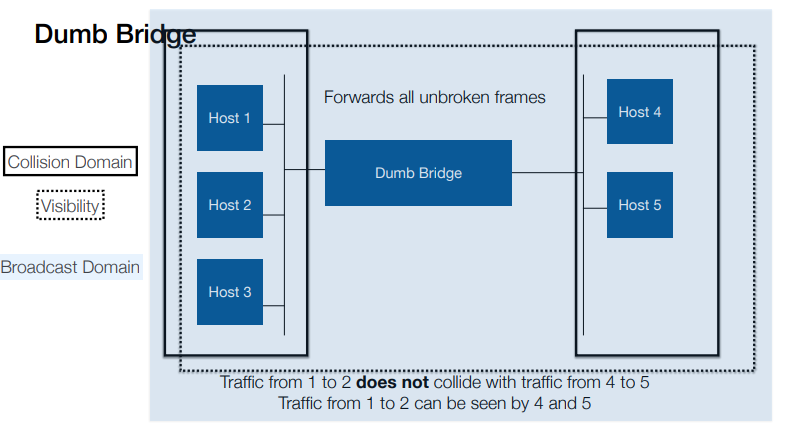
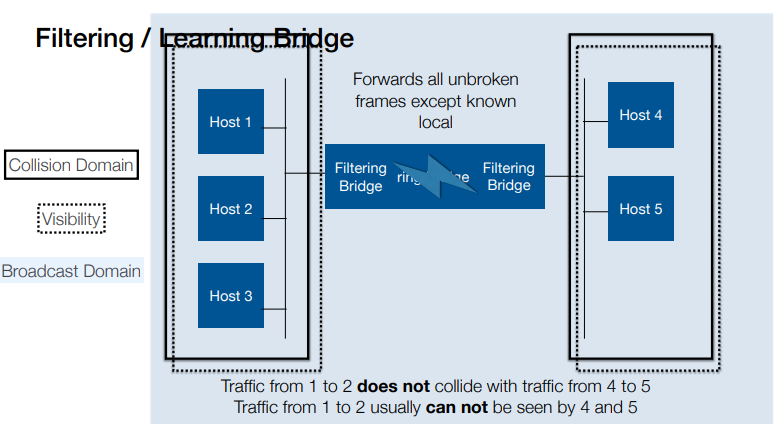
“learning” or “filtering” bridges only send frames that belong on the other side; “dumb” bridges just propagate everything
Ether hubs
Ether hubs are repeaters, not bridges. There are collisions when two stations talk.
What do the Collision Domain, Visibility and Broadcast Domain look like on a Repeater?
What do the Collision Domain, Visibility and Broadcast Domain look like on a Dumb Bridge?
What do the Collision Domain, Visibility and Broadcast Domain look like on a Filtering / Learning Bridge?
Ethernet Switches
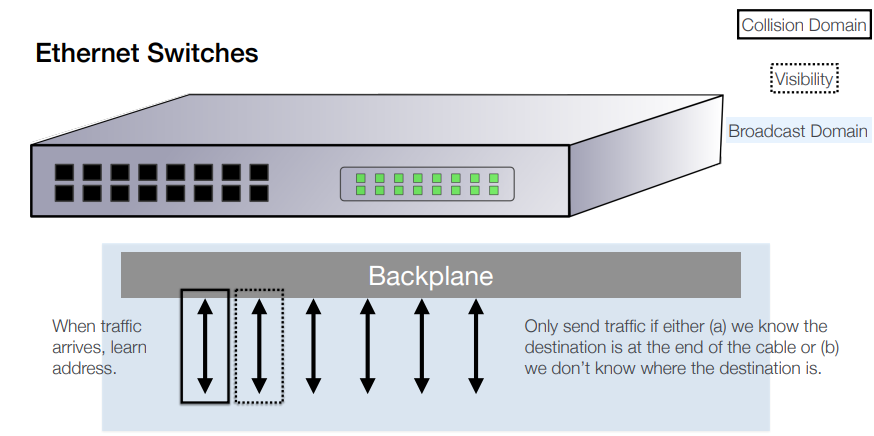
A switch is a set of learning bridges in a box.
Each interface is its own collision domain.
Packets to unknown destinations are sent out of all ports, otherwise only traffic for devices plugged in to the port is sent.
“Full Duplex” means traffic goes in and out without colliding as each direction is a separate collision domain.
Large buffers internally deal with congestion.
Result: no collisions, although they are still potentially possible (for example, one plausible response to running out of buffer space is to fake a collision)
Cut-Through Switches
Conservative switches accept frames in their entirety, confirm the checksum, then transmit them to other interfaces
Aggressive switches look at the header, and immediately start transmitting on the correct interface (“cut through).
This propagates broken frames if there are any to be propagated, as it can’t check the checksum (although some switches fake a collision to trash the broken packet, so it’s not propagated any further)
Token Ring/Bus
Token Rings and Token Buses pass a “token” from station to station
The station that holds the token can transmit, and then passes the token on when it has finished.
Slotted Rings
Instead of circulating a token, empty data frames circulate, in the manner of the conveyor belt in a Sushi restaurant, or other alternatives
Requires a minimum length of network, so that there are a sufficient number of empty packets circulating
Hence long lengths of cable coiled under the floor
Popular in UK universities as boards were cheap and easy to build and drivers were available for common Unix variants; never achieved significant traction elsewhere
How can latency be caused by filling packets?
Filling a 64 byte packet when you are sending 8KHz, 8 bit samples (ie, 64Kbps): 8ms
Note: filling a 1280 byte packet (20x bigger) is 160ms!
Receiving it at the other end: 8ms
That’s 32ms round trip: almost all your budget gone
With 32 byte packets, 16ms: you’ve got time to switch the packet
35ms - 16ms = 19ms, 5700km at speed of light
Americans were running echo cancellation already so didn’t care, and wanted larger packets for efficiency
French wanted smaller packets to avoid the problem.
Everyone lost, as 48 byte packets satisfied no-one (and made the standard look a bit mad)
How can we justify using ATM?
Smaller packets gives lower latency particularly for low-rate streams (but not low enough, as we saw)
Switching a stream of small datagrams is allegedly very inefficient (large headers, lots of routing decisions)
ATM is therefore virtual circuit orientated
Also incorporates extensive traffic shaping and policing options (more later)
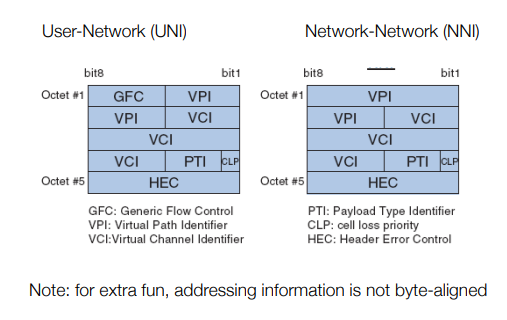
What are ATM headers like?
What does nailed up circuits mean?
ATM is virtual circuit orientated: you ask the network to establish a circuit, and once set up the packets just have to say which circuit they are on.
All packets on one VC follow the same path: simplifies error recovery, means packets stay in order (mostly)
Original idea for UK ADSL broadband was switched virtual circuits (SVC): you could choose your ISP dynamically, and a visitor could plug into your line and use their ISP (think dial-up, if you are old enough).
What are some Traffic Engineering policies?
Constant Bit Rate, Available Bit Rate, Variable Bit Rate, Unspecified Bit Rate…
Different profiles over Cell Delay Variation Toleration (the variability of latency) and various minimum, average, maximum and burst parameters
What is the idea behind traffic engineering?
Idea was to share out limited bandwidth “fairly”, while providing a means to charge for premium services.
Applied to each virtual circuit, to match requirements of applications
Which implies one VC created per application, which as we have seen didn’t work
What does Constant Bit Rate do?
Constant Bit Rate guarantees you a fixed-speed point to point link, as close to a piece of wire as you can get
What does Variable Bit Rate do?
Variable Bit Rate allows you to burst to higher speeds, while preserving guarantees about timing
What does Availability Bit Rate do?
Available Bit Rate guarantees you a minimum performance, but potentially delays packets that exceed it (and is very complicated)
What is Unspecified Bit Rate?
Unspecified Bit Rate is best efforts, for rate, delay and reliability
What is Traffic Shaping?
At the edge of the network, you can shape data into a particular profile by clocking it into a large buffer as it arrives and clocking it out within the parameters of the profile. This might introduce delay if the arrival rate is higher than the departure rate, and will drop packets if the average input rate is higher than the average departure rate (more memory allows you to deal with this for longer).
Buffer acts like the queue for a crowded train
What is Traffic Policing?
Core equipment does not have the capacity to shape traffic, nor should it have to if the edge equipment is doing its job.
Traffic policing (aka “hard drop” policing) simply checks whether passing traffic is within the parameters for the VC, and discards anything which is outside
What is Traffic Engineering?
Traffic Engineering is useful whenever you have traffic of varying sensitivities which you need to fit into a restricted link
Similar requirements to prioritise voice in large deployments. Which leads to MPLS, which we will talk about at the end
Why are switches not always effective?
Ethernet switching solves many of the problems of ethernet
Machines exchanging large amounts of data no longer hog the ether (a big issue in the past with backup scheduling)
Machines exchanging large numbers of small packets no longer hog the ether (a big issue in the past with remote window systems like X11)
Performance is far more predictable