EECS 3421 Second Half
 Call Kai
 Learn
Learn Practice Test
 Spaced Repetition
 Match
Match Flashcards
 Knowt Play
1/23

There's no tags or description
Looks like no tags are added yet.
Name | Mastery | Learn | Test | Matching | Spaced | Call with Kai |
|---|
No analytics yet
Send a link to your students to track their progress
24 Terms
What does SQL stand for
Structured Query Language
What is SQL
Developed by IBM
A standard query language for relational database access
can be used by most RDBMS tools such as IBM DB2…
SQL Commands
• Data Definition Language (DDL)
• Data Manipulation Language (DML)
• Data Control Language (DCL)
• Transaction Control Language (TCL)
Data Definition Language (DDL)
Set of commands to create and modify the structure of database objects (e.g., tables, views, schemas, indexes, etc.)
goal is to enable the implementation of the relational schema as an actual relational database
Example commands: CREATE, ALTER, DROP
Schema is the logical definition of a database (it defines table name, column names, data types, etc.)
Data Definition Language (DDL) Example
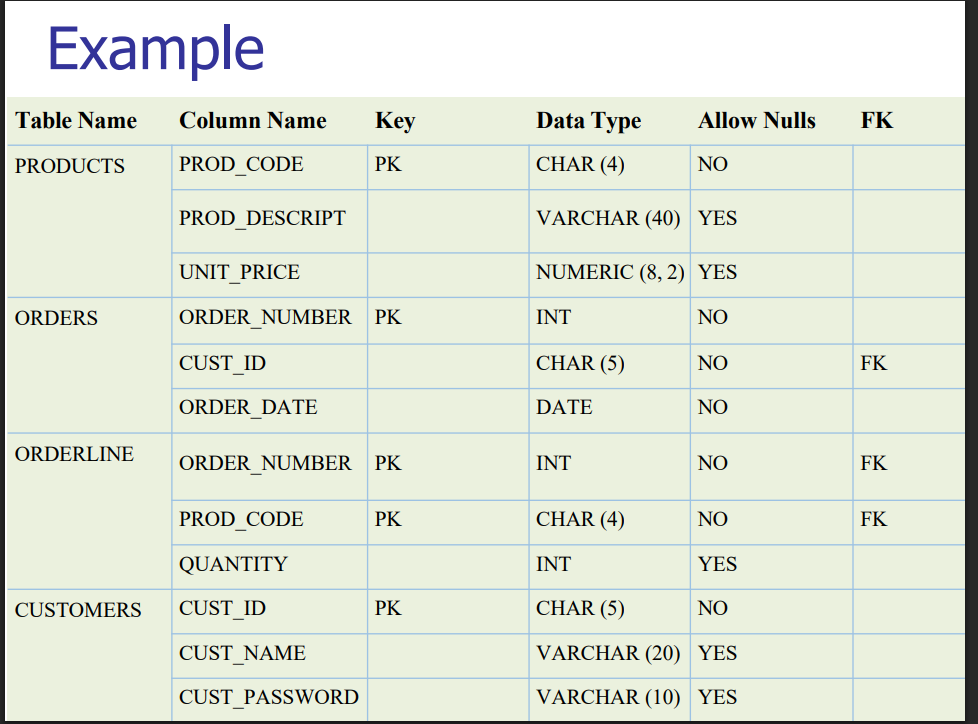
SQL Data Types
Numeric - int, numeric, float
String - char, varchar, text
Date amd time - date, datetime
Data Manipulation Language (DML)
used to insert, modify, delete, and retrieve data.
Primary DML Commands:
SELECT
INSERT
UPDATE
DELETE
Data Manipulation Language (DML) Example
select Staff_Name, Salary
from Staff
where Salary > 15000;
n insert into Staff
(Staff_ID, Staff_Name, DeptNumb, Salary)
values (510, ‘Harrison’, ‘D38’, 15400);
n update Staff
set Salary = Salary * 1.15
where Staff_ID = 510;
n delete from Staff
where Staff_ID = 540;
SELECT
specifies the attributes to be returned by the query
SELECT DISTINCT
show one instance of all the different values of the selected attributes in the relation.
FROM
specifies the table(s) from which the data will be retrieved
ORDER BY
sorts the final query result rows in order based on the values of one or more ascending or descending attributes
WHERE
filters the rows of data based on provided criteria
Operations:
Arithmetic operators:
+ - * /
Comparison operators:
= > >= <= <>
Boolean operators:
AND OR NOT IN BETWEEN LIKE
GROUP BY
groups the rows of data into collections based on sharing the same values in one or more attributes
HAVING
filters the groups formed in the GROUP BY clause based on provided criteria (i.e., determines which groups will be displayed in the result).
JOIN
Combines data from two relations based on values for a common attribute
INNER JOIN Vs OUTERJOIN
INNER JOIN (not allow null in join fields: if missing,
drop)
OUTER JOIN (allow null in join fields)
LEFT OUTER JOIN (include all records in left join table course) --- include courses that do not have an instructor
RIGHT OUTER JOIN (include all records in right join table instructor) --- include instructors that do not teach any course
FULL OUTER JOIN (include all records in course and instructor tables)
ANY
ANY returns true if any of the subquery values meet the condition.
Example: List employees who work in EASTERN division
SELECT STAFF_NAME, STAFF_ID
FROM STAFF
WHERE DEPTNUMB = ANY
(SELECT DEPTNUMB FROM ORG WHERE DIVISION = ‘EASTERN’)
ALL
returns true if all of the subquery values meet the
condition.
Example: Find the department with highest average salary
SELECT DEPTNUMB, AVG(SALARY)
FROM STAFF
GROUP BY DEPTNUMB
HAVING AVG(SALARY) >= ALL
(SELECT AVG(SALARY) FROM STAFF GROUP BY DEPTNUMB)