CompTIA A+ Hardware and Network Troubleshooting
 Call Kai
 Learn
Learn Practice Test
 Spaced Repetition
 Match
Match Flashcards
 Knowt Play
1/198

Earn XP
Description and Tags
Name | Mastery | Learn | Test | Matching | Spaced | Call with Kai |
|---|
No analytics yet
Send a link to your students to track their progress
199 Terms
Back up the phone, then reset it to factory specifications
You have an android phone that is extremely slow. The apps aren’t as speedy as they used to be, but there’s still plenty of free memory. You’ve restarted your phone multiple time, but it’s still too slow. You Tried simply running one application at a time , but it’s still slow regardless of whatever app you’re using. What should you do next?
The projector entered standby
A one-day training session is taking place in your company’s conference room. When the group has returned from their lunch break, the projector had been turned off. The presenter has asked for your assistance. Of the following scenarios, which has MOST LIKEY happened?
Slower switch
A customer reports that despite installing a 10GB ethernet card in his server and using a cable that supports 10 GBps, his network connection is still running at 1 GBps. What is the MOST LIKELY source of the problem?
Inspect the inside of the computer for visible signs of damage
A client calls you to report that she smells as if something is buring from her desktop computer. Right after that you ask her to turn the computer off. What should you do next?
Reseat the RAM
A macOS computer is beeping and the sound repeats once every 5 seconds. What should you do to fix the problem?
Move toward an outside wall
A user needs to make a phone call, however, when she stays inside her building, the signal bar is just displaying a half. What should she do then?
Go to settings, select the General tab’ and for Date and Time choose set automatically
An iPhone always has the wrong time, what should the owner do to simply fix the issue?
Print a test page
You sent multiple print jobs to a networked printer, but nothing came out. You do not have administrator privelages’ on the printer. What can you do to test whether your Windows computer is CORRECTLY interacting with the printer?
The motor in the kitchen appliances are interfering with the Wifi signal
One of your coworkers has just started working from her home, and she said that she preferred working in her kitchen, so you helped her move the router into the kitchen to get a better signal. However, since then the Wi-Fi connection has dropped periodically no matter where she is in the house. What is going on?
Paper will jam
A user bought replacement printer paper with a thicker caliper than the device manufacturer suggested. When using this type of paper, which of the following faults will the user stand the biggest risk?
Enable write caching on the drive
Your computer’s hard drive performance has slowed over time. A brief look at Performance Monitor reveals that your disk read/writes are taking longer than expected. What should you do to fix this problem?
Dead pixels
A user says that the video on their desktop computer is not correctly displaying. There are various points on the screen where the screen does not light up; these are always black dots. This is a sign of _______________________.
Replace the failed drive and restore from backup
What can you do to recover a Raid 0 array using for disks when one of the disk fails?
You’re not sure but will check the vendor documentation
While working on a server RAID array, you notice that the drive is glowing green, then amber, then off. What does this mean?
Reseat the sound card
A welcome video is shown on the desktop computer in your building lobby for visitors. Recently the audio began to fail intermittently. You change the speakers, but the problem is still there. What should be your next step in troubleshooting the problem?
The WAP is down
A user contacts the help desk to report that they are receiving a “SSID not found” error message. Then you get a call for the same reason again. The day before , both individuals were connected from the identical locations. What is the MOST LIKELY source of the problem?
The system BIOS completed the POST routine normally.
After replacing a damaged RAM in a desktop computer, you restart the computer, and it beeps once after a few seconds. What does this imply?
Back up the system’s data
You’re debugging a computer system that has an S.M.A.R.T. (Self-Monitoring, Analysis, and Reporting Technology) error. Which of the following actions will you take FIRST?
Incorrect video resolution
The icons on a computer screen are so big that its u ser can see only a few of them while the user can see the start menu. Which of the following is MOST LIKELY to be the cause of the issue?
Stepper motor
Your inkjet printer’s print lines are unevenly spaced. Some are too near to one another, while other are far away. What is the MOST LIKELY source of this issue?
Uninstall and reinstall the app
An Android phone runs slowly. The issue appears to be limited to one app in particular. You check and discover that the phone still has plenty of free RAM. You’ve restarted the phone multiple times, yet the app is still slow. What should you attempt next>
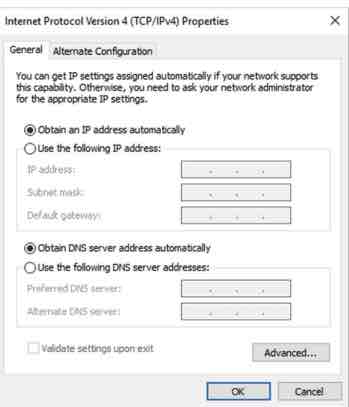
Use a packet sniffer to determine the computer with a duplicate address, and change that computer to obtain an IP address automatically
A user recently reported intermittent network access issues. While troubleshooting, a notification appears stating that Windows has identified an IP address conflict. There is a DHCP server on your network. When you open the user’s TCP/IP properties, it is configured as in this picture. What steps must you take to fix the problem?
Establish a theory of probable cause
A user has called the hotline, and you’re assisting them in troubleshooting a malfunctioning PC. When you question the user, you learn that there was a lightning storm in his neighborhood the night before. What step of the best practice technique for problem resolution will you do next?
Gather information
Describe the problem
Determine the most probable cause
Create a plan of action and test a solution
Implement the solution
Analyze the result
Document the process
Troubleshooting methodologies vary, but the following seven steps are often used.
Inverter
Which display component is MOST LIKELY causing a laptop’s screen to intermittently flicker?
Install RAID-5
Your server’s drive read/write times are becoming a bottleneck in your system, and you’re worried about downtime if a drive fails. Which of the following will have the BEST positive impact on performance and fault tolerance?
Identify the problem
A computer cannot boot normally. As an IT help desk, you ask the owner if there are changes that he has made to the system. According to the troubleshoot methodology, this action is reffered to as which step.
Find a way to increase the refresh rate of the device
A user asked if he could do anything to fix tearing on his display so that he might get a better gaming experience. Which of the following is the BEST response to his question?
PSU
The desktop computer you’re working on won’t boot. When you press the power button , no status lights are on, and there are no fan sounds. You check the outlet and try a power cord that you know works, but it doesn’t help. Which component is MOST LIKELY to be at fault?
Replace the port
A laptop only charge when the connector is put at a certain angle and being wiggled. As a technician, what should you do in this situation?
The printer driver
A printer has just been installed on a client computer. When the technician prints to the printer , the characters are entirely garbled. What is the MOST LIKELY source of this issue?
Replace the display
A user says that no matter what image is displayed on her LCD desktop display, she can always see an outline of another image that never changes. What can you do to solve the problem?
The video cable is loose
When you move your laptop, the display appers to flicker on and off. What is going on?
Processor
You’re investigating a PC that, according to its owner, shuts down after 10 minutes every time it is booted up. The same thing happens if he waits a few minutes and resume it. What is the MOST LIKEY source of the problem?
Motherboard’s internal USB connector disconnected.
When setting up a new desktop computer, you find everything id working fine except for a flash drive which is placed in the USB ports on the top of the case. This drive is not recognized by the operating system. Which of the following is MOST LIKELY to be the cause?
Add another switch to the network
Your network has just expanded from 50 client machines to approximately 90. All network workstations are connected by Cat 6 or better cabling, and all network devices handle at leat 1 Gbps data transfers. Since thr expansion, users have been reporting extremely sluggish network connections, and complaits are becoming more frequent. Which of the following actions is MOST LIKELY to aid in the resolution of the problem?
POST
What is the name of the boot routine, that among other things, checks the size and integrity of the system memory?
Replace the HDMI cable
Your company has a busy conference room with a ceiling-mounted projector. An HDMI cable connects the projector to the laptops of users. Users have recently complained that the sound is muted regardless of which computer is connected to the projector. What are you going to try first to solve it?
Wireless router overheating
A user claims that the wireless internet connection would go down at random throughout the afternoon. You check the Internet router near the window to see if it is still powered on and its power supply still works. What is the MOST LIKELY source of this issue?
Replace the projector bulb
At the end of a long presentation, there is a loud pop sound heard from the projector, then the image goes dark. In this situatiuon, what should be done to fix the issue?
Try the display on another computer or another display on this computer
When a macOS desktop computer boots, no image appears on the screen, but a chime sound is heard and normal indicator lights illuminate. The monitor is linked to the computer, and the power light is illuminated. What should the next step in the troubleshooting process be?
Replace the backlight
An LCD display suddenly turns very dim, even when the brightness settings is set on the highest level. In this case which of the following options will MOST LIKELY resolve the problem?
Video port
A user attempts to project a presentation onto a screen, but nothing happens. He attempts toggling their LCD cutoff switch, but it has no difference. Another user has just finished presenting on the projector, and everything was OK. Which of the following components is MOST LIKELY to be at fault?
Verify full system functionality and, if applicable, implement preventitive measures
You’re troubleshooting a laptop that you think has malware on it. You have devised a strategy and implemented the solution. Which step should you take next, according to the best practice problem solving methodology?
Disconnect the power, and turn the device off
You and a friend are having lunch. He is charging his phone, and you see it;s swelling. what should be the initial step?
The contrast setting is too high
A projector is showing fuzzy images on the screen when being used. In this case, which of the following issues is LEAST likely to be the cause?
Low RF signal
As you handle computer problems, you must reguraly carry your laptop throughout the building. The Wi-Fi connection stops completely in many locations. What is the MOST LIKELY source of this issue?
Turn the phone off and let it cool down
A phone is getting extremely hot and appears to be locked up. What should the phone owner do in this case?
Try rebooting the system. Windows will try to fix it
A user call you in panic because her computer has a BSOD. You ask wheter a error message is displayed or whether she has recently installed any hardware or software. They haven;t done so. To resolve the BSOD, which of the following should be the first step to be done?
HIs company firewall
A user has the habit of watching gaming streams on Twitch, he can easily enjoy those contents at his home as well as at his friend’s homes. When he enters the site on his computer at his office after lunchtime, the website looks fine, but he can’t watch anyone play games. He encounters the same issue even when using his phone. Which of the following is MOST LIKELY to be the reason in this situation?
CMOS battery
The desktop computer you’re fixing won’t save the correct time and date. You set the time and date, then turn off and on the system. The settings are once again incorrect. Which component is MOST LIKELY to be at fault?
On a stand in the corner of the dining room
You’ve just moved into a new two-story townhouse and are considering where to put your router. The townhouse has an oopen floor design, with the dining room in the center. Which of the positions is the best?
The battery is failing
A user claims that their tablet computer will only run for around 20 minutes on battery power, even after the battery symbol indicates it is full. They claim that it initially ran for serval hours on battery power. What is the MOST LIKELY source if the issue?
ping -t
Several network cables were unplugged from the patch panel, and none were labeled. You're at the workstation that has to be reconnected, while another technician is in the cable closet. You should configure this computer to monitor network connectivity continuously so that you know when the other technician plugs in the correct cable. In this case, you should use which of the following commands?
Port flapping
A port on a Cisco switch is repeatedly changing between up and down repeatedly. What is this called?
Use lint-free swabs with a small amount of isopropyl alcohol to gently clean the connection
Your phone isn't charging correctly. Inside the port, you can see corrosion on the connectors. Which of the following is the BEST solution?
Remove and reinsert the toner cartridge
After replacing the toner cartridge on a laser printer, a technician notice an error message displayed on the screen. What should this technician do next?
Cable tester
You are working remotely and your computer could not connect to the network properly. You suspect that there might be issue with the UTP cable or the network card. In this case, you can use which of the following tools to determine whether the cable is causing the problem?
The corporate policies, procedures, and impacts before implementing changes.
You're going to start troubleshooting a laptop that doesn't have a display. What should you always consider before beginning troubleshooting, according to best practice methodology?
Document the finding, actions, and outcomes
You just finished debugging a network connectivity issue for a user at your firm. You've confirmed that the system is fully operational again and discussed with the user about how to avoid this incident in the future. After all of these, what are you supposed to do next?
Adjust the antennas
You've just installed and configured a new WAP to improve network access in a distant area of the facility. Even if you're looking up at the WAP, there are just a couple of bars when you turn on your laptop to check connectivity. What should you do?
The fusing roller
The advertising department at your company has spent the entire day printing flyers for an upcoming seminar. They've just called you because they've found that the last several printouts had lighter copies of the print job shown under the original. What component are you going to clean or replace?
Before making changes
A Windows desktop computer seems to be having driver issues. When is the best time to perform system backups, according to troubleshooting methodology?
Perform a software reset
Your Xerox color multifunction printer is making a grinding sound. What will be your FIRST step to solve the issue?
Replace the phone
What should you do when your phone keeps over heating and being locked up completely?
PSU
A user reports that their computer is making a loud whining noise. It happens whenever the device is turned on and is fairly consistent. Which component is
MOST LIKELY to be the source of this issue?
The OS is performing updates
After a period of working, a user decides to restart his Windows 10 computer, but instead of booting into the operating system, the screen flashes on and off numerous times and appears to reset. In this situation, what is happening?
Gentle shake or replace the toner cartridge
Your laser printer frequently creates photos with white streaks going down the page. What can you do first to fix this problem.
Magnetic hard drive
Which of the following components’ failure will cause an intermittent grinding noise?
RAM
You are debugging a crashed Windows 10 computer. It displays a blue screen with the error messages “UNEXPECTED_KERNAL_MODE_TRAP.“ Which component is MOST LIKELY to blame for this issue?
Press and release the volume up button, press and release the volume down button, and press and hold the side button
Your iPhone 11 appears to have locked up. The touchscreen is inoperable. You press and hold the volume and side buttons, but nothing happens. What should be your next action?
Packet loss
User on your Network are hearing only ever other word during VoIP ( Voice over IP) calls. What is this a sign of?
It will display incorrect colors
A user bent some of the connector pins while plugging in a VGA display. You tried to straighten them up, but two of them broke off. What is the MOST LIKELY outcome if you use this display?
Check for problems with their router
You’ve arrived at a friend’s apartment. Your phone was OK before you arrived, and it is usually fine when you are here, but now it takes forever to open a web page, then it times out and asks if you want to use cellular data. You’ve reached the limit of your data plan. What should you do then.
Faulty switch
Several users in one area of the building have called in over the last five minutes to complain that their network connection has dropped significantly. Earlier in the day, the connection had been functional. What is the MOST LIKELY source of the problem?
If the tablet is set to silent mode
A user is irritated because when they receive a phone call, their Android tablet does not ring. What should be the first thing you have them check?
RAID 5
Which RAID level will have the least number of drives wile still offering higher performance and fault tolerance?
A toner vacuum
A technician spilled toner on and around a laser printer while replacing a toner cartridge. Which of the following tools should be used to clean the spill?
Run Optimize and defragment the drive
A computers’s hard drive performance has slowed over time. A brief look at Performance Monitor reveals that the disk read/writes are taking longer than expected. Which of the following actions would MOST LIKELY fix the problem?
Remove old files or applications
A user complains that their PC is slow. When you examine, you discover that the free disk space at 5%. What is the FIRST solution to consider?
Re-center the laptop’s point stick
You’re working on a laptop computer with a pointing stick in the center of the keyboard. If no one moves the external mouse, the cursor will gradually move up and to the right. You’ve tried a new external mouse, yet the problem persists. What steps should you take to fix the problem?
The RAID controller
You’ve installed an internal RAID controller and set up a RAID-5 array with four hard drives. It has been functioning normally. When you boot up today, you get an error message that says, “RAID not found.” Which component is MOST LIKELY to blame for this problem?
HDD
A user reports that thier computer occasionally fails to open files in carious programs. Which component is MOST LIKELY to be the source of this issue?
Leet the phone cool down before turning it on again
While driving, you place your phone in a cubby on the dashboard of your car. It’s a frigid winter day in upstate New York, so you’ve turned up the hear in your car. When you get to your destination and take out your phone, you realize that it has shut down and will not switch back on. What should you do?
The network cable may not be connected
A user complains that he is unable to access his network shares, email, or connect to the printer, but that his local applications are operational. When you as the user if he has changed anything since hi last access, he says that he just cleaned his desk. What could be the issue?
The RAID controller’s BIOS
A PCIe RAID controller has just been installed to establish a RAID 5 array with three disks. After the disks has been inserted, the computer id turned on. However, the RAID array is not recognized. Where should the technician find or go to set up/ troubleshoot the RAID array?
Update the driver
A user in your network reports that he can not connect to your WiFi network, no matter how many times he tries. When you check their device, there is no indication that WiFi is functioning, and Airplane mode is turned off. What shouold you do if you notice a yellow exclamation point next to the WiFi NIC in Device Manager
Backlight
A user’s iPhone began experiencing random flickering while in use. Despite his attempts to resolve the issue by powering the phone off and on again, the flickering persists. Which of the following components is the MOST probable cause of the problem?
Lower the WAP’s power setting
While walking around the outside of your office building, your WiFi analyzer detects that your network is visible in the parking lot. You are afraid that an unauthorized individual may join to your wireless network. What should you do to relieve your concern?
Their wireless card id disabled
A user contacts from their desk in the morning to complain that his laptop is unable to connect to the wireless network. He has never had an issue connecting to the WiFi network from his cubicle. When you look at his WiFi adapter, you find out no lights are glowing. What is the MOST LIKELY source of the problem?
Update the WAP’s firmware
Your corporate office has issued a directive requiring all remote offices to utilize a security protocol that your WAP does not support. What should you start with?
PSU
When you turn on a desktop computer, you can hear the fan spinning. However, there are no indicator lights or a POST beep. Which component is MOST LIKELY to be at fault?
Remove and reinsert the battery
What is the most recommended initial step to resolve the issue when a user reports that their laptop does not charge when plugged into an AC outlet?
The display has a native resolution of 1920x1080
You recently plugged an OLED display into a desktop PC. When one of your coworkers adiusts the resolution from 1920x1080 to 1920x1200, the image becomes severely distorted. What is the MOST reasonable reason for this?
You're not sure but will check the vendor's documentation.
You own a NAS and have seen alternating blinking red and white LEDs. What is going on?
Open the log for information on failed jobs
During a meeting, The manager complains that the projector has been acting weird since the meeting began. He attempted to run the projector from a few laptops but was unsuccessful. There were multiple pop-ups, however it’s unclear what the pop-up windows reported. What should you do next to fix the problem?
SSID broadcasting is disabled on the WAP
A user equipped with an 802.11ac network adapter is attempting to connect to your 802.11ax network. His laptop is right next to yours, which is offline. He is, however, unable to locate the SSID. What is the MOST LIKELY source of the issue?
Pickup roller or seperation pad
Print jobs have recently begun pulling many pages from the tray rather than just one. You’ve checked that the paper is the correct weight, that the try is properly calibrated, and the paper’s edges are fanned, yet it still happens. What part of the printer will MOST LIKELY need to be replaced?
Push and hold the power button until the laptop turns off, and reboot
On a laptop which seems to be frozen, you repeatedly enter the Num Lock key, yet the indicator light remains on. What should you do to try to solve the problem?
A USB drive is in a USB port
Your home PC was great yesterday, but now your recieve an error message claiming that a bootable device could not be located. Which of the following is MOST LIKELY?