Quarantine and Monitor
 View linked note
 Call Kai
 Learn
Learn Practice Test
 Spaced Repetition
 Match
Match Flashcards
 Knowt Play
1/27

Earn XP
Description and Tags
Vocabulary and key concepts from the LAN Edge Architect study guide focusing on manual and automatic quarantine mechanisms in FortiOS 7.6.
Name | Mastery | Learn | Test | Matching | Spaced | Call with Kai | Chat |
|---|
No analytics yet
Send a link to your students to track their progress
28 Terms
Layer 2 Quarantine
A quarantine method involving the use of switches, NAC, or 802.1X to isolate noncompliant devices based on MAC address or VLAN assignment.

Layer 3 Quarantine
A quarantine method using firewalls or routers to control IP traffic from noncompliant devices based on IP address or routing/firewall rules.
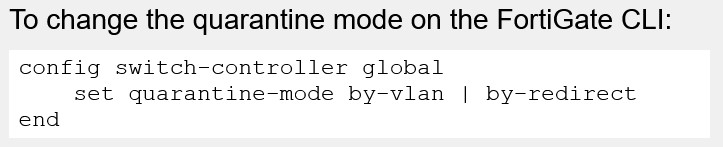
To enable MAC address quarantine on the FortiGate CLI (enabled by default):
config user quarantine
set quarantine enable
end
MAC Address Quarantine
• Two modes supported:
• By VLAN (default mode):
• Traffic from quarantined device is placed in the quarantine VLAN
• No additional configuration required to block the inter-VLAN traffic if using the default quarantine VLAN
• By redirect:
• Device is kept in the current VLAN
• A firewall policy is required to block the inter-VLAN traffic
• In both modes:
• Intra-VLAN traffic is blocked automatically by FortiGate
• Additional policies can be created to allow quarantined devices to access restricted network resources
VLAN 4093
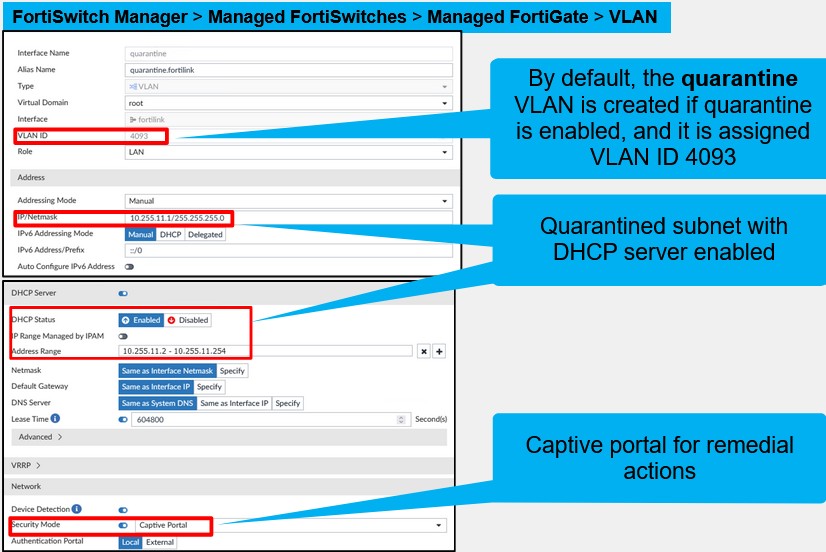
The default VLAN ID assigned to the quarantine VLAN in FortiOS when quarantine is enabled.
By VLAN Mode
The default MAC address quarantine mode where traffic from a quarantined device is placed into the quarantine VLAN, automatically blocking inter-VLAN traffic if no policies are configured.
Note that the device can still get an IP address through DHCP because the quarantine VLAN has the DHCP server enabled by default. However, this would require the device to restart its DHCP client, which typically requires user intervention. This could make it difficult for an administrator to perform remediation on the device.
By Redirect Mode
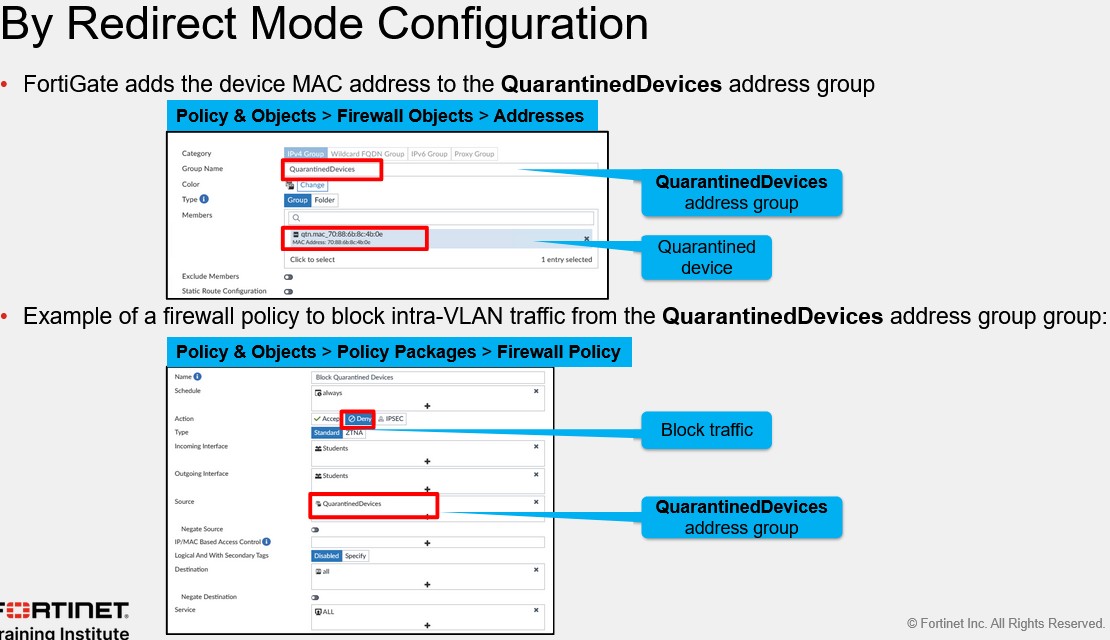
A quarantine mode where the device is kept in its current VLAN and its MAC address is added to the QuarantinedDevices firewall address group, requiring a manual firewall policy to block inter-VLAN traffic.
The device IP address does not change, which is useful for performing remediation
By Redirect Mode Configuration
• FortiGate adds the device MAC address to the QuarantinedDevices address group
• Example of a firewall policy to block intra-VLAN traffic from the QuarantinedDevices address group group
Quarantine VLAN Interface
If you are using by VLAN mode, then you might want use the default quarantine VLAN as your quarantine VLAN.
To isolate quarantined devices from each other, access VLAN is enabled on the quarantine VLAN by default.
The quarantine VLAN has captive portal enabled for device remediation. Part of the role of quarantining devices is to challenge connectivity with the captive portal.
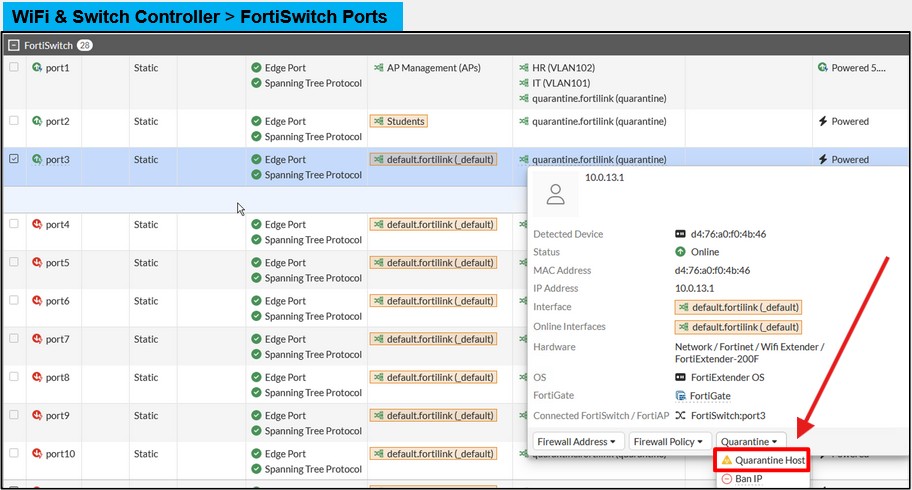
Quarantine a MAC Address Manually—FortiSwitch Ports
To manually quarantine a MAC address on the FortiGate GUI, browse to FortiSwitch Ports on the WiFi & Switch Controller page, click the device listed in the Device information column, and then select Quarantine Host.
QuarantinedDevices
The firewall address group to which FortiGate adds a quarantined device's MAC address when using by redirect mode.
Access VLAN
A setting on the quarantine VLAN, visible only on the FortiGate GUI, that isolates quarantined devices from each other within the same VLAN.
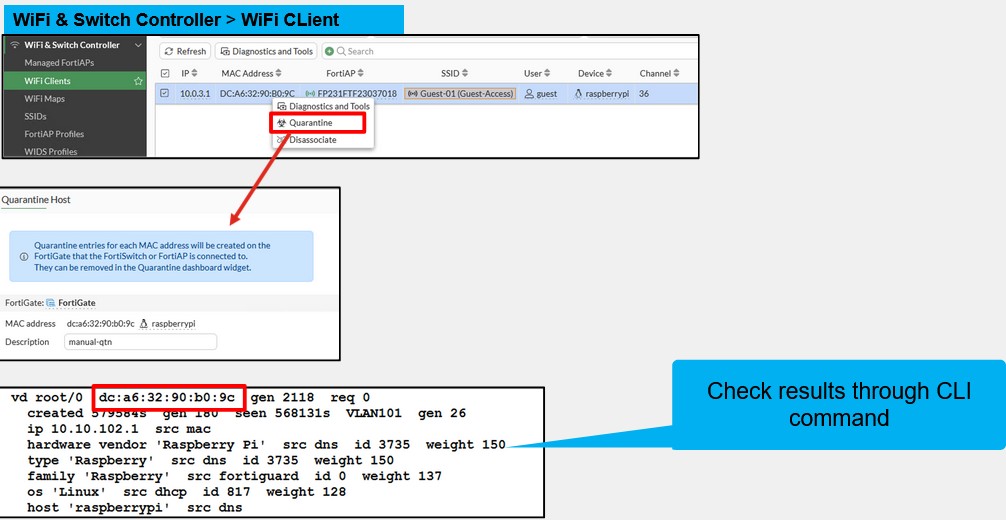
Quarantine a MAC Address Manually—WiFi Clients
FortiGate offers the capability to quarantine wireless users connected through FortiAPs, enabling administrators to isolate devices that exhibit suspicious behavior or violate network policies.
Manual Client Quarantine—WiFi Clients
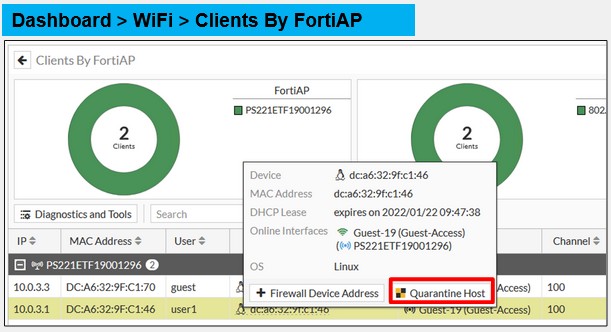
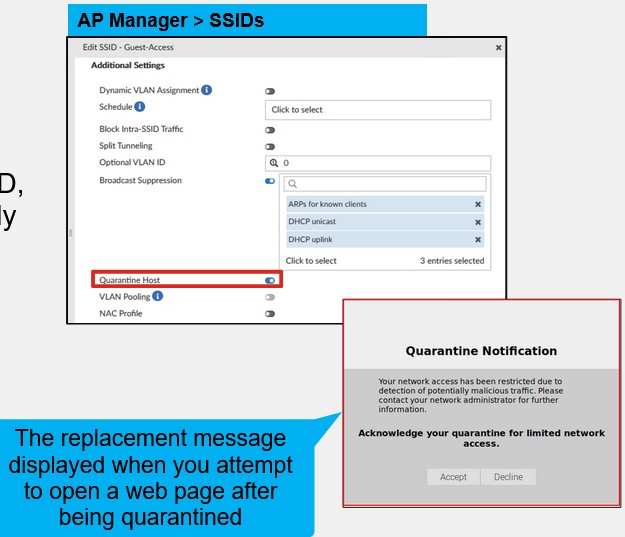
Another method that you can use to manage any hosts that are currently quarantined, or release hosts from quarantine, is by using the Clients By FortiAP dashboard widget, under Dashboard > WiFi
Quarantine a Device Automatically
Detection uses:
• Security Fabric (requires FortiAnalyzer with IOC license)
Requires FortiAnalyzer - you also need a valid threat detection services license. The license enables FortiAnalyzer to use IOCs to detect compromised devices on the network.
• Security events logs
• Automation stitch
After FortiAnalyzer determines that the device has been compromised, you can configure the Security Fabric to perform the following actions…
• IP ban
Block traffic from the device IP address on FortiGate (intra-VLAN traffic is still allowed)
• Access-layer quarantine
Block inter-VLAN and intra-VLAN traffic from the device MAC address using FortiGate and FortiSwitch
• Quarantine FortiClient
Block all traffic from the device on the device itself using FortiClient
• VMware NSX endpoint
If an endpoint in VMware NSX environment is compromised, it will be blocked using the security tag
• FortiNAC quarantine
IP ban
An automated traffic-based action that blocks traffic from a compromised device's IP address on FortiGate, though intra-VLAN traffic remains allowed.
Access-layer quarantine
An automated action that blocks both inter-VLAN and intra-VLAN traffic from a device's MAC address using the coordinated efforts of FortiGate and FortiSwitch.
Indicator of Compromise (IOC)
Events or characteristics collected about a device that indicate with high confidence that the device has been compromised, requiring a FortiAnalyzer with an IOC license for detection.
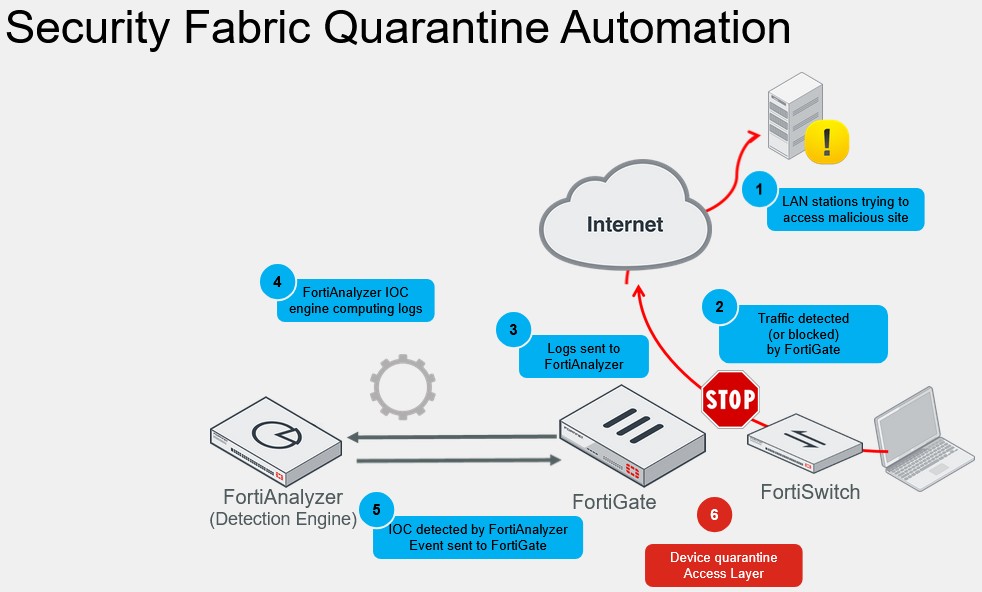
Security Fabric Quarantine Automation
User-defined automation on FortiGate to quarantine compromised devices can be strengthened with IOC services on FortiAnalyzer. This slide shows how compromised devices are quarantined automatically, using IOC and the Security Fabric:
1. A device attempts to access content that is a security risk, such as a malicious website.
2. FortiGate blocks access to the site based on the firewall policy defined with the web filter profile.
3. FortiGate sends a log record to FortiAnalyzer regarding the violation committed.
4. FortiAnalyzer processes the logs using IOC services.
5. FortiAnalyzer makes a security risk verdict and sends it back to FortiGate.
6. User-defined automation takes action to quarantine the compromised device and place it in isolation.
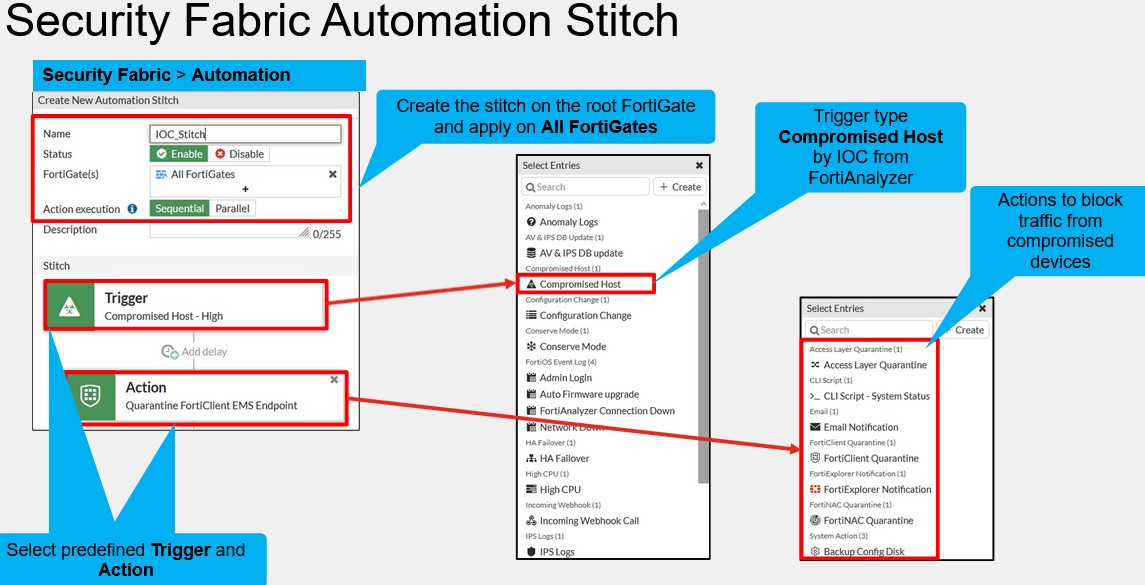
Security Fabric Automation Stitch
You can create the automation stitch only on the root FortiGate, and then select which of the FortiGate devices in the Security Fabric the stitch will be applied to when triggered.
The IOC verdict assigned to a compromised host triggers the actions specified in the automation stitch. Access Layer Quarantine is a layer 2 action that places the host machine in isolation.
After the stitch is triggered, there are many actions available. From the actions shown on the slide, the following can block the traffic from the device: Access Layer Quarantine, FortiNAC Quarantine, and FortiClient Quarantine.
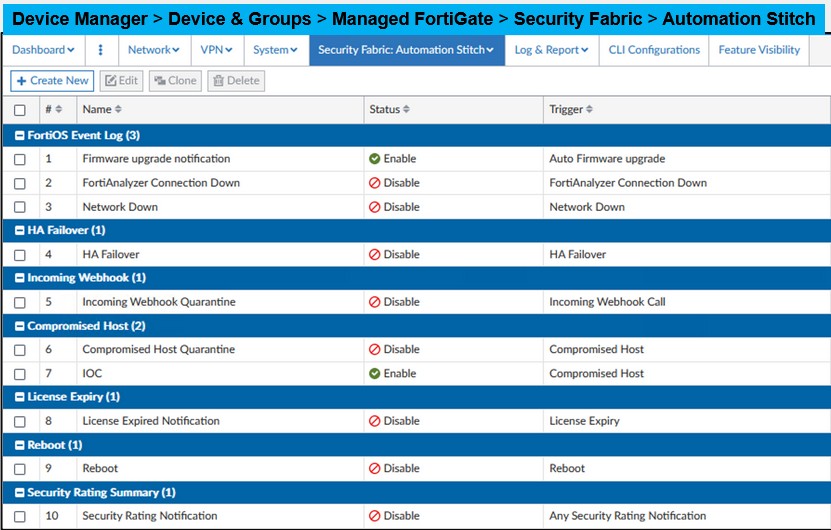
Security Fabric Automation Stitch—FortiManager
FortiManager allows administrators to configure automation stitches on a per-device basis. Unlike some other configurations, these stitches cannot be applied globally or through a template. This is because each FortiGate device may need unique automation actions that align with its specific network and security policies.
Integrated Wireless Quarantine
A feature available only for tunnel mode SSIDs within a Security Fabric that automatically creates a soft switch, quarantine interface, and captive portal when enabled.
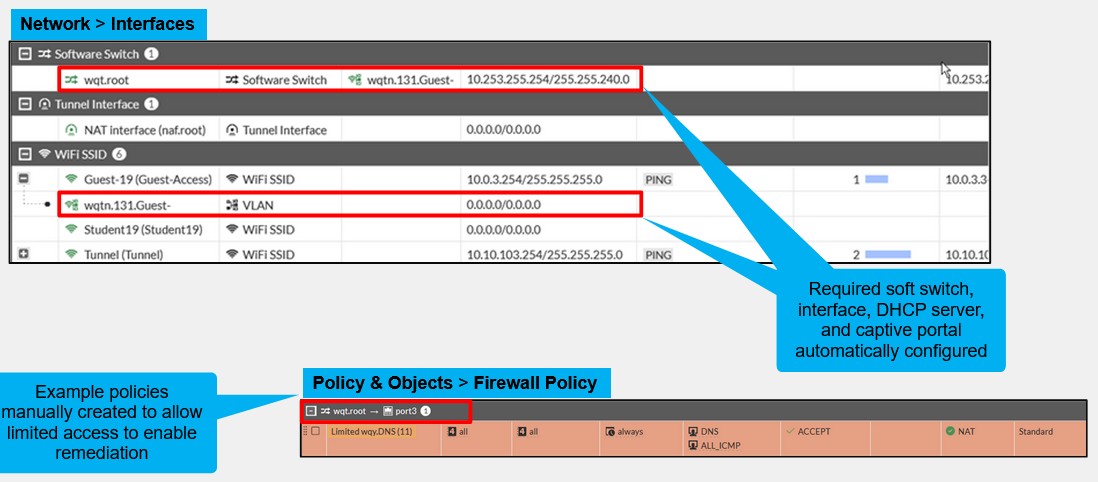
Integrated Wireless Quarantine (Contd)
Enabling a quarantine automatically creates a soft switch with a range of private IP addresses, together with a system DHCP server. It also creates a captive portal, and then creates a subinterface under the quarantined wireless network. If you want wireless clients to have access to the internet to enable them to update themselves, install required software, or both, you will need to configure a set of policies to allow limited access to the resources that are required. Typically, this requires DNS and specific HTTP/S access to resources that host the required remediation files.
Monitoring Compromised Devices
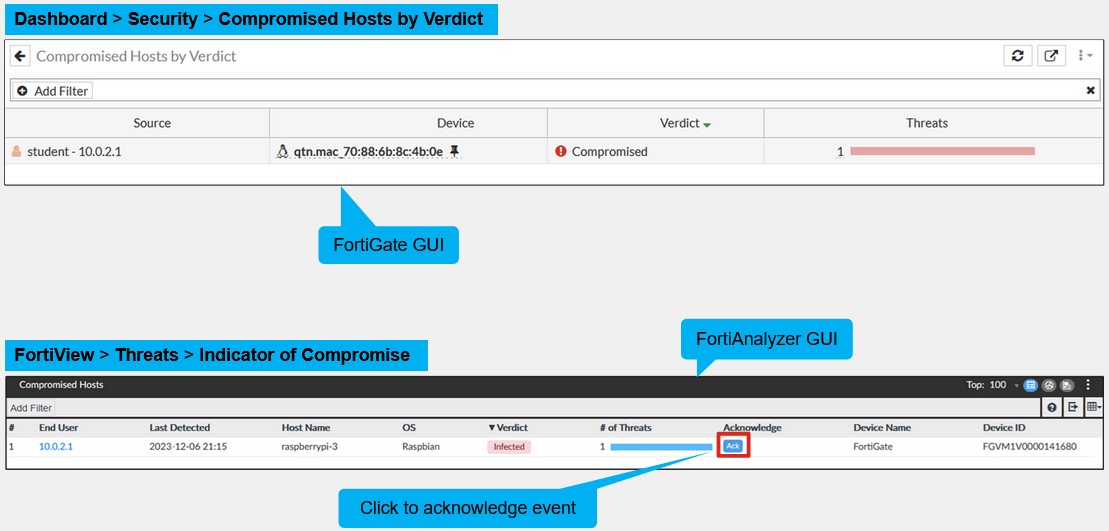
On the FortiGate GUI, you can view the compromised devices by IOC verdict by accessing the Compromised Hosts by Verdict widget available on the dashboard.
You can also display the compromised devices on the FortiAnalyzer GUI by accessing the Compromised Hosts section on FortiView.
You can click Ack to acknowledge the event. After you acknowledge an event, the event is removed from both the Compromised Hosts page on FortiAnalyzer, and the Compromised Hosts by Verdict widget on FortiGate.
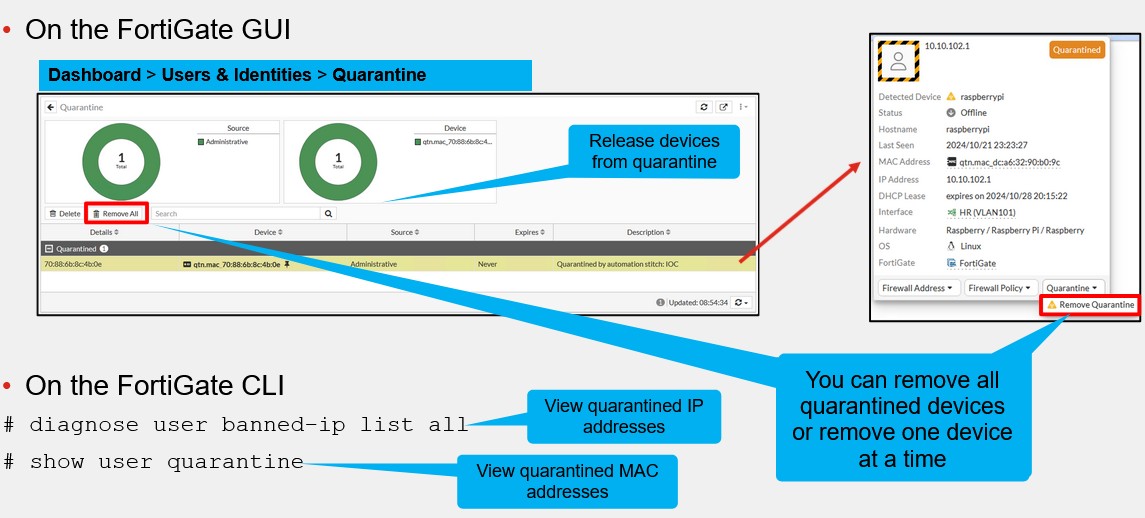
The FortiGate CLI command used to display the list of devices currently under an IP ban.
diagnose user banned-ip list all
The FortiGate CLI command used to view the list of quarantined MAC addresses.
show user quarantine
Monitoring Quarantined Devices
You can view the list of quarantined devices on the FortiGate GUI by accessing the Quarantine widget available on the dashboard