ASLP 5850 Exam I (AAC)
 Call Kai
 Learn
Learn Practice Test
 Spaced Repetition
 Match
Match Flashcards
 Knowt Play
1/63

There's no tags or description
Looks like no tags are added yet.
Name | Mastery | Learn | Test | Matching | Spaced | Call with Kai |
|---|
No analytics yet
Send a link to your students to track their progress
64 Terms
aided AAC
usage of something outside of the body
involves some form of equipment or technology
examples: communication board, PECS
unaided AAC
you are using your own body
no external equipment or technology
ex: vocalizations and speech approximations, gestures, signs, eye blink codes
low tech AAC
communication boards/books
objects
pictures
visual schedules
high tech AAC
computer/tablet/smartphone
communication apps such as AAC software that enable dynamic symbol/language representation
text to speech features
single message devices and recordable digitized devices
speech generating devices (SGD)
what is assistive technology
“any item, piece of equipment, or product system, whether acquired commercially, modified or customized, that is used to increase, maintain, or improve functional capabilities of individuals with disabilties”
what are the purposes of AAC
communication of needs and wants
information transfer
social closeness
social etiquette
communicate with oneself
communication of needs and wants
goal: regulate behavior of someone else as a means to fulfill wants and needs
focus of interaction is desired object or action
duration of interaction is limited
content is important
highly predictable
information transfer
goal is to share information
focus of interaction is info
duration of interaction may be lengthy
content is important
social closeness
goal is to establish, maintain, and/or develop personal relationships
focus of interaction is interpersonal relationship
duration of interaction may be lengthy
content isn’t as important
may be somewhat predictable
social etiquette
goal is to follow social norms of politeness (ex: greetings)
focus of interaction is social convention
duration of interaction is limited
content is not important
somewhat predictable
communicate with oneself (internal dialogue)
communicate with oneself or to conduct an internal dialogue
ex: diaries, journals, list of future plans, daily schedules
content words
refer to words that have a specific meaning
includes nouns, verbs, adverbs, adjectives, question words
carries meaning
ex: house, car, girl, who, intelligent
function words
represented by articles, conjunctions, modals, pronouns, prepositions, and auxiliary verbs
grammatical structure
ex: can, must, have to, a, the, near, with
core words
high-frequency words to comprise messages
small number of words
applies to all topics
applies to all environments
variety of parts of speech (verbs, pronouns, adjectives)
fringe words
low frequency words
large number of words
limited environments
useful in 1-2 situations
related to a specific topic
mostly nouns
vocabulary selection for preliterate individuals
vocabulary to communicate essential messages
developmental vocabulary (helps develop language skills)
vocabulary selection for non-literate individuals
aims to meet daily, ongoing, functional communication needs in a variety of environments
functional approach to selection
new vocabulary when new environments or participation opportunities are encountered
vocabulary selection for literate individuals
timing enhancement
message acceleration
fatigue reduction
how is vocabulary selection different for preliterate or nonliterate individuals
preliterate aims to develop vocabulary and communicate essential messages whereas nonliterate takes a functional approach to selection by aiming to meet daily, ongoing, and functional communication
considerations about timing enhancement, message acceleration, and fatigue reduction that should be made when selecting vocabulary for literate individuals
making sure it’s not taking them too long to put together their responses
the way to use the AAC matches their physical abilities
not requiring too much work on their end
multimodal communication
rely on different modes of communication - unaided and aided
multiple modes may be used to communicate a single message
important for both expression and comprehension
augmented input
what is augmented input
total communication → using signs and speech
ex: speech + pointing at pics on page
what is a symbol
“something used for or regarded as representing something else”
ex: hand doing an “ok” sign, pointing, etc.
gestures
fine motor movements of the fingers, hands, and arms, as well as facial expressions, body movements, or postures
types:
gesture involving contact with the referent
gestures that don’t involve contact with the referent (ex: pointing to a ball)
eye pointing (ex: eye gaze to a snack)
representational or iconic gestures (ex: moving hand up for “drink”)
conventional gestures (ex: nodding head for yes)
what are manual sign systems
access to greater range of vocabulary
ASL - true language system
seldom used in AAC intervention
advantages of manual sign systems
useful to augment expression and/or comprehension
less physically demanding than speech production
don’t require external equipment
disadvantages of manual sign systems
most don’t know manual sign languages
meaning cannot be easily guessed
partial object examples
part of the front of a cereal box used to represent cereal
label from a bottle of all-purpose cleaner to represent cleaning the kitchen
associated object examples
leash for walk the dog, sponge for clean the kitchen
tangible symbols
permanent and manipulatable with a simple motor behavior
ex: spoon, fork, cut out of a label
would use with someone with severe intellectual disability (it’s concrete)
advantages of using photographs in an AAC system
more portable
represent a greater range of concepts than real, partial, or associated objects
can be exchanged to communicate a request (PECS)
can be offered for choices
can be organized in a grid in a low tech communication board or book
visual scene displays
what are the considerations in selecting line drawing symnols
factors related to the vocabulary concepts represented (motivational value, familiarity, concreteness
iconicity - transparent (very obvious), translucent, opaque(not obvious)
factors related to the individual with complex communication needs
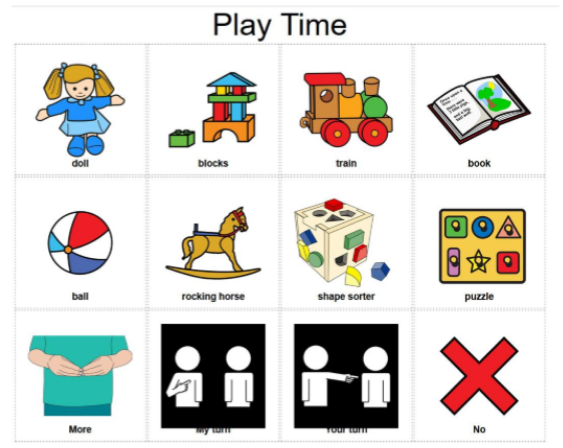
grid display
language concept is represented by a symbol which is organized in rows and columns in a grid pattern
few symbols or a diverse range of vocabulary concepts
can support a wide range of communication outcomes
don’t capture the functional relationships between people, actions, and objects
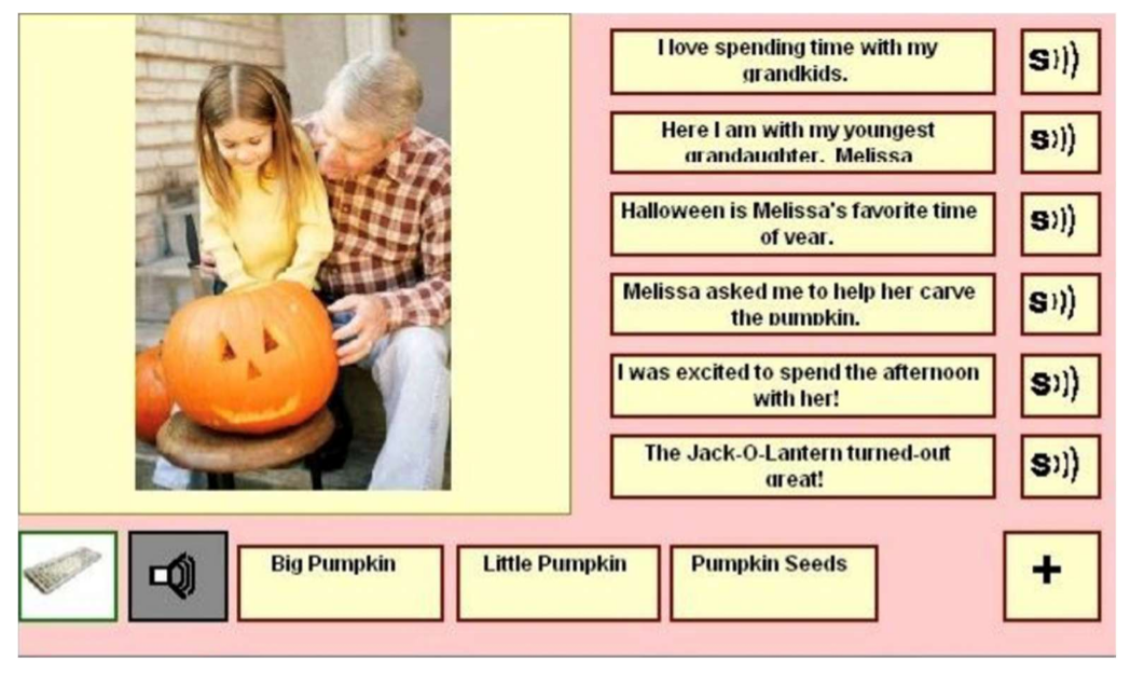
visual scene display
integrated scenes, typically photographs, of meaningful and motivating events within an individual’s life
language concepts are represented by “hotspots” in the scene
beneficial for both beginning communicators with developmental disabilities and adults with acquired conditions (ex: an adult with severe Broca’s aphasia)
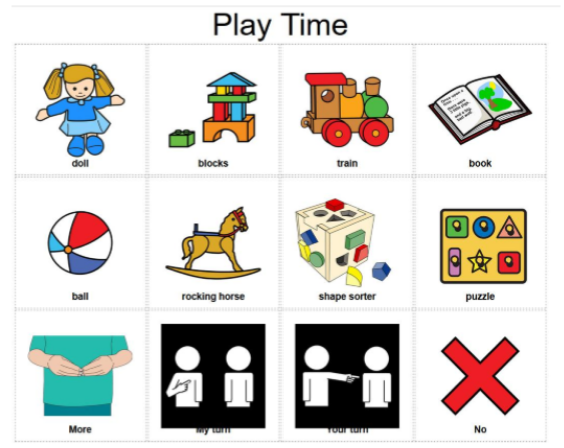
schematic grid display
all related to one topic
ex: everything on one single page relates to getting ready
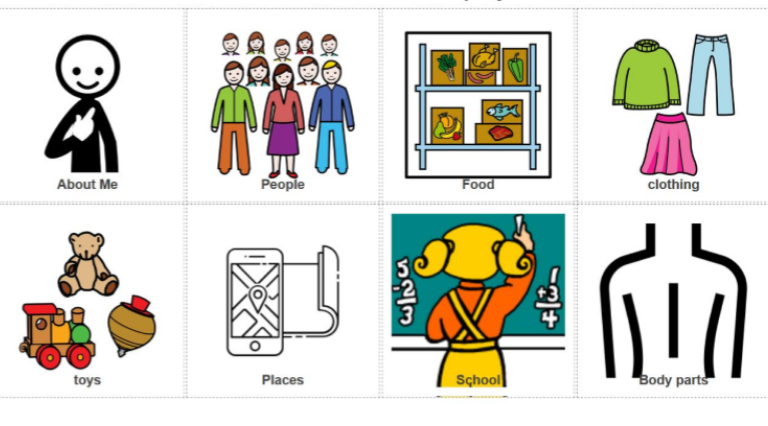
taxonomic grid display
organized by category, typically developing kids will not use until around 6-7
semantic-syntactic grid display
seen in commonly used apps
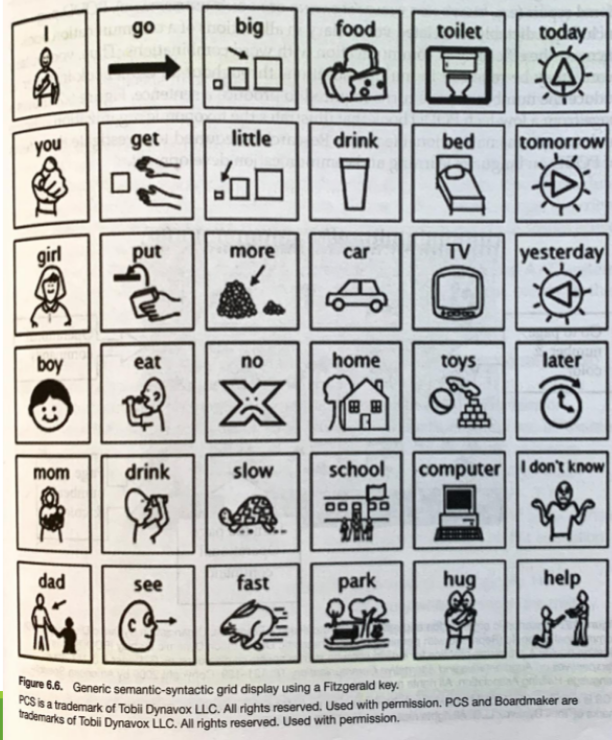
pragmatic organization of dynamic display
combination of types of vocabulary organization
activity displays are used for predictable activities
taxonomic category displays are used for less predictable messages
incorporate navigational strategies
to increase efficiency, vocabulary words are repeated in multiple places
chronological grid
commonly confused with schematic grid
organized by schedule/sequence of events
helps individuals who have difficulties with change
idiosyncratic grid display
organized by how the person wants it to be, very specific to them
what is a transition to literacy (T2L) feature and what is the benefit
feature can enhance single-word reading
use motion to learn words
useful because it’ll attract their visual attention
helps transition the user from symbols to reading and written text
what are some advantages of visual scene display
preserve visual and functional relationships between people and objects
natural scenes allow for rapid visual processing
what are disadvantages of visual scene displays
primarily semantic systems
don’t support advanced morphosyntactic development
benefits of video VSDs
integrate AAC supports into videos to facilitate communication
capitalize on preferred activities
reduce joint attention demands
capture spatial and temporal cues
motion within the videos serves as a powerful attractor of visual attention
hybrid displays
both pictures and words
just in time programming
programming concepts that happen just as those concepts are needed by the individual to express them
supports quick and easy programming
allows individuals to be more activity engaged with programming
supports vocabulary acquisition and expressive communication
alphabetic encoding
truncation codes: abbreviate words by first few letters (ex: HAMB)
contraction codes: include only the most salient letters (ex: HMBGR)
iconic encoding
unity utilizes encoding
developed in 1982 and referred to as Minspeak
picture icons are selected for rich semantic associations
ex: apple could be apple, food, fruit, eat, bite
relies on a fixed display
line drawings have more than one meaning
prediction techniques
prediction: process in which options are offered according to a word or message that has already been formulated
communication partners can predict words or messages based on letters or words selected
language model in an AAC app may also make predictions
most predictions occur at the word level
what is selection set
visual, auditory, or tactile presentation of all messages, symbols, photographs, and codes
most displays are presented visually
auditory or tactile displays are used for those with visual impairments
options a user has to create a message
fixed display
presentations don’t change
symbols and representation are fixed in a particular location
also referred to as static
typically used in low tech communication boards and some AAC techs
dynamic display
computer screen displays that can be changed to a new set of symbols
require navigation (home screen, navigation bar)
wide variety of AAC products
what physical characteristics should be considered about the selection set display and what is important about each?
number of representations
size of representations and display
spacing and arrangement of representations
orientation of the display
different means of direct selection
physical contact - no pressure required, just touch
physical pressure or depression to activate technology
pointing (no contact) - eye pointing or tracking
timed activation
sustained contact to make a selection
release activation
release contact to make a selection
filtered or averaged activation
brief movements away from specific items are ignored
benefits of prediction techniques
reduce the number of selections required which will decrease effort
provides spelling support for those who can recognize words but have trouble spelling accurately
provides grammatic support for those who have difficulties with morphosyntax
increase communication rate for those who rely on scanning and have slow rates of communication
circular scanning
representations are scanned in a circular motion
linear scanning
representations are scanned row by row
group item scanning
row column scanning
When an AAC device is set up with rows and columns, it can be set to scan an entire row first, by highlighting the row
message output
information that is sent to the communication partner
message input
information that people who rely on AAC receive from others
synthesized speech
“electronic speech”
text to speech: text converted to digital signals
digitized speech: natural speech is recorded, stored, and reproduced
reduces communication partner burden
doesn’t require you to first get someone’s attention bc they’ll hear you