IB CS Topic A1.1 - Computer Hardware and Operations
 Call Kai
 Learn
Learn Practice Test
 Spaced Repetition
 Match
Match Flashcards
 Knowt Play
1/104

Earn XP
Name | Mastery | Learn | Test | Matching | Spaced | Call with Kai | Chat |
|---|
No analytics yet
Send a link to your students to track their progress
105 Terms
CPU (Central Processing unit)
The primary hardware component of a computer system that executes program instructions by performing arithmetic, logical, control, and input/output (I/O) operations, using the Fetch-Decode-Execute (FDE) cycle.
Control Unit (CU):
Directs operations, decodes instructions, manages control lines, and coordinates data movement.
Arithmetic Logic Unit (ALU)
Performs calculations (addition, subtraction) and logical comparisons (AND, OR, NOT).
System Clock
Continuous pulse generator synchronizing execution steps.
Registers:
A very small, extremely fast storage location built directly inside the CPU used to hold temporary addresses, instructions, or data.
Internal CPU Registers
Program Counter (PC)
Memory Address Register (MAR)
Memory Data Register (MDR)
Instruction Register (IR)
Accumulator (AC)
Program Counter (PC)
A CPU register that holds the memory address of the next instruction to be fetched and executed.
Memory Address Register (MAR):
A CPU register that holds the memory address currently being accessed in RAM for a read or write operation.
Memory Data Register (MDR):
A CPU register that holds the actual data or instruction just read from RAM or about to be written to RAM.
Instruction Register (IR)
A CPU register that holds the instruction currently being decoded and processed by the Control Unit.
Accumulator (AC)
A CPU register that holds intermediate arithmetic and logic results, reducing the frequency of slow RAM accesses.

What is a Bus?
A bus is a collection of parallel wires or electrical conductors that connects the CPU to primary memory (RAM) and other components on the motherboard. It acts as a physical conduit used to transmit binary signals (data, memory addresses, and control commands) between different hardware devices.
Address Bus
Direction: Unidirectional (Data flows strictly in one direction: CPU → RAM / Peripherals).
Function: Carries the physical memory address generated by the Memory Address Register (MAR) to specify where data needs to be read from or written to in RAM.
Key Detail: The width of the address bus (number of physical wires) determines the maximum amount of RAM the CPU can address (2n memory locations, where n is bus width in bits).
Data Bus
Direction: Bidirectional (Data flows both ways: CPU ↔ RAM / Peripherals).
Function: Carries the actual binary data or instruction op-codes between the CPU’s Memory Data Register (MDR) and primary memory or input/output devices.
Key Detail: A wider data bus allows more bits to be transferred in a single clock cycle (e.g., a 64-bit data bus transfers 64 bits per cycle).
Control Bus
Direction: Bidirectional / Unidirectional (depending on the specific control line).
Function: Transmits timing, synchronization, and command signals generated by the Control Unit (CU) to coordinate hardware operations across the system.
Key Signals Carried:
Memory Read / Memory Write: Tells RAM whether to output data to the Data Bus or receive data from it.
Bus Request / Bus Grant: Controls which device currently has permission to access system buses.
System Clock Pulses: Synchronizes hardware steps across the system.
Interrupt Signals: Notifies the CPU when an input/output device requires immediate attention.
What is a CPU Core
A core is an independent processing unit within the CPU containing its own ALU, registers, and execution hardware capable of completing its own Fetch-Decode-Execute cycle.
Single-Core Processors
Architecture: Contains one single ALU and execution pipeline connected to the Control Unit.
Execution: Can process only one instruction at a time sequentially.
Concurrency: To run multiple applications, the CPU relies on rapid time-slicing (switching between tasks billions of times per second). It appears to multitask to the user, but hardware execution remains strictly sequential.
Multi-Core Processors (Dual-Core, Quad-Core, etc.)
Architecture: Contains two or more complete execution cores (multiple ALUs/register sets) integrated onto a single silicon chip or package.
Execution: Enables true parallel processing. While Core 1 is executing an instruction for one thread, Core 2 can simultaneously process an instruction for another thread.
Why Move to Multi-Core?
Increasing clock speed endlessly produces exponential heat and power consumption (thermal limits).
Adding extra cores increases overall throughput without requiring unsustainable clock frequencies.
IB CS Comparison for Paper 1
Feature | Single-Core CPU | Multi-Core CPU |
ALUs / Processing Units | Single ALU | Multiple independent ALUs |
Execution Style | Sequential processing (pseudo-multitasking) | True hardware parallel execution |
Throughput | Bottlenecked by clock speed limits | Higher total instructions processed per second |
Software Requirement | Works natively with all standard code | Requires multithreaded operating systems/software to utilize extra cores efficiently |
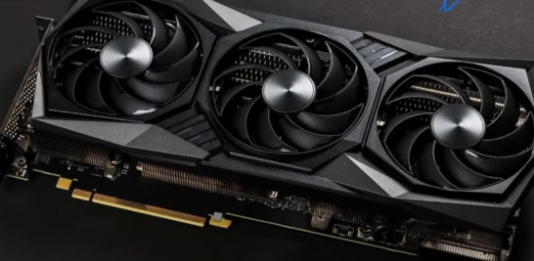
What is a GPU
A Graphics Processing Unit (GPU) is a specialized processor composed of thousands of small cores designed for massive parallel processing and high-throughput data-parallel operations.
How does GPU processing power differ fundamentally from CPU processing power?
CPU: Contains a small number of large, complex cores with large caches designed for sequential, low-latency processing.
GPU: Contains hundreds or thousands of smaller, simpler cores designed to process thousands of tasks/threads simultaneously in parallel (high throughput).
What is the primary role of a GPU in supporting overall CPU performance?
It works alongside the CPU to offload visual or mathematically intensive computations, boosting overall system efficiency and freeing up the CPU for general task management.
What are Streaming Multiprocessors (SMs) in a GPU?
Hardware blocks inside a GPU that group many small cores together to execute thousands of lightweight threads simultaneously across large parallel datasets.
Why are GPU processing blocks called Streaming Multiprocessors?
Because they process continuous streams of data (e.g., pixels, vertices, matrix values) in a pipeline, applying the same instruction across many data elements at once (SIMD / SIMT style).
What is High-Throughput Scheduling in Streaming Multiprocessors?
The ability of each SM to manage and schedule groups of threads efficiently, keeping all internal execution units (ALUs) constantly busy to maximize performance.
hat is Video Memory (VRAM) and what is its role in GPU architecture?
High-speed, dedicated video memory integrated with a memory controller that quickly stores and retrieves textures, frame buffers, and instructions required for real-time graphical rendering.
What physical bus interface connects the CPU/RAM system to the GPU card?
The PCI-Express (PCIe) bus interface.
What are Graphics APIs and Protocols? Name three key examples.
Definition: Software protocols that allow the operating system and applications to communicate directly with the GPU hardware.
Examples: DirectX, OpenGL, Vulkan.
What tasks do Graphics APIs like DirectX, OpenGL, and Vulkan enable the GPU to perform?
Render 2D/3D images, process complex 3D virtual environments, and manage real-time graphical effects.
What are the 4 main real-world applications of GPUs covered in the IB syllabus?
Artificial Intelligence & Machine Learning: Training large AI models using parallel matrix math.
Video Editing & Rendering: Accelerating render times, applying effects, and encoding/decoding high-res video.
Scientific Simulations: Running complex physics, climate modeling, and genomics calculations.
Cryptocurrency Mining: Performing repetitive, high-speed hashing calculations to validate blockchain transactions.
Compare the internal layout of a CPU core vs. a GPU block based on silicon space allocation.
CPU: Allocates large amounts of silicon space to Control Units and multi-level Caches (L1, L2, L3) with few ALUs.
GPU: Allocates the vast majority of silicon space to massive arrays of ALUs, with minimal Control Units and smaller per-SM caches.

Task Focus and Instruction Handling: CPUs vs. GPUs
CPU: Optimized for sequential, complex tasks; excels at single-threaded performance and logic-heavy operations with frequent branching.
GPU: Optimized for parallel, highly repetitive tasks; excels at multi-threaded, data-heavy operations.
Latency vs. Throughput and Clock Speed: CPUs vs. GPUs
CPU: Prioritizes low latency (fast response time for individual tasks) using higher clock speeds per core.
GPU: Prioritizes high throughput (processing massive data volumes at once) using thousands of cores working in parallel at lower clock speeds.
Thread Handling: CPUs vs. GPUs
CPU: Executes a small number of powerful concurrent threads, focusing on minimizing execution latency per thread.
GPU: Executes thousands of lightweight threads simultaneously to maximize hardware utilization and hide memory delays.
Memory Access, Types, and Access Patterns: CPUs vs. GPUs
CPU: Uses low-latency system RAM with a complex cache hierarchy (L1/L2/L3); optimized for random and unpredictable memory access.
GPU: Uses high-bandwidth VRAM (GDDR or HBM) designed for large datasets; accesses memory in structured blocks to process similar data in parallel.
Power Distribution and Performance per Watt: CPUs vs. GPUs
CPU: Focuses power on a few strong cores; highly energy-efficient for light, everyday workloads by dynamically scaling power down.
GPU: Spreads power across thousands of active cores; achieves higher performance-per-watt efficiency for heavy parallel workloads.
Idle and Dynamic Power Usage: CPUs vs. GPUs
CPU: Consumes less power during light workloads by dynamically scaling voltage and frequency.
GPU: Draws significantly higher dynamic power under heavy processing loads to run thousands of active parallel cores.
Integrated GPUs vs. Discrete GPUs (Memory and Interconnects)
Integrated GPU: Shares main system RAM directly with the CPU.
Discrete GPU: Features dedicated high-speed VRAM (GDDR/HBM) and communicates with the CPU across the PCIe bus.
Task Division and Coordinated Processing in CPU-GPU Architecture
CPU (Host): Manages general tasks, executes the operating system, handles I/O, and evaluates control decisions.
GPU (Device): Receives offloaded parallel tasks from the CPU, performs heavy graphics rendering or matrix calculations, and returns computed results.
GPU Kernels in Parallel Programming (CUDA)
Specialized parallel functions launched by the host CPU that execute simultaneously across thousands of threads on GPU cores.
Synchronization Mechanisms: Events vs. Barriers in CPU-GPU Execution
Events: Signals used to track execution progress and detect when specific GPU tasks have completed.
Barriers: Execution checkpoints that pause processing until all parallel GPU tasks reach the exact same point, ensuring data consistency.
Overlapping (Asynchronous) Execution in CPU-GPU Systems
A processing model where the CPU continues executing local non-dependent tasks while the GPU asynchronously computes offloaded parallel workloads in the background.

Primary Storage
Memory directly accessible by the CPU (such as RAM, ROM, and Cache Memory) that holds instructions and data currently needed for active execution.
RAM (Random Access Memory)
Volatile primary memory used to store data, running applications, and operating system instructions currently in active use by the CPU.
Volatility (Computer Memory)
A characteristic of memory where continuous electrical power is required to retain data; when power is switched off, all stored content is lost.
Dynamic RAM (DRAM) vs. Static RAM (SRAM)
DRAM: Uses capacitors and transistors, requires periodic electrical refresh cycles, is cheaper, denser, and used for main memory.
SRAM: Uses flip-flop circuits, requires no refreshing, is significantly faster, more expensive, and used for CPU cache.
Read-Only Memory (ROM)
Non-volatile primary memory that stores permanent startup instructions (such as BIOS / UEFI bootloader firmware) required to boot up the computer.
RAM vs. ROM Comparison
RAM: Volatile, read/write accessible, and stores active programs/OS data.
ROM: Non-volatile, read-only (or flashable), and stores permanent bootup firmware (BIOS/UEFI).
Cache Memory
Extremely high-speed Static RAM (SRAM) located on or near the CPU die that stores frequently accessed instructions and data to reduce the latency of fetching from main memory (DRAM).
Levels of CPU Cache (L1, L2, L3)
L1 Cache: Fastest, smallest capacity, built directly into individual CPU cores.
L2 Cache: Slightly larger and slower, dedicated per core or shared between core pairs.
L3 Cache: Largest capacity, slower than L1/L2, shared across all CPU cores.
Cache Hit vs. Cache Miss
Cache Hit: The required data is found in the high-speed CPU cache, resulting in immediate, low-latency execution.
Cache Miss: The required data is not in cache, forcing the CPU to fetch it from slower main RAM.
Virtual Memory
A memory management technique where a portion of secondary storage (HDD or SSD) is allocated to act as pseudo-RAM when physical RAM becomes full.
Paging and Page Faults
Paging: Dividing memory into fixed-size blocks (pages) moved between RAM and disk.
Page Fault: Occurs when the CPU requests data not currently in RAM, requiring a slow page swap from secondary storage.
Thrashing (Virtual Memory)
A severe performance degradation state where the CPU spends more time swapping data pages between RAM and secondary storage than actually executing program instructions.
Spatial Locality (Cache Management)
The principle of storing related data in contiguous memory locations so that when one item is accessed, nearby items are loaded into the cache together.
Example: Accessing array elements sequentially rather than accessing random memory locations.
Temporal Locality (Cache Management)
The principle of reusing the exact same data or instructions repeatedly within a short period of time, ensuring it remains stored in high-speed cache memory.
Cache Prefetching (Hardware vs. Software)
Prefetching Definition: Loading data into the cache ahead of time before the CPU explicitly requests it.
Hardware Prefetching: Automatically performed by dedicated CPU circuits detecting sequential access patterns.
Software Prefetching: Explicitly requested by compiler instructions embedded in program code.
Three Primary Strategies to Minimize CPU Cache Misses
Spatial Locality: Accessing contiguous memory locations so adjacent data is loaded into cache simultaneously.
Temporal Locality: Reusing recently accessed data repeatedly to keep it resident in cache.
Prefetching: Loading anticipated data into cache early before execution demands it.
Fetch, Decode, Execute, Memory Access, and Write-back (writing results to registers).
Non-pipelined: One instruction must complete all stages before the next instruction begins.
Pipelined: While one instruction is in one stage the next instruction is in the previous stage, overlapping execution.
What is the primary benefit of pipelining on CPU performance?
Reduces CPU downtime, increases instruction throughput (number of instructions completed per clock cycle), and executes programs more quickly without needing to increase clock speed.
Each core runs its own independent pipeline, processing multiple instruction streams in parallel across cores.
"Each core has access to its own cache and ALU to execute instructions independently but must coordinate with other cores when writing to shared resources like system RAM and registers."
Pipeline hazards (disruptions like data dependency hazards);
Increased Design Complexity (requires extra logic for cache coherence, task distribution, and synchronization);
Diminishing Returns (performance does not scale linearly if tasks are unevenly distributed or software lacks multi-core support)."
What is a Pipeline Hazard and what causes a Data Hazard?
"Pipeline Hazard: An event that disrupts the smooth flow of instructions through the pipeline.
Data Hazard: Occurs when an instruction depends on the result of a previous instruction that has not yet completed its execution/write-back stage."
"Non-volatile , persistent long-term storage that holds all files, software, and data not currently in active use by the CPU when power is off."
"How does secondary storage compare to primary memory regarding speed, cost, and capacity?
Secondary storage is slower, cheaper per gigabyte, much larger in capacity, and not directly connected to the CPU."
Internal: 1. HDDs, 2. SSDs, 3. eMMCs.
External: 4. Optical Drives, 5. Flash Drives, 6. Memory Cards, 7. Network Attached Storage (NAS)
"How do Hard Disk Drives (HDDs) physically store and read data?"
"HDDs store data as magnetic charges in tracks and sectors on metal platters spinning at 5400-7200 RPM , which are read/written by a moving magnetic read/write head.

"Pros: High storage capacity (1TB-10TB+), low cost per gigabyte, long lifespan for cold storage.
Cons: Slower read/write performance, fragile/vulnerable to physical shock due to moving parts, higher power usage/noise/heat."
"How do Solid-State Drives (SSDs) store and access data?"
SSDs use NAND flash memory chips with no moving mechanical parts, reading and writing data electronically using internal controller chips to manage memory cells."
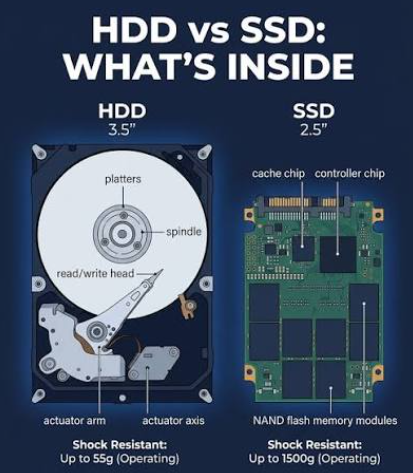
"Pros: Extremely fast performance (instant file/boot access), durable with no moving parts (shock-resistant), lower power consumption.
Cons: Higher cost per gigabyte, limited write lifespan (flash memory cells wear out), difficult data recovery upon drive failure."
"A compact, cost-effective flash memory chip containing NAND flash and a self-managed controller soldered directly onto a device motherboard, commonly found in smartphones, tablets, and budget laptops."
1. Efficient Storage (saving space using lossless compression like PNG/TIFF);
2. Faster Data Transmission (ensuring smooth streaming via lossy compression like H.264);
3. Backup and Archiving (reducing backup file sizes with ZIP/7z);
4. Optimized Web Performance (improving page load times with JPEG/GZIP).
RLE: Lossless; replaces repeated values with value/count pairs; best for simple data with many repeated elements.
Transform Coding: Usually lossy (can be lossless); converts data into mathematical frequency components; best for complex multimedia (images, audio, video).
RLE: Low efficiency for complex/noisy data; very low computational cost (simple implementation).
Transform Coding: High efficiency for rich, detailed multimedia; higher computational cost (requires complex mathematical operations like DCT).