Information system managament
 Call Kai
 Learn
Learn Practice Test
 Spaced Repetition
 Match
Match Flashcards
 Knowt Play
1/52

There's no tags or description
Looks like no tags are added yet.
Name | Mastery | Learn | Test | Matching | Spaced | Call with Kai |
|---|
No analytics yet
Send a link to your students to track their progress
53 Terms
What is the internet?
Computer network which connects billions of computing devices throughout the world
How are the all devices called(2)
Hosts or end systems
With what are end systems connected (2)
Communication links and packet switches
Types of communication links (4)
Coaxial cable
Copper wire
Optical fiber
Radio spectrum
Types of packet switches (2)
Routers
Link-layer switches
The Internet is all about connecting ….. to each other (fill the dots 2 words) And …. The Internet is all about connecting end systems to each other ( 1 word)
end systems
ISPs
What provides access to end to end systems?
ISP’s
ISPs provide Internet access to content providers, connecting servers directly to the Internet via?
routers over leased/dedicated backbone links, using peering or transit arrangements (toks rimtokas atsakymas idk ar reik)
Internet standards are developed by the …. (1 zodis, trumpinys) their standard documents are called … (1 zodis, trumpinys)
IETF (Internet Engineering Task Force)
RCF (Request for comments)
RFC protocols (4)
TCP (Transmission control protocol)
IP (Internet protocol)
HTTP (for the Web)
SMTP (for e-mail)
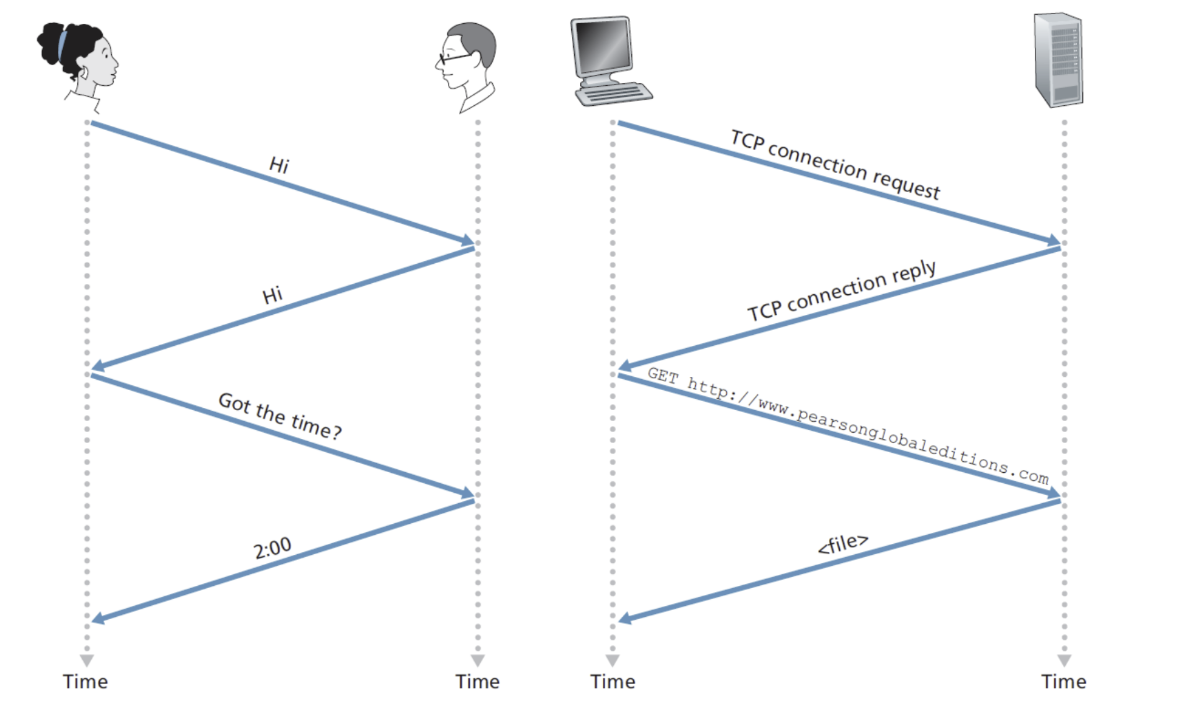
Protocol defines the … and the … of messages exchanged between two or more communicating devices. (po 1 zodi abu)
format
order
Hosts are divided into two categories
Clients
Servers
2 types of clients, their definition
thin clients - managed remotely with limited input (ATMs, self check-outs)
thick clients - customized by individual employees by installing the necessary software (PCs with application installed on it)
What is the internet socket interface?
Socket interface is a set of rules that the sending program must follow, so that the internet can deliver data to the destination.
Where do most of the servers from which we receive search results, emails and so on reside?
Data centers
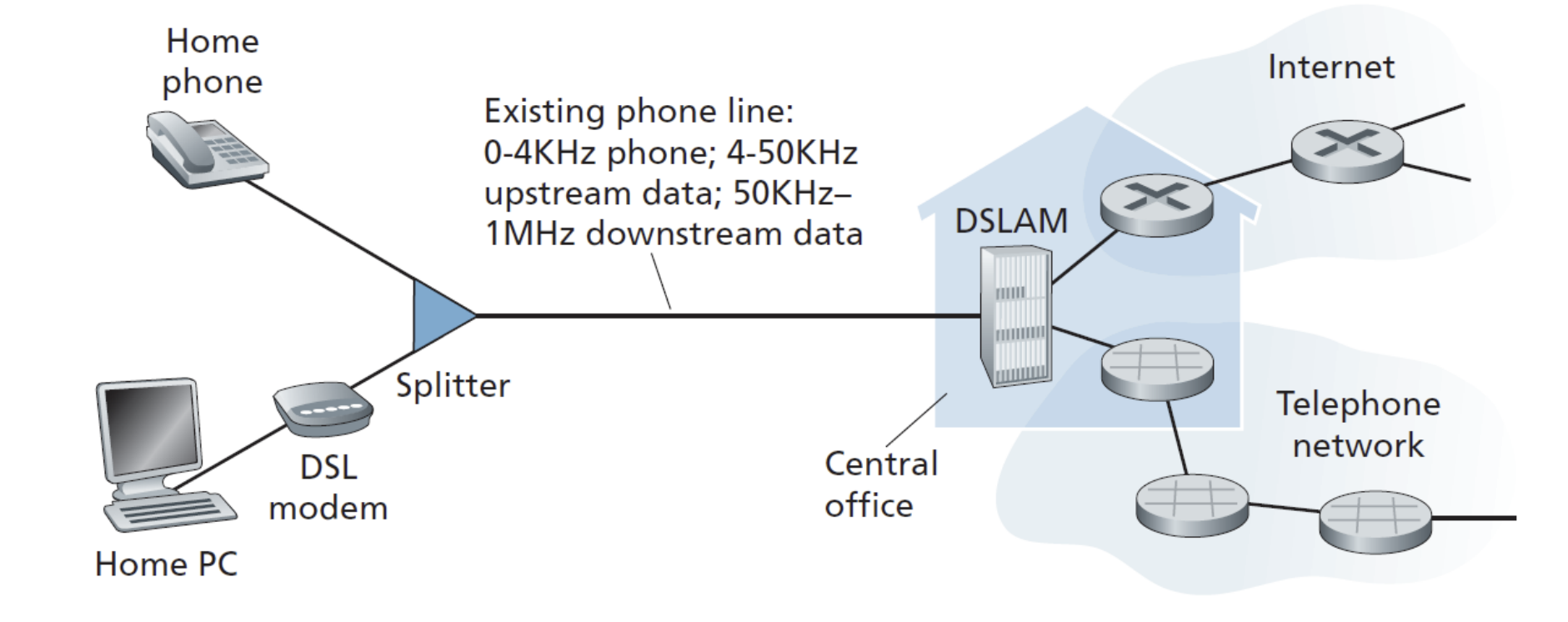
What’s shown in the picture
DSL (Digital subsriber line) uses your existing telephone line to carry both voice and internet data simultaneously, by splitting the line into separate frequency bands:
What is DSL
DSL (Digital subscriber line) reuses your existing telephone line to carry both voice and internet data simultaneously
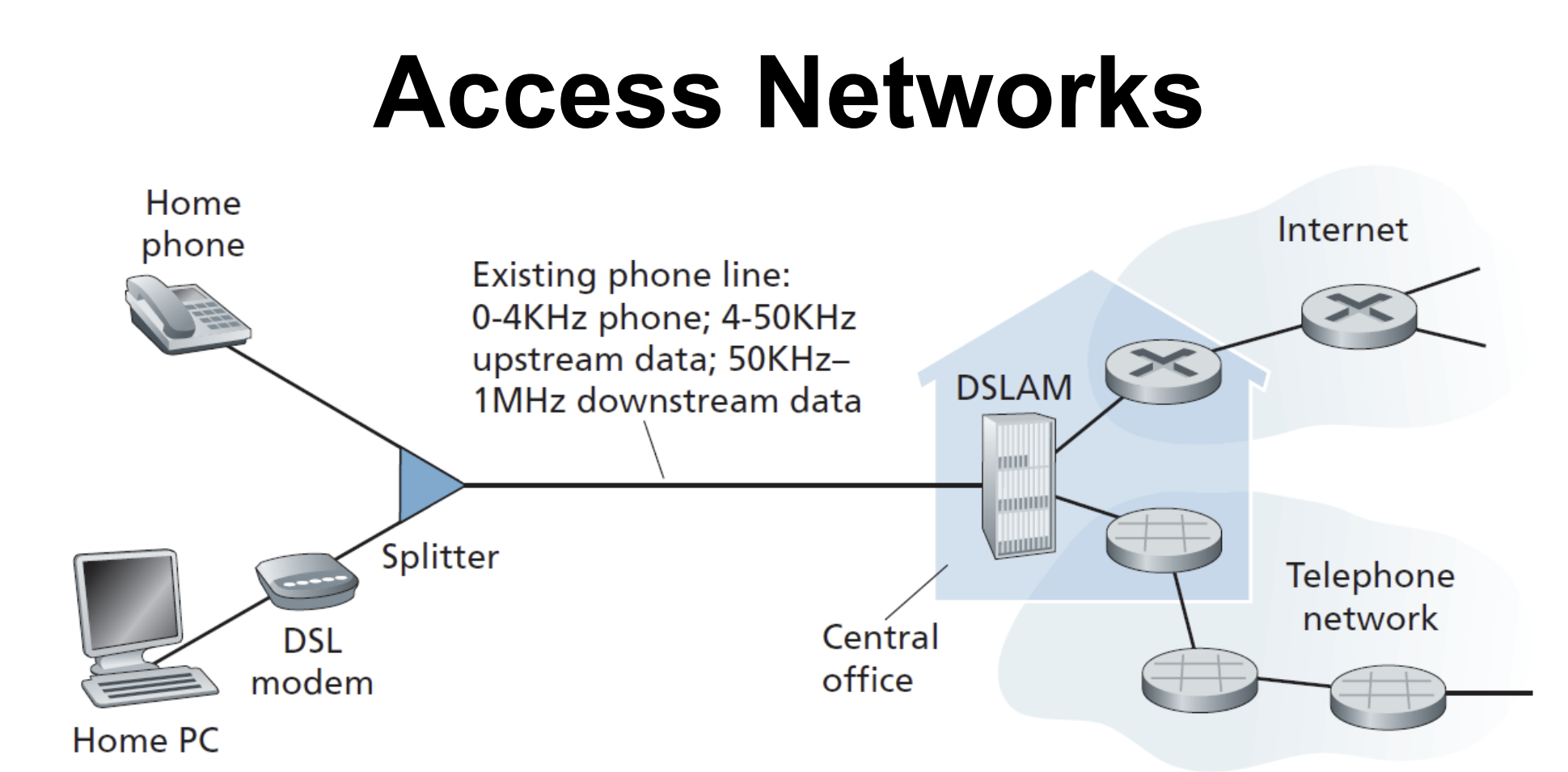
How does DSL keep the voice from the phone calls and data from PCs from clashing
Uses frequency division multiplexing (divides the line into frequency zones) → this way voice and data share the line without interfering
0-4 kHz → regular phone calls
4 - 50 kHz → upstream data (you → internet)
50 kHz - 1 MHz → downstream data (internet → you)
1. Digital Subscriber Line (DSL) :telco’s.
2.Cable: television’s
Who is the ISP in this case?
The ISP is the company which provides the internet connection
For DSL the ISP is telco’s
For Cable the ISP is television’s
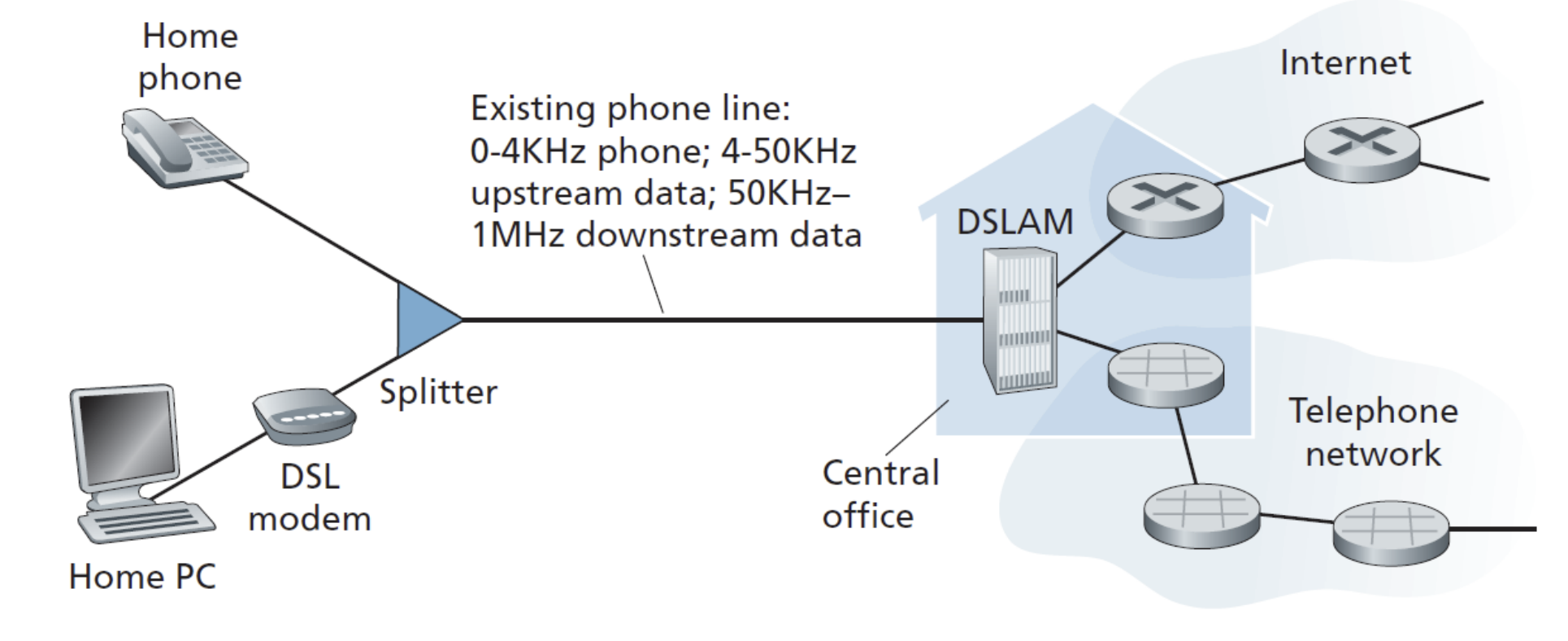
Purpose of DSLAM and what it is
DSLAM (Digital Subscriber Line Access Multiplexer) ISP's equipment that receives signals from many homes, separates voice from data, and routes each to the right network.
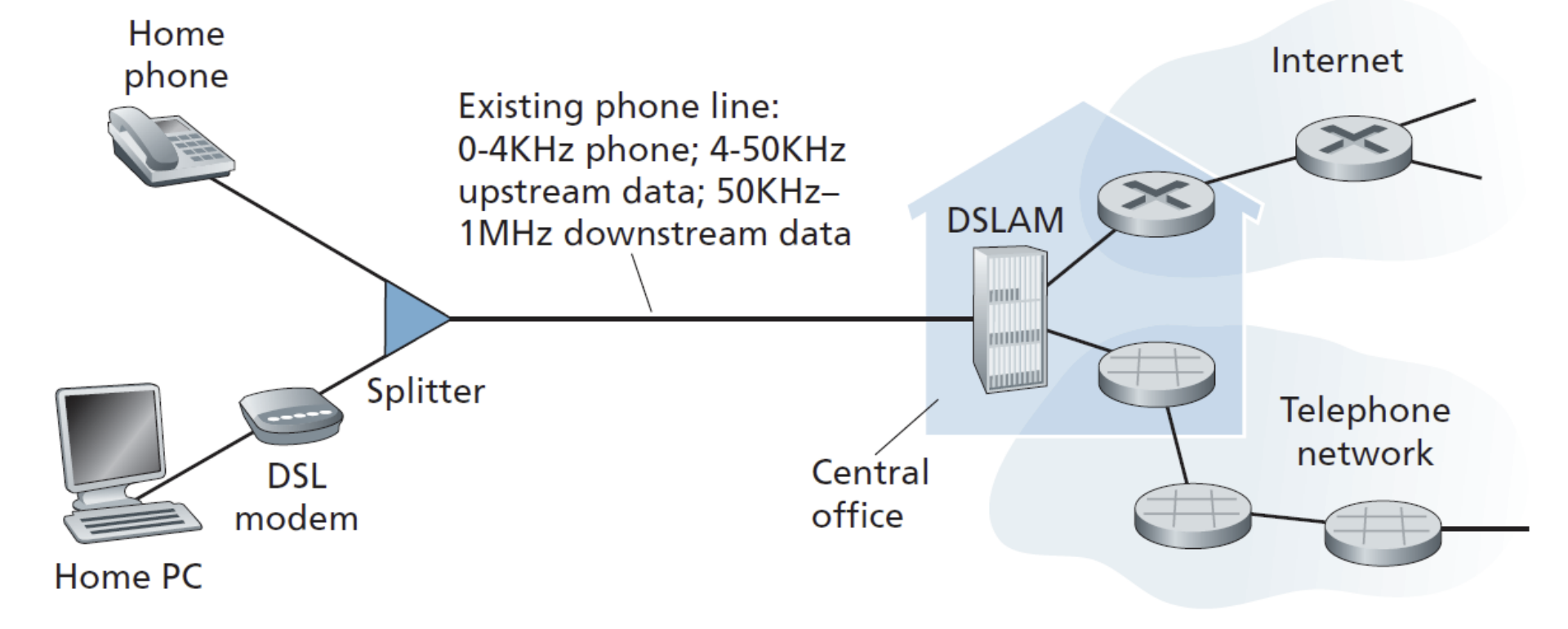
What is the maximum distance between the home and the CO, why is it limited
It is limited to 5-10 miles, the longer it is the slower it becomes. It is limited because cooper wire has electrical resistance, the longer the wire = more resistance
High frequencies weaken faster than low ones, so downstream weakens fastest
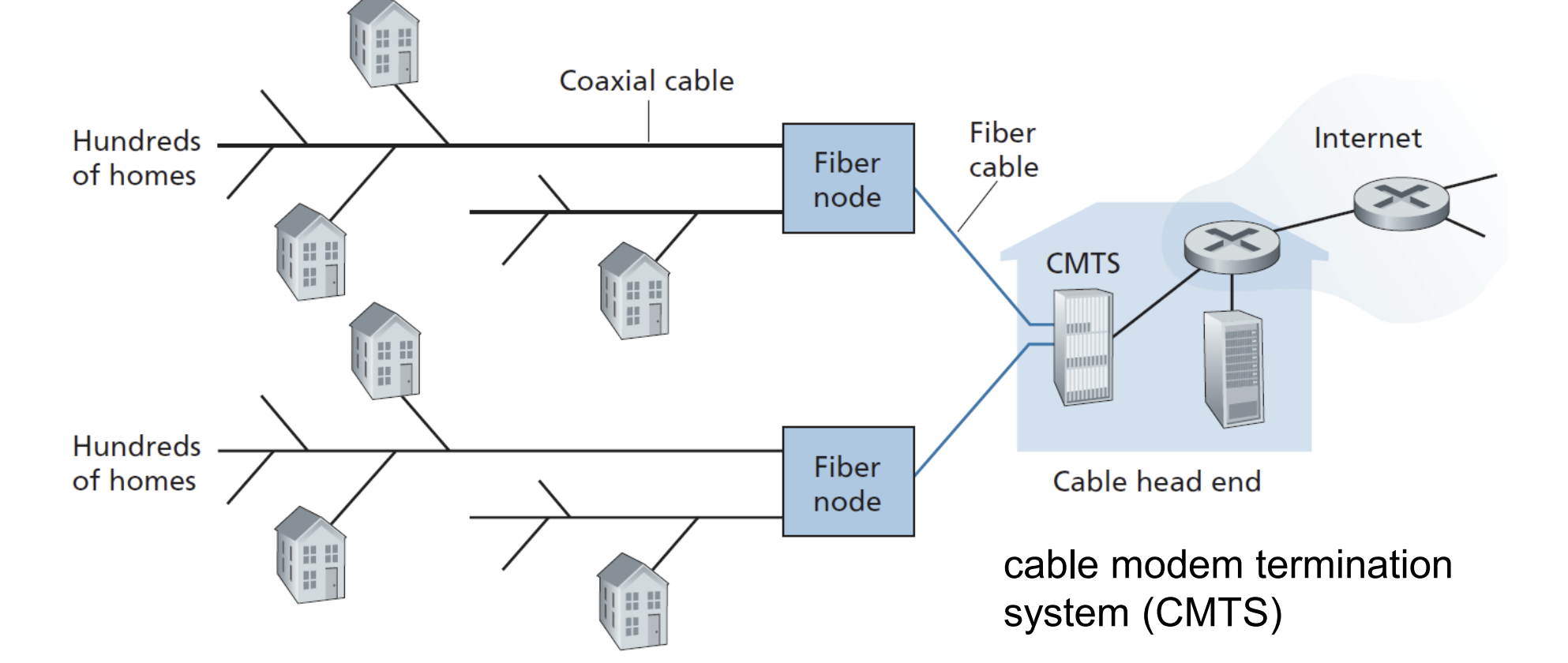
What is shown in the picture
HFC network (Hybrid Fiber-Coaxial)
Why is HFC called hybrid
HFC uses a combination of two cable types to get data from the internet to your home:
Fiber optic cable — from the Cable Head End to Fiber Nodes (fast, long distance)
Coaxial cable — from the Fiber Node to individual homes (the "last mile")
HFC comparison to DSL
In HFC coaxial cable is shared among hundreds of homes in the neighborhood — unlike DSL where each user has their own dedicated line.
What is CMTS
CMTS is the equivalent of DSL's DSLAM — it manages traffic at the provider's end
Types of HFCs
AON (Active Optical Network) — point-to-point, each subscriber gets their own dedicated fiber line to an optical concentrator
PON (Passive Optical Network) — point-to-multipoint, passive optical splitters share the signal among multiple users
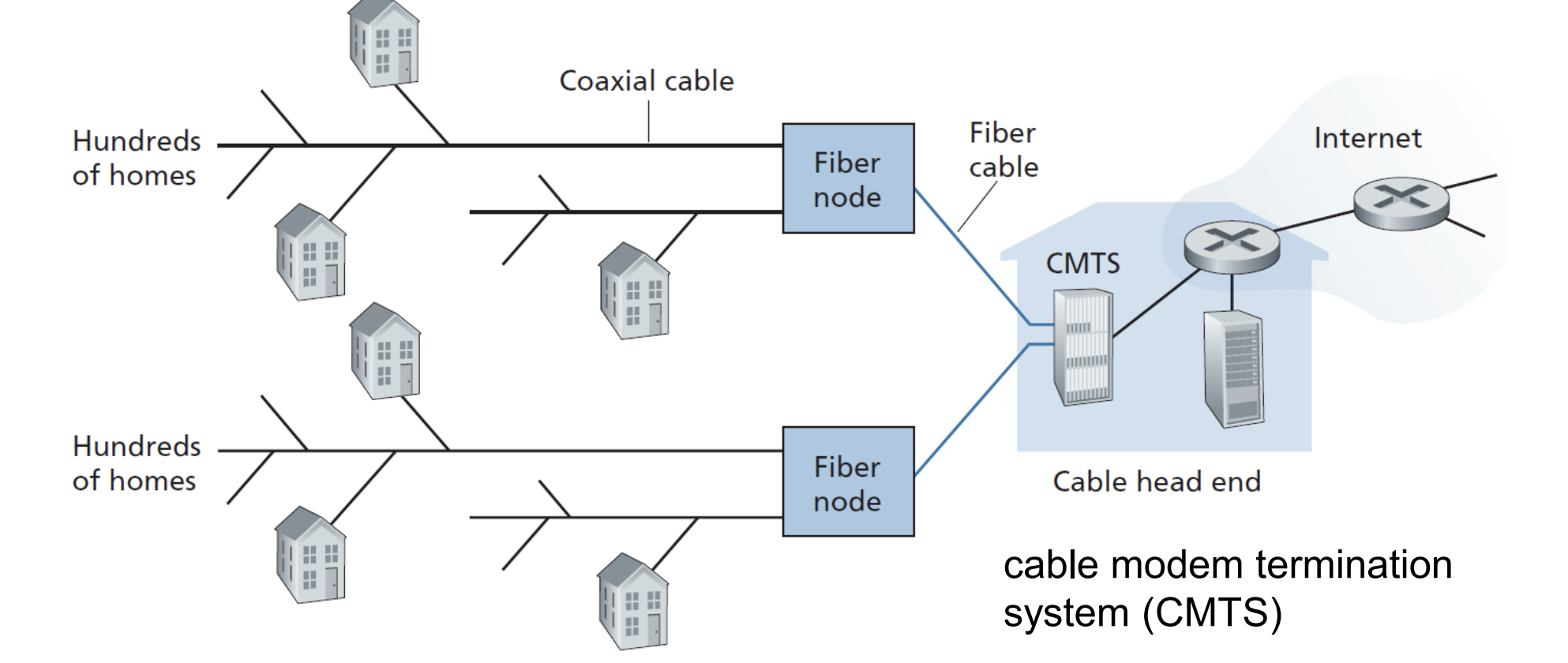
Why does HFC performance degrade during peak hours?
Coaxial segment is shared bandwidth — more active neighbors = slower speeds for everyone
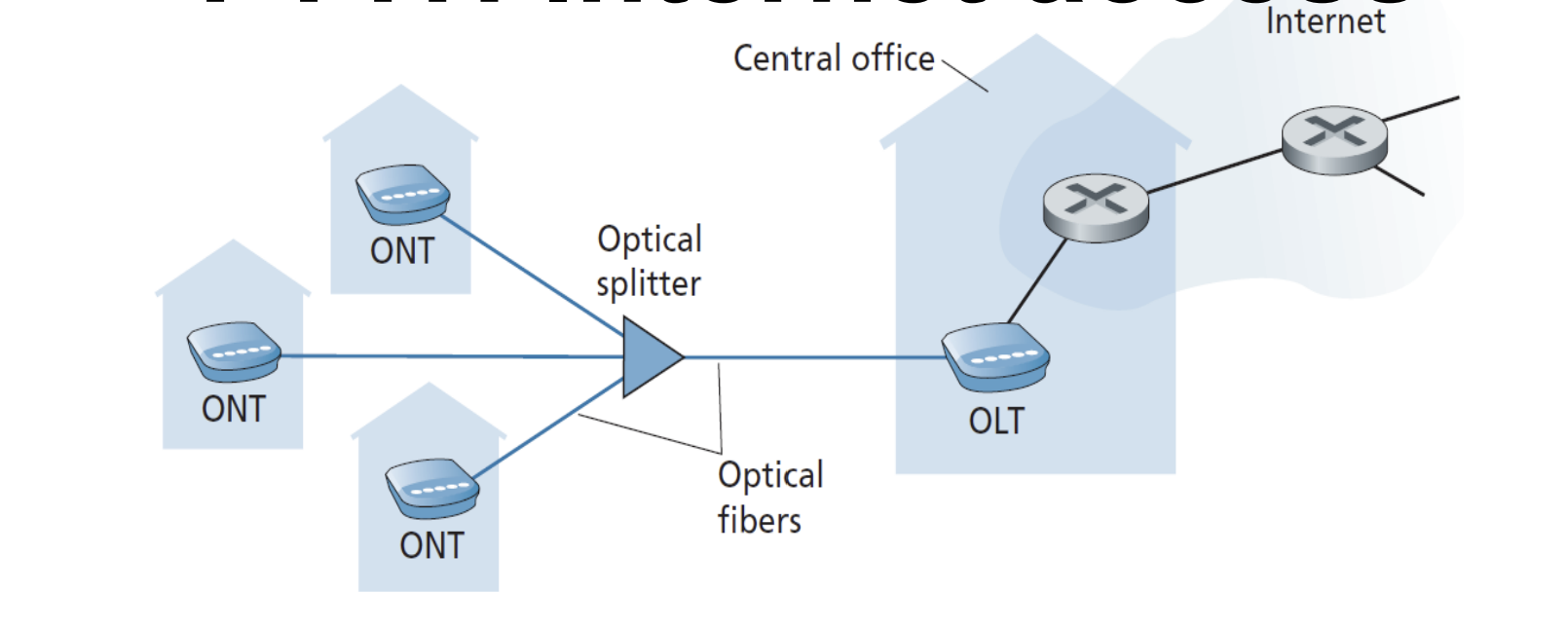
What’s portrayed in the image? And what does it do?
FTTH (Fiber to the Home) Runs optical fiber from the central office all the way directly to your home.
Currently this is the fastest residential technology available
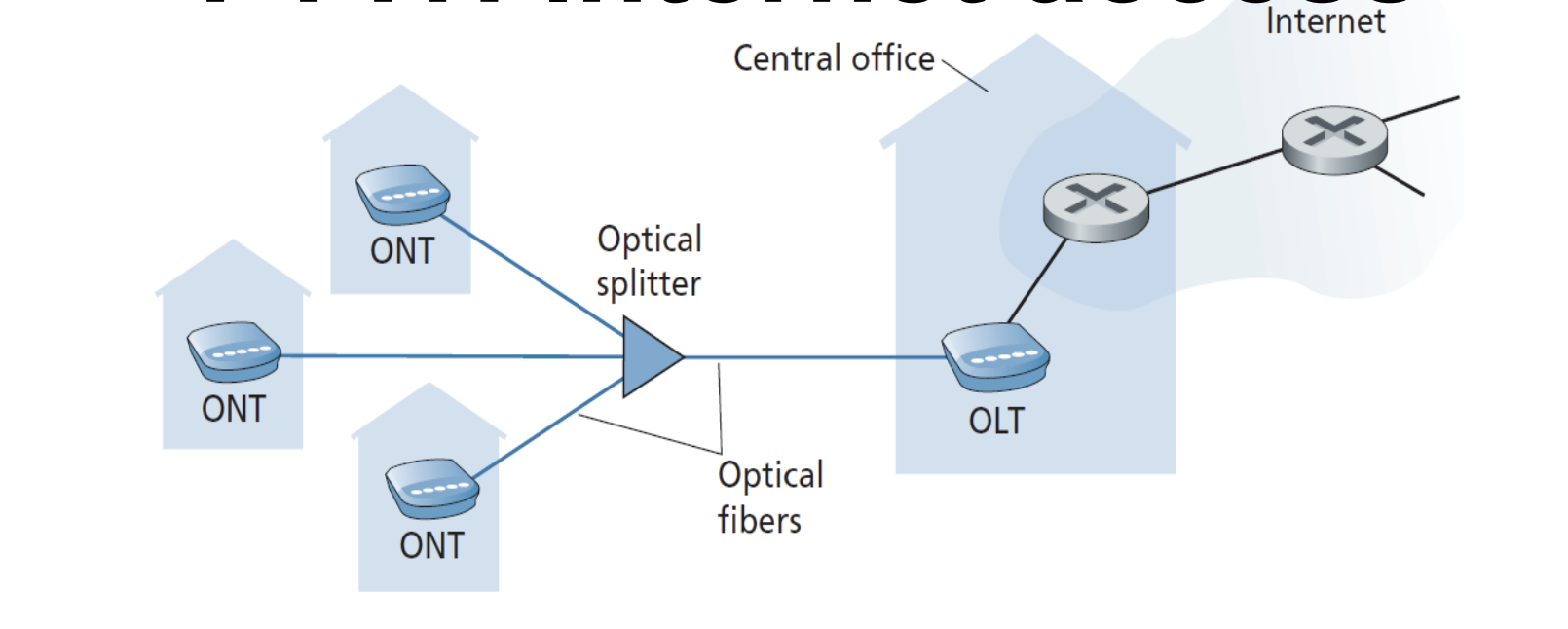
What does the OLT, ONT and Optical splitter do?
OLT - is at the central office and converts between optical and electrical signals
ONT - the device installed at your home, essentially the “modem” for fiber, converts fiber into electric signals
Optical Splitter - Passively splits the fiber signals out to multiple homes, similar to PON from HFC
What are the 4 main residential access technologies
DSL, HFC, FTTH, 5G fixed wireless
Why is 5G more effective than DSL, HFC, FTTH
Even though 5G is not the fastest, it’s speed to cost ratio is the best, since there is no need to dig wires for it, only to build towers
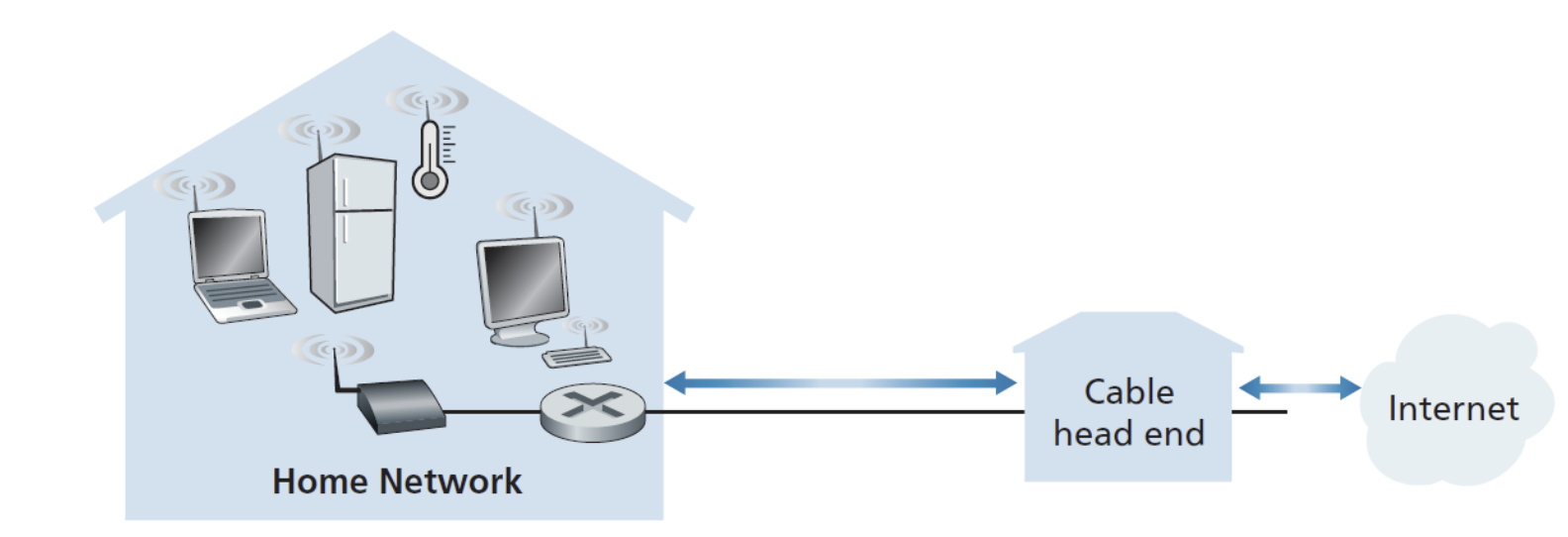
What is a home network
A typical home network combines a broadband connection (DSL or cable modem) with a wireless LAN (WiFi router) to serve multiple devices inside the home.
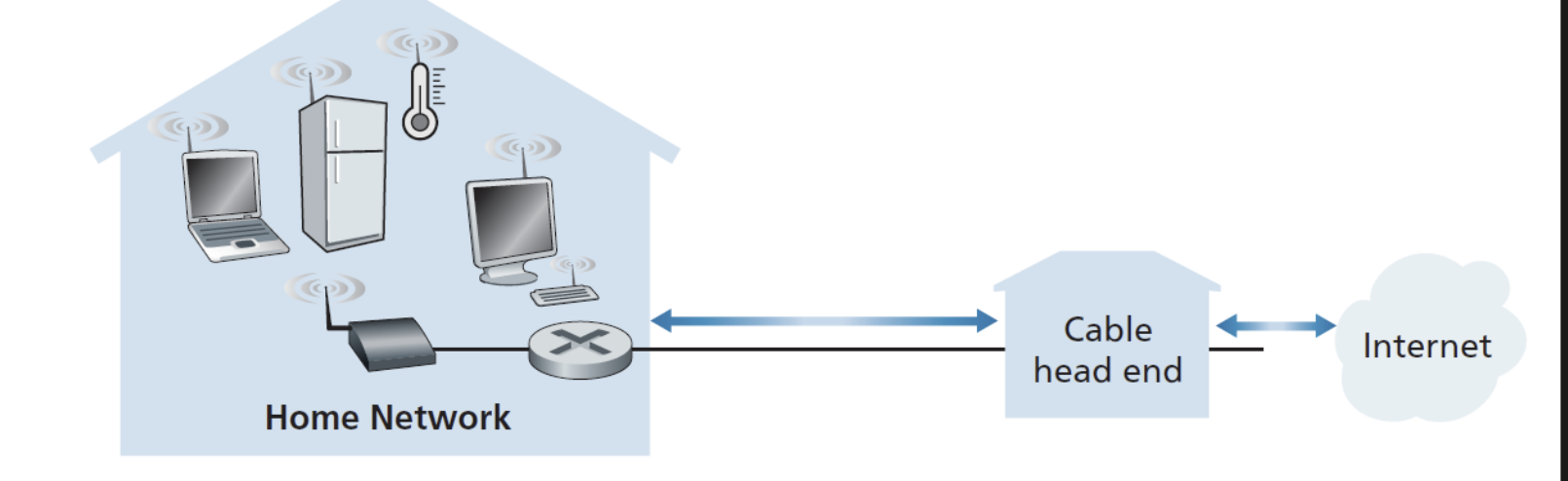
How does a home network work
The cable modem or DSL modem handles the connection to the ISP
A wireless router then distributes that connection locally inside the home
The home network is the final segment
Name all access networks (3)
DSL, HFC, FTTH
If two people in the same house are streaming 4K video simultaneously, where are the bottlenecks likely to occur — inside the home network or at the access network, and why?
Inside the access network, because modern wifi routers are usually very fast and 2 streams is not a problem for them. The access network can crash because it’s shared, so if the traffic is already high it might crash
To send a message from a source end system to a destination end system, the source breaks long messages into smaller chunks of data known as ….. (1 word)
packets
Each packet travels through communication links and ……. ( 2 words)
packet switches
What is a packet
if one end systems has data to send it segments the data and adds header bytes to each segment, the resulting packages are packets
What is store-and-forward switching
A type of switching, where a router cannot forward even a single bit of a packet until it has received the entire packet first. It must store it completely, then forward it.
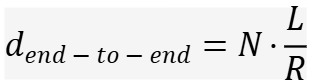
Store-and-forward delay formula
Where:
L = size of the packet in bits
R = transmission rate of each link in bps
N = number of links (hops) along the path
L/R = time to transmit one packet across one link
So if you have 3 links, you pay the L/R delay 3 times — once at each hop.
A packet of 1,000 bits is sent over 3 links each at 1,000 bps. What is the end-to-end delay?
Answer: 3 × (1000/1000) = 3 seconds
Why can't the router just forward bits as they arrive (cut-through)?
The router needs to check the entire packet for errors (via checksums) before forwarding it. If it forwarded corrupt bits immediately, those errors would propagate all the way to the destination.
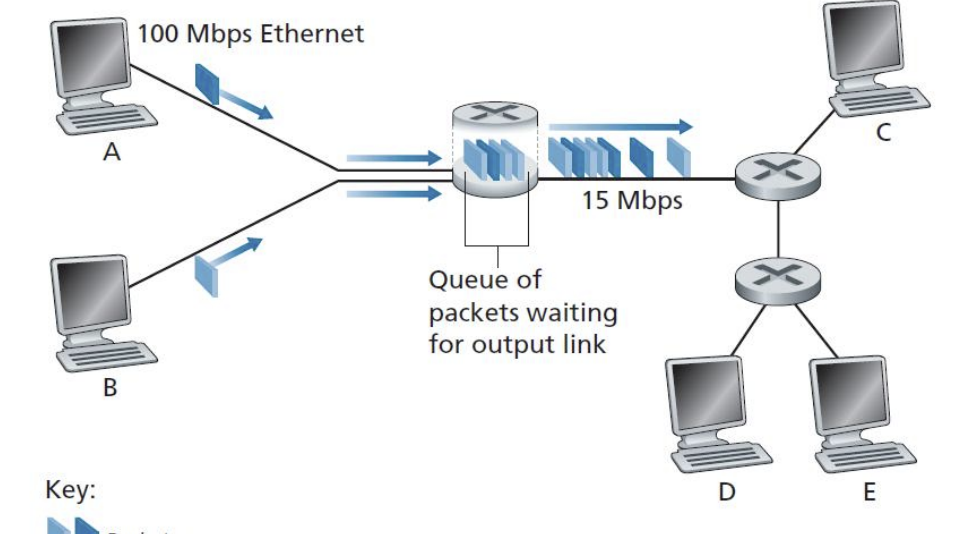
Both computers A and B are sending data at 100 Mbps each into a router, but the outbound link to the next router only runs at 15 Mbps. What does this result in?
That massive speed mismatch causes packets to pile up in the output buffer/queue while they wait their turn to be transmitted.
This is the core problem: traffic coming in faster than it can go out.
This results in Queuing Delays and Packet Loss
Why does packet loss occur?
Every router link has an output buffer (queue) that holds packets waiting to be sent. If the outbound link is busy, incoming packets wait in the queue
Buffer space is finite — when it fills up, packets are dropped = packet loss
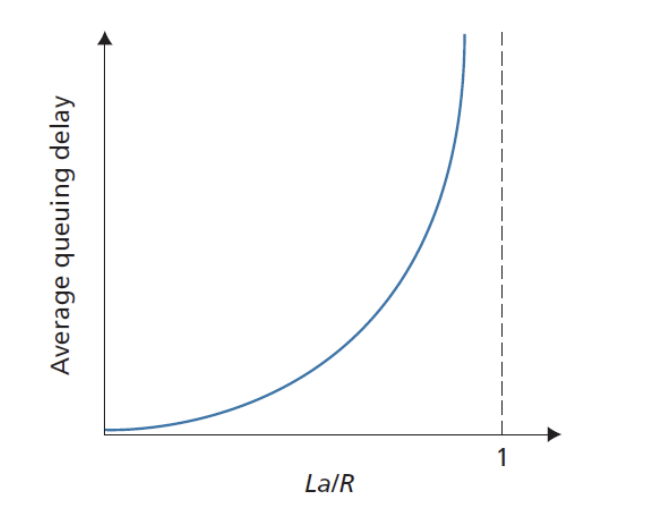
How is traffic intensity calculated?
Formula: La/R — when this approaches 1, the system is near collapse
a = average packet arrival rate, L = packet size, R = link rate
The 4 Components of Total Nodal Delay:
Processing delay — time to examine packet header and determine where to send it
Queuing delay — time waiting in the output buffer
Transmission delay — time to push all bits of the packet onto the link (L/R)
Propagation delay — time for bits to physically travel across the link (depends on distance/medium)
How is performance at a node measured (2 factors)
delay
probability of packet loss
Which delay component dominates on a long undersea fiber cable?
Which dominates on a slow link sending a large file?
Propagation delay - how long it takes for a signal to travel through the wire
Transmission delay - how long it takes to push a packet into the wire, all about the size of the packet and the speed of the link
Why does delay explode as traffic intensity approaches 1, not just increase steadily?
Think of it like a checkout line — if a cashier serves 10 customers/minute and 9 arrive/minute, the line stays manageable. But if 9.9 arrive/minute, the line grows faster than it clears.
At exactly 10/minute, the line never clears and grows infinitely.
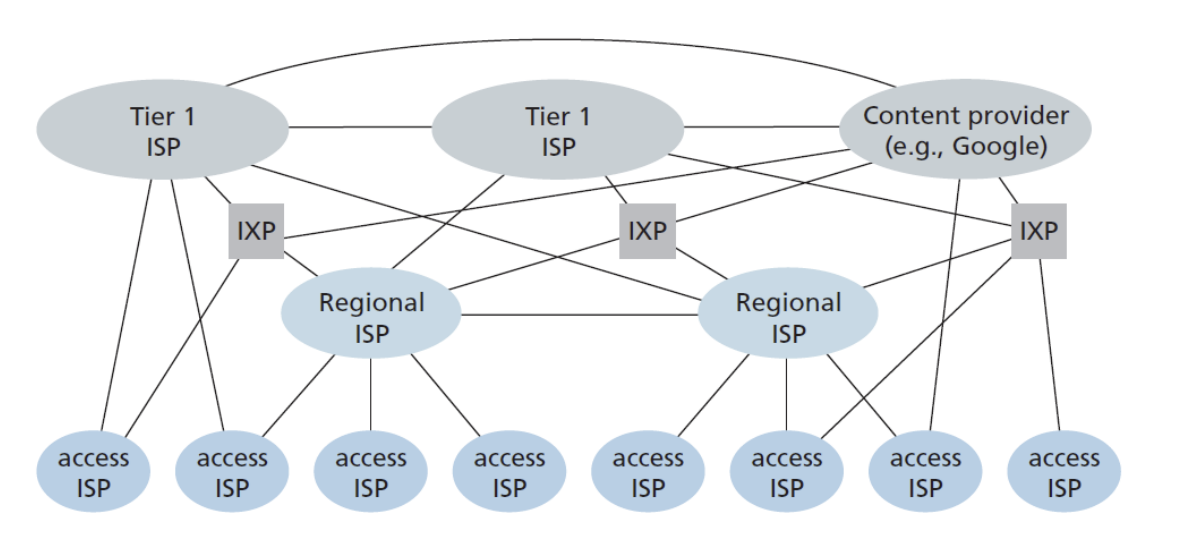
What is shown in the image
Network of networks - a hierarchical system of interconnected ISPs organized into tiers, like a pyramid
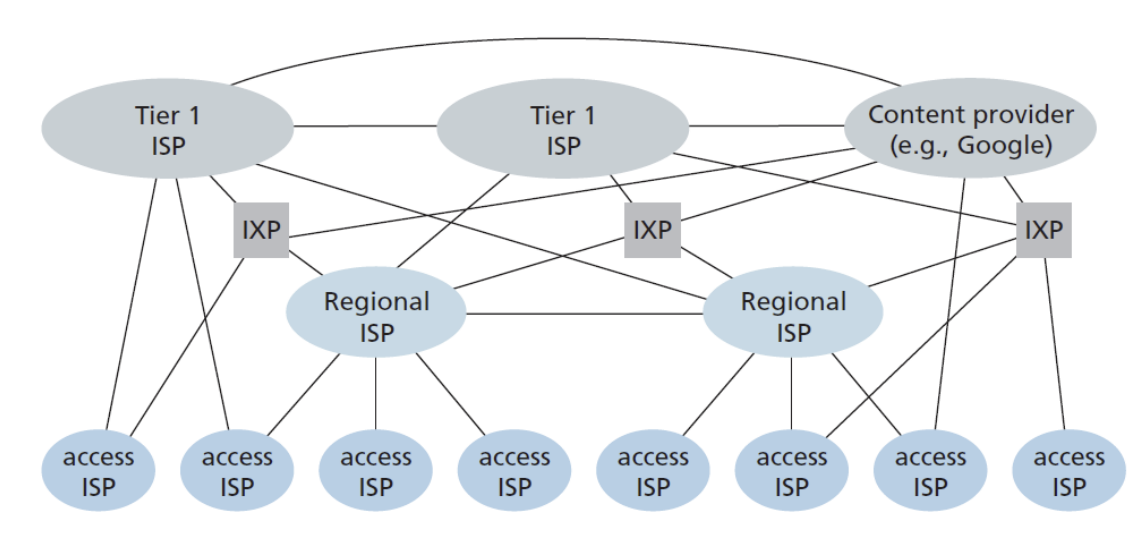
Name all tears of the network of networks (3)
Top - tier 1 ISP’s (global backbone-cover entire continents), connects directly to each other (no one pays anyone — called settlement-free peering)
Middle - Regional ISP’s, connects to tier 1 ISP’s and pays them for access, smaller access ISP’s are their customers, covers geographic regions
Bottom - Access ISP’s (what connects to your home, Telia, Cgates), connects to regional ISP’s and pays them, provides DSL, cable, FTTH, WiFi, cellular to end users
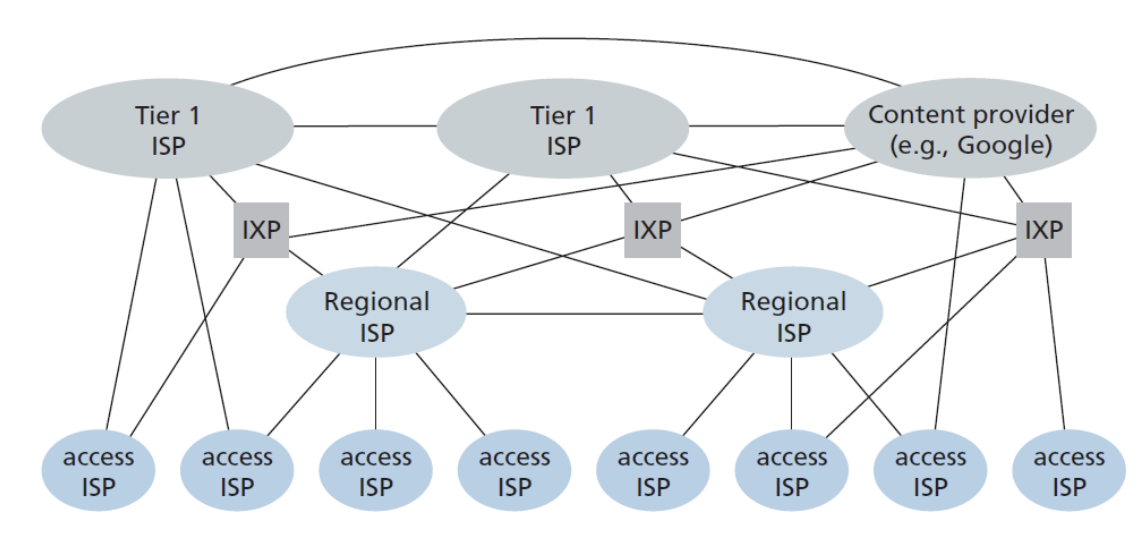
What is the IXP(Internet exchange point)
A physical meeting point where multiple ISPs peer together. Allows ISPs to exchange traffic directly without going through a Tier-1 ISP. Saves money and reduces latency — traffic doesn't need to travel up and back down the hierarchy
How do content providers use IXP aka Google
Smaller data centers often located within IXPs for direct peering
Connects directly into lower-tier ISPs, bypassing Tier-1 ISPs where possible