IB Computer Science paper one topics 1-4
 Call Kai
 Learn
Learn Practice Test
 Spaced Repetition
 Match
Match Flashcards
 Knowt Play
1/121

There's no tags or description
Looks like no tags are added yet.
Name | Mastery | Learn | Test | Matching | Spaced | Call with Kai |
|---|
No analytics yet
Send a link to your students to track their progress
122 Terms
Changing to a new system
What’s the extent? completely changing the UI, does it have different features or is it a simple change like upgrading the webpage color?
Difficulties of changing a system
Difficulties:
-Users do not like change/learning new things
-Some features may be omitted (to make space for a new feature, or not enough time to recreate)
-Old system may be faster (added features in the new system may slow it down or different programs use different ways)
-Incompatibility with other systems
-Data loss
-Switching could be expensive
Limitations for a new system
What can’t you do anymore
Context in which the system will be used
Organizational issues
-Issues the software causes within the company
User roles
-It may change what users can or must do to use the software
Direct changeover
Old system is completely stopped, and the new system is started
low cost, high risk
Pros: change is swift and the new system will immediately be available
Cons: no backup in case of failure, no time to work out kinks or bugs, and no protection
Parallel changeover
The old and new system are run at the same time, data is also entered at the same time
low risk, high cost
Pros: backup in case the new system fails, output from both systems can be compared (choose what is best) to verify the new system works correctly
Cons: entering data can be tedious, running both is expensive
Pilot changeover
The system is tested with a small part of the organization, bugs are fixed, then it is expanded to the full system
medium risk, lengthy method
Pros: All features can be tested before adoption by whole organization, staff who are a part of the pilot can train others as they already have had experience with the software, if the system fails only one part suffers
Cons: No backup for that part of the organization
Phase changeover
Features of software/system introduced in “phases” where the old system is gradually phased out feature by feature
medium risk, lengthy method
Pros: people get to use the new system before complete implementation, training can be done in stages as opposed to all at once, easier for users to adapt
Cons: no backup for that feature, training can be costly, users have to know how to use two different systems
Data Migration
Moving data from one system to another
-can be a huge process (depending on the size of the systems), but necessary when transitioning systems.
Data Migration Problems
Incompatible file formats:
-different systems use different versions of the same software
-data is simply stored in different file formats
Data structure differences:
-differences in how data is stored and structured
-the hierarchy of data organization may be different
-ex. data stored in arrays in one system and data is linked in the other
Validation rules
-different rules for what constitute valid data
-one system may be less strict
Incomplete data transfers:
-process is interrupted
-only some data is moved to the new system not all of it
-data may be lost
Different conventions
-dates in different orders
-different currencies
-different language/characters
Legacy system
Old technology, computer systems, or application that is no longer supported by the parent company or available for purchase
-modernization/switching to a new system may be time consuming
ex. floppy disks, windows XP
ex. government organization are guilty of this
Local (Traditional) vs Remote (SaaS)
Local: runs on your computer
-one time fee
-not available on mobile devices
-no free trial
-installment required
-some automatic updates
-less likely to have supplemental apps
-new versions require purchases
-costly
Remote: accessed through web browsers
-subscription fee
-available on many mobile devices
-free trial often available
-installment not required
-all updates are automatic
-most likely has supplemental apps
-users always get latest software version
-often free
Benefits/Drawbacks of SaaS/Remote
Benefits:
-employee mobility (use software from anywhere)
-scalability (any number of users can use it as long as the infrastructure supports it)
-cost savings (cuz its just a web browser lil bro)
-power support staff (support provided by a third party usually with subscription idk like teams)
-pay as you go (subscription)
-easier maintenance (maintained by the third party i think)
Drawbacks:
-geographical location
-availability
-security
-compliance
-data corruption/recovery
(the software is managed by the third party so you lose control and have to abide by their security configuration and if something changes you have to comply)
Software Testing and Automation
making sure there are no bugs and it works/does what it needs to do
-focuses on meeting requirements
Static Testing
basically matching plans to what was built
-was the right system built
-examines documentation, planned specifications, test plans, etc.
-makes sure documents lead to the correct system being built
-VERIFICATION
Dynamic Testing
tests code to see if it meets requirements
-code is executed
-makes sure code produced required result
-software meets business requirements
-VALIDATION
Alpha Testing
-done by internal team
-tests users journey to confirm if it works as intended
-may take months, longer
-rigorously structured with all results documented and analyzed
-address/fix bugs and UI issues
Beta Testing
-done by end users
-tests real life scenarios to see how software performs
-can take weeks
-unstructured
-fixes blocking, bugs, and makes decisions following A/B tests
-users provide feedback and results to product team for incorporation of the next version
Black Box Testing/Functional Testing Techniques
Closed box
QA testers
-We know nothing - programming/implementation knowledge is not required
-structure/design is not known by the testers
-mainly applicable to higher levels of testing (ex. acceptance and system testing)
-testing done by software testers
-using the software without seeing the code
-seeing if features meet requirements
White Box Testing/Structural Testing Techniques
Open Box
Developers
-We know everything
-structure/design is known to the tester - programming/implementation knowledge is required
-mainly applicable to lower level testing (ex. unit and integration testing)
-done by software developers
-testing code to ensure it works as intended
User Acceptance Testing
-end user testing
-software is tested by its intended users and checks if it meets their requirements/expectations
Usability Testing
-does the app meet functional requirements
-how easy is it to use
User Documentation
-essential so the user is aware of all features
-types: manual, online, help files
User Training
-before using product
-ways: in person (expensive) /online (user can’t ask questions) training, self-instruction with provided resources (most cost efficient
Automated Testing
-automated testing software
-tests are preconstructed
-program output is automatically compared to the expected output
-rapidly complete
-tests to test specific pieces of code
Dry Run/Table Top Testing
put data into the algorithm and see the output
-like a trace table
Causes of Data Loss
-Hardware/system malfunction (triggered by external factor)
-Human error
-Software corruption (something goes wrong, cannot be read, processed, or salvaged)
-Malicious software (viruses, destroys or steals data)
-Natural disasters
Prevent Data Loss
-failover systems (when the first server fails, you can move to the next one)
-The failover system is a mirror image of the primary system/ is a standby/ backup/redundant system; that is always ready to automatically switch into action when the primary system fails/is shut down for servicing; ensuring continuous operation / minimizing downtime;
-redundancy/data replication (active and mirrored data)
-removeable media (ex. updating hard drive)
-offsite/online storage (ex. cloud which backs up the data into a system located away from the computer)
-physical security
Social/Ethical Implications
Reliability: does it function as intended
Jobs: will it eliminate human jobs, compensation
Security: is the data secure, customer client data responsibility
Privacy: cannot share client data without permission
Stakeholders: person with interest or concern in something can be affected
Requirements from Stakeholders
Methods for getting requirements:
-Direct observation: observing it in the real world, users may act differently
-Interviews: ask users directly for feedback, can be costly, may feel pressured/won’t be honest
-Surveys: questionaries, cheap, time efficient, users may not take it seriously, answering anonymously encourages honesty
Prototypes
Plans or abstract representation of an end product
-displays functionality
-not fully finished
-gets feedback from stakeholders
Iteration
Cyclical process that ends in a finished product
-prototyping, testing, analyzing results, refining, repeat until requirements met
-allows for constant improvement based on feedback
Software Deployment
Release: process of launching a new product
Update: software file that fixes a problem after release
Patch: temporary fix between full releases (bug, security, compatibility)
Usability
how effectively and efficiently a product can be used
Accessibility
How easily can people use the software
Computer Architecture
What goes on physically, under the hood
-how different components work together
-CPU (central processing unit)
-Storage (RAM, hard drive)
-OS (operating system)
CPU
The Brain
-processes all instructions sent from the computer programs, peripherals, etc.
-arithmetic, logical, input/output operations
Random Access Memory
-all the instructions/data for the program, whenever the computer is open, they are loaded into the RAM
-organized into an address and resultant data both corresponding to the operations of the program
VON NEUMANN MODEL
START AT PC (program counter) repetitively foes through all addresses in RAM and executes instructions
→ MAR (memory address register) sends the address to the RAM (from PC to MAR and MAR to RAM travels through address bus/wire)
→ RAM gives the data that gets sent through the data bus
→ sent to MDR (memory data register) sends to
→ CU (control unit) stored in the CIR (current instruction register) decodes and translates data to something the ALU can read
→ data sent to ALU (arithmetic logic unit) → output to monitor, stored in RAM
-while ALU executed, ACC (accumulator is where data is kept between calculations)
CPU/FDE (fetch, decode, execute) Cycle
Orchestrated by the CU
-also called machine instruction cycle
Primary Memory - RAM vs ROM
Short Term
not persistent storage
ROM (Read only memory)
RAM
-Address → Data
-Volatile: data is lost when the computer is off
-used to store permanent instructions
-instructions to booth computer (BIOS)
-instructions written in factory and cannot be changed
-keeps data without electricity/stores when computer is off
Cache
-Stores frequently used instructions from RAM
-processor checks
-L1 is the fastest
-L2
-expensive
Secondary Memory
-Hard Drive
-Long term memory
-Persistent
-Holds all data not currently in use (when program starts it is put in RAM/ secondary → primary)
-slower/cheaper
-not directly connected to the CPU
-larger amounts
Virtual Memory
When primary memory us overloaded, data is sent to secondary
-slower, temporary
-returned to primary memory as needed
-stored in “pages”
Hierarchy (higher = smaller, costlier, faster
CPU
Registers
L1 Cache
L2, L3 Cache
System RAM
Permanent Storage
Network Storage
Operating system
-set of software that controls computers hardware and resources and provides services for computer programs
-5 roles: UI, memory management, peripheral management, multitasking, security
User Interface
Link between user and hardware
Types: Graphical UI (menus, point and click), Command Line I (type commands), Natural Language I (speak to computer), (Menu Based I (menu options)
Memory Management
-keeps track of storage devices
-allocate memory to programs
-modify memory location
-sort data on disk drives and RAM for efficiency/optimal configuration
-organize data and copy/delete files
Peripheral Management
Peripherals: external hardware component connected to a computer (keyboard, mouse, etc.)
-Coordinate with basic input/output system (BIOS)
-Use device drivers to interface with peripherals
-Device drivers translate peripheral signal
Multitasking
-Allocates CPU cycles to concurrent programs based on priority and time
-Each program is a given a slice of time or turn to use the CPU
-Slices may vary in length of time
Security
-username and password
-user permissions
-file permissions
Application Software
-word processes
-spread sheets
-database management system (DBMS)
-web browser
-computer aided design
-graphic processing software
Bit
measurement unit
-only two values: 1 (true/on) and 0 (false/off)
1 Byte
8 bits
ex. 10101101
Conversions
-1 kilobyte = 1024 bytes
-1 megabyte = 1024 kilobytes
-1 gigabyte = 1024 megabytes
-1 terabyte = 1024 gigabytes
1 ASCII character is one byte
Binary
Language of the CPU and modern computing
Hexadecimal
efficiently represents large binary values, colors, memory addresses, MAC (media access control) addresses
Unicode
represents multiple languages
Image Display
divided into pixels (6 digit hexadecimal value, first 2 red, 2nd 2 green, last 2 blue), each with a different color
-resolution = # pixels high x # pixels wide
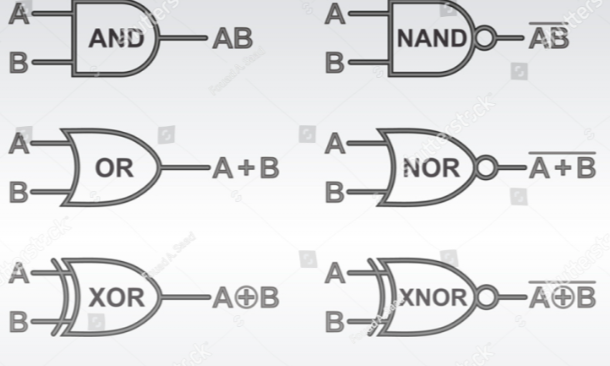
Logic Gates
-processors/chips made up of switches/logic gates
-each gate takes up to 1 to 2 inputs and one output
-units: 1(high voltage/true) or 0(low voltage/falseC)
-voltage - pressure that forces charged electrons to flow through circuit
Client
Computer system or software application requests a service from a server connected to the same network
Server
Computer system or software application that provides a service, central piece of hardware or system
Computer Network
When 2 or more computers are linked together
-every computer/device on a network can send and receive data from any other devices connected to the network
Connecting Computer Systems
Hub: connection point for devices on a single network
-to send data to another, network copies data and sends it to ALL devices connected to its ports (unnecessary traffic, slow)
Switch: like hub but identifies which device is connected to which port, allowing a network connected by switches to operate faster, data is only sent to computer that needs it
Router: can connect multiple networks and servers as an intermediary between them ex home network and internet
Internet
Globally connected network system
-uses TCP/IP protocol to transmit data: data all has to fit into a specific format and travel in a way specified by the TCP/IP rules
-no centralized governing body (some organizations help it run)
-host pages make up the World wide web - internet = physical infrastructure that allow computers and internet to communicate, web pages = WWW
-internet service providers (ISP) run networks that provide internet access
-glued together by internet exchanges (IXP)
-IXP = keep to connecting all ISPs and networks together
How the internet works
-Data travels in the form of packets
-Every file sent or requests made are split up into packets
-individual packets often take different routes through exchanges, ISPs, junction boxes
-reach destination and are reassembled
Packet switching
Packet: unit of information suitable for travel through networks
-file being transmitted through packet switching may be divided into multiple packets
-each packet can follow a different route allowing for efficient transmission and reduced delays
-routers help data get to destination efficiently
-typically have payloads, header, and footer
Router
-manages and controls traffic flow of packets
-checks address of packets
-puts packets on correct path
-secure transmission
Local Area Network (LAN)
-single or collection of buildings - <1km radius
-something like what is in your house
-small range
-no leased telecommunication lines
-high data transfer rate
-setting up extra devices is not very expensive
-fewer problems because smaller number of systems
Wide Area Network (WAN)
-covers more area than LAN- >1km radius
-multiple routers
-several LANs connected using routers
-may use leased lines
-large range
-requires leased telecommunication lines
-lower data transfer rate and less speed
-since networks in remote areas have to be connected, set up costs are higher but public networks can be set up cheaply
-less fault tolerant because it has a larger number of systems
Virtual Local Area Network (VLAN)
-1 or more physical LAN
-network switch used to divide network (artificial networks made with software that mimics physical LAN allowing more networks than you have
-works as multiple networks
-each VLAN has a different security requirements
-Appears to an outsider and one LAN or WAN
Compared to LAN
-more flexible
-safer
-more complex to set up
-better for larger organizations
Storage Area Network (SAN)
Network of storage devices, often appear as attached drives, connect directly to computers that want access, server dedicated to store data/access storage devices
-purpose specific servers
-backup servers, battery backup in case of disasters
-not accessible through LAN
-better performance
Wireless Local Area Network (WLAN)
-LAN by which devices are connected by high frequency data/radio waves/WiFi (wireless diferlity
-through WiFi, can make a request to the WiFi router → requests to internet and responses/data from the internet through the router
-Advantages: can be unlicensed radio spectrum (cheaper), no cables (cheaper), can move ground, global standards, minimal set up costs
-Disadvantages: interference, limited range, security and health concerns
Personal Area Network (PAN)
-connects devices in a user’s immediate area (LAN with smaller radius) ex. hotspots
Intranet and Extranet
-Private network - sort of private internet (cannot access from WWW unless you are connected to the internet hosting internet)
-uses TCP/IP
-can view webpages similar to those on the internet
-intranet webpages only accessible from computers on network
-if the intranet system is accessible through online portal, becomes extranet
Virtual Private Network (VPN)
-uses VPN client, accessing internet through VPN server (from client, sends requests to the server)
-VPN server requests to that internet resources on your behalf and returns response to you via VPN client
-encrypted connection done with encryption technology
-tunneling: process of creating and maintaining an encrypted connection between server and client
-Advantages: authentication (encryption cannot be changed by outside/ have control over what you send), encryption (data cannot be accessed or altered), tunneling (data can be secured using proprietors/protocols of the company or external VPN provider), multiple exit notes (origin of initial data packets are unclear and data can appear to originate from multiple IP addresses
Peer to Peer Network (P2P)
Allows 2 or more computers to share resources with each other
-each computer acts as a client AND server
-no central points
Protocol
Set of rules for data transmission (packets)
TCP/IP: rules for transmitting data on the internet
HTTPS: rules for securely transmitting data between web browser and server
SFTP: rules for securely transferring files from client to server
Role: maintain data integrity, flow control, prevent deadlock (2 packets do not block each other), prevent errors
Open System Interconnection (OSI) Model
7 Application
-end user layer
6 Presentation
-syntax layer
5 Session
-synch and sent to port
4 Transport
-end to end connections
3 Network
-packets
2 Data Link
-frames
1 Physical
-physical structure
Transmission Media
physical media by which data packets are transmitted
types: wired (ethernet, fiber optic, copper) and wireless (WLAN/radio waves, microwaves)
factors: security, reliability, cost, speed
WiFi vs Ethernet
WiFi
-slow data transfer speed
-suffers from signal interference
-data flow needs encryption
-higher latency
-easy to install/deploy
Ethernet
-faster
-delivers at consistent speed
-doesn’t need encryption
-cable installation infrastructure required
Transmission Speed
Primary Factor: traffic
Secondary Factors: time of day, distance, infrastructure
Tertiary Factors: environmental issues, data type
Compression
Lossy: removes data, smaller file size, irreversible, used when data can be lost
Lossless: uses algorithm to reduce file size, larger than lossy, reversible, used when cannot be lost
Network Security
Authentication
-one way/factor: password
-two way/factor: password, text message
-three way/factor: password, text message, face id
Encryption
-encodes data
-data can only be read by sender and receiver
-involves a key
Media Access Control (MAC) Address
-identifies network, enabled devices in networks - assigned to any network enabled device/controller - only want specific mac address
-hard coded by manufacturer
-network interface controller
-unique
Firewalls
-hardware or software
-analyzes packets
-controls incoming and outgoing packets based on predetermined rules/filters
Physical Security
-locked doors, cages, guards etc.
Linear Search
goes through array one by one
Binary Search
splits into half each time
Bubble Sort
compares each element to the element after it and swaps (larger numbers bubbles to the end)
Selection Sort
finds the lowest value and swaps with the first index
Data Flow Diagram
A data flow diagram uses standardized symbols/notation to show the way information flows through a process/ system; It specifies the software, hardware, files, and people involved in an information flow / it includes data inputs and outputs, data stores, and the various subprocesses the data moves through; A data flow diagram describes various entities and their relationships using standardized symbols; It specifies what information is being transmitted/what entities are receiving that info/ what general processes occur,
State two features of a computer language.
fixed vocabulary/ a set of words (keywords) of computer languages is constrained (and standardised); consistent grammar/ the way different elements (statements, keywords, operators, punctuation) are combined is precisely stated/ordered (so that when are combined they create meaningful instructions/ always act in the same way); consistent syntax/ the arrangement of various elements (statements, keywords, operators, punctuation) in code is uniform (and predictable)/ unique rules that control the structure of the code; unambiguous meaning/ each method(function/statement) has one clear meaning/ corresponds to a single specific operation (that can be uniquely recognised by the computer);
Purpose of a data flow diagram
A data flow diagram uses standardized symbols/notation to show the way information flows through a process/ system; It specifies the software, hardware, files, and people involved in an information flow / it includes data inputs and outputs, data stores, and the various subprocesses the data moves through; A data flow diagram describes various entities and their relationships using standardized symbols; It specifies what information is being transmitted/what entities are receiving that info/ what general processes occur, etc.
Ways to improve accessibility
voice recognition; touch screen; text-to-speech; Braille keyboard;
Purpose of the memory data register (MDR) within a central processing unit
to hold data that will be stored into or fetched from the primary memory
Characteristics of fibre-optic cables
reliable/ strong signal transfer/ signals traveling via a fibre optic cable are immune from (electromagnetic/ radiofrequency/ high voltage) interference; fast transfer of data; high transmission rate and bandwidth; huge data capacity; less maintenance; transmit data as pulses of light; low latency; secure transmission; difficult to install (more difficult than other types of cables (such as copper cables)); expensive (more expensive than other types of cables (such as UTP cable))
Reasons for using a virtual machine in the testing and development of apps
Virtual machines provide a software emulation of other operating systems
More suitable/ effective; App to be tested is compiled into the language of the virtual machine and this can be interpreted into the language of the host machine/ an app can be tested in multiple operating systems on a single machine;
Cost effective; Reduced hardware costs/ reduced the costs associated with licenses and storage;
Less time consuming; Than having to test app on several computers with different OS;
Faster deployment times for apps; multiple virtual environments can be quickly created (and used in testing);
Increased security; due to the isolation of virtual instances (e.g., when testing unapproved software solutions);
Improved scalability of apps; virtual machines are able to utilize much more computing power since they are not bound to specific hardware (whereas a physical machine is limited by the hardware it contains);
Scalable resource allocation; resources can easily be added or removed depending on the demands of the app;
Portability; apps may be tested/executed/used on any platform/ in multiple operating systems;
Legacy System Support; Apps can be tested on older OS versions that may no longer be supported on modern hardware/ maintaining backward compatibility;
Efficient debugging; Bugs that occur only on specific OS versions can be caught by running the app in multiple VMs
Hardware components of a WLAN
Wireless router; Wireless access points (WAP) Accept access point (AP); Wireless antennas; Client wireless adaptors / Network interface cards (NICs); Wireless bridge/ repeater; Wireless controller; Network switches;
Advantages of a WLAN
Flexibility / mobility within the office; Office-based employees can work without sitting at dedicated computers/ allow employees to remain online even if they move their laptop/ allow employees use of other mobile devices around the office/building;
Access/ availability; Employees can communicate while on the move/ enable employees to share the network and hardware/ WLAN 'hotspots' offering guests access to internet/ employees can bring their own devices (and use full functionality of the network);
Increased collaboration; employees can be located anywhere in the office and still access key documents and information/ can easily work in teams/groups;
Cost savings/ wireless networks can be cheaper to install / cheaper to extend; because no need for buying additional hardware or cables to access the network / allows network access to areas where cabling was not cost-effective/ practical;
Simpler infrastructure/office organization/ office layout; Desk locations are not dictated by wires and cables;
Scalability; New employees can be added to the network easily and quickly
Ways to avoid unauthorized interception issues
Use of encryption keys; so that only devices with the correct key can communicate with access points (Wired Equivalent Privacy (WEP));
Use the most up-to-date wireless encryption protocol (accept Wi-Fi Protected Access/WPA2/WPA3); to protect internet traffic on wireless networks;
Media Access Control (MAC) addresses attached to each device can be filtered; to limit connection to access points/ use of trusted/authorised devices;
Service Set Identifiers (SSIDs); to prevent connection to access points (unless a device uses a given identifier correctly);
Multi-factor verification; the login process by requiring the user to verify their identity with a text message/email/an authenticator app;
Authentication (user ID + password/ biometric) should be used on all devices/ data files; to verify the identity of the user;
Strong password (that includes special characters, numbers, and uppercase and lowercase characters/ that is changed regularly/ never shared); To prevent data breaches / to prevent brute-force attacks (systematically guessing passwords until the correct one is found);
Encryption/ encoding data in such a way that it cannot be read by anyone; except for the intended recipient with decryption key;
Activate firewall protection (software or hardware) to protect the system/network from unauthorized access; by controlling the incoming and outgoing traffic/data;
(Buy and) use a high-quality data intercept security software; that protects the sensitive data from being intercepted by hackers/ helps to protect against viruses, malware, spam;
Keep software and firmware up to date; to patch any security vulnerabilities;
Use a VPN; to encrypt communication between devices and network;
Segment network; to limit access to sensitive data;
Intranet and extranet could be implemented; extranet is accessible to all users / extranet provides limited access from outside the WLAN for all users/ the intranet (private/secure network) is restricted to group of users /employees; – 9 8825 – 6407M
Authorization; To specify actions an authenticated user is permitted to perform/ to specify role access rights (to resources and operations);
Install antivirus software; to identify, block and protect against malicious software/ infected links/suspicious activity;
How a virtual private network (VPN) allows full functionality as well as secure access
VPN ensures that only authorized users can connect using authentication; Tunnel established between the employee’s device and the organization’s network; All data passing through this tunnel is encrypted, even if someone intercepts it, they cannot understand it; Gives the employee access to internal resources (files, databases, printers, or applications) as if they were physically connected to the company’s LAN; Masks the employee's IP address making the data origin untraceable; Uses multiple exit nodes making it hard to trace the data path
Advantages of direct observation
The system analyst can gather data at the time they occur/ where activity is occurring/ can obtain direct/ first-hand information about the system / can observe how processes are really carried out;
The analyst does not rely on users’ willingness to provide information/ does not have to ask users about their behaviour (can observe users’ actions/expressions/reactions);
The analyst can reveal system issues that the users are unable to identify/ are not aware of;
The analyst can conduct his/her study over a longer period/ analysis can be detailed;
The analyst can gain information that is more reliable/less biased/more accurate (than data collected by other methods);