IS 310 - Chapter 11 Network Security
 Call Kai
 Learn
Learn Practice Test
 Spaced Repetition
 Match
Match Flashcards
 Knowt Play
1/46

There's no tags or description
Looks like no tags are added yet.
Name | Mastery | Learn | Test | Matching | Spaced | Call with Kai |
|---|
No analytics yet
Send a link to your students to track their progress
47 Terms
Threat
Any potential occurence that can do harm, interrut the suystems using the network, or cause a monetary loss to the org
Vulnerability
The opportunity for threats to gain access to individual or organizational assets. weakness in a controlled system
Security Threats
Threats to business continuity
Disruptions
Destruction of data
Disasters
Threat of Unauthorized access (intrusion)
External attackers exist, but most unauthorized access incidents involve employees
CIA Triad
Confidentiality
Protection of org data from unauthorized disclosure
Integrity
Assurance that data has not been altered or destroyed
Availability
Providing continuous operation of the orgs hardware and software
Network Controls
Are safeguards that reduce or eliminate threats to network security
Preventative Controls
Mitigate or stop a person from acting or an event from occuring
Detective Controls
Reveal or discover unwanted events (ex: auditing)
Corrective Controls
Remedy an unwanted event or intrusion
Risk Assessment Steps
Develop risk measurement criteria
Inventory IT assets
Identify threats
Document existing controls
Identify improvements
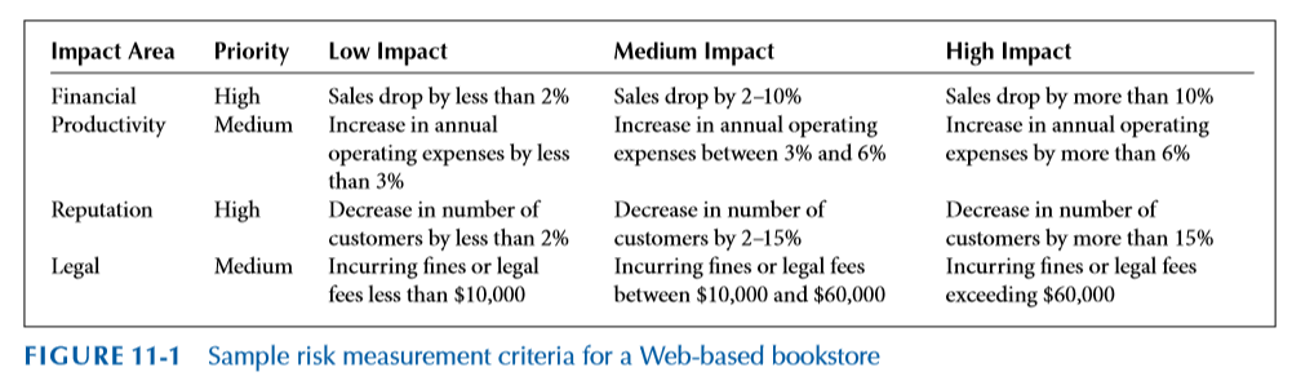
Develop Risk Measurement Criteria
The measures used to examine how threats impact the org
Prioritize and evaluate each measure
Business impacts: Financial, Productivity, Reputation, Safety, and Legal
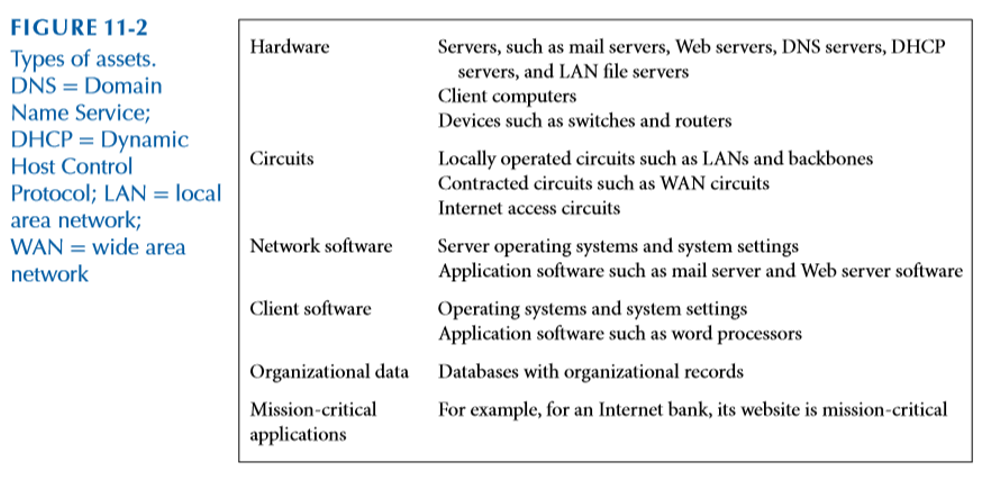
Inventory IT Assets
Mission critical applications and data are the most important
Document and evaluate why each asset is important to the org
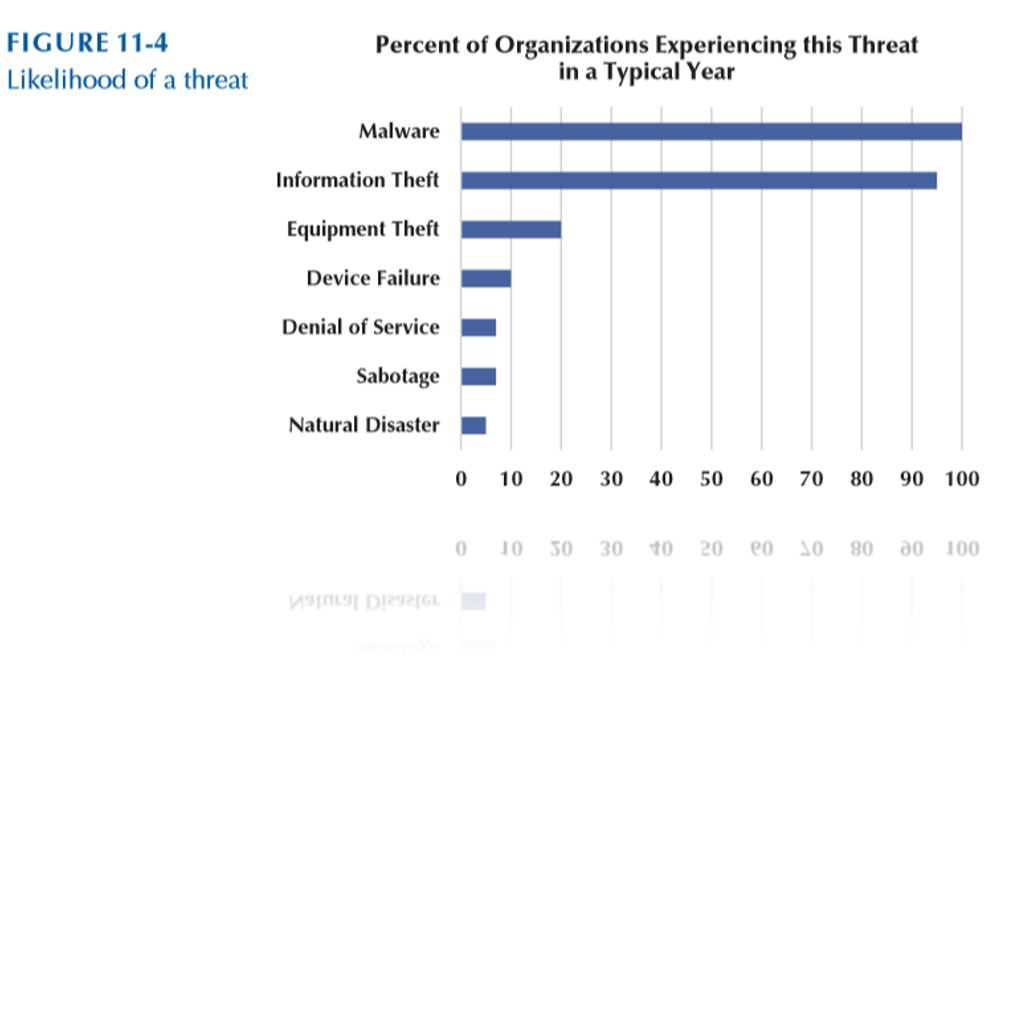
Identify Threats
Any potential occurrence that can do harm, interrupt the systems using the network or cause a monetary loss to the org
Create threat scenarios that describe how an asset can be compromised by a threat
Likelihood of occurrence
Potential consequences of threat
Risk scores can be used to quantify the impact and likelihood of occurrence
Document Existing Controls
Identify controls and determine how they will be used in the risk control strategy
Risk acceptance
Orgs may choose to take no actions for risks that have low impacts
Risk mitigation
Use of control to remove or reduce impact of threat
Risk Sharing
Transferring all or part of impact (ex: insurance)
Risk Deferring
For non-imminent risks
Identify Improvements
It is infeasible to mitigate all risks
Evaluate the adequacy of the controls and the degree of risk associated with each threat
Establish priorities for dealing with threats to network security
Security Threats
Threats to Business Continuity
Disruptions
Destruction of data
Disasters
Threat of Unauthorized Access
External attackers exist, but mist unauthorized access incidents involve employees
Ensuring Business Continuity
Making certain that orgs data and applications will continue to operate even in the face of disruption, destruction, or disaster
Virus Protection
Ddos Protection
Threat protection
Device failure protection
Disaster protection
Viruses
A piece of programming code
Causes a pc to behave in an undesirable manner
Spread to other machines when a pc user shares an infected file or sends an email with a virus-infected attachment
Cannot infect ur pc unless you run or open the program
Worms
A harmful program that resides in the active memory of the computer
Duplicates itself
Can propagate without human intervention
Denial of Service (DoS) attack
Floods a network with messages that prevent normal access
Keeps target busy responding to each requests that legit users cannot get in
So many requests are made that the target system becomes overloaded and cannot respond to legit requests for service
Distributed DoS (DDoS)
Uses multiple devices to perform attack
DDoS attacks are often performed using a network of compromised devices (agents, bots, or zombies)
How to Prevent a DoS
Traffic filtering
Traffic limiting
Traffic analysis
Using traffic anomaly analyzer
Disaster Protection
Avoidance, storing data in multiple locations and avoiding locations prone to natural disasters
Disaster Recovery
Orgs should have a clear disaster recovery plan (DRP)
Identify responses to different types of disasters
Provide recovery of data, applications, and network
Specify the backup and recovery controls
Cold Site
A separate facility that does not have any computer equipment, but is a place where employees can move after a disaster
No Hardware
Empty Building
No data
Bring it with you
No people
Bus in your team
Warm Site
A separate facility with computer equipment that requires installation and configuration
Somewhere between cold and hot
Big Room with rack space
Hardware is ready and waiting
You bring the software and data
Hot Site
A separate and fully equipped facility where the company can move immediately after a disaster and resume business
An exact replica: Duplicate everything
Stocked with hardware: Constantly updated/You buy two of everything
Applications are constantly updated: Automated replication
Phising
The act of fraudulently using email to try to get the recipient to reveal personal data
Con artists send legit looking emails urging recipients to take action to avoid a negative consequence or to receive a reward
Pharming
Reroutes requests for legit websites to false websites
Hackers change DNS server list
Spoofing
Gain unauthorized access to a users system or information by pretending to be the user
Trojan Horses
A seemingly harmless program in which malicious code is hidden
Appear to be useful software from a legit source
Destroy hard drives
Corrupt files
Control the pc remotely
Launch attacks later
Spy on users and steal passwords
Social Engineering
Psychological manipulation of people into performing actions or divulging confidential info
Security Policy
Defines an orgs security requirements along with the controls and sanctions needed to meet those requirements
Firewalls
Special purpose device examines packet flowing into and out of a network
Packet-level firewalls
Application-level firewalls
NAT firewall
Packet Level Firewalls
Examine the source/dest address of every packers
Decide which packets are allowed or denied
Transport layer and network layer used
Application Level Firewalls
Use stateful inspection to examine traffic at layer 5 (Session Layer) for anomalous behavior
Examines the contents
Network Address Translation
Converts one IP address to another
Often from a publicly routable address to a private address
External intruders on the internet cant see
Encryption
Disguising info using mathematical riles, providing confidentiality
The strength of the encryption is based on
The strength of the algorithm (key)
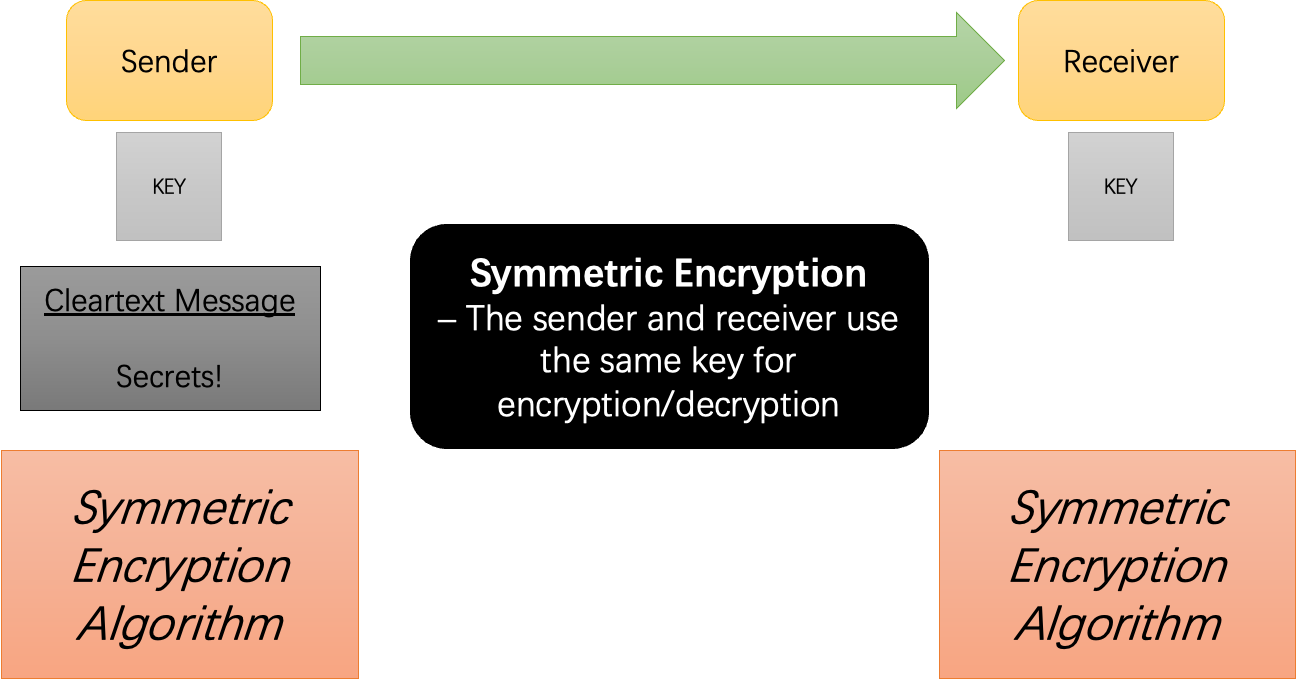
Symmetric Encryption
Using a single key for encrypting and decrypting
Challenge in sharing key
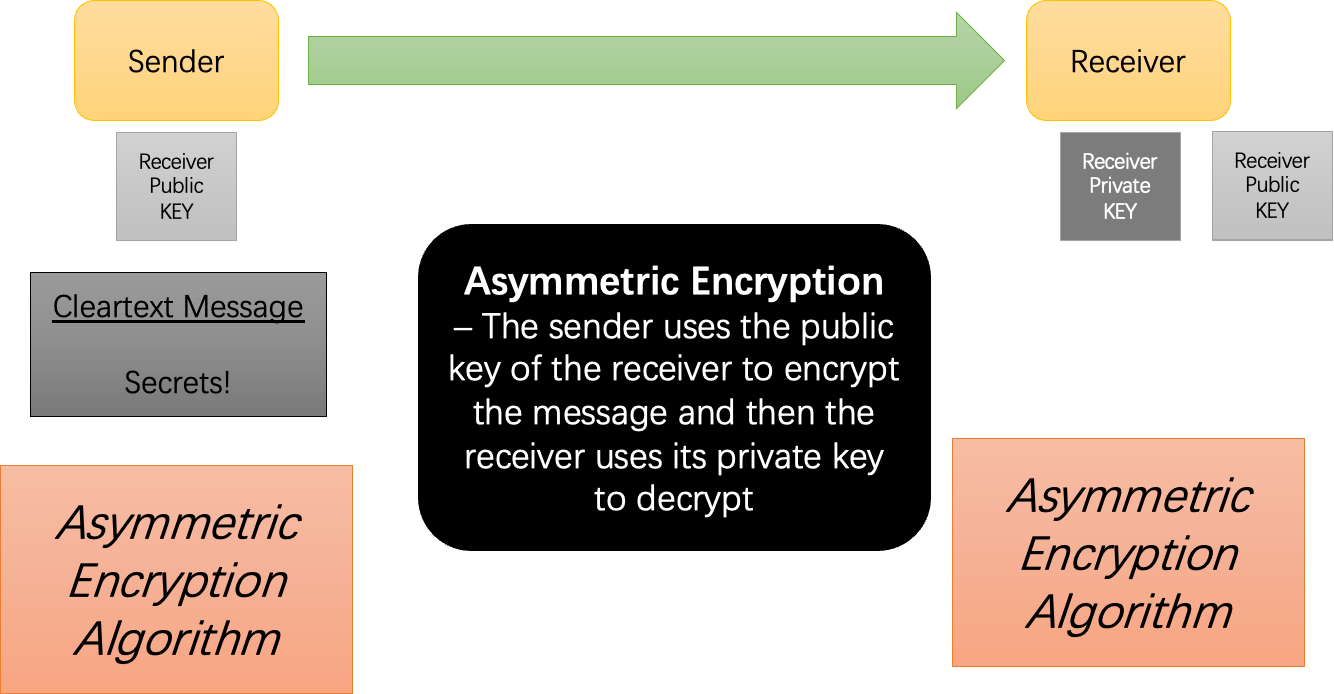
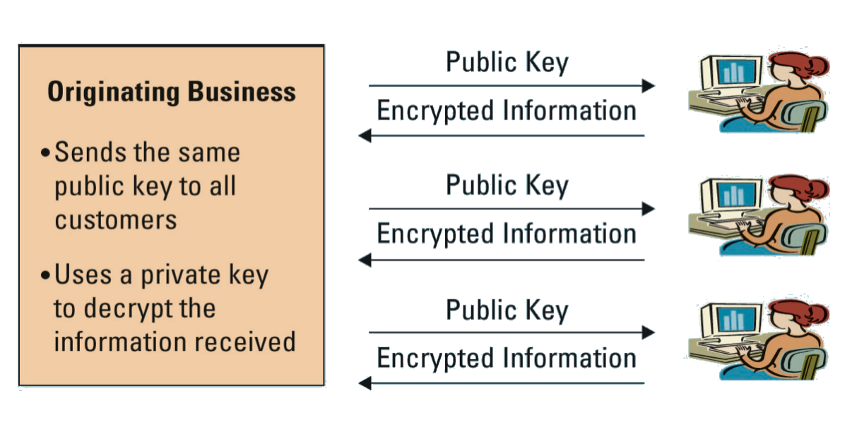
Asymmetric (public-key) encryption
A pair of kets are used
One key is designated the public key and can be freely shared
The other key is designated the secret private key
When a message is encrypted using one key, it can only be decrypted with the other
Authentication
A method for confirming users identites
The most secure type of authentication invloves
Something the user knows
User ID/Password
Most ineffective
Something the user has
Smart cards: Small card with embedded tech that allows you to gain access
Tokens: small device that changes user passwords automatically
Something that is part of the user
Biometrics: The identification of a user based on a physical characteristic
Costly and intrusive
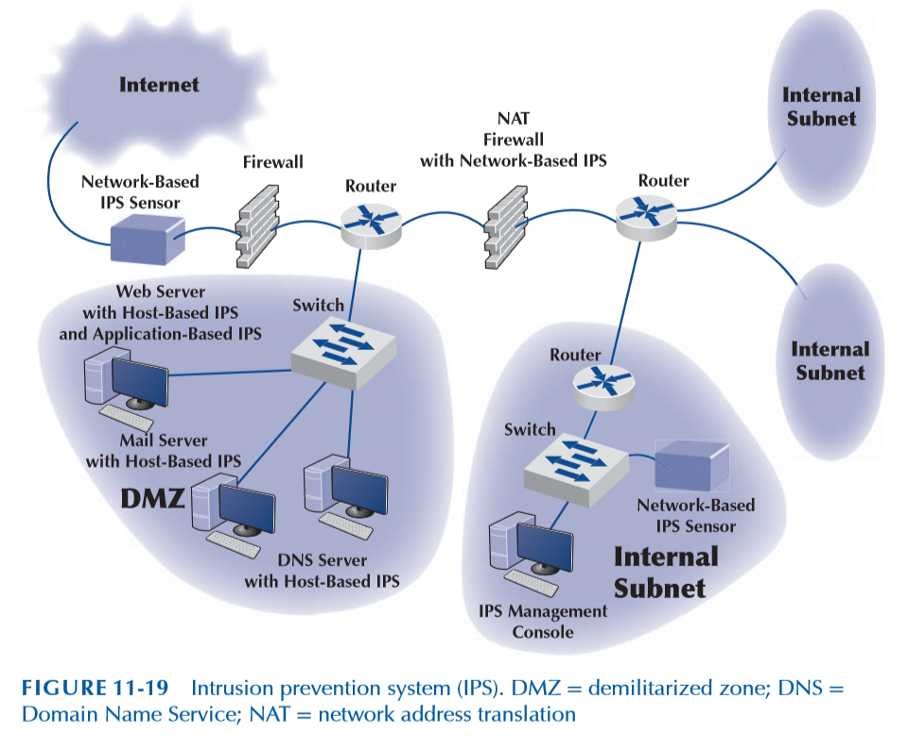
Intrusion Prevention Systems
Detect an intrusion and take action to stop it
Compares monitored activities with signatures of known attacks
Compares monitored activities with the “normal” set of activities.
IPS warns firewall of suspicious traffic.
Messages from IPS routed to the network security team
Risk Assessment Steps
•Develop risk measurement criteria
•Inventory IT assets
•Identify threats
•Document existing controls
•Identify improvements
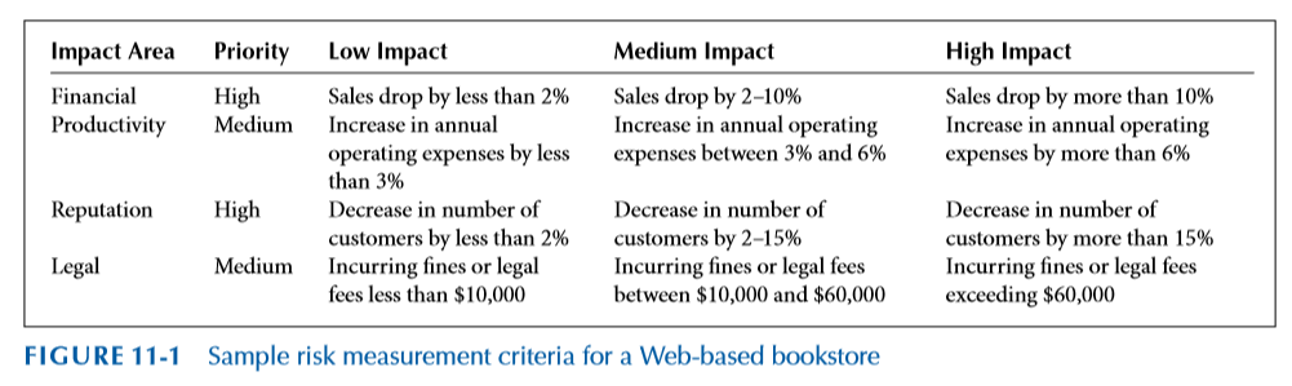
Develop Risk Measurement Criteria
The measures used to examine how threats impact the org
Prioritize and evaluate eacg measure
Business Impacts: Financial, Productivity, Reputation, Safety, and Legal
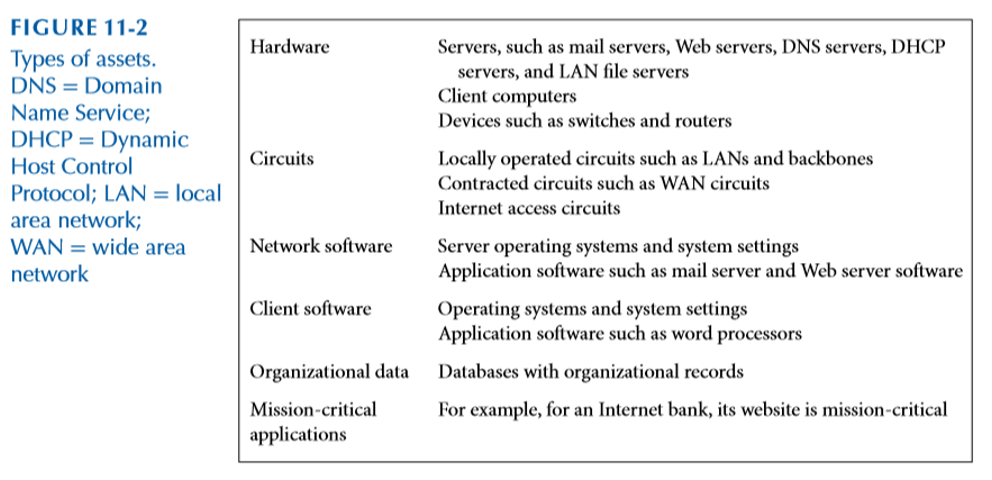
Inventory IT assets
Mission critical applications and data are the most important
Document and evaluate why each asset is important to the org
Identify Threats
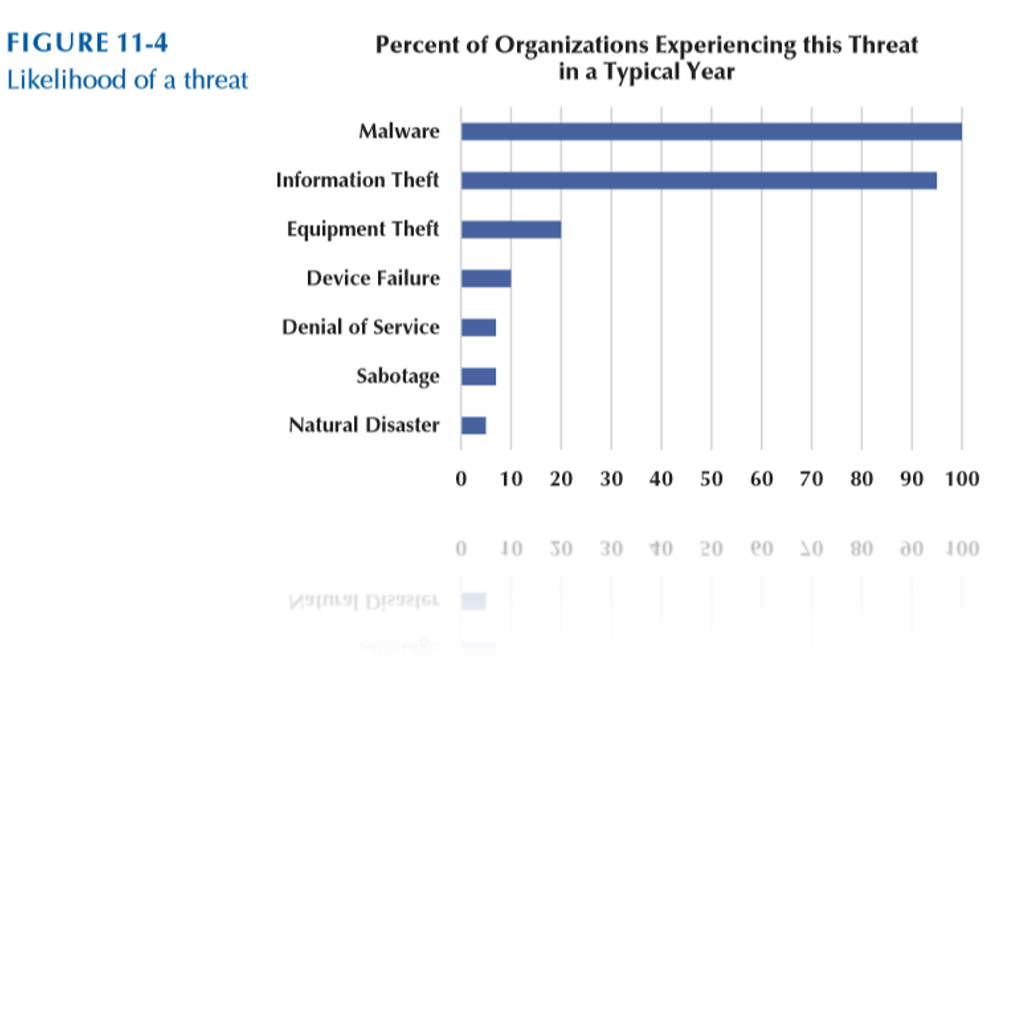
Any potential occurrence that can harm, interrupt the systems using the. network or cause a monetary loss to the org
Create threat scenarios that describe how an asset can be compromised by a threat
Likelihood of occurenece
Potential consequences of threat
Risk scores can be used to quantify the impact and likelihood of ooccurence
Document Existing Controls
Identify controls and determine how they will be used in the risk control strategy
Risk acceptance
Organizations may choose to take no actions for risks that have low impacts
Risk mitigation
Use of control to remove or reduce impact of threat
Risk sharing
Transferring all or part of impact (e.g., insurance)
Risk deferring
For non-imminent risks
Identify Improvements
•It is infeasible to mitigate all risks
•Evaluate the adequacy of the controls and the degree of risk associated with each threat
•Establish priorities for dealing with threats to network security