Information system management 4 (Servers)
 Call Kai
 Learn
Learn Practice Test
 Spaced Repetition
 Match
Match Flashcards
 Knowt Play
1/60

There's no tags or description
Looks like no tags are added yet.
Name | Mastery | Learn | Test | Matching | Spaced | Call with Kai |
|---|
No analytics yet
Send a link to your students to track their progress
61 Terms
Name typical product families (3)
Most typically a computer vendor has 3 different product families:
Home
Business
Server
What product family is a video game console ((like a Nintendo Switch Lite or entry-level Xbox)?
Home product family
Characteristics of a home product family (4)
Absolute cheapest price
Expensive upgrades, accessories
Suppliers are changed frequently, so there are no two identical suppliers
flexible „gaming features”: joystick, high performance graphic, audio
What product family is a Commercial Laptop (like a Dell Latitude or Lenovo ThinkPad)?
Business product family
Characteristics of business product family (2)
Minimizing the total cost of ownership (more expensive start price, but longer lifetime)
Less frequent changes, because changes are expensive for companies:
– to store spare parts to a lot of (sub)types
– to train the support/sales personal
What product family is a Rackmount Server (like a Dell PowerEdge or HPE ProLiant)
Server product family
Characteristics of server product family (5)
Different architecture (to have „longer life”: lot of free capacity, easy-to-upgrade, easy-to-upgrade)
Minimal cost comparing to performance
Easy to maintain, upgrade; robust, minimal maintenance time
Location of connections, controllers, buttons:
• Front and rear, but not at the sides
• Rackmount
Reliability is the key design option
What is a server
a heavy duty computer or a software which provides access to:
Stored or provided data for other devices
Hardware resources (printers, back-ups, processors)
Different services
What is server appliance
such a device which is suitable for one, dedicated service.
Example: File server, web-server, email server
For what 3 features are servers built?
reliability, scalability, and high throughput
Explain why servers are easily expandable
More internal space allows future upgrades: additional CPUs, RAM, storage drives, or expansion cards.
Key exam point: Servers prioritize modular design so components can be added without replacing the whole system.
What does server use for processing power? Why does servers performance not always depend on processing power
Multiple CPUs or one high performance CPU to handle concurrent requests.
Important nuance: Servers are often I/O bound, not CPU bound. This means performance is limited by data transfer speed, not raw processing power.
Why is Input/Output(I/O) used in servers
Servers handle many client requests simultaneously, so I/O is critical
Key exam point: I/O performance scales with the number of connected clients.
Explain what is rack mountable design in servers and why is it used
Rack mountable design has front and rear access only
It is used because:
Side-access isn't needed, which improves space efficiency, airflow, and cable management in tightly packed server racks.
Compare how Home, Business, and Server product families handle hardware model changes over time.
Home: Frequent changes, suppliers rotate often, parts aren't standardized.
Business: Deliberately infrequent changes to minimize TCO (avoids spare part inventory & retraining costs).
Server: Long-lifecycle architecture with modular, standardized components for easy upgrades.
An admin sees 20% CPU usage but users report slow response times. Based on server hardware principles, what’s the likely issue?
The server is I/O bound.
Why do business product families avoid frequent hardware updates, even when newer technology is available?
Frequent changes increase Total Cost of Ownership. So they pay a high up-front cost for a long time use.
How many server racks(RU-rack unit or U) do servers typically use
2U or 4U
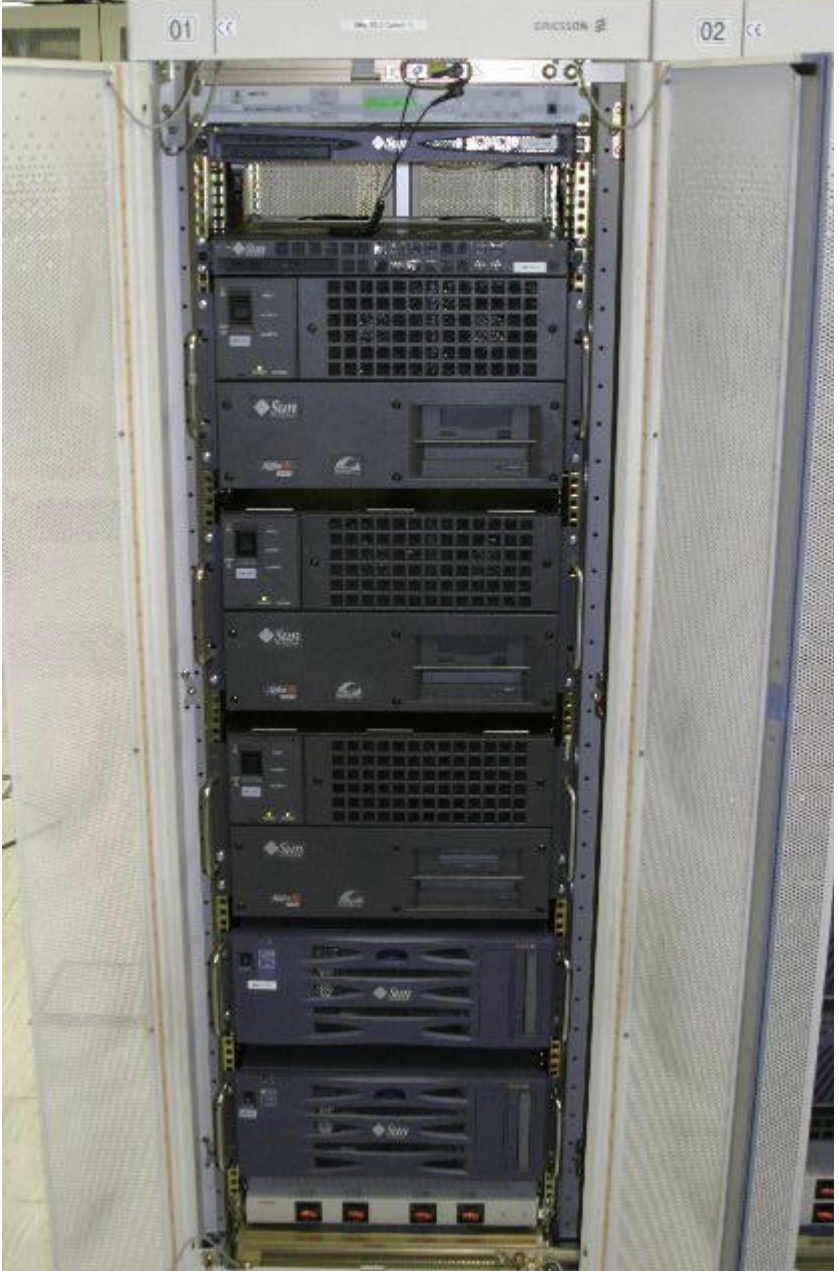
What part of the server is shown in the picture
Server rack rear
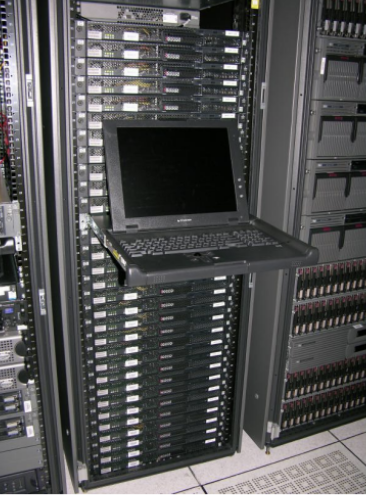
What part of the server is shown in the picture
User terminal
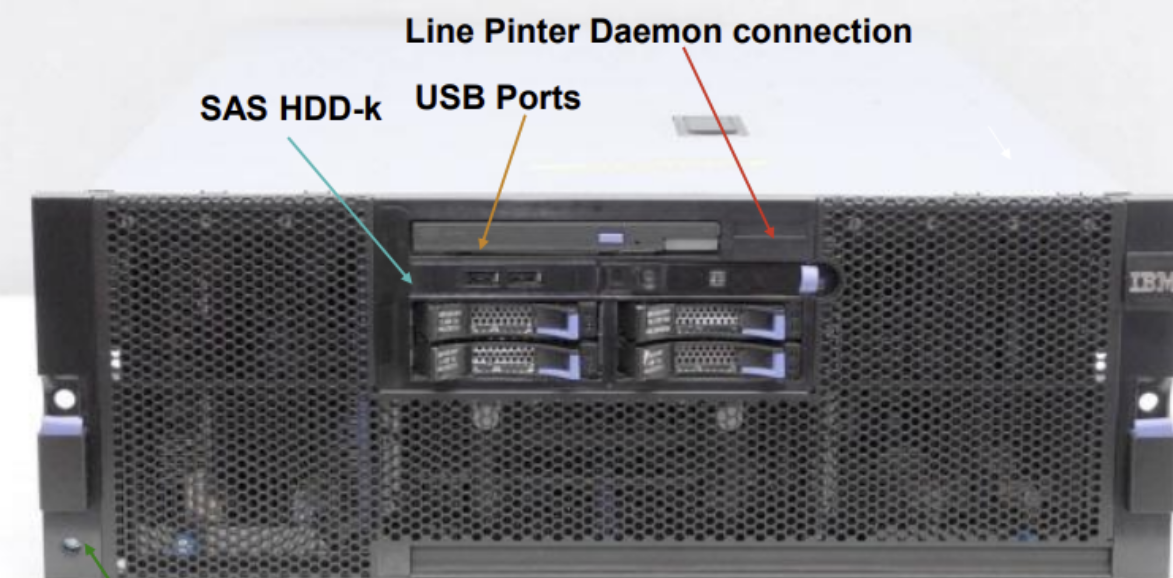
What part of the server is shown in the picture
Front panel (of an rack-mounted server)
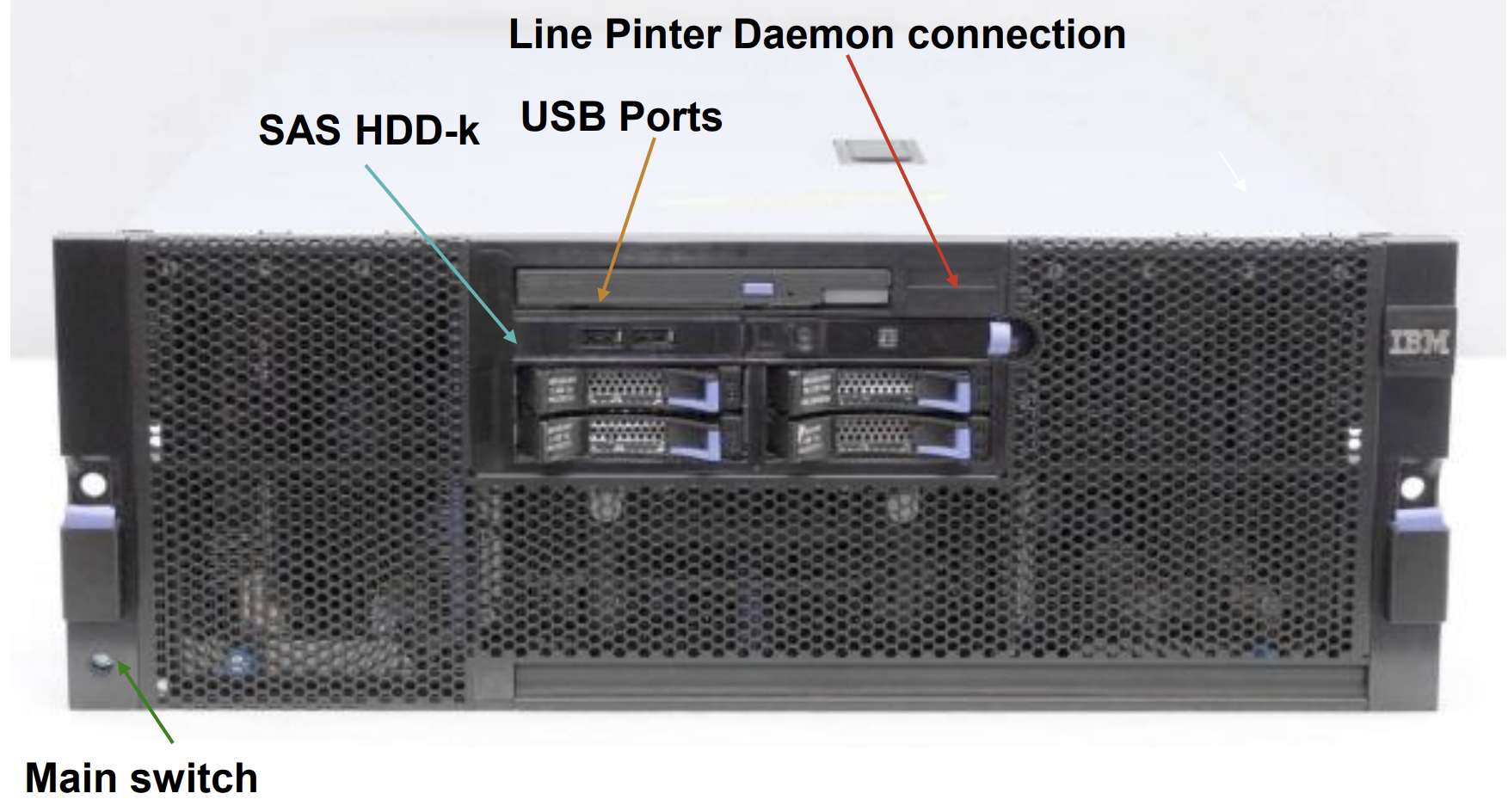
Name what each of the 4 parts you can see in the do
SAS HDD-k -These are the SAS (Serial Attached SCSI) hard disk drives they are known for high speed, reliability, and support for 24/7 operation.
USB Ports - Standard USB ports located on the front panel for easy access.
Line Printer Daemon (LPD) Connection - associated with the LPD protocol. It allows the server to communicate with printers using the classic Unix/Linux printing standard.
Main Switch - The power button located at the bottom-left of the front panel.
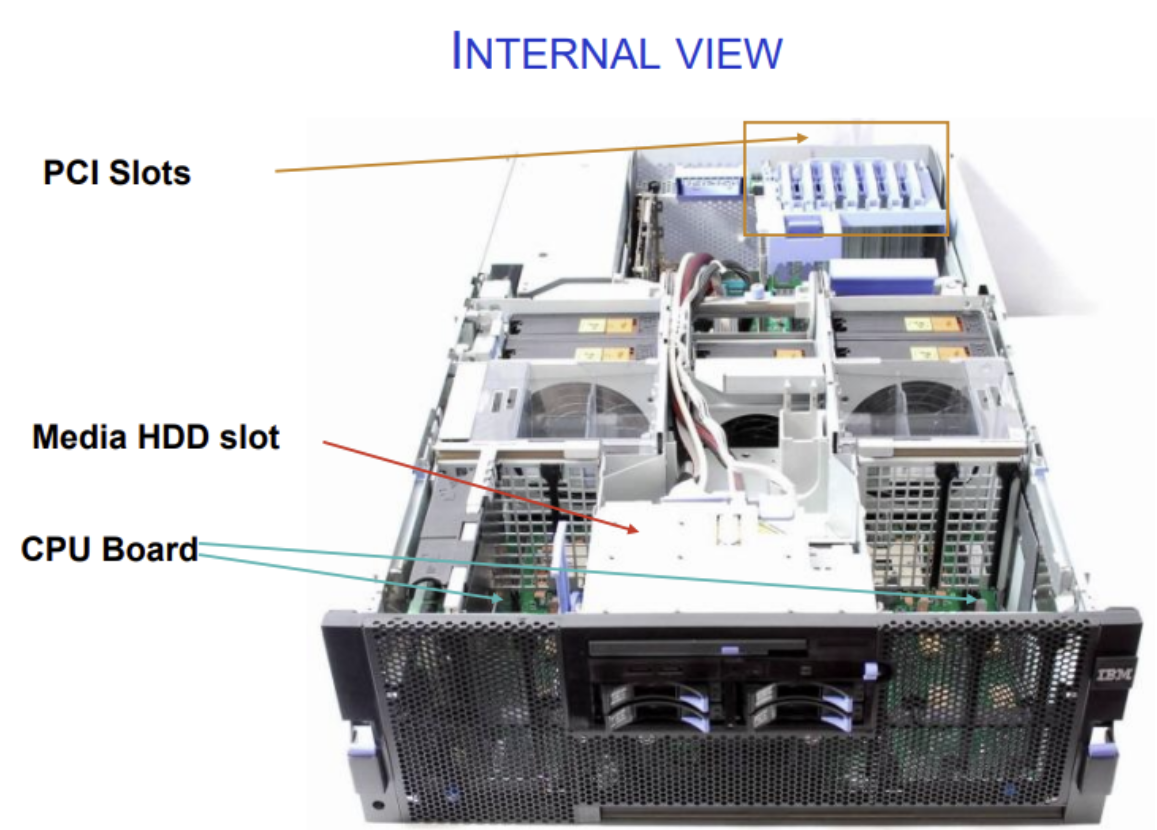
This is the internal view of the server name what each of the 3 parts do
PCI Slots - allow expansion cards to be installed, such as (Network Interface Cards (NICs), RAID controllers…)
Media HDD Slot - used for an internal media hard disk. It is typically used for the operating system installation drive or a secondary internal storage device.
CPU Board -This is the main motherboard/system board, which houses: processors, memory, power delivery components
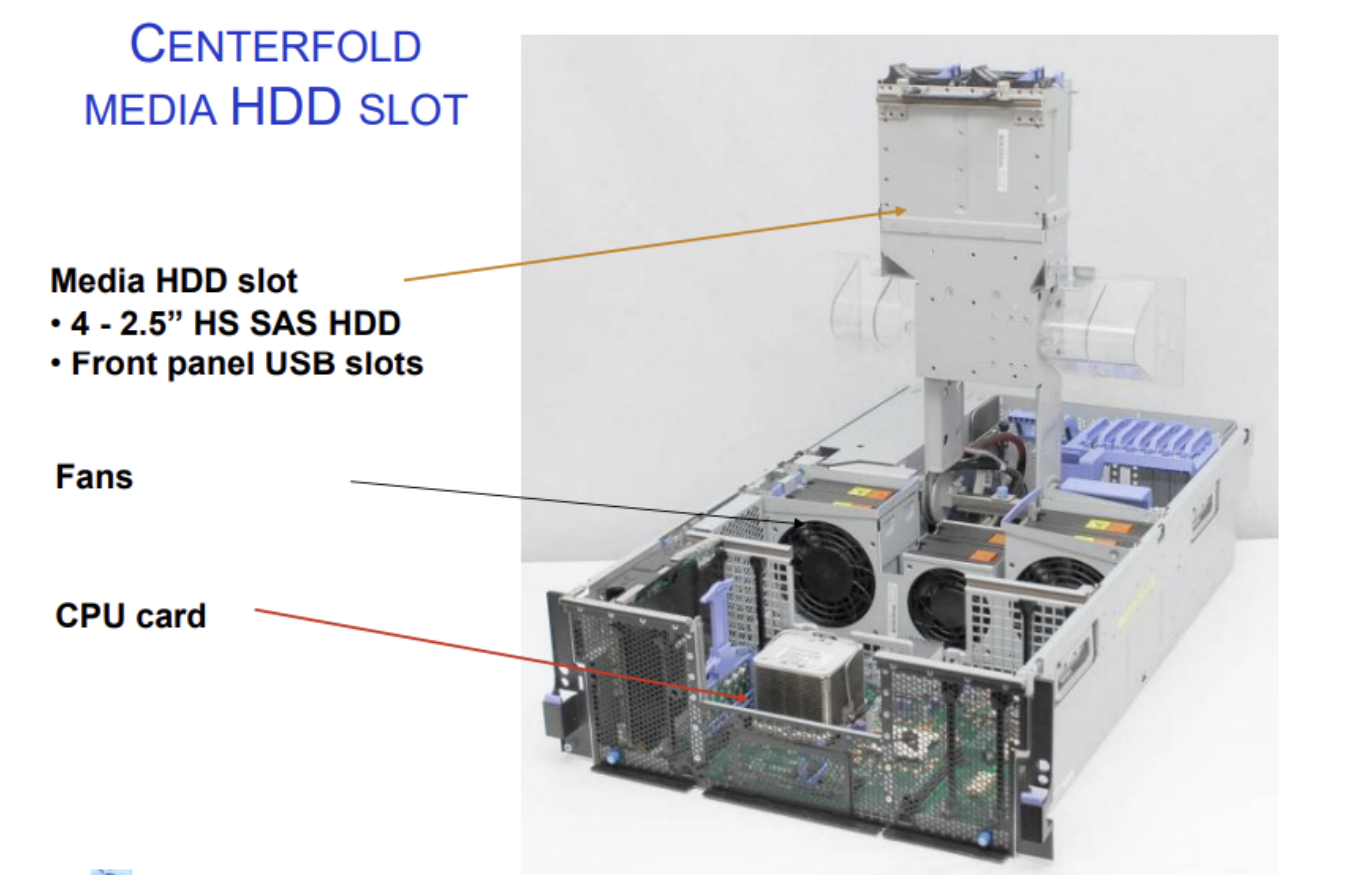
What part of the server is shown in the picture and what does it do
It’s a special place inside a server where hard drives (HDDs) are installed in the middle section of the server.
What does it do?
It is used to store data inside the server.
That data can be:
Files (documents, videos, backups)
Databases
Operating system
Application data
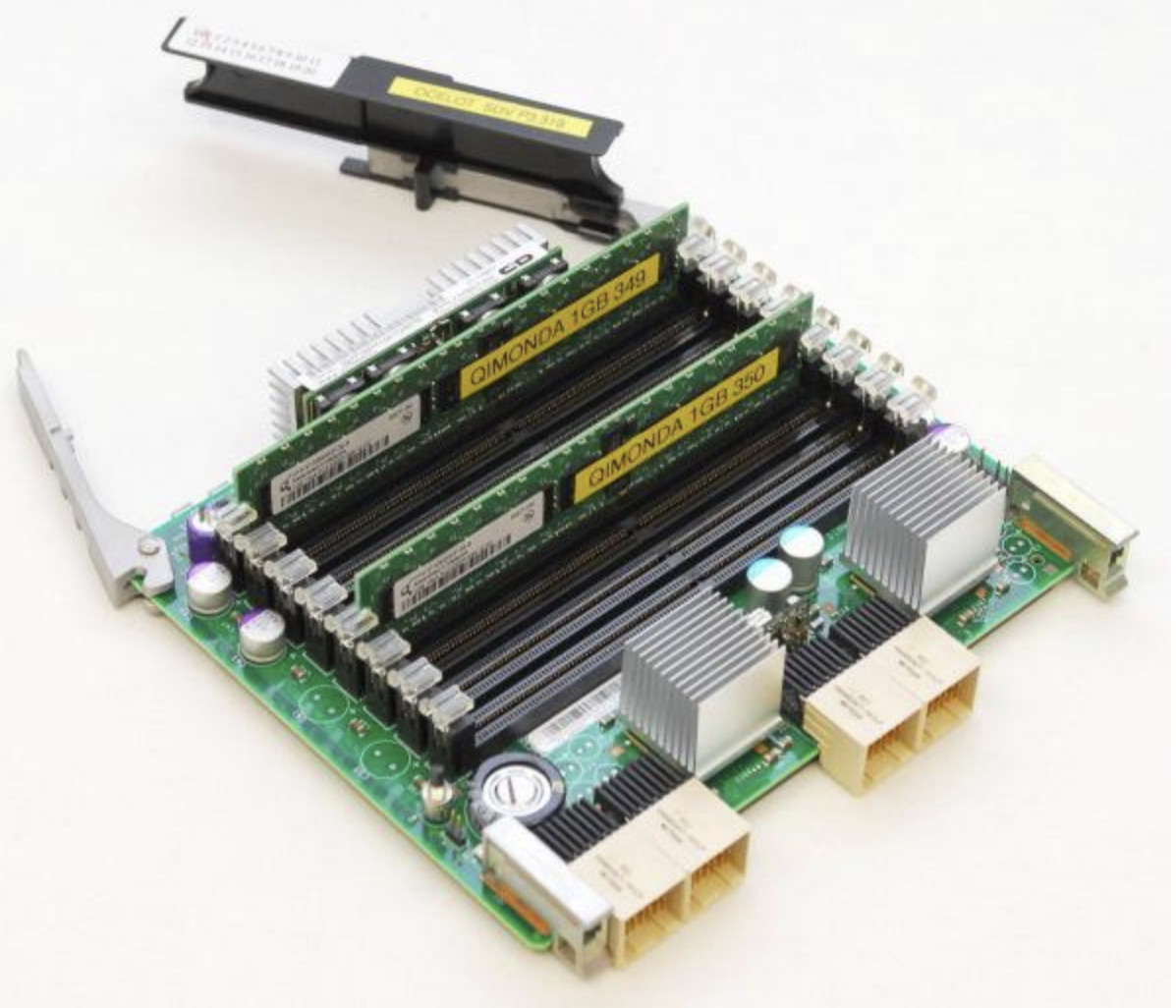
what is this and what it is used for
Memory card.
Used for - is used as a small storage or special-purpose card that helps the server store or access important data quickly
What is the concept of blade servers(4)
• The concept is completely opposite to usual servers
• As small and as powerful as possible
• Optimized for minimal energy consumption
• Goal: put as much computing power into as small of a place as possible
How is it possible to build a blade server, how is it achieved?
Contains only the most important parts in the blade:
• Some memory – enough for basic actions
• CPU
• Network interfaces (integrated network controller) – must be able to connect to the network
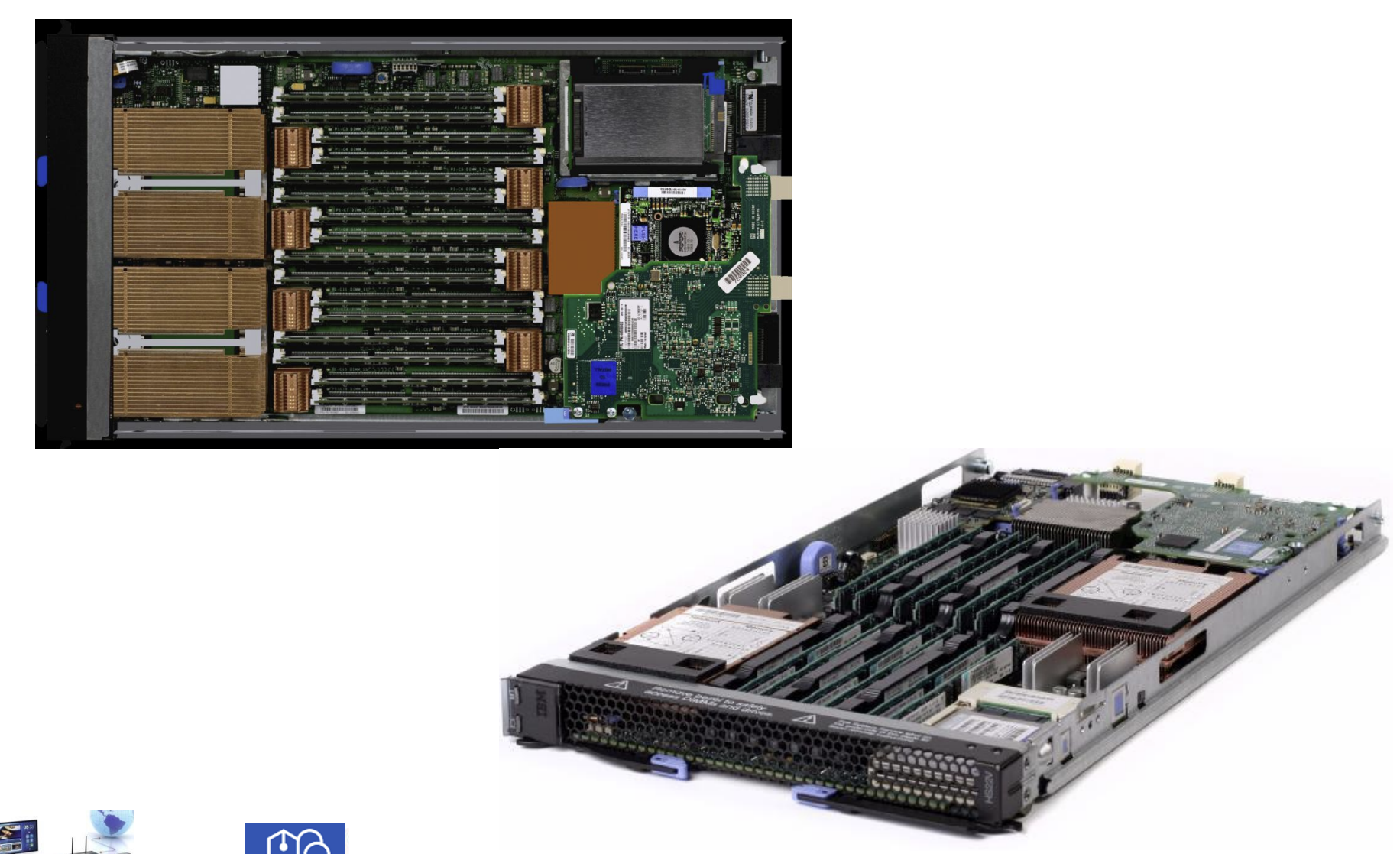
What is shown in the picture?
Blade server
What is contained in blades servers frame? (5)
Power supply
Cooling system
Could contain some disks
Interface ports for keyboard, mouse, monitor
Network connectivity
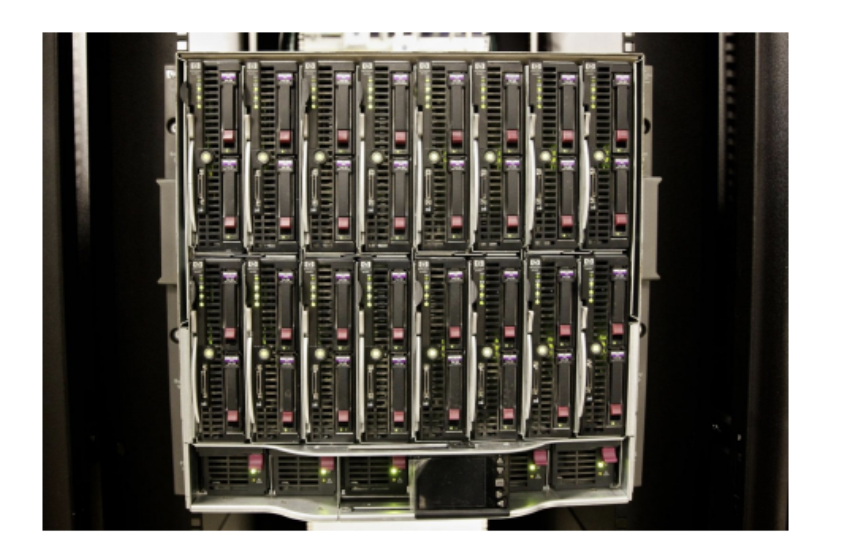
What part of the blade server is shown in the picture
Blade server chassis - front
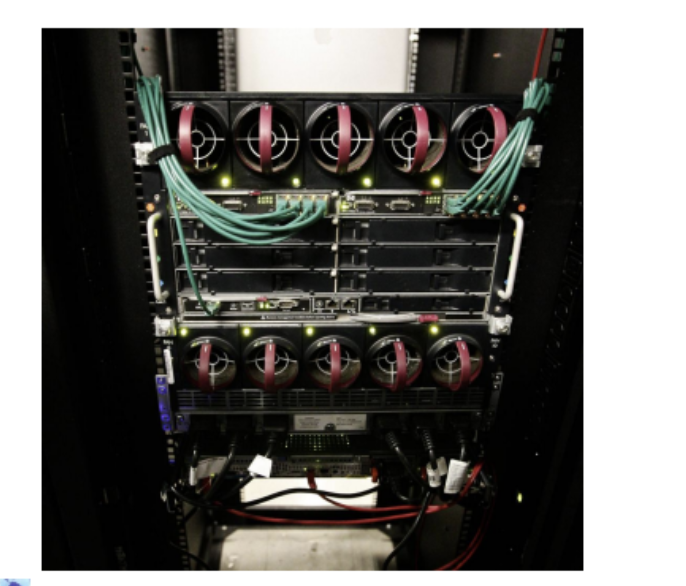
What part of the blade server is shown in the picture
Blade server chassis - rear
What is server blade and blade server
Server blade = one computer unit which is inserted into the chassis
Blade server = the whole system including the chassis and all server blades inside
name at least 2 of blade server advantages (jeigu kieta gali ir 3 as tiek nemoku 😕 )
Much smaller – takes up less rack space
Smaller power consumption – shared PSUs run at higher efficiency
Simplified cabling – one network/power connection per chassis
Centralized management via chassis module
Hot swap blades – replace without powering down chassis
Self‑diagnosis – faulty blades can be identified and replaced easily
Very easy setup – you do NOT have to connect each server separately to power, Ethernet, SAN, management network, display, keyboard, or mouse. Just plug the blade into the chassis.
Name 3 or more disadvantages of the blade server
No upgrading possibility at blade level – CPU/RAM usually fixed
Shorter lifetime – higher thermal density can increase component stress
Chassis is not standardized – usually suitable for one vendor/type only
Not well scalable beyond chassis capacity – need new chassis when slots are full
Limited local storage – relies on external SAN/NAS
Special climate control required – hot‑aisle / cold‑aisle or hot‑row / cold‑row layout
Costs: you pay for both the server blades AND the chassis
Where are blade servers typically used name at least 2 uses (tasks which require high computing power but less storage)
Email servers, web servers
Database control (with external storage)
SSL encryption of web communication
Infrastructure applications such as DNS, DHCP
Streaming audio and video content (encoding/transcoding)
Virtualization (requires sufficient RAM per blade)
Distributed computing / parallel processing
Server clusters for load balancing or HPC
What is the main architectural difference between a server blade and a traditional server?
A server blade contains only CPU, minimal RAM, and NIC. Power, cooling, storage, and management are moved to the shared chassis. Traditional servers include all components in one self contained unit.
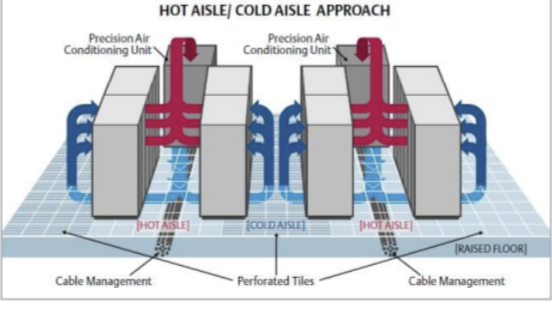
Explain Hot aisle/ Cold Aisle layout
The Hot Aisle / Cold Aisle layout is a physical arrangement of server racks in a data center designed to separate cool intake air from hot exhaust air, improving cooling efficiency and reducing energy costs.
The backs of servers face each other → creating a Hot Aisle (where hot exhaust air is expelled)
The fronts of servers face each other → creating a Cold Aisle (where cool air is drawn in)
Servers can be of 2 types, define them
Homogeneous - from same vendor, from same type, family
Heterogeneous - from different vendor, from different product families
Advantages of homogeneous servers(3)
Easier education (training people to work with servers)
Easier maintenance
Easier repairing (one set of spares)
Advantages of heterogeneous(3)
Most appropriate equipment can be chosen for all tasks
Can not get stuck when something happens. For example the vendor bankrupts
Competition between vendors result in smaller prices
Location of the server must be protected against (3):
Damage by disaster
Electromagnetic influence
Damage by human
Server location must have (4):
UPS - Uninterruptable power supply
HVAC - heating, ventilation and air conditioning
Fire protection
Physical protection (Protected against physical harm)
Name 2 types of basic UPS(Uninterruptable power supply)
Large batteries - Only for 2-4-6 hours
Diesel engine - For longer outage
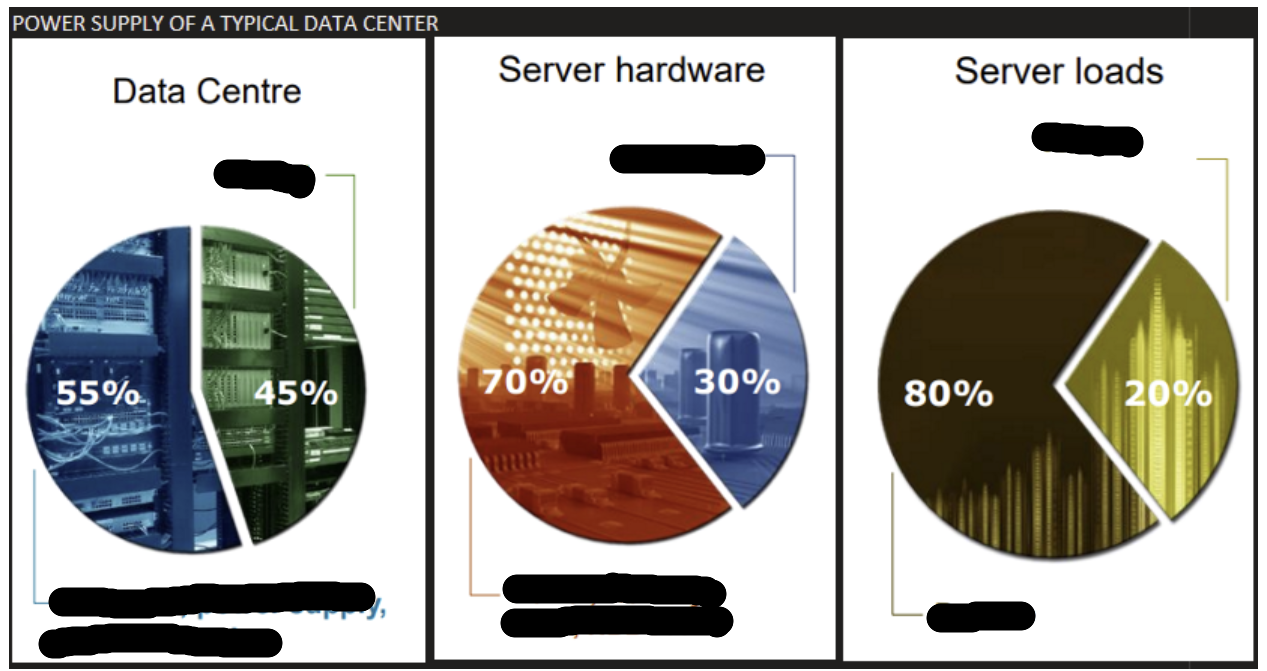
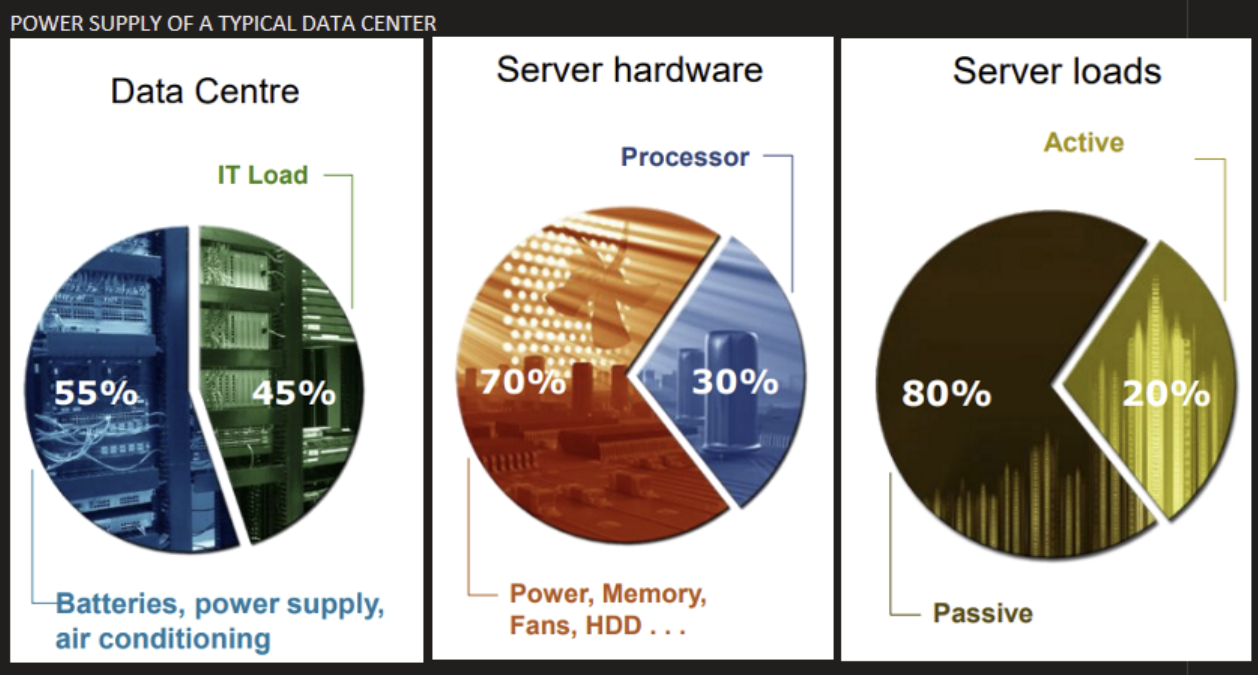
What 3 characteristics of servers are shown in the image (they are related to 1.Where does the most of data center power go 2. What component uses the most server power 3. Is more server active or passive overall)
A large share of data center power goes to support systems: cooling, power distribution, UPS/batteries, not to actual computing.
What 2 types of redundancies are used in servers, describe them
Full Redundancy
Two complete sets of hardware with fail-over configured (Like having a backup car in your garage. If your main car breaks down, you switch to the backup and keep going.)
One system works, other stays idle until failure
Load sharing (Both systems run at half-load, but each can handle the full load alone if the other fails.)
N+1 Redundancy
Instead of doubling everything, you have N working components plus 1 spare. If one fails, the spare takes over — the whole system stays operational.
• In case of n>2: n+1 redundancy is cheaper than full
• Often not the whole system is redundant, but only the main parts
What is the difference between full redundancy and N+1 redundancy?
Full redundancy duplicates every component (2× everything). N+1 adds just one spare to N components — cheaper but still keeps the system operational if one part fails.
What is cold-swap?
Parts can only be removed/replaced when system is powered OFF
What is hot-swap
Failed component can be replaced while system is RUNNING
What is the risk unique to hot-swap systems?
Double failure — if the replacement is delayed and a second component fails in the meantime, the system may lose redundancy entirely and go down.
What are the problems of hot-swap? (4)
Not all parts are hot-swappable — you must know which components support it.
Service interruption: Some interruption still happens during the switch — how long depends on the component type.
Degraded operation: While the new part (e.g. a disk) is being rebuilt, the system may run at reduced capacity.
Reset may still be required: Even if a device is labeled hot-swappable, some upgrades or replacements trigger a system reset — negating the benefit.
What is redundancy in the context of servers
Server redundancy is the strategic duplication of server hardware, components, or entire systems to ensure uninterrupted service availability and prevent downtime
What is the difference between reliability and availability in the context of redundancy?
Reliability = the hardware physically won't fail (redundant disks, PSUs, cooling). Availability = the system can detect, predict, and survive failures through monitoring and PFA — keeping the service accessible even when hardware does fail.
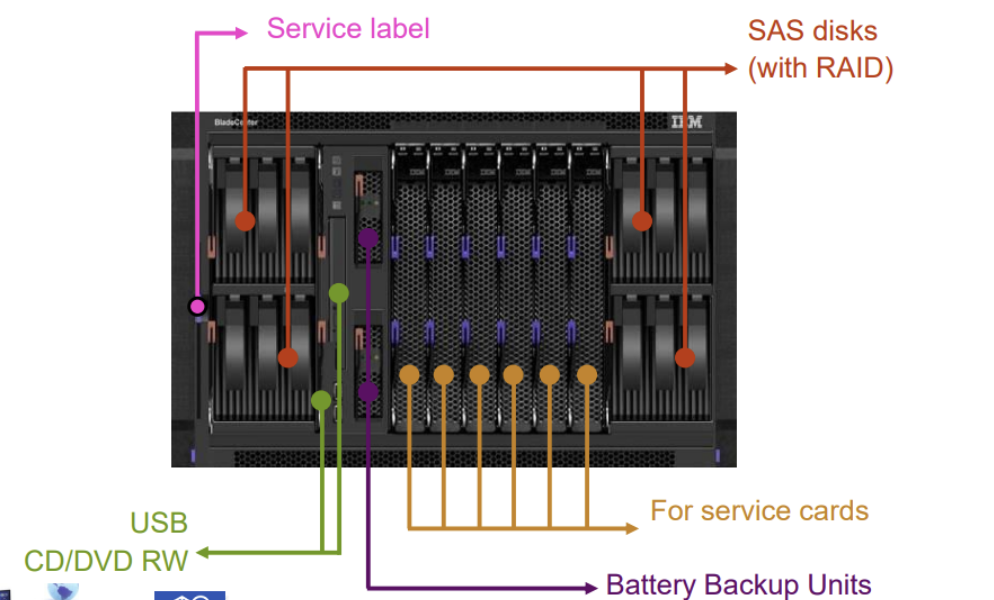
What is shown in the image
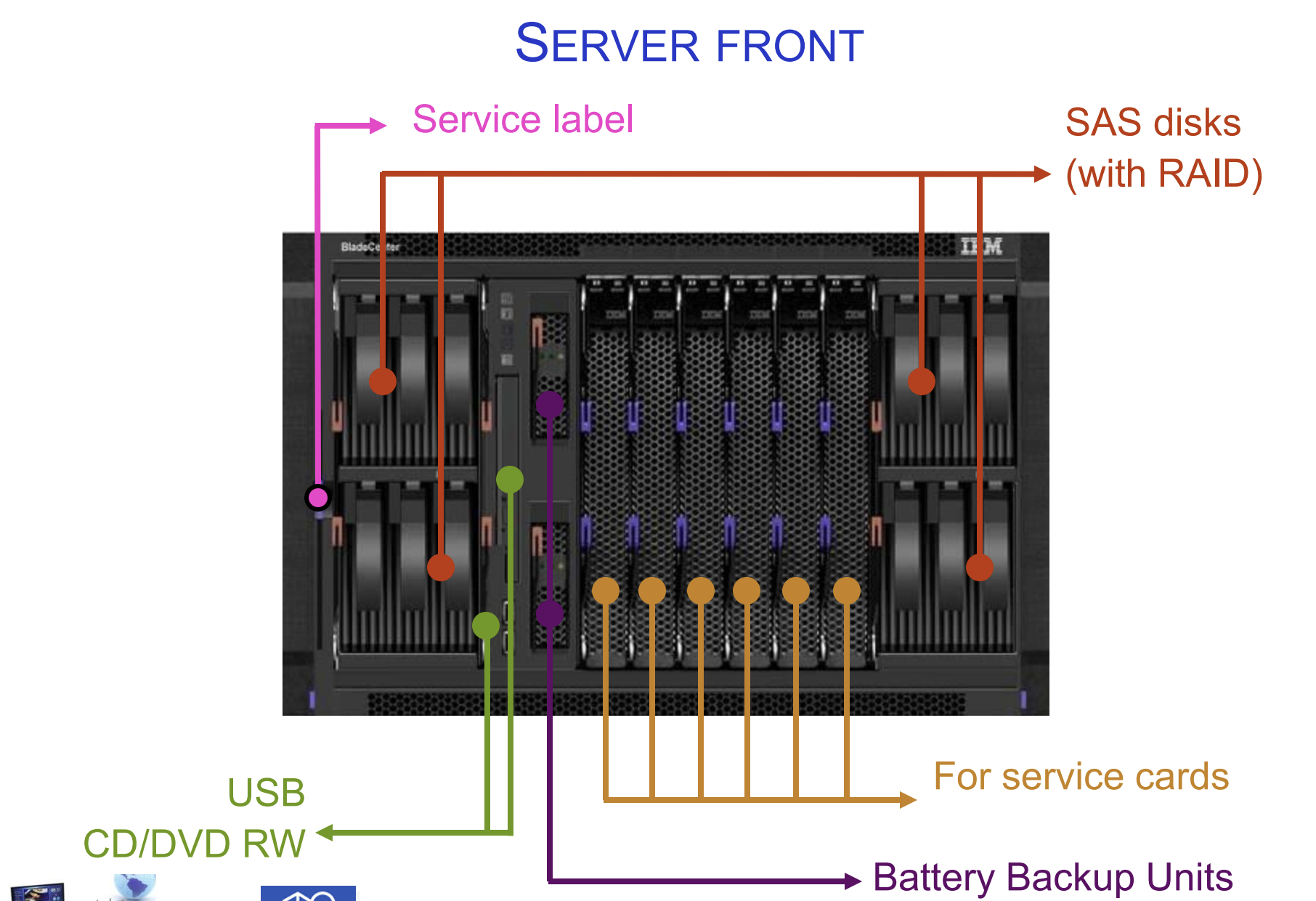
Server front. The front of the server houses the components that are most frequently accessed or replaced — primarily storage and media devices.
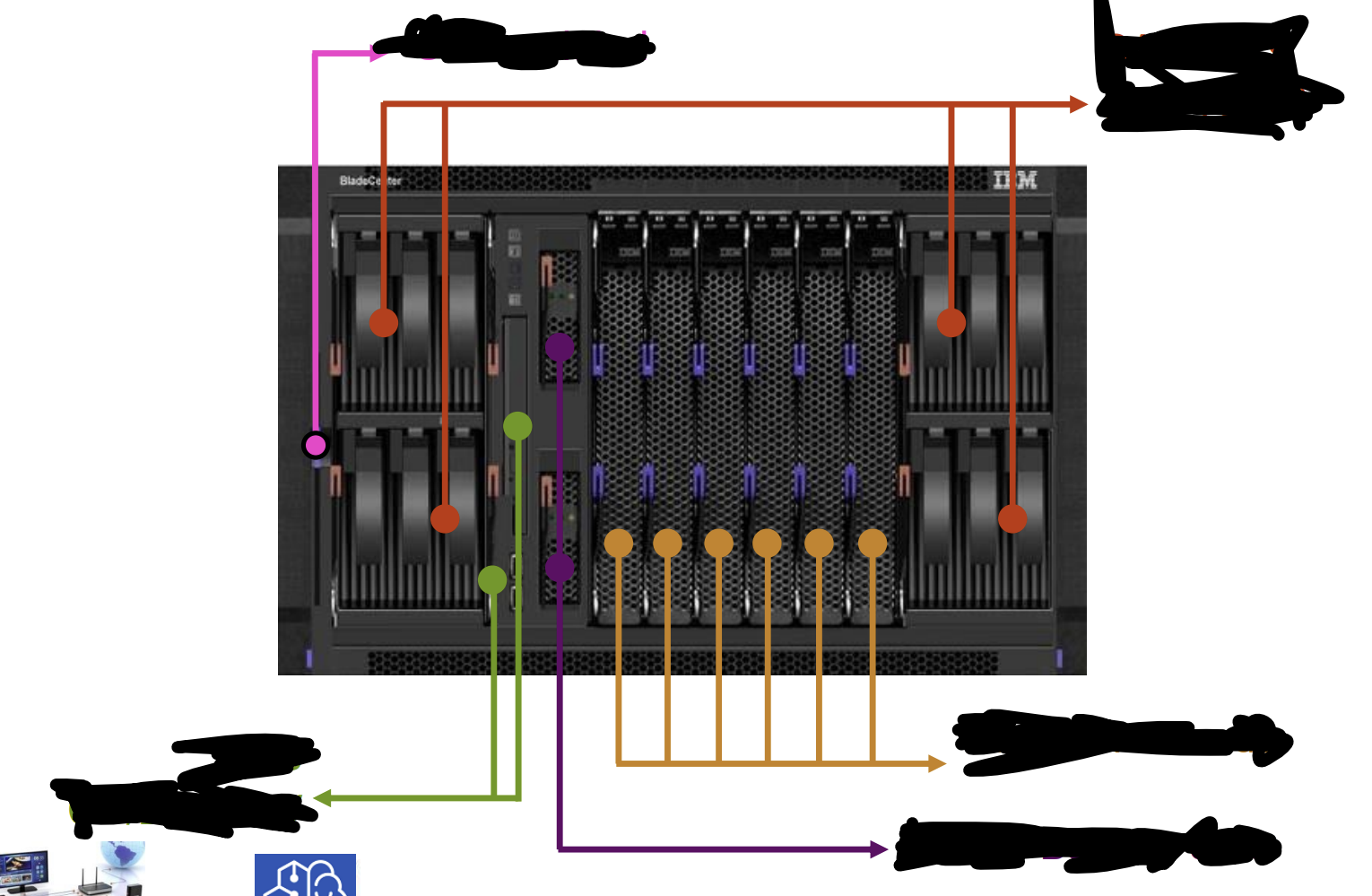
Service label — Identification information for maintenance and support
SAS disks with RAID — Main storage, accessible from the front for easy hot-swap replacement
USB & CD/DVD RW — For installation media and local access
Battery Backup Units (BBU) — Keeps data safe and cache powered during power loss
What components does a server front house and what do they do (5)
Service cards slots — Expansion cards for specialized services
Why are disks mounted at the front of the server?
For easy access — disks are the most commonly replaced components, and front-mounting enables hot-swap replacement without opening the chassis or accessing the rear.
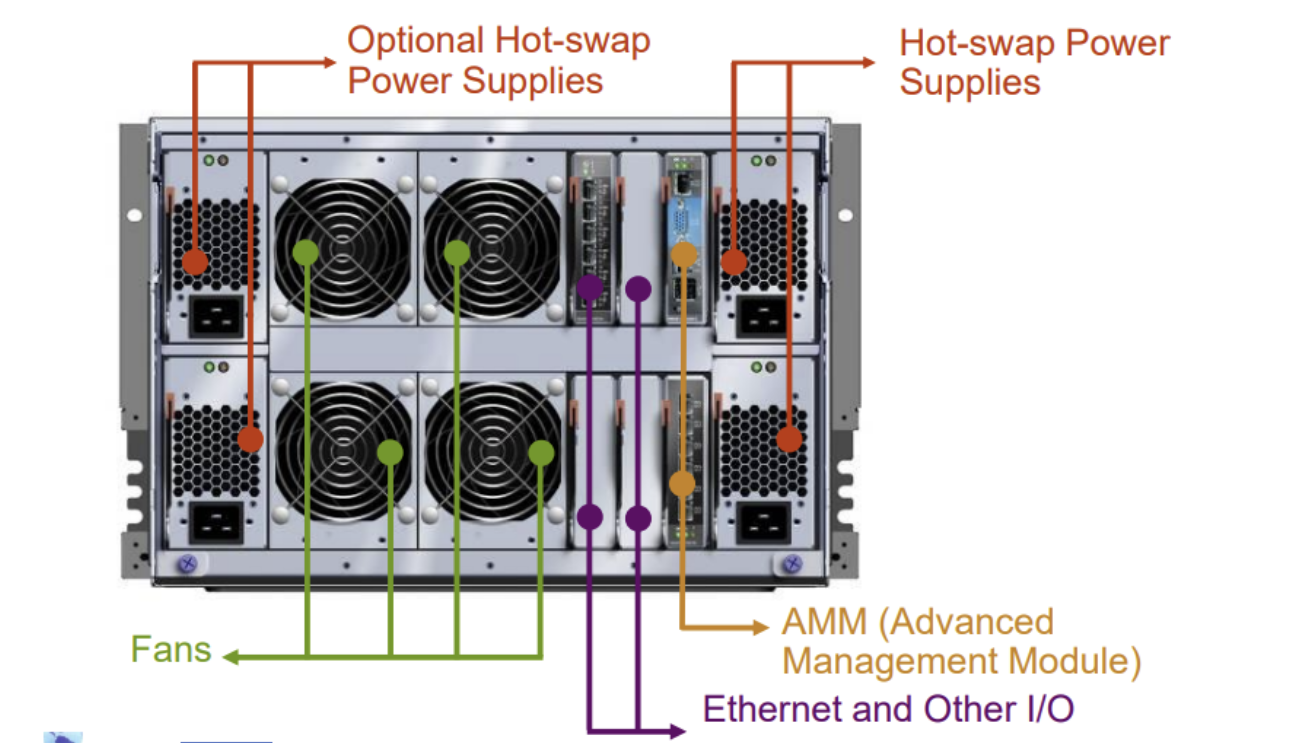
What is shown in the picture and what does it do?
Server rear. The rear hosts power, cooling, management, and connectivity — the infrastructure that keeps the system running and connected.
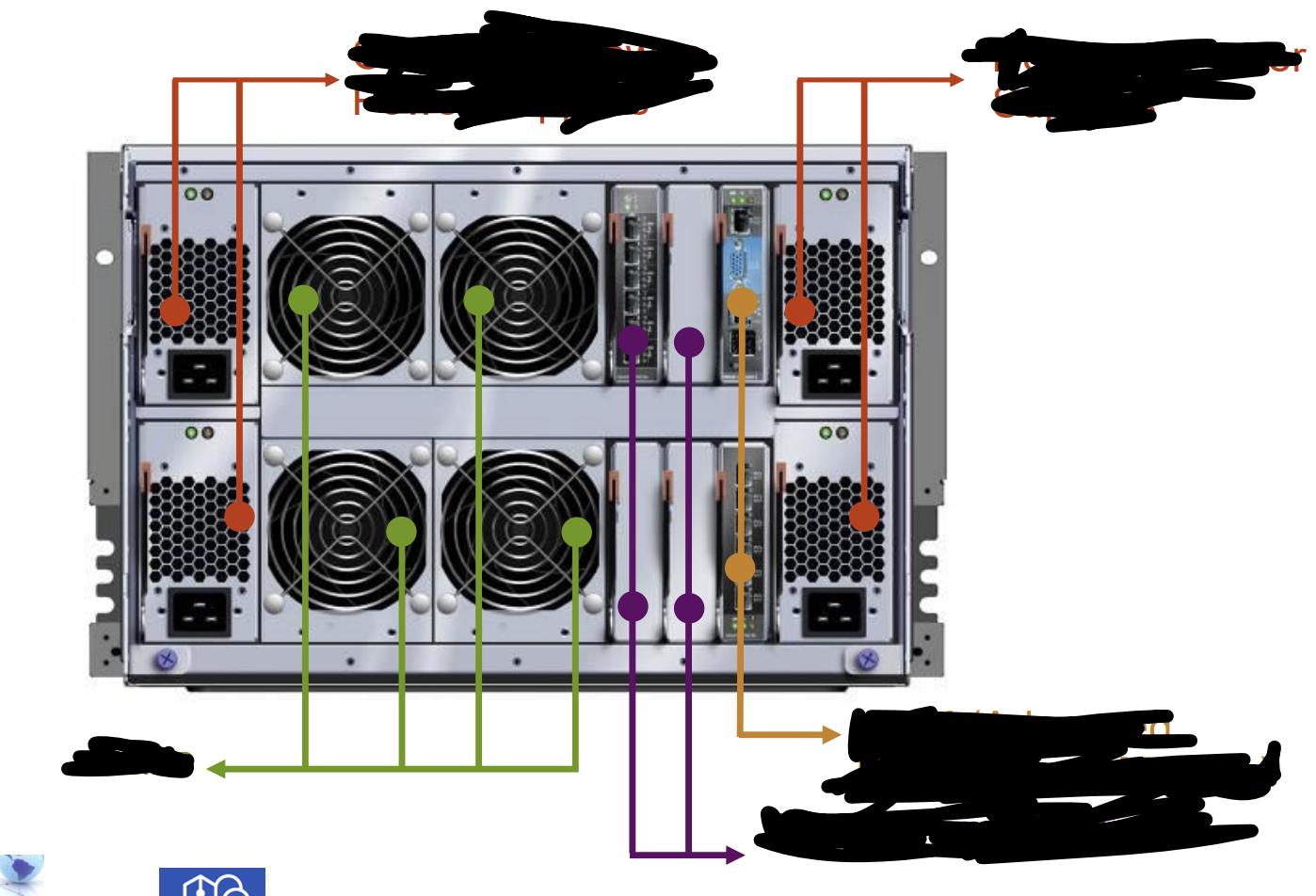
What components does a server reave house and what do they do (5)
Optional Hot-swap Power Supplies — Additional PSU slots for extra redundancy (N+1 power)
Hot-swap Power Supplies — Multiple PSUs; if one fails, others take over instantly without downtime
Fans — Cooling; typically also hot-swappable in enterprise servers
AMM (Advanced Management Module) — Remote monitoring and management of the entire server (connects to PFA, error logs)
Ethernet and other I/O — Network and peripheral connectivity
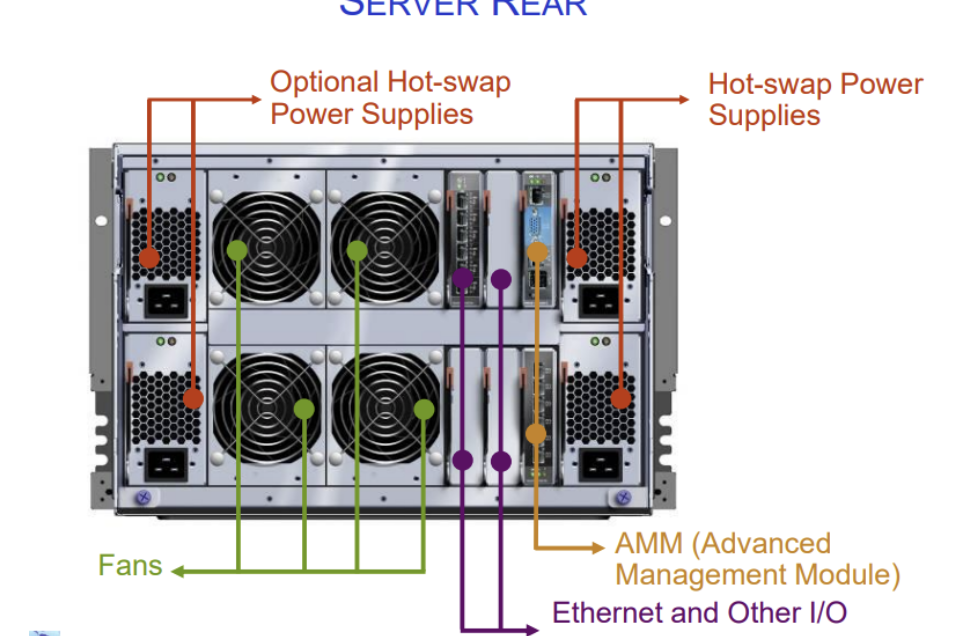
What does the AMM do?
The Advanced Management Module allows remote monitoring, management, and diagnostics of the server — it's the hardware interface for Predictive Failure Analysis and error logging.
Why are power supplies at the rear instead of the front?
Power supplies connect directly to the power infrastructure (cables, UPS) at the back of the rack. Fans and PSUs are rear-mounted for airflow efficiency — cool air enters front, hot air exits rear.
What is Predictive Failure Analysis (PFA) and how does it improve availability?
PFA monitors components for early warning signs of failure (unusual errors, performance degradation, temperature spikes). It allows proactive replacement BEFORE failure occurs, preventing unplanned downtime.
Compare load-sharing redundancy with active-standby (full) redundancy.
Load-sharing: Both systems run at half load; each can handle full load if other fails. Better resource utilization, faster failover.
Active-standby: One system works, other sits idle. Wastes resources but simpler to configure.