Digital Animation Terms
 Call Kai
 Learn
Learn Practice Test
 Spaced Repetition
 Match
Match Flashcards
 Knowt Play
 Podcast
1/126

Earn XP
Description and Tags
Based off notes from two animation courses
Name | Mastery | Learn | Test | Matching | Spaced | Call with Kai |
|---|
No analytics yet
Send a link to your students to track their progress
127 Terms
Straight-ahead
Drawing in sequence (1, 2, 3, etc.)
Fluid, spontaneous
Difficult to keep things on model or consistent
Harder to hit timing cues
Pose-to-pose
Start with most “important” drawings then add drawings in between
Easier to stay consistent throughout the animation
Can be “stiffer” and feel “less organic” than straight-ahead
Animatics are exclusively pose-to-pose
Keys
Frames that work as the “backbone” of your animation. Typically worked on first.
Extremes
Furthest forward/backwards subject moves
Breakdowns (BKDNs)
Illustrate subtleties with a movement
Inbetweens (IBTWNs) (Tweening)
Frames that occur between two keyframes
Timing & Spacing
Time an action takes from start to finish; measure in frames
Amount of space/overlap between adjust drawings, and how that changes over time
Faster objects require less frames and more stretch!
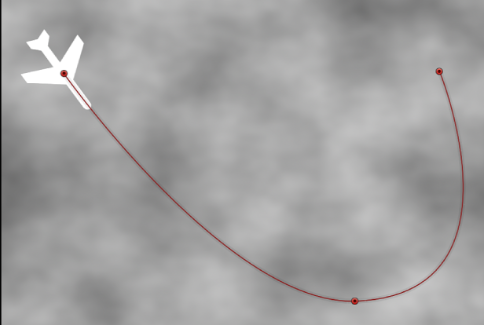
Arcs (Paths of motions)
Things tend to move in curves, not straight lines
Straight lines give a robotic/mechanic look; inorganic
Interesting, catches the eye
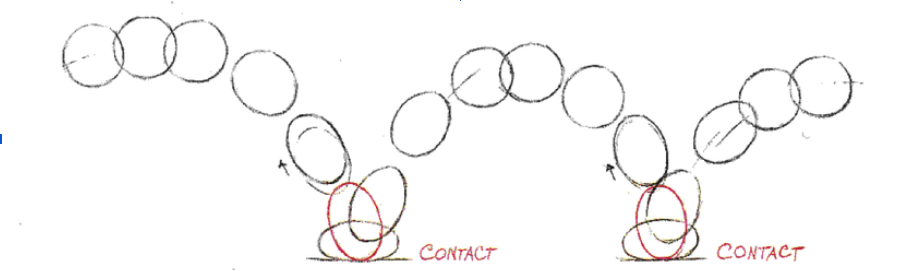
Squash and Stretch
Used to create the illusion of material quality (rubbery, soft, NOT STIFF OR RIGID)
Seen with bouncing, impact, pushing, etc
Dependent on material, force/velocity, and animation style (For example, rubber hose animation would be a lot more “stretchy” than something more realistic)
Can be used subtlety
Ease in/ease out
Slow at the beginning, fast/abrupt at the end; fast
Abrupt at the beginning, slow at the end.
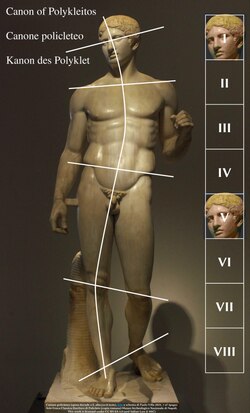
Contrapposto
A natural, asymmetrical standing posture.
Attitude take towards our drawings
Drawings represent 3D forms/volumes, NOT 2D shapes
Walk cycles
|
Start with contact position Our feet come to an imaginary line when walking from above | |
Overlapping Action
Different parts of the body moving differently from one another
Follow through
Secondary movement that is a physical result of main action
For example, hair bobbing when a character walks
Secondary action
Independent of main action, but happens at same time
Describes character, tone, environment
For example, shivering while walking because it’s cold outside would be a secondary action
Breaking joints
“Break” joints in smear/in between frames
Anticipation
Move/action before main action
Counteraction
Bigger action - Bigger Anticipation
Pose, timing
Throwing our weight behind an action
Attention, direct it to the action
Anticipation, Action, Reaction
Throw our own weight behind action
Reaction, aka follow through,momentum carry on, overshoot + settle
Staging
Pushing our drawings, poses, actions, compositions in service of clarity (Making things READ)
“Show don't tell”
“Blocking” our characters, camera, other scenery, etc.
Silhouettes of poses, strengthening
Front facing for expressions
Actions in profile
Staging in time
Exaggeration
Pushing our poses, drawings, actions, etc.
Inbetweens tend to soften actions
Animation tends to lose weight
Appeal
Historically: Characters designed based on role in story
Design informs audience’s expectations
Round characters = softer, friendlier, more approachable
Angular characters = rigid, mean, intimidating
“Charisma”, “presence”
“Tie down”
Stay on model
Line quality
Additional details
Tying down held positions
Flipping! Look for errors
“Logic”
Twinning
Limbs moving in unison
Too much of this looks unnatural
Change up arm/hand
Stagger timing of hands (follow-through)
1 frame (1/24th)
A very quick jab
Strobe effect
2 frames (1/12th)
Blink
Shaky hands (or similar, “shaky” cycle
“The Invisible Anticipation”
4 frames (1/6th)
Baseball swing (anticipation is nine frames)
Light anticipation for tiny action
Clapping
6 frames
“Threshold of readability” for held poses
Sprint (fast, realistic run)
8 frames
Jog (slower run)
Quick hand gestures
Swinging large/heavy tool
Anticipation for moderate action (I.e 1 frame jab, baseball swing, etc.
16 frames (⅔, 90 BPM)
Can’t Stop by RHCP
Slow/casual walk, slower skip
Heavier, forceful actions
Workout/exercise reps
Anticipation for big action
24 frames (1 second)
Slow, gentle movement
Very slow walk
Quick inhale or exhale
Deliberate, thoughtful anticipation
Fast “beat” or moment of thought
36 frames
Delicate or lethargic movement
Impossibly slow walk or sneaking walk
Carefully slow anticipation, “wind up”
Inhale or exhale
Small, simple “acting moments”
Null Layers
Layers which have no visible information - they can be used (via parenting, etc.) to control other layers.
Pre-Compositions (Pre-Comps)
Can be used to organize layers, as well as quickly copy+paste multiple instances of an element or collection of elements.
Storyboards & Animatics
Creates a clear, whole vision of a film/animated sequence, shot-by-shot
Describes the position, movement, and actions of camera, characters, and key elements
Motion Graphics
Enhances compositions of type and other graphic elements through animations
Typically emphasizes smooth, seamless transitions between graphic moments, visualization of info/data, sleek and energetic motion designed to engage viewer
Ex. A quick logo animation
Is associated with vector graphics animated with computer techniques, but as a general medium/genre of animation can be applied in a variety of styles
Kinetic Typography
Making words, letters, or numbers move, scale, or transform on screen
Animated Illustration
Generally enhance the value of an illustrated image though animated elements, often as a short loop
Broad, ambiguous category of media including: editorial illustrations for online publications, animated album art for music, splash art/loading screens for video games, digital collectible cards, etc
Oftentimes, these media exist alongside a static “print” version of the illustration, which may have previously existed as a standalone work before the animated version is produced
Inpoint & Outpoint
Markers that define the start and end of a specific segment you want to isolate
Focal Length
The optical distance from the center of a lens to the point where light rays converge to form a sharp image on a sensor or film
Puppet Pin Tool (After Effects)
Allows for layers to be bent/distorted at manually-designated points.
Position Pins
The 'classic' Puppet Pin Tool option - moving their position pushes and pulls the nearby region(s) of the layer
Starch Pins
Puppet Tool pins that cannot be animated, but are used to define 'stiff' regions of the layer that should not distort as much
Bend Pins
These Puppet Tool pins cannot have their position moved, but can have their angle adjusted to bend the layer at that point
Advanced Pins
A combination of the position and bend pins, allowing for adjustment of position and rotation data separately.
Adjustment Layers (After Effects)
Allow for easy application of an effect(s) onto an entire composition. Any effects placed on the adjustment layer will apply to any layers which sit underneath it.
Continuity Editing
A film and television technique used to create a seamless, logical flow of time and space
Temporal Continuity
The principle of maintaining a smooth, unbroken progression of time across a sequence.
Avoid Jump Cuts
Match-on-Action
“Motivating” a cut with an action
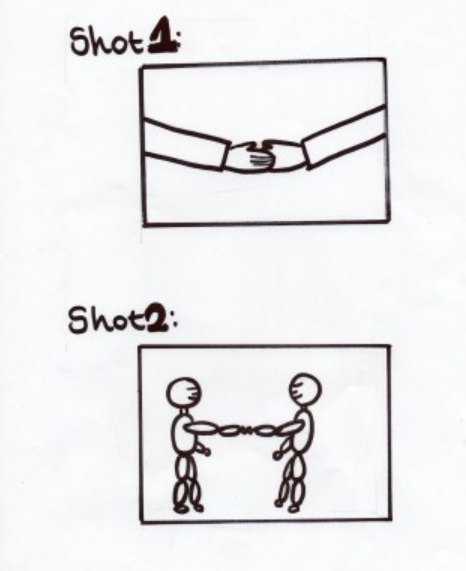
Logical Continuity
Eyeline
Reverse/reaction shot
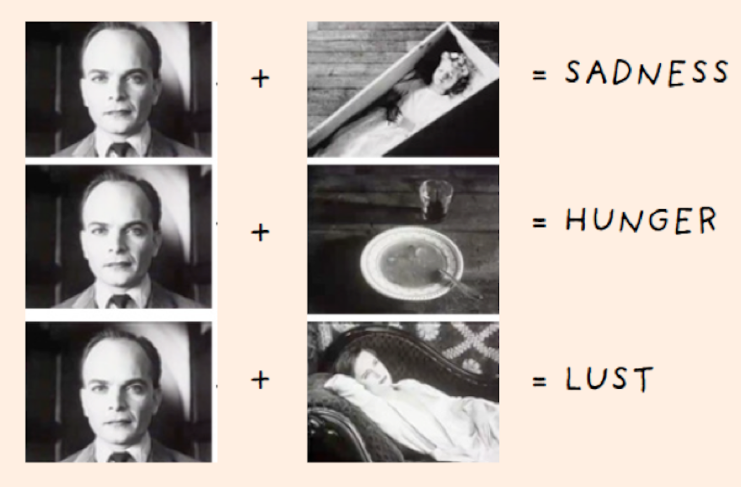
Kuleshov Effect
Juxtaposition
No emotion, just face
ActionScript
An object-oriented programming language that is designed specifically for website animation
Workspace
The work area in a software program consisting of a customized arrangement of various UI (user interface) elements, such as panels, bars, and windows; options in Animate include Animator, Designer, Essentials, Developer, and Classic or it may be customized
Interface
A device or program enabling a user to communicate with a computer; Animate's Interface is comprised of the Stage, Pasteboard, Properties panel, Library, etc.
Drawing Tools
Tools in a software program that aid the user with different drawing abilities - pencil, pen, brush, shape, line, paint, etc.
Timeline
The area below the stage in Animate that displays the sequence of frames and is used for several actions
Project Phases
Plan, design, build, test, publish/launch
Scope Creep
In project management, refers to changes, continuous or uncontrolled growth in a project's scope at any point after the project begins
Stage
The window in which you will see any type of content on the document once it has been published
Pasteboard
The area around the stage which can be used to have things off screen which can then be animated into the stage
Color Picker
Tool used to choose colors to apply to text, objects, strokes, etc.
Motion Tween
A type of animation that uses symbols to create movement, size and motion changes, fades, and color effects
Classic Tween
A tool used to create animation movements within an Animate document; similar motion tweens, but more complex to create and not as flexible
Shape Tween
Animation using shapes in Adobe Animate
Stamp
A paint tool used to copy pixel values from one place and time to another
Library
An area in Animate that allows you to store various types of assets (documents, templates, images, etc.) for later use
Preset
A motion tween that is pre-configured that enables you to add animations with a minimal number of steps. You can also create a custom preset from any animation you make and reuse
Symbol
A graphic, button, or movie clip that you create once in the Animate CC authoring environment or by using the SimpleButton (AS 3.0) and MovieClip classes
Instance
A clone or duplicate of a symbol
Alignment
Tool that allows you to align layers on the stage (horizontal center, horizontal right, horizontal left, vertical center, vertical top, vertical bottom, etc.)
Transformation
Tool that allows you to transform/change shapes, objects, etc. - resize, flip horizontally/vertically, etc.
Mask
A layer that creates a hole through which underlying layers are visible; used for spotlight effects and transitions; it can be a filled shape, a type object, an instance of a graphic symbol, or a movie clip
Anchor
A point on a line
Clone
A duplication of a symbol
Background Layer
The bottommost layer in the layers palette
Graphic Symbol
Used for static images and to create reusable pieces of animation that are tied to the main Timeline; add less to the FLA file size than buttons or movie clips because they have no timeline
Bitmap Layer
A layer containing digital images composed of a matrix of dots
Tangent Handle
Tool used to adjust the curve on either side of an anchor point
Match Screen
Export option allowing you to use the screen resolution and maintain the aspect ration of the original image
Actions Panel
Allows you to create and edit code for an object or frame
Component Panel
Allows you to add a pre-built packaged module that can include graphics and code
Swatches Panel
Allows you to update and reuse colors across documents
Number
ActionScript 3.0 data type; used for storing floating-point numbers and integer values larger than 32-bit
String
ActionScript 3.0 data type; stored internally as Unicode characters and represents a sequence of 16-bit characters
Snap to Pixels
Snaps object directly to individual pixels or lines of pixels on the Stage
Snap to Align
Snaps objects to a specified snap tolerance, a preset boundary between objects and other objects or between objects and the edge of the Stage
Snap to Grid
A non-printing grid resembling graph paper that helps you organize objects
Snap to Guide
Non-printing guide lines that can be moved, modified, deleted or locked into place
Bone/Inverse Kinematics (IK)
a way of animating objects using bones chained into linear or branched armatures in parent-child relationships. When one moves, connected elements move in relation to it.
[E]
Free Transformation Tool
Playhead
Indicates the current frame displayed on the Stage. As a document plays, the playhead moves from left to right through the Timeline.
Onion Skinning
Used to compare the previous and next frames and adjust the objects in the current frame.
Mask Layer
Contain objects used as masks to hide selected portions of layers below them. Only the portion of the mask layer not covered by the mask is visible.
Graphic Looping
Every graphic symbol instance has looping properties (that is loop mode, first frame, last frame) associated with it. Please see Looping section under object tab in Property inspector to change looping properties of selected symbol instance.
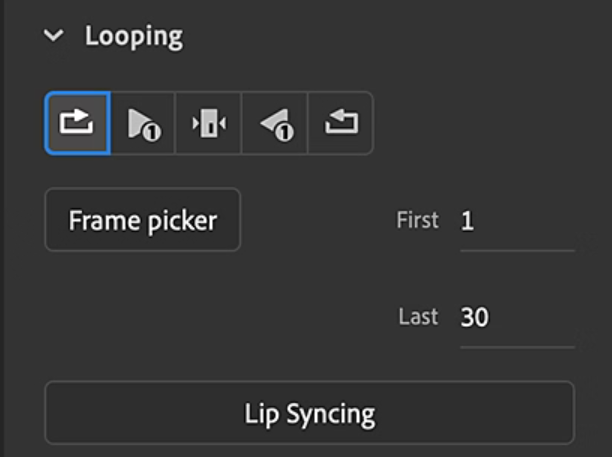
Loop
Plays the frames of the Graphic from ‘first frame’ to ‘last frame’ in sequence and keeps looping until there are frames on the parent timeline’s frame span.
Play Once (Loop)
Plays the frames of the Graphic only once from ‘first frame’ to ‘last frame’. After that instance stays at ‘last frame’ for the rest of the frames in the parent timeline’s frame span.
Single Frame (Loop)
Plays only one frame of Graphic that is pointed by the ‘first frame’ property.
Asset Warp
A powerful animation feature in Adobe Animate and After Effects used to deform and manipulate vector graphics and bitmaps.
Stopwatch
Indicates whether a property is animated.
Expressions
Uses a scripting language based on JavaScript to specify the values of a property and to relate properties to one another. Used by connecting properties with the pick whip.
The Graph Editor
Represents property values using a two-dimensional graph, with composition time represented horizontally (from left to right)
In layer bar mode, on the other hand, it only represents the horizontal time element, without showing a graphical, vertical representation of changing values.
Motion Paths
Appears as a sequence of dots, where each dot marks the position of the layer at each frame. A box in the path marks the position of a keyframe.
Composition Panel
A panel in After Effects that represents layers spatially, and where compositions are displayed at the location of the CTI on the Timeline panel