Paper 1 - Unit 6 - Security, privacy and data integrity
 Call Kai
 Learn
Learn Practice Test
 Spaced Repetition
 Match
Match Flashcards
 Knowt Play
1/47

There's no tags or description
Looks like no tags are added yet.
Name | Mastery | Learn | Test | Matching | Spaced | Call with Kai |
|---|
No analytics yet
Send a link to your students to track their progress
48 Terms
Data Security
The protection of data against unauthorised access, corruption, or accidental loss.
Focuses on keeping data safe from external threats and ensuring it is recoverable.
Methods:
User authentication: Passwords, biometrics
Firewalls: Hardware or software that filters network traffic based on predefined rules to block unauthorised access.
Encryption: data unreadable without decryption key
Backups & disaster recovery: creating regular copies of data, stored in separate physical locations, to ensure it can be restored if the original is lost.
Anti-malware, pen testing, auditing
Data Privacy
The ability of an individual or organisation to control how their personal information is collected, used, and shared with third parties.
Methods:
User Access Levels (UALs): Assigning different permissions so users only see data that is needed for their job role.
Data Protection Legislation: UK Data Protection Act / GDPR mandates fair and lawful data processing
Privacy Policies: Formal agreements that define what data is collected and how it will be used.
Data Integrity
The requirement for data to be accurate, consistent and up to date. Ensures data remains unaltered during storage or transmission.
Methods:
Validation: Ensures data is sensible and meets criteria, e.g. range/length/format checks
Verification: Ensures data matches original source, e.g. double entry / visual check
Transmission checks: Mathematical checks to detect errors during data transfer, e.g. parity bits, checksums, check digits
Security vs Privacy
Security is the protection of data from authorized access or loss, whereas privacy is the legal and ethical control over how that data is shared and used.
Security: Stops the “bad guys” from getting in
Privacy: Stops the “good guys” from seeing too much.
A system can be secure but not private and vice versa.
Security vs Integrity
Security is the protection of data from unauthorized access or loss, whereas integrity is the assurance that the data remains accurate, consistent, and free from errors.
Security stops people from stealing the data, integrity stops the data from being wrong.
Threats to Data Security
Internal mismanagement
Natural disasters
Unauthorised intrusion into the system by an individual
Malicious software entering the system.
Authentication
Process of determining whether somebody is who/what they claim to be before granting access
Frequently done through log on passwords/biometrics / digital certification
Prevents unauthorised access to data
Digital signature
A means of electronically signing a document with data that cannot be forged
Sender hashes message.
Hashed message encrypted using sender’s private key. This is the digital signature.
Digital signature attached to original message and sent.
Receiver decrypts the digital signature using the sender’s public key.
Receiver hashes the original message.
Receiver compares this with the result of decryption of digital signature.
If they match, message is authentic and has not been altered
If they don’t match, message has been tempered with / sent by someone else
Ensures document is authentic // came from a trusted source
Ensures document has not been altered during transmission (Integrity)
Firewall
Prevents unauthorised access to computer systems from external sources
Sits between the computer or LAN and the Internet/WAN and permits or blocks traffic to/from the network
Can make precise decisions about what to allow or block as it can detect attempts by specific software to connect to Internet
Can help to block hacking and prevent viruses from reaching a computer
Can be software and/or hardware
Software firewall:
Protects only the specific device it is installed on.
Consumes host CPU/RAM
Transmission/data must enter the system/network before it can be inspected.
Hardware firewall:
Secures all devices within a network.
A physical filtering component that inspects data packets from the network before they reach computers and other devices on a network.
Free-standing unit - does not use the resources of the computers it is protecting, so there is no impact on processing performance.
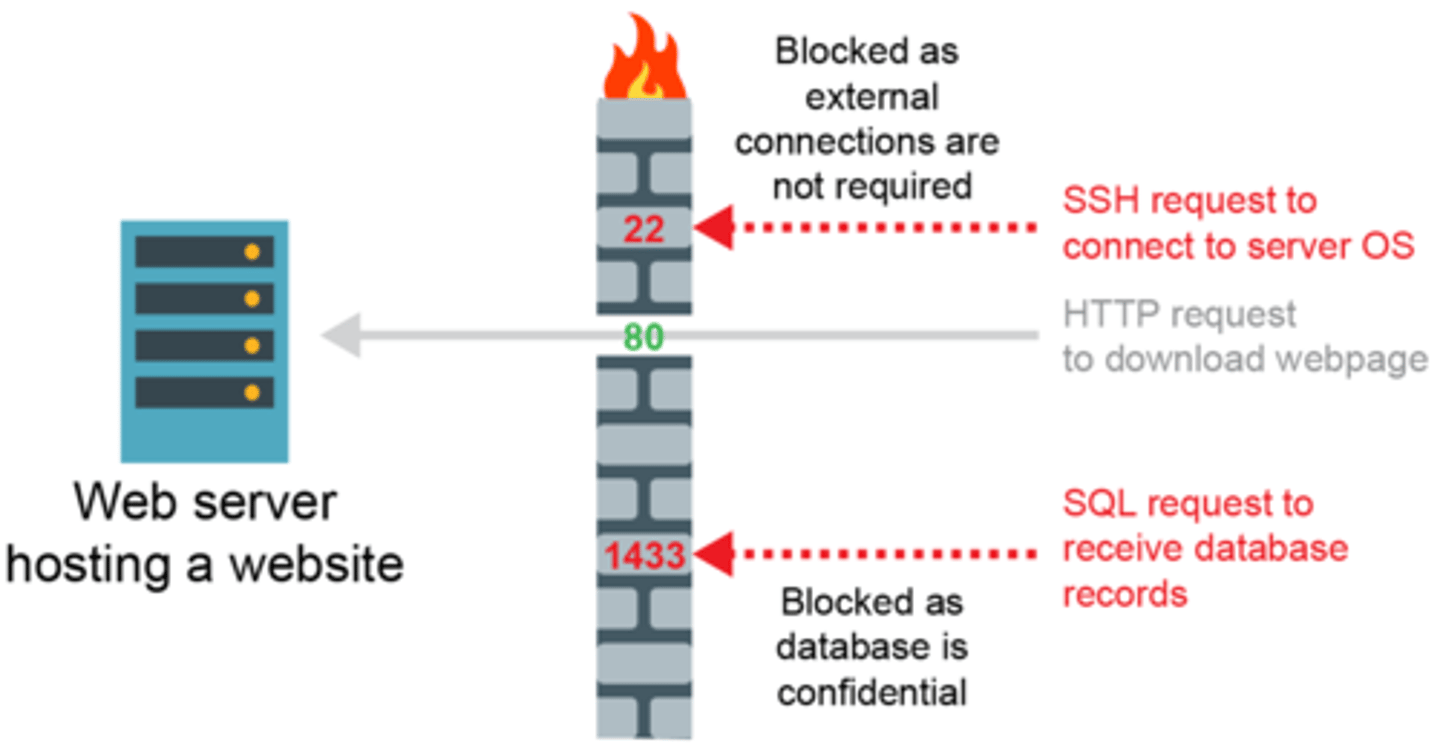
Packet filtering
Uses various fields in a packet's IP and TCP headers to decide what to do with the packet
Packets of data are inspected by the firewall to check which port they are attempting to access
Access rights
e.g. read and write / read only // no access
Giving different users / accounts / logins access to different elements / views of the system.
Audit trails
• Logging all actions/changes to the system
• In order to identify any unauthorised use
Concurrent Access Controls/Record locking
Closes/locks a record to the second user until first update complete
Prevent simultaneous updates being lost
Secure passwords
Use a minimum of 12 characters
Use a mixture of numbers, lowercase and uppercase characters
Include symbols such as &, !, #, %
Do not include your name, DOB or personal details
Create a password based on a memorable phrase and exchange letters for numbers or symbols e.g. Brdu8#Jw4g
Encryption
The act of encoding a plaintext message so that it cannot be deciphered unless you have a numerical key to decrypt it
Malware
Software that is intended to damage or disable computers and computer systems.
Computer virus
Malware
Replicates / copies itself
Can cause loss of data / corruption of data on the computer
Can cause computer to "crash" / run slowly
Can fill up hard disk with data
Anti-virus software
Detect / remove / quarantine viruses / key-loggers etc.
Carry out regular scans
When a virus checker should be run
when machine is first turned on, checks for boot sector viruses.
when an external storage device is connected
checks a file when it is downloaded
checks a web page when it is accessed
Worm
A standalone malware program that does not require a user to run it in order for it to spread
Exploit vulnerabilities in the destination system and spreads automatically
Could corrupt user's computer // delete data // consume bandwidth
Trojan Horse
Malicious pieces of software that masquerade as something seemingly innocuous or useful
Cannot self-replicate
Often they serve to open up back doors in your computer to the Internet so that the processing power, Internet bandwidth and data can be exploited remotely
Spyware
Software that enables someone to obtain covert information about another person’s computer
Examples: keylogger, webcam hack, transmitting data covertly from their hard drive
Spam
User's inbox is filled by large amounts of unwanted email
User / email server employs filtering software that can divert / delete spam email
Phishing
Using email to manipulate a victim into visiting a fake website and giving away personal information
Pharming
Redirects website to fake website even when right URL is entered
Domain name server compromised/Proxy server compromised
Need to check digital certificate
Code Quality
Improving code quality, together with monitoring attempts to gain unauthorised access and protection can significantly reduce threats from malware
Avoiding accidental data loss
Frequent backup EITHER to secondary media/to cloud
Disk-mirroring strategy/RAID
UPS (uninterruptable power supply)/backup generator
Protection of data - Physical measures
Locked doors/keyboards etc.
Secure methods of access, keypads/ biometric scans etc.
Security guards
Protection of data - Backup of data
Regular copies of the data are made
If the data is corrupted it can be restored
Protection of data - Monitoring
User access logs/audit trails - list of all the requests for individual files that people have requested from a server/website etc
Packet sniffers - tool that intercepts data flowing in a network and analyses it for malicious content
Protection of data - Software maintenence
Up-to-date patches to the operating system and application programs - reduce vulnerabilities in the system
Up-to-date anti-malware software can prevent the spread of infection
Buffer Overflow
When a program accidentally writes data to a location too small to handle it.
Overflowed data may end up in a neighbouring instruction space
Malware can deliberately cause and manipulate overflow data which may then be read as a malicious 'instruction'
SQL Injection
An attack that targets SQL servers by injecting commands to be manipulated by the database.
Error detection methods
Parity bits
Majority voting
Check digits
Checksums
Parity bits
uses even or odd parity which is decided before data sent
• each byte has a parity bit
• parity bit is set to 0 or 1 to make parity for byte correct
• after transmission, parity of each byte re-checked
• if it is different, then an error is flagged
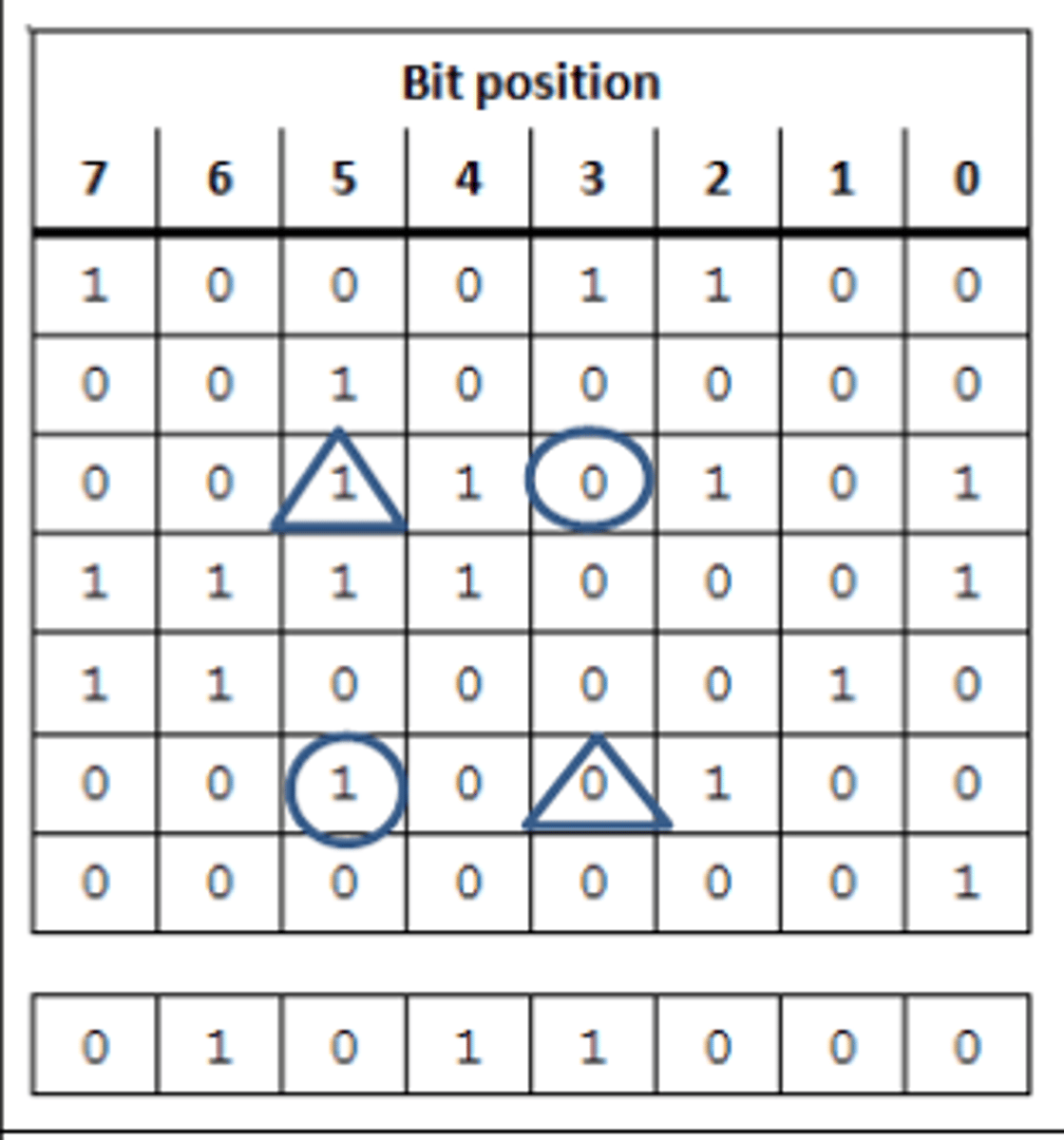
Using parity bytes for additional check
• Each byte has a parity bit // horizontal parity
• An additional parity byte is sent with vertical (and horizontal) parity
• Each row and column must have an even/odd number of 1s
• Identify the incorrect row and column
• The intersection is the error
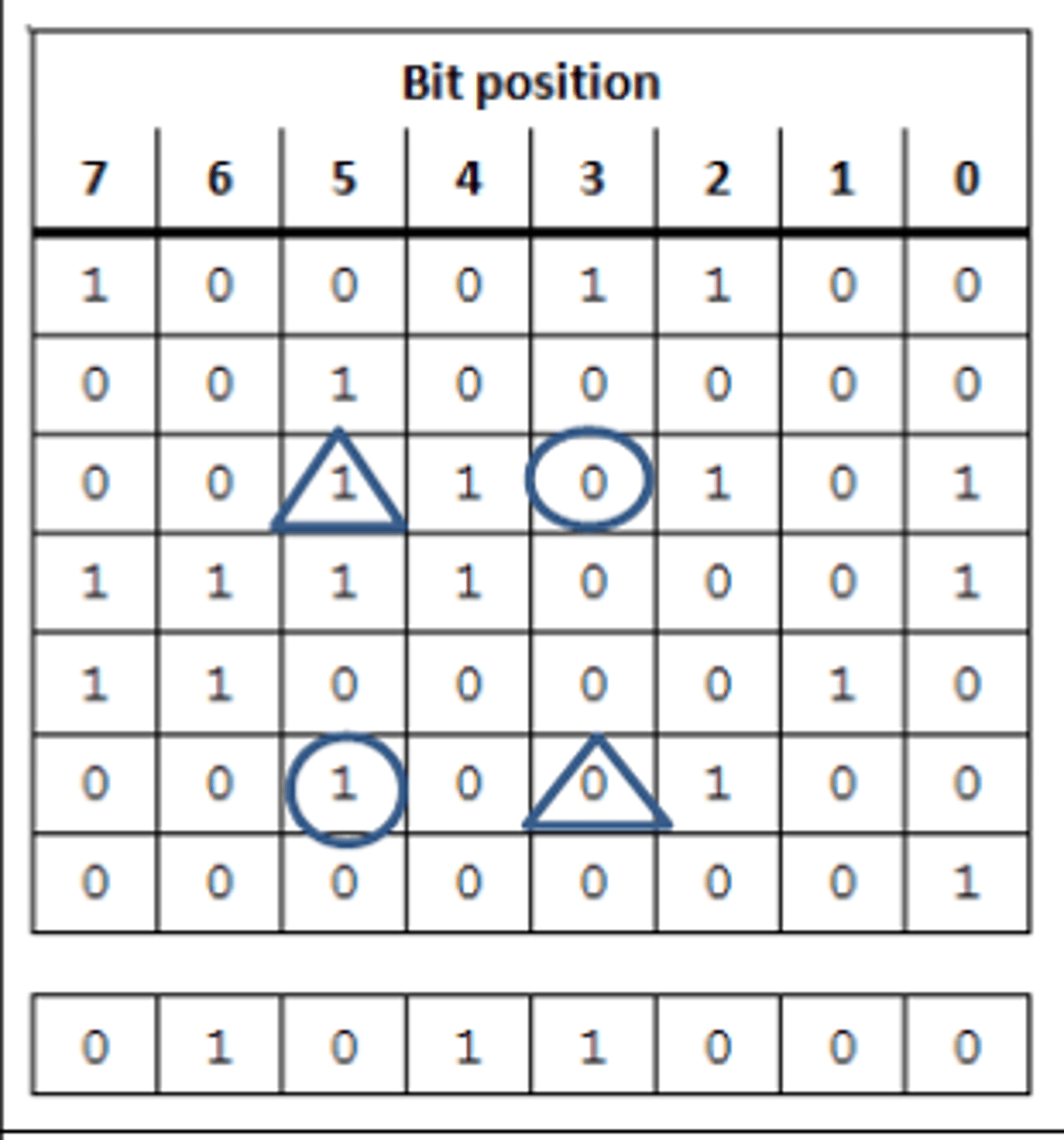
How the incorrect bit is determined
Consider each row in sequence
Identify any row with incorrect parity
Repeat the process for each column in sequence
Identify where a row and column with incorrect parity intersect
Check digits
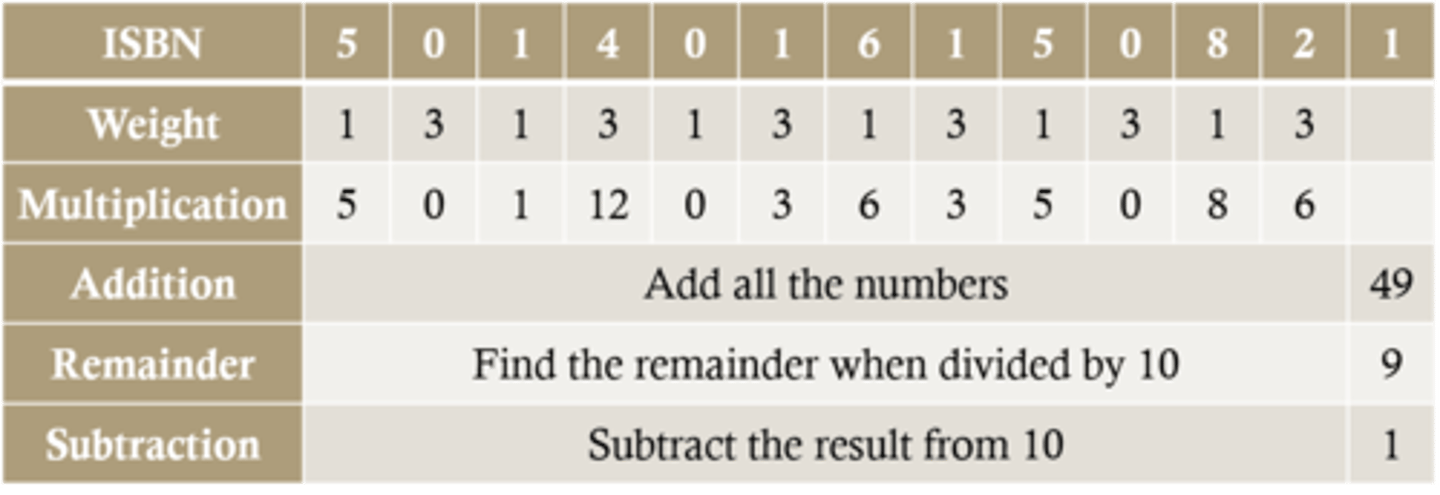
An additional digit at the end of a string of other numbers designed to check for mistakes in input or transmission
Printed books and other products have a unique barcode with a ISBN or EAN
The first 12 digits of the barcode are the unique item number...
...the 13th is the check digit calculated by an algorithm based on the other 12 digits
This can be calculated using the Modulo 10 system
Checksum
a calculation is carried out on the data to be sent (checksum)
• the result is sent, along with data to recipient
• checksum is re-calculated at receiving end
• if both sums are the same, no error has occurred
• if the sums are different, the data has been corrupted during transmission
• request is sent to re-send data
Validation
Needed to check that the data entered is sensible/reasonable/acceptable/matches required criteria
Automatic check by computer
Examples include range, type, length, etc.
Does not check data is correct
Validation checks
Uniqueness check - data is not pre-exiting in the system
Length check
Format check- e.g. Checks postcode is in the correct format
Type check - e. g. Checks the number has digit characters only
Presence check - data must be entered
Range check
Existence check - Checks data inputted is part of pre-defined acceptable values
Verification
Needed to ensure that the data entered exactly matches the original source/data is consistent
Comparison of two versions of the data
Examples include double entry, visual checking, proof reading etc...
Does not check data is sensible/acceptable
Backup Strategy questions
How often should the data be backed up? e.g. at the end of each day - When have most changes occurred
What medium should the data be backed up to? e.g. external hard disk drive - capacity? write speed?
Where should the backups be stored? e.g. off-site - building damage/natural disasters
What is backed up? e.g. only updated files ... - Large files could take a long time
When should the backup take place? e.g. overnight - not likely to be used
Who is responsible for performing the backup? - skilled staff, may not be done otherwise
Make sure the procedure is written down and understood by staff - may not be carried out or done properly
Back up methods
Cloud storage
Removable devices
On-Site server
Disk mirroring/RAID
UPS
UPS
Uninterruptable power supply/backup generator
Avoids data being lost as generator will kick in in event of power failure
Disk mirroring
Process by which data is written simultaneously to two or more disk drives.
Read and write speed is decreased but redundancy in case of catastrophe is increased.
List of security measures
Passwords/biometrics
Encryption of data
Installation and use of up to date anti-malware/anti-virus
Give different access rights to different users
Firewall/proxy
Physical methods/lock doors and use secure entry devices/CCTV
Two-step authentication
Implications of poor security
Unauthorised to confidential information
Potential to lose money e.g. brand reputation diminished, investment to fix issues
Stop computers working - ransomware, corrupt files etc
Make computers bots - to perform DDOS attacks