1725 Principles of Digital Radiography
 Call Kai
 Learn
Learn Practice Test
 Spaced Repetition
 Match
Match Flashcards
 Knowt Play
1/17

There's no tags or description
Looks like no tags are added yet.
Name | Mastery | Learn | Test | Matching | Spaced | Call with Kai |
|---|
No analytics yet
Send a link to your students to track their progress
18 Terms
Digital Radiographic Image Sampling
2 steps in image processing
Preprocessing: Takes place in the computer where the algorithms determine the image histogram
Postprocessing: Done by the technologist through various user functions
The Image Histogram
Data recognition program searches for anatomy recorded on the imaging plate by
Finding collimation edges
Eliminating scatter outside the collimation
Information within the collimated area is the signal used for image data
This is the source for a vendor-specific exposure data indicator
Failure to find the collimation edges can result in incorrect data collection
Images may be too bright or too dark
Equally important is centering anatomy to the center of the imaging plate
Ensures that appropriate recorded intensities are located
Failure to do so could result in an image that is too bright or dark
Histogram
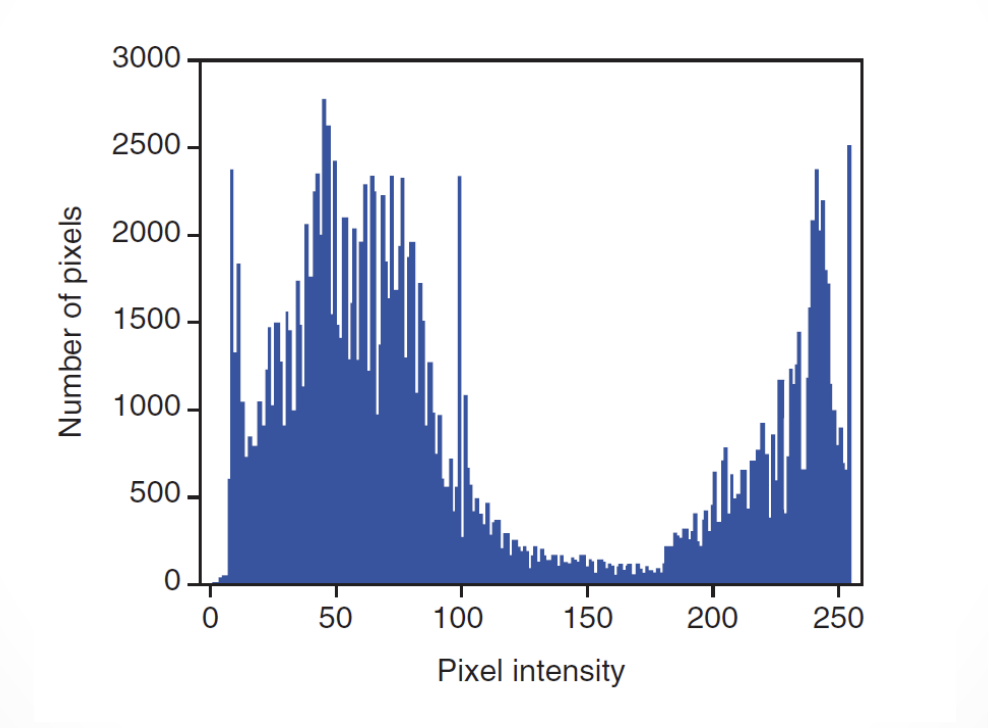
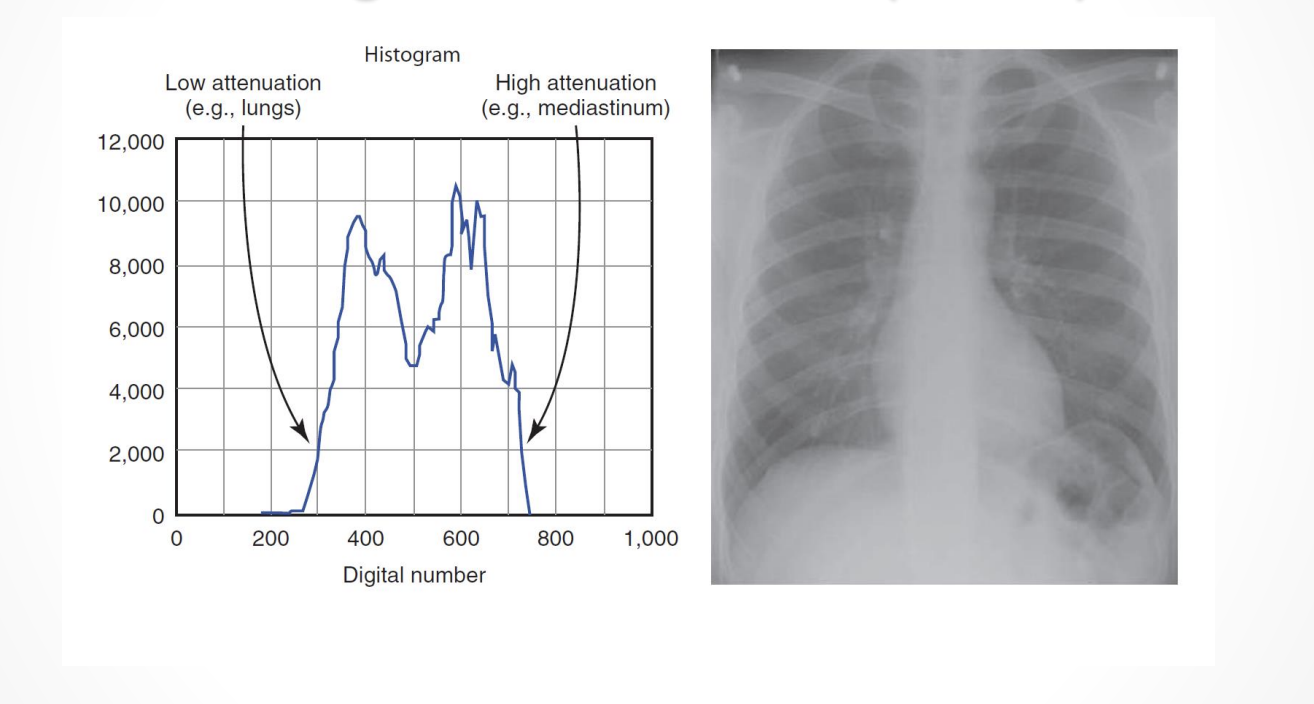
A graphical representation of exposure values collected from the imaging plate
Horizontal axis - tone values
Vertical axis - number of pixels in each tone
Values on one end represent the black areas (greater acquired signals)
Tones vary toward the opposite end and get brighter and the middle area is the medium tones
The extreme opposite end represents the white tones (no acquired signals)
Histogram Formation
IR is scanned
Image location and orientation are determined
Size of the signal is determined
Value is placed on each pixel
A histogram is generated from the image data
Low energy (kVp) gives
A wider histogram
High energy (kVp) gives
A narrow histogram
Histogram shows
The distribution of pixel values for any given exposure
For example:
Pixels have values of 1,2,3, and 4 for a specific exposure
Histogram shows the frequency of each of those values and actual number of values
Histogram sets the minimum (S1) and maximum (S2) “useful” pixel values
Histogram Analysis
Analysis is complex
Shape of the histogram stays fairly constant for each part exposed (anatomy specific)
For example: Shape of histogram for a chest radiograph on a large adult patient looks different from a knee histogram generated from a pediatric knee exam
Choosing the correct anatomic region on the menu before exposing the patient is essential
Raw data used to form the histogram are compared with a “normal” histogram of the same body part by the computer
Image correction takes place at this time
Digital Radiography Image Sampling
Nyquist Theorem
Aliasing
Automatic Rescaling
Look-up Table
The Nyquist Theorem
The theorem states that when sampling a signal, the sampling frequency must be greater than twice the bandwidth of the input signal so that the reconstruction of the original image will be as close to the original signal as possible
At least twice the number of pixels needed to form the image must be sampled
If too few pixels are sampled, the result is a lack of resolution
Oversampling does not result in additional useful information
During image acquisition, energy conversion allow for signal loss. Conversions include
X-rays to light to electrical signal (indirect capture)
X-rays to electrical signal (direct capture)
The indirect method of image acquisition has the highest potential for loss of signal
The PSP plates, The longer the electrons are stored, the more energy they lose
When laser stimulates electrons, some lower energy electrons escape the active layer
If enough energy was lost, some lower energy electrons are not stimulated enough to escape, and information is lost
All manufacturers suggest that imaging plates be read as soon as possible to avoid this loss
Aliasing
Occurs in digital imaging when:
Spatial frequency is greater than the Nyquist frequency
Sampling occurs less than twice per cycle
Information is lost
Fluctuating signal is produced
Also known as foldover or biasing
Causes mirroring of the signal at ¼ the frequency
A wraparound image is produced, and the image appears as two superimposed images slightly out of alignment
Aliasing Results in a moire effect
The same effect can occur with grid errors
When a sampled frequency is exactly at the Nyquist frequency, often a zero amplitude signal will result
Termed the critical frequency
Results from frequency phase shifts, causing aliasing of the signal
Automatic Rescaling
Occurs when exposure is greater than or less than what is needed to produce an image
Images are produced that have uniform brightness and contrast regardless of the amount of exposure
Problems occur with rescaling
Too little exposure results in quantum mottle
Too much exposure results in a loss of contrast and loss of distinct edges because of detector saturation (This is very extreme)
Rescaling is no substitute for appropriate technical factors
Danger exists of using higher than necessary mAs values because doses will “creep” up over time
To combat dose creep RTs should use standardized technique charts
Charts should be validated by radiologists to ensure an acceptable SNR
Look-Up Table
Defined as a histogram of the luminance values derived during image acquisition
Used as a reference
To evaluate the raw information
Correct the luminance values
Is a mapping function:
All pixels are changed to a new grey value
Image will have appropriate appearance in brightness and contrast
Provided for every anatomic part
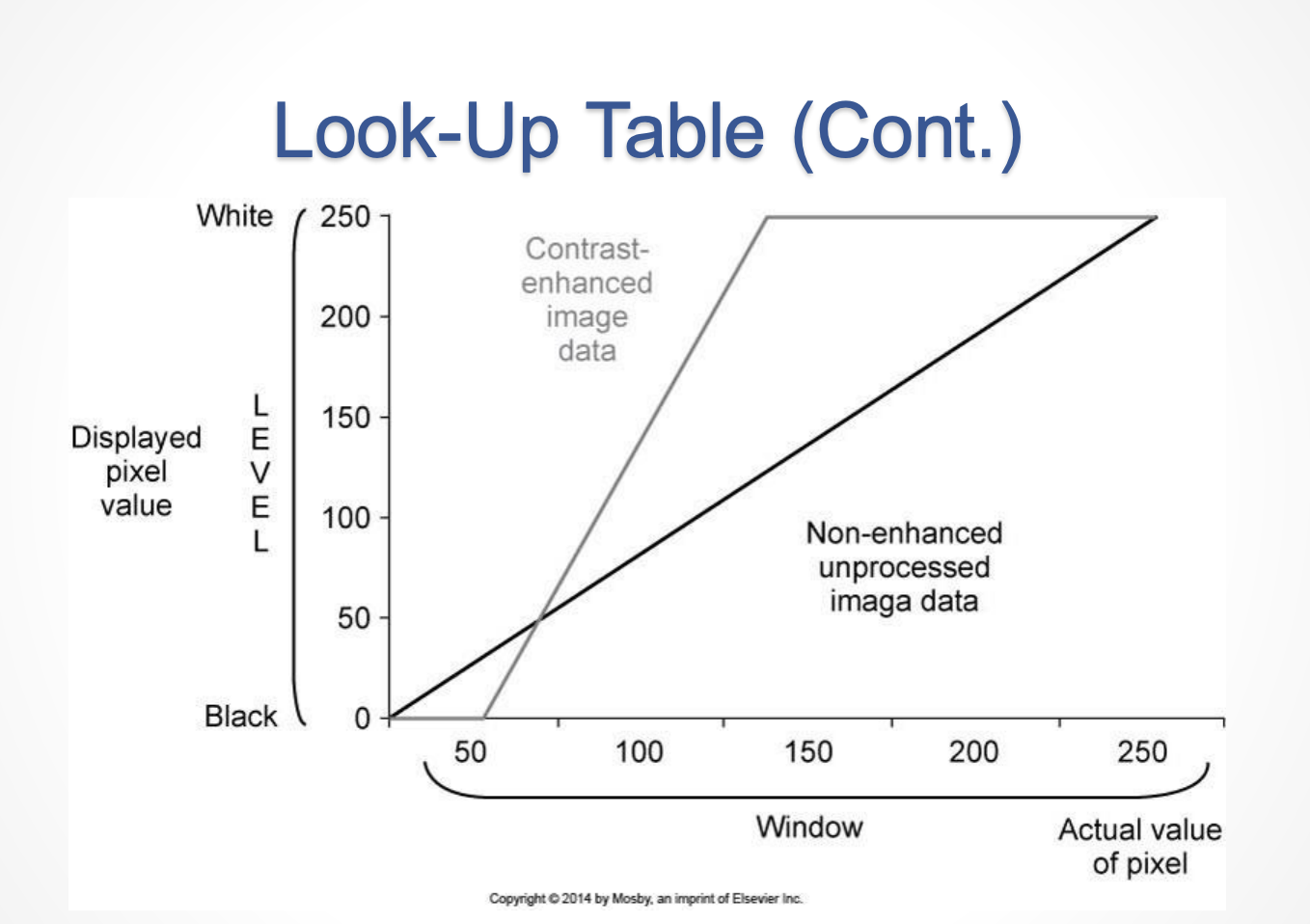
Look-Up Tables can be graphed as follows:
Plotting the original values ranging from 0 to 255 on the horizontal axis
Plotting new values, also ranging from 0 to 255 on the vertical axis
Contrast can be increased or decreased by changing the slope of the graph
Brightness can be increased or decreased by moving the line up or down the y-axis