Topic 7(Network Layer)
 Call Kai
 Learn
Learn Practice Test
 Spaced Repetition
 Match
Match Flashcards
 Knowt Play
1/97

There's no tags or description
Looks like no tags are added yet.
Name | Mastery | Learn | Test | Matching | Spaced | Call with Kai |
|---|
No analytics yet
Send a link to your students to track their progress
98 Terms
Memorize this
De-encapsulation: The frame enters via the Gigabit Ethernet 0/0/0 interface, where R1 strips off the Layer 2 header and trailer.
Path Determination: R1 identifies the destination IPv4 address and finds the best matching route in its table, designating R2 as the next hop.
Forwarding: R1 re-encapsulates the packet into a new Ethernet frame and sends it out the appropriate interface toward the next router.
The Network Layer
Provides services to allow end devices to exchange data.
The Network Layer
IP version 4 (IPv4) and IP version 6 (IPv6) are the principal network layer communication protocols.
Addressing end devices
Encapsulation
Routing
De-encapsulation
The network layer performs four basic operations:
IP address does not change from source to destination, IP is encapsulated into a segment from the transport layer, IP packet will be examined by all layer 3 devices as it is transported.
Characteristics of IP encapsulation
Connectionless
There is no connection with the destination established before sending data packets
Connectionless Communication
is conceptually similar to sending a letter to someone without
notifying the recipient in advance
Connectionless
IP requires no initial exchange of control information to establish an end-to-end connection before packets are forwarded
Best Effort
IP is inherently unreliable because packet delivery is not guaranteed.
Best Effort
With no pre-established end-to- end connection, senders are unaware whether destination devices
Best Effort
Are present and functional when sending packets,
Best Effort
What network layer characteristic is this
• Receives the packet
• Are able to access and read the packet
Best Effort
The IP protocol was not designed to track and manage the flow of packets. These functions, if required, are performed by other protocols at other layers, primarily TCP at Layer 4.
Media Independent
Operation is independent of the medium (i.e., copper, fiber-optic, or wireless) carrying the data
Media Independent
IP does not concern itself with the type of frame required at the data link layer or the media type at the physical layer.
Media Independent
As shown in the figure, IP packets can be sent over any media type: copper, fiber, or wireless.
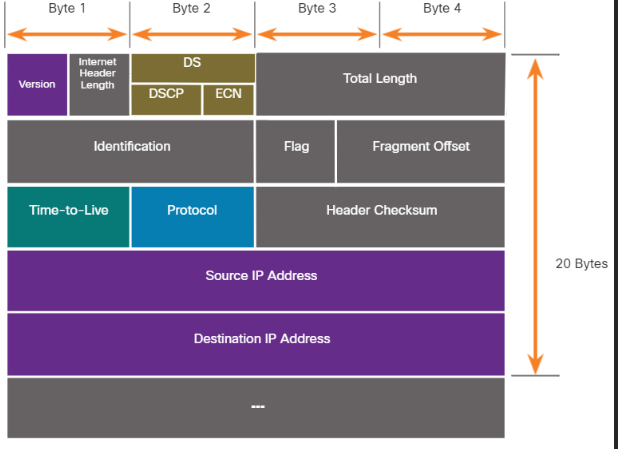
IPv4 Packet Header
Diagram is read from left to right, 4 bytes per line
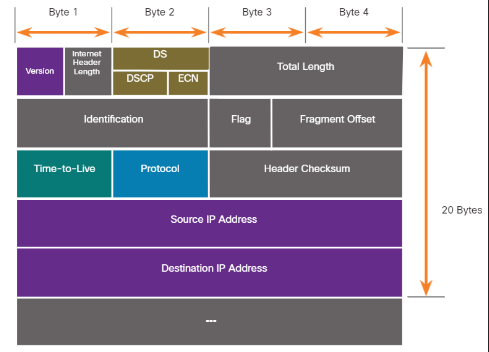
IPv4 Packet Header
The two most commonly referenced fields are the source and destination IP addresses
IPv4 Packet Header
These fields identify where the packet is coming from and where it is going
IPv4 Packet Header
Typically, these addresses do not change while travelling from the source to the destination.
Version
This will be for v4, as opposed to v6, a 4 bit field= 0100
Differentiated Services
Used for QoS: DiffServ – DS field or the older IntServ – ToS or Type of Service
Header Checksum
Detect corruption in the IPv4 header
Time to Live (TTL)
Layer 3 hop count. When it becomes zero the router will discard the packet.
Protocol
I.D.s next level protocol: ICMP, TCP, UDP, etc.
Source IPv4 Address
32 bit source address
Destination IPv4 Address
32 bit destination address
IPv4 address depletion, Lack of end-to-end connectivity, Increased network complexity
What are the limitations of IPv4
IPv6
Developed to overcomes the limitations of IPv4.
Increased address space, Improved packet handling, Eliminates the need for NAT
What are the IPv6 Improvements
NAT
causes latency and troubleshooting issues.
Network Address Translation
What does NAT stand for
Increased address space
based on 128 bit address, not 32 bits
Improved packet handling
simplified header with fewer fields
Eliminates the need for NAT
since there is a huge amount of addressing, there is no need to use private addressing internally and be mapped to a shared public address
The IPv6 Header
is simplified, but not smaller.
IPv6
What header is this
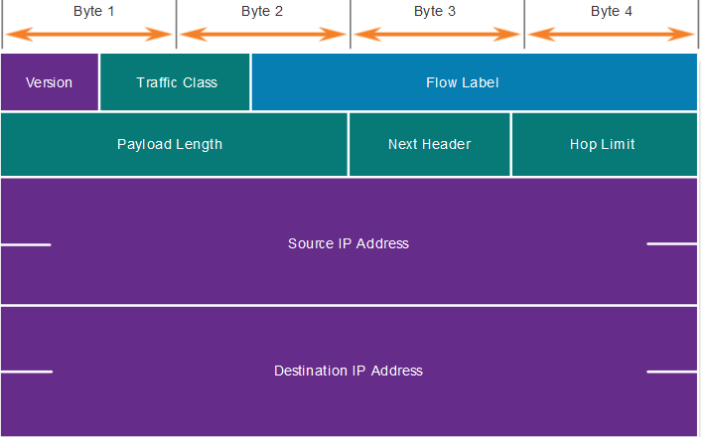
IPv4 Header
What header is this
IPv6
The header is fixed at 40 Bytes long.
Flag, Fragment Offset, Header Checksum
Some IPv4 fields were removed to improve performance:
Version
This will be for v6, as opposed to v4, a 4 bit field= 0110
Traffic Class
Used for QoS: Equivalent to DiffServ – DS field
Flow Label
Informs device to handle identical flow labels the same way, 20 bit field
Payload Length
This 16-bit field indicates the length of the data portion or payload of the IPv6 packet.
Next Header
I.D.s next level protocol: ICMP, TCP, UDP, etc
Hop Limit
Replaces TTL field Layer 3 hop count
Source IPv6 Address
128 bit source address
Destination IPV6 Address
128 bit destination address
Host Routing
Each host device creates its own routing table.
Itself, Local Hosts, Remote Hosts
A host can send packets to the following destinations:
Itself
127.0.0.1 (IPv4) – the special address of the loopback interface
Local Hosts
on the same LAN
Remote Hosts
on the different LANs
Default Gateway
Remote traffic is forwarded directly to the _________ on the LAN.
Host Forwarding Decision
The source device determines whether the destination is local or remote by comparing its own IP address with the destination IP address.
Default Gateway
A router or layer 3 switch can be a _______.
Default Gateway
It must have an IP address in the same range as the rest of the LAN.
Default Gateway
It can accept data from the LAN and forward traffic to other networks.
False
True or False
If a device has no default gateway or a bad default gateway, its traffic will be able to leave the LAN.
statically or through DHCP in IPv4
The host will know the default gateway either ________________.
Routing Table
Use route print or netstat -r to display the _______.
Interface List and MAC addressing, IPv4 Routing Table, IPv6 Routing Table
What are the three sections of the routing table
Routing table
contain information used by the router to forward packets.
Directly Connected Networks, Remote Networks, Default Route
What are the three types of routes in a routing table
Directly Connected networks
Are automatically added by the router, provided the interface is active
and has IP addressing
Remote networks
Routes that the router does not have a direct connection and may be learned manually or dynamically
Manually
With a static route
Dynamically
by using a dynamic routing protocol
Default Route
a gateway of last resort, used when there is not a match in the routing table.
Static Route
Must be configured manually
Static Routing
Must be adjusted manually by the administrator when there is a change in the topology
Static Routing
Good for small non-redundant networks
Static Routing
Often used in conjunction with a dynamic routing protocol for configuring a default route
Dynamic Routing
Discover remote networks
Dynamic Routing
Maintain up-to-date information
Dynamic Routing
Choose the best path to the destination
Dynamic Routing
Find new best paths when there is a topology change
Open Shortest Path First
what does OSPF stand for
L, C, S, O, D
What are the route sources?
L
Directly connected local interface IP address
C
Directly connected network
S
Static route, manually configured
O
OSPF
D
EIGRP
Enhanced Interior Gateway Routing Protocol
EIGRP
Directly Connected, Remote Routes, Default Routes
What are the types of routes
Directly connected
C and L
Remote routes
O, D etc.
Remote Routes
S*
no shutdown
Activates the interface
description Link to LAN
Adds information about the network connected to the interface
show ip interface brief and show ipv6 interface brief
To verify interface configuration or to view status of all interfaces use the
______________ commands shown
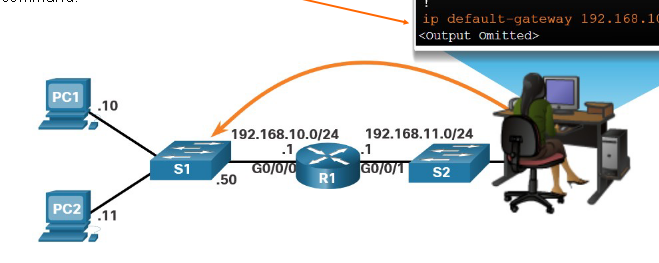
Default Gateway
is used when a host sends a packet to a device on another network
Default Gateway Address
is generally the router interface address attached to the local network of the host.
Default Gateway
To reach PC3, PC1 addresses a packet with the IPv4 address of PC3, but forwards the packet to its ________, the G0/0/0 interface of R1.
isp
Password
False
True or False
A switch must not have a default gateway address configured to remotely managed the switch from another network.
ip default-gateway
Configured by using the __________ command.