STORYBOARD - SIR UAL
 Call Kai
 Learn
Learn Practice Test
 Spaced Repetition
 Match
Match Flashcards
 Knowt Play
1/23

There's no tags or description
Looks like no tags are added yet.
Name | Mastery | Learn | Test | Matching | Spaced | Call with Kai | Chat |
|---|
No analytics yet
Send a link to your students to track their progress
24 Terms
multimedia storyboard
a communication tool used by multimedia designers to map out and organize their project ideas before actually developing their program.
Storyboarding
refers to the process of creating a sequence of screens to provide an overview of the project, demonstrate the arrangement and functionality of the program elements, and help delineate the program's navigation scheme.
storyboards
allow you to visualize how the final product is going to look and operate, and help ensure that no vital information is left out during the development process.
storyboards
typically describes all of the elements appearing on a single screen (instructional text, graphics, animations, etc.), how those elements will be arranged on the screen, and how that screen will link to others.
flowchart
will show the complete outline for your program
storyboards
will show the details on each of the screens
storyboards
a designer's visual representation of what he or she envisions the final project to look like.
purpose of the storyboard
The ________________ for the designer to determine a logical format for the information to be presented in the multimedia project.
Acts as a process tool
Acts as a communication tool
Storyboarding serves two basic purposes
Preproduction activities
such as scriptwriting and storyboarding encourage students to focus on generating and polishing ideas, instead of fooling around with hardware.
Keep the number of buttons low, usually 5 or less.
How many buttons should I have on a page?
groups of buttons or roll-over buttons
In either of these cases the information is chunked, and is more manageable for the user.
corner of the main menu card
in the exact location that the home button
What about an exit button, where do I put it?
The home button is placed on all pages in the project, in the exact same location, usually a corner.
What about a home button, what pages have that?
Linear Structure
The web user navigates sequentially, moving from one screen to the next. The linear approach is appropriate when you want the user to visit each page sequentially without skipping around.

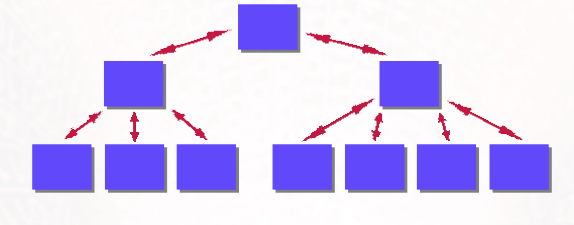
Hierarchical Structure
This layout usually begins with a master page, or home page. This page usually has links that lead to related or subordinate pages; these pages, in turn, contain links back to the home page.
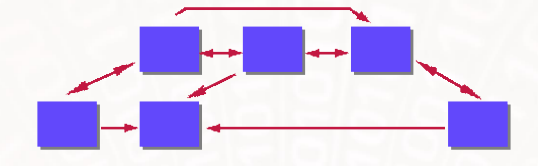
Non-Linear Structure
Web users can navigate freely through the content of the web project, unbound by predetermined routes.
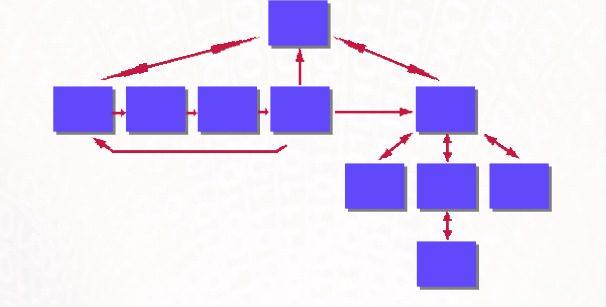
Composite Structure
For the most part users can navigate freely (as in the non-linear structure), but are occasionally constrained to a linear or hierarchical structure for some of the material.
interface
is not the information you are trying to communicate, but rather the shell that allows the user to approach and interact with the information.
interface
what the user sees and uses to navigate through the product.
paper, in a word processor, in an authoring application, or in specific software applications
Storyboards can be created on
flowchart
allows you to determine how your learners will progress through the program, what order they will encounter the instruction, and how everything will be linked together.
Content of the storyboard
project title
date
screen number
brief description of content on screen
sketch of screen layout
description of the text attributes
description of any still images
description of any moving images
description of any sound clips
description of any interactive elements
listing of the screens that lead to that screen, and the screens that are accessible from that
screen
It helps catalyze feelings about the feasibility of the program idea.
Omissions may be spotted as a result of producing the storyboard.
There is a document which everyone can point to as a common point of reference, enabling the design team (which includes the client) to say, 'Yes, that is what I meant', or 'No, we've a problem here'.
The storyboard helps focus on the total content of the program
Problems may be spotted from the storyboard which may have proven more costly to correct at a later stage.
A detailed storyboard can save time in writing project documentation, e.g., in the production of the product specification document.
Advanced planning can result in templates for the content-writer to work with. This speeds up
the content-writing process and makes the production of the storyboard itself so much faster.
Advantages of Storyboarding