AP CSA Unit 4.1-4.7
 Call Kai
 Learn
Learn Practice Test
 Spaced Repetition
 Match
Match Flashcards
 Knowt Play
1/37

There's no tags or description
Looks like no tags are added yet.
Name | Mastery | Learn | Test | Matching | Spaced | Call with Kai |
|---|
No analytics yet
Send a link to your students to track their progress
38 Terms
Algorithmic bias
describes systemic and repeated errors in a program that create unfair outcomes for a specific group of users.
data set
a collection of specific pieces of information or data.
For example, the following table is a data set that keeps track of information about students.
Data can be represented in a diagram by using a chart or table. Here it is shown as a spreadsheet table with columns for the first name, last name, email, and GPA.

array
a block of memory that stores a collection of data items (elements) of the same type under one name. Arrays are useful whenever you have many elements of data of the same type that you want to keep track of, but you don’t need to name each one. Instead you use the array name and a number (called an index) for the position of an item in the array.
index
a number that indicates the position of an item in a list, starting at 0
Declaring and Creating an Array
When we declare a variable, we specify its type and then the variable name. To make a variable into an array, we put square brackets after the data type. For example, int[] scores means we have an array called scores that contains int values.
How to create an array
use the new keyword with the type and the size of the array (the number of elements it can hold). This will actually create the array in memory.
You can do the declaration and the creation all in one step, see the String array
namesbelow. The size of an array is set at the time of creation and cannot be changed after that.

length
how many elements an array can store
dot-notation
Used to access the instance variable, for example arrayName.length
first element in an array
.length - 1
(index 0)
indexed array variable
the array name and the index inside of square bracket [ ]
Array Index Out Of Bounds Exception.
Using an index value outside of 0 - (length-1) will result in this
i
Used in loops to traverse an array. In challenging AP problems, you will see mathematical expressions inside the square brackets ([]).
array[i-1]
refers to the previous element right before the ith element in array
array[i+1]
refers to the next element after the ith element.
Traversing
Doing this to an array means visiting each element of the array. We can use a loop to visit each element of an array and perform some operation on it. This is a common operation when working with arrays.
iteration
when repetition statements are used to access all or an ordered sequence of elements in an array.
We can traverse an array with an indexed
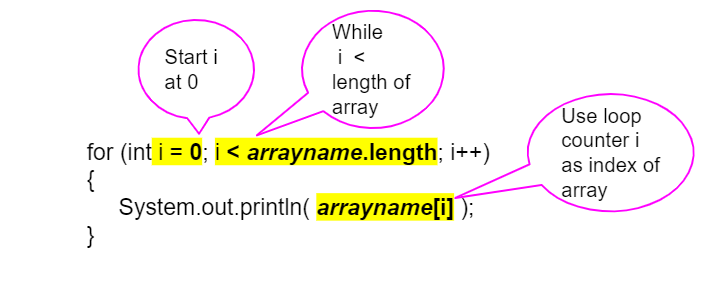
forloop orwhileloop, accessing the elements using an index variable.Just start the index at 0 and loop while the index is less than the length of the array. Note that the variable i (short for index) is often used in loops as the loop counter variable and is used here to access each element of an array with its index.
Since this is a simple counter-controlled loop,
forloops are used more often thanwhileloops for array traversals.
Off by one errors
These errors are easy to make when traversing an array, resulting in an ArrayIndexOutOfBoundsException being thrown.
In
forandwhileloops, make sure the index for an array starts at 0 and end at the number of elements − 1.
enhanced for loop (for-each loop)
Can be used to loop through an array without using an index variable. Loops through ALL the Values WITHOUT CHANGING THEIR VALUES
To set up a for-each loop, use for (type variable : arrayname) where the type is the type for elements in the array, and read it as “for each variable value in arrayname”.
cannot modify the array elements.

When you should not use a for each loop
Only use for-each loops when you want to loop through all the values in an array without changing their values.
Do not use for each loops if you need the index.
Do not use for each loops if you need to change the values in the array.
Do not use for each loops if you want to loop through only part of an array or in a different order.
accumulator pattern
an algorithm that iterates through a set of values using a loop and updates an accumulator variable with those values, for example to compute a sum or average of a set of values. The accumulator pattern has 4 steps:
Initialize the accumulator variable before the loop.
Loop through the values.
Update the accumulator variable inside the loop.
Print or use the accumulated value when the loop is done.
file
storage for data that persists when the program is not running. The data in a file can be retrieved during program execution.
A file can be connected to the program using the
FileandScannerclasses. These classes must be imported in from libraries; theScannerclass is in thejava.utilpackage andFileis in thejava.iopackage (iostands for input/output).When using the
Fileclass, it is required to indicate what to do if the file with the provided name cannot be opened. One way to accomplish this is to addthrows IOExceptionto the header of the method that uses the file. If the file name is invalid, the program will terminate.
While loop
Usually used to read in a file with multiple lines.
The loop can use the method
hasNextas the loop condition to detect if the file still contains elements to read. A loop with this condition will terminate when there are no more lines to read in the file. After the loop is finished reading the data, theclosemethod from Scanner should be called to close the file.

Split string delimeter
splits a string into an array of substrings based on a specified delimiter which is a character like a comma or a space that separates the units of data. This method returns a String array where each element in the array represents a field of data from the line.
java.io package
(AP 4.6.A.5) The File and IOException classes are part of this package. An import statement must be used to make these classes available for use in the program.
Scanner(File f)
the Scanner constructor that accepts a File for reading.
int nextInt
returns the next int read from the file or input source. If the next int does not exist, it will result in an InputMismatchException. Note that this method does not read the end of the line, so the next call to nextLine() will return the rest of the line which will be empty.
double nextDouble ()
returns the next double read from the file or input source. If the next double does not exist, it will result in an InputMismatchException.
boolean nextBoolean ()
returns the next Boolean read from the file or input source. If the next boolean does not exist, it will result in an InputMismatchException.
String nextLine ()
String nextLine() returns the next line of text up until the end of the line as a String read from the file or input source; returns the empty string if called immediately after another Scanner method like nextInt that is reading from the file or input source;returns null if there is no next line.
String next()
eturns the next String up until a white space read from the file or input source.
boolean hasNext()
returns true if there is a next item to read in the file or input source; false otherwise.
Void close ()
closes the input stream.
Wrapper class
A class that wraps (encloses) around a primitive data type and gives it an object appearance.
The wrapper classes are part of the java.lang package, which is imported by default into all Java programs.
The Integer class and Double class are wrapper classes that create objects from primitive types of int and double respectively.

Autoboxing
The automatic conversion that the Java compiler makes between primitive types and their corresponding object wrapper classes. This includes converting an int to an Integer and a double to a Double.
The Java compiler applies autoboxing when a primitive value is passed as a parameter to a method that expects an object of the corresponding wrapper class or assigned to a variable of the corresponding wrapper class. Here’s an example of autoboxing.

Unboxing
The automatic conversion that the Java compiler makes from the wrapper class to the primitive type. This includes converting an Integer to an int and a Double to a double.
The Java compiler applies unboxing when a wrapper class object is passed as a parameter to a method that expects a value of the corresponding primitive type or assigned to a variable of the corresponding primitive type.

Underflow
Java will return the maximum integer value if you try to subtract one from the minimum value

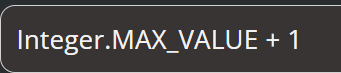
Overflow
Java will return the minimum integer value if you try to add one to the maximum.
Parse methods
can be used to convert strings to numbers.
They are often used with the Scanner class to convert input which is read in as a String into an int or double so that you can create arithmetic expressions (do math) or create logical conditions that test the values against other numbers using relational operators like < and >
