Chapter 1 Computer science
 Call Kai
 Learn
Learn Practice Test
 Spaced Repetition
 Match
Match Flashcards
 Knowt Play
1/64

There's no tags or description
Looks like no tags are added yet.
Name | Mastery | Learn | Test | Matching | Spaced | Call with Kai |
|---|
No analytics yet
Send a link to your students to track their progress
65 Terms
Lossless Compression
Loss less compression is when data is encoded to reduce file size + lossless compression is reversible + Reduce file size but not dramatic + Used when data lost is unsuitable like a full document or coding lines + Encodes pattern and repition 🔄
Binary Use - Digits
+ Data in computers are processed with logic gates which only have states 0/1 🤖
+ Computers is consist of millions of tiny switches with two logic gates -> It has two possible values only (0 [OFF] and 1 [ON]) 🔌
+ The binary system only has two digits 1/0 which means each digit can represents different state 0️⃣1️⃣
Denary
Base 10 number system 🔟
Denary Conversions
Subtracting by the binary board of number made by 2^n for denary
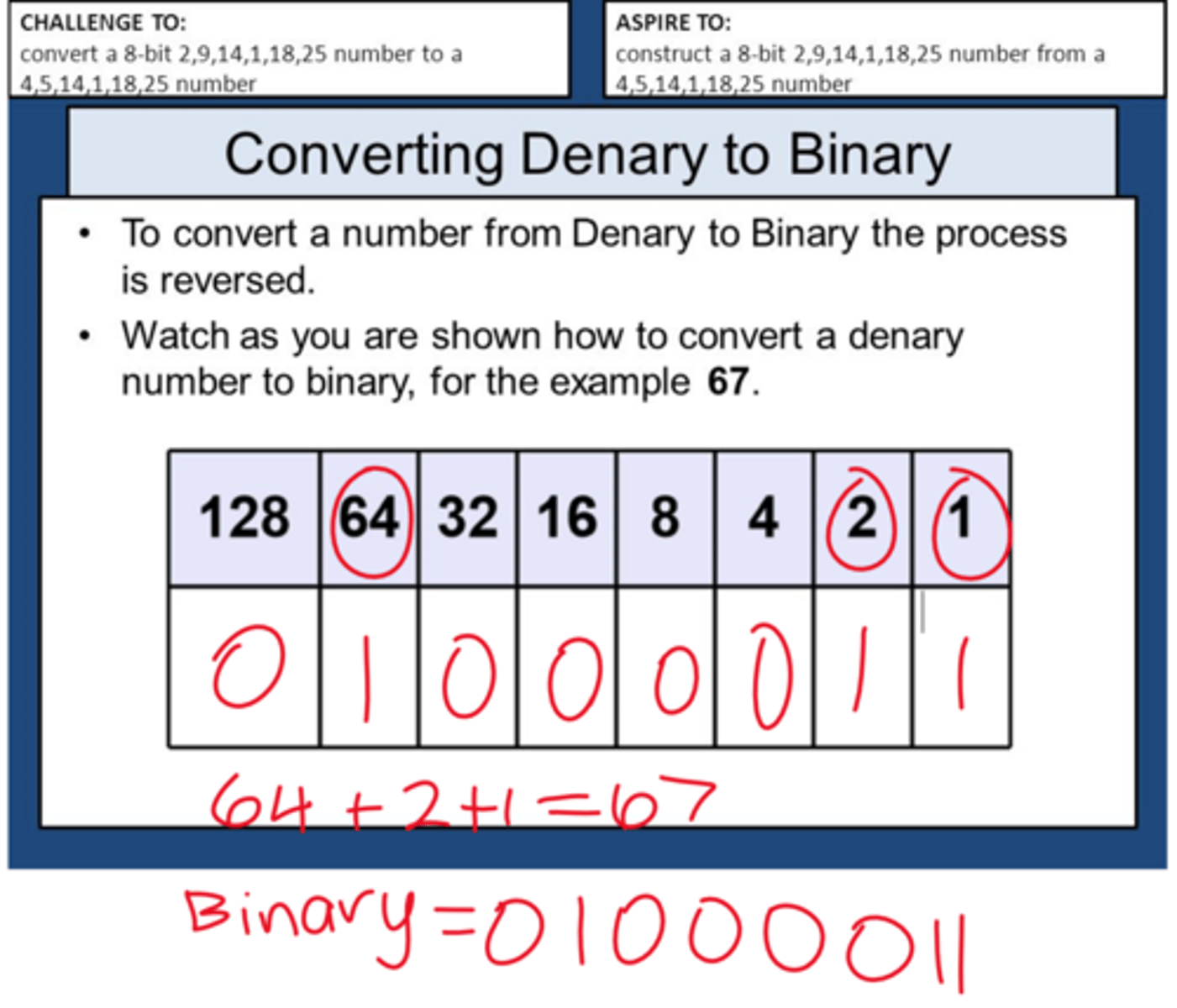
Hexadecimal
It is a base 16 system. 🔠
Why use hexadecimal
+ Often perferred to be use with large values
-> Fewer digits needed to represent given value
+ Easy to read by humans
+ Less prone to error when trying to input
Hexadecimal examples
E.g
+ MAC address
+ Colour codes
+ URL's 🔣
Binary addition
is the process of adding together two integer binary bits of 8 bits
-Rule of thumb
0+0 = 0
1+0 = 1
1+1 = 0 (remember 1)
1+1+1 = 1 (rem 1)
Overflow error (Addition)
could happen when the results of a binary addition exceeds the maximum bits operable in the computer ⚠️
Binary Shifts
is how a computer perform multiplication and division on numbers ✖️➗
Left shift
Moved left ( Left shift): Multiply that number by 2 and doubles the number value ⬅️
Right shift
Moved right (Right shift): Divides a number by 2 and halves the number by 2 ➡️
Binary Shift Increments
The number can keep moving and with an increment to multiply or divide by two 📈
Overflow error (Shifts)
An Overflow error can happen when a 1 is shifted out of the MSB on the left in a logical shift This means that important data will be lost and damage number value 🚫
Two's complement
is the "computer way" of using positive and negative values ➕➖
Two's complement Rule 1
In two's complement the LSB is designed as MSB 🥇
Two's complement Rule 2
MSB = -128 🔢
Two's complement Steps
Step 1: Workout the positive version of number Step 2: Invert all the bits Step 3: Add 1 in LSB 🪜
Text
Text is converted to binary to be processed by a computer 🔤
Character set
A standardized list use by computer using binary values to represent character and symbols 📋
ASCII
A standard character set accepted to represent english characters and math symbols and notations 🇺🇸
ASCII
+ A standard character set accepted to represent english characters and math symbols and notations
+ ASCII uses 7 bits or a maximum of 128 characters
Extended ASCII
an extended character set using 8 bits which is 256 unique codes and add essential characters with math operations and recent symbols
ASCII Limitations - Characters
Limited number of characters only represent English alphabet and some number and some special characters 📉
ASCII Limitations - Languages
Cannot other languages and does not include modern symbols or emojis too ❌
UNICODE
A characters set with a minimum of 16 bits which is over 65,536 characters it can represent 🌍
UNICODE Advantages
UNICODE can represent a wide range of characters from many major languages and a range of recent emojis and symbols ✨
UNICODE Disadvantages
But UNICODE required more bits per character than ASCII -> More storage space required 💾
Sound
Sound waves are captured as an analouge version -> convert to digital form with measurements of amplitude and in binary values. This is called Analogue to Digital conversion (ADC) 🎤
Sample Rate
Amount of samples taken per second of the analouge wave ⏱️
Sample resolution
Number of bits stored per sample 📏
Sample Rate Relationship
As Sample Rate increase, quality and accuracy of sound increases, but file size increase 📈
Sample Resolution Relationship
As Sample resolution increase, quality and accuracy of sound increases, but file size increase 📊
Sound file size calculation
Sample rate x duration x sample resolution 🧮
Images
Images are represent by computer as bitmaps that stores a specific binary values for each pixel with each picture have different size resolution and colour variety 📸
Pixel
Smallest element of a bitmap image ⬛
Resolution
Total amount of pixels in an image -> Height x Width 📏
Colour depth
Number of bits used to represent every colour 🎨
Amount of colours calculation
The amount of colours can be calculated as 2^n (n = colour depth) 🧮
Image File Size calculation
colour depth x resolution (width x height) 💾
File Size vs Resolution/Colour Depth
As the resolution and/or colour depth increases, the bigger the size of the file becomes on secondary storage 📈
Resolution vs Bits
The higher the resolution, the more pixels are in the image, the more bits are stored ⬆️
Colour Depth vs Bits
The higher the colour depth, the more bits per pixel are stored 🌈
Bit
1 or 0 1️⃣
Nibble
4 Bits 🧀
Byte B
8 Bits 🗃️
Kibibyte KiB
1,024 B (2^10) 📦
Mebibyte MiB
1,024 KiB (2^20) 📚
Gibibyte GiB
1.024 MiB (2^30) 🗄️
Tebibyte TiB
1,024 GiB (2^40) 🏢
Pebibyte PiB
1,024 TiB (2^50) 🏙️
Exbibyte EiB
1,024 PiB (2^60) 🌎
Conversion Tips
Tips - Multiply by 1024 to convert the units ✖️
Data Compresssion
Reduce size of files so that it takes up less space and secondary storage 🗜️
Data Compression Benefits
+ Less storage space needed
+ Less bandwidth required
+ Shorter transmission time ✅
Lossy Compression
Lossy compression is when data is Lost in order to reduce fie size 📉
Lossy Compression Characteristics
+ Lossy compression are irreversible
+ Reduce file size greatly -> more than lossless
+ Use when Reducing quality is acceptable
-> e.g: images, video, sound 🗑️
Lossy Sound (MP3)
-> Reduce file size by 90% -> Removes sounds outside human ear range -> Eliminates soft sound by perceptual music shaping 🎵
Lossy Video (MP4)
-> Reduce multimedia file size -> Allows movies to stream across web servers 🎬
Lossy Picture (JPEG)
-> Reduce file size of an image -> Human eyes cannot detect diffrences 🖼️
Lossless Compression
Loss less compression is when data is encoded to reduce file size 📦
Lossless Compression Characteristics
+ lossless compression is reversible
+ Reduce file size but not dramatic
+ Used when data lost is unsuitable like a full document or coding lines
+ Encodes pattern and repition 🔄
RLE (Run Length Encoding)
example of lossless compression
+ Reduce string of adjacent, identical items
RLE First Value
First value represent numbers of identical data 1️⃣
RLE Second Value
Second value represent ASCII of data item 2️⃣