Cxc IT Computer Networks
 Call Kai
 Learn
Learn Practice Test
 Spaced Repetition
 Match
Match Flashcards
 Knowt Play
1/48

There's no tags or description
Looks like no tags are added yet.
Name | Mastery | Learn | Test | Matching | Spaced | Call with Kai |
|---|
No analytics yet
Send a link to your students to track their progress
49 Terms
what is upload?
It means to send a file or data from your device to another system, usually over the internet.
What is a download?
It means to receive data or a file from another system to your device.
Ways a computer can transmit data
1.Point-to-point: A direct link between two computers in a network
2.Broadcast:using one computer to transmit data and information to serve the needs of several computers connected to it in a network
Network Configuration
A computer network connects computers so that peripherals such as printers can be shared among computers.
LAN(Local Area Network)
A Local Area Network (LAN) is a network that connects computers and devices within a limited area, such as a home, school, or office building
MANs (Metropolitan Area Networks)
is a network that is larger than a LAN but smaller than a WAN, covering a city or large campus.
WAN (Wide Area Network)
is a network that connects computers over large distances such as countries or continents.Eg.largest wan-internet
Stand Alone Computers
Computers that are not networked . Data that is on a stand-alone system has to be transferred using a secondary storage device if it is to be used on another computer.
Wireless Networks
IT is a type of computer network that allows devices to connect and communicate without using physical cables, instead using radio waves or infrared signals.
Wireless networks are also beneficial in older buildings where it may be difficult or impossible to install cables.
Connecting LAN
To connect computers to a LAN using cables, you need:
-network cabling
-a network card in each computer
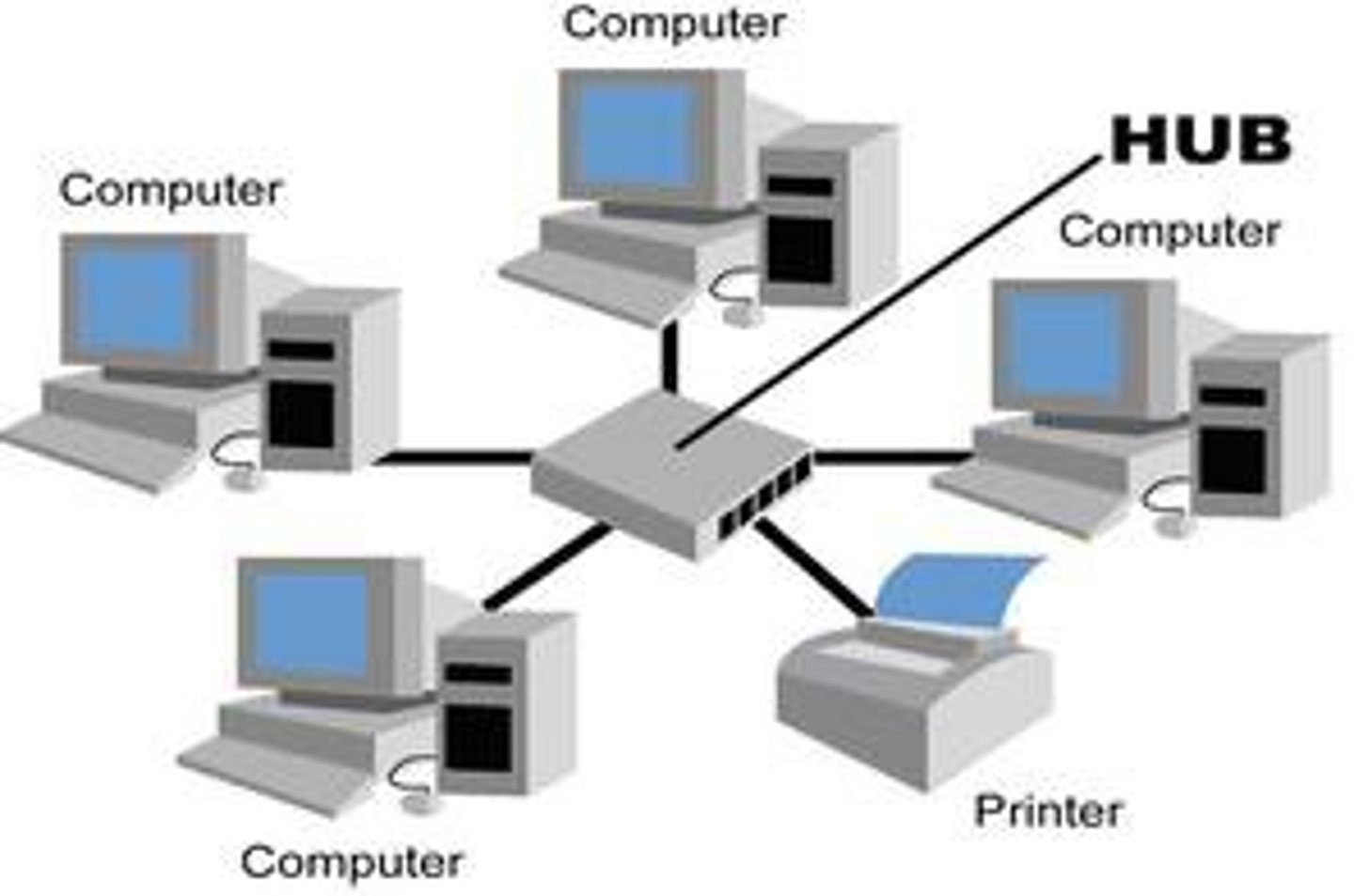
-a hub (or hubs)
-a file server
-system software
Hubs
It is a basic networking device used to connect multiple devices (like computers, printers, or servers) in a local area network (LAN) so they can communicate with each other.
One or more hubs are then connected to a file server.
FIle server
A file server is a high-performance computer containing large capacity hard disk drives that are available to network users. It is where application programs and data can be shared to all users on the network. A file server is not used as a normal computer terminal, as its job is dedicated only to the task of managing shared files.
Peer to peer
If a network does not have a file server, it's called a peer-to-peer network.In this network, every computer acts as a mini-server for the others.Users can share files and devices (like printers) directly with each other.
Internet
The Internet is a global network of computers that are connected so they can share information and communicate with each other.
WLAN (Wireless Local Area Network)
WLANs use high frequency radio signals, infrared light beams, or lasers to communicate between the workstations and the file server or hubs. Each workstation and file server on a wireless network has some sort of transceiver or antenna to send and receive the data.
Remote computers
can connect to the LAN through the transceivers as if they were physically connected. Transceivers are often built into hubs, laptops and portable devices.
Bluetooth and Wi-Fi
Bluetooth and Wi-Fi (short for wireless fidelity) both provide wireless connectivity using radio waves. The main purpose of Bluetooth is to replace cables, while Wi-Fi provides high-speed wireless access to a network or the Internet.
Bluetooth
Bluetooth allows the exchange of data over short distances among both wired and wireless devices.
WLANs (Wireless Local Area Networks) provide easy access to information between wireless devices from different manufacturers.
Wifi(wireless fidelity)
Wi-Fi is a wireless technology that allows devices to connect to a network or the Internet using radio waves, without the need for cables.
Devices with Wi-Fi—such as computers, mobile phones, games consoles, or MP3 players—can connect to the Internet if a wireless network is within range.
Hotspot
A hotspot is a public area as small as a room or as large as many square miles that offers Internet access over a WLAN. Wi-Fi hotspots can be in cafés, airports and hotels.
Stand-alone computers Advantages
-Ideal for most home users
-No network card needed
-Can be dedicated to a specific task, e.g. composing music
-No need for network software licences - only single-user licence required
-Security from users on other sites
Stand-alone computers Disadvantages
-Cannot easily share data, particularly large amounts of data, with others
-Data can be transferred only by disk or by modem. Will need to use an external hard drive or online storage, which can be time consuming and unreliable
Networked computers Advantages
-Access to network from any workstation
-Share files with, and send messages to, other computers
-Share resources such as disk drives, CD-ROM drives, modems or printers
-Share programs (such as word-processing, spreadsheet or database software) which are stored centrally. Possible for network users to work on the same file rather than each user having their own file. These programs are cheaper per user than one-off software for stand-alone computers
-Activities of network users and such things as amount of storage space available to users can be controlled by network manager
Networked computers Disadvantages
-Network cards, cabling, hubs and servers can be costly. -Wireless connection to a network may result in reduced data transfer rates and unreliable connectivity
-If the file server stops working (known as a 'crash'), it can stop everybody on the network from using a computer
-Poor security. With more users there is a greater risk of computer viruses and of unauthorised users (hackers) gaining access to network data
-Need for network manager to manage the system. This can be costly
Communication channels
The communication channel is the method or medium used for transmitting data. Characteristics of communications channels include transmission mode, direction of data flow, transmission medium and transmission speed.
Transmission modes
transmission modes or rates determine the number of characters that can be transmitted in one second. Two modes are:
-asynchronous
-synchronous
asynchronous
data is transmitted at irregular intervals, and at a low speed of one character at a time
synchronous
data is transmitted at regular intervals, with high-speed simultaneous transmission of large blocks of data
Direction of data flow
Transmission lines and media can also be classified according to the direction in which data can flow.
Simplex (Direction of data flow)
Data in a simplex line can flow in only one direction, just like traffic in a one-way street. It is a send-only or receive-only line. Examples are radio, TV, computer to printers, public address systems or any other one-directional transmission.
Half duplex(Direction of data flow)
Data in a half-duplex line can flow in both directions, but only one way at a time. In other words, data can be either sent or received at any given time. CB radio and walkie-talkies are half-duplex.
Full duplex (Direction of data flow)
Data in a full-duplex line can be both sent and received at the same time, like traffic in a two-way street. Most modern connections today transmit full duplex. This increases efficiency, as data flows on the same pair of wires in both directions simultaneously.
Transmission media
Data can be transmitted through various types of cabled (wired) or wireless media. Cabled media uses wires to transmit data. Wireless media transmits data through the air. Cabled media include twisted pair, coaxial and fibre optic cables; wireless media include satellite, microwave and infrared methods.
Three Types of Transmission Media
1.Twisted pair
2.Coaxial Cable
3.Fibre optic cable
Cabled media
Cabled media include twisted pair, coaxial and fibre optic cables.
Twisted pair or ethernet cable
A voiceband channel can transmit data at a rate of 300 bits per second (bps) to 9600 bps. The most popular form of transmitting data is via telephone lines. This is easy to handle and cheap, but relatively slow. You need a modem to do this, since telephone lines are built to handle analogue data and not the digital data found in computers. Twisted pair wires are used for this form of data transmission.
Voice Band Channel(twisted pair)
is common in telephone cables. These cables have pairs of insulated copper wires twisted round each other to help eliminate interference from adjacent pairs and other electrical devices.
Ethernet Cable
An ethernet cable is one of the most popular forms of network cable. It resembles a phone cable but is slightly larger. These cables have different colours which differentiate them from phone cables which are usually grey in colour. Like any cable, an ethernet cable has various lengths, but the longer the cable, the weaker the strength of the signal.
broadband
A broadband channel can transmit data at a rate of thousands of characters per second. Examples of broadband channels are coaxial cables and fibre optic cables.
Coaxial Cable
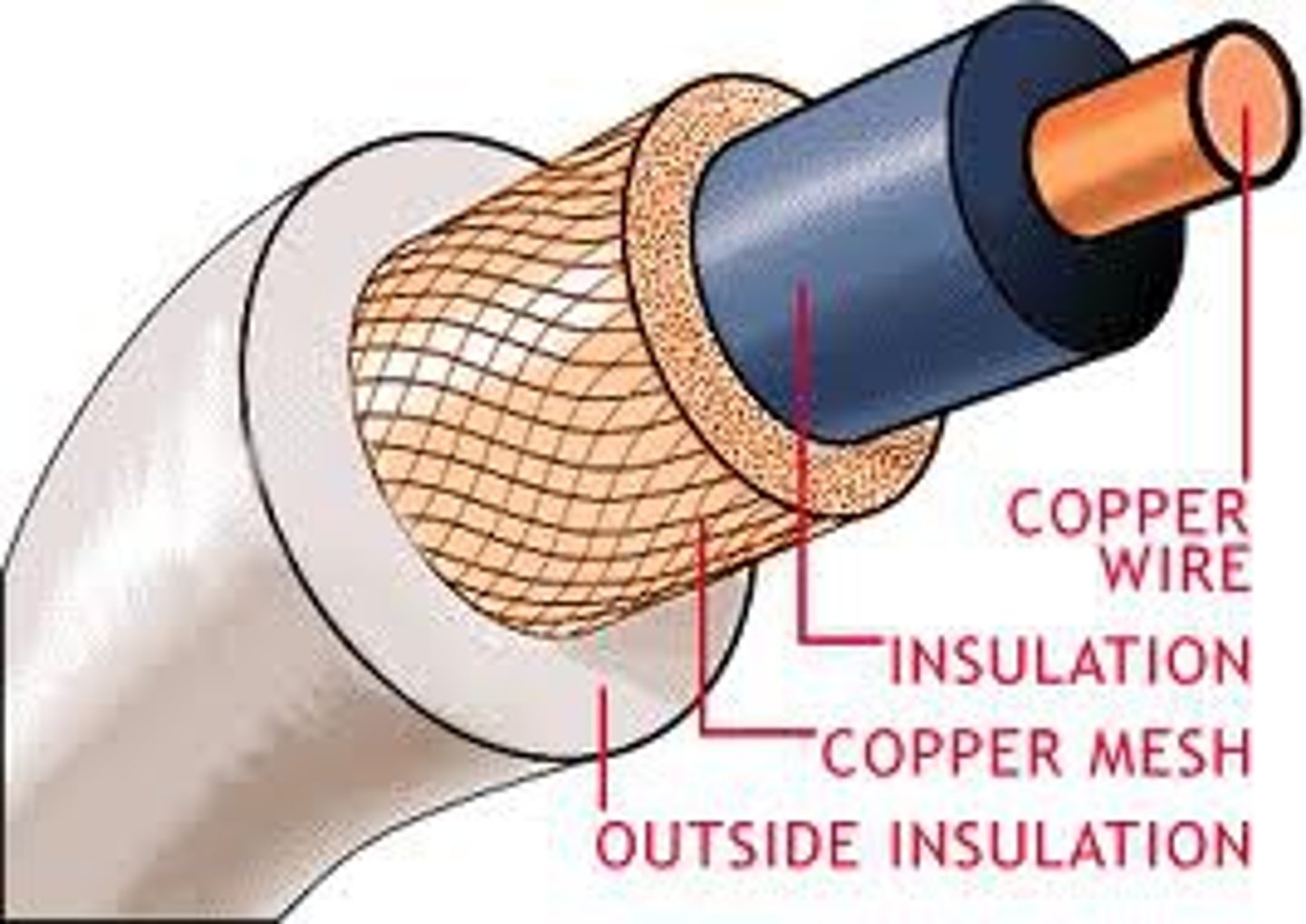
Coaxial cables are found on televisions, videos and cable TV. They use thickly insulated copper wire and are capable of high-speed transmission but are difficult to install since the cable is somewhat rigid.
Fiber Optic Cable
Fibre optic cables are a high-speed communication medium made of thin strands of glass or plastic that transmit data as pulses of light rather than electrical signals. This allows them to carry data over long distances with very high speeds and minimal signal loss. They are not affected by electrical interference, making them more reliable than other cables. Fibre optic cables are commonly used by telecommunications companies and for connecting networks between buildings, especially for services like video conferencing and high-speed Internet.
Wireless transmission
Remember that wireless media include microwave, satellite and infrared methods. A microwave signal has a very short wavelength, hence the word 'micro'-wave. These powerful signals can be projected over long distances over a direct line-of-sight path between any two points, such as antennae. Satellite transmission is similar to microwave transmission. However, instead of using two microwave dish antennae that are close to each other, it uses a satellite that is located in space.
Line of sight transmission
line-of-sight communication means that there must be an unblocked direct line between the workstation and the transceiver. If a person walks within the line-of-sight while there is a transmission, the information would need to be sent again. This kind of obstruction can slow down the wireless network.Example: TV remote control
Scattered
Scattered infrared communication is a broadcast of infrared transmissions sent out in multiple directions that bounces off walls and ceilings until it eventually hits the receiver.Eg.Wireless mouse using infrared
Types of Infrared Communication
1.Line of sight
2.Scattered
Intranet
a network designed for the exclusive use of computer users within an organization that cannot be accessed by users outside the organization,a company can set up an intranet and allow its workers to send messages to each other and use a browser to access company information saved as web pages.
Intranets are used by many businesses and other organisations to:
-distribute documents
-share information
-distribute software
-access databases
-help with staff training
-facilitate group work
-enable teleconferencing
Extranents
An extranet is a network that allows authorised external users, such as customers and suppliers, to access part of a company's intranet. It improves communication, information sharing, and efficiency between businesses. Access is restricted using usernames and passwords, ensuring only approved users can view certain information. Extranets help organisations work closely together by sharing data, managing orders and deliveries, and supporting joint activities like training.
EDI (Electronic Data Interchange)
is a method of transferring business documents electronically between organisations.EDI often involves putting the data into special computer code to stop other people looking at the data.