Section 3
 Call Kai
 Learn
Learn Practice Test
 Spaced Repetition
 Match
Match Flashcards
 Knowt Play
1/24

There's no tags or description
Looks like no tags are added yet.
Name | Mastery | Learn | Test | Matching | Spaced | Call with Kai |
|---|
No analytics yet
Send a link to your students to track their progress
25 Terms
Operator
A symbol that computes a value from 1+ other value (operands).
Arithmetic operators compute numeric values from numeric operands
Comparison operators compute logical values TRUE or FALSE
Logical operands compute logical values from logical operands
Unary operator
Has 1 operand
Binary operator
Has 2 operands.
Most operators are binary.
Expression
A string of operators, operands, and parentheses that evaluates to a single value.
Operands may be column names or fixed values.
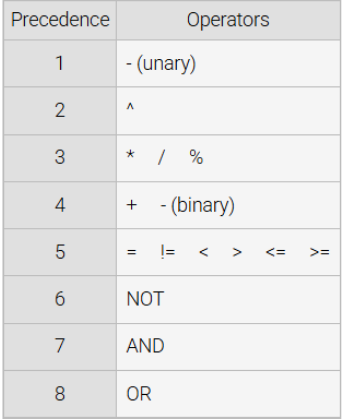
Operator precedence
Determines the order in which expressions are evaluated.
Condition
An expression that evaluates to a logical value
When arithmetic/comparison operators have 1+ NULL operands, what is the result?
NULL
What happens when a WHERE clause evaluates to NULL?
The row is not selected.
Can comparison operators select NULL values?
No
When either operand is null, what do comparison operators return?
NULL
Function
Operates on an expression enclosed in parentheses (an argument) and returns a value
Each operates on, and evaluates to, different data types.
Can have one, several, or no args.
Args are usually a simple expression.
Aggregate Function
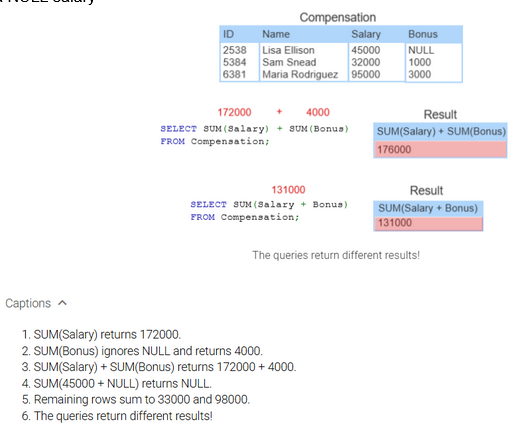
Processes values from a set of rows and returns a summary value.
Appear in SELECT clauses and process all rows that satisfy the WHERE clause condition.
If no WHERE clause, it processes all rows.
Ignores NULL values
eg. SUM(Salary) adds all non-NULL salaries and ignores rows containing a NULL salary
Equijoin
Compares columns of 2 tables with the “ = “ operator.
Most joins are equijoins.
Non-equijoin
Compares columns with an operator other than “ = “
eg. > , <
eg. Price > Cost
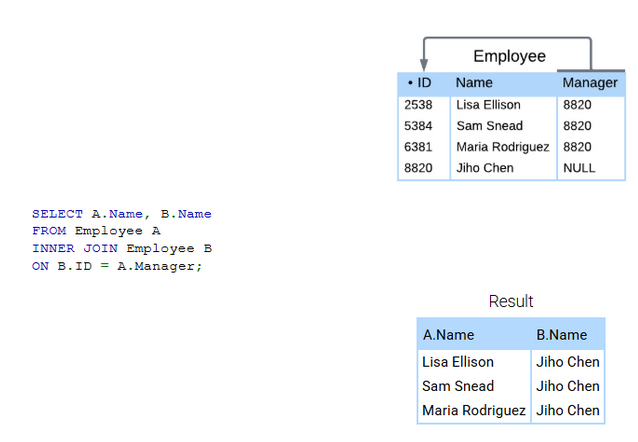
Self-join
Joins a table to itself.
Can compare columns as long as they have comparable data types.
If the foreign key and referenced primary key are in the same table, a self-join commonly compares those key columns.
Aliases are necessary to distinguish left and right tables
Views
Restructure table columns and data types without changes to the underlying database design
View Table
A table name associated with a SELECT statement (the view query).
Table data not normally stored
Base Table
A table specified in the view query’s FROM clause.
Are always source tables, created as tables rather than views.
Whenever it changes, the corresponding view tables also change.
Materialized views must be refreshed.
Materialized View
A view for which data is stored at all times.
Many DBs (including MySQL) do not support these to avoid the overhead of refreshing views.
Can a view table be defined on another view table?
Yes when the query FROM clause additional view tables.
1) What happens when queries are executed against view tables?
2) Does this also happen when queries are executed against materialized views?
1) The changes are reflected in the base tables. The queries are converted to a merged query and, then executed (this is for non-materialized view tables).
2) Yes, queries are also executed on the view table
What are 3 advantages of using views?
1) Protect sensitive data - a view can exclude sensitive columns and include all others
2) Save complex queries - complex SELECT statements can be saved as a view
DB users can reference the view without writing the SELECT statement.
3) Save optimized queries - optimally performing SELECT statements can be saved as a view and distributed to DB users
What are 3 problems with using INSERT, UPDATE, and DELETE statements with views?
1) Primary keys - if a base table primary key doesn’t appear in a view, the insert to the view generates a NULL primary key value.
Since primary keys cannot be NULL, this insert isn’t alowed.
2) Aggregate values - a view query can contain aggregate functions (eg. AVG(), SUM() ); an update/insert to the view may create a new aggregate value, which must be converted to many base tables
The conversion is undefined, so the insert/update is not allowed
One aggregate value corresponds to many base table values
3) Join views - The effect of a join view delete is undefined, and therefore, not allowed
In a join view, foreign keys of one table may match primary keys of another.
A delete from a view might delete foreign key rows only, primary keys only, or both primary and foreign keys
What are views best for?
Reading data.
Avoid inserts/updates/deletes
What may make inserts/updates appear to fail?
When they create a row that does not satisfy the view query WHERE clause.
In this case, the row doesn’t appear on the view table, even though the table may have been successfully changed.
Use WITH CHECK OPTION to prevent this.