1: Basic Security Concepts
 Call Kai
 Learn
Learn Practice Test
 Spaced Repetition
 Match
Match Flashcards
 Knowt Play
1/18

There's no tags or description
Looks like no tags are added yet.
Name | Mastery | Learn | Test | Matching | Spaced | Call with Kai |
|---|
No analytics yet
Send a link to your students to track their progress
19 Terms
Security
Protection of computer-related assets: hardware, software, storage media, data, people.
3 classification of protection
Prevention - take measures that prevent your assets from being damaged.
Detection - take measures that allow you to detect when an asset has been damaged.
Reaction - take measures that allow you to recover from damage to your assets
Real life example:
Prevention - locks at the door or around the property
Detection - burglar alarm rings when a break-in occurs
Reaction - call the police
Security Goals
Confidentiality - Assets of computing systems are accessed only by authorized parties. Access for reading, viewing, printing.
Integrity - Assets can be modified only by authorized people / ways. Preserve integrity means it is precise, accurate, unmodified.
Availability - Assets are accessible to authorized parties when needed without any delay Applies to data and services.
Security Threats: 4
Interruption
Interception
Modification
Fabrication
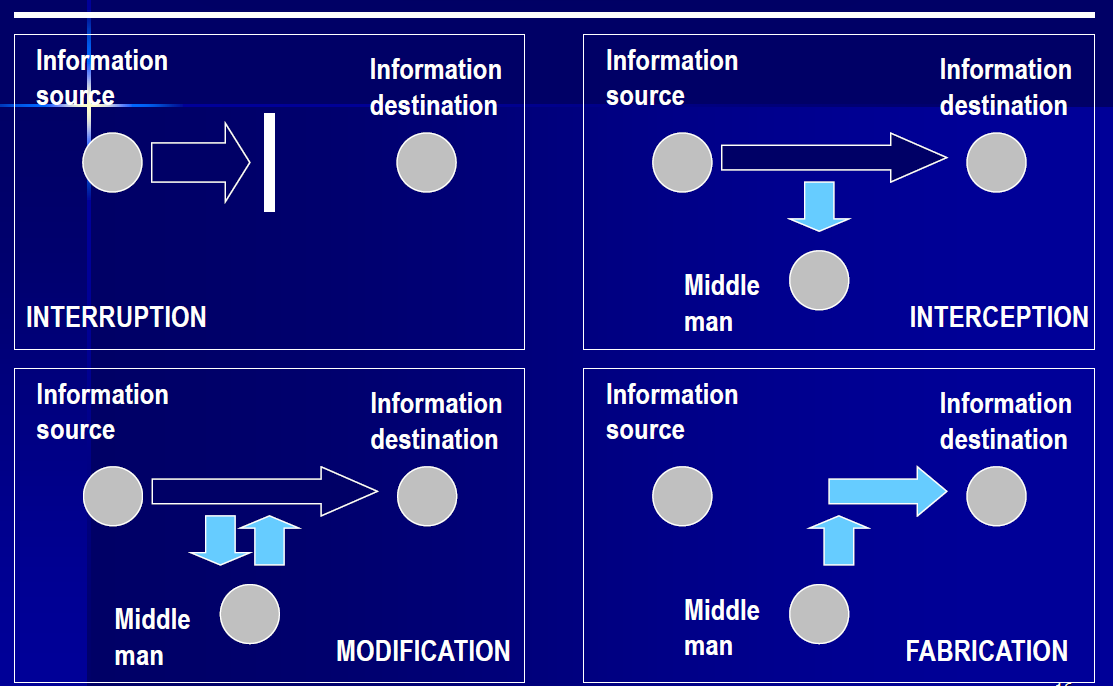
Interruption
An asset of the system is destroyed or become unavailable. Attack on Availability.
Interception
An unauthorized party gains access to an asset. Attack on Confidentiality.
Modification
An unauthorized party not only gain access but tampers with the assets. Attack on Integrity.
Fabrication
An unauthorized party insert counterfeit objects into the system. Attack on Authenticity.
Vulnerability
Weaknesses in the security system that might be exploited to cause loss or harm.
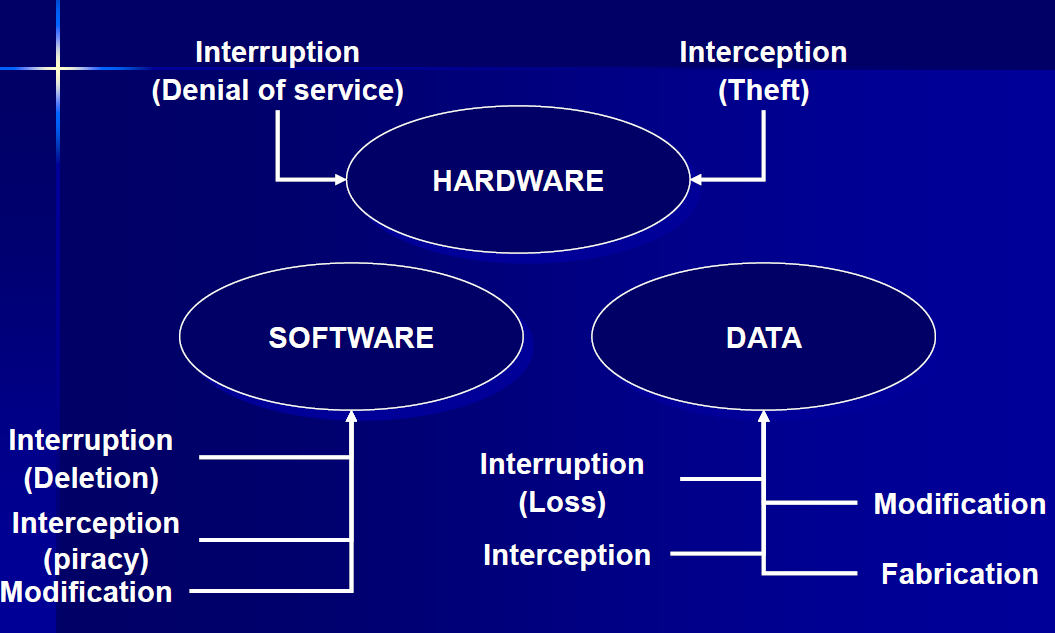
Threats to hardware: DoS and Theft
Threats to software: Modification, piracy
Threats to data: Loss of data, Interception
Threats to other exposed assets: storage media - backups
Methods of defense
Encryption - provides confidentiality for data
Policies - frequent change of password, training, codes of ethics
Software/Hardware controls - OS controls, Dev controls, Smart card encryption
Physical controls - Lock doors, keep backup copies
People: 4
Amateurs = Normal people who observe a flaw in a security system
Crackers = May be students who attempt to access computing facilities for which they have not been authorized
Career criminal = Understands the targets of computer crime
Hackers = Someone with deep knowledge and interest in multiple OS
Methods how computer security provides protection
System Access Control - ensuring unauthorized users don’t get into the system
Data Access Control - monitoring who can access what data and for what purposes
System and Security Administration - performing certain procedures
System Design - taking advantage of basic hardware and software security characteristics
System Access Control
Identification tells the system who you are
Authentication proves to the system that you are who you are
Prove by something you know, you have, you are
(username & password, tokens, fingerprints)
Common threats on password
Password guessing
Password spoofing
Compromise of the password file
How to defend password security
Change default password
Avoid obvious passwords
Password length and format
Improve password security
Password checkers
Password generator
Limit login attempts
Data Access Control
Observe: look at the contents of an object
Change: change the contents of an object
Effectiveness of controls
Likelihood of use: controls must be effective, easy to use and appropriate.
Overlapping controls: combination of controls on one exposure
Periodic review: ongoing task in judging the effectiveness of a control.