CS: Systems Analysis (11)
 Call Kai
 Learn
Learn Practice Test
 Spaced Repetition
 Match
Match Flashcards
 Knowt Play
1/70

Earn XP
Description and Tags
All of system's analysis section
Name | Mastery | Learn | Test | Matching | Spaced | Call with Kai |
|---|
No analytics yet
Send a link to your students to track their progress
71 Terms
System life cycle.
A series of stages that are worked through during the development of a new information system, that creates a careful plan to ensure that the system does what it is meant to do as well as not being expensive or time consuming.
Feasibility study.
Examining the current system to find out whether it is worthwhile replacing it with a new system or not.
Five factors in a feasibility study.
Technical, economic, legal, organisational and scheduling/time.
Technical feasibility.
Determines whether the project is possible with the resources available, or if the technology needed even exists at all.
Economic feasibility.
Determines whether the project is within the company’s budget, if it will be profitable or if they have alternatives which are more efficient.
Legal feasibility.
Determines whether the project will violate any laws or contracts, or if the company has legal responsibilities, liabilities or governing bodies to satisfy.
Organisational feasibility.
Determines if the new system will meet the needs & expectations of the organisation, as well as if it will solve/address the original problem.
Schedule/time feasibility.
Determines if the project can be finished in time so it is actually beneficial or to meet any constraints.
Analysis stage.
Process of finding out exactly what the system will entail. Considers how the current system works, and what the new system will entail.
4 different methods of analysis.
Interviews, questionnaires, examine current system documentation, observe current users.
Benefits of interviews.
Can gather large amounts of information.
Can ask follow up / open ended questions for more detailed information.
Drawbacks of interviews.
Time consuming.
Expensive.
Requires a trained interviewer and the results are difficult to analyse (due to the wide variety).
Benefits of questionnaires.
Relatively cheap for large amounts of people
Can be done online
Lots of responses in a short time.
Drawbacks of questionnaires.
Has to be designed by experts of information could be unusable.
Limited responses.
‘Busy’ people may not complete fully or give false responses.
Benefits of examining current system documentation.
Able to see how the system should be operating.
Inexpensive method of gathering lots of information quickly.
Can identify storage requirements.
Drawbacks of examining current system documentation.
Staff may not be using system as properly intended and may be working in their own way.
Documentation may be out of date and doesn’t reflect system change.
Benefits of observing current users.
Can actually see what is really happening, and how the system is really being used.
Drawbacks of observing current users.
Very time consuming to carry out and therefore expensive.
If staff feel like they’re being watched, they might not behave naturally, giving you inaccurate information.
Cost of sending analysts around the world.
Design stage.
Process of taking the requirements of a new system to decide what the system will look like and how it will store / process data.
Designing algorithms.
Algorithms must be well designed as this can affect the speed of a process such as searching or sorting.
Designing HCI (Human Computer Interface).
Involves the design of how the computer and human will interact with each other, involving hardware (mouse / keyboard input) and software (form design / layout).
Designing data structure.
Files and records must be designed (serial vs sequential organisation, fixed vs variable record/field length).
Data flow diagrams + advantages.
Shows how a system will process information.
DFDs can be broken down into multiple levels (flowcharts can’t).
Show distinction of internal and external parts of the system.
Data flow diagram symbols.
Internal process, external entity, data store and arrows to indicate data flow.
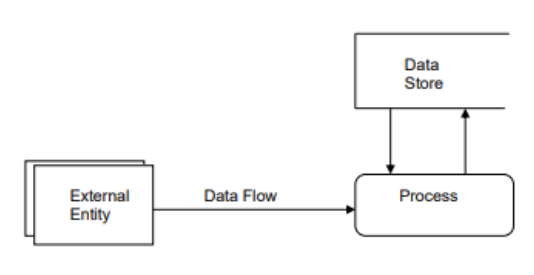
External entity.
Represent anything from outside the system to be modelled. Tends to be some form of human input, but could also be a sensor or a separate system.
Changeover.
The process which hardware and software of the old system is replaced by the new system.
Four changeover methods.
Direct.
Pilot.
Parallel.
Phased.
Direct changeover definition.
Complete changeover of everything in a single pass.
Appropriate for smaller systems or organisations where their computers cannot handle old and new system simultaneously.
Advantages of direct changeover.
Can be cheaper to implement.
New system available immediately.
Least disruptive if implemented well.
Disadvantages of direct changeover.
New system may not work as well until staff are more experienced / trained to using it.
If new system fails, the organisation has no other system to fall back to (costly and dangerous).
Definition of pilot changeover.
A small group of users use the new system, before the bulk of the organisation switches.
Helps resolve bugs with minimal inconvenience.
Advantages of pilot changeover.
All features of new system can be tested.
If the new system has a major issue, only a small part of the organisation is affected.
The initial small group who used the system first can help train other staff later on.
Disadvantages of pilot changeover.
No backup system for the group doing the pilot, if things go wrong.
Might cause problems in the changeover period where they need to communicate, but have different systems.
Slower to get new system up and running compared to other methods.
Definition of parallel changeover.
When both the old and new system are available simultaneously.
If any issues arise in the new system, the old system is still available in the organisation.
Advantages of parallel changeover.
Safest option as if new system fails, they still have existing system to rely on.
New system available immediately if required.
Can compare outputs from old and new system, to check that the new system is running correctly.
Disadvantages of parallel changeover.
Expensive as it requires temporary staff, or overtime for current staff to operate both systems.
Could cause confusion having two systems running simultaneously.
Definition of phased changeover.
One department at a time receives the new system, until the entire organisation has switched over.
More suitable for larger organisations, as they are undergoing significant change and would be more vulnerable to bugs.
Advantages of phased changeover.
Allows users to gradually get used to the new system.
Staff training can be done in stages.
Problems can be fixed quicker as more experts to resolve one functionality at a time.
Disadvantages of phased changeover.
No backup system for the department with the new system in place.
Might cause problems in the changeover period where they need to communicate, but have different systems.
Slower to get new system up and running compared to other methods.
Some systems cannot be easily broken down by functionality.
Three types of testing.
Alpha testing.
Beta testing.
Acceptance testing.
Alpha testing.
Testing that is conducted by the developers (or testers working with them), typically module by module and subroutine by subroutine.
Beta testing.
Testing that is conducted by prospective end users (privileged or existing users), who are regular users of the system as they would use the end product.
They notify the developers of any bugs they identify (constructive comments).
Beneficial to the company as they receive constructive comments, and the testers get to also use the system early.
Acceptance testing.
Conducted by end users/prospective customers. Answers the question if the system is what they wanted.
Three types of maintenance.
Perfective maintenance.
Adaptive maintenance.
Corrective maintenance.
Perfective maintenance.
Aims to make a functioning system even better e.g. adding multiple input methods, speeding up a network connection or tweaking an interface.
Adaptive maintenance.
Changes a system to match changing requirements, e.g. a new law requiring storage of additional data, or the VAT rate changing.
Another example is altering the program to run on a different O.S. e.g. from Windows to iOS.
Corrective maintenance.
Removing bugs that weren’t addressed in testing.
An example of corrective maintenance is when a bug is found like an incorrect calculation and the program is corrected, and the calculation changed to produce the correct result.
Restore points.
Allows changes to an operating system to be undone, if there is an error e.g. a new driver malfunctions.
External disks.
Copying data to external disks and back, to help recover lost data due to system errors.
Storing data remotely.
This can be storing data in the cloud, which would be kept safe. This process can take regularly with no human intervention.
Three types of backup procedures.
Generational file backup.
Incremental backup.
Delta change backup.
Generational file backup.
Stores the three most recent versions of the master file in a grandfather - father - son format.
Useful if one version is corrupted, as the others are available.
Data should also be stored offsite in case of disaster.
Incremental backup.
Only backs up data that has changed, and writes over the old backup.
Saves storage space and is faster than a full backup.
Only allows the user to restore the most recent backup.
Delta change backup.
Only data changed since the previous backup, is backed up.
The original backup is also maintained, in case data needs to be restored.
Faster than creating a complete backup.
User documentation.
How software is to be installed and used, how to use any specialist hardware and basic troubleshooting instructions.
Can include step by step guides / tutorials, installation guides, license information or FAQs.
Five types of maintenance documentation.
Annotated code listings.
Variable lists.
Data dictionaries.
Design documents.
Hardware / software requirements.
Annotated code listings.
Code listings that abide by the coding standards set out by the development company.
Normally self-documenting and/or annotated.
Variable lists.
Including names, data types, visibility (global or local) and a description of purpose.
Data dictionaries.
Listings of fields within each file, to include names, primary keys, data types and requirements for validation.
Design documents.
Any relevant documentation from design phase.
Hardware / software requirements.
For performance, storage and networking.
Computational thinking.
A way of solving problems using methods that computers (and computer scientists) use.
Main techniques of computational thinking.
Decomposition & abstraction.
Decomposition definition.
Breaking a large, complex problem into smaller, easier-to-solve sub problems. This makes development faster, clearer, and more efficient.
Abstraction definition.
Process of ignoring or removing unnecessary information and data to allow developers to focus on the important details of a specific subproblem.