COMP 3000
 Call Kai
 Learn
Learn Practice Test
 Spaced Repetition
 Match
Match Flashcards
 Knowt Play
1/96

There's no tags or description
Looks like no tags are added yet.
Name | Mastery | Learn | Test | Matching | Spaced | Call with Kai |
|---|
No analytics yet
Send a link to your students to track their progress
97 Terms
What is an operating system
No universally accepted definition
Resource Allocator - Manages all resources
Control program - Controls execution of programs
What is the name of the bit used for dual-mode operation? (user vs kernel mode)
Mode bit
What are the three kinds of exeptions?
Faults, Traps, Aborts
What’s the difference between an external interup and an exception?
Exceptions are CPU-generated, and often call software.
External interupts are hardware-generated
What kind of exception is recoverable, and allows for the system to retry?
Fault
What kind of exception is intentional and synchronous? This is also used in system calls
Trap
What kind of exception is fatal? Example: Illegal instruction
Aborts
Quiz 1 Question
What is a device controller?
A piece of hardware that operates/manages a particular device type, translating its operation into data/signal streams understandable by a CPU and vice versa.
Quiz 1 Question
What is the channel through which the CPU and devices communicate?
System Bus
Quiz 1 Question
How do devices notify CPU that I/O operations are done?
Device (via its controller) sends an interrupt to CPU.
Quiz 1 Question
Why do we say “Operating systems are interrupt driven”?
The operating system primarily executes in response to events such as interrupts, traps, and exceptions, rather than running continuously.
Quiz 1 Question
What are the major steps of interrupt handling?
A) save the state of the current execution; B) identify the necessary service routine; C) execute the routine
Quiz 1 Question
T/F
A system call always generates a trap?
True
Quiz 1 Question
T/F
All I/O instructions are privileged instructions
True
Quiz 1 Question
T/F
Program Counter points to the exact location in memory where the next instruction to execute is located.
False
Quiz 1 Question
T/F
Popular operating systems for personal computer use (such as Windows and Linux) are real-time systems.
False
What is DMA?
Direct Memory Access. Alternative to interupt driven I/O
Better for large IO transfers
What is a process?
A process is a running program.
A program is an executable file
What is a program
A program is a passive entity (ex. Executable file)
What is multiprogramming
Keeping the CPU busy by running another process when one blocks
Map the following terms to their definitions
Stack Contains global variables
Heap Contains program code
Data section Contains temporary data (funciton parameters, return addresses, local vars)
Text section Contains dynamically allocated memory during runtime
Stack: Contains temporary data (funciton parameters, return addresses, local vars)
Heap: Contains dynamically allocated memory during runtime
Data section: Contains global variables
Text section: Contains program code
What is contained in the Process Control Block? (PCB)
Process State: Current execution state
CPU registers (Saved on context switch)
Scheduling info
Memory info: Page tables, memory mappings
Accounting info: CPU time used, PID
I/O Status: Open files, allocated I/O devices
PCB Pointer: Address of another PCB
What are the 5 states in the Process 5-State Model
New
Running
Waiting
Ready
Terminated / Zombie
What is a context switch
When the CPU switches to another process.
Needs to save the current state, load the new state.
Context is represented in the PCB
What is a PID
A Process Identifier. A unique number is given to each process
Stored in the PCB
What is a PPID?
A Parent Process Identifier. The PID of the parent process
Stored in the PCB
What does fork() do
Creates a new process (child) by duplicating the calling process.
Child gets a copy of parent’s memory
What does exec() do
Replaces the memory space of the current process with a new program
What is posix spawn()
spawn() is a combination of fork() and exec()
Creates a new process and immediately executes a new program
What does exit() do
Tells the system to delete the calling process
Returns status to parent (via wait())
What does abort() do?
A parent can call abort() to terminate the child process
What is cascading termination
If a child can’t exist without a parent, and a process ends, all children, grandchildren, etc of that process get terminated
What’s the difference between a zombie and an orphan process?
If parent isn’t waiting, process is a zombie
If parent terminated without invoking wait, process is an orphan
What are the two types of communication models? (Communication between processes)
Shared Memory, and Message Passing
Shared Memory: Fast, but needs synchronization (Semaphores and mutexes)
Message Passing: Implicit synchronization, but lots of overhead (copying and system calls)
What are the two types of pipes?
Ordinary and Named
Ordinary: Only accessed from the process that created it or Parent/Child
Named: Can be accessed without parent-child relationship. Bidirectional
Quiz 2 Question
Which of the following are true?
A ready process waiting to get access to the CPU is in the "waiting" state
Not all PCBs in the ready queue have to belong to processes in the "ready" state.
All I/O system calls force a process to move from "running" to "waiting" state.
Context switch implies that the saved state and the restored state come from different processes.
Not all PCBs in the ready queue have to belong to processes in the "ready" state.
Quiz 2 Question
For each of the following features select whether they are characteristic of the Stack or the Data region of a process memory, or neither.
-Holds program counter.
-Holds global scope, initialised constants.
-Has dynamic size (grows and ebbs).
-Has statically fixed size.
-Holds local (function scope) variables.
-Holds global scope variables.
Neither: Holds program counter.
Data: Holds global scope, initialised constants.
Stack: Has dynamic size (grows and ebbs).
Data: Has statically fixed size.
Stack: Holds local (function scope) variables.
Data: Holds global scope variables.
Quiz 3 Question
What are good ways to implement “cascading termination”? (Select all that apply)
When a process is moved to the "terminated" state, OS sends SIGKILL to all its children. Once the children terminate, it will cause SIGKILL to grand-children, etc.
When a process terminates, the system sends SIGKILL signal to all its children, grand-children, etc, down the "parenting" tree.
When a process is deleted from the system, the OS also scans the process "parenting" tree, collects the descendant processes (children, grand-children, etc), and deletes the descendants as well, releasing all their resources (closes open files, deallocates memory…).
When a process is moved to the "terminated" state, OS moves all its "orphan" children to the care of the (very first) "init" process. It will "wait" on them, causing gradual termination down the "parenting" tree.
When a process is moved to the "terminated" state, OS sends SIGKILL to all its children. Once the children terminate, it will cause SIGKILL to grand-children, etc.
Quiz 3 Question
A parent process has some batch of data that needs to be processed, and has a sub-routine that can do this processing. A child process is created to run this sub-routine. The most efficient way to transfer the arguments (data batch) for that child-process run sub-routine is….
Using a named pipe. It allows the child process to be run independently from the parent, so the parent doesn't even need to fork().
Child process begins as a copy of the parent process, it already knows everything the parent did and that includes the intended sub-routine arguments.
Using an ordinary pipe. It has a system-run buffer and no preset size of message, so safe (no danger of a race condition, etc) and flexible for arbitrary argument transfer between processes.
Using shared memory. It uses the least amount of memory for IPC and OS already has race condition solutions, so simple to program.
Child process begins as a copy of the parent process, it already knows everything the parent did and that includes the intended sub-routine arguments.
Quiz 3 Question
Which of the following are true?
exec() call replaces the original program related content, but can retain open file descriptors
The "wait()" system call is generally used by a child process to wait for instructions from a parent process.
Zombie process is a process that has terminated due to a computational violation, and the parent process could not respond to that error.
fork() system call returns two values to the process that initiated it.
exec() call replaces the original program related content, but can retain open file descriptors
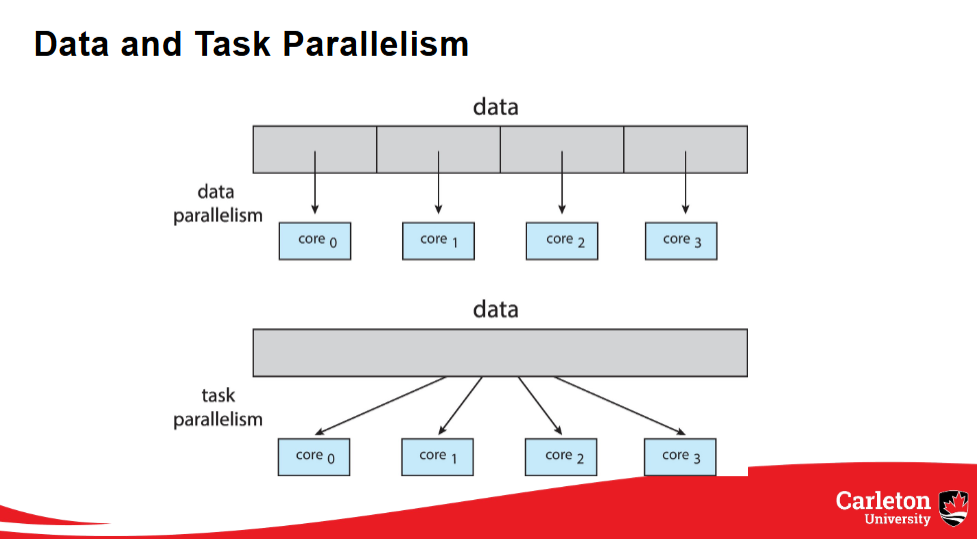
What are the types of parallelism
Data and Task
Data Parallelism: Distributes subsets of the same data across multiple cores. Same operation on each core
Task Parallelism: Distributes threads across cores. Each thread does a unique operation
What is a thread pool?
x threads that are pre-created waiting for work.
What is preemptive vs nonpreemptive scheduling? (CPU)
Nonpreemptive: One a process is given to the CPU, it holds onto it until it finishes or voluntarily releases
Preemptive: Can forcibly remove processes from the CPU (Widely used)
Explain the following scheduling algorithms
First come first served
Shortest Job First
Shortest Remaining Time First
Round Robin
Priority Based Scheduling
Multi-Level Feedback Queues
First come first served - Schedules the program that’s been ready the longest
Shortest Job First - When picking a new process, picks the shortest time. Doesn’t change during process
Shortest Remaining Time First - Same as SJF, but will replace current process if new process has less time
Round Robin - Uses a quantum value. Gets 1st process in queue, runs for quantum time or until finished. Repeat
Priority Based Scheduling - Each process has a priority value. New process will replace current if priority is higher.
Multi-Level Feedback Queues - Same as RR, but multiple queues. Each queue has it’s own quantum (increasing with each queue). Process moves down a queue when quantum is reached and process not finished. Will always run processes in higher queues first
What is the convoy effect?
Short processes get blocked by long processes (in certain scheduling algorithms) which leads to poor performance and reduced responsiveness.
(This is common in FCFS)
What is the critical section?
A section of code that only one process can be there at a time (if there are more, race conditions start happening)
What are the solution specs for CSP? (Critical Section Problem)
Mutual exclusion: Only one thread/process allowed in the critical section
Progress: If no thread is in the critical section, one waiting thread must eventually be allowed to proceed
Bounded Waiting: There is a limit on how many times other processes can enter their critical sections before a waiting process gets a turn
What is a deadlock?
Two or more processes are waiting for an event that can only be caused by one of the waiting processes
What are the necessary conditions for a deadlock?
Mutual exclusion: only one thread at a time can use a resource
Hold and wait: a thread holding at least one resource is waiting to acquire additional resources held by other threads
No preemption: a resource can be released only voluntarily by the thread holding it, after that thread has completed its task
Circular wait: there exists a set {T0, T1, ..., Tn} of waiting threads such that T0 is waiting for a resource that is held by T1, T1 is waiting for a resource that is held by T2, ..., Tn–1 is waiting for a resource that is held by Tn, and Tn is waiting for a resource that is held by T0
Explain the following deadlock handling methods
Ostrich Algorithm
Prevention
Avoidance
Detection
Ostrich Algorithm - Ignore the problem
Prevention - Break one of the 4 conditions for a deadlock
Avoidance - Use process’ resource requirements to ensure the system is always in a safe state
Detection - Allow the system to detect deadlocks, and recover from them
What is a claim edge in a resource allocation graph? How are they represented?
An edge between Ti and Rj indicates that process Ti may request resource Rj. It’s represented by a dashed line
Explain Banker’s algorithm
For each process, until all processes are finished, if Needed resources are <= available resources, finish that process, then free those resources, adding them to the available resources. If a full loop completes with no processes finished, it’s a deadlock, and cannot complete
What is the MMU?
Memory Management Unit
What is the logical address? (Also known as Virtual address)
The address generated by the CPU
What is the physical address?
The address seen by the memory unit
Using the base and limit of a process in memory, how do you get the following?
Size of process, Beginning address, End address
Size = limit
Beginning address = base
End address = base + limit
What are the three solutions to the dynamic storage allocation problems? Explain how each algorithm works
First fit, best fit, worst fit
Explain the two types of fragmentation. When does each one occur?
Internal Fragmentation - Occurs with fixed partition (pages/frames). Unused memory within a frame
External Fragmentation - Occurs with variable partition. Has enough memory to satisfy request, but memory isn’t contiguous (need to compact)
What does a page number do?
Acts as the index into the page table
What is the page offset value?
The page offset is combined with the base address to define the physical memory address. That combined address is sent to the memory unit
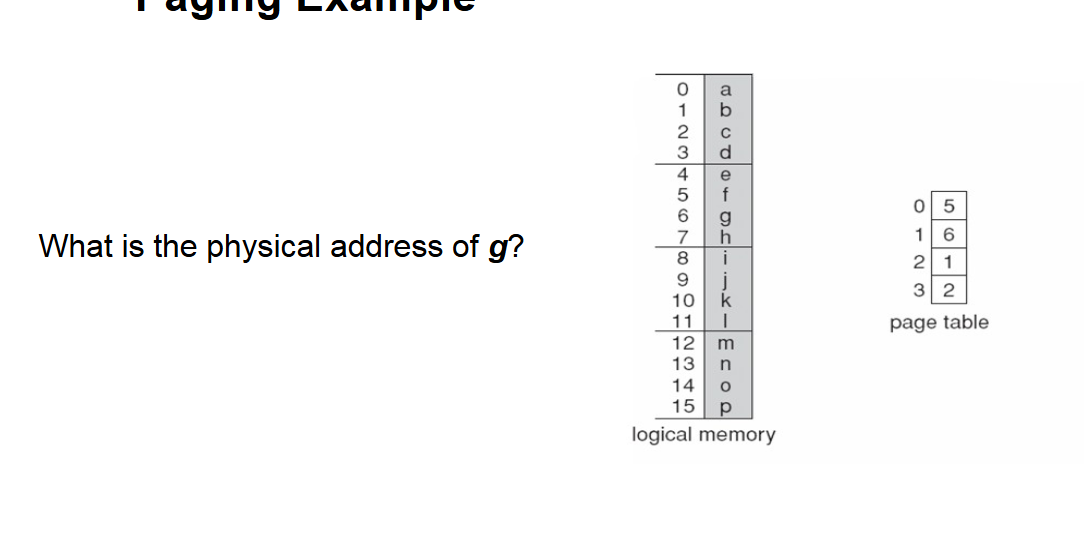
Steps to solve
g has a logical address of 6. Pages have a size of 4
Floor (6 / 4) = 1, = Page number
6 % 4 = 2 = Offset
Lookup 1 (page number) i page table, which returns 6 = Frame number
Frame number * page size + offset
6 × 4 + 2 = 26
Therefore the physical address of g = 26
What does a Translation Look-Aside buffer store? (TLB)
What is its purpose?
It stores a page number, and it’s corresponding frame number
It’s used to reduce the number of memory accesses for a request from 2 to 1, if the page is in physical memory at the time of the requests
What is the purpose of the valid bit in a page table?
The valid bit is true if the page is stored in physical memory, false if you need to put it into memory
What is swapping?
Temporarily moves a process out of ram into main memory. Brings it back when it needs it. Saves memory in ram.
What does the dirty (modified) bit do?
If it’s true, something was changed, and it will need to be written to the disc at some point.
This allows pages that haven’t been modified to not use unnecessary overhead
Explain the following page replacement algorithms
FIFO
OPT
LRU
SC
FIFO - Removes the page that was added last (even if it was accessed recently)
OPT - Looking at all page accesses (in the past), determine what would’ve been the best page replacements
LRU - Removes the page that hasn’t been used for the longest time
SC - Only replace pages with a reference bit = 0. When page added, reference bit = 0, when page accessed after being added, ref bit = 1, when page would be replaced and has ref bit = 1, set to 0, and attempt to remove next page
What’s the difference between global and local replacement
A process can choose a replacement frame from all frames for global replacement, including other processes, while local replacement can only choose from its set of frames
What is Thrashing?
When a process is too busy page swapping that nothing/almost nothing gets done
What are the frame allocation methods? Describe them
Equal: Each process gets the same # of frames
Proportional: Each process gets frames based on their memory
Fault Frequency: Each process gains and loses frames based on how often page faults happen, trying to stay within an upper and lower bound
Working Set: Uses a window and a delta. This allows the process to determine how much ram it needs to avoid thrashing
Explain the following HDD scheduling algorithms
FCFS
SCAN
C-SCAN
C-LOOK
SSTF
FCFS - Keeps a queue of requests, and does them in order of receiving
SCAN - Start at one end of the disk, and move to the other end, then reverse back to the start, servicing all requests as you come across them
C-SCAN - Same as SCAN, except doesn’t reverse, just resets back to the start
C-LOOK - Same as C-SCAN, except stops at the last requests, and starts at the earliest request, instead of the end and start
SSTF - Shortest seek time first. Goes to the nearest request
How do HDDs work?
HDDs (Hard Disk Drives) spin platters that rotate multiple times, with an arm that moves to the desired cylinder/platter to read/write data.
What is Logical Block Addressing in HDDs?
Blocks of memory are stored in HDDs using Logical Block Addressing, which allows the OS to manage storage locations.
What is the advantage of NVM/SSD over HDD?
NVM (Non-Volatile Memory)/SSD (Solid State Drive) operates faster than HDDs since they do not rely on spinning platters.
What is SATA?
SATA (Serial ATA) is an interface that connects to storage devices like HDDs and SSDs.
What is NVMe?
NVMe (Non-Volatile Memory Express) is a protocol designed for SSDs that provides faster data transfer speeds than SATA.
Explain the First Come First Serve (FCFS) HDD scheduling algorithm.
FCFS services requests in the order they are received, focusing on the first requested location.
Describe the SCAN HDD scheduling algorithm.
SCAN starts at one end of the disk, moves to the other end while servicing requests, and then reverses direction.
What is C-SCAN in HDD scheduling?
C-SCAN provides a more uniform response by servicing requests from the head to the end and then jumps back to the start.
What does Shortest Seek Time First mean?
Shortest Seek Time First selects the request that will take the least time to reach next, but it can lead to starvation.
What are the write limitations of NVM?
NVM cannot overwrite in place; it must first erase before rewriting and can only be erased a limited number of times.
List the responsibilities of Kernel I/O.
Kernel I/O is responsible for buffering, caching, error handling, and protection between the kernel and I/O devices.
What is buffering in Kernel I/O?
Buffering temporarily stores information to handle mismatched speeds between the kernel and I/O devices.
Explain caching in Kernel I/O.
Caching stores a copy of I/O data to speed up access and sometimes works alongside buffering.
What is the purpose of error handling in Kernel I/O?
Error handling manages retries, notifies about errors, and logs them for review.
What are I/O instructions in the context of Kernel I/O?
I/O instructions are defined to be privileged and must be performed through system calls for protection.
Describe blocking in I/O operations.
In blocking I/O, the process is suspended until the I/O operation is completed.
What is non-blocking I/O?
Non-blocking I/O returns available data immediately without waiting for the device to be ready.
What is asynchronous I/O?
In asynchronous I/O, the process continues executing while the I/O operation is handled in the background.
What is memory-mapped I/O?
Memory-mapped I/O places device registers in regular physical address space, allowing CPU access as if they were process pages.
What are the core components of a File System Interface?
File concepts such as operations (create, open, close), attributes (name, type, size), and types of access (sequential, direct, indexed).
How do directories function in file systems?
Directories maintain sets of files, functioning like trees where each directory can contain subdirectories and files.
What are inodes in file systems?
Inodes are data structures used by Linux to control files; each file has a unique inode number for management.
How does the mount table function in file systems?
The mount table tracks all currently mounted file systems to ensure proper access to data.
What is the allocation method for contiguous files?
Contiguous allocation keeps files in a set of blocks but can lead to fragmentation and difficulties in resizing.
Explain linked file allocation.
Linked allocation chains files together like a linked list, which avoids fragmentation but suffers from bad access times.
What is the bit vector method in free space management?
A bit vector is a bitmap of free blocks that indicates which blocks are available for storage.
Describe the performance enhancements in file systems.
File systems enhance performance by keeping data and metadata close together to speed up access times.