Zero Trust LAN Access
 Call Kai
 Learn
Learn Practice Test
 Spaced Repetition
 Match
Match Flashcards
 Knowt Play
1/33

Earn XP
Description and Tags
Vocabulary flashcards covering 802.1X architecture, EAP methods, and port authentication configurations on FortiSwitch and FortiAuthenticator.
Name | Mastery | Learn | Test | Matching | Spaced | Call with Kai |
|---|
No analytics yet
Send a link to your students to track their progress
34 Terms
802.1X
A standard designed to provide layer 2 authentication services to network devices that want to join a wired or wireless network.
Supplicant
The client device that wants to join the network; its network stack must support 802.1X.
Authenticator
A network device, such as a FortiSwitch or wireless access point, that acts as the broker in the authentication process and allows or denies access based on the server response.
Authentication server
A host that supports RADIUS and EAP, such as FortiAuthenticator, used to verify client credentials like usernames, passwords, or digital certificates.
EAP stands for Extensible Authentication Protocol.
It is an authentication framework used frequently in network and internet connections. Instead of specifying one specific authentication method, EAP provides a common structure that allows for various different authentication mechanisms (such as passwords, digital certificates, or smart cards) to be used to secure a connection.
EAPOL
The protocol that defines how EAP is encapsulated over the LAN (EAP over LAN).
EAP-MD5
A password-based authentication method similar to CHAP that is vulnerable to dictionary attacks and is not supported by FortiAuthenticator.
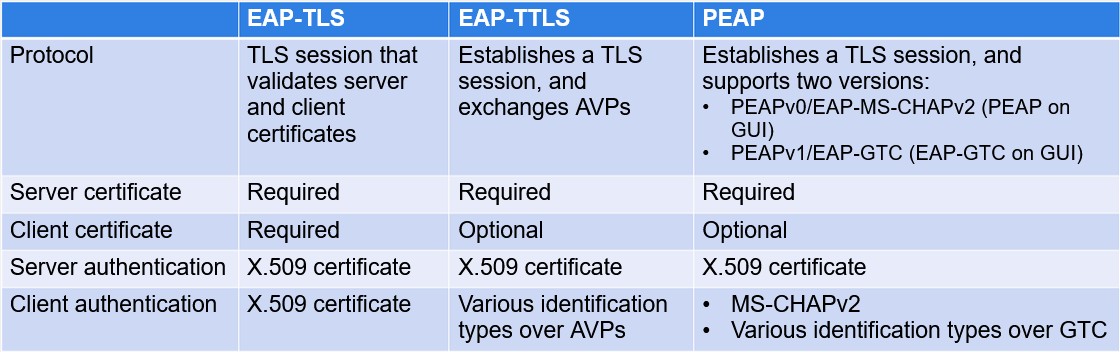
PEAP
Protected EAP; a method that establishes a TLS tunnel first to authenticate the server before using an inner EAP method for client authentication.
• Password-based authentication
• Inside the TLS session, the two most used inner EAP methods are:
• Protected EAP version 0 (PEAPv0) and Microsoft CHAP version 2 (MS-CHAPv2)
• Authenticate the client using MS-CHAPv2
• PEAPv1/EAP-Generic Token Card (EAP-GTC)
• User authentication supports different identification types, including one-time passwords
• Very flexible, but not commonly supported
EAP-TLS
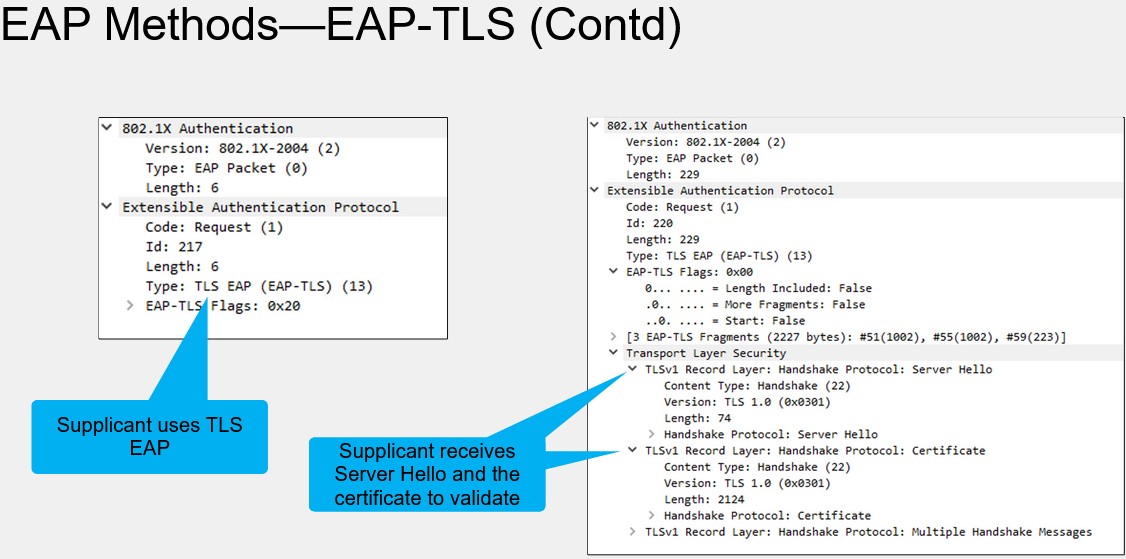
A certificate-based authentication protocol where both the client and the server require an X.509 certificate for mutual authentication.
• Certificate-based authentication
• Standard, original wireless authentication protocol (Can also be used in wired networks)
• TLS is used for encryption and authentication (Client and server require a X.509 certificate)
• Widely supported among vendors
EAP-TTLS
EAP Tunneled TLS; a method that establishes a TLS session to authenticate the server and then exchanges attribute-value pairs (AVP) to authenticate the client.
• Certificate or password-based authentication
• A TLS session is established first (An X.509 certificate is used to authenticate the server)
• Inside the TLS session, attribute-value pairs (AVP) are interchanged
• These AVPs authenticate the client using:
• Any inner EAP method
• A legacy authentication protocol, such as Password Authentication Protocol (PAP) or CHAP
EAP Methods Supported by FortiAuthenticator
In all these methods, a TLS session is established first, and a digital certificate is used for authenticating the server. The way clients are authenticated varies from one method to another.
Port-based Security Mode
A mode where FortiSwitch authenticates a single host and then opens the port to other devices behind it, granting them the same access level.
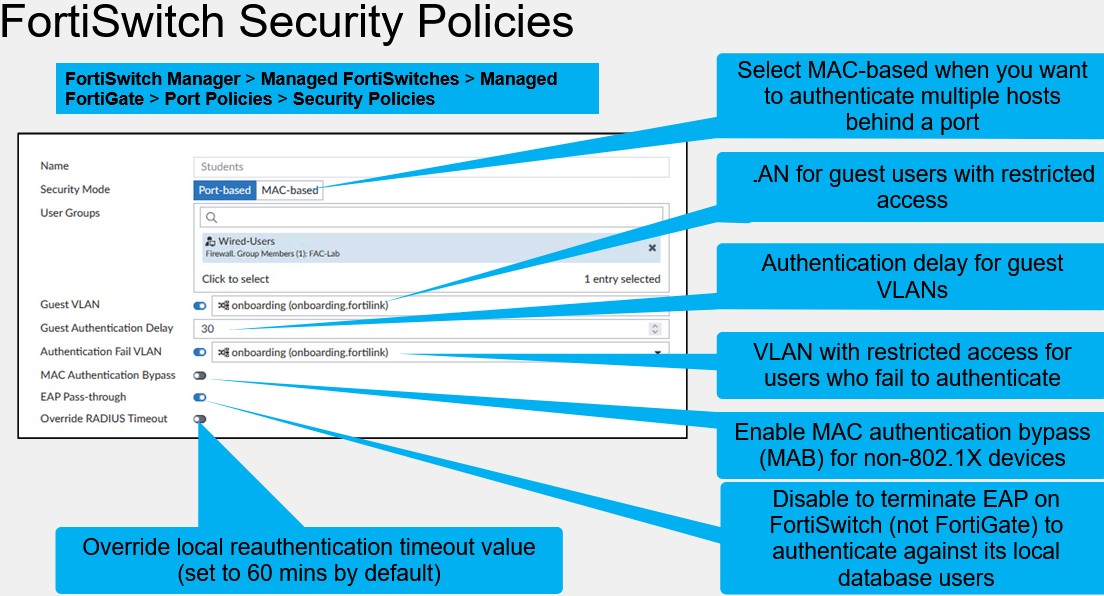
MAC-based Security Mode
A security mode where each individual device behind a physical port must authenticate separately for network access.
Guest VLAN
A VLAN used for non-802.1X devices or those that fail to authenticate before the 802.1X process times out.
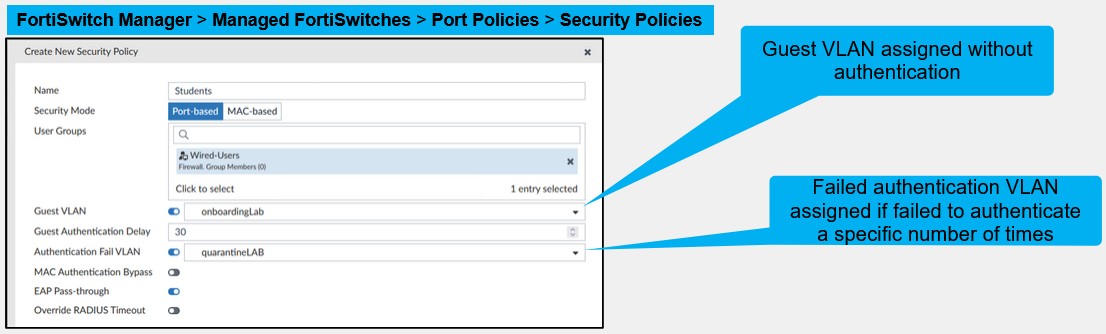
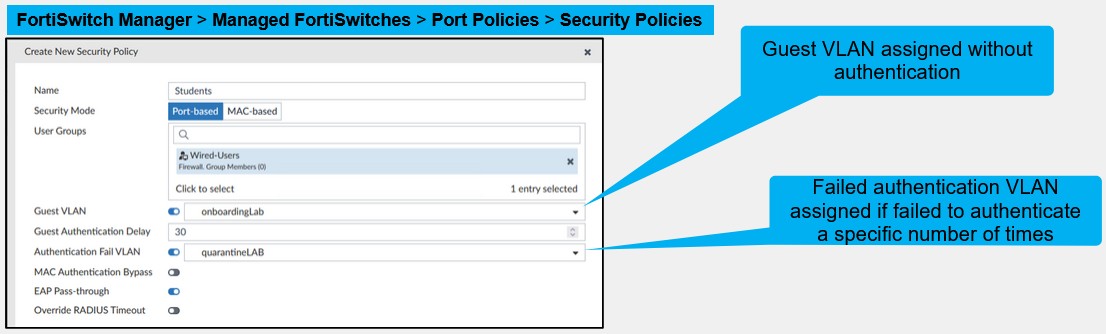
Authentication fail VLAN
A restricted access VLAN for devices that attempt 802.1X authentication but fail due to reasons such as incorrect credentials.
MAC Authentication Bypass (MAB)
A fallback authentication method for devices that do not support 802.1X, where the FortiSwitch uses the device's MAC address as the username and password for RADIUS authentication.
• FortiSwitch can authenticate devices that do not support 802.1X
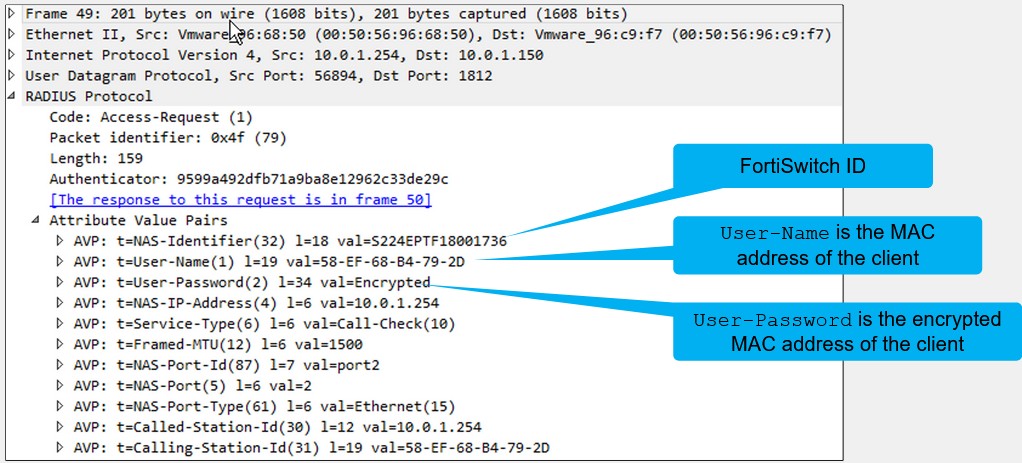
FortiSwitch sends a RADIUS Access-Request, using the MAC address of the device as the username, and the encrypted MAC address of the device as the password.
You can configure FortiAuthenticator with a list of MAC addresses that are allowed to access the network without 802.1X authentication. If the MAC address of the device is included in this list, the device is authorized.
EAP pass-through
You can disable EAP pass-through if the FortiSwitch role is to authenticate users against its local users database, or if the authentication server does not support EAP. The authentication process is only performed by FortiSwitch
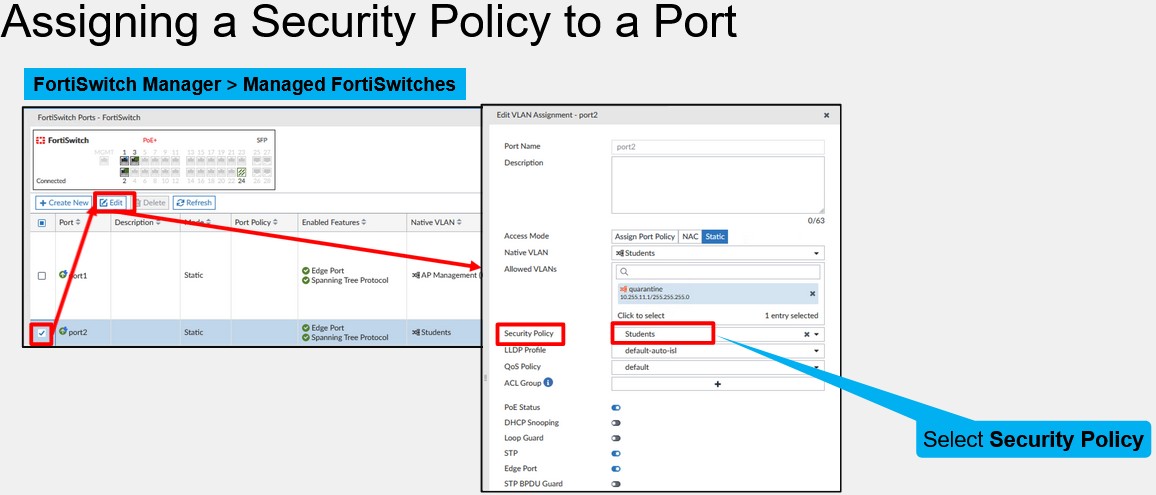
Assigning a Security Policy to a Port
After creating the security policies, you define which policy is applied to a FortiSwitch port. 802.1X authentication is enabled only on ports that have a security policy assigned to them
There are four 802.1X settings that you can configure either globally or per switch on the FortiGate CLI:
link-down-auth
reauth-period
max-reauth-attempt
tx-period
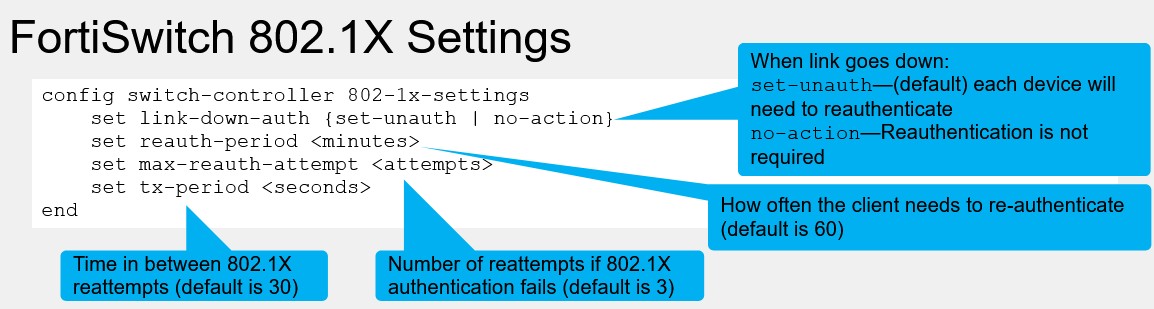
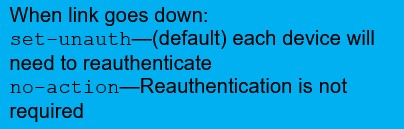
link-down-auth
By default, FortiSwitch clears the 8021.X authentication information for a device after the port the device is connected to bounces, which results in the device having to authenticate again. However, you can configure FortiSwitch to skip reauthentication if the port bounces.
reauth-period
FortiSwitch requests authenticated devices to reauthenticate every hour by default. This option allows you to adjust this timer if needed

max-reauth-attempt
The number of reattempts FortiSwitch will make if 802.1X authentication fails, with a default of 3.

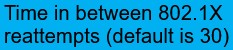
tx-period
The amount of time between 802.1X reauthentication attempts, which is set to 30 seconds by default.
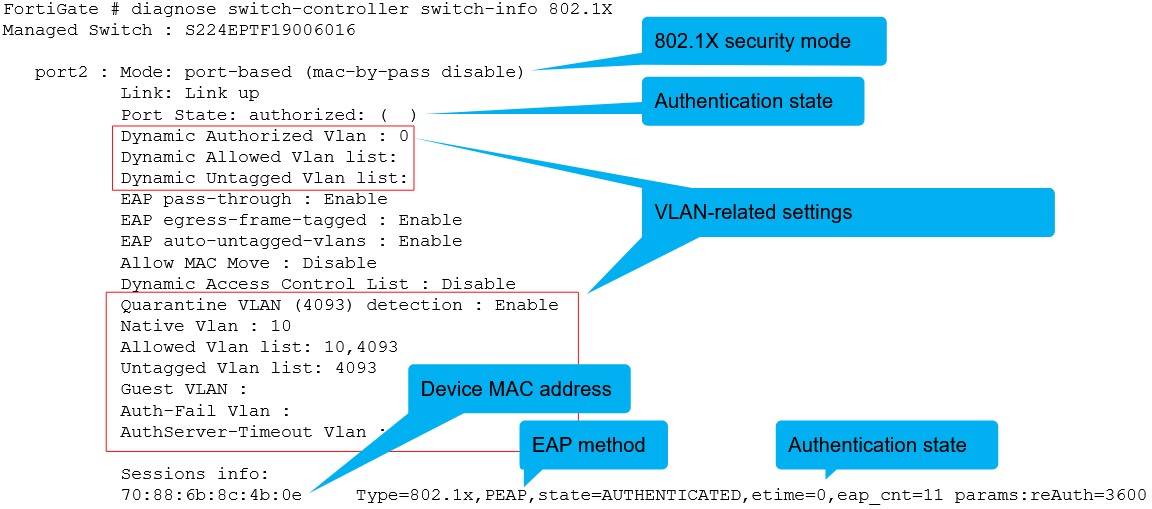
diagnose switch-controller switch-info 802.1X
Displays the 802.1X status for each switch port performing 802.1X authentication. The output indicates the 802.1X security mode in use, whether the device has been authorized or not, as well as the EAP method used for authentication. The output also shows important information, such as the device MAC address, quarantine VLAN, native VLAN, allowed VLANs, guest VLAN, and authentication fail VLAN.
In Windows environments, there are two types of 802.1X authentication:
AD machine authentication
User authentication
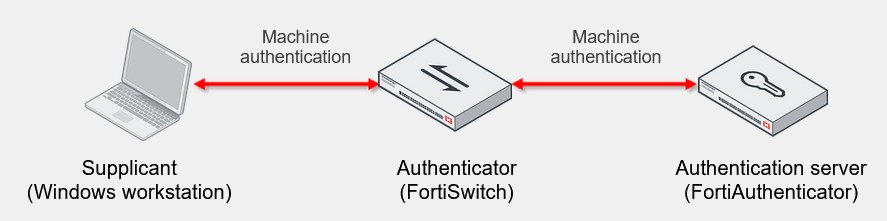
AD machine authentication
Active Directory (AD) machine authentication is performed by a Windows workstation, even before the Windows login screen appears
• Commonly occurs on startup
• AD machine authentication is performed by the Windows OS, which sends its computer object credentials before the Windows login screen appears.
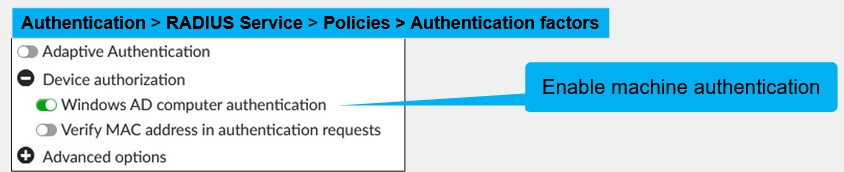
• FortiAuthenticator supports machine authentication
• It caches authenticated devices based on MAC address, for a configurable period (480 mins by default)
User Authentication
User authentication is performed by a user when that user is logging in to the network.
This is the traditional type of 802.1X authentication that is not restricted to Windows workstations. It is supported by almost all operating systems.
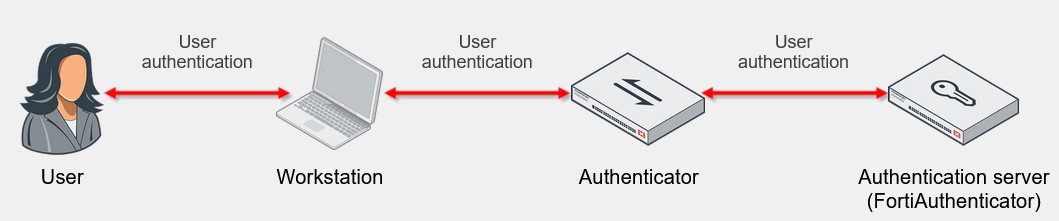
Machine and User Authentication
• FortiAuthenticator also supports the use of both machine and user authentication
• You can limit access to the network based on machine credentials
• User authentication can occur after machine authentication
• You can grant further access to the network based on user credentials
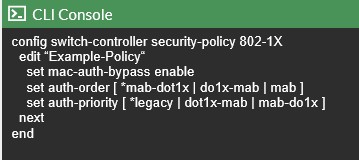
Set Order of 802.1X and MAB Authentication Methods
• The sequence in which the authentication methods 802.1x and MAB are executed can now be managed
• This enables users to prioritize one method over the other based on their specific network security requirements
• Auth priority:
• legacy - EAP 1X has a higher priority than MAB with legacy
• dot1x-MAB - EAP 1X has a higher priority than MAB
• MAB-dot1x - MAB has a higher priority than EAP 1X
RADIUS Access-Request Sniffer for MAB
The packets captured on this slide show the RADIUS Access-Request when MAB is used. It includes the FortiSwitch ID, client MAC address (as the username), encrypted client MAC address (as the password), and the client MAC address (as the Calling-Station-ID).
MAB and FortiSwitch
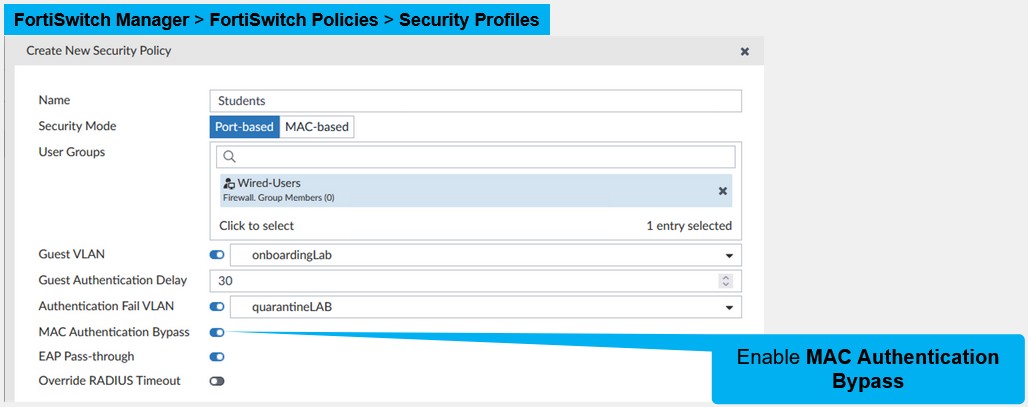
In FortiSwitch, you enable MAC Authentication Bypass for each security policy
MAB and FortiAuthenticator
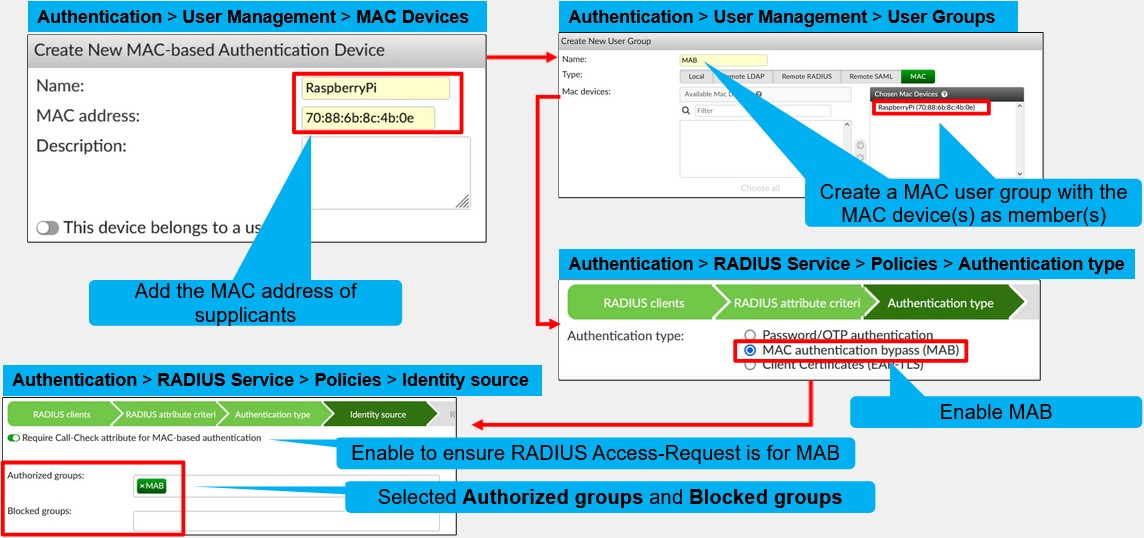
To have FortiAuthenticator work with MAB, you must add the MAC address of every supplicant on the FortiAuthenticator MAC Devices page. After that, you must create one or more MAC groups on the User Groups page, and then add the MAC devices to their respective MAC groups.
The next step is to enable MAC authentication bypass (MAB) in the Authentication type section of the matching RADIUS policy. Then, in the Identity source section, select the MAB groups that are part of the Authorized groups or the Blocked groups.
Finally, it is recommended that you enable the Require Call-Check attribute for MAC-based authentication.
Require Call-Check
Since MAB uses the device MAC address as the username and password, enabling this option instructs FortiAuthenticator to also check that the RADIUS Access-Request received from the network-attached storage (NAS) includes the Service-Type attribute, and it is set to Call-Check. By performing this additional verification, FortiAuthenticator prevents processing non-MAB requests, which may also contain the device MAC address in a RADIUS attribute, as MAB requests. Enabling Require Call-Check attribute for MAC-based authentication does not require additional configuration on FortiSwitch. FortiSwitch always includes the Service-Type attribute set to Call-Check in all its MAB requests
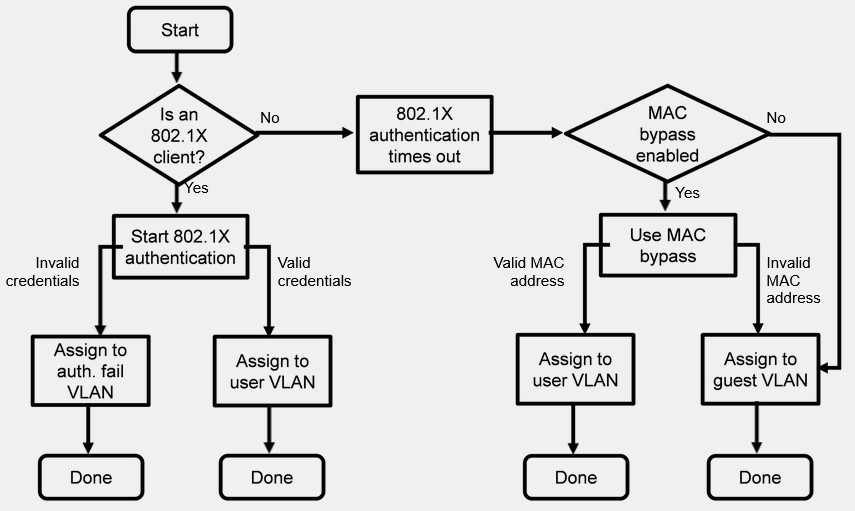
802.1X Port-Based Authentication
This slide shows the authentication process when 802.1X is combined with MAB. When a physical device is connected to an 802.1X port, FortiSwitch waits for the EAPOL-Start packet
If FortiSwitch receives an EAPOL-Start packet from the connected device, the 802.1X authentication starts. FortiSwitch checks the credentials against a RADIUS server, with the following results:
• If the credentials are invalid, and Authentication fail VLAN is enabled, traffic from the device is allowed and assigned to the authentication fail VLAN.
• If the credentials are invalid, and Authentication fail VLAN is disabled, traffic from the device is blocked.
• If the credentials are valid, traffic from the device is allowed and assigned to the respective user VLAN.
If FortiSwitch does not receive EAPOL-Start packets after a certain amount of time, the 802.1X authentication times out. After that, the source MAC address of the device is checked, with the following results:
• If MAC bypass is disabled, the traffic is assigned to the guest VLAN (or blocked, if Guest VLAN is
disabled).
• If MAC bypass is enabled, but the source MAC address is not in the MAB table, the traffic is assigned to
the guest VLAN (or blocked, if Guest VLAN is disabled).
• If MAC bypass is enabled, and the source MAC address is in the MAB table, the traffic is allowed and
assigned to the respective user VLAN