Paper 1 - Unit 8 - Databases
 Call Kai
 Learn
Learn Practice Test
 Spaced Repetition
 Match
Match Flashcards
 Knowt Play
1/60

There's no tags or description
Looks like no tags are added yet.
Name | Mastery | Learn | Test | Matching | Spaced | Call with Kai |
|---|
No analytics yet
Send a link to your students to track their progress
61 Terms
Data redundancy
Repeated / duplicated data
DBMS
Database management system
Software that controls access to data in a database
DBA
Database administrator
A person who uses the DBMS to customise the database to suit user and programmer requirements
Data Integrity
The process of maintaining the consistency of the database.
The database must reflect the reality that it represents.
Data Security
Protection of data using passwords and different access rights for different users of the database
Prevention of data loss
Data dictionary
A file/table containing all details of the database design
It contains metadata about the data.
Hidden from view from everyone except the database administrator.
Data dictionary contents
Table name
Field name
Data type
Type of validation
Primary Key
Foreign Key
Relationships
Indexing
An index is a secondary table which is associated with an attribute that has unique values.
Contains the attribute values and pointers to the corresponding record/tuple in the original table.
The index can be on the primary/secondary key
Searching an index table is much quicker than searching the full table.
Secondary key
An attribute that is a candidate key, but is not the primary key.
An attribute that can be indexed, for faster searches.
A table can have more than one secondary key.
Generally have identifying information, but may not completely uniquely identify a record with complete accuracy
e.g. surname - there may be multiple people with the same surname
Reasons for secondary keys
The database user will frequently want to search on a secondary key
The secondary key attribute has been indexed - allows for a faster search
DBMS security measures
Issue usernames and passwords:
stops unauthorised access to the data through strong passwords, changed regularly
Access rights / privileges:
only relevant staff / certain usernames can read/edit certain parts of the data
read only, full access, read, write and delete
Create (regular / scheduled) backups:
A copy is available in case of loss/damage to the live data
Encryption of data:
if there is unauthorised access to the data, it cannot be understood // needs a decryption key
Different views of data:
composed of one or more tables, controls the scope of the data accessible to authorised users
Usage monitoring / logging of activity:
creation of an audit /activity log
records the use of the data in the database / records operations performed by all users
Flat file / file based database
Database which consists of just one table.
File based limitations
Data redundancy // data is repeated in more than one file
Data dependency // changes to data means programs accessing that data have to adapt
Lack of data integrity // entries that should be the same can be different in different places
Lack of data privacy // all users have access to all data if a single flat file
Entity
A category of object, person, event or thing of interest about which data needs to be recorded.
Represented as a table in a database.
Database table
Collection of related records that contain fields to organise data
Dataset organised in rows and columns; the columns form the structure and the rows form the content
One table should represent a single entity e.g. Customer, Event etc
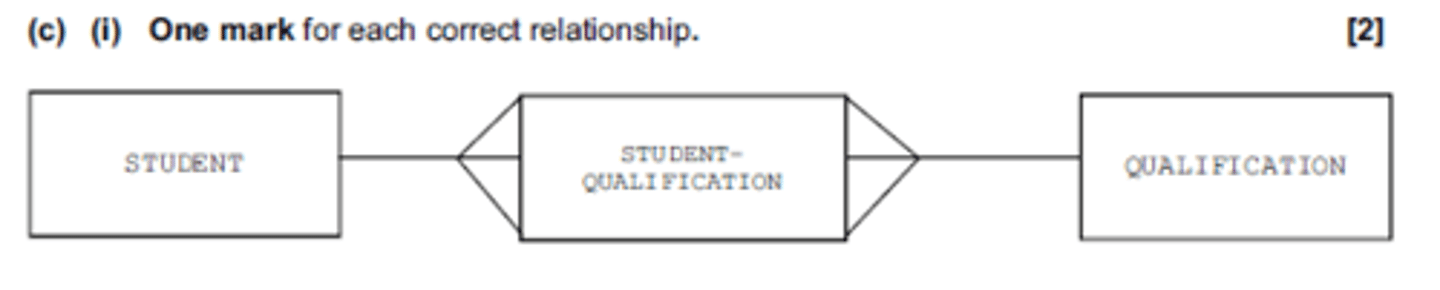
Entity-Relationship (E-R) diagram
A graphic method of representing entities and their relationships
Field
A single characteristic of data that appears in a table as a column
One piece of information about a person or thing
Record / Tuple
A collection of fields / attributes about one person or thing that appear as a row in a database or table.
Queries
Set up search criteria
Queries used to find / retrieve / return the data that matches the criteria
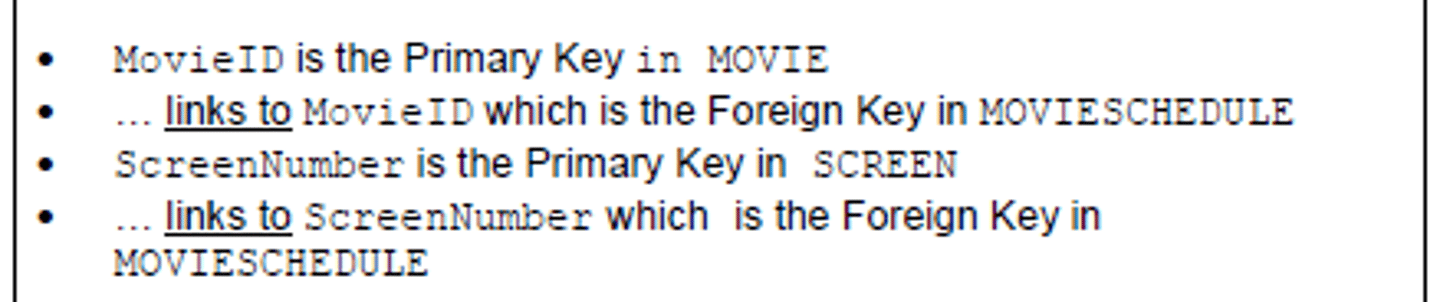
Explaining relationships
Types of relationship
one to one
one to many (optimal for normalised relational databases)
many to many (can't be used in normalised relational databases)
Problems if relationships do not exist
Referential integrity could be violated:
Data becomes inconsistent
Tables might not be automatically updated
Records will become orphaned
Relational database benefits/features
Multiple tables are linked together:
Reduces data redundancy or duplication
Increases data integrity / consistency
so reduces compatibility issues
so data need only be updated once (associated data will be automatically updated // referential integrity can be enforced)
so eliminates unproductive maintenance
Program-data independence:
The structure of data can change and does not affect program
The structure of programs can change and does not affect data
The data can be accessed by any appropriate program
Allows concurrent access to data:
through record locking
by restricting over-writing changes
Complex queries can be more easily written to search / find specific data
Different users can be given different access rights, which improves security
Different users can be given different views of the data, so they do not see confidential information, and data privacy is maintained
Relational database benefits/features (Summarised)
Reduced Data Redundancy: Eliminates duplication.
Increased Data Integrity: Ensures consistency.
Improved Data Maintenance: Simplified updates through referential integrity. No unproductive maintenance.
Program-Data Independence: Flexibility for data and program structure changes.
Concurrent Access: Support for multiple users with record locking.
Complex Queries easier to write: Efficient searching.
Security: Controlled access rights and views. Maintains data privacy.
How a relational database reduces data redundancy
Data is stored in individual tables and the tables are linked by relationships
Each record/piece of data is stored once and is referenced by a (primary) key
By the proper use of Primary and Foreign keys
By enforcing referential integrity
By going through the normalisation process
Primary key
A key in a relational database that is unique for each record.
It is a unique identifier, such as a driver license number
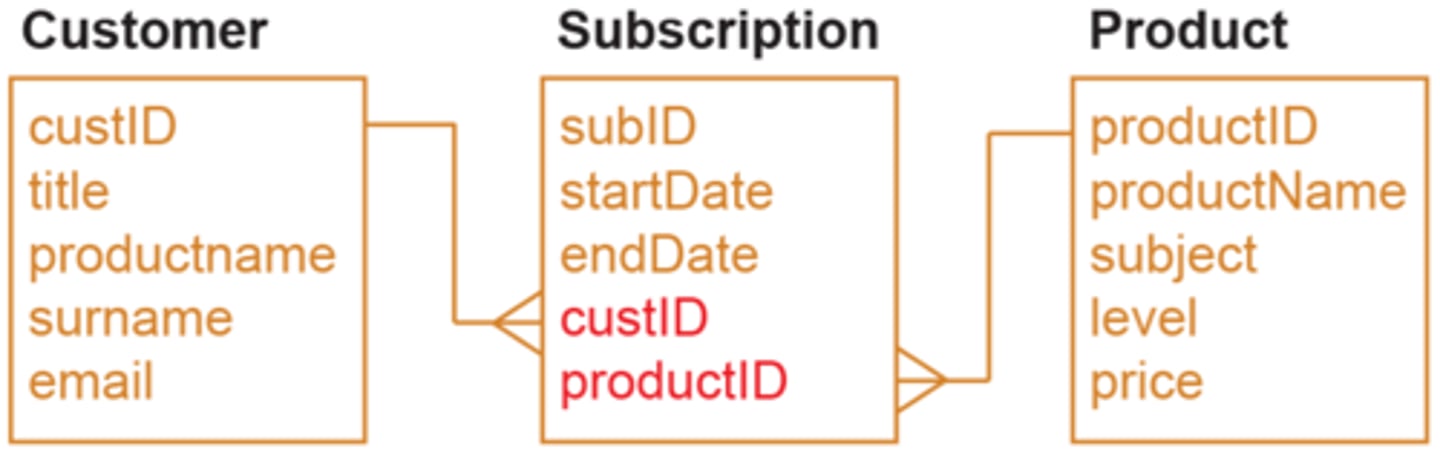
Foreign key
An attribute in one table that refers to the primary key in another table
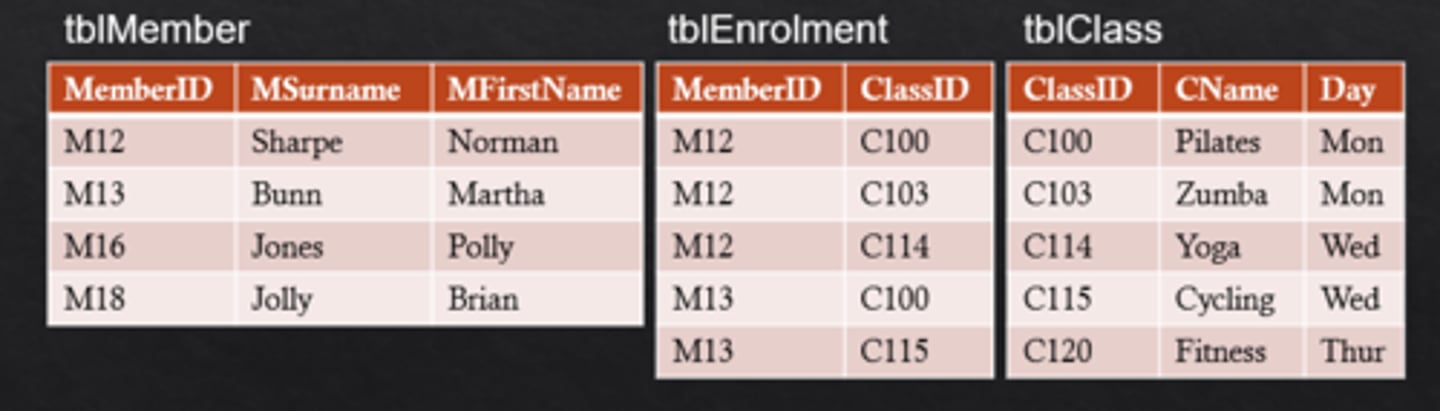
Composite key
Two or more fields that collectively define the primary key by unique combinations of their values.
Candidate key
Any attribute or combination of attributes that can qualify as a unique key...
...but not used as one
It is a candidate to be a key
Normalisation
Process used to come up with the best possible design for a database
Tables should be organised so that data is not duplicated in the same table or in different tables
The structure should allow complex queries to be made
Referential Integrity
Ensures related data in tables are consistent
Making sure tables do not try to reference data which don’t exist:
If one table has a foreign key (the 'foreign' table) ...
... then it is not possible to add a record to that table
... unless there is a corresponding record in the linked table with a corresponding primary key (the 'primary' table)
Cascading update / delete:
If a record is updated / deleted in the 'primary' table ...
… all corresponding linked records in 'foreign' tables must also be updated / deleted
First Normal Form (1NF)
All field names unique.
No duplicate rows (identical records)
All fields (attributes) must be atomic - e.g. a single attribute cannot consist of two data items such as firstname and surname
Needs to have a primary key.
Second Normal Form (2NF)
In first normal form already
Contains no partial dependencies. Partial dependency means one or more of the fields depend on parts of the primary key, and this occurs when the primary key is composite.
If there are partial dependencies, need to separate the composite key to different tables, and move the columns that depend on each part to their respective tables.
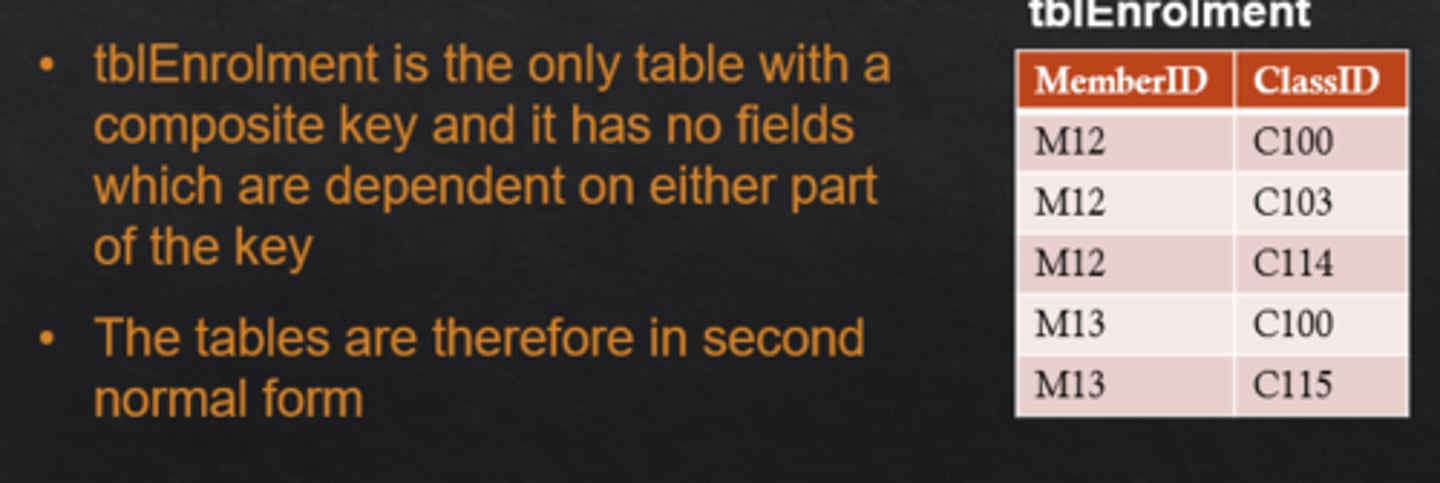
Third Normal Form (3NF)
If it is in second normal form
Contains no non-key dependencies.
Non-key dependency means some fields depend on fields that aren't part of the primary key at all.
Need to make the depended-upon fields into primary keys (by moving to separate tables).
i.e. All attributes must be fully dependent on the primary key (whole of the primary key if composite)
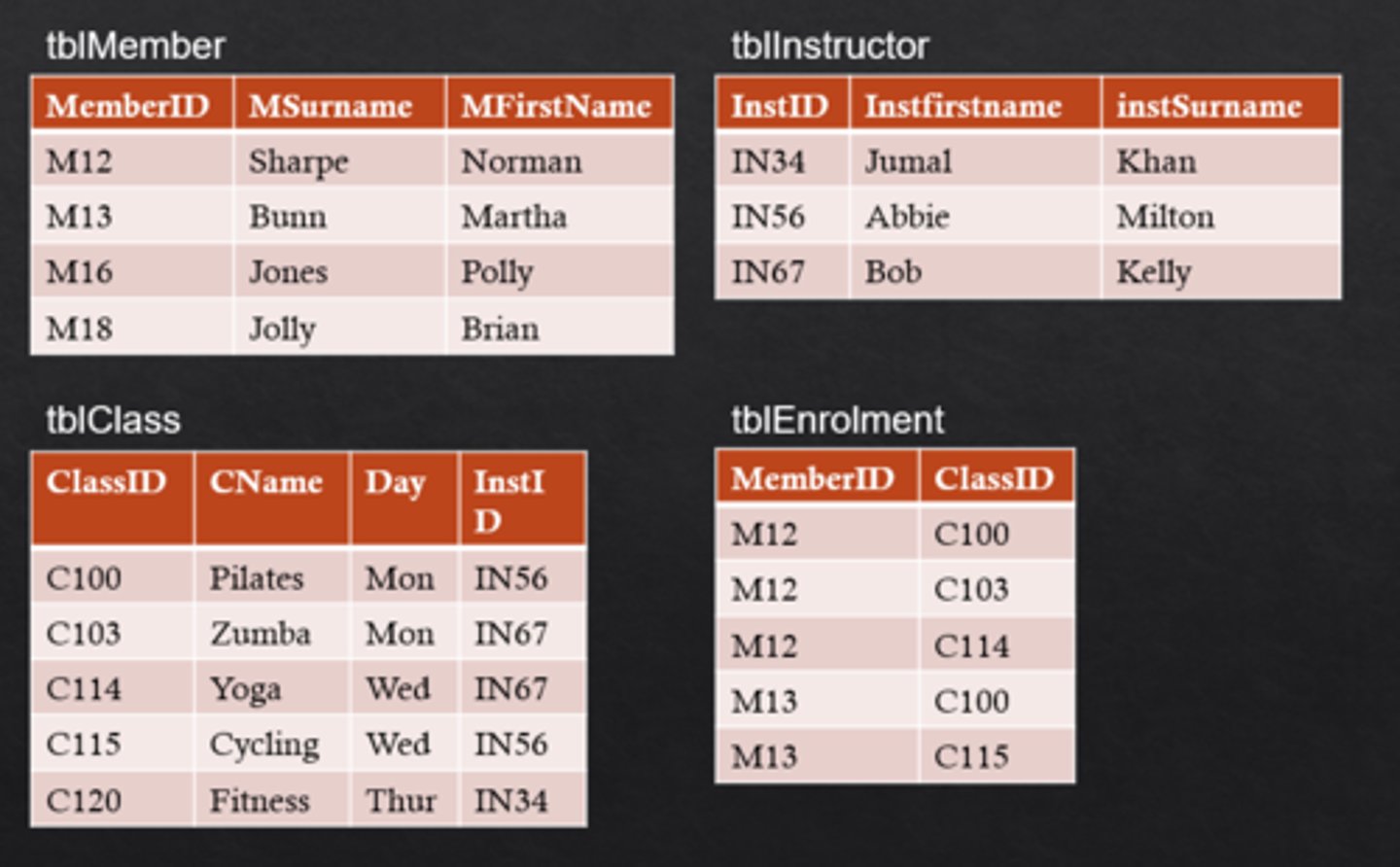
Importance of normalisation
Easier to maintain and change a normalised database e.g. adding a new field
There is no unnecessary duplication of data
Data integrity is maintained - if a person changes address, for example, the update need only be made once to a single table
Having smaller tables with fewer fields means faster searches and savings in storage
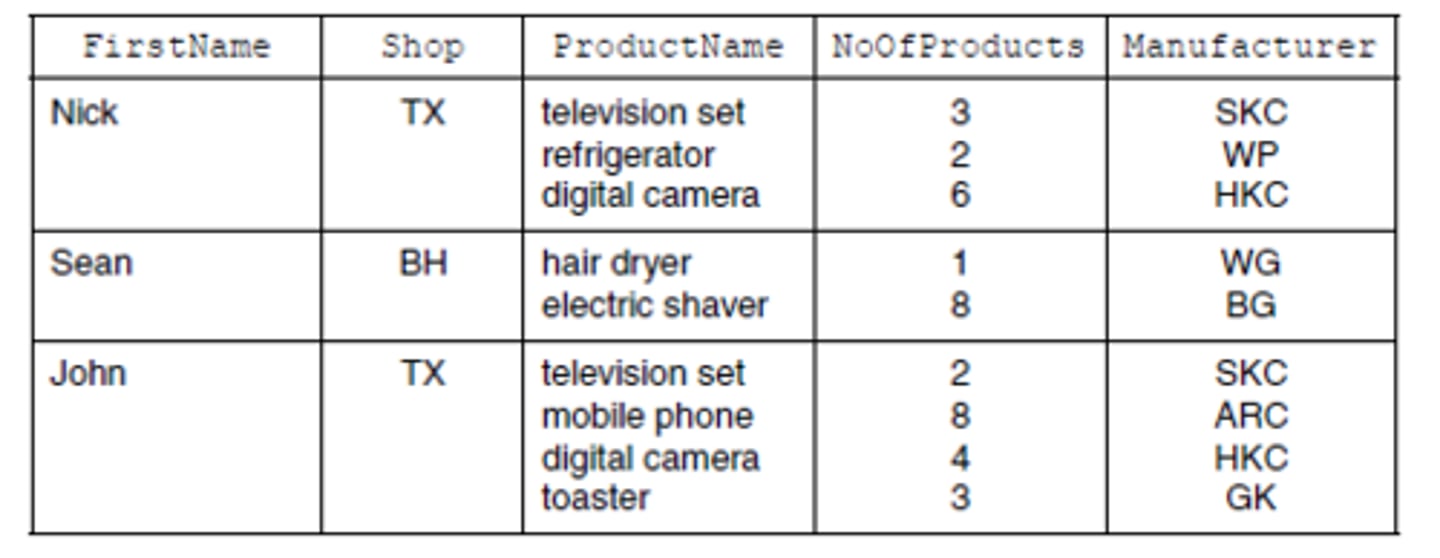
Why this table is not in 1NF
(ShopSales) table has repeated group (of attributes)
Each sales person has a number of products
FirstName, Shop would need to be repeated for each record
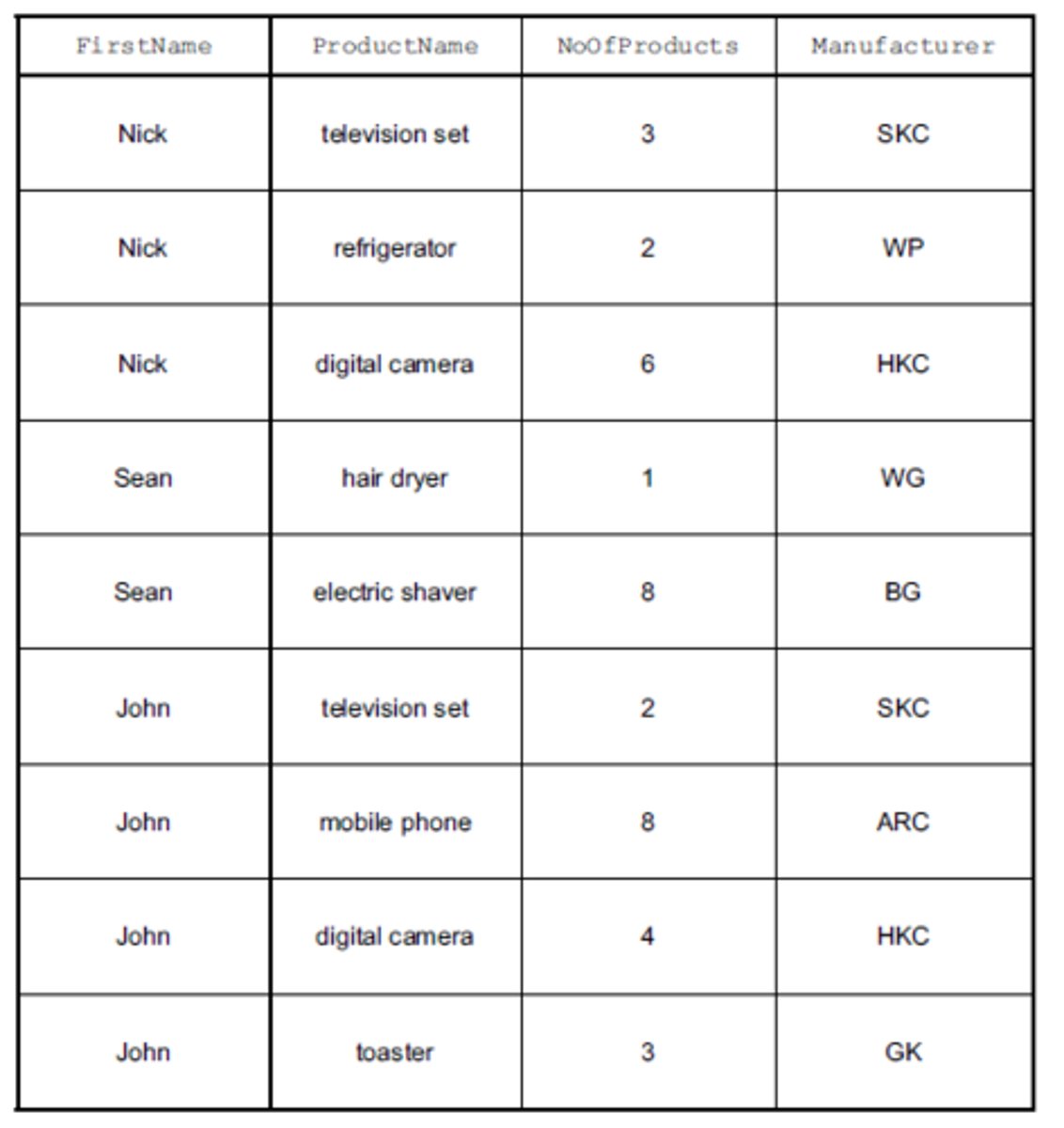
Why this table is not in 3NF
There is a non-key dependency
Manufacturer is dependent on ProductName, (which is not the primary key of the SalesProducts table)
Example table definitions
Underline means primary key
Underlined multiple fields means composite primary key

SQL
Structured Query Language
Provided by a DBMS to support all of the operations associated with a relational database e.g. querying, updating etc
Data Definition Language (DDL)
Part of SQL provided for creating or altering tables
Only create the structure. They do not put any data into the database.
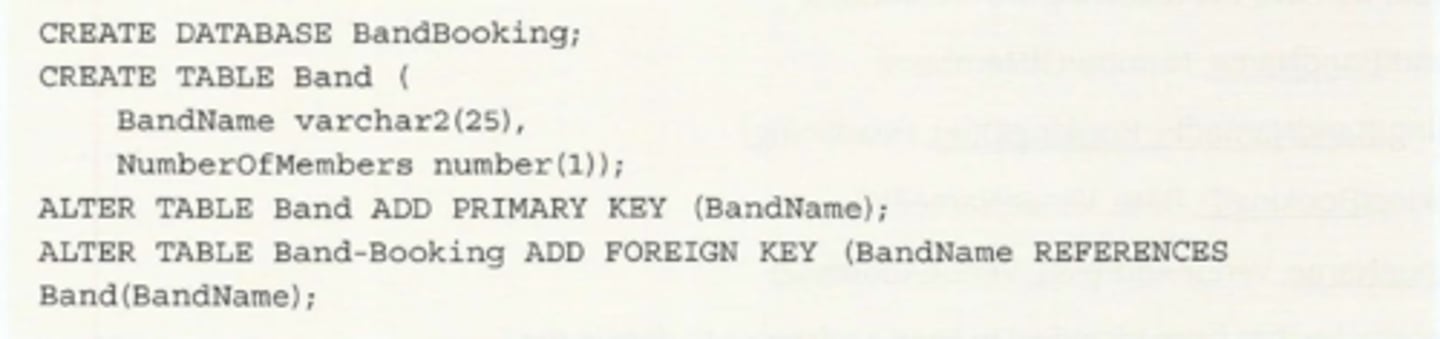
Data Manipulation Language (DML)
Used when a database is first created, to populate the tables with data. It can then be used for ongoing maintenance.
Main use is to obtain data from a database using a query
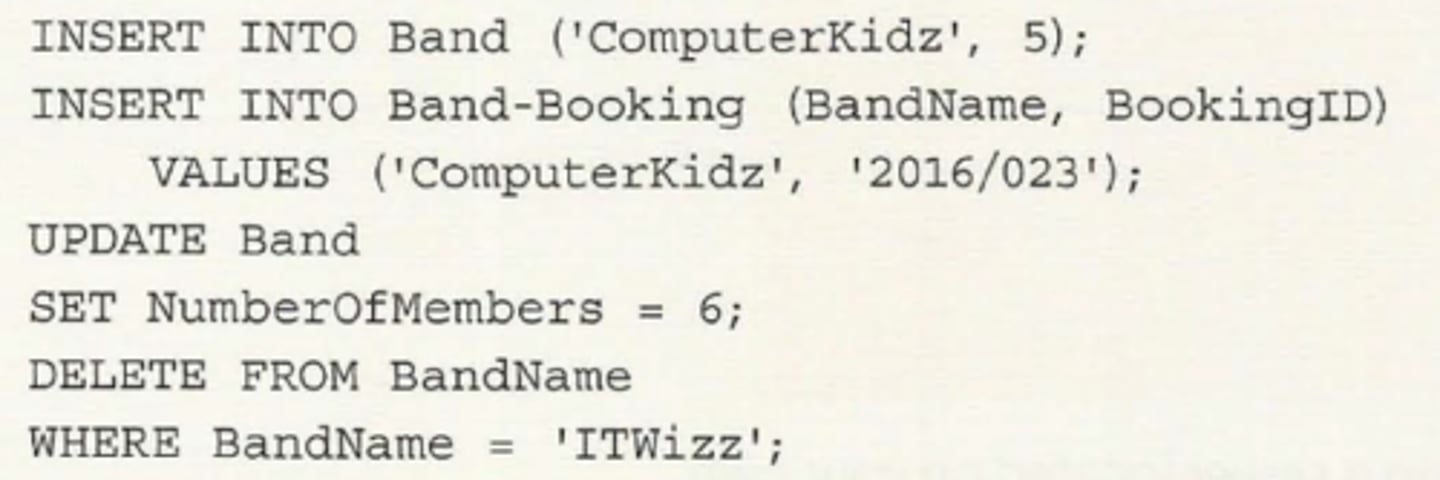
SQL data types
CHAR(size) - Fixed-length character string. Size is specified in parenthesis. Max 255 bytes.
VARCHAR(size) - Variable-length character string. Max size is specified in parenthesis.
DATE - Date value. “YYYY-MM-DD”
TIME - Time value. hh:mm:ss
INTEGER(size) - whole number. size specifies mininum display width.
real - can store non-whole numbers
BOOLEAN - True/False value
bit (seen in old syllabus) - integer data type that can take a value of 0, 1 or null - essentially a boolean
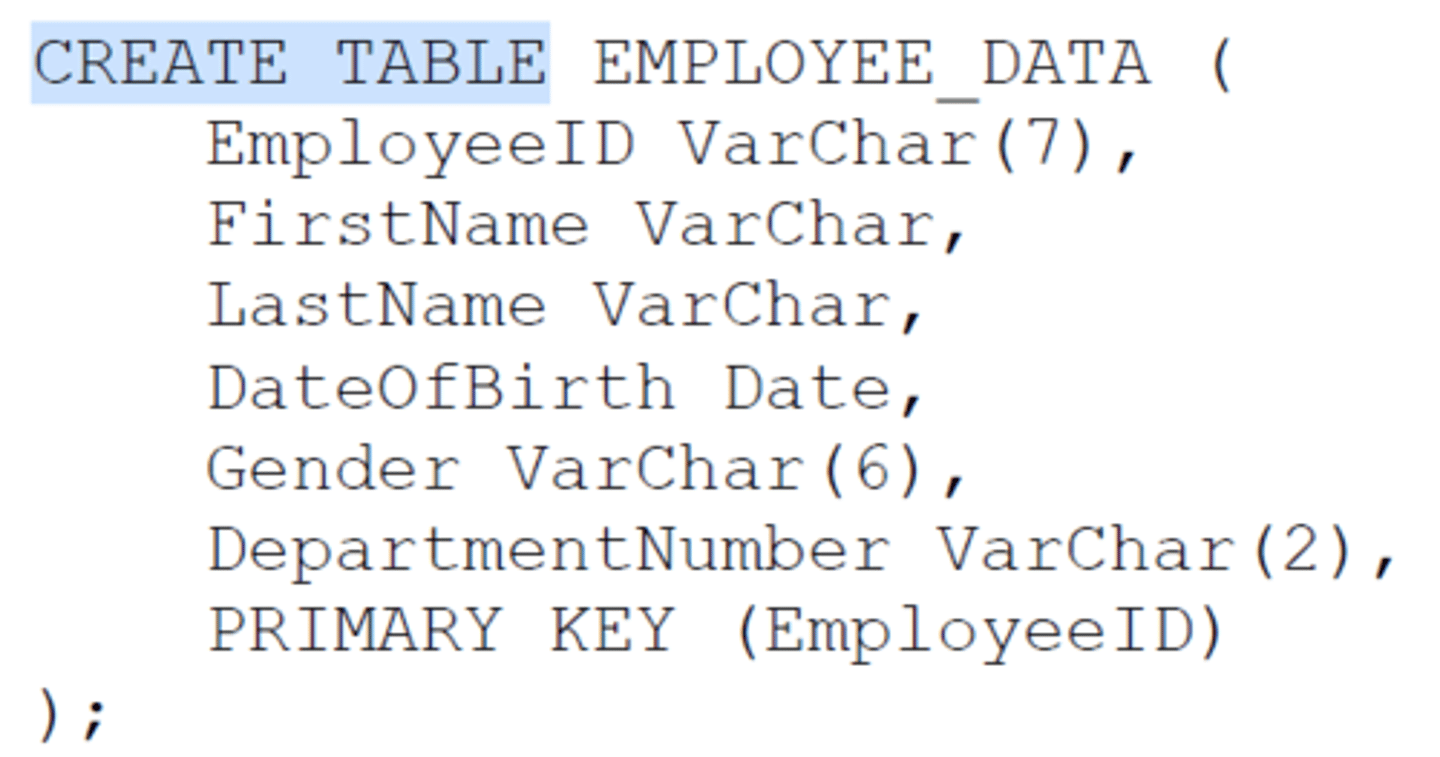
CREATE DATABASE example
CREATE DATABASE SPORTS_CLUB;
CREATE TABLE example
SELECT-FROM-WHERE
The SELECT statement is used to extract fields from one or more tables
SELECT list of fields to be displayed
FROM list the table or tables the data will come from
WHERE list of search criteria
ORDER BY list the fields that the data is to be sorted on (ASC or DESC, default is ASCending order)
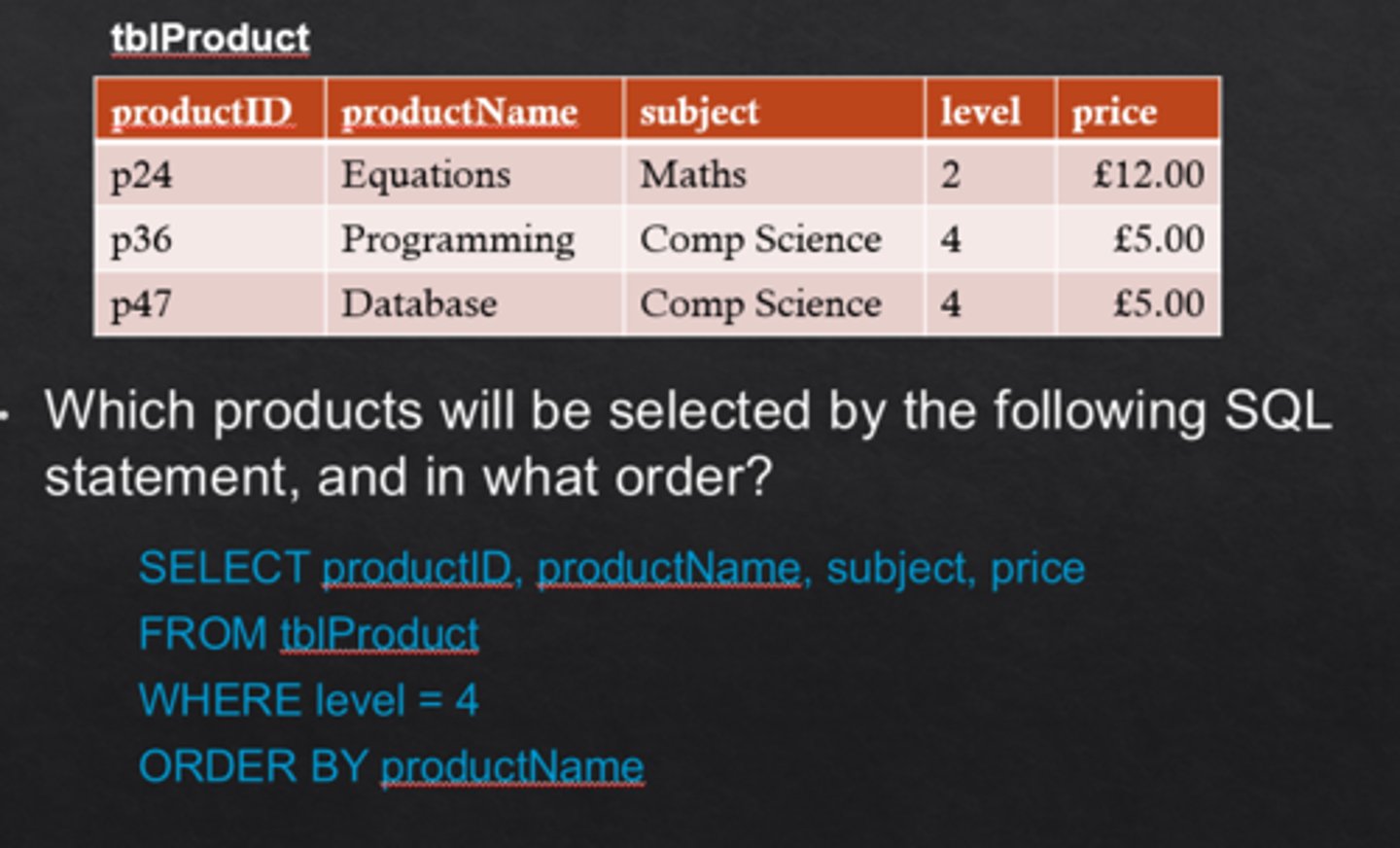
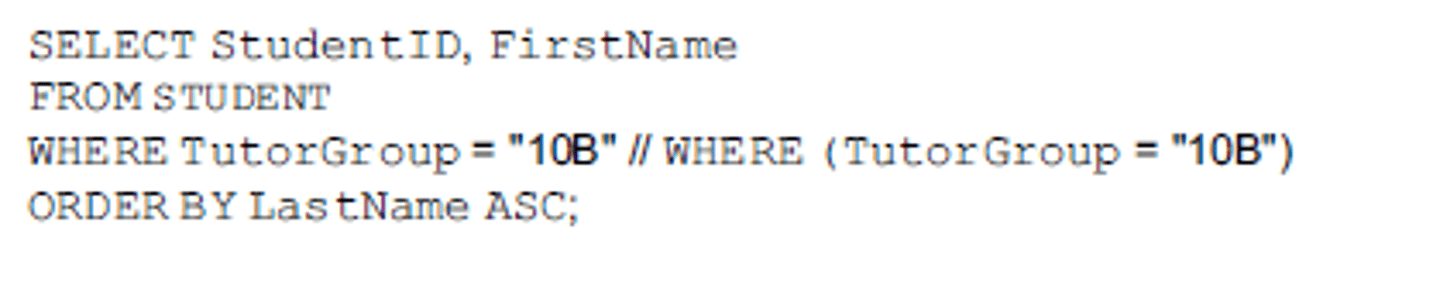
Example SELECT, FROM, WHERE, ORDER BY
SQL script to display the StudentID and FirstName of all students who are in the tutor group 10B. Display the list in alphabetical order of LastName.
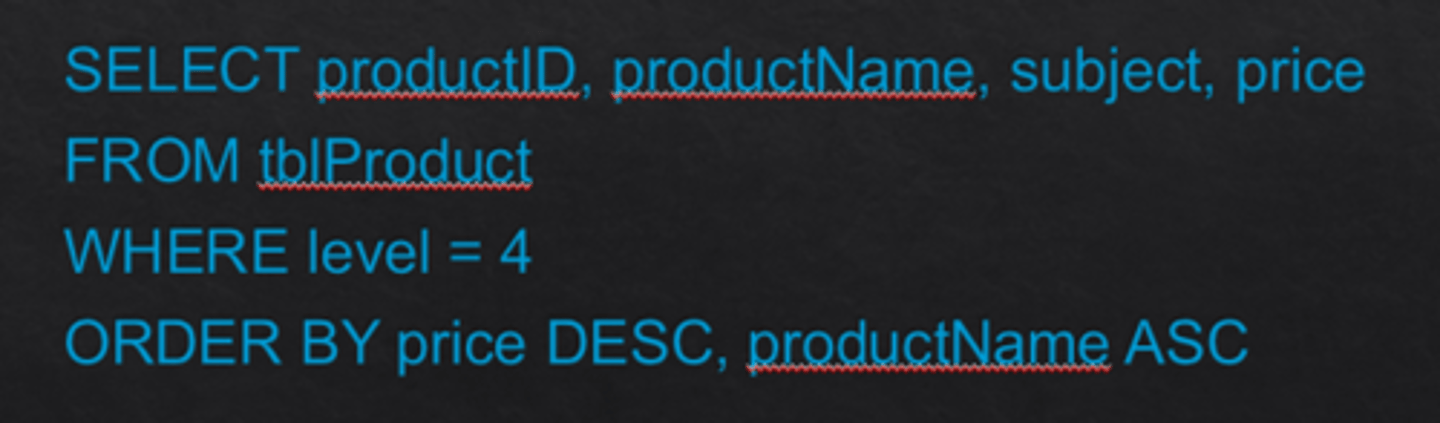
ORDER BY
A SQL clause that is useful for ordering the output of a SELECT query (in ascending or descending order).
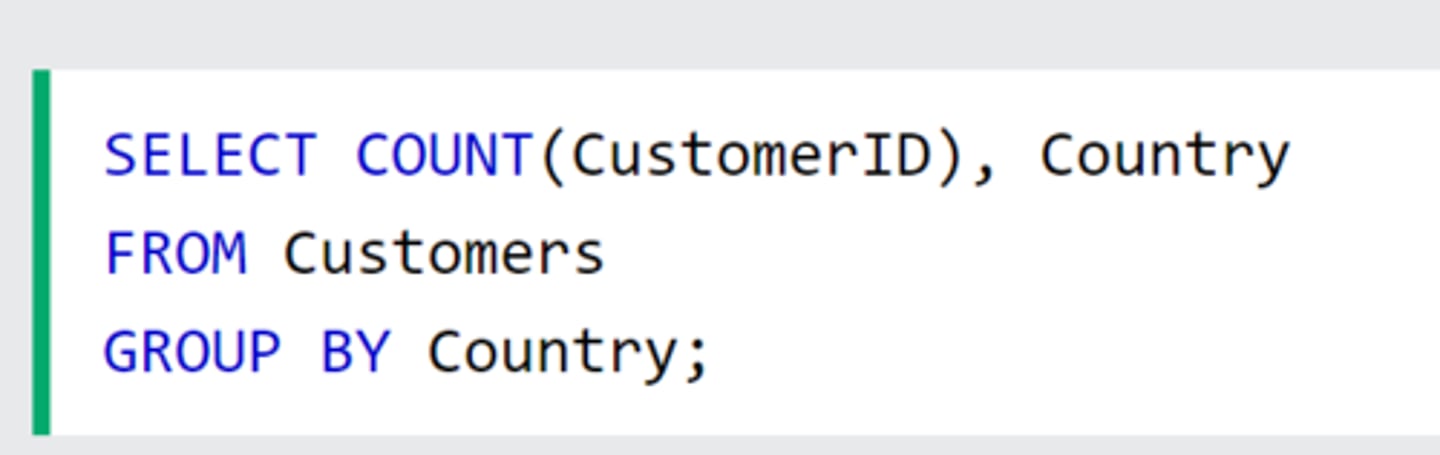
GROUP BY
A SQL clause that is useful for grouping output of a SELECT query by a particular field i.e. it groups rows that have the same values into summary rows, like "find the number of customers in each country".
The GROUP BY statement is often used with aggregate functions (COUNT(), MAX(), MIN(), SUM(), AVG()) to group the result-set by one or more columns.
Wildcard (%)
A special character that represents other characters in a search.
The % is used to represent zero or more characters.
SELECT * FROM tblProduct
WHERE subject LIKE "Comp%";
"LIKE" is used to search for a pattern
Wildcard _
A special character that represents any single character in a search.
The _ is used to represent a single character.
SELECT * FROM Customers
WHERE City LIKE '_ondon';
"LIKE" is used to search for a pattern
Operators in The WHERE Clause
BETWEEN - between an inclusive range
IN - specify multiple possible values for a column

Specifying links between tables
When you are selecting attributes from linked tables, if the attribute name occurs in more than one table, you should specify the table name
If the attribute name occurs in only one table, specifying the table name is optional

Example - ALTER table
ALTER TABLE STUDENT
ADD DateOfBirth DATE;
Adds a new field column to the table and specifies its datatype
Example multi table SQL query
SELECT STUDENT.LastName
FROM STUDENT, CLASS-GROUP
WHERE ClassID = "CS1"
AND CLASS-GROUP.StudentID = STUDENT. StudentID;
SQL script to display the LastName of all students who attend the class whose ClassID is CS1.
Example UPDATE SQL
UPDATE B-NURSE
SET FamilyName = 'Chi'
WHERE NurseID = '076';
Update table B-NURSE
Change the FamilyName attribute for NurseID primary key 076 to "Chi"
Example INSERT INTO SQL
INSERT INTO SHOP-SUPPLIER (ShopID, SupplierID)
VALUES (8765, 'SUP89');
Insert new record into Shop-Supplier table
insert 8765 into shopID and SUP89 into SupplierID
SQL AS keyword
An SQL command that allows the user to re-assign a column name (new alias) within a query.
E.g. example shows counting the number of customers with a particular ID value, and renaming the resulting column name/alias.

Aggregate Functions
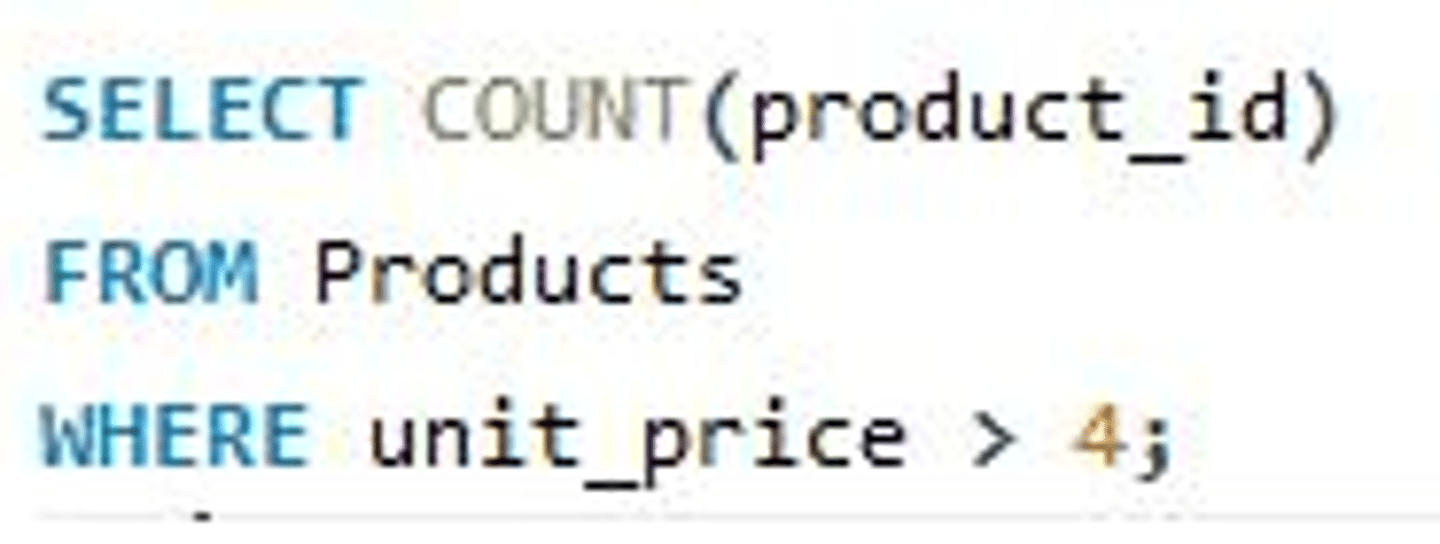
Calculations such as Min, Max, Avg, Sum and Count that are performed on a group of records. They return a single value after calculating multiple values of a column/attribute.
Count() - Returns the number of matching records i.e the number of rows returned by the inner query (see image for usage).
Sum() - Returns the total sum of a numerical column from the matching records.
Avg() - Returns the mean average of a numerical column from the matching records.
Min() - Returns the smallest value (from a set of NON-NULL values) in the column from the matching records
Max() - Returns the largest value (from a set of NON-NULL values) in the column from the matching records
Note that aggregate functions are either used by themselves after SELECT, or if multiple columns need to be selected, a GROUP BY is required at the end.
Logical Schema
The overview of a database structure...
Models the problem / situation…
... by using methods such as an ER diagram...
... Describes relationships between the data...
... independent of any particular DBMS
Query processor
A component of a DBMS
Allows the user to enter criteria
Searches for data which meets the entered criteria
Organises the results to be displayed to the user
Developer Interface functions
A software tool found within DBMS:
Create a table
Set up relationships between tables
Create / design a form
Create / design a report
Create / design a query (NOT run a query)