Business Process Modelling
 Call Kai
 Learn
Learn Practice Test
 Spaced Repetition
 Match
Match Flashcards
 Knowt Play
1/20

There's no tags or description
Looks like no tags are added yet.
Name | Mastery | Learn | Test | Matching | Spaced | Call with Kai |
|---|
No analytics yet
Send a link to your students to track their progress
21 Terms
Tokens
once a process instance has been spawned (started), we use the notion of token to identify the progress (or state) of that instance. At which stage this case currently is.
Business Process modeling languages
Petri net - traditional, used in research, not user friendly
UML activity diagram - popular for programming
Event-driven Process Chains (EPC)
Business-Process Model and Notation (BPMN) - used in this lass, imperaive process modelin languages
DECLARE - declarative language. Defines rules/constraints between activities instead of a fixed sequence.
CMMN - case management model and notation: standardized used for one time disaster. States resources and roles, and suggest the path to follow (but not strict depends on circumstances).
Imperative vs Declarative languages
Imperative (BPMN) = HOW to do things. tells exact steps
Declarative = WHAT is allowed/not allowed, sets the rules,not fix the order
WHY BPMN
1. Standard & widely used
International standard (OMG)
Used by many companies/tools (multi-vendor support)
2. Easy to understand
Business-friendly
Three basic shapes + specialisations within shapes (simple visually)
3. Clear process structure
Shows full process from start to end
Can hide/show details (sub-processes)
4. Good for communication
Distinguishes:
Sequence flow (steps inside process)
Message flow (communication between parties)
5. Handles complexity
Can model:
Multiple interacting processes (choreography)
Events (triggers, exceptions)
Process diagrams
Private (internal processes)
non-executable (only for understanding, high-level)
executable - can be run by a sytem (automated)
Public (shows interactions with external participants without internal process details)
Interacion between a private business process and another process or participant
Activities of the private process model are not shown
BPMN diagram types
Process Diagrams
Collaboration Diagrams
Choreography Diagrams
Converstion Diagrams
Collaboration diagram
Depicts the interaction between two or more entities:
Featuers usually - includes internal activities, in contrast to choreography diagram, like two or more pools and message flows
Choreography Diagram
Procedural contract between participants
Contains:
Interactions between participants instead of activities
Interections represent set of Message exchanges
Conversation Diagram
Particular usage of and informal descriptio of a Collaboration diagram
Pools do not contain process
Shows conversations between pools
Process decomposition
Process may be too large to be understood at once
Readability can be improved by using sub-processes that hide certain parts of the process
Sub-process - mini-process inside the proces: self-contained, composite activity
Collapsed or Expended view
Value of sub-processes:
allows to visualise end-to-end process on the single page
enable top-down modeling (hierarchy)
clarify governnce boundaries (who responsible for what)
scope event anding by adding events to a sub-process
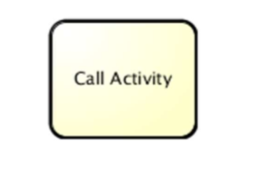
Call-activity
In case a sub-process is used in more than one proces
Define sub-process as a global process model (the content of sub-process can be defined)
Call sub-process from each process that uses it by means of he Call Activity (thick border)
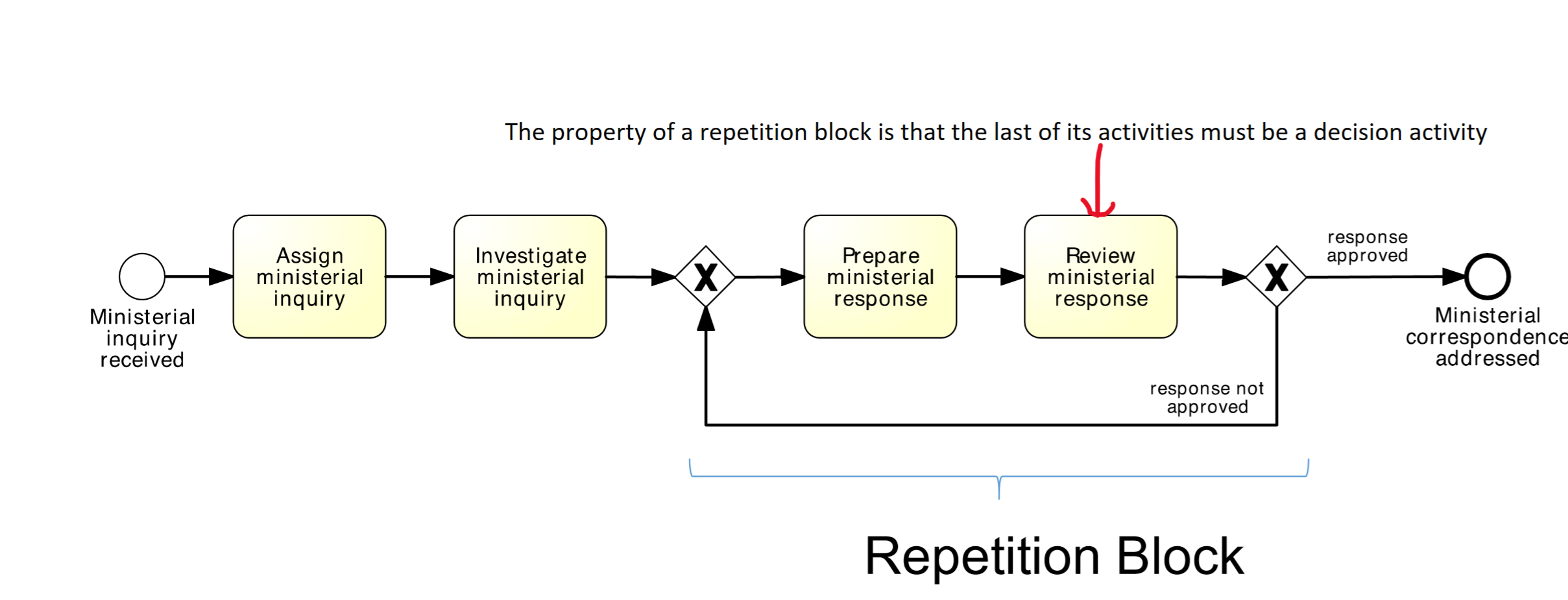
Rework and repetition
For that we use XOR-split with two branches one allowing to continue the rest of the process, and the second goes back
Alternative way is to use subprocesses
Rework and repetition with sub-processes
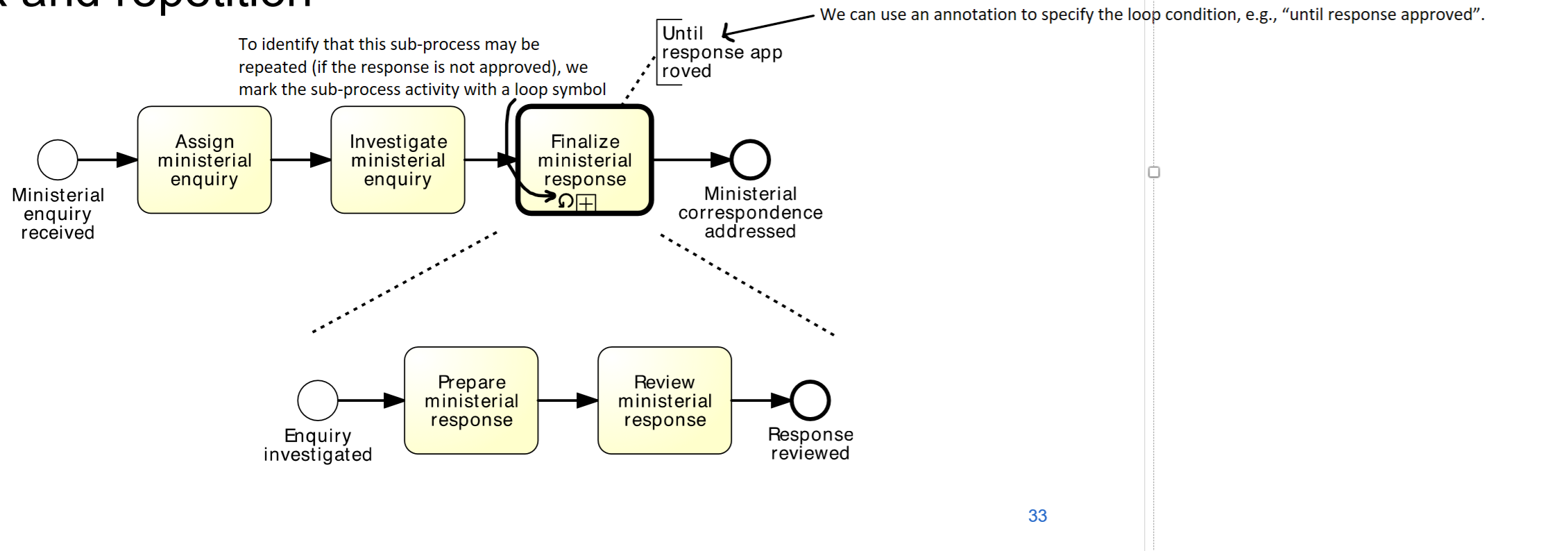
Loop activity or cycle
A loop activity is just a shorthand for a cycle — but you can only use that shorthand when the cycle is clean enough (1 entry, 1 exit). If not, you're stuck with drawing the full cycle manual (here two exit points - so cycle)
If it is a cycle not a loop - hard to demonstrate it as a subprocess
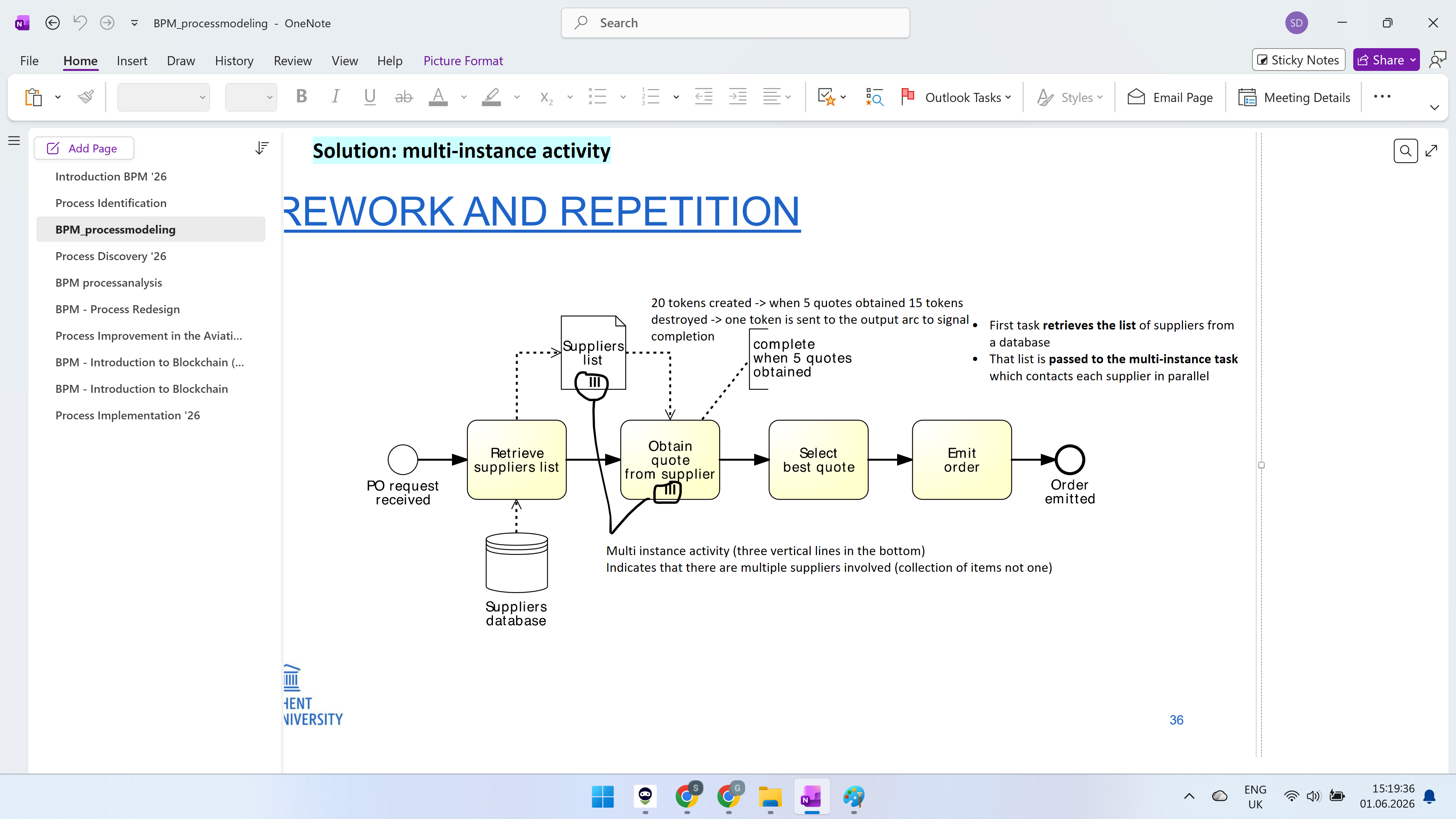
Multi-instance activity
An activity executed multiple times for a collection of items (e.g., one execution per supplier or customer), often in parallel. The BPMN symbol is three vertical lines at the bottom of the activity.
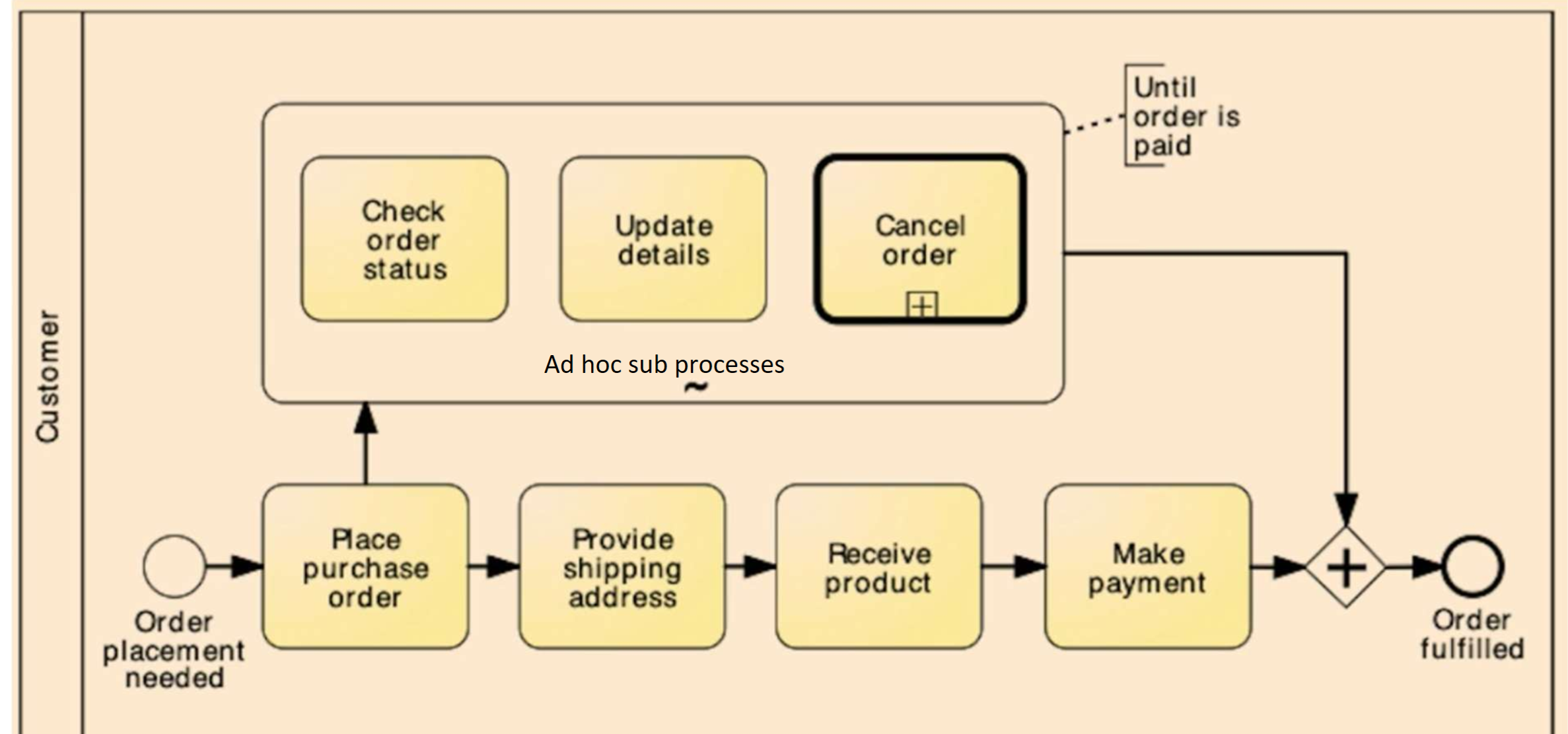
Ad-hoc sub-process
You do not know the order of the activities (start point or end point). The process continues until the goal is achieved (the order is paid in this case)
!!! All other sub-processes must have start and end events
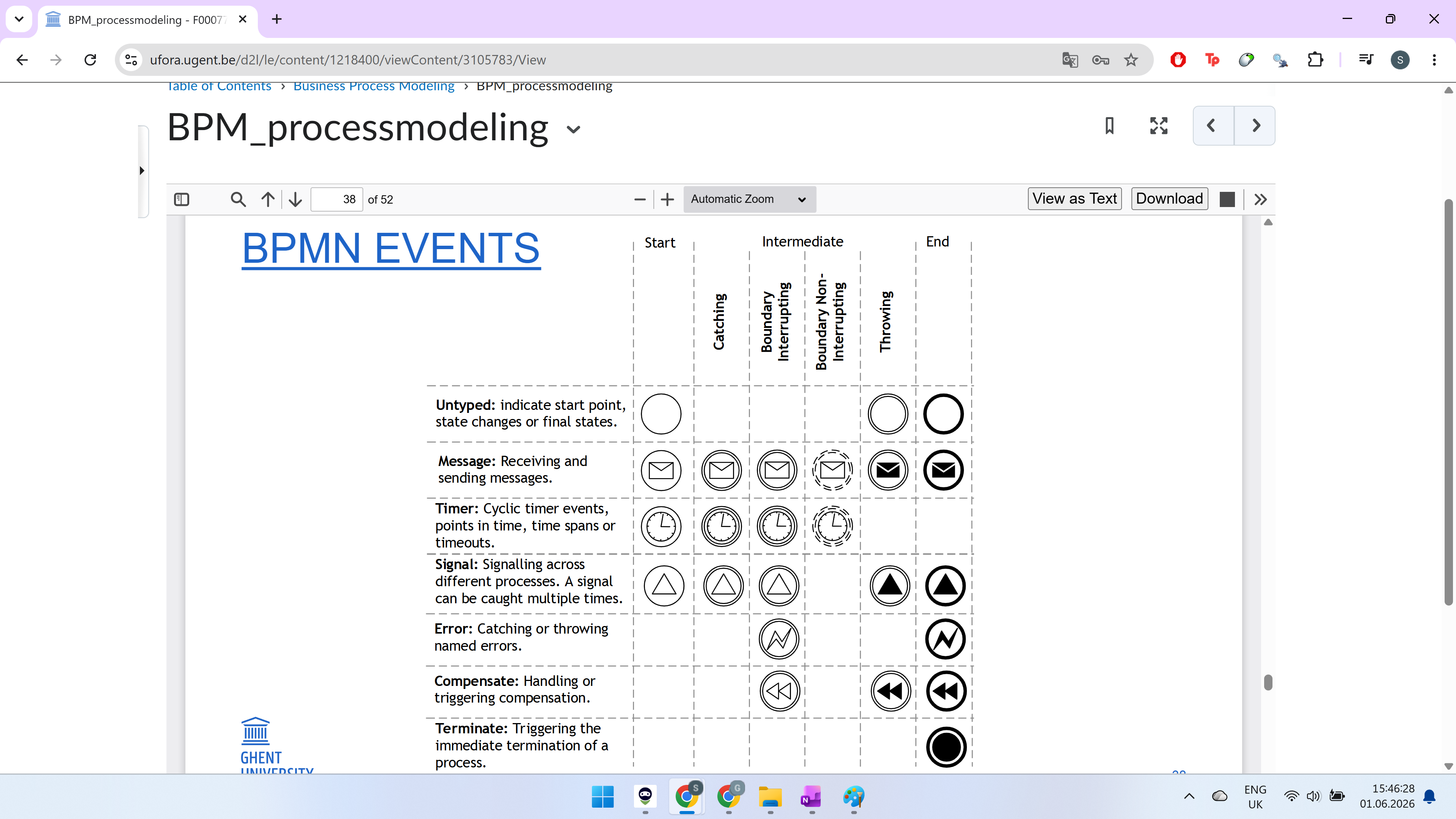
BPMN events
Timer - if the event starts periodically
Signal - can be caught by multiple processes (message only by one)
Error Event - something goes wrong and an exception path is triggered; the process may continue.
Terminate event - something goes wrong and an exception path is triggered; the process may continue.
Intermediate events - happens during the process
Boundary events - events put on the side of the activity - during the implementation of a certain activity you get a cancellation request or any other thing that interruprs your process
Boundary interrupting - stops the whole process
Boundary non-interrupting - additional process is running in parallel
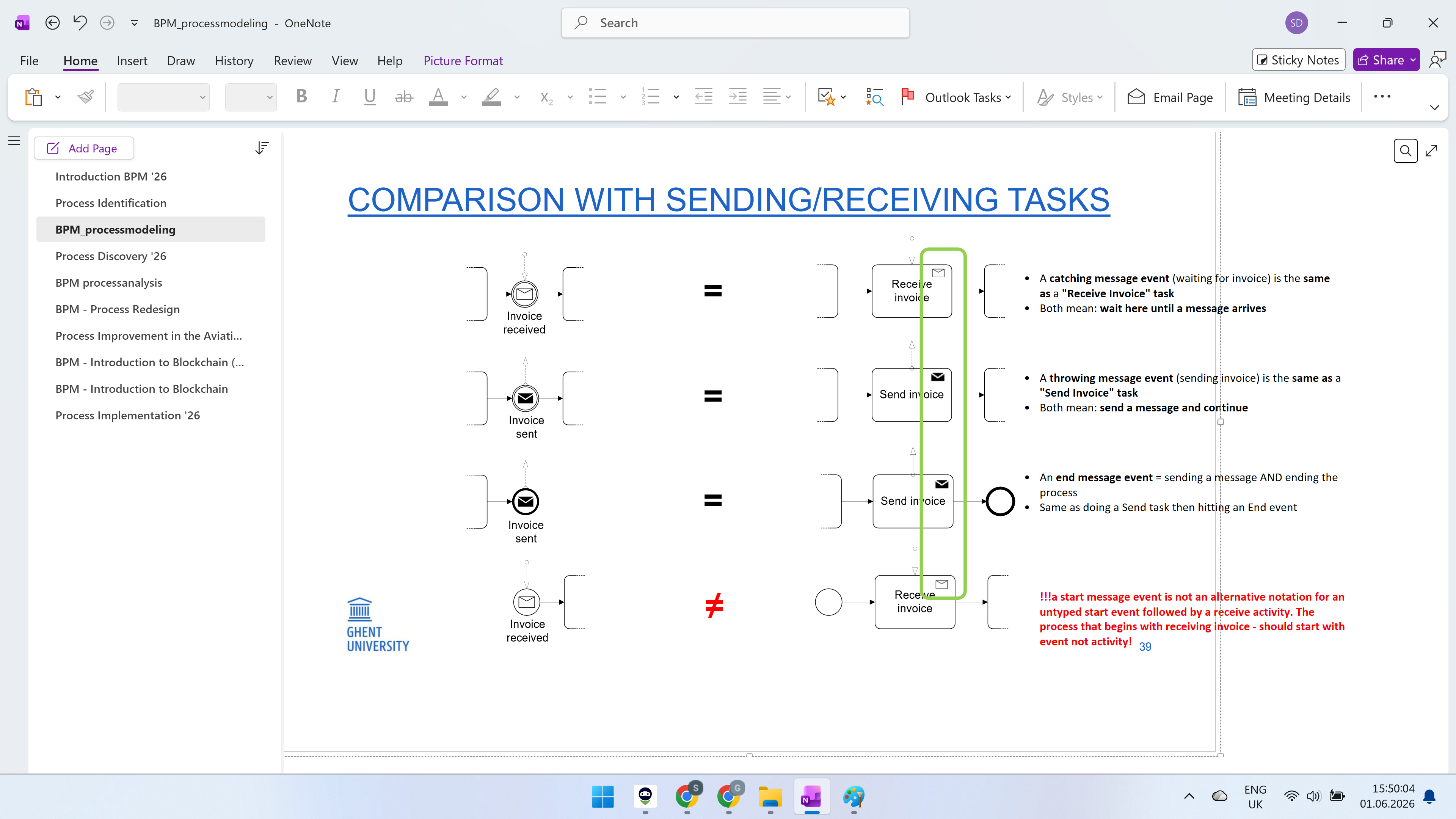
Sending and receiving message events
Racing events: Event-based decision events
XOR split gateway - you decide based on the case
a branch is chosen based on conditions that evaluate over available data
the choice can be made immediately after the token arrives from the incoming flow
Event-driven XOR split - it happens from outside (approval or disapproval from client), or timer
Sometimes the choice must be delayed until and event happens
The choice is based on a race among events
Exception handling
Exception handling - stopping a sub-procss and performing a special activity
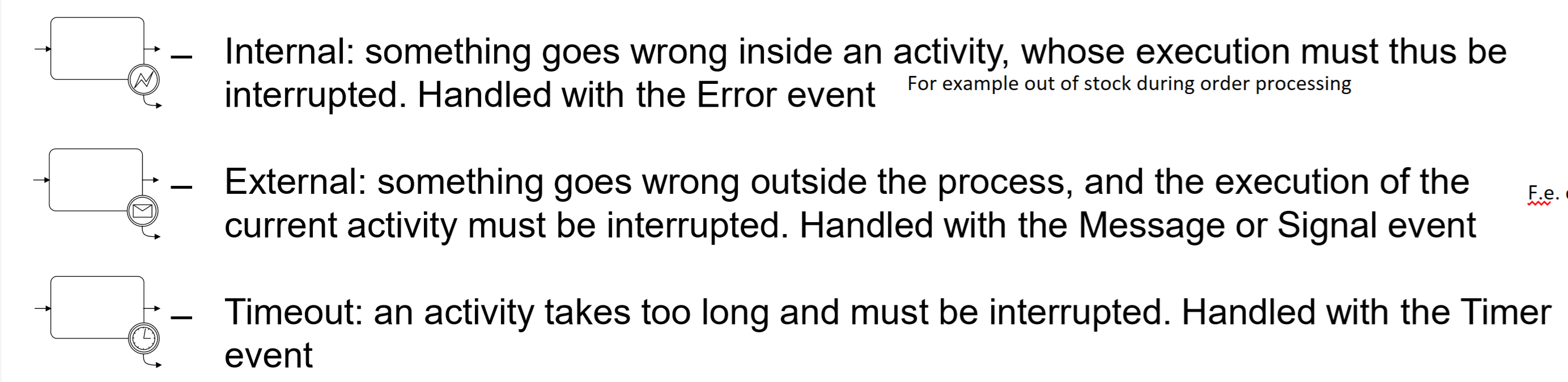
Types of exceptions for an activity (task/sub-process):
All these are cathing and interrupting intermediate events. They stop the enclosing activity and start an exception handling routine.
Conditional events
To capture business rules:
A conditional event keeps checking over and over until the rule becomes true