(Variables + ) Algorithms + Programming key definitions
 Call Kai
 Learn
Learn Practice Test
 Spaced Repetition
 Match
Match Flashcards
 Knowt Play
1/19

Earn XP
Description and Tags
(use rest of OneNote for full understanding)
Name | Mastery | Learn | Test | Matching | Spaced | Call with Kai |
|---|
No analytics yet
Send a link to your students to track their progress
20 Terms
Variable?
Named references to locations in memory (unique identifiers) that stores data whilst a program is running (temporarily)
Constant?
A data item whose value cannot change while the program is running. (why its called a constant)
Algorithms?
A theoretical set of instructions (a sequence of steps) to solve a problem/ complete a task
Vs. a program? – algorithms that you can create, can be coded into programs
Abstraction
Removing unnecessary detail from a problem so you can focus on essential parts of it
Decomposition
Breaking down a problem/task into smaller ones (modules (ie. Sub-problems)) to make it easier to solve
Sequence, Selection, Iteration?
Sequence - Order with which instructions are executed
Selection - A conditional statement determining whether a part of a program should be executed or not (or another part instead)
Iteration - repetition of a part of a program
Arrays?
A fixed-size data structure used to store multiple data values (of the same type) under a single identifier
Subroutines? + advantages of using them
“out of line“ blocks of code that can be executed when called upon in a program statement
Structuring programs by using subroutines makes them:
Easier to understand
More efficient when coding overall
Easier to test (can be tested in isolation)
Procedures (vs) Functions?
Procedures - subroutines that contain instructions (then does something with input values)
Functions - subroutines that take in values, process the values and always returns values
Defensive design of software (important for companies etc.)?
an approach to software development to produce robust and secure programs by:
Anticipating misuse of the program and therefore planning for things that could go wrong
Writing maintainable code so its easier to diagnose problems/bugs if they arise
Testing the program - using suitable test data to identify any areas with errors/bugs to be fixed before software is put into general use
Ways of testing programs? (2 and one of them in more detail)
Trace Tables
Test Plans:
using all types of test data:
Normal data - data of expected type + within the range
Boundary data - data of the correct type either side of the expected range
Erroneous data - outside expected range/wrong type/wrong format: makes sure validation routines are working correctly and to check that effective/appropriate exception handling is in place
Why is testing programs important (then for for companies/ in the real world etc.)?
Making sure program works as intended
Making sure it can cope with errors when given bad/unexpected data
Legal obligations
Reputational damage if lost of bugs/ + service not working properly
Input Sanitisation? Input Validation?
Input Sanitation - removing malicious characters or special commands before passing it on to be processed by program
Input Validation - checking that input data meets certain criteria before being passed on to be processed by program
Types of Input Validation checks?
Type check - correct data type
Range check - within a permitted range
Presence check - required data is present or not
Format check - whether data meets set format
Length check - minimum or maximum number of characters
Authentication?
process of checking that a particular person/system is authorised/permitted to use a system, and if so which parts of the system they can use - once a user has been authenticated they should be able to see data relevant to themselves and no one else.
(most commonly a username and password check)
Errors/bugs? (+ types)
bugs are MISTAKES not deliberate attempts to bring down a system (unlike malware + viruses)
Syntax errors - mistakes in the way the code in a program is written (The translator requires code to be syntactically correct)
Logic errors - a mistake in the logic of the code (programs will run but the outcome will not be as intended)
How to reduce errors?
using meaningful identifier names for variables and subroutines whatever
Refactoring - breaking down complex programs into subroutines
using comments to explain parts of code
(Exception handling? - “try“… “except“)
Representing algorithms
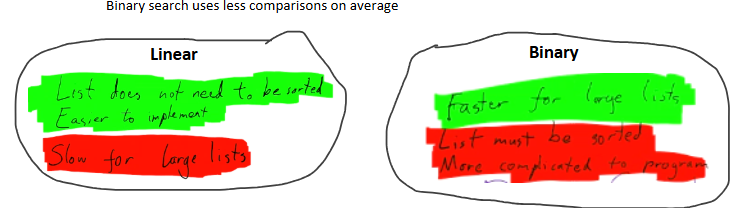
Binary vs Linear search
Merge vs Bubble sort