Computer Science Component 1
 Call Kai
 Learn
Learn Practice Test
 Spaced Repetition
 Match
Match Flashcards
 Knowt Play
1/33

There's no tags or description
Looks like no tags are added yet.
Name | Mastery | Learn | Test | Matching | Spaced | Call with Kai |
|---|
No analytics yet
Send a link to your students to track their progress
34 Terms
Arrays
Collection of variables of same type under 1 identifier. Each item called element. This can be 2d (a table) or 3d (a cube)
Records
Set of data items related to one same thing, can have different data types.
Stacks
FILO data structures. Remove and add from top. Pointers to the top and bottom. Pushing (adding) and popping (adding)
Queue
FIFO data structure. Pointers to front and back. Add to back remove from front.
Binary Trees
Data structures composed of nodes and links between them. Each node can have two nodes from it.
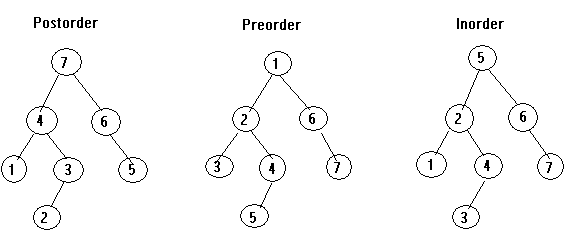
Binary Tree Traversals.
Pre-order: Root Left Right; used for: copying a tree i.e files
In order: Left Root Right: Sorting values.
Post-order traversal: Left Right Root: Deleting files/the tree
Hash Tables
A table where the locations of the data is decided by being inputted into a hash function.
Passing Parameters
Parameter passing issending data into a subroutine. There are two types: pass by value, sends a copy so the original variable cannot be changed, and pass by reference, which sends the actual variable, allowing the subroutine to modify the original data.
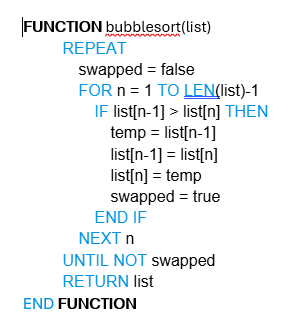
Bubble sort
Goes through comparing two items beginning at index 0 to sort a list, swapping to make the lower value at the lower index.
Time complexity: n²
Memory: O(1)
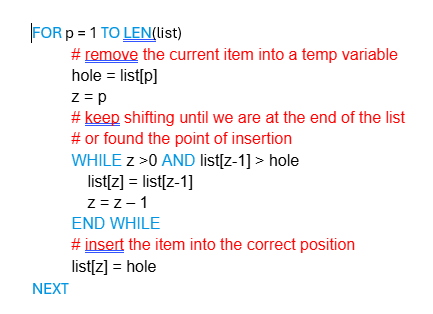
Insertion Sort
Has multiple arrays and simply places the data into the correct location in the list:
Time: n²
Memory: O(1)
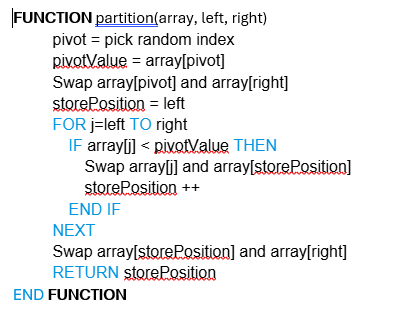
Quicksort:
Recursive algorithm. Chooses pivot then orders all the items to the left and right,
Time: O(nlogn)
Memory: O(logn)
Binary Search
Requires sorted data, splits array in half and checks if value to left or right. Repeats this until only one item selected.
Time: O(
Memory:
Procedural Programming
Sequential execution. made up of statements including variable assignment, selection (IF), iteration (loops) and procedures.
Event=Driven
When a user interacts with an input device, the OS will process it in the usual way and then send then the event to the applications event queue.
Object-Oriented
Classes, Objects and methods. An object is an instance of a class, with the attributes and methods that come with it. A class is a blueprint for an object, defining it. A method is the behaviour of a class/object.
Encapsulation: Hiding unnecessary technical detail
Inheritance: A class/object gaining the definition, methods and attributes of another
Polymorphism: An object/class temporarily gaining different methods and attributes.
Standardisation:
Definition — Standardisation is the process of ensuring data from different sources follows a consistent, agreed‑upon format.
Purpose — It allows computers, systems, and organisations to exchange and process data reliably.
Prevents Misinterpretation — Ensures values mean the same thing everywhere (e.g., dates, character sets, file formats).
Enables Compatibility — Different hardware, software, and networks can work together because they follow the same rules.
Supports Data Sharing — Makes it possible for systems to communicate without custom conversions.
Improves Accuracy — Reduces errors caused by inconsistent formats or ambiguous data.
Speeds Up Processing — Systems don’t waste time converting or interpreting data.
Examples — ASCII/Unicode, JPEG/PNG, MP4, TCP/IP, ISO date format (YYYY‑MM‑DD).
Waterfall development
Definition — Waterfall is a linear software development model where each stage is completed fully before the next begins.
Sequential Stages — The process flows downward through fixed steps (requirements → design → implementation → testing → deployment → maintenance).
Heavy Planning — Requires detailed requirements and documentation before coding starts.
No Overlap — Stages do not overlap; you cannot return to a previous stage without restarting.
Predictability — Timelines, costs, and deliverables are easier to estimate because everything is planned upfront.
Low Flexibility — Hard to change requirements once development has begun.
Best For — Projects with stable, well‑understood requirements (e.g., government, engineering, safety‑critical systems).
Why Needed — Ensures structure, documentation, and clear progress tracking in projects where mistakes are costly.
Agile development
Definition — Agile is an iterative development model where software is built in small, repeatable cycles called sprints.
Incremental Delivery — The product is delivered in small, working sections rather than one big final release.
Customer Involvement — Users give frequent feedback, shaping the product as it develops.
Flexibility — Requirements can change at any time; the team adapts quickly.
Frequent Testing — Each sprint includes testing, reducing bugs and improving quality early.
Team Collaboration — Developers, testers, and stakeholders communicate daily (e.g., stand‑ups).
Short Cycles — Work is done in short sprints (typically 1–4 weeks).
Best For — Projects with changing requirements, evolving goals, or unclear specifications.
Feasabilities:
Technical Feasibility — Checks whether the organisation has the technology, hardware, software, and expertise needed to build the system.
Economic Feasibility — Determines whether the project is financially worthwhile (cost–benefit analysis, ROI, budget limits).
Legal Feasibility — Ensures the project complies with laws and regulations (Data Protection Act, GDPR, copyright, contracts).
Operational Feasibility — Assesses whether the new system will work in practice and whether staff can use and support it effectively.
Schedule Feasibility — Checks whether the project can be completed within the required time frame.
Ethical Feasibility — Evaluates whether the system is morally acceptable (privacy, fairness, impact on staff).
Organisational Feasibility — Determines whether the system fits the company’s goals, culture, and structure.
Changeovers:
Direct Changeover — The old system is stopped immediately and the new system is switched on at the same time. Fast and cheap, but risky if the new system fails.
Parallel Changeover — The old and new systems run side‑by‑side for a period. Very safe because results can be compared, but expensive and time‑consuming.
Phased Changeover — The new system is introduced one part/module at a time. Reduces risk because only small sections change at once, but requires both systems to work together temporarily.
Pilot Changeover — The new system is rolled out to one location or department first. If successful, it is rolled out everywhere else. Good for large organisations.
Maintenance:
Corrective Maintenance — Fixes errors, bugs, and faults discovered after the system is in use. Restores the system to proper working order.
Adaptive Maintenance — Updates the system so it continues to work when the environment changes (new hardware, OS updates, new laws, new business requirements).
Perfective Maintenance — Improves the system by adding new features, enhancing performance, or making it more efficient based on user feedback.
Testing
White box- Structure of code tested, requiring knowledge of how it was developed. Each path, possibility, needs to be tested. These will be carried out by developers.
Black box- No knowledge of code needed, testing the functionality by itself based on requirements
Alpha tests: Unstable builds lacking full functionality tested by developers or testing teams
Beta: These are given to customers for testing, used as if it was real. This will then be returned to dev team for any corrections.
End user: Final testing phase done before payments made, real data used to see whether system is suitable.
Development Methods
Incremental: the entire system is designed before being divided into separate modules or subsystems. These modules are then programmed one after the other
Iterative: Iterative development models deliver a fully working system up front but then build on this functionality with every additional release
Contemporary HCI
Voice Input: Using the human voice to control computing systems has been possible for some time. It started with simple fixed commands
Touch Screen: Touch screens allow for the use of gestures, such as a swipe, to perform actions. These gestures are intuitive to the user, such as pinching to make something smaller.
Force Feedback: Haptic feedback, as it is known, will give the user a physical sense that an action has occurred by using subtle vibrations.
Virtual Reality: Virtual reality (VR) is where the user is transported, through the use of technology, to an alternative reality. By taking over as many of the users senses as possible, and enabling them to navigate the new world in an intuitive way
Augmented Reality: Augmented reality (AR) takes the real world and lays digital information over it.
CASE Tools
Upper case: Used in planning, analysis and design.
Lower: Implementation. testing, maintenance.
IDEs
An IDE (Integrated Development Environment) is a software application that provides programmers with a complete set of tools for writing, editing, testing, and debugging code in one place.
Code editor — e.g., VS Code editor pane
Compiler — e.g., GCC for C
Interpreter — e.g., Python interpreter
Debugger — e.g., breakpoints, step‑through
Syntax highlighting — e.g., coloured keywords
Auto‑completion — e.g., IntelliSense
Error checking — e.g., red underline for errors
Build automation — e.g., Makefile build
Version control integration — e.g., Git panel
Project explorer — e.g., folder/file tree
Terminal/console — e.g., built‑in command line
Code formatting — e.g., auto‑indent
Refactoring tools — e.g., rename variable
Plugins/extensions — e.g., Python extension
Testing tools — e.g., unit test runner
Variable watch — e.g., watch window in debug mode
Call stack viewer — e.g., stack trace panel
Breakpoints — e.g., toggle breakpoint marker
Output console — e.g., program output window
Compilers
Compilers convert source code written in a high-level language, such as Small Basic, Java or C++, into machine code. A compiler produces a standalone executable file which can be released to others without the need for further compilation. Compiled code protects the intellectual property of the developers, unless they release the source code themselves under an open source licence. When code is compiled, it will be targeted at a specific platform and CPU instruction set.
Interpreters
An interpreter handles the job of translating code very differently from a compiler. Instead of producing a single executable, it translates each line of code into machine code, line by line. The interpreter takes the first line of the source code, translates it and executes it before moving on to the next. One of the key design goals is that an interpreted language can be run on any system, as long as an interpreter has been installed.
Compilation Steps
Lexical analysis — converts characters into tokens
Syntax analysis — checks tokens follow grammar rules
Semantic analysis — checks meaning, types, declarations
Intermediate code generation — produces IR form of program
Code optimisation — improves efficiency of IR
Code generation — converts IR into machine code
Linking — combines object code with libraries
Loading