M6: Data normalization in Microsoft Sentinel
 Call Kai
 Learn
Learn Practice Test
 Spaced Repetition
 Match
Match Flashcards
 Knowt Play
1/39

There's no tags or description
Looks like no tags are added yet.
Name | Mastery | Learn | Test | Matching | Spaced | Call with Kai |
|---|
No analytics yet
Send a link to your students to track their progress
40 Terms
_______ in Microsoft Sentinel allows for the standardization of data across multiple data sources.
Data normalization
Why Normalization ?
You have multiple connectors that write unstructured firewall data to the CommonSecurityLog table. You need to empower security analysts to easily write analytical rule queries against the firewall data. You need to create an ASIM parser to provide one table for the analysts to query.
______ transforms Microsoft Sentinel's inconsistent, and hard to use source telemetry to user friendly data.
ASIM
ASIM Functionalities :
Cross source detection. Normalized analytics rules work across sources, on-premises and cloud, and detect attacks.
Source agnostic content. The coverage of both built-in and custom content using ASIM automatically expands to any source that supports ASIM, even if the source was added after the content was created. For example, process event analytics support any source that a customer may use to bring in the data, such as Microsoft Defender for Endpoint, Windows Events, and Sysmon.
Support for your custom sources, in built-in analytics
Ease of use. After an analyst learns ASIM, writing queries is simpler as the field names are always the same.
ASIM aligns with the _____ common information model, allowing for predictable entities correlation across normalized tables.
Open Source Security Events Metadata (OSSEM)
What is OSSEM ?
OSSEM is a community-led project that focuses primarily on the documentation and standardization of security event logs from diverse data sources and operating systems. The project also provides a Common Information Model (CIM) that can be used for data engineers during data normalization procedures to allow security analysts to query and analyze data across diverse data sources.
By using ____ and ______ a custom, product-specific, non-normalized table cab be converted that table to normalized data.
a parser and a normalization schema
ASIM components ?
Normalized schemas: Cover standard sets of predictable event types that you can use when building unified capabilities
Parsers: Map existing data to the normalized schemas using KQL functions.
Content for each normalized schema: Includes analytics rules, workbooks, hunting queries, and more.
ASIM terminology
Reporting device: The system that sends the records to Microsoft Sentinel. This system may not be the subject system for the record that's being sent.
Record: A unit of data sent from the reporting device. A record is often referred to as log, event, or alert, but can also be other types of data.
Content or content Item: The different, customizable, or user-created artifacts that can be used with Microsoft Sentinel. Those artifacts include, for example, Analytics rules, Hunting queries and workbooks. A content item is one such artifact.
Access Asim parsers:
Azure:
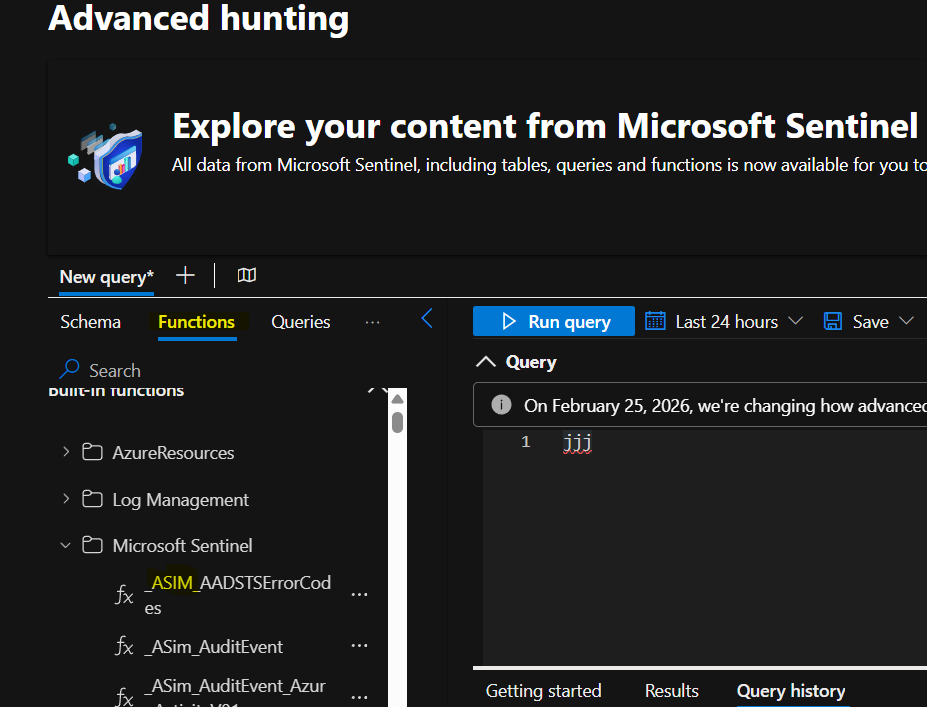
Sentinel > Overview > logs > Functions > Microsoft sentinel
Defender portal:
Investigation & Response > Hunting > Advanced Hunting > Functions > Microsoft sentinel
You'll see functions starting with ASim and Im.
In Microsoft Sentinel, parsing and normalizing happen at _____ time.
query
Parsers
Parsers are built as KQL user-defined functions that transform data in existing tables, such as CommonSecurityLog, custom logs tables, or Syslog, into the normalized schema.
Users use Advanced Security Information Model (ASIM) parsers instead of table names in their queries to view data in a normalized format, and to include all data relevant to the schema in your query.
ASIM also supports deploying parsers to specific workspaces from ____ , using an ARM template or manually
GitHub
Built-in
Compare | Built-in (ASim ). | Workspace-deployed (Im) |
|---|---|---|
Advantages | Exist in every Microsoft Sentinel instance. Usable with other built-in content. | New parsers are often delivered first as workspace-deployed parsers. |
Disadvantages | Can't be directly modified by users. Fewer parsers available. | Not used by built-in content. |
When to use | Use in most cases that you need ASIM parsers. | Use when deploying new parsers, or for parsers not yet available out-of-the-box. |
Both out-of-the-box and workspace-deployed parsers are functionally equivalent, but have slightly different naming conventions, allowing both parser sets to coexist in the same Microsoft Sentinel workspace.
What are two levels of ASIM parsers ?
unifying parser and source-specific parsers
Unifying Parser vs source specific parser
The user usually uses the unifying parser for the relevant schema, ensuring all data relevant to the schema is queried. The unifying parser in turn calls source-specific parsers to perform the actual parsing and normalization, which is specific for each source.
The unifying parser name is ImSchema for built-in parsers, and imSchema for workspace deployed parsers.
The unifying parser name is ____ for built-in parsers, and ___ for workspace deployed parsers.
_Im_Schema and imSchema
Unifying parsers
When using ASIM in your queries, use unifying parsers to combine all sources, normalized to the same schema, and query them using normalized fields.
Schema | Unifying parser |
|---|---|
Authentication | imAuthentication |
Dns | _Im_Dns |
File Event | imFileEvent |
Network Session | _Im_NetworkSession |
Process Event | imProcessCreate and imProcessTerminate |
Registry Event | imRegistry |
Web Session | _Im_WebSession |
____ are used before parsing and enhance query performanc
filtering parameters
Using parsers may impact your query performance, primarily from filtering the results after parsing. For this reason, many parsers have optional filtering parameters, which enable you to filter before parsing and enhance query performance. With query optimization and pre-filtering efforts, ASIM parsers often provide better performance when compared to not using normalization at all.
Every schema that supports filtering parameters supports at least the starttime and enttime parameters and using them is often critical for optimizing performance.
Example for parameterized KQL functions ?
It is an KQL, with two parameters saved as an function called AzureActivityByCategory
AzureActivityByCategory("Administrative", todatetime("2021/04/05 5:40:01.032 PM"))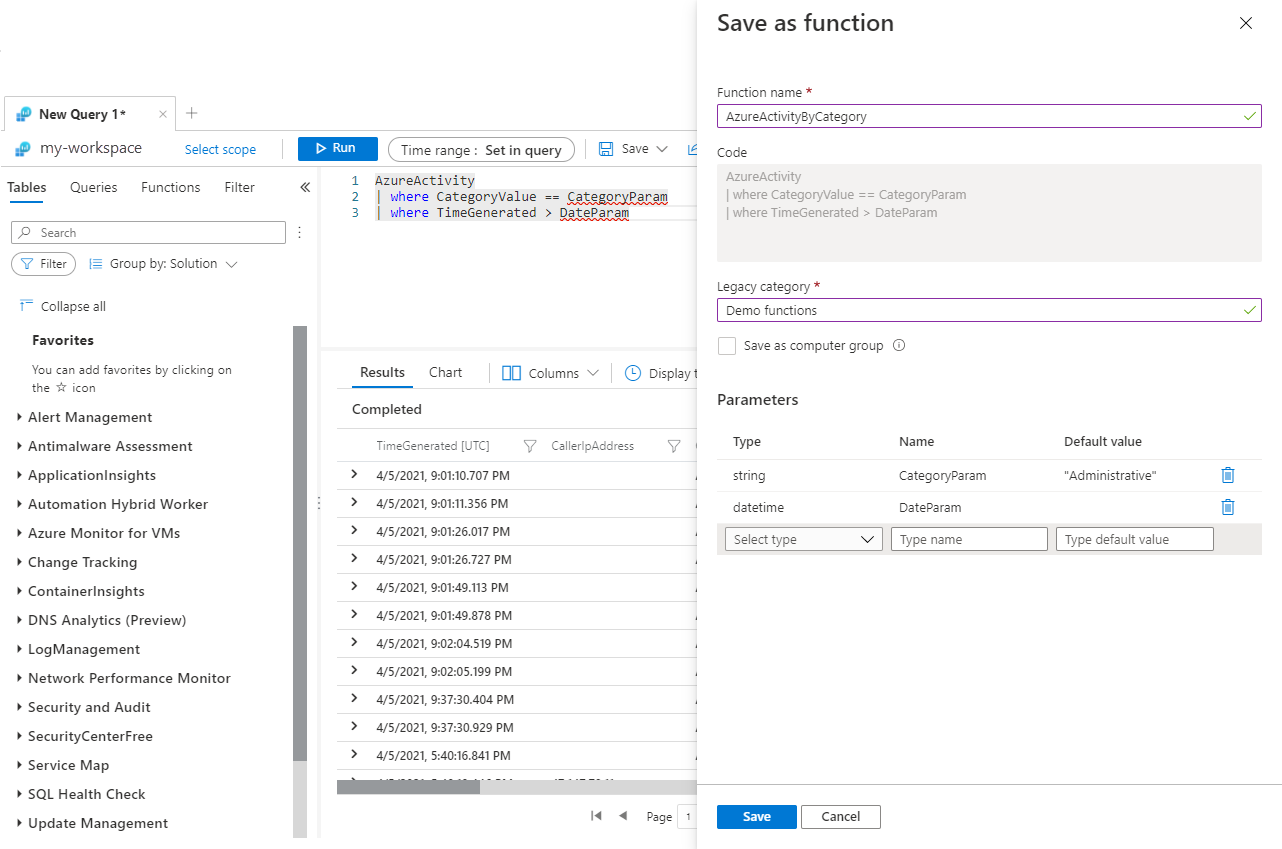
Custom Parser
A custom parser is a KQL query developed in the Microsoft Sentinel Logs page. The parser query has three parts:
Filter > Parse > Prepare fields
____ allows to filter by source type using a watchlist in ASIM
ASimSourceType watchlist
In some cases, the event itself doesn't contain information that would allow filtering for specific source types.
For example, Infoblox DNS events are sent as Syslog messages, and are hard to distinguish from Syslog messages sent from other sources. In such cases, the parser relies on a list of sources that defines the relevant events. This list is maintained in the ASimSourceType watchlist.
filtering recommendations to ensure the performance of the parser :
Always filter on built-in rather than parsed fields. While it's sometimes easier to filter using parsed fields, it dramatically impacts performance.
Use operators that provide optimized performance. In particular, ==, has, and startswith. Using operators such as contains or matches regex also dramatically impacts performance.
_____ is needed if multiple event fields are conveyed in a single text field.
parsing
The KQL operators that perform parsing are listed below, ordered by their performance optimization. The first provides the most optimized performance, while the last provides the least optimized performance.
Operator | Description |
|---|---|
split | Parse a string of delimited values. |
parse_csv | Parse a string of values formatted as a CSV (comma-separated values) line. |
parse | Parse multiple values from an arbitrary string using a pattern, which can be a simplified pattern with better performance, or a regular expression. |
extract_all | Parse single values from an arbitrary string using a regular expression. extract_all has a similar performance to parse if the latter uses a regular expression. |
extract | Extract a single value from an arbitrary string using a regular expression. Using extract provides better performance than parse or extract_all if a single value is needed. However, using multiple activations of extract over the same source string is less efficient than a single parse or extract_all and should be avoided. |
parse_json | Parse the values in a string formatted as JSON. If only a few values are needed from the JSON, using parse, extract, or extract_all provides better performance. |
parse_xml | Parse the values in a string formatted as XML. If only a few values are needed from the XML, using parse, extract, or extract_all provides better performance. |
In addition to parsing string, the parsing phase may require more processing of the original values, including
Formatting and type conversion. The source field, once extracted, may need to be formatted to fit the target schema field. For example, you may need to convert a string representing date and time to a datetime field. Functions such as todatetime and tohex are helpful in these cases.
Value lookup. The value of the source field, once extracted, may need to be mapped to the set of values specified for the target schema field. For example, some sources report numeric DNS response codes, while the schema mandates the more common text response codes. The functions iff and case can be helpful to map a few values.
Mapping Values
Use case, iff, and lookup statements when there's a need to map a set of values to the values allowed by the target field.
When each source value maps to a target value, define the mapping using the datatable operator and lookup to map
Notice that lookup is useful and efficient also when the mapping has only two possible values.
When the mapping conditions are more complex use the iff or case functions. The iff function enables mapping two values and the case function supports more than two target values.
The parser must _____ the fields in the results set to ensure that the normalized fields are used.
prepare
KQL operators used to prepare fields in your results set ?
project-rename - Renames fields.
project-away - Removes fields.
project - Selects fields that existed before, or were created as part of the statement, and removes all other fields.
extend - Add aliases.
To parse different variants in a single parser u can use conditional statements of ?
To parse different variants in a single parser either use conditional statements such as iff and case, or use a union structure.
To deploy a large number of parsers, we recommend using ____ templates ?
parser ARM
Another way of normalizing log data is transforming the data at ___ time.
ingestion
Using DCR
Normalizing log data by transforming the data at ingestion time provides the benefit of storing the data in a ____ format for use in Microsoft Sentinel.
parsed format
Data collection rules in Azure Monitor ?
Data Collection Rules (DCRs) allows to define the way that data coming into Azure Monitor should be handled.
Depending on the type of workflow, DCRs may specify where data should be sent and may filter or transform data before it's stored in Azure Monitor Logs.
Types of data collection rules :
There are currently two types of data collection rules in Azure Monitor:
Standard DCR. Used with different workflows that send data to Azure Monitor. Workflows currently supported are Azure Monitor agent and custom logs.
Workspace transformation DCR. Used with a Log Analytics workspace to apply ingestion-time transformations to workflows that don't currently support DCRs.
______ in a data collection rule (DCR) allow you to filter or modify incoming data before it's stored in a Log Analytics workspace.
Transformations
Data transformations are defined using a _____ statement that is applied individually to each entry in the data source
Kusto Query Language (KQL)
It must understand the format of the incoming data and create output in the structure of the target table.
Q1. When creating a Workspace transformation DCR. What is the name of the virtual table to query?
source
input
target
Q2. What is an ASIM parser in KQL?
Variable
Function
Aggregate
Q3.Every schema that supports filtering parameters supports at least the parameter?
createdon
ingestiontime
starttime