SECTION 5: Data and Database Fundamentals (13%)
 Call Kai
 Learn
Learn Practice Test
 Spaced Repetition
 Match
Match Flashcards
 Knowt Play
1/46

Earn XP
Description and Tags
Value of Data, Database overview, backups
Name | Mastery | Learn | Test | Matching | Spaced | Call with Kai |
|---|
No analytics yet
Send a link to your students to track their progress
47 Terms
Data
These are raw facts and figures
Information
These are processed data with meaning
Critical Data
A type of data that is critical for operations
Ex: Customer data, Financial data, Operational data
Non-Critical Data
A type of data that is nice to have but non-essential
Ex: Marketing preferences, Archived emails
Data Capture and Collection
The process of gathering data from various sources
Data can be collected from online forms/surveys, point-of-scale systems, website analytics and tracking
Customer interactions and transactions
Sensors, surveys, and observations
Data Correlation
The process of finding relationships between data sets, identifying patterns and connections, reveal insights not obvious individually
Meaningful Reporting
The process of converting data into actionable insights
Visual presentations and dashboards
Tailored to audience needs
Direct Data Monetization
A type of data monetization that involves selling raw data to third parties, like advertisers or market researchers
Ex: Social Media platforms sell user data to advertisers aiming to target specific demographics
Indirect Data Monetization
A type of data monetization where instead of selling data, companies use it to enhance internal processes or develop new offerings
Ex: E-commerce sites analyze customer purchase data to suggest products, which helps boost sales
Data Analytics
This is the process of examining data for insights, statistical analysis and pattern recognition, and transform raw data into knowledge
Descriptive Analytics
A type of data analytics that summarizes historical data to spot trends and patterns
Ex: Understanding past sales performance/analyzing customer behavior
Diagnostic Analytics
A type of data analytics that investigates underlying causes of trends and patterns
Ex: Identifying reasons for a drop in sales during a specific period
Predictive Analytics
A type of data analytics that forecasts future outcomes based on historical data
Ex: An online retailer predicting future sales using seasonal trends
Prescriptive Analytics
A type of data analytics where it offers actionable recommendations for optimizing outcomes
Ex: Recommending a targeted marketing strategy to boost sales
Big Data
These are extremely large and complex data sets
Traditional tools cannot process these effectively and requires specialized technologies
Volume
(3 Types of Vs of Big Data)
In Big data: Massive amounts of data - petabytes/exabytes
Ex: Facebook generates vast amounts of data every second
Velocity
(3 Types of Vs of Big Data)
In Big Data: Rapid speed of data generation and processing
Ex: Data from sensors on self-driving cars or financial transactions
Variety
(3 Types of Vs of Big Data)
In Big Data: Diverse types of data. from structured (databases) to unstructured (emails, videos, social media posts)
Database
Organized collection of structured data
enables efficient storage and retrieval
foundation of modern information systems
Creating a Database
This is when you define the database structure with tables, fields, and relationships
Add new records, input fresh data from various sources, and expand database with new information
Ex: For customer management system - create tables for customers, orders, and products with fields like “Customer Name”, “Order Date”, etc.
Importing/Inputting Data in Database
This is when you bring data in to the database from external sources such as spreadsheets, text files, and other databases
Bulk data entry and migration
Ex: Import Customer data from a CRM to ensure all departments access the same information
Querying a Database
This is when you search and retrieve data in a database
Filter records based on criteria
Answer questions based on criteria
Ex: Query to find customers who purchased last month or identify top-selling products in a specific region
Generating Reports
This is when you produce formatted presentation of data to summarize and analyze information
Professional output for stakeholders
Ex: Sales report showing monthly revenue, helping management track business performance over time
Flat File Storage
A type of data storage structure that is:
Plaintext storage, often in CSV format, with data separated by delimiters like commas or tabs
Generally limited to single-use access
Difficult to expand, performance declines as data grows making it cumbersome
Slower for large datasets
Simple data types only
Database Storage
A type of data storage structure that is:
Organized in multiple tables with defined relationship indexes, and advanced management features, managed by systems like MySQL or Oracle database
Many users can access safely; handle user coordination; built for multi-user access
Highly scalable, designed to grow and handle increasing data volume
Optimized for fast retrieval; uses advanced indexing and optimization
Complex relationships supported and can handle multiple data formats
Storage
How and where data is physically kept
Affects performance and accessibility, critical for data management strategy
Database Persistence in Databases
Database data survives power loss unlike RAM
Essential for business records and transactions
Why your bank account survives system restarts
Data Availability
It is when and how data can be accessed
Affects business operations
Balance between access and security
Cloud or Local Storage
Online or Offline Access
Structured Data
Are highly organized data in predefined format, have a fixed schema with specific fields, easy to use operations such as querying, manipulation and analysis
Every datapoint follows a specific, consistent format
Requires planning before implementation
Ex: spreadsheets, relational databases
Ex: Customer Records = name, age, address fields in tables
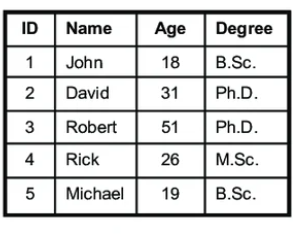
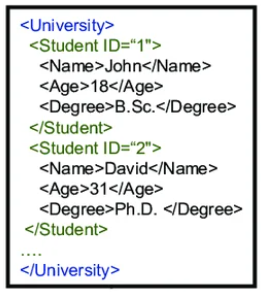
Semi-Structured Data
These data doesn’t follow a strict table format but has some organization
More flexible than structured data - uses tags or keys to provide structure
Easier to modify than structured data
Self-describing format
Ex: XML, JSON files
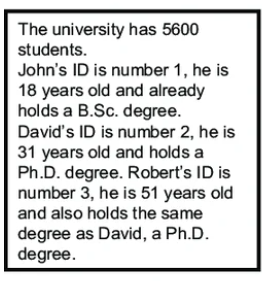
Non-Structured Data
Data that has no predefined organizational format
Free-form content without fixed schema
The most flexible data format but difficult to search automatically
Requires special tools for analysis
Relational Database
This is how data is organized in related tables with ROWS and COLUMNS
structured approach with fixed schema
Most common database type
Schema
In a relational database, this is the blueprint defining database structure, specifies tables, fields and relationships
Determines the types of data that can be stored or accessed
Must be designed before data entry
Ensures data consistency, enforces business rules, and provides clear data organization
Tables
In a relational database, these are collections of related records and acts as the core structure
Are organized in rows and columns
each table represents an entity type
Rows/Records
In a relational database, these are individual entries in a table
Each entry represents a single entity instance
Ex: In a “Customers” table, each row is an individual customer
Columns/Fields
In a relational database, these are individual data elements
Each column has a specific data type
Consistent across all rows
Ex: “Customers” table have the columns: Name, Age, Phone Number
Primary Key
In a relational database, it is the unique identifier for each record in a table
cannot be null or duplicate
ensures record uniqueness
Ex: Customer ID as primary key for “Customers” table
Foreign Key
In a relational database, these are links to a primary key in another table
This creates relationships between tables
Maintains referential integrity, prevents orphaned records, enforces data relationships, enable table joins
Ex: An “Order” table may have a foreign key to the “Customers” table to identify the customer who placed each order
Constraints
In a relational database, these are rules that limit allowable data
Ensures data quality and integrity
Ex: NOT NULL ensures columns cannot have empty values, UNIQUE ensures all values in a column are not duplicate, CHECK validates that values in a column meet a specified condition, and FOREIGN KEY establishes relationship between tables
Non-Relational Databases
These databases doesn’t require a fixed schema
Handle diverse data types efficiently
Known for flexibility and adaptability in managing data that doesn’t fit neatly into tables
Key/Value Database
A non-relational database that has a simple structure with key-value pairs
fast retrieval using unique keys
limited query capabilities
Ex: Redis, Amazon, DynamoDB
Document Database
A non-relational database that stores data as documents, commonly in JSON or BSON
Flexible schema within documents
Natural fit for application objects, easy to scale horizontally
Ex: MongoDB
Data Backup
This is the process of creating copies of important data to have protection against data loss, hardware failure, recover from accidental deletions and restoration after malware attacks
Essential for business continuity
File Backup
A type of backup in which you copy every single file in designated location (folder/drive)
Comprehensive but consumes more storage and time
Allows browsing and selecting specific files/folders to restore
System Backup
A type of backup which captures the entire OS, settings, programs, and files
Allows for full restoration to a previous state after system failures or corruption
Cloud Backup
A type of backup in which you put your files remotely via internet, access files by logging in to your account, and the data is stored in the provider’s data center
Data Restoration
The process of recovering backed-up information and returning data to usable state.
Critical when original data is lost