Advanced Features
 Call Kai
 Learn
Learn Practice Test
 Spaced Repetition
 Match
Match Flashcards
 Knowt Play
1/31

Earn XP
Description and Tags
Comprehensive vocabulary flashcards covering FortiOS 7.6 advanced LAN Edge features, including NAC, VLAN pooling, rogue AP detection, and wireless optimization techniques.
Name | Mastery | Learn | Test | Matching | Spaced | Call with Kai |
|---|
No analytics yet
Send a link to your students to track their progress
32 Terms
FortiLink NAC
A rules-based system that uses the FortiLink protocol to automate device onboarding by placing devices in an onboarding VLAN until their security posture is verified.
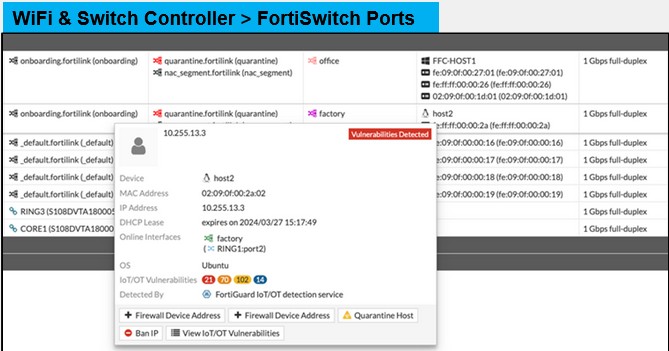
Device Detection + FortiGuard Service
FortiLink device detection, combined with FortiGuard Services, enables comprehensive device identification and vulnerability detection. It allows FortiGate to automatically detect any device connected to the network and analyze its potential security risks. By identifying device types and their associated vulnerabilities, administrators can take proactive steps to secure the network.
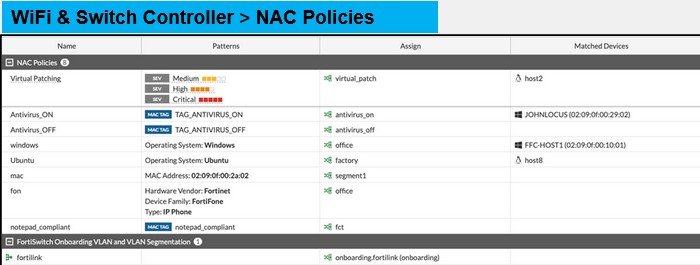
FortiLink NAC Policies—NAC With FortiGate and FortiSwitch
NAC policies combined with the FortiLink protocol in FortiGate, help to discover devices and assign appropriate policies based on their security status. This helps you to make sure the detected devices receive correct network permissions and restrictions. NAC uses device or user information, such as the device type or OS, to assign traffic to a specific VLAN or apply port settings. You can activate NAC on all FortiSwitch ports, or specific ones. Initially, devices connect to an onboarding VLAN with restrictive security, where device identification occurs. Once a device matches a NAC policy, actions like VLAN reassignment or security policy application are taken.
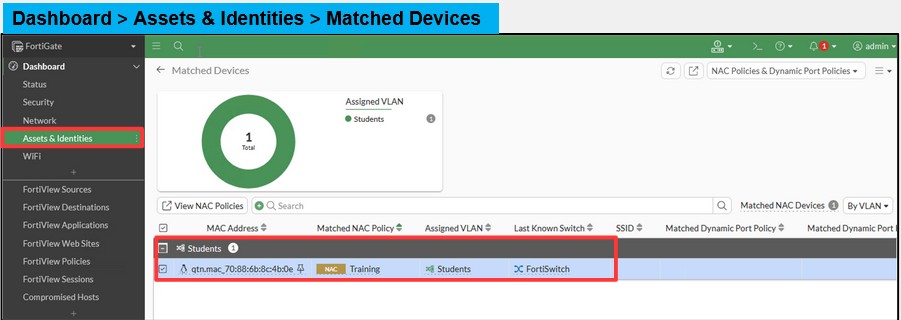
Matched NAC Devices
A dashboard widget under Assets & Identities that consolidates asset and identity information to simplify locating and identifying devices across the network.
FortiGuard Attack Surface Security Service
FortiGate assesses the security posture of connected devices, especially IoT devices, which often have weak security settings.
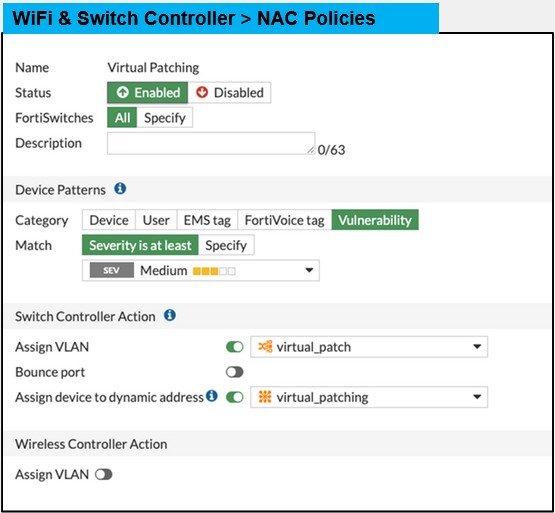
Virtual Patching
A security feature that uses FortiLink NAC to isolate vulnerable devices in a separate VLAN and applies IPS signatures to protect them before a permanent patch is available.
Dynamic Port Policies
Dynamically change port properties depending on device detected
• VLAN policy
• LLDP profile
• QoS policy
• 802.1X policy
Dynamic VLANs—Enterprise RADIUS Authentication
• The dynamic VLAN option is available when using enterprise security mode with RADIUS authentication
• RADIUS server must send the following attributes:
• IETF 64 (tunnel type)—Set this to VLAN
• IETF 65 (tunnel medium type)—Set this to IEEE 802
• IETF 81 (tunnel private group ID)—Set this to the VLAN ID
• The RADIUS server can also send additional attributes, either standard or vendor-specific, such as Fortinet-Group-Name
IETF 64 (Tunnel Type)
A mandatory RADIUS attribute for dynamic VLANs that must be set to 'VLAN' to indicate that VLAN information is included in the response.
IETF 65 (Tunnel Medium Type)
A mandatory RADIUS attribute for dynamic VLANs that must be set to 'IEEE 802'.
IETF 81 (Tunnel Private Group ID)
A mandatory RADIUS attribute for dynamic VLANs that specifies the VLAN ID to which the user should be attached.
VLAN Pooling
A mechanism that allows a single SSID to egress traffic into multiple VLANs, breaking down the broadcast domain to improve wireless performance.
Dynamic VLANs—MAC RADIUS Authentication
It is also possible to dynamically assign a VLAN and firewall group on non-enterprise wireless networks
• The following RADIUS attributes are added by FortiGate during RADIUS MAC authentication:
• Called Station Identifier
• NAS IPv4 Address
• NAS Identifier
• NAS Port Type
• The RADIUS server can then return:
• Fortinet-Group-Name
• Filter-ID
• Tunnel-Type
• Tunnel-Medium-Type
• Tunnel-Pvt-Group-ID
Round Robin (VLAN Pooling)
A load balancing method where the VLAN with the least number of clients is assigned to new connections within a pool.
Hash (VLAN Pooling)
A method where FortiOS assigns a VLAN based on a hash of the current number of SSID clients and the number of entries in the pool.
True Rogue AP
A malicious access point placed to compromise security by provide unauthorized access via a backdoor SSID or a phishing SSID.
Interferer AP
A neighboring access point that is not a direct security threat but causes disrupt network performance due to poor channel configuration.
WIDS (Wireless Intrusion Detection System)
A function that monitors wireless traffic for security threats like deauthentication broadcasts, weak WEP IV encryption, and rogue APs.
Background Scanning
An opportunistic rogue AP detection method where the FortiAP radio switches from serving clients to monitoring during idle periods.
Dedicated Monitor Mode
A configuration where a FortiAP radio is reserved exclusively for scanning and suppression, which prevents it from broadcasting SSIDs or serving clients.
MAC Adjacency
An on-wire rogue detection method that matches LAN and Wi-Fi MAC addresses with close hexadecimal values; the default difference is 7.
Rogue Suppression
An active process using a dedicated monitoring radio to send deauthentication messages to rogue APs and their clients to disrupt connectivity.
Fake SSID
A rogue access point that broadcasts an SSID that is an identical match to the official network SSID.
Offending SSID
A rogue access point that broadcasts an SSID matching a user-defined pattern (up to 128 patterns) to attract clients to an illegitimate network.
Oversubscription
A network design principle where upstream bandwidth is designed to handle less than the combined maximum bandwidth of all connected devices.
Co-Channel Interference (CCI)
Performance degradation caused when adjacent access points are set to the same channel, leading to increased retries and packet loss.
AP Handoff
A load balancing method that moves clients with the lowest RSSI to another AP or redirects new clients when a configured threshold is exceeded.
Frequency Handoff (Band Steering)
A technique that encourages clients to use the 5GHz frequency instead of 2.4GHz to access faster speeds and reduce interference.
Probe Response Threshold
A configurable value (default −80dBm) that defines the minimum signal strength required for an AP to respond to a client's probe request.
Multicast to Unicast Conversion
A setting that converts multicast traffic to high-rate unicast streams for each client to reduce airtime usage.
802.11b Rates
Legacy data rates that, when disabled, force management frames to be transmitted at a minimum of 6Mbps, improving airtime efficiency.
IoT Device Segregation
Many internet of things (IoT) devices are difficult to control because of limited wireless authentication support -
RADIUS MAC authentication now allows
• A single pre-shared key network to support multiple device types
• Maximizes wireless network efficiency
• Two-factor authentication: PSK or MPSK and MAC address
• Optional application of firewall polices based on MAC address
• Optional VLAN assignment based on MAC address
• Ability to optionally park other clients and apply default VLAN and firewall policy