IS 201: Digital Experience - Lecture 1 - 4
 Call Kai
 Learn
Learn Practice Test
 Spaced Repetition
 Match
Match Flashcards
 Knowt Play
1/45

There's no tags or description
Looks like no tags are added yet.
Name | Mastery | Learn | Test | Matching | Spaced | Call with Kai |
|---|
No analytics yet
Send a link to your students to track their progress
46 Terms
User Interface (UI)
Visual and interactive elements of a digital product and is the interface that users interact with
User Experience (UX)
The experiences a customer has with a brand during an activity across a single channel. Involves many UIs at different stages
Customer Experience (CX)
Sum of all touchpoints a brand has with its customers, ensuring they do not see the channels as different or siloed
Digital Experience (DX)
Interaction between a user and an organization through digital technologies
Web 1.0
The static or read-only web. Manually updates; mostly text with simple graphics; linear navigation
Web 2.0
Web focused on interactivity, user participation and social networking.
Web 3.0
Web focused on intelligent algorithms, AI, data networking and IoT. Machines understand structured data to provide personalized services
Web 4.0
The symbiotic web where AR and VR merge with AI and IoT
UCD (User-Centric Design)
Collection of processes putting users at the center of product design and development
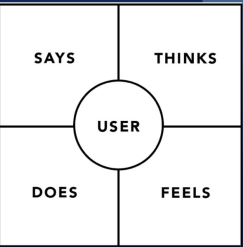
Empathy mapping
A visualization tool that provides a glance at who the user is, to better understand their needs
Journey Mapping
Visualization of the process a person goes through in order to accomplish a goal using your product or service
Components of a journey map
Actor
Scenario & expectations
Journey Phases
Actions, mindsets & emotions
Opportunities + ownership + metrics
Actor: Journey Map
The persona/user who experiences the journey
Scenario & expectations: Journey Map
Describes the actor’s specific goal, need, and what they expect to happen
Phases: Journey Map
The different high-level stages in the journey that organize actions, thoughts, and emotions
Actions, Mindsets & emotions: Journey Map
The specific behaviours, thoughts, and feelings the actor has mapped within each journey phase
Opportunities & metrics: Journey Map
Insights gained from the mapping process that show how the user experience can be optimized, along with who owns the task
JTBD (Jobs to be done) Framework
States that people buy products and services to ‘get jobs done’, focusing on progress rather than product features
JTBD Core concepts
Customers Hiring and Firing products
Stability of Jobs with changing solutions
The job is a Unit of Analysis
Circumstances create these job
Job Dimensions: Functional Progress
The practical, literal task the user is trying to accomplish
Job Dimensions: Emotional Progress
The internal feeling the user seeks while completing the job
Job Dimensions: Social Progress
The desired perception or how the user wants to be seen by others
IA (Information Architecture)
The organizing and structuring of content logically.
Components of IA
Content Grouping
Labelling
Navigation Systems
Search systems
Navigation
A collection of user interface components used to help users find info and encourage actions
Utility navigation
Small links found above the main navigation that focus on functional actions
Global Navigation
The primary main navigation menu found on every page
Breadcrumbs Trail
A hierarchical navigational aid, usually placed horizontally under the header, displaying the current page’s location
Local Navigation
The sidebar navigation
Fat footer
A large, content-rich footer at the bottom of a page that acts as a site map
Sitemap
Visual representation and blueprint outlining the website’s hierarchy structure and also provides its urls
Types of Sitemaps
HTML sitemaps
XML sitemaps
IA hierarchies
Flat hierarchy
Deep hierarchy
Flat hierarchy
has a wide breath but very few vertical levels, meaning most content is one or two clicks away
Pros of Flat Hierarchy
High discoverability
Efficient navigation
Lower bounce rates
Cons of Flat Hierarchy
Visual overload
Scaling issues as site grows
Deep hierarchy
Fewer top categories but many nested sub-layers, requiring users to navigate through several parent categories
Pros of Deep Hierarchy
Clean and simple design
Logical real-world organization
Easier mobile navigation
Cons of Flat Hierarchy
Navigation fatigue
Poor discoverability of info
IA research methods
Card Sorting
Tree testing
Card sorting
Method where participants place labelled cards into groups according to criteria that makes sense to them
Tree testing
Method that tests if people can find what they are looking for without the distraction of UI design and etc
Tree Testing process
Create the Tree
Write Tasks
Test with users
Review Data
heuristics
A set of guidelines used by evaluators to judge a design and ensure systems are easy to use
Nielsen’s 10 Usability Heuristics
Visibility of System Status
Match between the system and the real world
Clear User control and freedom
Consistency and standards
Error prevention
Recognition rather than recall
Flexibility and efficiency of use
Aesthetic and Minimalist Design
Help users Recognise, Diagnose and recover from errors
Help and documentation
UX Feedback Loops
0.1 Seconds: Instant reaction
1.0 Seconds: Thought flow
10 Seconds: Attention limit