4.1 Virtualization concepts/services
 Call Kai
 Learn
Learn Practice Test
 Spaced Repetition
 Match
Match Flashcards
 Knowt Play
1/32

There's no tags or description
Looks like no tags are added yet.
Name | Mastery | Learn | Test | Matching | Spaced | Call with Kai |
|---|
No analytics yet
Send a link to your students to track their progress
33 Terms
Q: What is virtualization?
A: Running different operating systems on one computer where each VM has its own virtual OS and shared CPU, memory, network, and storage.
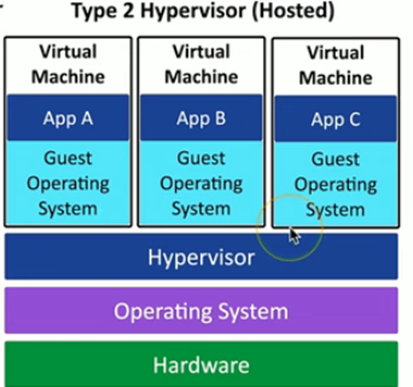
Q: What is host-based (Type 2) virtualization?
A: A hypervisor runs on top of a host OS (e.g., VirtualBox on Windows/Linux/macOS) allowing guest OSs to run alongside the normal desktop.
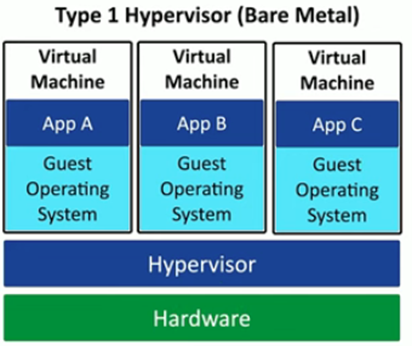
Q: What is a bare-metal (Type 1) hypervisor?
A: A standalone hypervisor installed directly on hardware (no host OS) used on enterprise servers to host multiple VMs.
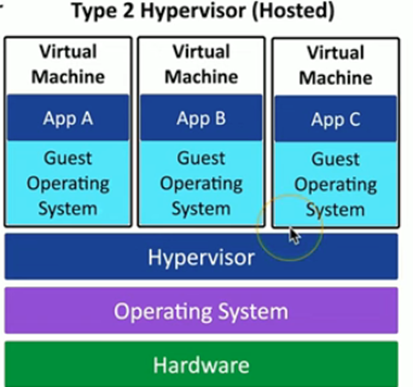
Q: Give the hardware/software stack for Type 2 hypervisors.
A: Hardware → Host OS (Linux Mint/Windows/macOS) → Hypervisor (VirtualBox/VMware) → Guest OS.
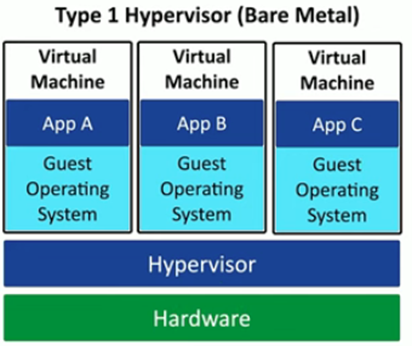
Q: Give the hardware/software stack for Type 1 hypervisors.
A: Hardware → Hypervisor → Multiple Guest VMs.
Q: What is sandboxing?
A: An isolated testing environment not connected to the real world used to safely run and test code.
Q: Name two sandboxing benefits.
Ability to snapshot and revert VMs
you can delete a broken VM without harming the host.
Q: How is virtualization used in development (build pipeline)?
A: Developers write code in a secure sandbox (develop), then use separate virtual environments to assemble and test the full application (test).
Q: How does virtualization help legacy software?
A: It allows running older OSs (e.g., Windows 10) on newer hardware/OS to support apps that require legacy environments.
Q: What is cross-platform virtualization?
A: Running one OS (e.g., Windows 11) on a different host OS (e.g., Linux) to use OS-specific apps without rebooting.
Q: Give two resource advantages of virtualization.
Saves time and hardware resources by eliminating the need for multiple physical machines
enables quick OS switching.
Q: What is the hypervisor (Virtual Machine Manager)?
A: Software that manages the virtual platform and guest OS, handling hardware resources like CPU, networking, and security.
Q: How can CPU support affect virtualization?
A: CPU virtualization features (Intel VT, AMD-V) can improve VM performance and are often required.
Q: How do Type 1 and Type 2 differ?
A: They run VMs the same way, but
Type 1 runs directly on hardware as the OS
Type 2 runs inside a host OS.
Q: What are memory requirements for virtualization?
A: You need more RAM than the host OS alone requires because each guest OS needs its own memory allocation.
Q: What are disk space requirements for virtualization?
A: Each guest OS uses its own disk image and needs space for the OS and its data.
Q: How is networking configured for VMs?
A: Networking is configurable per guest, often via a virtual switch.
Q: What is a shared network (NAT) for VMs?
A: The VM uses the host's IP via NAT, holding a private internal IP while appearing as the host on the physical network.
Q: What is a bridged network for VMs?
A: The VM appears as a separate device on the physical network with its own IP like a real computer.
Q: What is a private network for VMs?
A: The VM is given an internal-only IP that can connect only to selected machines.
Q: Why is the hypervisor a security concern?
A: It is a high-value target—compromise could let attackers access multiple guest VMs.
Q: What is VM escape?
A: Malware detects it's in a VM, compromises the hypervisor, and jumps from one guest OS to another.
Q: Why are hosted virtual services risky?
A: Malware on one customer's VM could potentially access data from another VM on the same host.
Q: How should you secure guest OSs?
A: Treat each VM like a real computer—use firewalls, antivirus/antimalware, and keep them patched.
Q: Why are third-party self-contained VMs dangerous?
A: They may contain hidden malware; you can't trust unknown VMs downloaded from the internet.
Q: What is Virtual Desktop Infrastructure (VDI) / Desktop as a Service (DaaS)?
A: Applications and desktops run on a remote server; the client device only needs input/output and minimal resources.
Q: What are VDI client requirements?
A: Minimal local CPU/RAM, but strong network connectivity since processing and storage are remote.
Q: What is a container?
A: A standardized, lightweight unit packaging an app and its dependencies into an isolated process using the host kernel.
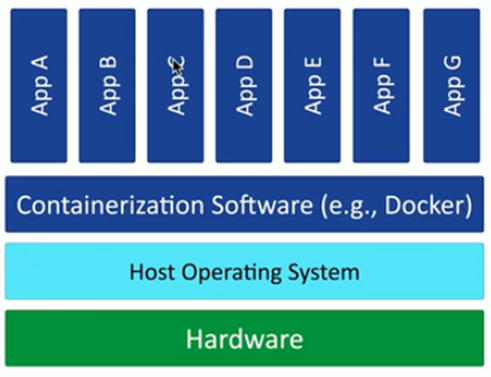
Q: How are containers different from VMs?
A: Containers share the host OS kernel, while VMs have separate OSs.
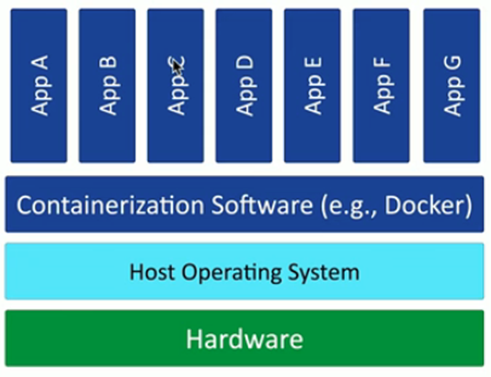
Q: What is a container image?
A: A portable, standardized unit used to deploy containers.
Q: Why are containers considered lightweight?
A: Because they don’t require a full OS—only the host OS kernel.
Q: What is a key disadvantage of virtualization compared to containers?
A: Each VM requires its own OS, increasing overhead.
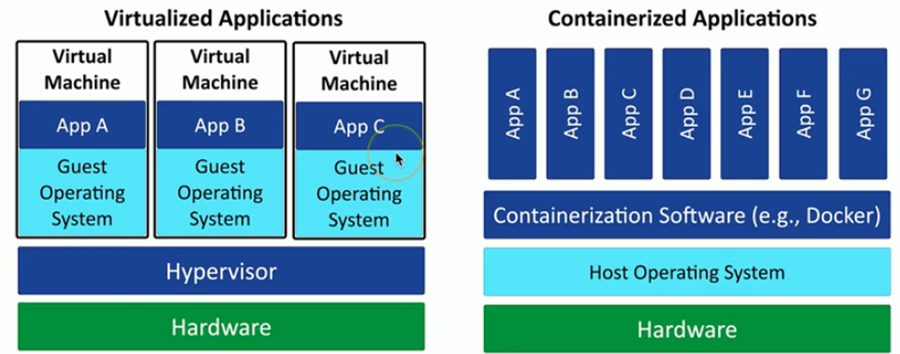
Q: What is a limitation of containers?
A: They can only run applications compatible with the host OS.